lock KIA Optima Hybrid 2012 3.G User Guide
[x] Cancel search | Manufacturer: KIA, Model Year: 2012, Model line: Optima Hybrid, Model: KIA Optima Hybrid 2012 3.GPages: 394, PDF Size: 8.63 MB
Page 35 of 394
321
Safety features of your vehicle
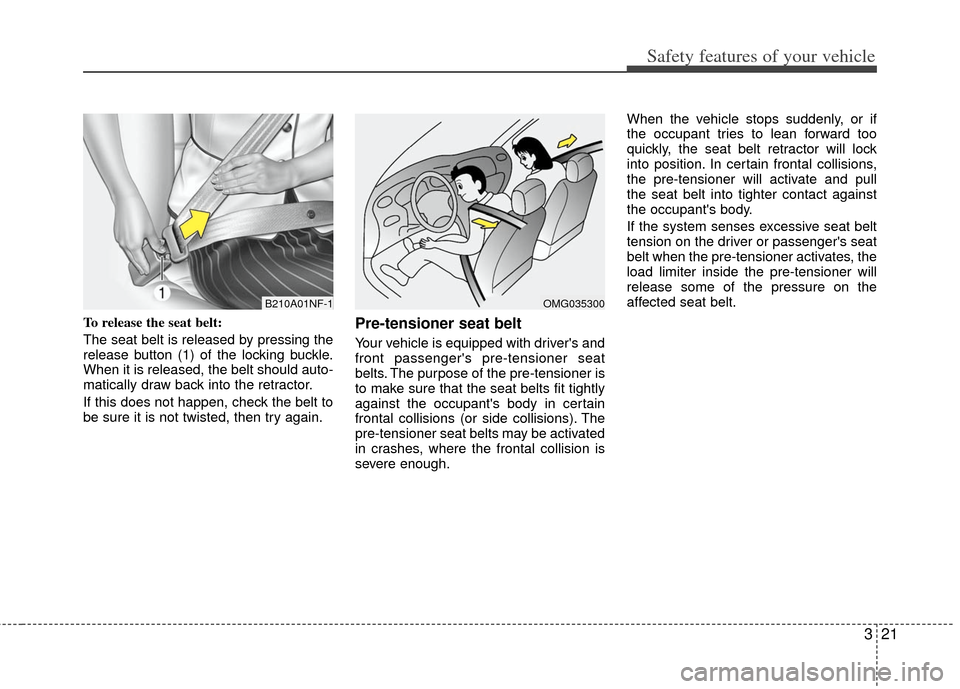
To release the seat belt:
The seat belt is released by pressing the
release button (1) of the locking buckle.
When it is released, the belt should auto-
matically draw back into the retractor.
If this does not happen, check the belt to
be sure it is not twisted, then try again.Pre-tensioner seat belt
Your vehicle is equipped with driver's and
front passenger's pre-tensioner seat
belts. The purpose of the pre-tensioner is
to make sure that the seat belts fit tightly
against the occupant's body in certain
frontal collisions (or side collisions). The
pre-tensioner seat belts may be activated
in crashes, where the frontal collision is
severe enough.When the vehicle stops suddenly, or if
the occupant tries to lean forward too
quickly, the seat belt retractor will lock
into position. In certain frontal collisions,
the pre-tensioner will activate and pull
the seat belt into tighter contact against
the occupant's body.
If the system senses excessive seat belt
tension on the driver or passenger's seat
belt when the pre-tensioner activates, the
load limiter inside the pre-tensioner will
release some of the pressure on the
affected seat belt.
B210A01NF-1OMG035300
Page 42 of 394
Safety features of your vehicle
28
3
Since all passenger seat belts move
freely under normal conditions and only
lock under extreme or emergency condi-
tions (emergency lock mode), you must
manually change these seat belts to the
auto lock mode to secure a child
restraint.
If the seat belt does not operate as
described in this section, have the sys-
tem checked immediately by your author-
ized Kia dealer.
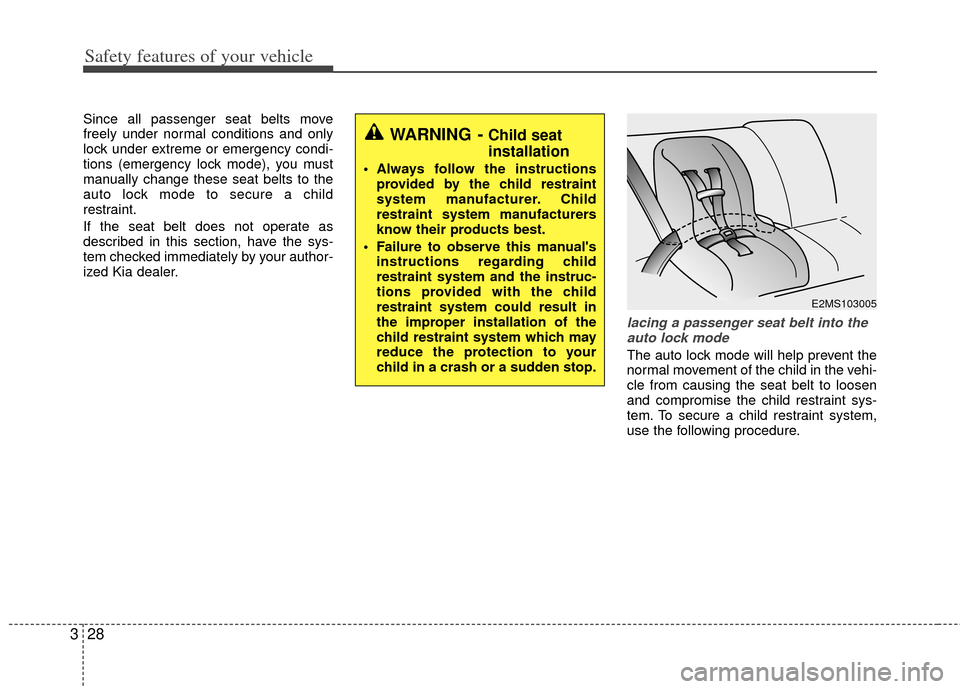
lacing a passenger seat belt into the
auto lock mode
The auto lock mode will help prevent the
normal movement of the child in the vehi-
cle from causing the seat belt to loosen
and compromise the child restraint sys-
tem. To secure a child restraint system,
use the following procedure.
WARNING - Child seat
installation
Always follow the instructions provided by the child restraint
system manufacturer. Child
restraint system manufacturers
know their products best.
Failure to observe this manual's instructions regarding child
restraint system and the instruc-
tions provided with the child
restraint system could result in
the improper installation of the
child restraint system which may
reduce the protection to your
child in a crash or a sudden stop.
E2MS103005
Page 43 of 394
329
Safety features of your vehicle
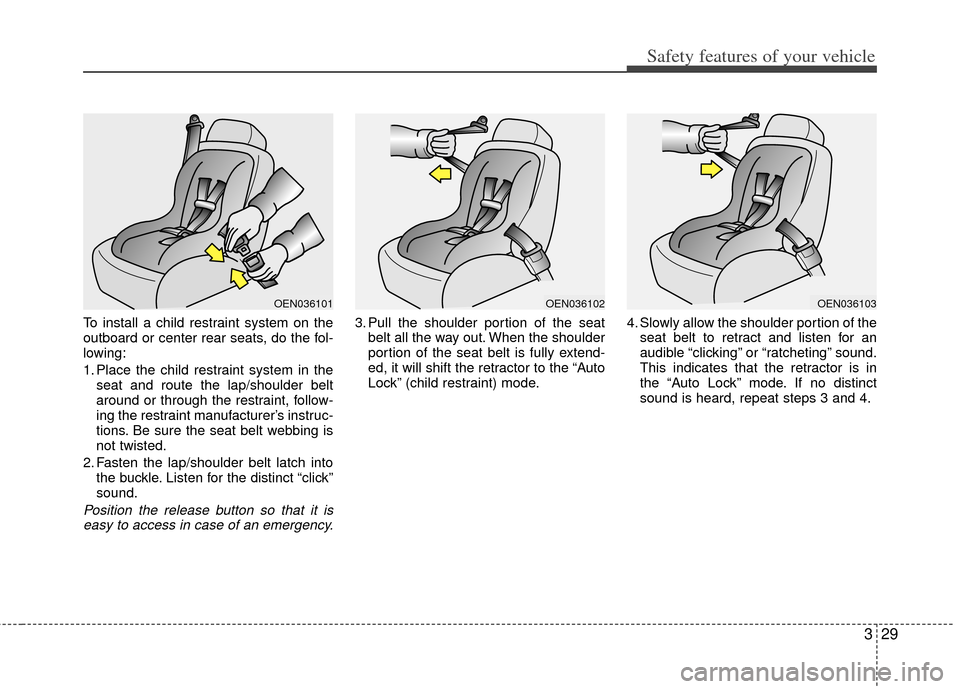
To install a child restraint system on the
outboard or center rear seats, do the fol-
lowing:
1. Place the child restraint system in theseat and route the lap/shoulder belt
around or through the restraint, follow-
ing the restraint manufacturer’s instruc-
tions. Be sure the seat belt webbing is
not twisted.
2. Fasten the lap/shoulder belt latch into the buckle. Listen for the distinct “click”
sound.
Position the release button so that it iseasy to access in case of an emergency.
3. Pull the shoulder portion of the seat belt all the way out. When the shoulder
portion of the seat belt is fully extend-
ed, it will shift the retractor to the “Auto
Lock” (child restraint) mode. 4. Slowly allow the shoulder portion of the
seat belt to retract and listen for an
audible “clicking” or “ratcheting” sound.
This indicates that the retractor is in
the “Auto Lock” mode. If no distinct
sound is heard, repeat steps 3 and 4.
OEN036101OEN036102OEN036103
Page 44 of 394
Safety features of your vehicle
30
3
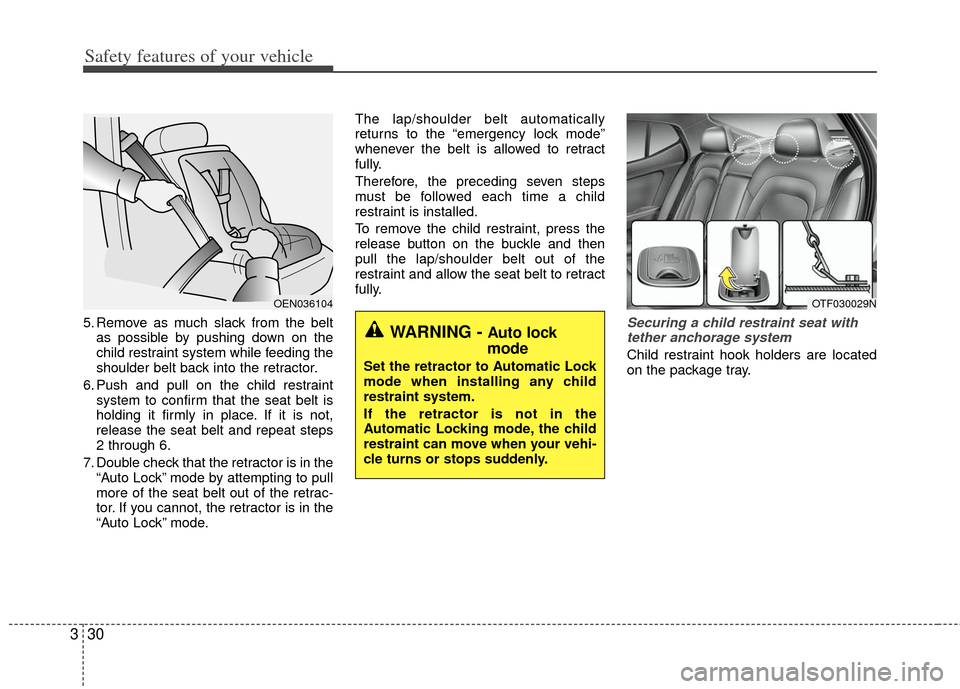
5. Remove as much slack from the belt
as possible by pushing down on the
child restraint system while feeding the
shoulder belt back into the retractor.
6. Push and pull on the child restraint system to confirm that the seat belt is
holding it firmly in place. If it is not,
release the seat belt and repeat steps
2 through 6.
7. Double check that the retractor is in the “Auto Lock” mode by attempting to pull
more of the seat belt out of the retrac-
tor. If you cannot, the retractor is in the
“Auto Lock” mode. The lap/shoulder belt automatically
returns to the “emergency lock mode”
whenever the belt is allowed to retract
fully.
Therefore, the preceding seven steps
must be followed each time a child
restraint is installed.
To remove the child restraint, press the
release button on the buckle and then
pull the lap/shoulder belt out of the
restraint and allow the seat belt to retract
fully.Securing a child restraint seat with
tether anchorage system
Child restraint hook holders are located
on the package tray.
OEN036104
WARNING - Auto lock
mode
Set the retractor to Automatic Lock
mode when installing any child
restraint system.
If the retractor is not in the
Automatic Locking mode, the child
restraint can move when your vehi-
cle turns or stops suddenly.
OTF030029N
Page 47 of 394
333
Safety features of your vehicle
When you install your child's restraint
system using the LATCH anchors buckle
the shoulder lap belt, then lock the
retractor and pull the belt to remove the
slack in the belt so it lies flat against the
vehicle seat.
Follow the child seat manufacturer’s
instructions to properly install child
restraint seats with LATCH or LATCH-
compatible attachments.
Once you have installed the LATCH child
restraint, assure that the seat is properly
attached to the LATCH and tether
anchors.
Also, test the child restraint seat before
you place the child in it. Tilt the seat from
side to side. Also try to tug the seat for-
ward. Check to see if the anchors hold
the seat in place.
WARNING - LATCH lower
anchors
Never attempt to attach a LATCH
equipped seat in the center seating
position. LATCH lower anchors are
only to be used with the left and
right rear outboard seating posi-
tions. You may damage the anchors
or the anchors may fail and break in
a collision.
Page 54 of 394
Safety features of your vehicle
40
3
✽
✽
NOTICE
Before you replace a fuse or disconnect
a battery terminal, turn the ignition
switch to the LOCK position and
remove the ignition key. Never remove
or replace the air bag related fuse(s)
when the ignition switch is in the ON
position. Failure to heed this warning
will cause the SRS air bag warning light
to illuminate.
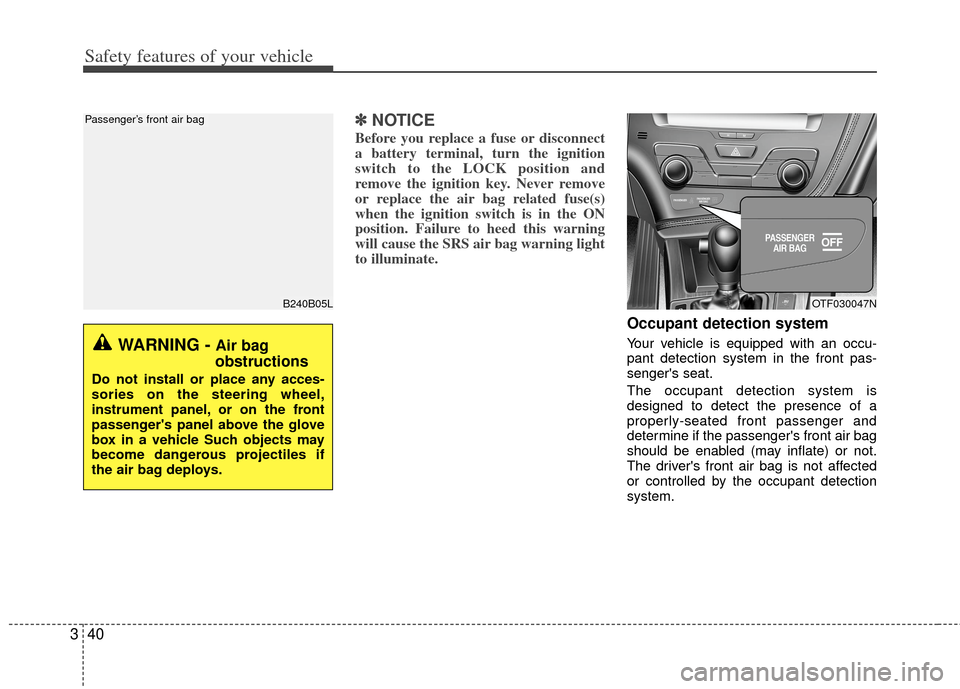
Occupant detection system
Your vehicle is equipped with an occu-
pant detection system in the front pas-
senger's seat.
The occupant detection system is
designed to detect the presence of a
properly-seated front passenger and
determine if the passenger's front air bag
should be enabled (may inflate) or not.
The driver's front air bag is not affected
or controlled by the occupant detection
system.
B240B05L
Passenger’s front air bag
WARNING - Air bag
obstructions
Do not install or place any acces-
sories on the steering wheel,
instrument panel, or on the front
passenger's panel above the glove
box in a vehicle Such objects may
become dangerous projectiles if
the air bag deploys.
OTF030047N
Page 58 of 394
Safety features of your vehicle
44
3
When an adult is seated in the front pas-
senger seat, if the PASSENGER AIR
BAG “OFF” indicator is on, turn the igni-
tion switch to the LOCK position and ask
the passenger to sit properly (sitting
upright with the seat back in an upright
position, centered on the seat cushion
with their seat belt on, legs comfortably
extended and their feet on the floor).
Restart the engine and have the person
remain in that position. This will allow the
system to detect the person and to
enable the passenger air bag. If the PASSENGER AIR BAG “OFF” indi-
cator is still on, ask the passenger to
move to the rear seat.
✽ ✽
NOTICE
The PASSENGER AIR BAG “OFF”
indicator illuminates for about 4 sec-
onds after the ignition switch is turned
to the ON position or after the engine is
started. If the front passenger seat is
occupied, the occupant detection sensor
will then classify the front passenger
after several more seconds.
B990A01O
WARNING - “AIR BAG
OFF” light
Do not allow an adult passenger to
ride in the front seat when the PAS-
SENGER AIR BAG “OFF” indicator
is illuminated, because the air bag
will not deploy in the event of a
crash. The driver must instruct the
passenger to reposition himself in
the seat. Failure to properly posi-
tion yourself may lead to airbag
deactivation resulting in airbag
non-deployment and in a collision.
If the PASSENGER AIR BAG “OFF”
indicator remains illuminated after
the passenger repositions them-
selves properly and the car is
restarted, it is recommended that
passenger move to the rear seat
because the passenger's front air
bag will not deploy.
Page 72 of 394
4
Keys / 4-2
Smart key / 4-4
Remote keyless entry / 4-6
Theft-alarm system / 4-9
Door locks / 4-12
Trunk / 4-17
Windows / 4-20
Hood / 4-24
Fuel filler lid / 4-25
Sunroof / 4-28
Driver position memory system / 4-32
Steering wheel / 4-34
Mirrors / 4-37
Instrument cluster / 4-47
Hazard warning flasher / 4-80
Rear parking assist system / 4-81
Rearview camera / 4-84
Welcome system / 4-85
Lighting / 4-86
Wipers and washers / 4-90
Interior light / 4-93
Defroster / 4-96
Automatic climate control system / 4-97
Windshield defrosting and defogging / 4-108
Storage compartment / 4-111
Interior features / 4-113
Audio system / 4-117
Features of your vehicle
Page 75 of 394
Features of your vehicle
44
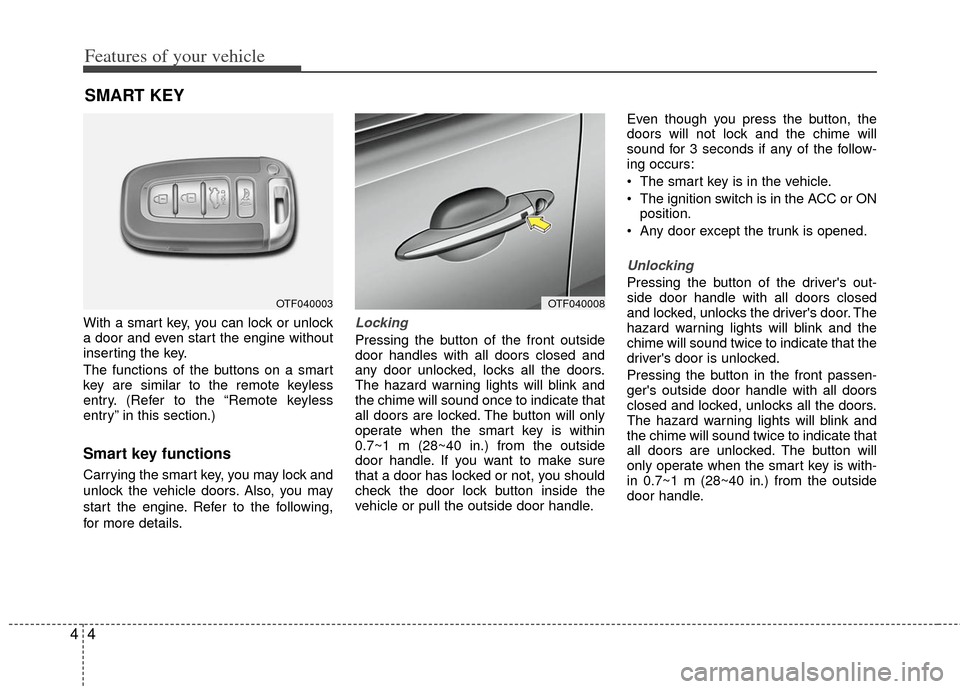
With a smart key, you can lock or unlock
a door and even start the engine without
inserting the key.
The functions of the buttons on a smart
key are similar to the remote keyless
entry. (Refer to the “Remote keyless
entry” in this section.)
Smart key functions
Carrying the smart key, you may lock and
unlock the vehicle doors. Also, you may
start the engine. Refer to the following,
for more details.
Locking
Pressing the button of the front outside
door handles with all doors closed and
any door unlocked, locks all the doors.
The hazard warning lights will blink and
the chime will sound once to indicate that
all doors are locked. The button will only
operate when the smart key is within
0.7~1 m (28~40 in.) from the outside
door handle. If you want to make sure
that a door has locked or not, you should
check the door lock button inside the
vehicle or pull the outside door handle.Even though you press the button, the
doors will not lock and the chime will
sound for 3 seconds if any of the follow-
ing occurs:
The smart key is in the vehicle.
The ignition switch is in the ACC or ON
position.
Any door except the trunk is opened.
Unlocking
Pressing the button of the driver's out-
side door handle with all doors closed
and locked, unlocks the driver's door. The
hazard warning lights will blink and the
chime will sound twice to indicate that the
driver's door is unlocked.
Pressing the button in the front passen-
ger's outside door handle with all doors
closed and locked, unlocks all the doors.
The hazard warning lights will blink and
the chime will sound twice to indicate that
all doors are unlocked. The button will
only operate when the smart key is with-
in 0.7~1 m (28~40 in.) from the outside
door handle.
SMART KEY
OTF040003OTF040008
Page 76 of 394
45
Features of your vehicle
Start-up
You can start the engine without inserting
the key. For detailed information refer to
“Starting the engine with a smart key” in
section 5.
Smart key precautions
If you lose your smart key, you will notbe able to start the hybrid system. Tow
the vehicle, if necessary, and contact
an authorized Kia dealer.
A maximum of 2 smart keys can be registered to a single vehicle. If you
lose a smart key, you should immedi-
ately take the vehicle and key to your
authorized Kia dealer to protect it from
potential theft.
The smart key will not work if any of fol- lowing occurs:
- The smart key is close to a radiotransmitter such as a radio station or
an airport which can interfere with
normal operation of the smart key.
- The smart key near a mobile two-way radio system or a cellular phone.
- Another vehicle’s smart key is being operated close to your vehicle.
When the smart key does not work cor-
rectly, open and close the door with the
mechanical key. If you have a problem
with the smart key, contact an author-
ized Kia dealer. If the smart key is in close proximity to
your cell phone or smart phone, the
signal from the smart key could be
blocked by normal operation of your
cell phone or smart phone. This is
especially important when the phone is
active such as making call, receiving
calls, text messaging, and/or send-
ing/receiving emails. Avoid placing the
smart key and your cell phone or smart
phone in the same pants or jacket
pocket and maintain adequate dis-
tance between the two devices. This device complies with industry
Canada standards RSS-210.
Operation is subject to the following two
conditions:
1. This device may not cause harmful
interference, and
2. This device must accept any interfer- ence received, including interference
that may cause undesired operation.
✽ ✽NOTICE
Changes or modifications not expressly
approved by the party responsible for
compliance could void the user’s
authority to operate the equipment. If
the keyless entry system is inoperative
due to changes or modifications not
expressly approved by the party respon-
sible for compliance, it will not be cov-
ered by your manufacturer’s vehicle
warranty.
CAUTION - Transmitter
Keep the smart key away from
water or any liquid as it canbecome damaged and not function properly.