engine KIA Optima Hybrid 2012 3.G Workshop Manual
[x] Cancel search | Manufacturer: KIA, Model Year: 2012, Model line: Optima Hybrid, Model: KIA Optima Hybrid 2012 3.GPages: 394, PDF Size: 8.63 MB
Page 145 of 394
Features of your vehicle
74
4
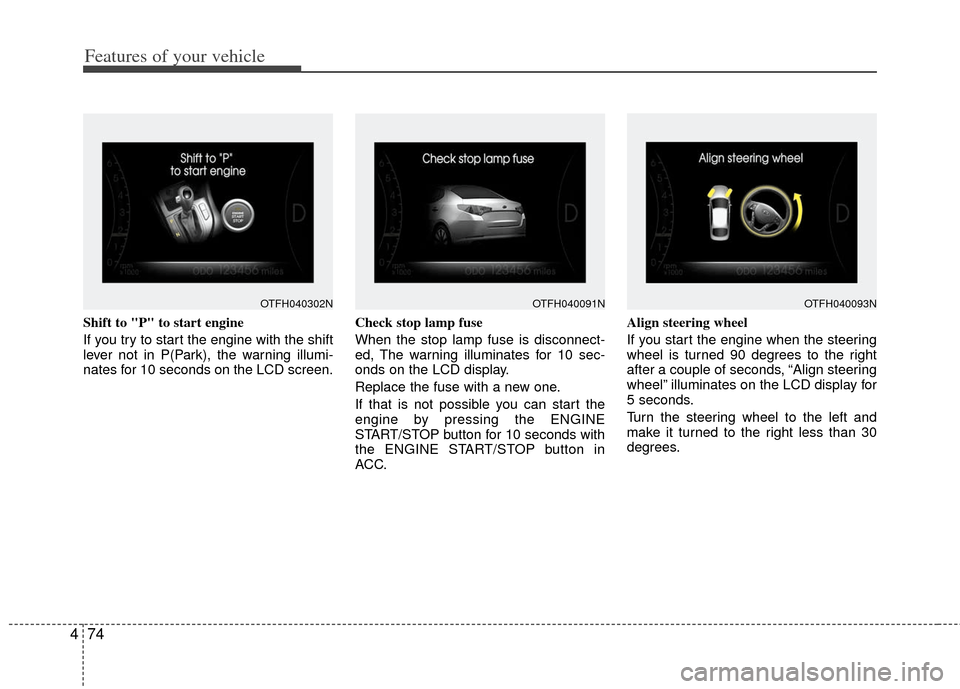
Shift to "P" to start engine
If you try to start the engine with the shift
lever not in P(Park), the warning illumi-
nates for 10 seconds on the LCD screen. Check stop lamp fuse
When the stop lamp fuse is disconnect-
ed, The warning illuminates for 10 sec-
onds on the LCD display.
Replace the fuse with a new one.
If that is not possible you can start the
engine by pressing the ENGINE
START/STOP button for 10 seconds with
the ENGINE START/STOP button in
ACC.Align steering wheel
If you start the engine when the steering
wheel is turned 90 degrees to the right
after a couple of seconds, “Align steering
wheel” illuminates on the LCD display for
5 seconds.
Turn the steering wheel to the left and
make it turned to the right less than 30
degrees.
OTFH040302NOTFH040093NOTFH040091N
Page 146 of 394
475
Features of your vehicle
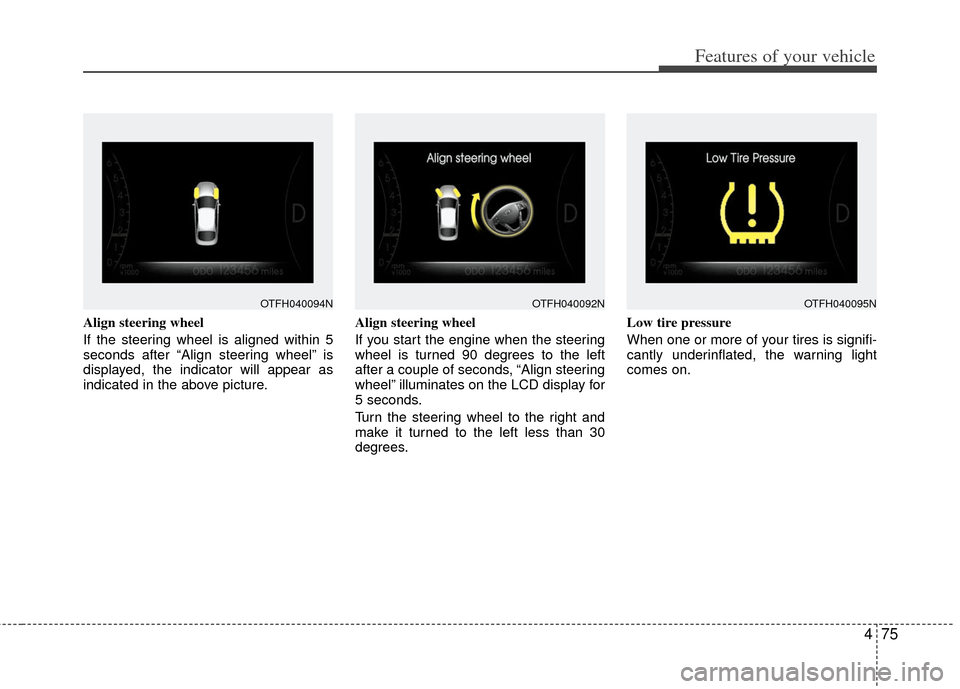
Align steering wheel
If the steering wheel is aligned within 5
seconds after “Align steering wheel” is
displayed, the indicator will appear as
indicated in the above picture.Align steering wheel
If you start the engine when the steering
wheel is turned 90 degrees to the left
after a couple of seconds, “Align steering
wheel” illuminates on the LCD display for
5 seconds.
Turn the steering wheel to the right and
make it turned to the left less than 30
degrees.Low tire pressure
When one or more of your tires is signifi-
cantly underinflated, the warning light
comes on.
OTFH040094NOTFH040095NOTFH040092N
Page 149 of 394
Features of your vehicle
78
4
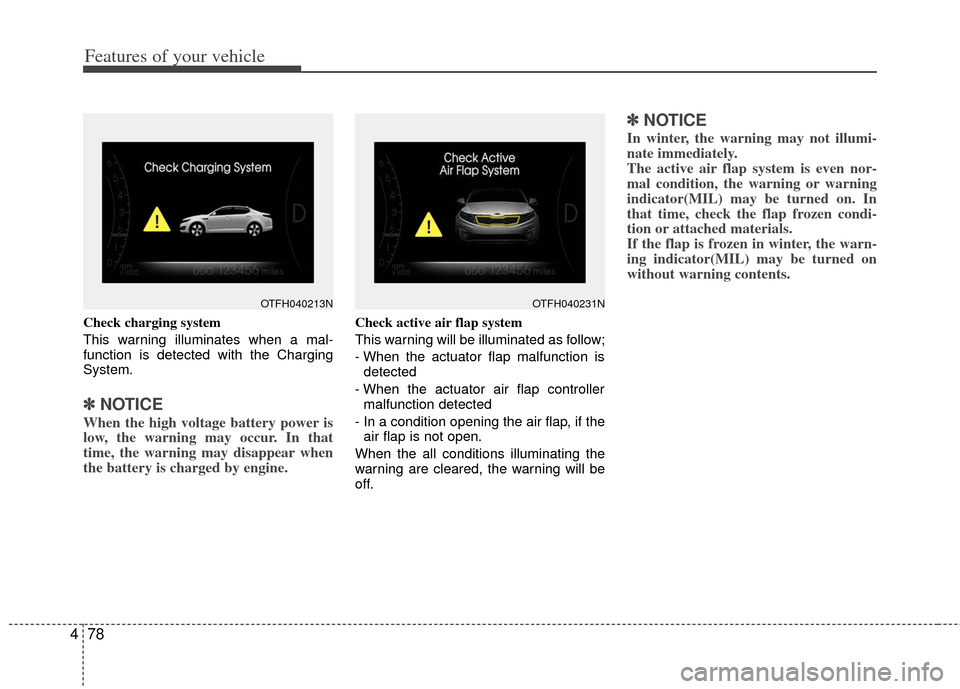
Check charging system
This warning illuminates when a mal-
function is detected with the Charging
System.
✽ ✽
NOTICE
When the high voltage battery power is
low, the warning may occur. In that
time, the warning may disappear when
the battery is charged by engine.
Check active air flap system
This warning will be illuminated as follow;
- When the actuator flap malfunction is
detected
- When the actuator air flap controller malfunction detected
- In a condition opening the air flap, if the air flap is not open.
When the all conditions illuminating the
warning are cleared, the warning will be
off.
✽ ✽ NOTICE
In winter, the warning may not illumi-
nate immediately.
The active air flap system is even nor-
mal condition, the warning or warning
indicator(MIL) may be turned on. In
that time, check the flap frozen condi-
tion or attached materials.
If the flap is frozen in winter, the warn-
ing indicator(MIL) may be turned on
without warning contents.
OTFH040213NOTFH040231N
Page 151 of 394
Features of your vehicle
80
4
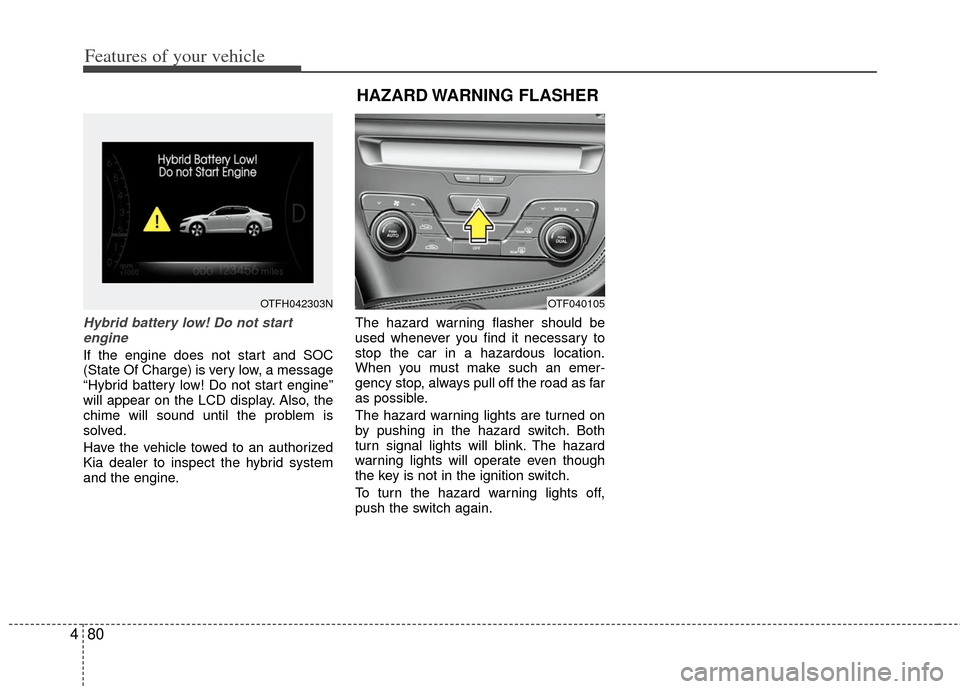
Hybrid battery low! Do not start
engine
If the engine does not start and SOC
(State Of Charge) is very low, a message
“Hybrid battery low! Do not start engine”
will appear on the LCD display. Also, the
chime will sound until the problem is
solved.
Have the vehicle towed to an authorized
Kia dealer to inspect the hybrid system
and the engine. The hazard warning flasher should be
used whenever you find it necessary to
stop the car in a hazardous location.
When you must make such an emer-
gency stop, always pull off the road as far
as possible.
The hazard warning lights are turned on
by pushing in the hazard switch. Both
turn signal lights will blink. The hazard
warning lights will operate even though
the key is not in the ignition switch.
To turn the hazard warning lights off,
push the switch again.
OTFH042303N
HAZARD WARNING FLASHER
OTF040105
Page 153 of 394
Features of your vehicle
82
4
Non-operational conditions of
rear parking assist system
The rear parking assist system may
not operate properly when:
1. Moisture is frozen to the sensor. (It will
operate normally when the moisture
has been cleared.)
2. The sensor is covered with foreign matter, such as snow or water, or the
sensor cover is blocked. (It will operate
normally when the material is removed
or the sensor is no longer blocked.)
3. Driving on uneven road surfaces (unpaved roads, gravel, bumps, gradi-
ent).
4. Objects generating excessive noise (vehicle horns, loud motorcycle
engines, or truck air brakes) are within
range of the sensor.
5. Heavy rain or water spray exists.
6. Wireless transmitters or mobile phones are within range of the sensor.
7. The sensor is covered with snow.
8. Trailer towing The detecting range may decrease
when:
1. The sensor is stained with foreign mat-
ter such as snow or water. (The sens-
ing range will return to normal when
removed.)
2. Outside air temperature is extremely hot or cold.
The following objects may not be rec-
ognized by the sensor:
1. Sharp or slim objects such as ropes, chains or small poles.
2. Objects which tend to absorb the sen- sor frequency such as clothes, spongy
material or snow.
3. Undetectable objects smaller than 1 m (40 in.) in height and narrower than 14
cm (6 in.) in diameter.
Rear parking assist system pre-
cautions
The rear parking assist system maynot sound sequentially depending on
the speed and shapes of the objects
detected.
The rear parking assist system may malfunction if the vehicle bumper
height or sensor installation has been
modified or damaged. Any non-factory
installed equipment or accessories
may also interfere with the sensor per-
formance.
The sensor may not recognize objects less than 40 cm (15 in.) from the sen-
sor, or it may sense an incorrect dis-
tance. Use caution.
When the sensor is frozen or stained with snow, dirt, or water, the sensor
may be inoperative until the stains are
removed using a soft cloth.
Do not push, scratch or strike the sen- sor. Sensor damage could occur.
Page 157 of 394
Features of your vehicle
86
4
Battery saver function
The purpose of this feature is to pre-
vent the battery from being dis-
charged. The system automatically
turns off the parking lights when the
driver removes the ignition key and
opens the driver- side door.
With this feature, the parking lights will turn off automatically if the driver parks
on the side of the road at night.
If necessary, to keep the lights on
when the Hybrid System is turned off,
perform the following
1) Open the driver-side door.
2) Turn the parking lights OFF and ON again using the light switch on the
steering column.
Daytime running light
Daytime Running Lights (DRL) can make
it easier for others to see the front of your
vehicle during the day. DRL can be help-
ful in many different driving conditions,
and it is especially helpful after dawn and
before sunset.
The DRL system will turn OFF when:
1. The headlight switch is ON.
2. The parking brake is applied.
3. Engine stops.
Headlight escort function
(if equipped)
The headlights (and/or taillights) will
remain on for approximately 20 minutes
after the ignition key is removed or turned
to the ACC or LOCK position. However, if
the driver’s door is opened and closed,
the headlights are turned off after 30 sec-
onds.
The headlights can be turned off by
pressing the lock button on the transmit-
ter (or smart key) twice or turning off the
light switch from the headlight or Auto
light position.
Headlight leveling device
(if equipped)
Automatic type
It is automatically adjusted the headlight
beam level according to the number of
the passengers and the loading weight in
the luggage area.
And it offers the proper headlight beam
under the various conditions.
LIGHTING
WARNING
If the headlights are not working
properly, have your vehicle inspect-
ed by an authorized Kia dealer.
Don't attempt to inspect or replace
the wiring yourself to prevent mal-
function.
CAUTION
If the driver gets out of the vehiclethrough other doors (except dri-ver's door), the battery saver func-tion does not operate and the head- light escort function does not turnoff automatically. Therefore, It caus-es the battery to be discharged. In this case, make sure to turn off thelamp before getting out of the vehi-cle.
Page 159 of 394

Features of your vehicle
88
4
Auto light position (if equipped)
When the light switch is in the AUTO light
position, the taillights and headlights will
turn ON or OFF automatically depending
on the amount of light outside the vehi-
cle.
Never place anything over sensor (1)
located on the instrument panel. This will
ensure better auto-light system control.
Don’t clean the sensor using a window
cleaner. The cleaner may leave a light
film which could interfere with sensor
operation.
If your vehicle has window tint or other
types of metallic coating on the front
windshield, the Auto light system may not
work properly.
High beam operation
To turn on the high beam headlights, push
the lever away from you. Pull it back for
low beams.
The high-beam indicator will light when
the headlight high beams are switched on.
To prevent the battery from being dis-
charged, do not leave the lights on for a
prolonged time while the engine is not
running. To flash the headlights, pull the lever
towards you. It will return to the normal
(low-beam) position when released. The
headlight switch does not need to be on
to use this flashing feature.
OAM049044
WARNING- High beams
Do not use high beam when there
are other vehicles. Using high
beam could obstruct the other dri-
ver's vision.
OAM049043OVG049181
Page 162 of 394

491
Features of your vehicle
To vary the speed setting, turn the speed
control knob (1).
If the wiper switch is set in AUTO mode
when the ignition switch is ON, the wiper
will operate once to perform a self-check
of the system. Set the wiper to off posi-
tion when the wiper is not in use.
Always remove all snow and ice and
defrost the windshield properly prior to
operating the windshield wipers.
✽ ✽NOTICE - Sensor cover
Do not remove the sensor cover located
on the upper end of the passenger side
windshield glass as this may damage the
sensor system.
✽ ✽NOTICE - Winter driving
Always set the auto wiper switch to the
off position in the winter to avoid auto
activation during icy conditions which
may damage the windshield wipers.
Windshield washers
In the OFF position, pull the lever gently
toward you to spray washer fluid on the
windshield and to run the wipers 1-3
cycles.
Use this function when the windshield is
dirty.
The spray and wiper operation will con-
tinue until you release the lever. If the
washer does not work, check the washer
fluid level.
If the fluid level is not sufficient, you will
need to add appropriate non-abrasive
windshield washer fluid to the washer
reservoir.
The reservoir filler neck is located in the
front of the engine compartment on the
passenger side.
CAUTION - Wiper position
When washing the vehicle, set the
wiper switch in the off position tostop the auto wiper operation.
The wiper may operate and be dam-aged if the switch is set in the AUTOmode while washing the vehicle.
OYF049101
Page 164 of 394
493
Features of your vehicle
Do not use the interior lights for extended
periods when the engine is not running.
It may cause battery discharge.
Automatic turn off function
(if equipped)
The interior lights automatically turn off
approximately 20 minutes after the igni-
tion switch is turned off.
If your vehicle is equipped with the theft
alarm system, the interior lights automat-
ically turns off approximately 3 seconds
after the system is armed stage.
Map lamp
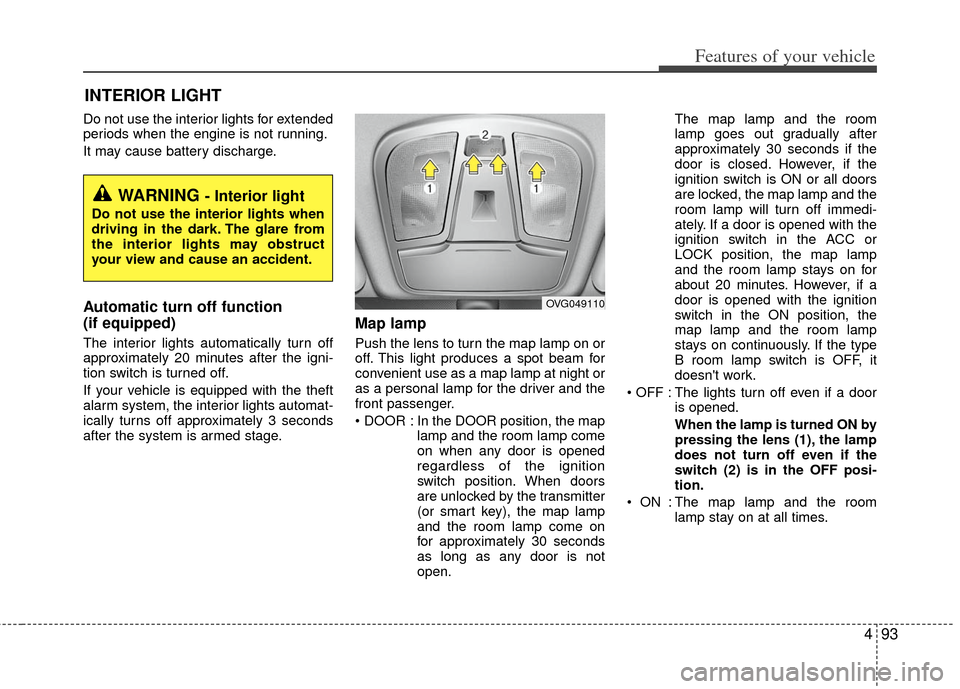
Push the lens to turn the map lamp on or
off. This light produces a spot beam for
convenient use as a map lamp at night or
as a personal lamp for the driver and the
front passenger.
In the DOOR position, the maplamp and the room lamp come
on when any door is opened
regardless of the ignition
switch position. When doors
are unlocked by the transmitter
(or smart key), the map lamp
and the room lamp come on
for approximately 30 seconds
as long as any door is not
open. The map lamp and the room
lamp goes out gradually after
approximately 30 seconds if the
door is closed. However, if the
ignition switch is ON or all doors
are locked, the map lamp and the
room lamp will turn off immedi-
ately. If a door is opened with the
ignition switch in the ACC or
LOCK position, the map lamp
and the room lamp stays on for
about 20 minutes. However, if a
door is opened with the ignition
switch in the ON position, the
map lamp and the room lamp
stays on continuously. If the type
B room lamp switch is OFF, it
doesn't work.
: The lights turn off even if a door is opened.
When the lamp is turned ON by
pressing the lens (1), the lamp
does not turn off even if the
switch (2) is in the OFF posi-
tion.
: The map lamp and the room lamp stay on at all times.
INTERIOR LIGHT
WARNING - Interior light
Do not use the interior lights when
driving in the dark. The glare from
the interior lights may obstruct
your view and cause an accident.
OVG049110
Page 167 of 394
Features of your vehicle
96
4
If you want to defrost and defog the front
windshield, refer to “Windshield
Defrosting and Defogging” in this section.
Rear window defroster
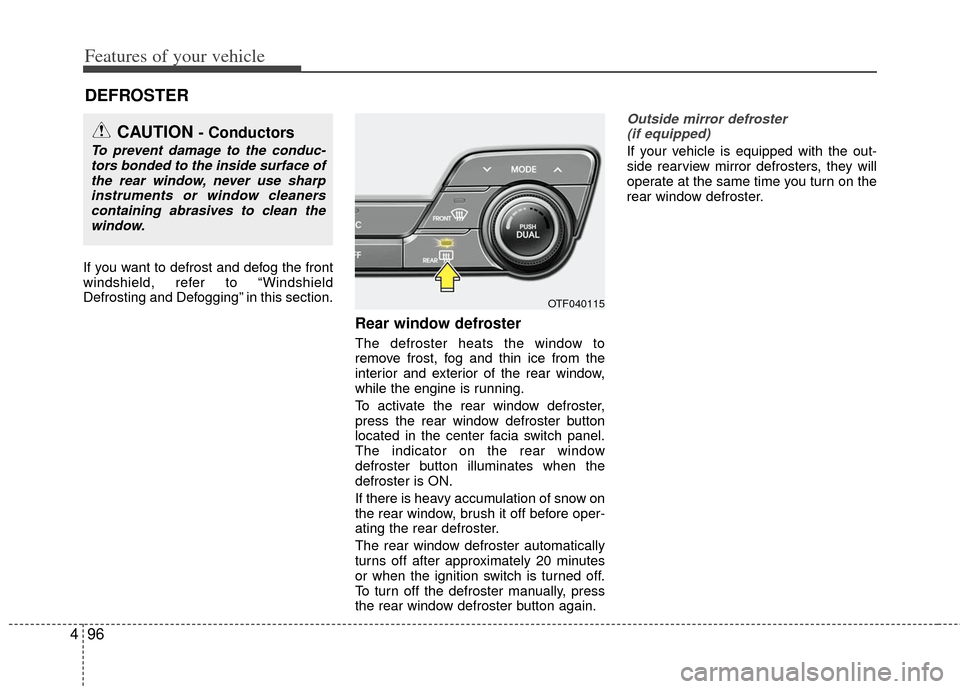
The defroster heats the window to
remove frost, fog and thin ice from the
interior and exterior of the rear window,
while the engine is running.
To activate the rear window defroster,
press the rear window defroster button
located in the center facia switch panel.
The indicator on the rear window
defroster button illuminates when the
defroster is ON.
If there is heavy accumulation of snow on
the rear window, brush it off before oper-
ating the rear defroster.
The rear window defroster automatically
turns off after approximately 20 minutes
or when the ignition switch is turned off.
To turn off the defroster manually, press
the rear window defroster button again.
Outside mirror defroster
(if equipped)
If your vehicle is equipped with the out-
side rearview mirror defrosters, they will
operate at the same time you turn on the
rear window defroster.
DEFROSTER
CAUTION - Conductors
To prevent damage to the conduc- tors bonded to the inside surface ofthe rear window, never use sharpinstruments or window cleanerscontaining abrasives to clean the window.
OTF040115