key battery KIA OPTIMA HYBRID 2015 Owners Manual
[x] Cancel search | Manufacturer: KIA, Model Year: 2015, Model line: OPTIMA HYBRID, Model: KIA OPTIMA HYBRID 2015Pages: 495, PDF Size: 13.38 MB
Page 6 of 495
1
2
3
4
5
6
7
8I
IntroductionFuel requirements / Vehicle break-in process / Vehicle data collection and event data recorders
Your vehicle at a glance
Exterior overview / Interior overview / Instrument panel overview / Engi\
ne compartment
Safety features of your vehicle
Seats / Seat belts / Child restraint system / Air bag
Features of your vehicleKeys / Door locks / Trunk / Windows / Hood / Fuel filler lid / Sunroof / Steering wheel / Mirrors / Instrumentcluster / Lighting / Wipers & Washers / Climate control system / Audio system / Etc.
Driving your vehicleBefore driving / Engine start/stop button / Transaxle / Brake system / Cruise control system
Active ECO system / BSD (Blind Spot Detection) system / Winter driving / Vehicle load limit / Etc.
What to do in an emergencyRoad warning / Emergency while driving / Emergency starting / Engine overheat / TPMS / Flat tire / Towing / Etc.
MaintenanceEngine compartment / Maintenance service / Engine oil / Engine coolant /\
Brake fluid / Washer fluid /
Parking brake / Air cleaner / Wiper blades / Battery / Tire and wheels / Fuses / Light bulbs / Etc.
Specifications, Consumer information and Reporting safety defects
Index
table of contents
Page 75 of 495
Safety features of your vehicle
40
3
✽
✽
NOTICE
Before you replace a fuse or discon-
nect a battery terminal, turn the
ignition switch to the LOCK posi-
tion and remove the ignition key.
Never remove or replace the air bag
related fuse(s) when the ignition
switch is in the ON position. Failure
to heed this warning will cause the
SRS air bag warning light to illumi-
nate.
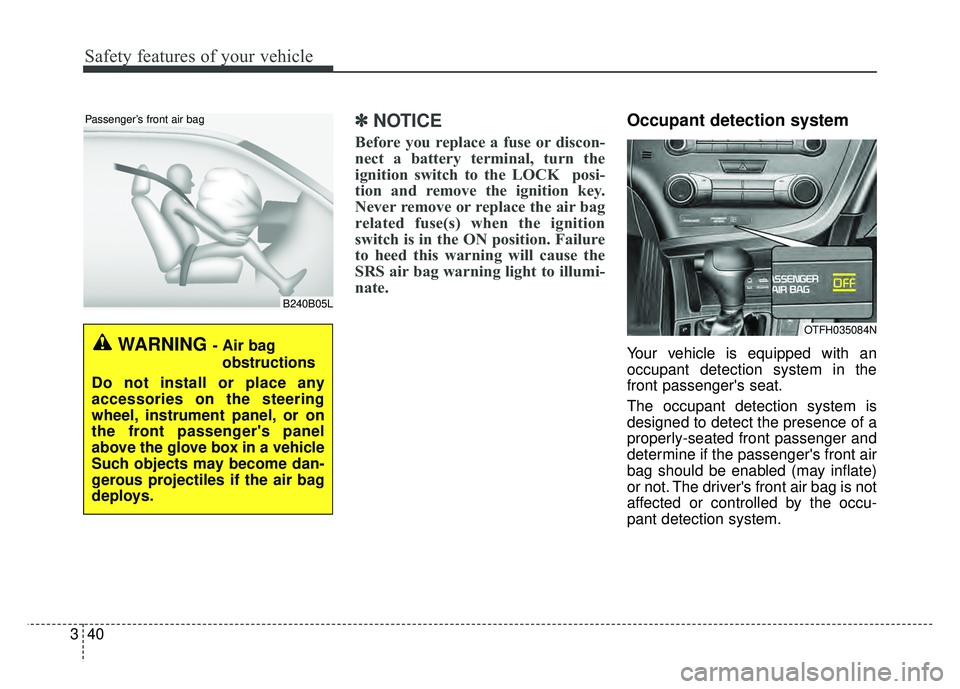
Occupant detection system
Your vehicle is equipped with an
occupant detection system in the
front passenger's seat.
The occupant detection system is
designed to detect the presence of a
properly-seated front passenger and
determine if the passenger's front air
bag should be enabled (may inflate)
or not. The driver's front air bag is not
affected or controlled by the occu-
pant detection system.
B240B05L
Passenger’s front air bag
WARNING - Air bag
obstructions
Do not install or place any
accessories on the steering
wheel, instrument panel, or on
the front passenger's panel
above the glove box in a vehicle
Such objects may become dan-
gerous projectiles if the air bag
deploys.
OTFH035084N
Page 100 of 495
![KIA OPTIMA HYBRID 2015 Owners Manual 49
Features of your vehicle
The smart key will not work if any of
following occurs:
The ignition key is in the ignitionswitch.
You exceed the operating distance limit (about 90 feet [30 m]).
The ba](/img/2/55003/w960_55003-99.png "KIA OPTIMA HYBRID 2015 Owners Manual 49
Features of your vehicle
The smart key will not work if any of
following occurs:
The ignition key is in the ignitionswitch.
You exceed the operating distance limit (about 90 feet [30 m]).
The ba")
49
Features of your vehicle
The smart key will not work if any of
following occurs:
The ignition key is in the ignitionswitch.
You exceed the operating distance limit (about 90 feet [30 m]).
The battery in the smart key is weak.
Other vehicles or objects may be blocking the signal.
The weather is extremely cold.
The smart key is close to a radio transmitter such as a radio station or
an airport which can interfere with
normal operation of the transmitter.
When the smart key does not work
properly, open and close the door
with the ignition key. If you have a
problem with the smart key, contact
an authorized Kia dealer. If the smart key is in close proximity
to your cell phone or smart phone,
the signal from the smart key could
be blocked by normal operation of
your cell phone or smart phone.
This is especially important when
the phone is active such as making
call, receiving calls, text messaging,
and/or sending/receiving emails.
Avoid placing the smart key and
your cell phone or smart phone in
the same pants or jacket pocket and
maintain adequate distance
between the two devices. This device complies with Part 15
of the FCC rules.
Operation is subject to the following
two conditions:
1. This device may not cause harm-
ful interference, and
2. This device must accept any inter- ference received, including inter-
ference that may cause undesired
operation.
✽ ✽NOTICE
Changes or modifications not
expressly approved by the party
responsible for compliance could void
the user’s authority to operate the
equipment. If the keyless entry sys-
tem is inoperative due to changes or
modifications not expressly approved
by the party responsible for compli-
ance, it will not be covered by your
manufacturer’s vehicle warranty.
Page 101 of 495
Features of your vehicle
10
4
Battery replacement
A battery should last for several years,
but if the transmitter or smart key is
not working properly, try replacing the
battery with a new one. If you are
unsure how to use or replace the bat-
tery, contact an authorized Kia dealer.
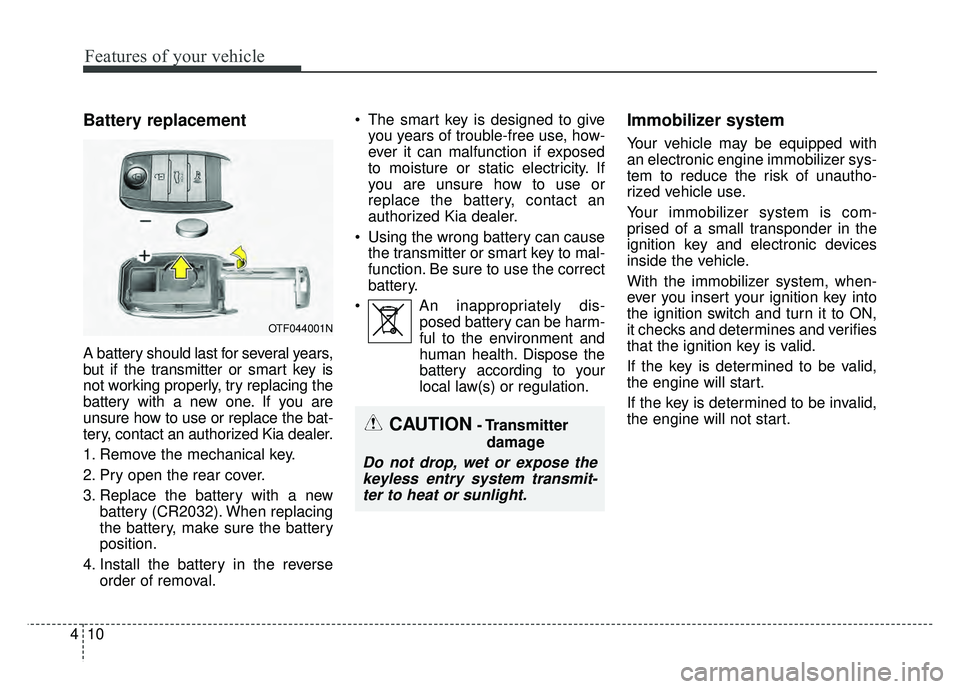
1. Remove the mechanical key.
2. Pry open the rear cover.
3. Replace the battery with a new
battery (CR2032). When replacing
the battery, make sure the battery
position.
4. Install the battery in the reverse order of removal. The smart key is designed to give
you years of trouble-free use, how-
ever it can malfunction if exposed
to moisture or static electricity. If
you are unsure how to use or
replace the battery, contact an
authorized Kia dealer.
Using the wrong battery can cause the transmitter or smart key to mal-
function. Be sure to use the correct
battery.
An inappropriately dis- posed battery can be harm-
ful to the environment and
human health. Dispose the
battery according to your
local law(s) or regulation.
Immobilizer system
Your vehicle may be equipped with
an electronic engine immobilizer sys-
tem to reduce the risk of unautho-
rized vehicle use.
Your immobilizer system is com-
prised of a small transponder in the
ignition key and electronic devices
inside the vehicle.
With the immobilizer system, when-
ever you insert your ignition key into
the ignition switch and turn it to ON,
it checks and determines and verifies
that the ignition key is valid.
If the key is determined to be valid,
the engine will start.
If the key is determined to be invalid,
the engine will not start.
OTF044001N
CAUTION- Transmitter
damage
Do not drop, wet or expose thekeyless entry system transmit-ter to heat or sunlight.
Page 150 of 495
459
Features of your vehicle
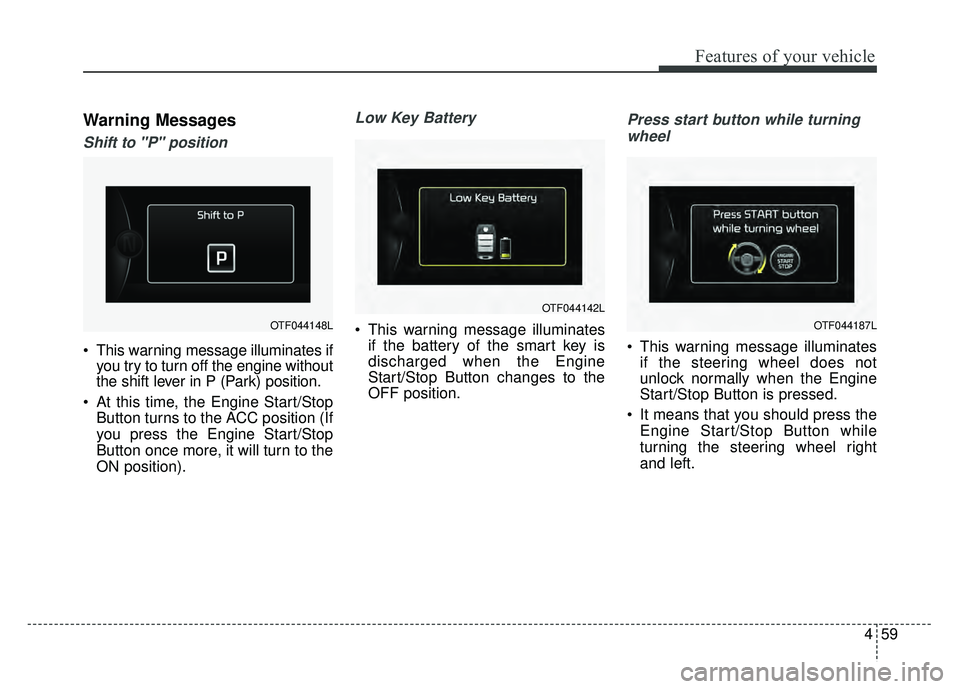
Warning Messages
Shift to "P" position
This warning message illuminates ifyou try to turn off the engine without
the shift lever in P (Park) position.
At this time, the Engine Start/Stop Button turns to the ACC position (If
you press the Engine Start/Stop
Button once more, it will turn to the
ON position).
Low Key Battery
This warning message illuminatesif the battery of the smart key is
discharged when the Engine
Start/Stop Button changes to the
OFF position.
Press start button while turning
wheel
This warning message illuminates if the steering wheel does not
unlock normally when the Engine
Start/Stop Button is pressed.
It means that you should press the Engine Start/Stop Button while
turning the steering wheel right
and left.
OTF044148L
OTF044142L
OTF044187L
Page 172 of 495
481
Features of your vehicle
Immobilizer IndicatorLight (With Smart Key)
This indicator light illuminates for up
to 30 seconds:
When the vehicle detects the smart key in the vehicle properly
while the Engine Start/Stop Button
is ACC or ON.
- At this time, you can start theengine.
- The indicator light goes off after starting the engine.
This indicator light blinks for a few
seconds:
When the smart key is not in the vehicle.
- At this time, you can not start theengine. This indicator light illuminates for 2
seconds and goes off:
When the vehicle can not detect
the smart key which is in the vehi-
cle while the Engine Start/Stop
Button is ON.
In this case, have your vehicle
inspected by an authorized Kia
dealer.
This indicator light blinks:
When the battery of the smart key is weak.
- At this time, you can not start theengine. However, you can start the
engine if you press the Engine
Start/Stop Button with the smart
key. (For more details, refer to
"Starting the Engine" in section 5).
When there is a malfunction with the immobilizer system.
In this case, have your vehicle
inspected by an authorized Kia
dealer.
Turn Signal Indicator
Light
This indicator light blinks:
When you turn the turn signal light on.
If any of the following occurs, there
may be a malfunction with the turn
signal system. In this case, have your
vehicle inspected by an authorized
Kia dealer. - The indicator light does not blinkbut illuminates.
- The indicator light blinks more rapidly.
- The indicator light does not illumi- nate at all.
Page 179 of 495
Features of your vehicle
88
4
Battery saver function
The purpose of this feature is to
prevent the battery from being dis-
charged. The system automatically
turns off the parking lights when
the driver removes the ignition key
and opens the driver-side door.
With this feature, the parking lights will turn off automatically if the driv-
er parks on the side of the road at
night.
If necessary, to keep the lights on
when the ignition key is removed,
perform the following:
1) Open the driver-side door.
2) Turn the parking lights OFF and ON again using the light switch
on the steering column.
Headlight delay function
(if equipped)
The headlights (and/or taillights) will
remain on for approximately 5 min-
utes after the ignition key is removed
or turned to the ACC or LOCK posi-
tion. However, if the driver’s door is
opened and closed, the headlights
are turned off after 15 seconds.
The headlights can be turned off by
pressing the lock button on the trans-
mitter (or smart key) twice or turning
off the light switch from the headlight
or Auto light position.
If the driver gets out of the vehicle
through other doors (except driver's
door), the battery saver function
does not operate and the headlight
escort function does not turn off
automatically. Therefore, causing the
battery to be discharged. In this
case, make sure to turn off the head-
light before getting out of the vehicle.
Headlight leveling device
(if equipped)
Automatic type
It automatically adjusts the headlight
beam level according to the number
of passengers and the loading
weight in the luggage area.
And it offers the proper headlight
beam under various conditions.
LIGHTING
Page 190 of 495
499
Features of your vehicle
■
■Ty p e B
DOOR :
In the DOOR position, the map lamp
and the room lamp come on when any
door is opened regardless of the igni-
tion switch position. When doors are
unlocked by the transmitter (or smart
key), the map lamp and the room lamp
come on for approximately 30 sec-
onds as long as any door is not open.
The map lamp and the room lamp go
out gradually after approximately 30
seconds if the door is closed.
However, if the ignition switch is ON
or all doors are locked, the map lamp
and the room lamp will turn off imme-
diately. If a door is opened with the
ignition switch in the ACC or LOCK
position, the map lamp and the room
lamp stay on for about 20 minutes.
However, if a door is opened with the
ignition switch in the ON position, the
map lamp and the room lamp stay on
continuously. OFF : The lights turn off even if a
door is opened.
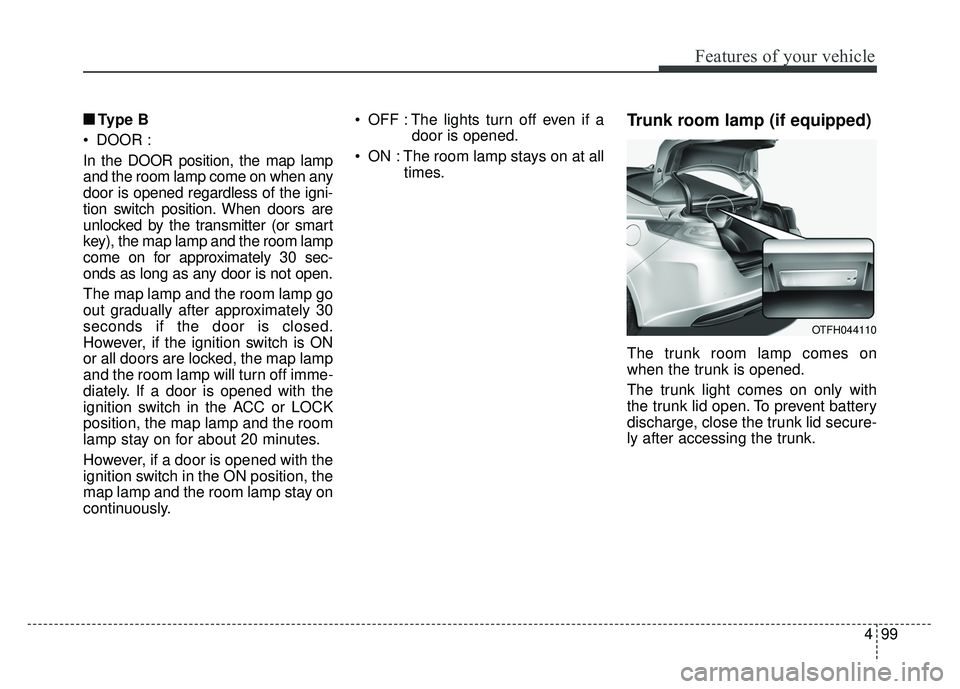
ON : The room lamp stays on at all times.Trunk room lamp (if equipped)
The trunk room lamp comes on
when the trunk is opened.
The trunk light comes on only with
the trunk lid open. To prevent battery
discharge, close the trunk lid secure-
ly after accessing the trunk.
OTFH044110
Page 284 of 495
Driving your vehicle
10
5
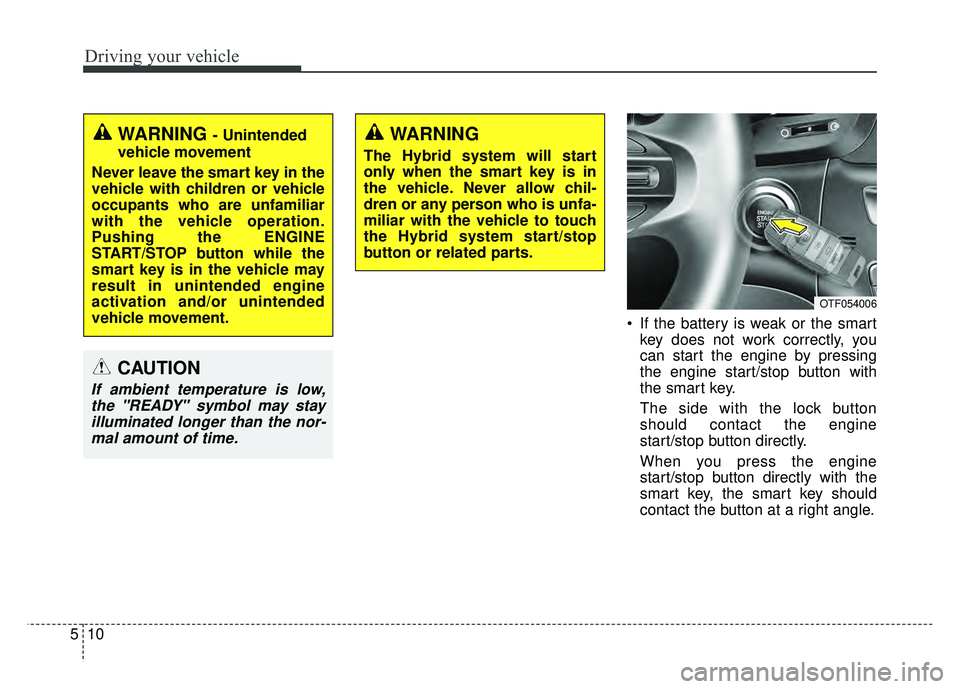
If the battery is weak or the smart
key does not work correctly, you
can start the engine by pressing
the engine start/stop button with
the smart key.
The side with the lock button
should contact the engine
start/stop button directly.
When you press the engine
start/stop button directly with the
smart key, the smart key should
contact the button at a right angle.
WARNING - Unintended
vehicle movement
Never leave the smart key in the
vehicle with children or vehicle
occupants who are unfamiliar
with the vehicle operation.
Pushing the ENGINE
START/STOP button while the
smart key is in the vehicle may
result in unintended engine
activation and/or unintended
vehicle movement.
CAUTION
If ambient temperature is low, the "READY" symbol may stayilluminated longer than the nor-mal amount of time.
WARNING
The Hybrid system will start
only when the smart key is in
the vehicle. Never allow chil-
dren or any person who is unfa-
miliar with the vehicle to touch
the Hybrid system start/stop
button or related parts.
OTF054006
Page 492 of 495

I9
Index
Shift-lock override . . . . . . . . . . . . . . . . . . . . . . . . . . . . 5-16
Side air bag . . . . . . . . . . . . . . . . . . . . . . . . . . . . . . . . . . 3-48\
Smart key . . . . . . . . . . . . . . . . . . . . . . . . . . . . . . . . . . . . \
4-4Record your key number . . . . . . . . . . . . . . . . . . . . . . 4-4
Remote keyless entry system operations . . . . . . . . . . 4-7
Smart key precautions . . . . . . . . . . . . . . . . . . . . . . . . 4-8
Battery replacement . . . . . . . . . . . . . . . . . . . . . . . . . 4-10
Immobilizer system . . . . . . . . . . . . . . . . . . . . . . . . . 4-10
Smart key functions . . . . . . . . . . . . . . . . . . . . . . . . . . . . 4-4
Smart key precautions. . . . . . . . . . . . . . . . . . . . . . . . . . . 4-8
Smooth cornering . . . . . . . . . . . . . . . . . . . . . . . . . . . . . 5-54
Snow tires . . . . . . . . . . . . . . . . . . . . . . . . . . . . . . . . . . . 5-\
57
Spare tire Changing tires . . . . . . . . . . . . . . . . . . . . . . . . . . . . . 6-15
Compact spare tire . . . . . . . . . . . . . . . . . . . . . . . . . . 6-19
Compact spare tire replacement . . . . . . . . . . . . . . . . 7-52
Special driving conditions . . . . . . . . . . . . . . . . . . . . . . 5-53 Hazardous driving conditions . . . . . . . . . . . . . . . . . 5-53
Rocking the vehicle . . . . . . . . . . . . . . . . . . . . . . . . . 5-53
Smooth cornering . . . . . . . . . . . . . . . . . . . . . . . . . . . 5-54
Driving at night . . . . . . . . . . . . . . . . . . . . . . . . . . . . 5-54
Driving in the rain . . . . . . . . . . . . . . . . . . . . . . . . . . 5-55
Driving in flooded areas. . . . . . . . . . . . . . . . . . . . . . 5-55
Highway driving . . . . . . . . . . . . . . . . . . . . . . . . . . . . 5-56
Driving off-road . . . . . . . . . . . . . . . . . . . . . . . . . . . . 5-56
Speedometer . . . . . . . . . . . . . . . . . . . . . . . . . . . . . . . . . 4-47
Sports mode . . . . . . . . . . . . . . . . . . . . . . . . . . . . . . . . . 5-14
SRS Care. . . . . . . . . . . . . . . . . . . . . . . . . . . . . . . . . . . . \
3-55 SRS components and functions . . . . . . . . . . . . . . . . . . 3-38
Starting difficulties, see engine will not start . . . . . . . . . 6-4
Starting the hybrid system . . . . . . . . . . . . . . . . . . . . . . . 5-9
Starting the hybrid system
With a smart key . . . . . . . . . . . . . . . . . . . . . . . . . . . . 5-9
State of charge guage . . . . . . . . . . . . . . . . . . . . . . . . . . 4-48
Steering wheel . . . . . . . . . . . . . . . . . . . . . . . . . . . . . . . 4-37 Electric power steering. . . . . . . . . . . . . . . . . . . . . . . 4-37
Tilt and telescopic steering. . . . . . . . . . . . . . . . . . . . 4-38
Horn . . . . . . . . . . . . . . . . . . . . . . . . . . . . . . . . . . . . \
. 4-38
Heated steering wheel . . . . . . . . . . . . . . . . . . . . . . . 4-39
Steering wheel audio controls . . . . . . . . . . . . . . . . . . 4-127
Storage compartment . . . . . . . . . . . . . . . . . . . . . . . . . 4-119 Center console storage . . . . . . . . . . . . . . . . . . . . . . 4-119
Glove box . . . . . . . . . . . . . . . . . . . . . . . . . . . . . . . . 4-119
Cool box . . . . . . . . . . . . . . . . . . . . . . . . . . . . . . . . . 4-120
Sunglass holder . . . . . . . . . . . . . . . . . . . . . . . . . . . 4-120
Sunglass holder . . . . . . . . . . . . . . . . . . . . . . . . . . . . . . 4-120
Sunroof . . . . . . . . . . . . . . . . . . . . . . . . . . . . . . . . . . . . \
. 4-31
Sunvisor . . . . . . . . . . . . . . . . . . . . . . . . . . . . . . . . . . . 4-\
122
Tether anchor system . . . . . . . . . . . . . . . . . . . . . . . . . . 3-31
Theft-alarm system . . . . . . . . . . . . . . . . . . . . . . . . . . . . 4-12
Tilt and telescopic steering . . . . . . . . . . . . . . . . . . . . . . 4-38
Tire chains. . . . . . . . . . . . . . . . . . . . . . . . . . . . . . . . . . . 5-\
58
T