roof KIA OPTIMA HYBRID 2017 User Guide
[x] Cancel search | Manufacturer: KIA, Model Year: 2017, Model line: OPTIMA HYBRID, Model: KIA OPTIMA HYBRID 2017Pages: 604, PDF Size: 13.16 MB
Page 169 of 604
439
Features of your vehicle
When the sunshade is opened
Push the sunroof glass control lever
backward to the 1st or 2nd detent
position, the sunroof glass will be
opened.
To stop the sunroof glass movement
at any point, push the sunroof control
lever momentarily.
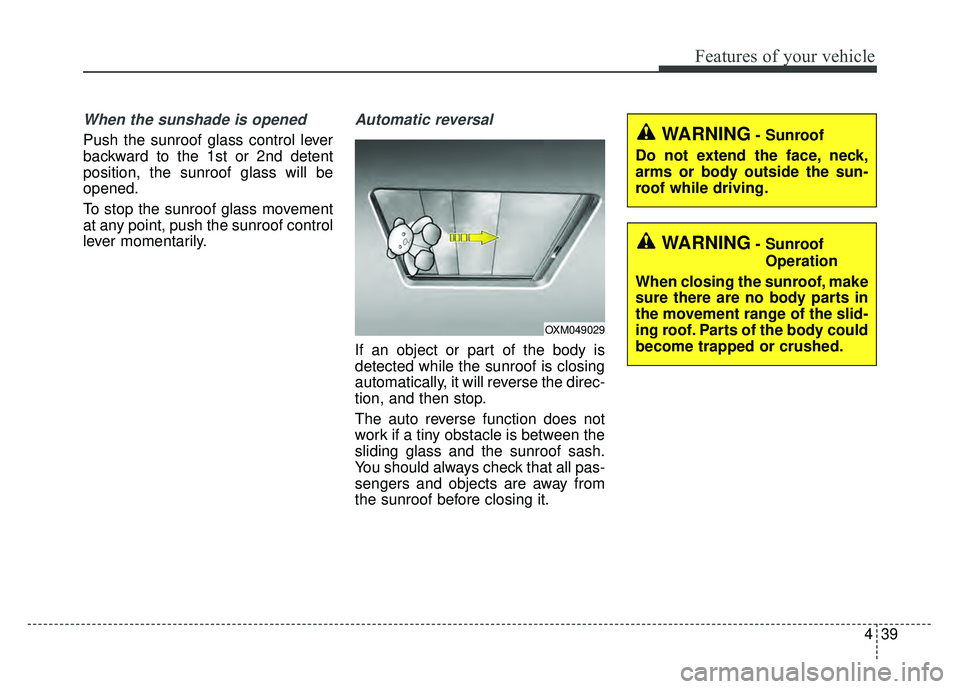
Automatic reversal
If an object or part of the body is
detected while the sunroof is closing
automatically, it will reverse the direc-
tion, and then stop.
The auto reverse function does not
work if a tiny obstacle is between the
sliding glass and the sunroof sash.
You should always check that all pas-
sengers and objects are away from
the sunroof before closing it.
OXM049029
WARNING- SunroofOperation
When closing the sunroof, make
sure there are no body parts in
the movement range of the slid-
ing roof. Parts of the body could
become trapped or crushed.
WARNING- Sunroof
Do not extend the face, neck,
arms or body outside the sun-
roof while driving.
Page 170 of 604
Features of your vehicle
40
4
✽
✽
NOTICE
If you drive with the sunroof opened
right after a vehicle wash or rain,
water may get inside the vehicle.
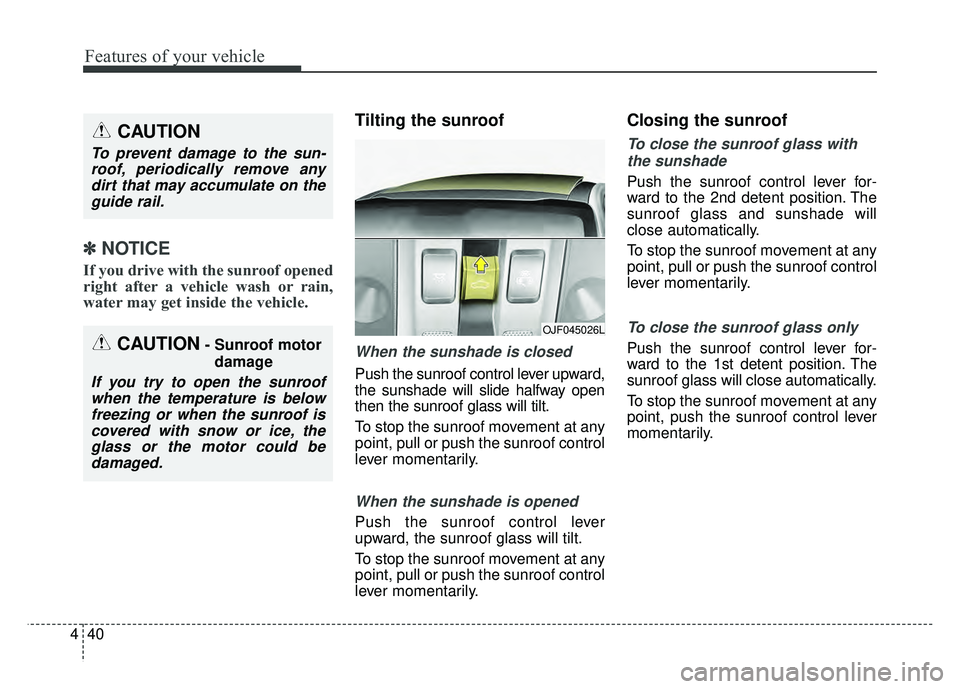
Tilting the sunroof
When the sunshade is closed
Push the sunroof control lever upward,
the sunshade will slide halfway open
then the sunroof glass will tilt.
To stop the sunroof movement at any
point, pull or push the sunroof control
lever momentarily.
When the sunshade is opened
Push the sunroof control lever
upward, the sunroof glass will tilt.
To stop the sunroof movement at any
point, pull or push the sunroof control
lever momentarily.
Closing the sunroof
To close the sunroof glass with
the sunshade
Push the sunroof control lever for-
ward to the 2nd detent position. The
sunroof glass and sunshade will
close automatically.
To stop the sunroof movement at any
point, pull or push the sunroof control
lever momentarily.
To close the sunroof glass only
Push the sunroof control lever for-
ward to the 1st detent position. The
sunroof glass will close automatically.
To stop the sunroof movement at any
point, push the sunroof control lever
momentarily.
CAUTION
To prevent damage to the sun-roof, periodically remove anydirt that may accumulate on theguide rail.
CAUTION- Sunroof motor
damage
If you try to open the sunroofwhen the temperature is belowfreezing or when the sunroof iscovered with snow or ice, theglass or the motor could bedamaged.
OJF045026L
Page 171 of 604
441
Features of your vehicle
Resetting the sunroof
Whenever the vehicle battery is dis-
connected or discharged, you must
reset your sunroof system as follows:
1.Start the engine.
2.Close the sunshade and sunroofcompletely if opened.
3.Release the sunroof control lever.
4.Push the sunroof control lever for- ward in the direction of close
(about 10 seconds) until the sun-
shade slightly moves. Then,
release the lever.
5.Push the sunroof control lever for- ward in the direction of close, until
the sunroof operates as follows
again:
Sunshade Open → Glass Tilt Open
→ Glass Slide Open → Glass Slide
Close → Sunshade Close
Then, release the lever. When this is complete, the sunroof
system has been reset and one
touch open and close should be
restored.
✽ ✽
NOTICE
If you do not reset the sunroof, it
may not work properly.
Page 205 of 604
475
Features of your vehicle
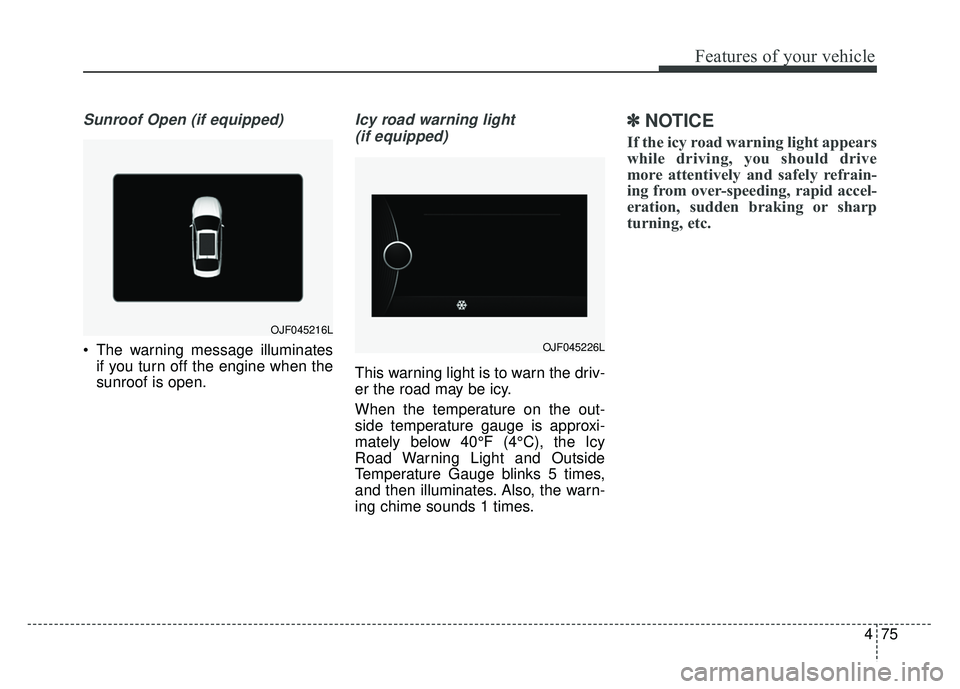
Sunroof Open (if equipped)
The warning message illuminatesif you turn off the engine when the
sunroof is open.
Icy road warning light
(if equipped)
This warning light is to warn the driv-
er the road may be icy.
When the temperature on the out-
side temperature gauge is approxi-
mately below 40°F (4°C), the Icy
Road Warning Light and Outside
Temperature Gauge blinks 5 times,
and then illuminates. Also, the warn-
ing chime sounds 1 times.
✽ ✽ NOTICE
If the icy road warning light appears
while driving, you should drive
more attentively and safely refrain-
ing from over-speeding, rapid accel-
eration, sudden braking or sharp
turning, etc.
OJF045216L
OJF045226L
Page 252 of 604
Features of your vehicle
122
4
Prolonged operation of the heater in
the recirculated air position (without
air conditioning selected) may cause
fogging of the windshield and side
windows and the air within the pas-
senger compartment may become
stale.
In addition, prolonged use of the air
conditioning with the recirculated air
position selected will result in exces-
sively dry air in the passenger com-
partment.
Sunroof inside air recirculation
(if equipped)
If the sunroof opens while the heater
or Air Conditioning system operates,
the outside (fresh) air will be select-
ed automatically for ventilating the
car. Then, if you select the recirculat-
ed air position, the outside (fresh) air
will be selected automatically after 3
minutes.
If you close the sunroof, the intake
mode will be changed to the previous
selected mode.
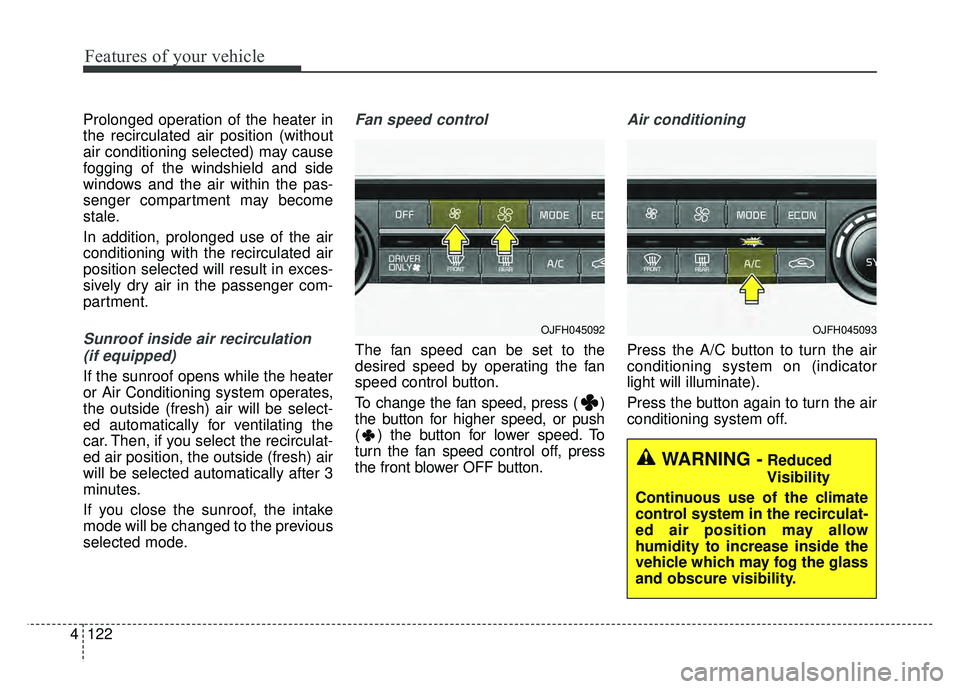
Fan speed control
The fan speed can be set to the
desired speed by operating the fan
speed control button.
To change the fan speed, press ( )
the button for higher speed, or push
( ) the button for lower speed. To
turn the fan speed control off, press
the front blower OFF button.
Air conditioning
Press the A/C button to turn the air
conditioning system on (indicator
light will illuminate).
Press the button again to turn the air
conditioning system off.
OJFH045092
WARNING -Reduced
Visibility
Continuous use of the climate
control system in the recirculat-
ed air position may allow
humidity to increase inside the
vehicle which may fog the glass
and obscure visibility.
OJFH045093
Page 290 of 604
Audio system
519
✽
✽NOTICE - Using Voice
Recognition
• When using the voice recognition
feature, only commands listed
within the user’s manual are sup-
ported.
• Be aware that during the opera- tion of the voice recognition sys-
tem, pressing any button other
than the button will terminate
voice recognition mode.
• For optimal voice recognition per- formance, position your head
below the microphone above the
driver’s seat and maintain proper
position when speaking voice com-
mands.
• Within the following situations, voice recognition may not function
properly due to external sound.
- When the windows and sunroofare open
- When the blower AC/heater is set to high
- When entering and passing through tunnels
- When driving on rugged and uneven roads
- During severe rain (heavy rains, windstorms) (Continued)(Continued)
• Phone related voice commands can
be used only when a Bluetooth®
Wireless Technology device is con-
nected.
• When making calls by stating a name, the corresponding contact
must be downloaded and stored
within the audio system.
• After downloading the Bluetooth
®
Wireless Technology phone book,
it takes some time to convert the
phone book data into voice infor-
mation. During this time, voice
recognition may not properly
operate.
• Pronounce the voice commands naturally and clearly as if in a nor-
mal conversation.
Page 293 of 604
Audio system
22
5
SiriusXM®Satellite Radio infor-
mation
Satellite Radio channels:
Enjoy SiriusXM Satellite Radio with a 3-
month trial subscription to the Sirius
Select package. You’ll get over 140
channels, including commercial-free
music, plus all your favorite sports,
exclusive talk, entertainment, and a
selection of premium programming. For
more information and a complete list
of SiriusXM channels, visit sir-
iusxm.com in the United States, sir-
iusxm.ca in Canada, or call Sir iusXM
at 1-888-539-7474.
Satellite Radio reception factors:
To receive the satellite signal, your
vehicle has been equipped with a
satellite radio antenna located on the
roof of your vehicle. The vehicle roof
provides the best location for an
unobstructed, open view of the sky, a
requirement of a satellite radio sys-
tem. Like AM/FM, there are several
factors that can affect satellite radio
reception performance:
Antenna obstructions: For optimal reception performance, keep the
antenna clear of snow and ice
build-up and keep luggage and other material as far away from the
antenna as possible.
Terrain: Hills, mountains, tall build- ings, bridges, tunnels, freeway
overpasses, parking garages,
dense tree foliage and thunder-
storms can interfere with your
reception.
SiriusXM Satellite Radio service:
SiriusXM is a subscription-based
satellite radio service that broad-
casts music, sports, news and enter-
tainment programming to radio
receivers, which are available for
installation in motor vehicles or facto-
ry installed, as well as for the home,
portable and wireless devices, and
through an Internet connection on a
personal computer.
Vehicles that are equipped with a
factory installed Sir iusXMSatellite
Radio system include:
Hardware and an introductory trial subscription term, which begins on
the date of sale or lease of the vehicle.
For a small upgrade fee, access to SiriusXM m usic channels, and other
select channels over the Internet
using any computer connected to
the Internet (U.S. customers only). For information on extended sub-
scription terms, contact SiriusXM at
1-888-539-7474.
NOTE:
SiriusXM services require a sub-
scription sold separately, or as a
package, by Sirius XM Radio Inc.
If you decide to continue service
after your trial, the subscription
plan you choose will automatical-
ly renew thereafter and you will be
charged according to your chosen
payment method at then-current
rates. Fees and taxes apply. To
cancel you must call SiriusXM at
1-866-635-2349. See SiriusXM
Customer Agreement for com-
plete terms at www.siriusxm.com.
SiriusXM U.S. satellite and data
services are available only in the
48 contiguous states, DC and
Puerto Rico (with coverage limita-
tions). SiriusXM satellite service is
also available in Canada; see
www.siriusxm.ca. All fees and pro-
gramming subject to change.
Sirius, XM and all related marks
and logos are trademarks of Sirius
XM Radio Inc.
Page 477 of 604
Maintenance
88
SCHEDULED MAINTENANCE SERVICE
Follow the Normal Maintenance
Schedule if the vehicle is usually
operated where none of the following
conditions apply. If any of the following
conditions apply, follow the
Maintenance Under Severe Usage
Conditions.
Repeatedly driving short distanceof less than 5miles (8 km) in nor-
mal temperature or less than 10
miles (16 km) in freezing tempera-
ture.
Extensive engine idling or low speed driving for long distances.
Driving on rough, dusty, muddy, unpaved, graveled or salt-spread
roads.
Driving in areas using salt or other corrosive materials or in very cold
weather.
Driving in heavy dust condition.
Driving in heavy traffic area. Driving on uphill, downhill, or
mountain roads repeatedly.
Towing a trailer or using a camper on roof rack.
Driving for patrol car, taxi, other commercial use of vehicle towing.
Driving over 106 mph (170 km/h).
Frequently driving in stop-and-go conditions.If your vehicle is operated under theabove conditions, you shouldinspect, replace or refill more fre-quently than the following NormalMaintenance Schedule. After 120months or 150,000 miles continue tofollow the prescribed maintenanceintervals.
Page 488 of 604
819
Maintenance
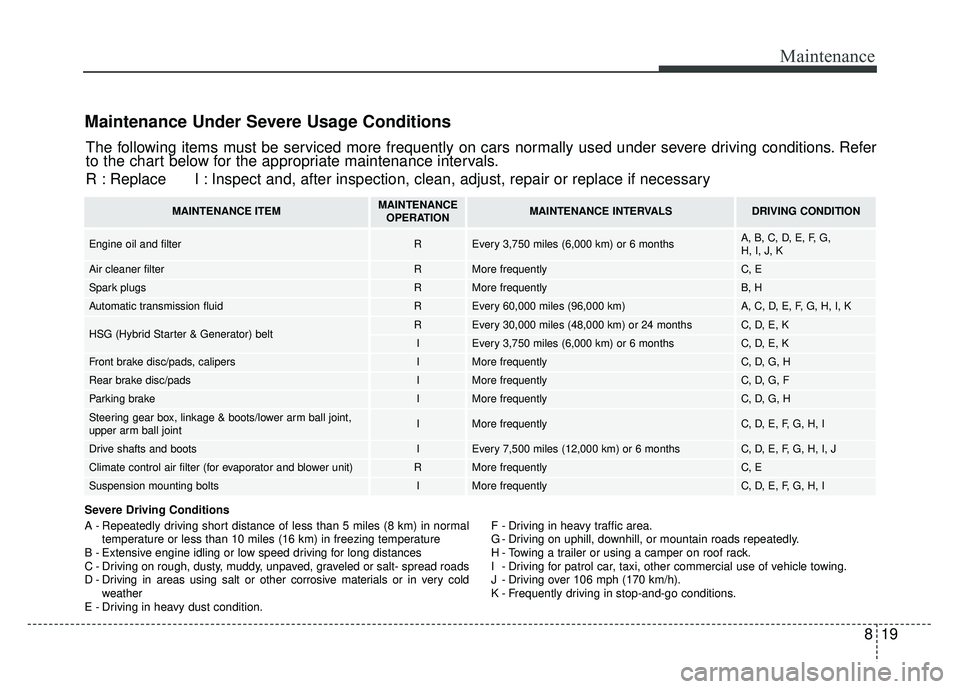
Maintenance Under Severe Usage Conditions
Severe Driving Conditions
A - Repeatedly driving short distance of less than 5 miles (8 km) in normaltemperature or less than 10 miles (16 km) in freezing temperature
B - Extensive engine idling or low speed driving for long distances
C - Driving on rough, dusty, muddy, unpaved, graveled or salt- spread roads
D - Driving in areas using salt or other corrosive materials or in very cold weather
E - Driving in heavy dust condition. F - Driving in heavy traffic area.
G - Driving on uphill, downhill, or mountain roads repeatedly.
H - Towing a trailer or using a camper on roof rack.
I - Driving for patrol car, taxi, other commercial use of vehicle towing.
J - Driving over 106 mph (170 km/h).
K - Frequently driving in stop-and-go conditions.
The following items must be serviced more frequently on cars normally used under severe driving conditions. Refer
to the chart below for the appropriate maintenance intervals.
R : Replace I : Inspect and, after inspection, clean, adjust, repair or replace if neces\
sary
MAINTENANCE ITEMMAINTENANCE
OPERATIONMAINTENANCE INTERVALSDRIVING CONDITION
Engine oil and filter REvery 3,750 miles (6,000 km) or 6 monthsA, B, C, D, E, F, G,
H, I, J, K
Air cleaner filterRMore frequentlyC, E
Spark plugsRMore frequentlyB, H
Automatic transmission fluidREvery 60,000 miles (96,000 km)A, C, D, E, F, G, H, I, K
HSG (Hybrid Starter & Generator) beltREvery 30,000 miles (48,000 km) or 24 monthsC, D, E, K
IEvery 3,750 miles (6,000 km) or 6 monthsC, D, E, K
Front brake disc/pads, calipersIMore frequentlyC, D, G, H
Rear brake disc/padsIMore frequentlyC, D, G, F
Parking brakeIMore frequentlyC, D, G, H
Steering gear box, linkage & boots/lower arm ball joint,
upper arm ball jointIMore frequentlyC, D, E, F, G, H, I
Drive shafts and bootsIEvery 7,500 miles (12,000 km) or 6 monthsC, D, E, F, G, H, I, J
Climate control air filter (for evaporator and blower unit)RMore frequentlyC, E
Suspension mounting boltsIMore frequentlyC, D, E, F, G, H, I
Page 513 of 604
Maintenance
44
8
When recharging the battery,
observe the following precautions:
The battery must be removed from
the vehicle and placed in an area
with good ventilation.
Do not allow cigarettes, sparks, or flame near the battery.
Watch the battery during charging, and stop or reduce the charging
rate if the battery cells begin
gassing (boiling) violently or if the
temperature of the electrolyte of
any cell exceeds 120°F (49°C).
Wear eye protection when check- ing the battery during charging.
Disconnect the battery charger in the following order.
1. Turn off the battery charger main switch.
2. Unhook the negative clamp from the negative battery terminal.
3. Unhook the positive clamp from the positive battery terminal. Before performing maintenance or
recharging the battery, turn off all
accessories and stop the engine.
The negative battery cable must be removed first and installed last
when the battery is disconnected.Reset items
Items should be reset after the bat-
tery has been discharged or the bat-
tery has been disconnected.
Auto up/down window (See chapter 4)
Sunroof (See chapter 4)
Trip computer (See chapter 4)
Climate control system (See chapter 4)
Driver position memory system (See chapter 3)
Audio (See chapter 5)