window KIA OPTIMA HYBRID 2018 Owners Manual
[x] Cancel search | Manufacturer: KIA, Model Year: 2018, Model line: OPTIMA HYBRID, Model: KIA OPTIMA HYBRID 2018Pages: 547, PDF Size: 11.56 MB
Page 56 of 547
Your vehicle at a glance
22
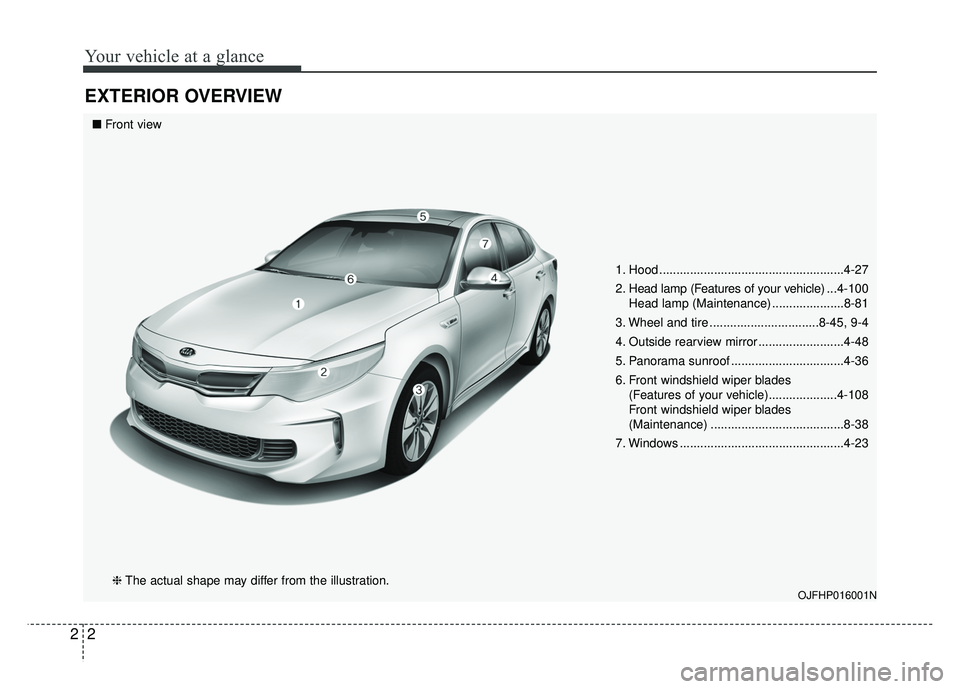
EXTERIOR OVERVIEW
1. Hood ......................................................4-27
2. Head lamp (Features of your vehicle) ...4-100
Head lamp (Maintenance) .....................8-81
3. Wheel and tire ................................8-45, 9-4
4. Outside rearview mirror .........................4-48
5. Panorama sunroof .................................4-36
6. Front windshield wiper blades (Features of your vehicle)....................4-108
Front windshield wiper blades
(Maintenance) .......................................8-38
7. Windows ................................................4-23
OJFHP016001N
■ Front view
❈ The actual shape may differ from the illustration.
Page 58 of 547
Your vehicle at a glance
42
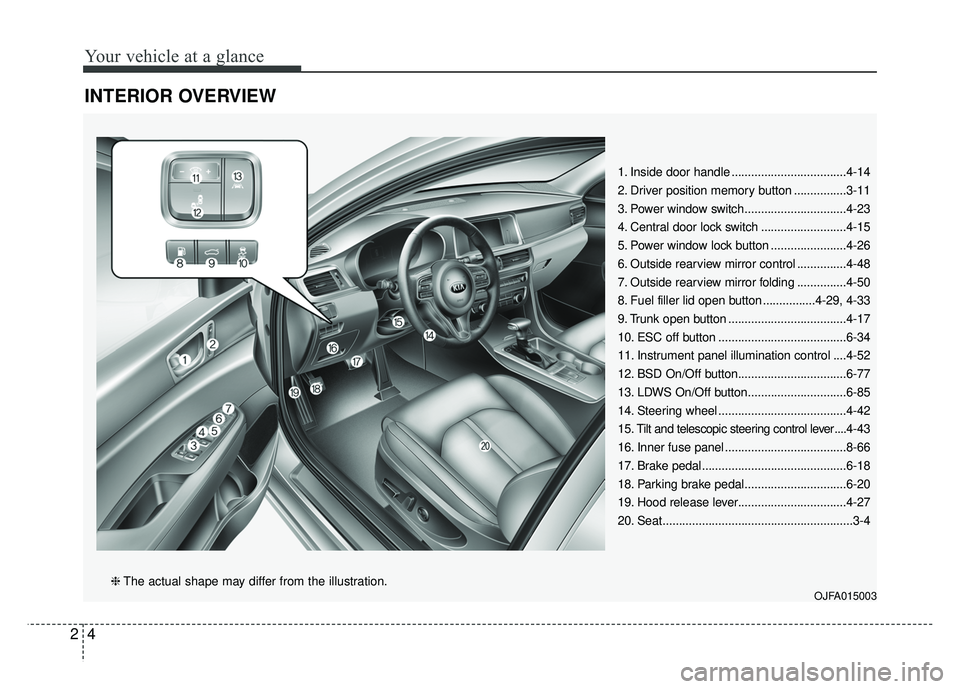
INTERIOR OVERVIEW
1. Inside door handle ...................................4-14
2. Driver position memory button ................3-11
3. Power window switch...............................4-23
4. Central door lock switch ..........................4-15
5. Power window lock button .......................4-26
6. Outside rearview mirror control ...............4-48
7. Outside rearview mirror folding ...............4-50
8. Fuel filler lid open button ................4-29, 4-33
9. Trunk open button ....................................4-17
10. ESC off button .......................................6-34
11. Instrument panel illumination control ....4-52
12. BSD On/Off button.................................6-77
13. LDWS On/Off button..............................6-85
14. Steering wheel .......................................4-42
15. Tilt and telescopic steering control lever ....4-43
16. Inner fuse panel .....................................8-66
17. Brake pedal............................................6-18
18. Parking brake pedal...............................6-20
19. Hood release lever.................................4-27
20. Seat..........................................................3-4
OJFA015003❈ The actual shape may differ from the illustration.
Page 105 of 547
345
Safety features of your vehicle
Noise and smoke
When inflated, the air bags make a
loud noise and leave smoke and
powder in the air inside the vehicle.
This is normal and is a result of the
ignition of the air bag inflator. After
the air bag inflates, you may feel sub-
stantial discomfort in breathing due
to the contact of your chest with both
the seat belt and the air bag, as well
as from breathing the smoke and
powder.Open your doors and/or
windows as soon as possible after
impact in order to reduce discom-
fort and prevent prolonged expo-
sure to the smoke and powder.
Though smoke and powder are non-
toxic, it may cause irritation to the
skin (eyes, nose and throat, etc). If
this is the case, wash and rinse with
cold water immediately and consult a
doctor if the symptom persists.WARNING- Hot compo-
nents
Do not touch the air bag storage
area's internal components
immediately after airbag infla-
tion. The air bag related parts in
the steering wheel, instrument
panel and the roof rails above
the front and rear doors are
very hot. Hot components can
result in burn injuries.WARNING- Airbag infla- tion
Sit as far back as possible from
the steering wheel while still
maintaining comfortable con-
trol of your vehicle. A distance
of at least 10" from your chest
to the steering wheel is recom-
mended. Failure to do so can
result in airbag inflation injuries
to the driver.
WARNING
Do not install or place any
accessories near air bag
deployment areas, such as the
instrument panel, windows, pil-
lars, and roof rails.
Page 123 of 547
363
Safety features of your vehicle
Curtain air bag
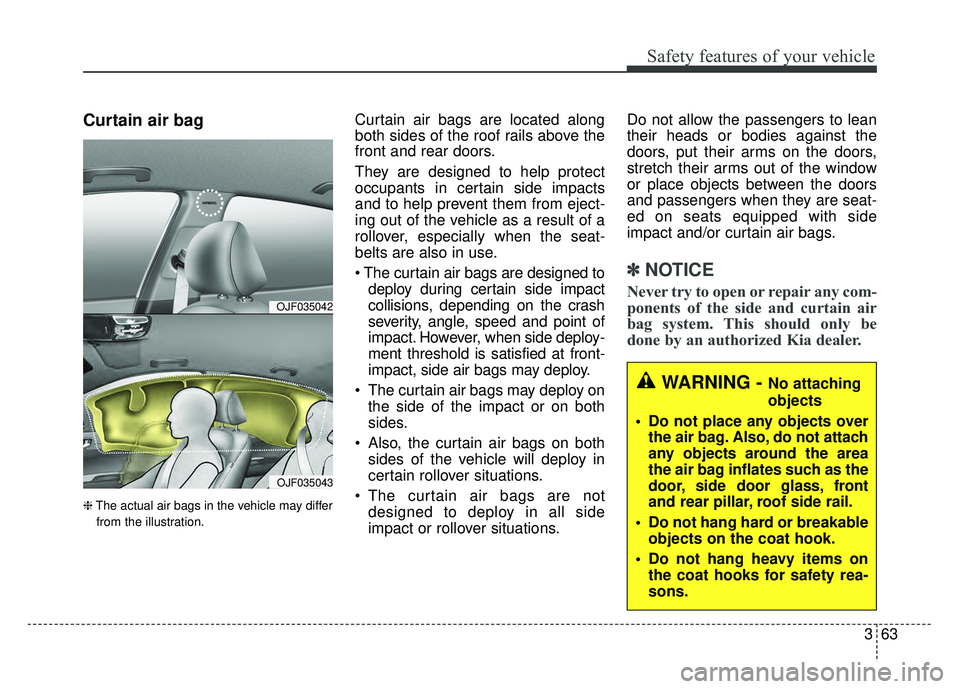
❈The actual air bags in the vehicle may differ
from the illustration.
Curtain air bags are located along
both sides of the roof rails above the
front and rear doors.
They are designed to help protect
occupants in certain side impacts
and to help prevent them from eject-
ing out of the vehicle as a result of a
rollover, especially when the seat-
belts are also in use.
The curtain air bags are designed to deploy during certain side impact
collisions, depending on the crash
severity, angle, speed and point of
impact. However, when side deploy-
ment threshold is satisfied at front-
impact, side air bags may deploy.
The curtain air bags may deploy on the side of the impact or on both
sides.
Also, the curtain air bags on both sides of the vehicle will deploy in
certain rollover situations.
The curtain air bags are not designed to deploy in all side
impact or rollover situations. Do not allow the passengers to lean
their heads or bodies against the
doors, put their arms on the doors,
stretch their arms out of the window
or place objects between the doors
and passengers when they are seat-
ed on seats equipped with side
impact and/or curtain air bags.
✽ ✽
NOTICE
Never try to open or repair any com-
ponents of the side and curtain air
bag system. This should only be
done by an authorized Kia dealer.OJF035042
OJF035043
WARNING - No attaching
objects
Do not place any objects over the air bag. Also, do not attach
any objects around the area
the air bag inflates such as the
door, side door glass, front
and rear pillar, roof side rail.
Do not hang hard or breakable objects on the coat hook.
Do not hang heavy items on the coat hooks for safety rea-
sons.
Page 131 of 547
Features of your vehicle
Smart key . . . . . . . . . . . . . . . . . . . . . . . . . . . . . . . . . 4-4
• Record your key number . . . . . . . . . . . . . . . . . . . . . . . 4-4
. . . . . . . . . . . . . . . . . . . . . . . . . . . . 4-4
. . . . . . . . . . . . . . . . . . . . . . . . . . 4-7
. . . . . . . . . . . . . . . . . . . . . . . . . 4-7
. . . . . . . . . . . . . . . . . . . . . . . . . . . 4-8
. . . . . . . . . . . . . . . . . . . 4-8
Theft-alarm system . . . . . . . . . . . . . . . . . . . . . . . . 4-10
. . . . . . . . . . . . . . . . . . . . . . . . . . . . . . . . . 4-10
. . . . . . . . . . . . . . . . . . . . . . . . . . . . 4-11
Door locks . . . . . . . . . . . . . . . . . . . . . . . . . . . . . . . . 4-13
. . . . 4-13
. . . . . . 4-14
. . . . . . . . . . . . . . 4-16
. . . . . . . . . . . . . . . . . 4-16
Trunk . . . . . . . . . . . . . . . . . . . . . . . . . . . . . . . . . . . . \
4-17
. . . . . . . . . . . . . . . . . . . . . . . . . . . . 4-17
. . . . . . . . . . . . . . . . . . . . . . . . . . . . . 4-18
. . . . . . . . . . . . . . . . . 4-18
Smart trunk . . . . . . . . . . . . . . . . . . . . . . . . . . . . . . 4-19
. . . . . . . . . . . . . . . . . . . 4-19
using the smart key . . . . . . . . . . . . . . . . . . . . . . . . . . 4-21
. . . . . . . . . . . . . . . . . . . . . . . . . . . . . . . 4-22
Windows . . . . . . . . . . . . . . . . . . . . . . . . . . . . . . . . . 4-23
. . . . . . . . . . . . . . . . . . . . . . . . . . . . . . 4-24
Hood. . . . . . . . . . . . . . . . . . . . . . . . . . . . . . . . . . . . \
. 4-27
. . . . . . . . . . . . . . . . . . . . . . . . . . . . 4-27
. . . . . . . . . . . . . . . . . . . . . . . . . . . 4-28
. . . . . . . . . . . . . . . . . . . . . . . . . . . . . 4-28
Fuel filler lid (Hybrid) . . . . . . . . . . . . . . . . . . . . . . 4-29
. . . . . . . . . . . . . . . . . . . . . . 4-29
. . . . . . . . . . . . . . . . . . . . . . . 4-29
Fuel filler lid (Plug-in hybrid) . . . . . . . . . . . . . . . . 4-33
. . . . . . . . . . . . . . . . . . . . . . 4-33
. . . . . . . . . . . . . . . . . . . . . . . 4-35
Panoramic sunroof . . . . . . . . . . . . . . . . . . . . . . . . . 4-36
. . . . . . . . . . . . . . . . . . . . . . . . . . . 4-38
. . . . . . . . . . . . . . . . . . . . . . . . . . . . 4-40
. . . . . . . . . . . . . . . . . . . . . . . . . . . 4-40
. . . . . . . . . . . . . . . . . . . . . . . . . 4-41
Steering wheel . . . . . . . . . . . . . . . . . . . . . . . . . . . . . 4-42
. . . . . . . . . . . . . . . . . . 4-42
. . . . . . . . . . . . . . . . . . . . . 4-43
4
Page 134 of 547
Features of your vehicle
44
Record your key number
The key code number
is stamped on the bar
code tag attached to
the key set. Should
you lose your keys,
this number will enable an author-
ized Kia dealer to duplicate the keys
easily. Remove the bar code tag and
store it in a safe place. Also, record
the code number and keep it in a
safe and handy place, but not in the
vehicle.
Smart key function
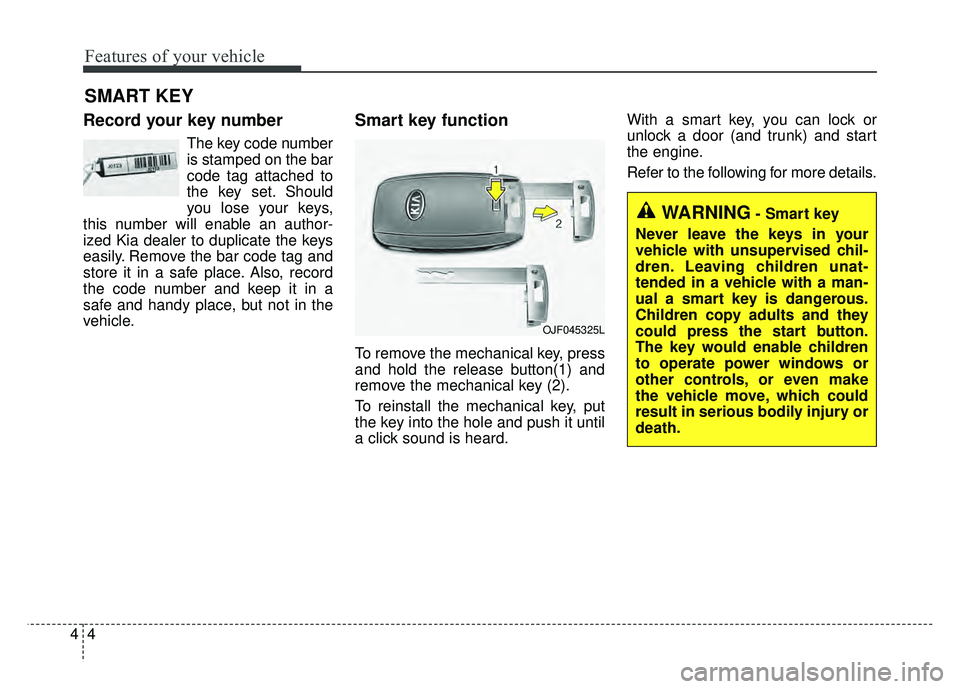
To remove the mechanical key, press
and hold the release button(1) and
remove the mechanical key (2).
To reinstall the mechanical key, put
the key into the hole and push it until
a click sound is heard. With a smart key, you can lock or
unlock a door (and trunk) and start
the engine.
Refer to the following for more details.
SMART KEY
OJF045325L
WARNING- Smart key
Never leave the keys in your
vehicle with unsupervised chil-
dren. Leaving children unat-
tended in a vehicle with a man-
ual a smart key is dangerous.
Children copy adults and they
could press the start button.
The key would enable children
to operate power windows or
other controls, or even make
the vehicle move, which could
result in serious bodily injury or
death.
Page 144 of 547
Features of your vehicle
14
4
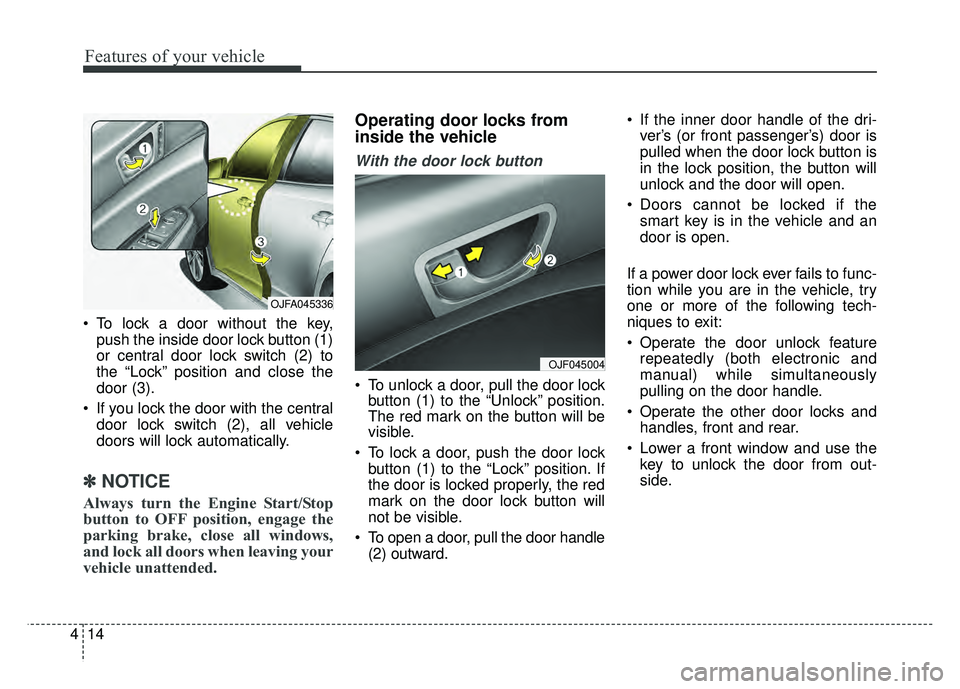
To lock a door without the key,
push the inside door lock button (1)
or central door lock switch (2) to
the “Lock” position and close the
door (3).
If you lock the door with the central door lock switch (2), all vehicle
doors will lock automatically.
✽ ✽ NOTICE
Always turn the Engine Start/Stop
button to OFF position, engage the
parking brake, close all windows,
and lock all doors when leaving your
vehicle unattended.
Operating door locks from
inside the vehicle
With the door lock button
To unlock a door, pull the door lock
button (1) to the “Unlock” position.
The red mark on the button will be
visible.
To lock a door, push the door lock button (1) to the “Lock” position. If
the door is locked properly, the red
mark on the door lock button will
not be visible.
To open a door, pull the door handle (2) outward. If the inner door handle of the dri-
ver’s (or front passenger’s) door is
pulled when the door lock button is
in the lock position, the button will
unlock and the door will open.
Doors cannot be locked if the smart key is in the vehicle and an
door is open.
If a power door lock ever fails to func-
tion while you are in the vehicle, try
one or more of the following tech-
niques to exit:
Operate the door unlock feature repeatedly (both electronic and
manual) while simultaneously
pulling on the door handle.
Operate the other door locks and handles, front and rear.
Lower a front window and use the key to unlock the door from out-
side.
OJF045004
OJFA045336
Page 153 of 547
423
Features of your vehicle
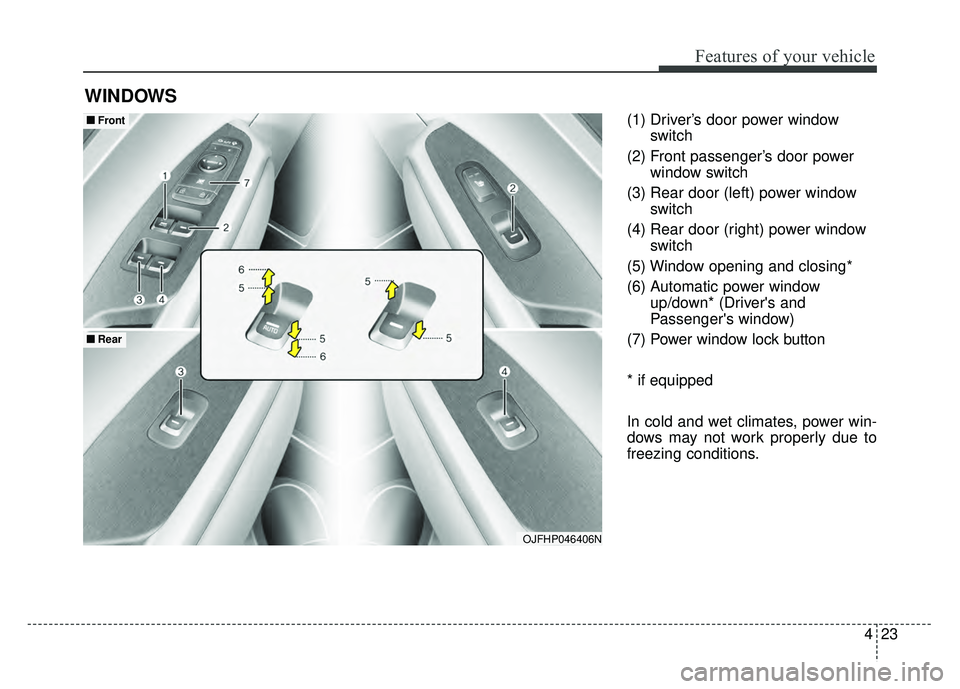
(1) Driver’s door power windowswitch
(2) Front passenger’s door power window switch
(3) Rear door (left) power window switch
(4) Rear door (right) power window switch
(5) Window opening and closing*
(6) Automatic power window up/down* (Driver's and
Passenger's window)
(7) Power window lock button
* if equipped
In cold and wet climates, power win-
dows may not work properly due to
freezing conditions.
WINDOWS
OJFHP046406N
■
■ Front
■
■Rear
Page 154 of 547
Features of your vehicle
24
4
Power windows
The Engine Start/Stop button must
be in the ON position for power win-
dows to operate.
Each door has a power window
switch that controls the door's win-
dow. The driver has a power window
lock button which can block the oper-
ation of passenger windows. The
power windows can be operated for
approximately 30 seconds after the
engine is turned off.
If the front doors are opened; howev-
er, the power windows cannot be
operated even within the 30 second
period.
If the window cannot be close
because it is blocked by objects,
remove the objects and close the
window.
✽ ✽
NOTICE
While driving with the rear windows
down or with the sunroof (if
equipped) in an open (or partially
open) position, your vehicle may
demonstrate a wind buffeting or
pulsation noise. This noise is a nor-
mal occurrence and can be reduced
or eliminated by taking the follow-
ing actions. If the noise occurs with
one or both of the rear windows
down, partially lower both front
windows approximately one inch. If
you experience the noise with the
sunroof open, slightly reduce the
size of the sunroof opening.
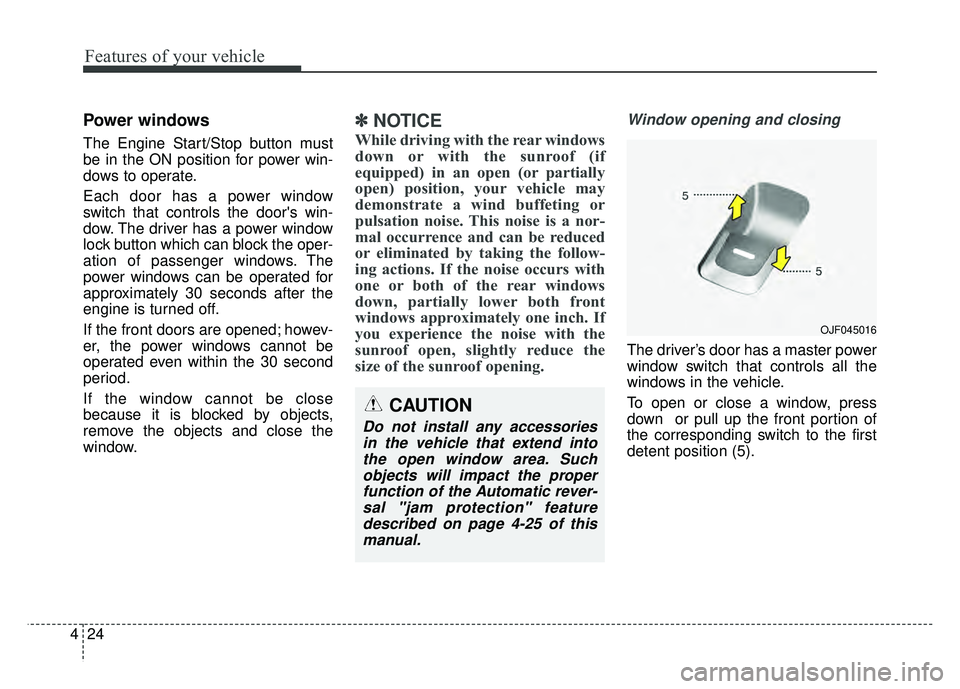
Window opening and closing
The driver’s door has a master power
window switch that controls all the
windows in the vehicle.
To open or close a window, press
down or pull up the front portion of
the corresponding switch to the first
detent position (5).
OJF045016
CAUTION
Do not install any accessories
in the vehicle that extend intothe open window area. Suchobjects will impact the properfunction of the Automatic rever-sal "jam protection" featuredescribed on page 4-25 of thismanual.
Page 155 of 547
425
Features of your vehicle
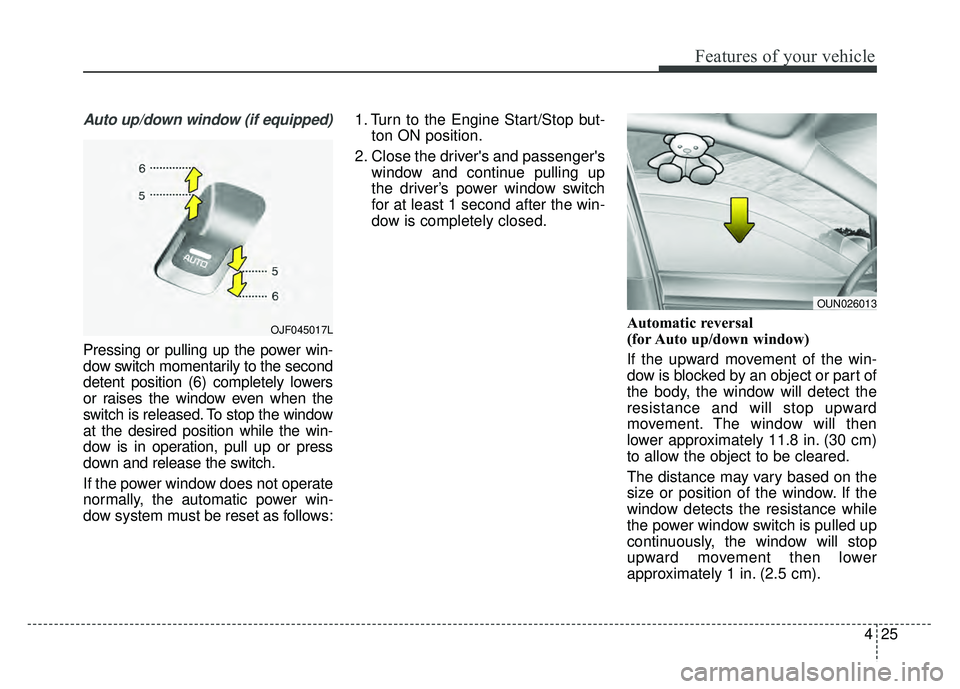
Auto up/down window (if equipped)
Pressing or pulling up the power win-
dow switch momentarily to the second
detent position (6) completely lowers
or raises the window even when the
switch is released. To stop the window
at the desired position while the win-
dow is in operation, pull up or press
down and release the switch.
If the power window does not operate
normally, the automatic power win-
dow system must be reset as follows:1. Turn to the Engine Start/Stop but-
ton ON position.
2. Close the driver's and passenger's window and continue pulling up
the driver’s power window switch
for at least 1 second after the win-
dow is completely closed.
Automatic reversal
(for Auto up/down window)
If the upward movement of the win-
dow is blocked by an object or part of
the body, the window will detect the
resistance and will stop upward
movement. The window will then
lower approximately 11.8 in. (30 cm)
to allow the object to be cleared.
The distance may vary based on the
size or position of the window. If the
window detects the resistance while
the power window switch is pulled up
continuously, the window will stop
upward movement then lower
approximately 1 in. (2.5 cm).
OUN026013
OJF045017L