ECU KIA OPTIMA PHEV 2018 Owner's Manual
[x] Cancel search | Manufacturer: KIA, Model Year: 2018, Model line: OPTIMA PHEV, Model: KIA OPTIMA PHEV 2018Pages: 547, PDF Size: 11.56 MB
Page 161 of 547

431
Features of your vehicle
Make sure to refuel your vehicle
according to the “Fuel requirements”
suggested in chapter 1.
If the fuel filler cap requires replace-
ment, use only a genuine Kia cap or
the equivalent specified for your vehi-
cle. An incorrect fuel filler cap can
result in a serious malfunction of the
fuel system or emission control sys-
tem.
WARNING- Cell phonefires
Do not use cellular phones
while refueling. Electric current
and/or electronic interference
from cellular phones can poten-
tially ignite fuel vapors causing
a fire.
WARNING- Smoking
DO NOT use matches or a
lighter and DO NOT SMOKE or
leave a lit cigarette in your vehi-
cle while at a gas station espe-
cially during refueling.
Automotive fuel is highly flam-
mable and can, when ignited,
result in fire.
WARNING- Refueling & Vehicle fires
When refueling, always shut the
engine off. Sparks produced by
electrical components related
to the engine can ignite fuel
vapors causing a fire. Once
refueling is complete, check to
make sure the filler cap and
filler door are securely closed,
before starting the engine.
CAUTION- Exterior paint
Do not spill fuel on the exterior surfaces of the vehicle. Anytype of fuel spilled on paintedsurfaces may damage the paint.
WARNING- Portable fuel
container
When using an approved
portable fuel container, be sure
to place the container on the
ground prior to refueling. Static
electricity discharge from the
container can ignite fuel vapors
causing a fire. Once refueling
has begun, contact with the
vehicle should be maintained
until the filling is complete. Use
only approved portable plastic
fuel containers designed to
carry and store gasoline.
Page 165 of 547
435
Features of your vehicle
Closing the fuel filler lid
1. To install the cap, turn it clockwiseuntil it “clicks” once. This indicates
that the cap is securely tightened.
2. Close the fuel filler lid and push it in lightly making sure that it is
securely closed.
✽ ✽NOTICE - Refueling
Do not "top off" after the nozzle
automatically shuts off when refuel-
ing. If pressurized fuel sprays out, it
can cover your clothes or skin and
subject you to the risk of fire and
burns. Always remove the fuel cap
carefully and slowly. If the cap is
venting fuel or if you hear a hissing
sound, wait until the condition stops
before completely removing the cap.
✽ ✽NOTICE
Always check that the fuel cap is
installed securely to prevent fuel
spillage in the event of an accident.
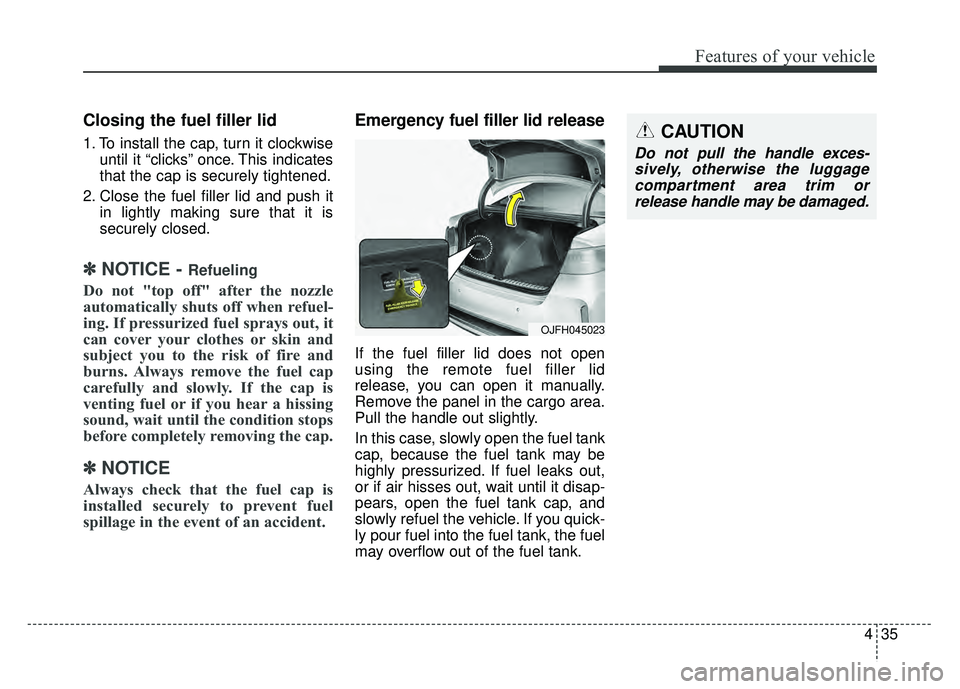
Emergency fuel filler lid release
If the fuel filler lid does not open
using the remote fuel filler lid
release, you can open it manually.
Remove the panel in the cargo area.
Pull the handle out slightly.
In this case, slowly open the fuel tank
cap, because the fuel tank may be
highly pressurized. If fuel leaks out,
or if air hisses out, wait until it disap-
pears, open the fuel tank cap, and
slowly refuel the vehicle. If you quick-
ly pour fuel into the fuel tank, the fuel
may overflow out of the fuel tank.
CAUTION
Do not pull the handle exces-
sively, otherwise the luggagecompartment area trim orrelease handle may be damaged.
OJFH045023
Page 167 of 547
437
Features of your vehicle
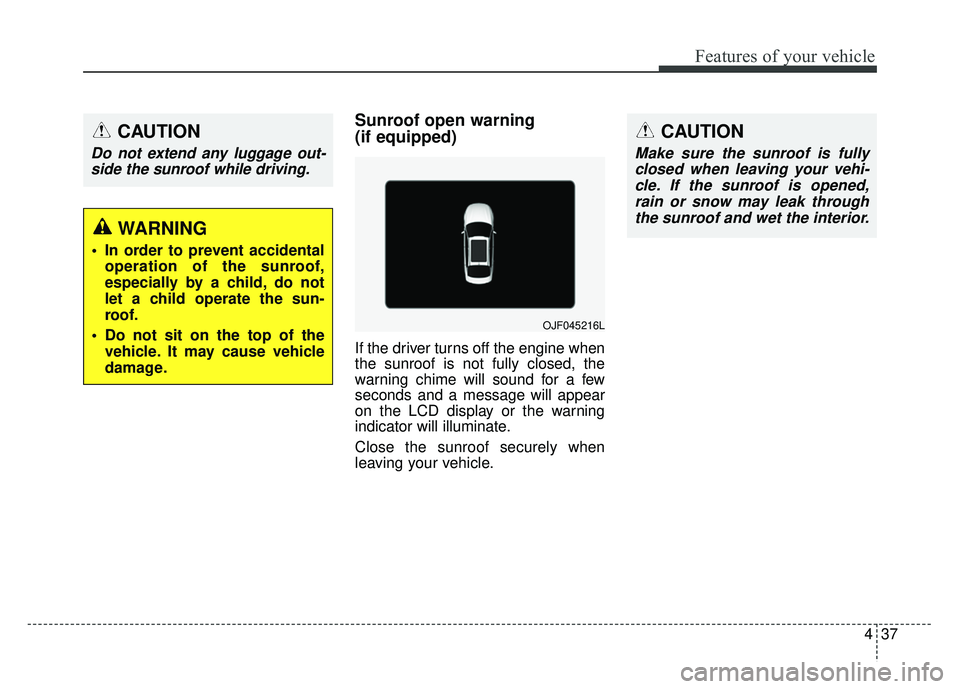
Sunroof open warning
(if equipped)
If the driver turns off the engine when
the sunroof is not fully closed, the
warning chime will sound for a few
seconds and a message will appear
on the LCD display or the warning
indicator will illuminate.
Close the sunroof securely when
leaving your vehicle.
OJF045216L
CAUTION
Make sure the sunroof is fullyclosed when leaving your vehi-cle. If the sunroof is opened,rain or snow may leak throughthe sunroof and wet the interior.
CAUTION
Do not extend any luggage out-side the sunroof while driving.
WARNING
In order to prevent accidental operation of the sunroof,
especially by a child, do not
let a child operate the sun-
roof.
Do not sit on the top of the vehicle. It may cause vehicle
damage.
Page 188 of 547
Features of your vehicle
58
4
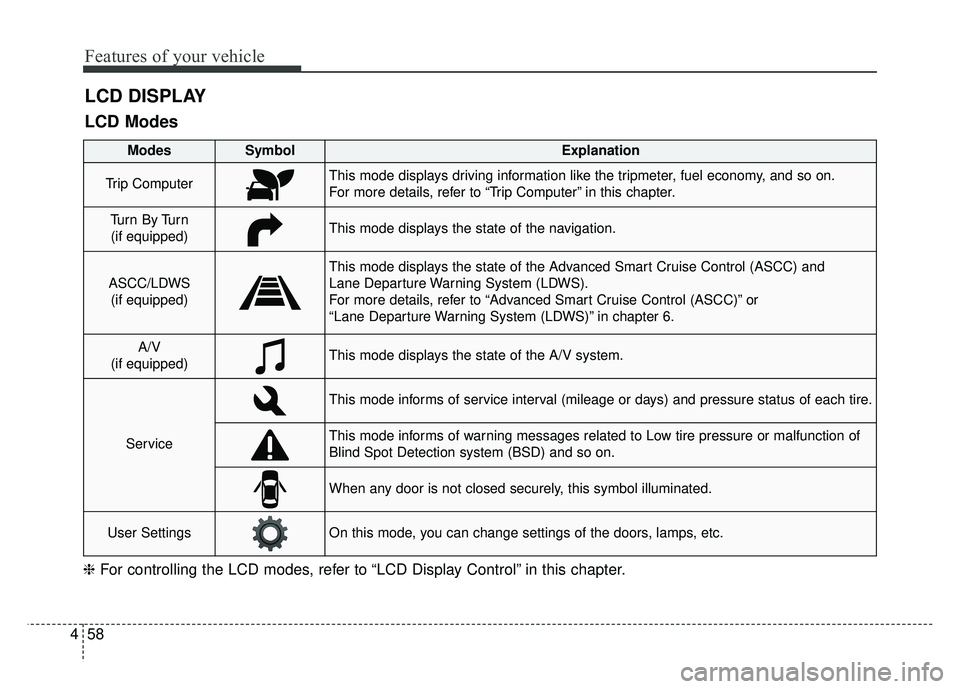
LCD DISPLAY
❈ For controlling the LCD modes, refer to “LCD Display Control” in this chapter.
LCD Modes
Modes SymbolExplanation
Trip ComputerThis mode displays driving information like the tripmeter, fuel economy, and so on.
For more details, refer to “Trip Computer” in this chapter.
Tu r n B y Tu r n
(if equipped)This mode displays the state of the navigation.
ASCC/LDWS (if equipped)
This mode displays the state of the Advanced Smart Cruise Control (ASCC) and
Lane Departure Warning System (LDWS).
For more details, refer to “Advanced Smart Cruise Control (ASCC)” or
“Lane Departure Warning System (LDWS)” in chapter 6.
A/V
(if equipped)This mode displays the state of the A/V system.
Service
This mode informs of service interval (mileage or days) and pressure status of each tire.
This mode informs of warning messages related to Low tire pressure or malfunction of
Blind Spot Detection system (BSD) and so on.
When any door is not closed securely, this symbol illuminated.
User SettingsOn this mode, you can change settings of the doors, lamps, etc.
Page 242 of 547
Features of your vehicle
112
4
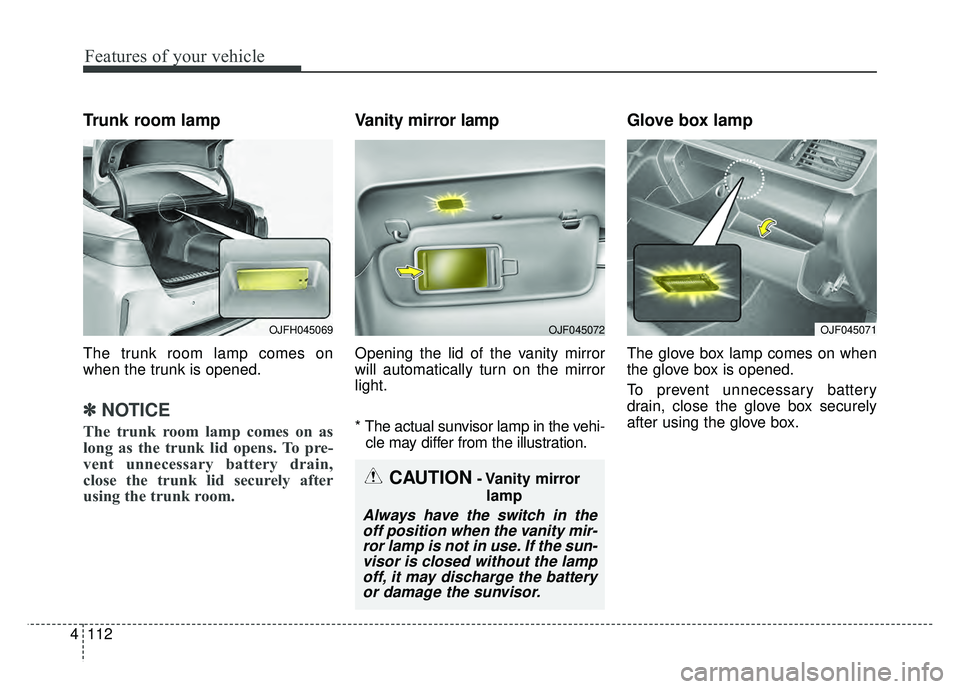
Trunk room lamp
The trunk room lamp comes on
when the trunk is opened.
✽ ✽
NOTICE
The trunk room lamp comes on as
long as the trunk lid opens. To pre-
vent unnecessary battery drain,
close the trunk lid securely after
using the trunk room.
Vanity mirror lamp
Opening the lid of the vanity mirror
will automatically turn on the mirror
light.
* The actual sunvisor lamp in the vehi-
cle may differ from the illustration.
Glove box lamp
The glove box lamp comes on when
the glove box is opened.
To prevent unnecessary battery
drain, close the glove box securely
after using the glove box.
CAUTION- Vanity mirror
lamp
Always have the switch in theoff position when the vanity mir-ror lamp is not in use. If the sun-visor is closed without the lampoff, it may discharge the batteryor damage the sunvisor.
OJFH045069OJF045072OJF045071
Page 263 of 547
4133
Features of your vehicle
STORAGE COMPARTMENTS
These compartments can be used to
store small items required by the
driver or passengers.
To avoid possible theft, do notleave valuables in the storage
compartment.
Always keep the storage compart- ment covers closed while driving.
Do not attempt to place so many
items in the storage compartment
that the storage compartment
cover can not close securely.Center console storage
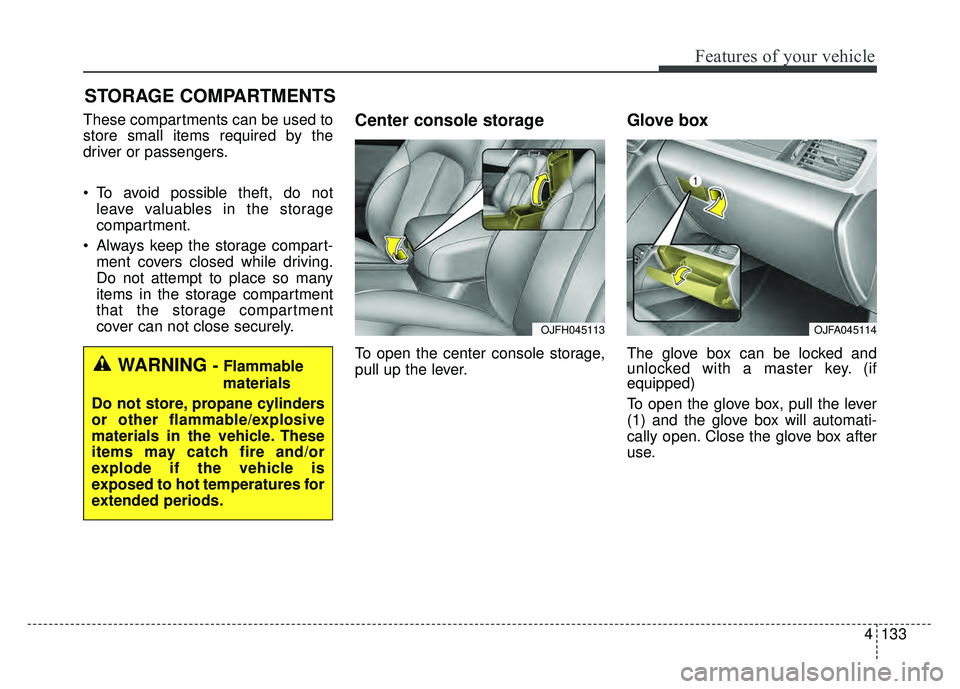
To open the center console storage,
pull up the lever.
Glove box
The glove box can be locked and
unlocked with a master key. (if
equipped)
To open the glove box, pull the lever
(1) and the glove box will automati-
cally open. Close the glove box after
use.WARNING - Flammable
materials
Do not store, propane cylinders
or other flammable/explosive
materials in the vehicle. These
items may catch fire and/or
explode if the vehicle is
exposed to hot temperatures for
extended periods.
OJFA045114OJFH045113
Page 270 of 547
Features of your vehicle
140
4
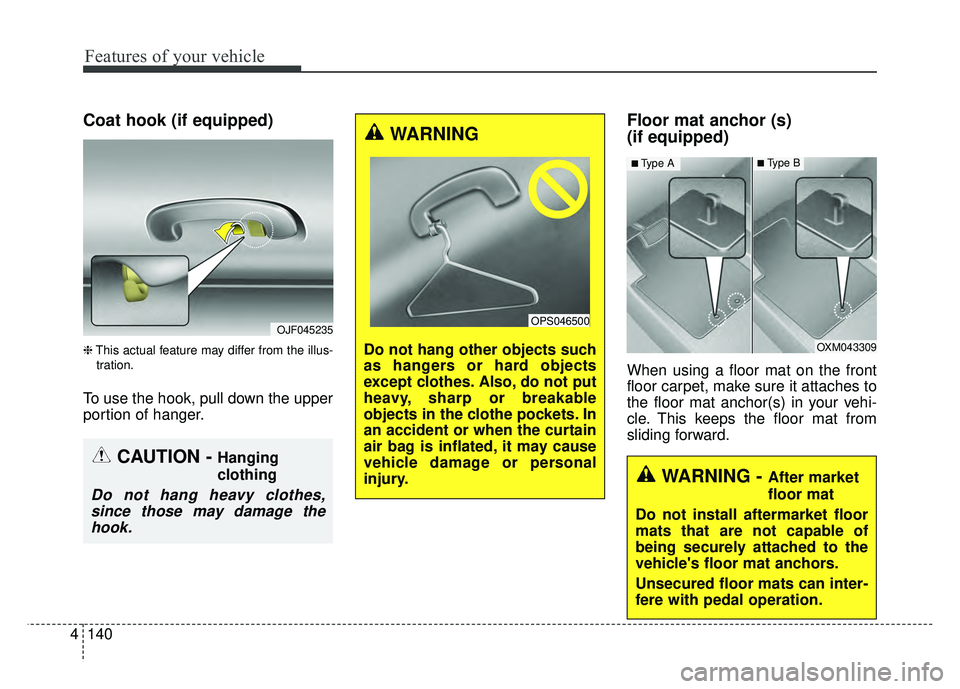
Coat hook (if equipped)
❈ This actual feature may differ from the illus-
tration.
To use the hook, pull down the upper
portion of hanger.
Floor mat anchor (s)
(if equipped)
When using a floor mat on the front
floor carpet, make sure it attaches to
the floor mat anchor(s) in your vehi-
cle. This keeps the floor mat from
sliding forward.
OJF045235
CAUTION - Hanging
clothing
Do not hang heavy clothes, since those may damage thehook.
OXM043309
■Type A■Type B
WARNING - After market
floor mat
Do not install aftermarket floor
mats that are not capable of
being securely attached to the
vehicle's floor mat anchors.
Unsecured floor mats can inter-
fere with pedal operation.
WARNING
Do not hang other objects such
as hangers or hard objects
except clothes. Also, do not put
heavy, sharp or breakable
objects in the clothe pockets. In
an accident or when the curtain
air bag is inflated, it may cause
vehicle damage or personal
injury.
OPS046500
Page 271 of 547
4141
Features of your vehicle
The following must be observed
when installing ANY floor mat to the
vehicle.
Ensure that the floor mats aresecurely attached to the vehicle's
floor mat anchor(s) before driving
the vehicle.
Do not use ANY floor mat that can- not be firmly attached to the vehi-
cle's floor mat anchors.
Do not stack floor mats on top of one another (e.g. all-weather rub-
ber mat on top of a carpeted floor
mat). Only a single floor mat should
be installed in each position.
✽ ✽ NOTICE
Your vehicle was manufactured with
driver's side floor mat anchors that
are designed to securely hold the
floor mat in place. To avoid any
interference with pedal operation,
Kia recommends that only the Kia
floor mat designed for use in your
vehicle be installed.
Side curtain (if equipped)
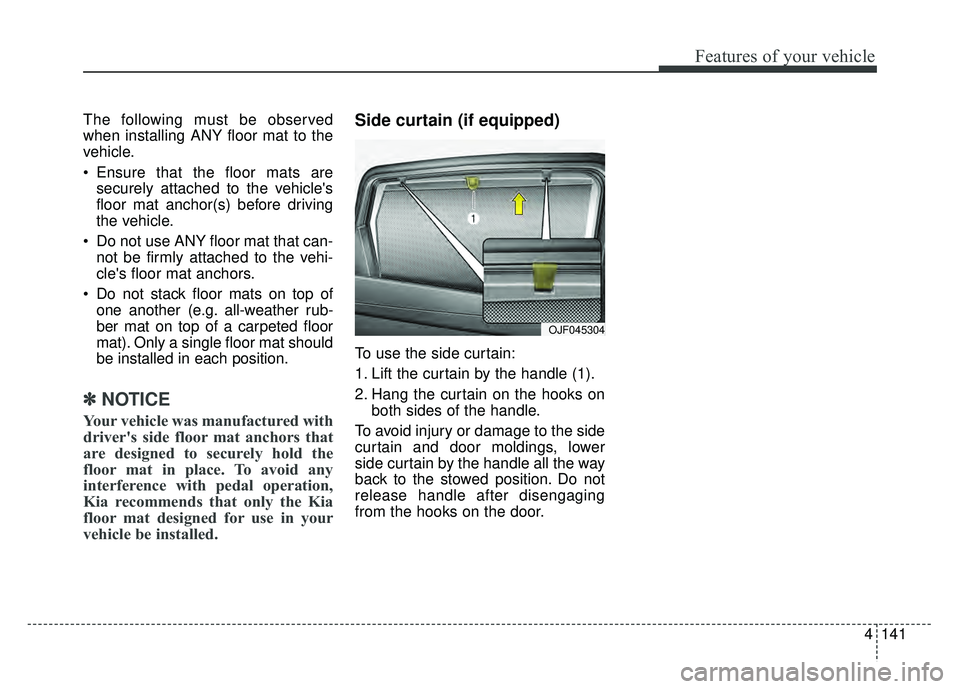
To use the side curtain:
1. Lift the curtain by the handle (1).
2. Hang the curtain on the hooks on
both sides of the handle.
To avoid injury or damage to the side
curtain and door moldings, lower
side curtain by the handle all the way
back to the stowed position. Do not
release handle after disengaging
from the hooks on the door.
OJF045304
Page 285 of 547
65
Driving your vehicle
WARNING- Check sur-roundings
Always check the surrounding
areas near your vehicle for peo-
ple, especially children, before
putting a vehicle into D (Drive)
or R (Reverse).
WARNING- Fire risk
When you intend to park or stop
the vehicle with the engine on,
be careful not to depress the
accelerator pedal for a long
period of time. It may overheat
the engine or exhaust system
and cause fire.WARNING- Loose objects
Securely store items in your
vehicle. When you make a sud-
den stop or turn the steering
wheel rapidly, loose objects
may drop on the floor and it
could interfere with the opera-
tion of the foot pedals, possibly
causing an accident.WARNING- Driving while intoxicated
Do not drive while intoxicated.
Drinking and driving is danger-
ous. Even a small amount of
alcohol will affect your reflexes,
perceptions and judgment.
Driving while under the influ-
ence of drugs is as dangerous
as or more dangerous than driv-
ing drunk.
Page 295 of 547
615
Driving your vehicle
In manual mode, moving the shift
lever backwards and forwards will
allow you to make gearshifts rapidly.
In contrast to a manual transaxle, the
manual mode allows gearshifts with
the accelerator pedal depressed.
Up (+) : Push the lever forward onceto shift up one gear.
Down (-) : Pull the lever backwards once to shift down one
gear. In manual mode, the driver must
execute upshifts in accordance
with road conditions, taking care to
keep the engine speed below the
red zone.
In manual mode, only the 6 forward gears can be selected. To reverse
or park the vehicle, move the shift
lever to the R (Reverse) or P (Park)
position as required.
In manual mode, downshifts are made automatically when the vehi-
cle slows down. When the vehicle
stops, 1st gear is automatically
selected.
In manual mode, when the engine rpm approaches the red zone shift
points are varied to upshift auto-
matically.
To maintain the required levels of vehicle performance and safety,
the system may not execute cer-
tain gearshifts when the shift lever
is operated. When driving on a slippery road,
push the shift lever forward into the
+(up) position. This causes the
transaxle to shift into the 2nd gear
which is better for smooth driving
on a slippery road. Push the shift
lever to the -(down) side to shift
back to the 1st gear.