stop start KIA OPTIMA PHEV 2018 Workshop Manual
[x] Cancel search | Manufacturer: KIA, Model Year: 2018, Model line: OPTIMA PHEV, Model: KIA OPTIMA PHEV 2018Pages: 547, PDF Size: 11.56 MB
Page 219 of 547
489
Features of your vehicle
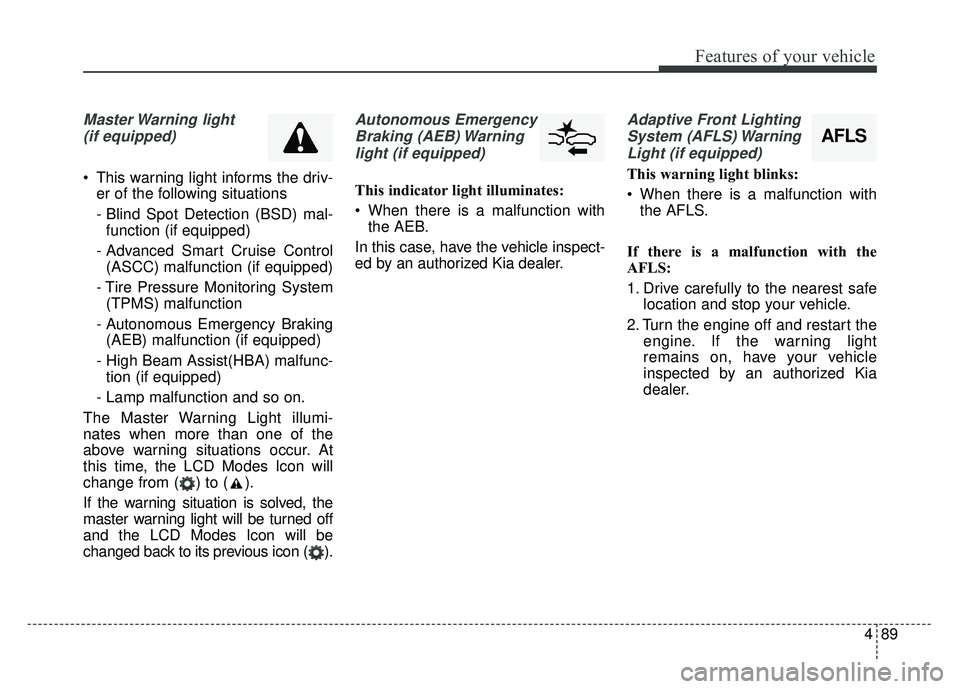
Master Warning light (if equipped)
This warning light informs the driv- er of the following situations
- Blind Spot Detection (BSD) mal-function (if equipped)
- Advanced Smart Cruise Control (ASCC) malfunction (if equipped)
- Tire Pressure Monitoring System (TPMS) malfunction
- Autonomous Emergency Braking (AEB) malfunction (if equipped)
- High Beam Assist(HBA) malfunc- tion (if equipped)
- Lamp malfunction and so on.
The Master Warning Light illumi-
nates when more than one of the
above warning situations occur. At
this time, the LCD Modes Icon will
change from ( ) to ( ).
If the warning situation is solved, the
master warning light will be turned off
and the LCD Modes Icon will be
changed back to its previous icon ( ).
Autonomous Emergency Braking (AEB) Warninglight (if equipped)
This indicator light illuminates:
When there is a malfunction with the AEB.
In this case, have the vehicle inspect-
ed by an authorized Kia dealer.
Adaptive Front Lighting System (AFLS) WarningLight (if equipped)
This warning light blinks:
When there is a malfunction with the AFLS.
If there is a malfunction with the
AFLS:
1. Drive carefully to the nearest safe location and stop your vehicle.
2. Turn the engine off and restart the engine. If the warning light
remains on, have your vehicle
inspected by an authorized Kia
dealer.
AFLS
Page 220 of 547
Features of your vehicle
90
4
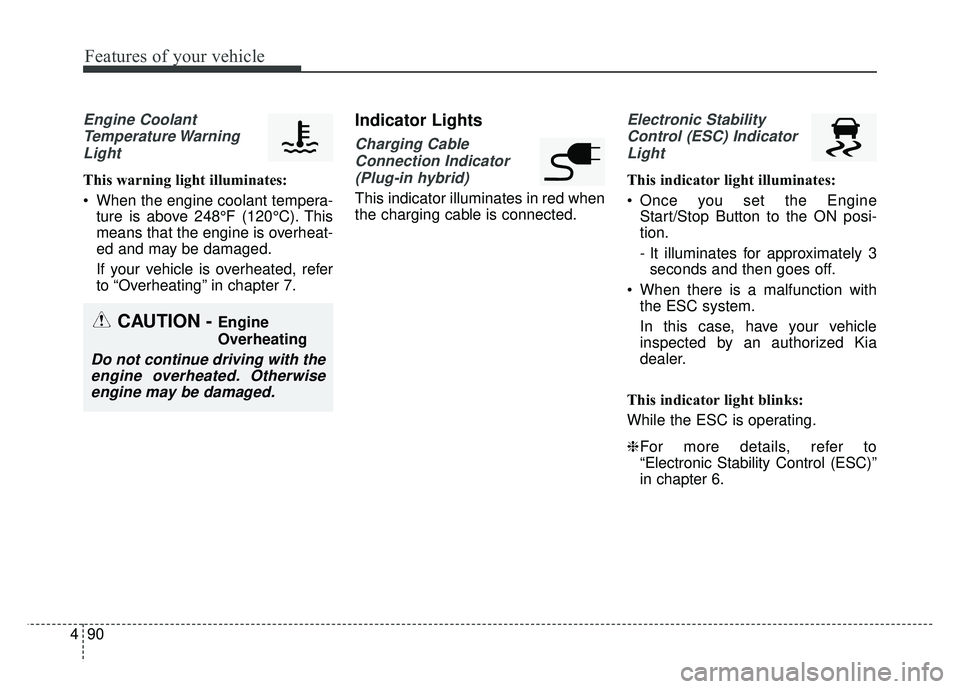
Engine Coolant
Temperature WarningLight
This warning light illuminates:
When the engine coolant tempera- ture is above 248°F (120°C). This
means that the engine is overheat-
ed and may be damaged.
If your vehicle is overheated, refer
to “Overheating” in chapter 7.
Indicator Lights
Charging Cable
Connection Indicator (Plug-in hybrid)
This indicator illuminates in red when
the charging cable is connected.
Electronic StabilityControl (ESC) IndicatorLight
This indicator light illuminates:
Once you set the Engine Start/Stop Button to the ON posi-
tion.
- It illuminates for approximately 3seconds and then goes off.
When there is a malfunction with the ESC system.
In this case, have your vehicle
inspected by an authorized Kia
dealer.
This indicator light blinks:
While the ESC is operating.
❈ For more details, refer to
“Electronic Stability Control (ESC)”
in chapter 6.
CAUTION - Engine
Overheating
Do not continue driving with the
engine overheated. Otherwiseengine may be damaged.
Page 221 of 547
491
Features of your vehicle
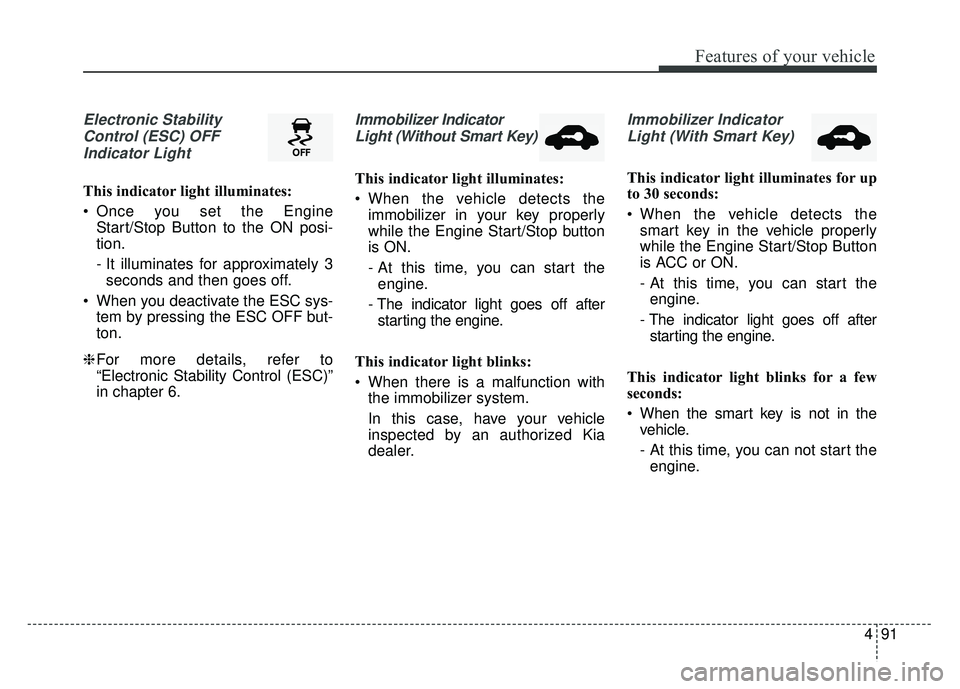
Electronic StabilityControl (ESC) OFFIndicator Light
This indicator light illuminates:
Once you set the Engine Start/Stop Button to the ON posi-
tion.
- It illuminates for approximately 3seconds and then goes off.
When you deactivate the ESC sys- tem by pressing the ESC OFF but-
ton.
❈ For more details, refer to
“Electronic Stability Control (ESC)”
in chapter 6.
Immobilizer Indicator
Light (Without Smart Key)
This indicator light illuminates:
When the vehicle detects the immobilizer in your key properly
while the Engine Start/Stop button
is ON.
- At this time, you can start theengine.
- The indicator light goes off after starting the engine.
This indicator light blinks:
When there is a malfunction with the immobilizer system.
In this case, have your vehicle
inspected by an authorized Kia
dealer.
Immobilizer Indicator
Light (With Smart Key)
This indicator light illuminates for up
to 30 seconds:
When the vehicle detects the smart key in the vehicle properly
while the Engine Start/Stop Button
is ACC or ON.
- At this time, you can start theengine.
- The indicator light goes off after starting the engine.
This indicator light blinks for a few
seconds:
When the smart key is not in the vehicle.
- At this time, you can not start theengine.
Page 222 of 547
Features of your vehicle
92
4
This indicator light illuminates for 2
seconds and goes off:
When the vehicle can not detect
the smart key which is in the vehi-
cle while the Engine Start/Stop
Button is ON.
In this case, have your vehicle
inspected by an authorized Kia
dealer.
This indicator light blinks:
When the battery of the smart key is weak.
- At this time, you can not start theengine. However, you can start the
engine if you press the Engine
Start/Stop Button with the smart
key. (For more details, refer to
“Starting the Engine” in chapter 6).
When there is a malfunction with the immobilizer system.
In this case, have your vehicle
inspected by an authorized Kia
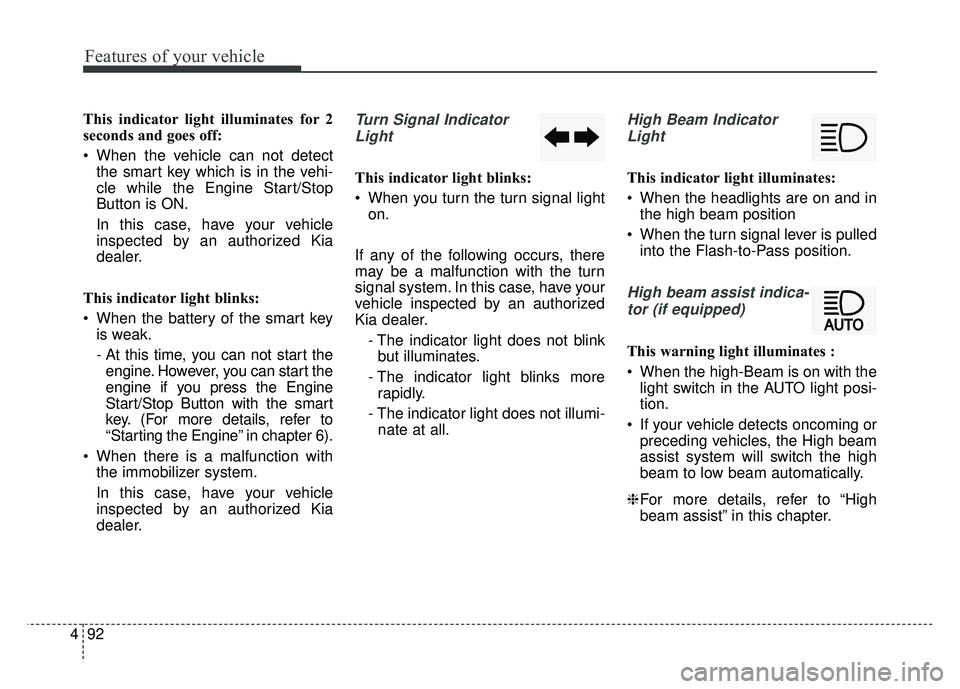
dealer.Turn Signal Indicator
Light
This indicator light blinks:
When you turn the turn signal light on.
If any of the following occurs, there
may be a malfunction with the turn
signal system. In this case, have your
vehicle inspected by an authorized
Kia dealer. - The indicator light does not blinkbut illuminates.
- The indicator light blinks more rapidly.
- The indicator light does not illumi- nate at all.
High Beam Indicator
Light
This indicator light illuminates:
When the headlights are on and in the high beam position
When the turn signal lever is pulled into the Flash-to-Pass position.
High beam assist indica-
tor (if equipped)
This warning light illuminates :
When the high-Beam is on with the light switch in the AUTO light posi-
tion.
If your vehicle detects oncoming or preceding vehicles, the High beam
assist system will switch the high
beam to low beam automatically.
❈ For more details, refer to “High
beam assist” in this chapter.
Page 269 of 547
4139
Features of your vehicle
Plug in battery equipped electronicdevices with reverse current pro-
tection. The current from the bat-
tery may flow into the vehicle’s
electri cal/electronic system and
cause system malfunction.USB charger (if equipped)
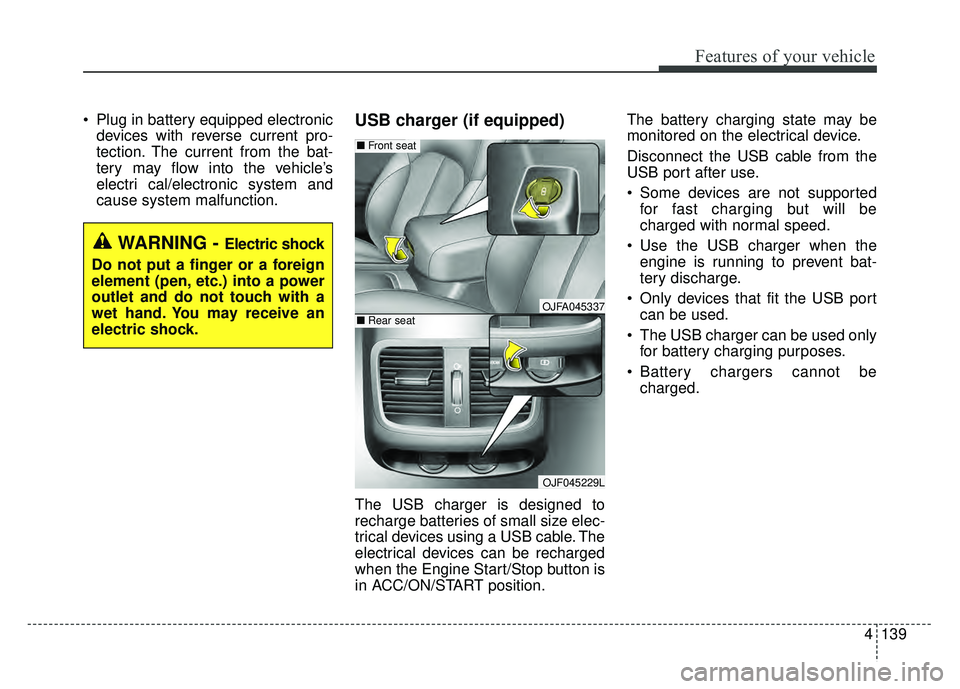
The USB charger is designed to
recharge batteries of small size elec-
trical devices using a USB cable. The
electrical devices can be recharged
when the Engine Start/Stop button is
in ACC/ON/START position. The battery charging state may be
monitored on the electrical device.
Disconnect the USB cable from the
USB port after use.
Some devices are not supported
for fast charging but will be
charged with normal speed.
Use the USB charger when the engine is running to prevent bat-
tery discharge.
Only devices that fit the USB port can be used.
The USB charger can be used only for battery charging purposes.
Battery chargers cannot be charged.
WARNING - Electric shock
Do not put a finger or a foreign
element (pen, etc.) into a power
outlet and do not touch with a
wet hand. You may receive an
electric shock.
OJFA045337
OJF045229L
■ Front seat
■Rear seat
Page 281 of 547
Driving your vehicle
Before driving . . . . . . . . . . . . . . . . . . . . . . . . . . . . . . 6-4
• Before entering vehicle . . . . . . . . . . . . . . . . . . . . . . . . . 6-4
. . . . . . . . . . . . . . . . . . . . . . . . . . 6-4
. . . . . . . . . . . . . . . . . . . . . . . . . . . . . . . 6-4
Engine start/stop button . . . . . . . . . . . . . . . . . . . . . 6-6
. . . . . . . . . . . . . 6-6
button position. . . . . . . . . . . . . . . . . 6-6
. . . . . . . . . . . . . . . . . . . . . . 6-8
Automatic transaxle . . . . . . . . . . . . . . . . . . . . . . . . 6-11
. . . . . . . . . . . . . . . . . . 6-11
. . . . . . . . . . . . . . . . . . . . . . . . 6-17
Brake system . . . . . . . . . . . . . . . . . . . . . . . . . . . . . . 6-18
. . . . . . . . . . . . . . . . . . . . . . . . . . . . . . . . 6-18
. . . . . . . . . . . . . . . . . . . . . 6-20
. . . . . . . . . . . . . . . . 6-21
. . . . . . . . . . . . . . . . . . . . . . . . . . . . . . . . 6-28
. . . . . . . . . . . . . . . . . . . . . . . . . . . . 6-30
. . . . . . . . . . . . . . . . . . 6-32
. . . . . . . . . . . . . . . 6-34
. . . . . . . . . . . . 6-38
. . . . . . . . . . . . . . . . . . 6-39
Autonomous emergency braking (AEB) / Forward collision warning (FCW) . . . . . . . . . . . 6-41
. . . . . . . . . . . . . . . . . . . 6-41 . . . . . . . . 6-44
. . . . . . . . . . . . . . . . . . . . . . . . . . . . . . 6-45
(front radar). . . . . . . . . . . . . . . . . . . . . . . . . . . . . . . . 6-46
. . . . . . . . . . . . . . . . . . . . . . . . . . . 6-47
. . . . . . . . . . . . . . . . . . . . . . . 6-48
. . . . . . . . . . . . . . . . . . . . . . . 6-51
Cruise control system. . . . . . . . . . . . . . . . . . . . . . . 6-52
. . . . . . . . . . . . . . . . . . . . 6-53
. . . . . . . . . . . . . 6-53
. . . . . . . . . . . . . . . . . 6-54
. . 6-54
do one of the following: . . 6-54
approximately 20 mph (30 km/h): . . . . . . . . . . . . . . 6-55
do one of the following: . 6-55
Advanced smart cruise control system (ASCC) . 6-56
. . . . . . . . . . . . . . . . . . . . . . . . . 6-57
. . . . . . . . 6-62
Advanced Smart Cruise Control . . . . . . . . . . . . . . 6-66
. . . . . . . . . . . . . . 6-67
. . . . . . . . . . . . . . . . . . . . . . 6-68
Drive mode integrated control system . . . . . . . . . 6-73
. . . . . . . . . . . . . . . . . . . . . . . . . . . . . . . 6-73
6
Page 284 of 547
Driving your vehicle
46
Before entering vehicle
• Be sure that all windows, outsidemirror(s), and outside lights are
clean.
Check the condition of the tires.
Check under the vehicle for any sign of leaks.
Be sure there are no obstacles behind you if you intend to back up.
Necessary inspections
Fluid levels, such as engine oil,
engine coolant, brake fluid, and
washer fluid should be checked on a
regular basis, at the exact interval
depending on the fluid. Further
details are provided in chapter 8,
“Maintenance”.
Before starting
Close and lock all doors.
Position the seat so that all con-trols are easily reached.
Buckle your seat belt.
Adjust the inside and outside rearview mirrors.
Be sure that all lights work.
Check all gauges.
Check the operation of warning lights when the engine start/stop
button is turned to the ON position.
Release the parking brake and make sure the brake warning light
goes out.
For safe operation, be sure you are
familiar with your vehicle and its
equipment.
BEFORE DRIVING
WARNING - Distracted driving
Focus on the road while driving.
The driver's primary responsi-
bility is in the safe and legal
operation of the vehicle. Use of
any handled devices, other
equipment or vehicle systems
that distract the drive should
not be used during vehicle
operation.
Page 286 of 547
Driving your vehicle
66
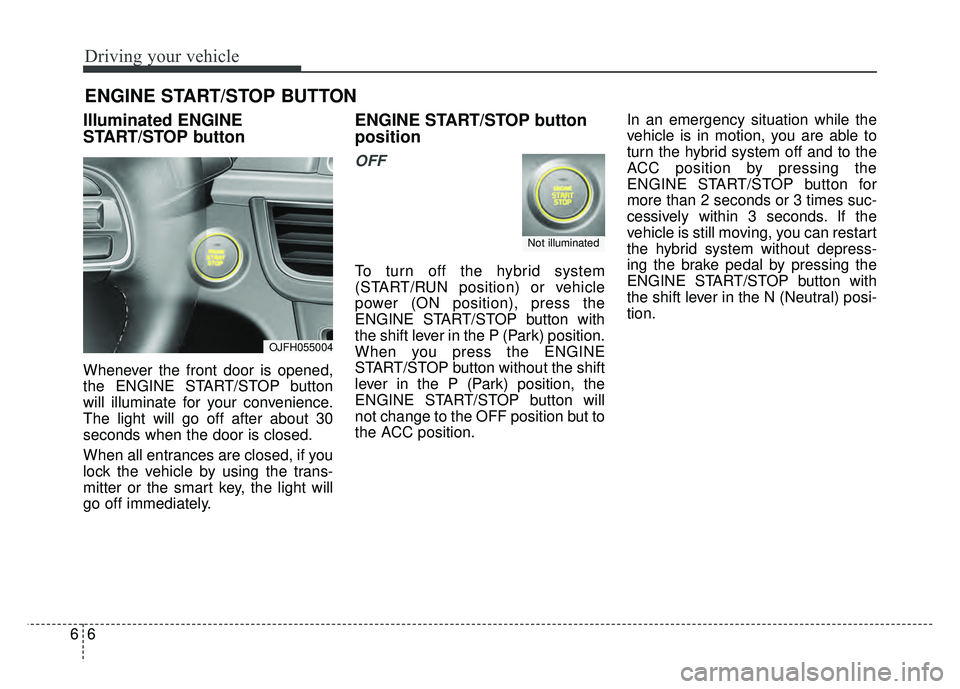
Illuminated ENGINE
START/STOP button
Whenever the front door is opened,
the ENGINE START/STOP button
will illuminate for your convenience.
The light will go off after about 30
seconds when the door is closed.
When all entrances are closed, if you
lock the vehicle by using the trans-
mitter or the smart key, the light will
go off immediately.
ENGINE START/STOP button
position
OFF
To turn off the hybrid system
(START/RUN position) or vehicle
power (ON position), press the
ENGINE START/STOP button with
the shift lever in the P (Park) position.
When you press the ENGINE
START/STOP button without the shift
lever in the P (Park) position, the
ENGINE START/STOP button will
not change to the OFF position but to
the ACC position.In an emergency situation while the
vehicle is in motion, you are able to
turn the hybrid system off and to the
ACC position by pressing the
ENGINE START/STOP button for
more than 2 seconds or 3 times suc-
cessively within 3 seconds. If the
vehicle is still moving, you can restart
the hybrid system without depress-
ing the brake pedal by pressing the
ENGINE START/STOP button with
the shift lever in the N (Neutral) posi-
tion.
ENGINE START/STOP BUTTON
OJFH055004
Not illuminated
Page 287 of 547
67
Driving your vehicle
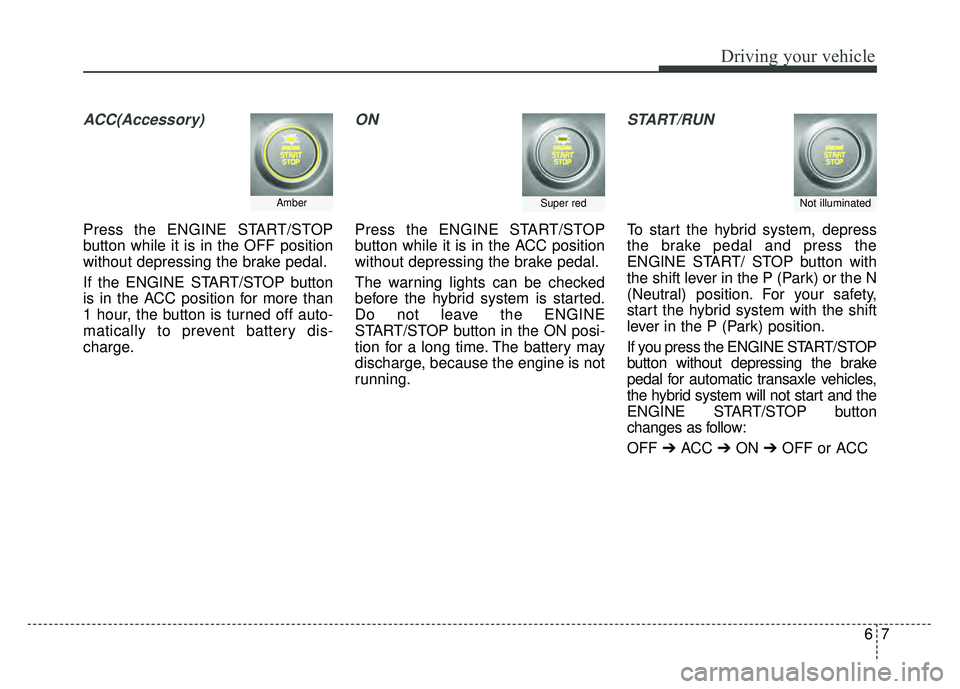
ACC(Accessory)
Press the ENGINE START/STOP
button while it is in the OFF position
without depressing the brake pedal.
If the ENGINE START/STOP button
is in the ACC position for more than
1 hour, the button is turned off auto-
matically to prevent battery dis-
charge.
ON
Press the ENGINE START/STOP
button while it is in the ACC position
without depressing the brake pedal.
The warning lights can be checked
before the hybrid system is started.
Do not leave the ENGINE
START/STOP button in the ON posi-
tion for a long time. The battery may
discharge, because the engine is not
running.
START/RUN
To start the hybrid system, depress
the brake pedal and press the
ENGINE START/ STOP button with
the shift lever in the P (Park) or the N
(Neutral) position. For your safety,
start the hybrid system with the shift
lever in the P (Park) position.
If you press the ENGINE START/STOP
button without depressing the brake
pedal for automatic transaxle vehicles,
the hybrid system will not start and the
ENGINE START/STOP button
changes as follow:
OFF ➔ACC ➔ON ➔OFF or ACC
AmberSuper redNot illuminated
Page 288 of 547
Driving your vehicle
86
✽
✽
NOTICE
If you leave the ENGINE START/
STOP button in the ACC or ON
position for a long time, the battery
will discharge.
Starting the hybrid system✽ ✽ NOTICE
• The hybrid system will start by
pressing the Engine Start/Stop
button, only when the smart key is
in the vehicle.
• Even when the smart key is in the vehicle, and when it is far away
from the driver, the hybrid system
may not start.
• When the Engine Start/Stop but- ton is in the ACC or ON position,
any door is open, the system
checks for the smart key. When
the smart key is not in the vehicle,
the " " indicator will blink and
the warning "Key not in vehicle"
will come on. When all doors are
closed, the chime will also sound
for about 5 seconds. Keep the
smart key in the vehicle when in
the ACC position or if the hybrid
system is ON.
WARNING- Starting
vehicle
Never press the ENGINE
START/STOP button while the
vehicle is in motion except in an
emergency. This would result in
loss of directional control and
braking function, which could
cause an accident.
WARNING
• Always wear appropriate shoes when operating your
vehicle. Unsuitable shoes,
such as high heels, ski boots,
sandals, flip-flops, etc., may
interfere with your ability to
use the brake and accelerator
pedals.
Do not start the vehicle with the accelerator pedal depressed.
The vehicle can move and
lead to an accident.