rear view mirror KIA OPTIMA PHEV 2019 User Guide
[x] Cancel search | Manufacturer: KIA, Model Year: 2019, Model line: OPTIMA PHEV, Model: KIA OPTIMA PHEV 2019Pages: 553, PDF Size: 11.97 MB
Page 231 of 553
4101
Features of your vehicle
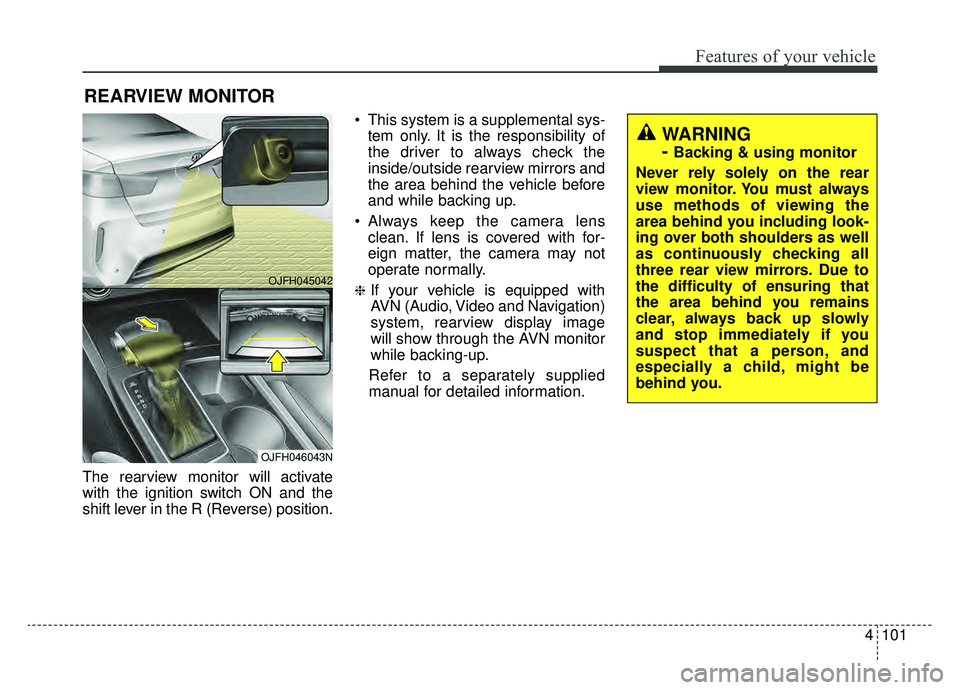
The rearview monitor will activate
with the ignition switch ON and the
shift lever in the R (Reverse) position. This system is a supplemental sys-
tem only. It is the responsibility of
the driver to always check the
inside/outside rearview mirrors and
the area behind the vehicle before
and while backing up.
Always keep the camera lens clean. If lens is covered with for-
eign matter, the camera may not
operate normally.
❈If your vehicle is equipped with
AVN (Audio, Video and Navigation)
system, rearview display image
will show through the AVN monitor
while backing-up.
Refer to a separately supplied
manual for detailed information.
REARVIEW MONITOR
WARNING
-
Backing & using monitor
Never rely solely on the rear
view monitor. You must always
use methods of viewing the
area behind you including look-
ing over both shoulders as well
as continuously checking all
three rear view mirrors. Due to
the difficulty of ensuring that
the area behind you remains
clear, always back up slowly
and stop immediately if you
suspect that a person, and
especially a child, might be
behind you.
OJFH045042
OJFH046043N
Page 247 of 553
4117
Features of your vehicle
If you want to defrost and defog the
front windshield, refer to “Windshield
defrosting and defogging” in this sec-
tion.
Rear window defroster
The defroster heats the window to
remove frost, fog and thin ice from
the rear window, while the engine is
running.
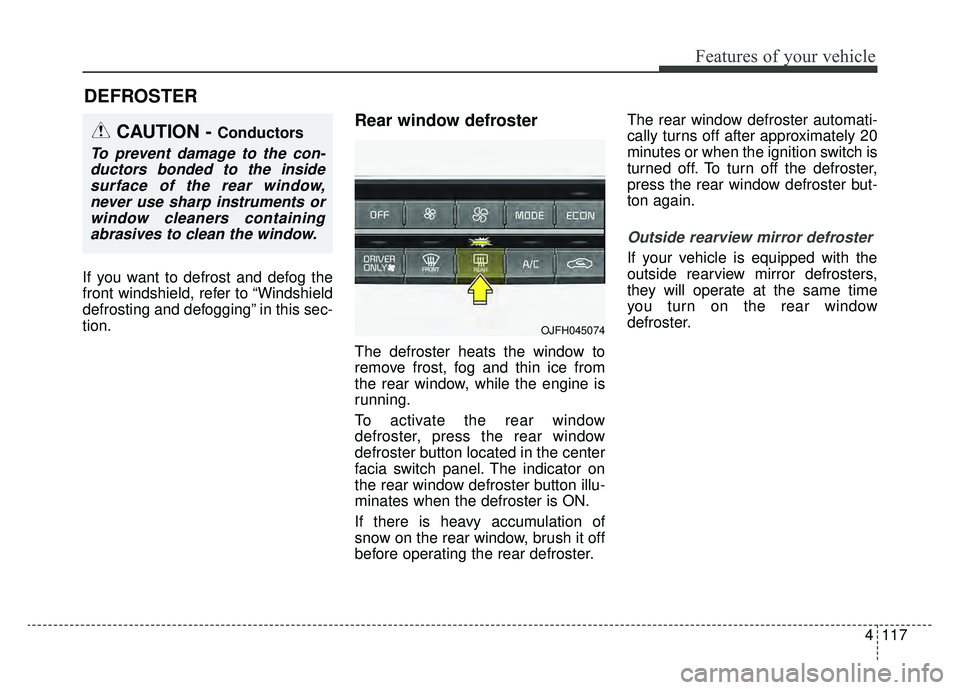
To activate the rear window
defroster, press the rear window
defroster button located in the center
facia switch panel. The indicator on
the rear window defroster button illu-
minates when the defroster is ON.
If there is heavy accumulation of
snow on the rear window, brush it off
before operating the rear defroster.The rear window defroster automati-
cally turns off after approximately 20
minutes or when the ignition switch is
turned off. To turn off the defroster,
press the rear window defroster but-
ton again.
Outside rearview mirror defroster
If your vehicle is equipped with the
outside rearview mirror defrosters,
they will operate at the same time
you turn on the rear window
defroster.
DEFROSTER
CAUTION - Conductors
To prevent damage to the con-
ductors bonded to the insidesurface of the rear window,never use sharp instruments orwindow cleaners containingabrasives to clean the window.
OJFH045074
Page 263 of 553
4133
Features of your vehicle
For maximum defrosting, set thetemperature control to the extreme
right/hot position and the fan speed
control to the highest speed.
If warm air to the floor is desired while defrosting or defogging, set
the mode to the floor-defrost posi-
tion.
Before driving, clear all snow and ice from the windshield, rear win-
dow, outside rear view mirrors, and
all side windows.
Clear all snow and ice from the hood and air inlet in the cowl grill to
improve heater and defroster effi-
ciency and to reduce the probabili-
ty of fogging up the inside of the
windshield.Automatic climate control
system
To defog inside windshield
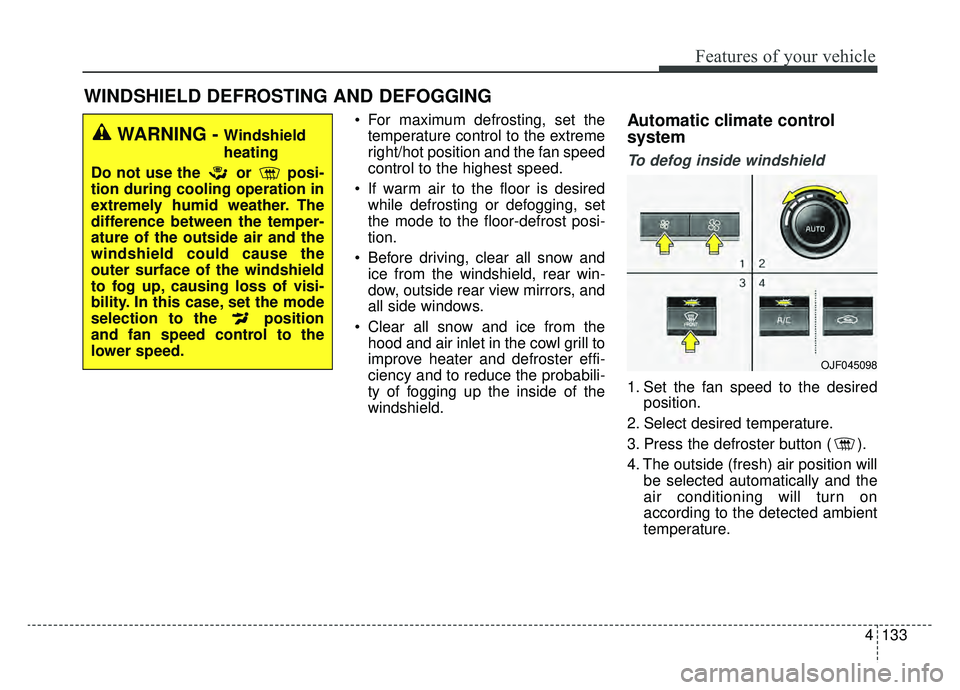
1. Set the fan speed to the desired position.
2. Select desired temperature.
3. Press the defroster button ( ).
4. The outside (fresh) air position will be selected automatically and the
air conditioning will turn on
according to the detected ambient
temperature.
WINDSHIELD DEFROSTING AND DEFOGGING
WARNING - Windshield
heating
Do not use the or posi-
tion during cooling operation in
extremely humid weather. The
difference between the temper-
ature of the outside air and the
windshield could cause the
outer surface of the windshield
to fog up, causing loss of visi-
bility. In this case, set the mode
selection to the position
and fan speed control to the
lower speed.
OJF045098
Page 287 of 553
65
Driving your vehicle
Before entering vehicle
• Be sure that all windows, outsidemirror(s), and outside lights are
clean.
Check the condition of the tires.
Check under the vehicle for any sign of leaks.
Be sure there are no obstacles behind you if you intend to back up.
Necessary inspections
Fluid levels, such as engine oil,
engine coolant, brake fluid, and
washer fluid should be checked on a
regular basis, at the exact interval
depending on the fluid. Further
details are provided in chapter 8,
“Maintenance”.
Before starting
Close and lock all doors.
Position the seat so that all con-trols are easily reached.
Buckle your seat belt.
Adjust the inside and outside rearview mirrors.
Be sure that all lights work.
Check all gauges.
Check the operation of warning lights when the engine start/stop
button is turned to the ON position.
Release the parking brake and make sure the brake warning light
goes out.
For safe operation, be sure you are
familiar with your vehicle and its
equipment.
BEFORE DRIVING
WARNING - Distracted driving
Focus on the road while driving.
The driver's primary responsi-
bility is in the safe and legal
operation of the vehicle. Use of
any handled devices, other
equipment or vehicle systems
that distract the driver should
not be used during vehicle
operation.
Page 368 of 553
Driving your vehicle
86
6
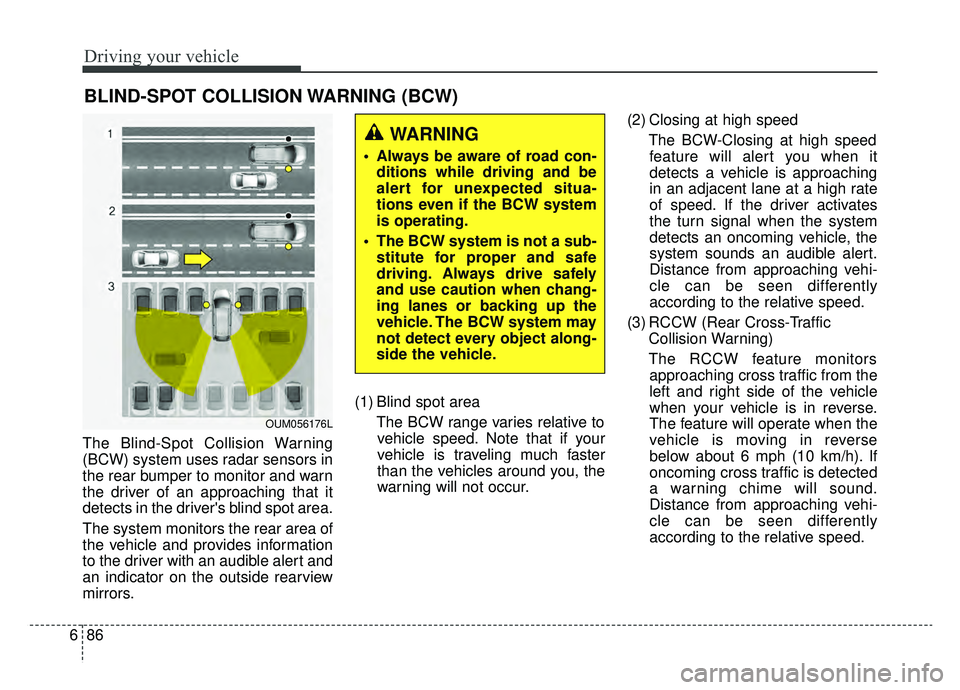
The Blind-Spot Collision Warning
(BCW) system uses radar sensors in
the rear bumper to monitor and warn
the driver of an approaching that it
detects in the driver's blind spot area.
The system monitors the rear area of
the vehicle and provides information
to the driver with an audible alert and
an indicator on the outside rearview
mirrors. (1) Blind spot area
The BCW range varies relative tovehicle speed. Note that if your
vehicle is traveling much faster
than the vehicles around you, the
warning will not occur. (2) Closing at high speed
The BCW-Closing at high speedfeature will alert you when it
detects a vehicle is approaching
in an adjacent lane at a high rate
of speed. If the driver activates
the turn signal when the system
detects an oncoming vehicle, the
system sounds an audible alert.
Distance from approaching vehi-
cle can be seen differently
according to the relative speed.
(3) RCCW (Rear Cross-Traffic Collision Warning)
The RCCW feature monitors approaching cross traffic from the
left and right side of the vehicle
when your vehicle is in reverse.
The feature will operate when the
vehicle is moving in reverse
below about 6 mph (10 km/h). If
oncoming cross traffic is detected
a warning chime will sound.
Distance from approaching vehi-
cle can be seen differently
according to the relative speed.
BLIND-SPOT COLLISION WARNING (BCW)
WARNING
Always be aware of road con- ditions while driving and be
alert for unexpected situa-
tions even if the BCW system
is operating.
The BCW system is not a sub- stitute for proper and safe
driving. Always drive safely
and use caution when chang-
ing lanes or backing up the
vehicle. The BCW system may
not detect every object along-
side the vehicle.
OUM056176L
Page 369 of 553
687
Driving your vehicle
BCW (Blind-Spot Collision
Warning) / LCA (Lane Change
Assist)
Operating conditions
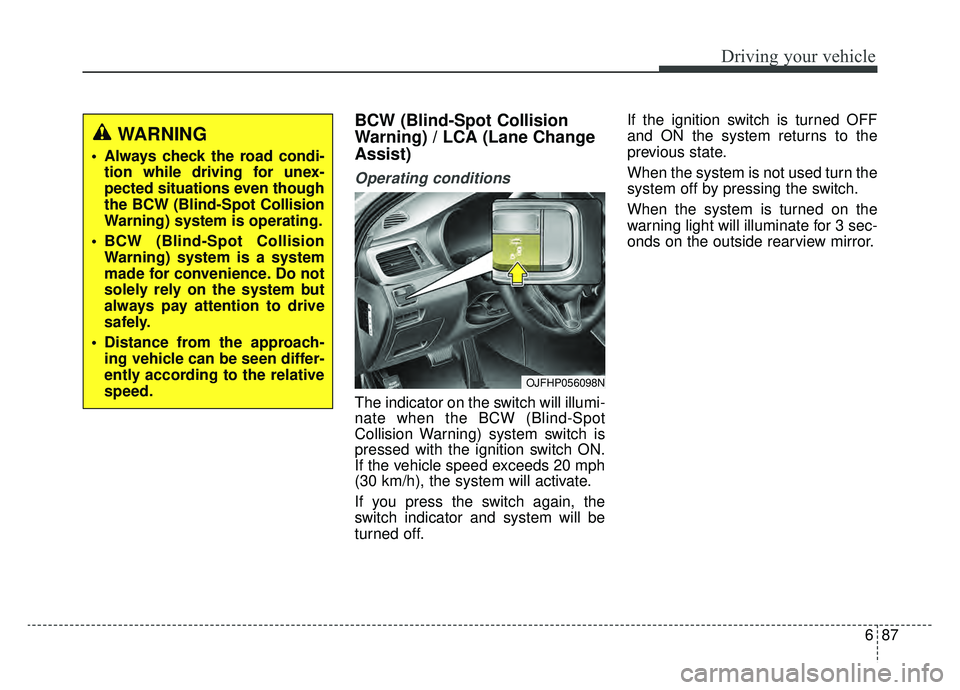
The indicator on the switch will illumi-
nate when the BCW (Blind-Spot
Collision Warning) system switch is
pressed with the ignition switch ON.
If the vehicle speed exceeds 20 mph
(30 km/h), the system will activate.
If you press the switch again, the
switch indicator and system will be
turned off.If the ignition switch is turned OFF
and ON the system returns to the
previous state.
When the system is not used turn the
system off by pressing the switch.
When the system is turned on the
warning light will illuminate for 3 sec-
onds on the outside rearview mirror.
WARNING
Always check the road condi-
tion while driving for unex-
pected situations even though
the BCW (Blind-Spot Collision
Warning) system is operating.
BCW (Blind-Spot Collision Warning) system is a system
made for convenience. Do not
solely rely on the system but
always pay attention to drive
safely.
Distance from the approach- ing vehicle can be seen differ-
ently according to the relative
speed.
OJFHP056098N
Page 370 of 553
Driving your vehicle
88
6
Warning type
The system will activate when:
1.The system is on
2.Vehicle speed is above 20 mph (30
km/h)
3.Other vehicles are detected in the rear side
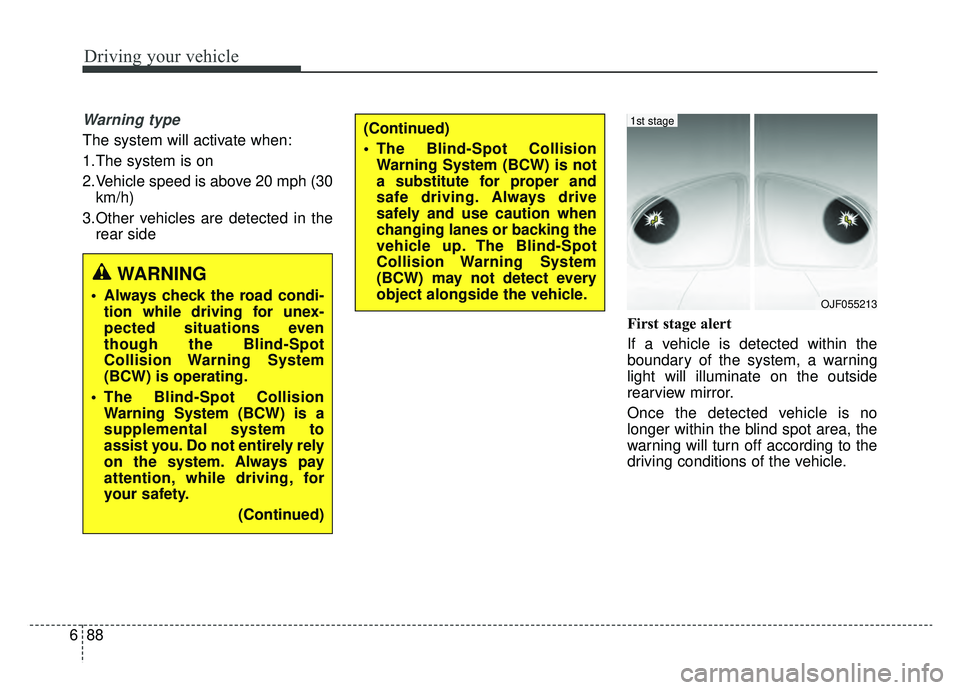
First stage alert
If a vehicle is detected within the
boundary of the system, a warning
light will illuminate on the outside
rearview mirror.
Once the detected vehicle is no
longer within the blind spot area, the
warning will turn off according to the
driving conditions of the vehicle.
WARNING
Always check the road condi-tion while driving for unex-
pected situations even
though the Blind-Spot
Collision Warning System
(BCW) is operating.
The Blind-Spot Collision Warning System (BCW) is a
supplemental system to
assist you. Do not entirely rely
on the system. Always pay
attention, while driving, for
your safety.
(Continued)
(Continued)
The Blind-Spot CollisionWarning System (BCW) is not
a substitute for proper and
safe driving. Always drive
safely and use caution when
changing lanes or backing the
vehicle up. The Blind-Spot
Collision Warning System
(BCW) may not detect every
object alongside the vehicle.
OJF055213
1st stage
Page 371 of 553
689
Driving your vehicle
Second stage alert
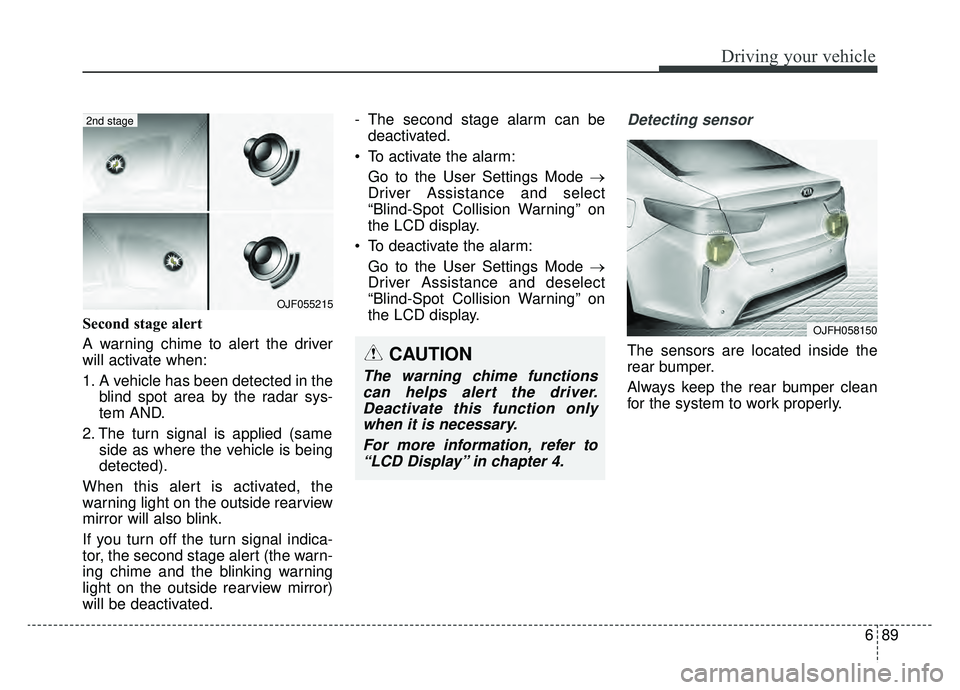
A warning chime to alert the driver
will activate when:
1. A vehicle has been detected in theblind spot area by the radar sys-
tem AND.
2. The turn signal is applied (same side as where the vehicle is being
detected).
When this alert is activated, the
warning light on the outside rearview
mirror will also blink.
If you turn off the turn signal indica-
tor, the second stage alert (the warn-
ing chime and the blinking warning
light on the outside rearview mirror)
will be deactivated. - The second stage alarm can be
deactivated.
To activate the alarm: Go to the User Settings Mode →
Driver Assistance and select
“Blind-Spot Collision Warning” on
the LCD display.
To deactivate the alarm: Go to the User Settings Mode →
Driver Assistance and deselect
“Blind-Spot Collision Warning” on
the LCD display.
Detecting sensor
The sensors are located inside the
rear bumper.
Always keep the rear bumper clean
for the system to work properly.
OJF055215
2nd stage
CAUTION
The warning chime functionscan helps alert the driver.Deactivate this function onlywhen it is necessary.
For more information, refer to“LCD Display” in chapter 4.
OJFH058150
Page 373 of 553
691
Driving your vehicle
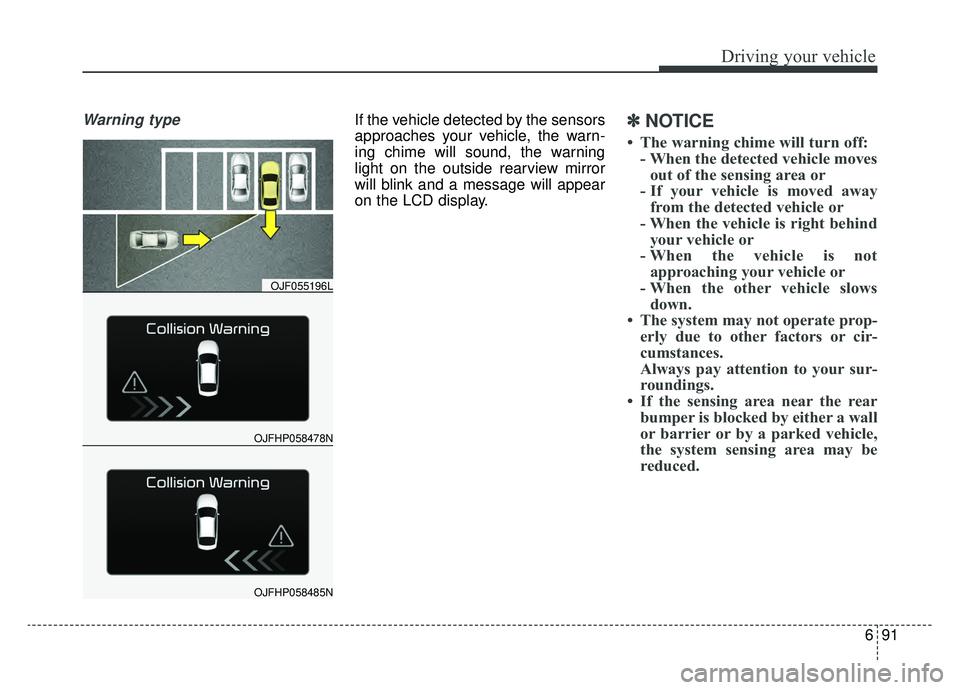
Warning typeIf the vehicle detected by the sensors
approaches your vehicle, the warn-
ing chime will sound, the warning
light on the outside rearview mirror
will blink and a message will appear
on the LCD display.✽ ✽
NOTICE
• The warning chime will turn off:
- When the detected vehicle movesout of the sensing area or
- If your vehicle is moved away from the detected vehicle or
- When the vehicle is right behind your vehicle or
- When the vehicle is not approaching your vehicle or
- When the other vehicle slows down.
• The system may not operate prop- erly due to other factors or cir-
cumstances.
Always pay attention to your sur-
roundings.
• If the sensing area near the rear bumper is blocked by either a wall
or barrier or by a parked vehicle,
the system sensing area may be
reduced.
OJFHP058478N
OJF055196L
OJFHP058485N
Page 374 of 553
Driving your vehicle
92
6
WARNING
When the BCW system is
being activated, the warning
light on the outside rearview
mirror will illuminate whenev-
er a vehicle is detected by the
system.
To avoid accidents, do not
focus only on the warning
light and neglect to see the
surrounding of the vehicle.
Drive safely even though the vehicle is equipped with a
BCW (Blind-Spot Collision
Warning) system. Do not sole-
ly rely on the system but
check for yourself before
changing lanes.
The system may not alert the
driver in some conditions so
always check the surround-
ings while driving.
(Continued)
(Continued)
The Blind-Spot CollisionWarning system (BCW) and
Rear Cross-Traffic Collision
Warning (RCCW) are not a
substitute for proper and safe
driving practices. Always
drive safely and use caution
when changing lanes or back-
ing up your vehicle. The Blind-
Spot Collision Warning sys-
tem (BCW) may not detect
every object alongside the
vehicle.CAUTION
The system may not work prop- erly if the bumper has beenreplaced or if a repair work hasbeen done near the sensor.
The detection area differs according to the roads width.If the road is narrow the sys-tem may detect other vehiclesin the second next lane.
On the contrary, if the road is very wide the system may notdetect other vehicles in thenext lane.
The system might be turned off due to strong electromag-netic waves.