reset KIA OPTIMA PHEV 2019 User Guide
[x] Cancel search | Manufacturer: KIA, Model Year: 2019, Model line: OPTIMA PHEV, Model: KIA OPTIMA PHEV 2019Pages: 553, PDF Size: 11.97 MB
Page 254 of 553
Features of your vehicle
124
4
Adjusting the driver and passenger
side temperature individually
Press the “SYNC” button again to
adjust the driver and passenger
side temperature individually. The
illumination of button turns off.
Operate the driver side tempera- ture control knob to adjust the driv-
er side temperature.
Operate the passenger side tem- perature control knob to adjust the
passenger side temperature.
Temperature conversion
You can switch the temperature
mode from Centigrade to Fahrenheit
as follows:
While pressing the OFF button,
press the AUTO button for 3 seconds
or more.
The display will change from
Centigrade to Fahrenheit, or from
Fahrenheit to Centigrade.
If the battery has been discharged or
disconnected, the temperature mode
display will reset to Fahrenheit.Air intake control
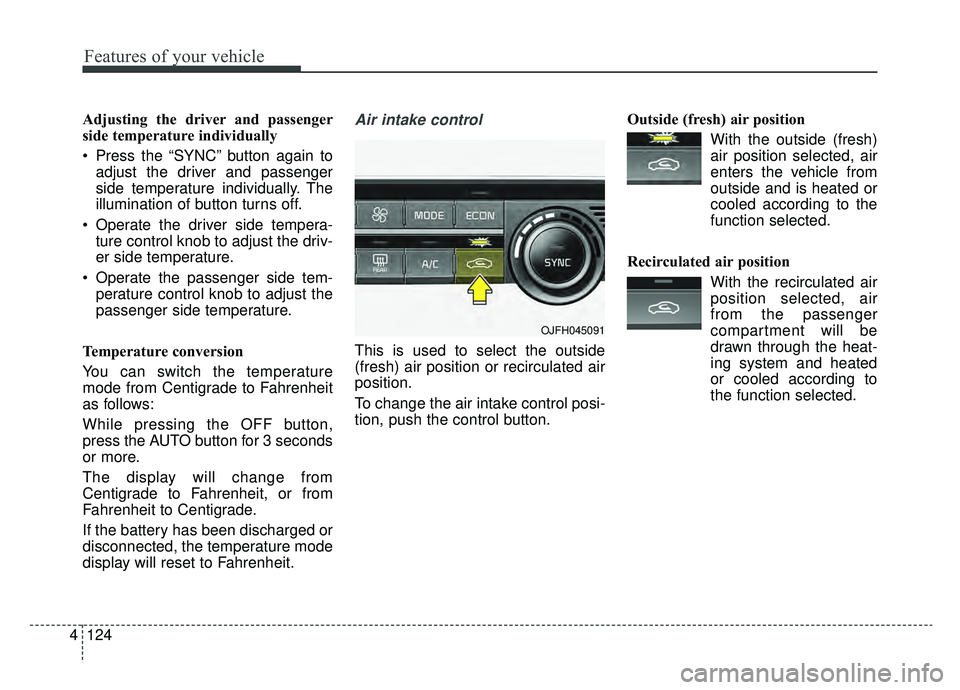
This is used to select the outside
(fresh) air position or recirculated air
position.
To change the air intake control posi-
tion, push the control button. Outside (fresh) air position
With the outside (fresh)air position selected, air
enters the vehicle from
outside and is heated or
cooled according to the
function selected.
Recirculated air position With the recirculated airposition selected, air
from the passenger
compartment will be
drawn through the heat-
ing system and heated
or cooled according to
the function selected.
OJFH045091
Page 258 of 553
Features of your vehicle
128
4
Automatic Ventilation
(if equipped)
When the ignition is ON or when the
engine is running and the outside
temperature is below 59°F (15°C),
the automatic ventilation feature will
activate if the recirculated air intake
position is selected for more than 5
minutes while A/C is off and floor
mode is selected. In this condition
the air intake position will automati-
cally switch to the outside (fresh) air
intake position.
To cancel or reset the Automatic
Ventilation
When the air conditioning system is
on, select Face Level mode and
keep pressing the air intake control
button more than 3 seconds.
When the automatic ventilation is
canceled, the indicator blinks 3
times. When the automatic ventila-
tion is activated, the indicator blinks
6 times.
System operation
Ventilation
1.Set the mode to the position.
2.Set the air intake control to the out- side (fresh) air position.
3.Set the temperature control to the desired position.
4.Set the fan speed control to the desired speed.
Heating
1.Set the mode to the position.
2.Set the air intake control to the out-side (fresh) air position.
3.Set the temperature control to the desired position.
4.Set the fan speed control to the desired speed.
5.If dehumidified heating is desired, turn the air conditioning system (if
equipped) on.
If the windshield fogs up, set the mode to the
orposition. Operation Tips
To keep dust or unpleasant fumes
from entering the vehicle through
the ventilation system, temporarily
set the air intake control to the
recirculated air position. Be sure to
return the control to the fresh air
position when the irritation has
passed to keep fresh air in the
vehicle. This will help keep the driv-
er more alert and comfortable.
Air for the heating/cooling system is drawn in through the grilles just
ahead of the windshield. Care
should be taken that these are not
blocked by leaves, snow, ice or
other obstructions.
To prevent interior fog on the wind- shield, set the air intake control to
the fresh air position and fan speed
to the desired position, turn on the
air conditioning system, and adjust
the temperature control to desired
temperature.
Page 265 of 553
4135
Features of your vehicle
Automatic climate control system
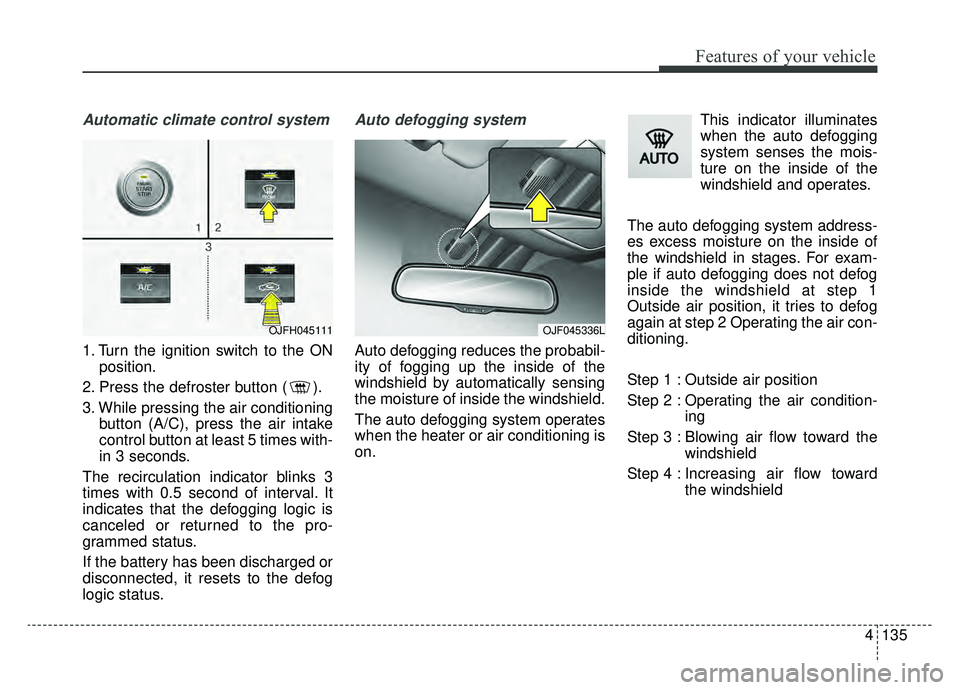
1. Turn the ignition switch to the ONposition.
2. Press the defroster button ( ).
3. While pressing the air conditioning button (A/C), press the air intake
control button at least 5 times with-
in 3 seconds.
The recirculation indicator blinks 3
times with 0.5 second of interval. It
indicates that the defogging logic is
canceled or returned to the pro-
grammed status.
If the battery has been discharged or
disconnected, it resets to the defog
logic status.
Auto defogging system
Auto defogging reduces the probabil-
ity of fogging up the inside of the
windshield by automatically sensing
the moisture of inside the windshield.
The auto defogging system operates
when the heater or air conditioning is
on. This indicator illuminates
when the auto defogging
system senses the mois-
ture on the inside of the
windshield and operates.
The auto defogging system address-
es excess moisture on the inside of
the windshield in stages. For exam-
ple if auto defogging does not defog
inside the windshield at step 1
Outside air position, it tries to defog
again at step 2 Operating the air con-
ditioning.
Step 1 : Outside air position
Step 2 : Operating the air condition- ing
Step 3 : Blowing air flow toward the windshield
Step 4 : Increasing air flow toward the windshield
OJF045336LOJFH045111
Page 266 of 553
Features of your vehicle
136
4
To cancel or reset the Auto Defogging
System
Press the front windshield defroster
button for 3 seconds when the igni-
tion switch is in the ON position.
When the Auto Defogging System is
canceled, ADS OFF symbol will blink
3 times and the ADS OFF will be dis-
played on the climate control infor-
mation screen.
When the Auto Defogging System is
reset, ADS OFF symbol will blink 6
times without a signal.
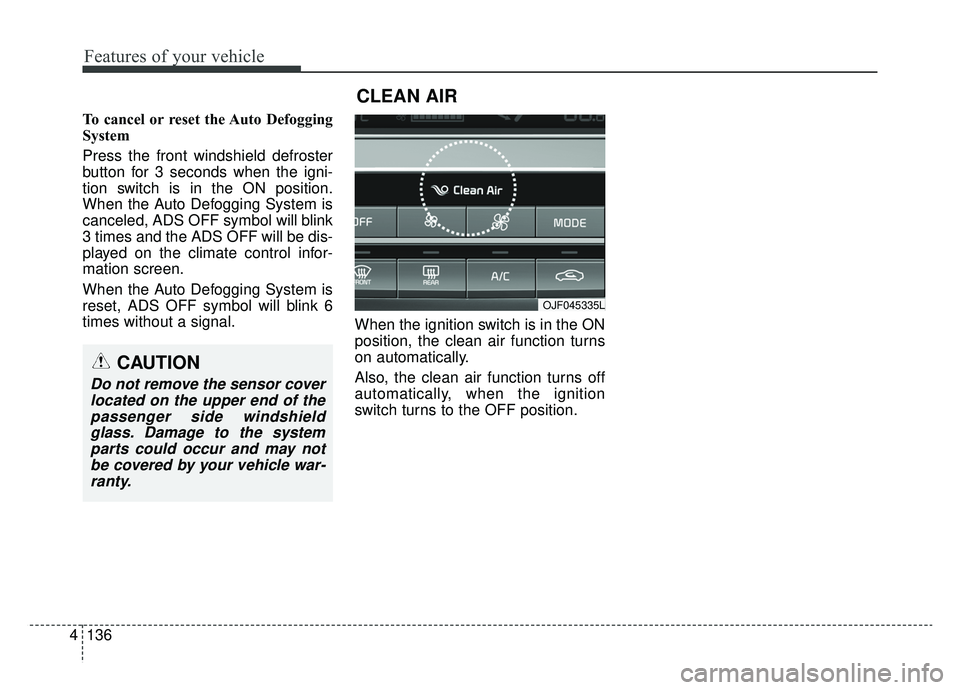
When the ignition switch is in the ON
position, the clean air function turns
on automatically.
Also, the clean air function turns off
automatically, when the ignition
switch turns to the OFF position.
OJF045335L
CLEAN AIR
CAUTION
Do not remove the sensor cover
located on the upper end of thepassenger side windshieldglass. Damage to the systemparts could occur and may notbe covered by your vehicle war-ranty.
Page 343 of 553
661
Driving your vehicle
Each of these actions will cancelcruise control operation (the SETindicator light in the instrument clus-ter will go off), but it will not turn thesystem off. If you wish to resumecruise control operation, move thelever up (to RES+). You will return toyour previously preset speed.To resume cruising speed at
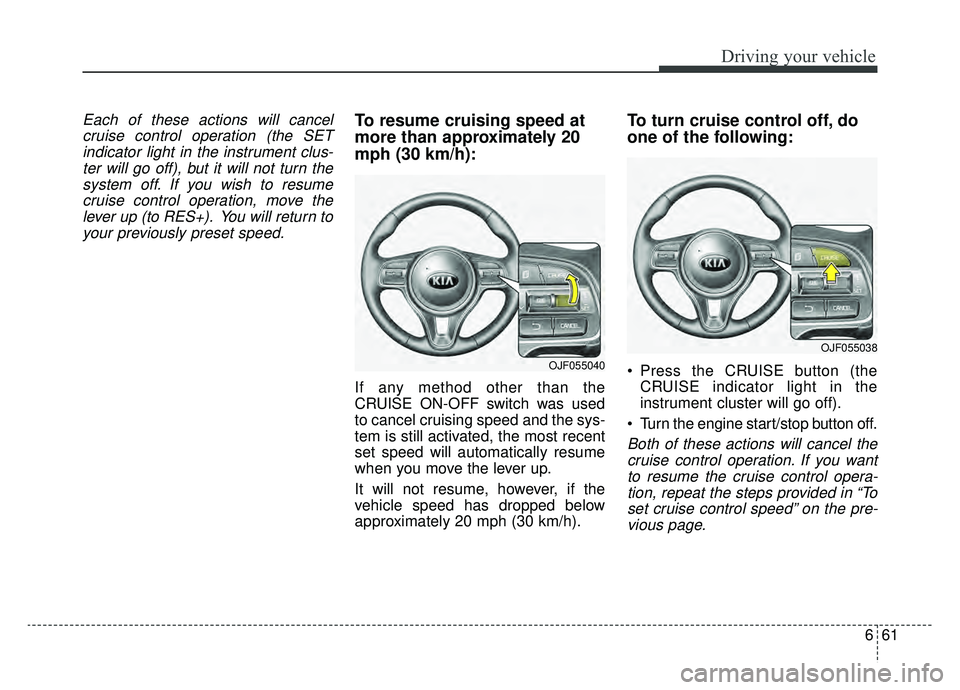
more than approximately 20
mph (30 km/h):
If any method other than the
CRUISE ON-OFF switch was used
to cancel cruising speed and the sys-
tem is still activated, the most recent
set speed will automatically resume
when you move the lever up.
It will not resume, however, if the
vehicle speed has dropped below
approximately 20 mph (30 km/h).
To turn cruise control off, do
one of the following:
Press the CRUISE button (the CRUISE indicator light in the
instrument cluster will go off).
Turn the engine start/stop button off.
Both of these actions will cancel the cruise control operation. If you wantto resume the cruise control opera-tion, repeat the steps provided in “Toset cruise control speed” on the pre-vious page.
OJF055040
OJF055038
Page 351 of 553
669
Driving your vehicle
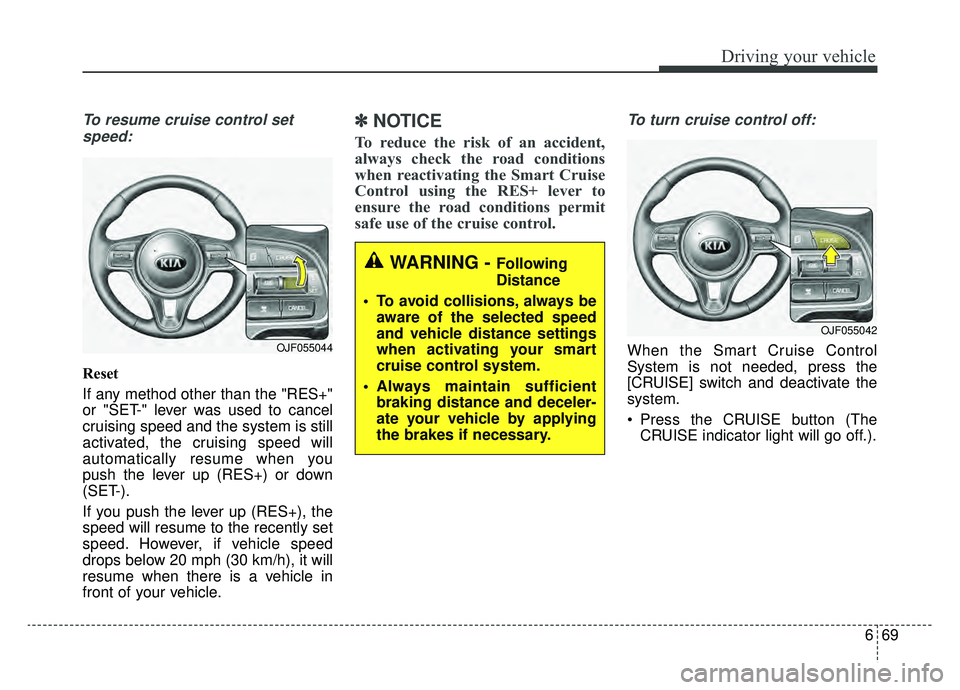
To resume cruise control setspeed:
Reset
If any method other than the "RES+"
or "SET-" lever was used to cancel
cruising speed and the system is still
activated, the cruising speed will
automatically resume when you
push the lever up (RES+) or down
(SET-).
If you push the lever up (RES+), the
speed will resume to the recently set
speed. However, if vehicle speed
drops below 20 mph (30 km/h), it will
resume when there is a vehicle in
front of your vehicle.
✽ ✽ NOTICE
To reduce the risk of an accident,
always check the road conditions
when reactivating the Smart Cruise
Control using the RES+ lever to
ensure the road conditions permit
safe use of the cruise control.
To turn cruise control off:
When the Smart Cruise Control
System is not needed, press the
[CRUISE] switch and deactivate the
system.
Press the CRUISE button (The
CRUISE indicator light will go off.).
OJF055042
OJF055044
WARNING - Following
Distance
To avoid collisions, always be aware of the selected speed
and vehicle distance settings
when activating your smart
cruise control system.
Always maintain sufficient braking distance and deceler-
ate your vehicle by applying
the brakes if necessary.
Page 364 of 553
Driving your vehicle
82
6
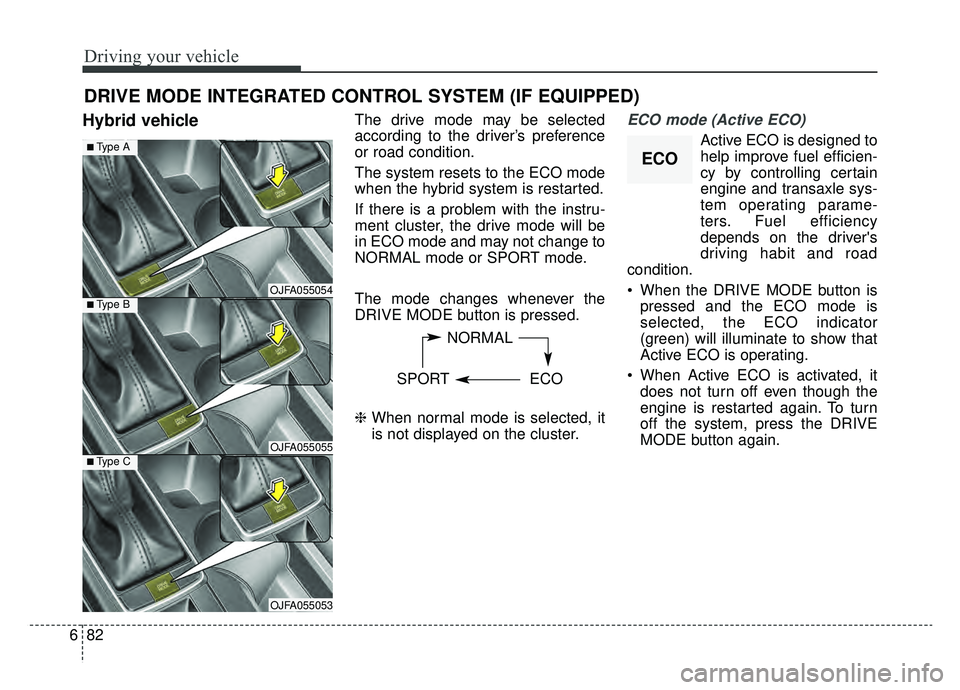
Hybrid vehicleThe drive mode may be selected
according to the driver’s preference
or road condition.
The system resets to the ECO mode
when the hybrid system is restarted.
If there is a problem with the instru-
ment cluster, the drive mode will be
in ECO mode and may not change to
NORMAL mode or SPORT mode.
The mode changes whenever the
DRIVE MODE button is pressed.
\b When normal mode is selected, it
is not displayed on the cluster.ECO mode (Active ECO)
Active ECO is designed to
help improve fuel efficien-
cy by controlling certain
engine and transaxle sys-
tem operating parame-
ters. Fuel efficiency
depends on the driver's
driving habit and road
condition.
When the DRIVE MODE button is pressed and the ECO mode is
selected, the ECO indicator
(green) will illuminate to show that
Active ECO is operating.
When Active ECO is activated, it does not turn off even though the
engine is restarted again. To turn
off the system, press the DRIVE
MODE button again.
DRIVE MODE INTEGRATED CONTROL SYSTEM (IF EQUIPPED)
NORMAL
SPORT ECO
OJFA055054
■Type A
■Type B
OJFA055055■Type C
OJFA055053
ECO
Page 366 of 553
Driving your vehicle
84
6
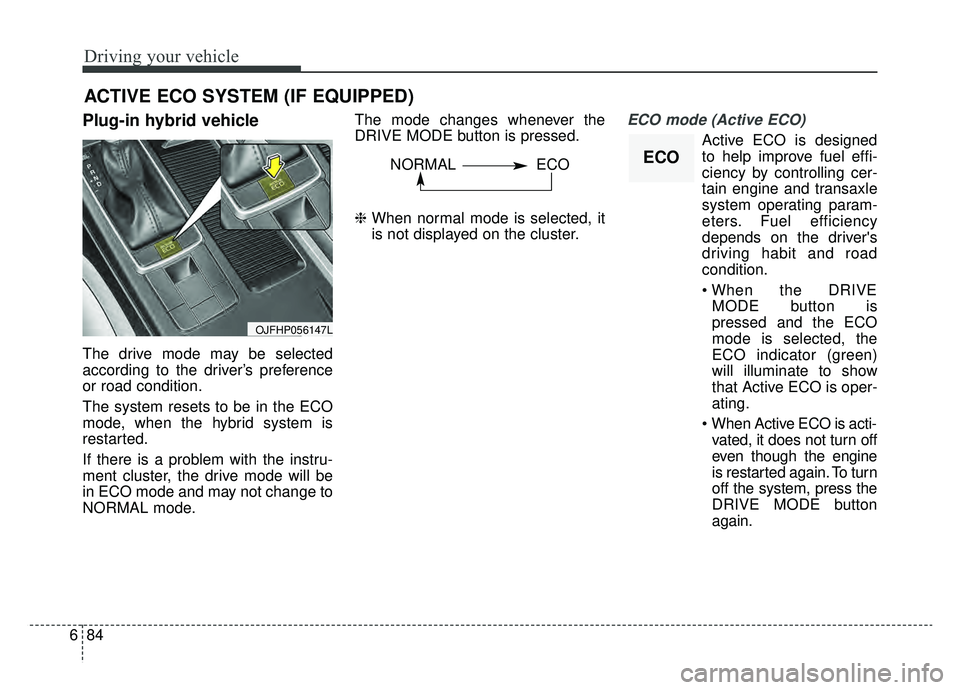
Plug-in hybrid vehicle
The drive mode may be selected
according to the driver’s preference
or road condition.
The system resets to be in the ECO
mode, when the hybrid system is
restarted.
If there is a problem with the instru-
ment cluster, the drive mode will be
in ECO mode and may not change to
NORMAL mode. The mode changes whenever the
DRIVE MODE button is pressed.
\b
When normal mode is selected, it
is not displayed on the cluster.
ECO mode (Active ECO)
Active ECO is designed
to help improve fuel effi-
ciency by controlling cer-
tain engine and transaxle
system operating param-
eters. Fuel efficiency
depends on the driver's
driving habit and road
condition.
MODE button is
pressed and the ECO
mode is selected, the
ECO indicator (green)
will illuminate to show
that Active ECO is oper-
ating.
vated, it does not turn off
even though the engine
is restarted again. To turn
off the system, press the
DRIVE MODE button
again.
ACTIVE ECO SYSTEM (IF EQUIPPED)
OJFHP056147L
ECONORMAL ECO
Page 401 of 553
73
What to do in an emergency
If the engine stalls at a cross-
road or crossing
If the engine stalls at a crossroad or
crossing, set the shift lever in the N
(Neutral) position and then push the
vehicle to a safe place.
If you have a flat tire while
driving
If a tire goes flat while you are driv-
ing:
1. Take your foot off the acceleratorpedal and let the vehicle slow
down while driving straight ahead.
Do not apply the brakes immedi-
ately or attempt to pull off the road
as this may cause a loss of con-
trol. When the vehicle has slowed
to such a speed that it is safe to do
so, brake carefully and pull off the
road. Drive off the road as far as
possible and park on firm level
ground. If you are on a divided
highway, do not park in the median
area between the two traffic lanes. 2. When the vehicle is stopped, turn
on your emergency hazard flash-
ers, set the parking brake and put
the transaxle in P (for Automatic
transaxle.
3. Have all passengers get out of the vehicle. Be sure they all get out on
the side of the vehicle that is away
from traffic.
4. When changing a flat tire, follow the instruction provided later in
this section.
If the engine stalls while driv-
ing
1. Reduce your speed gradually,keeping a straight line. Move cau-
tiously off the road to a safe place.
2. Turn on your emergency flashers.
3. Try to start the hybrid system again. If your vehicle will not start,
contact an authorized Kia dealer
or seek other qualified assistance.
✽ ✽NOTICE
If there was a check engine light and
loss of power or stall and if safe to do
so, wait at least 10 seconds to restart
the vehicle after it stalls. This may
reset the car so it will no longer run
at low power (limp home) condition.
IN CASE OF AN EMERGENCY WHILE DRIVING
Page 428 of 553
Maintenance
Engine compartment . . . . . . . . . . . . . . . . . . . . . . . . 8-3
Maintenance services . . . . . . . . . . . . . . . . . . . . . . . . 8-4
• Owner’s responsibility . . . . . . . . . . . . . . . . . . . . . . . . . 8-4
• Owner maintenance precautions . . . . . . . . . . . . . . . . . 8-5
Owner maintenance . . . . . . . . . . . . . . . . . . . . . . . . . 8-6
• Owner maintenance schedule. . . . . . . . . . . . . . . . . . . . 8-6
Scheduled maintenance service. . . . . . . . . . . . . . . . 8-8
Explanation of scheduled maintenance items . . . 8-14
Checking fluid levels . . . . . . . . . . . . . . . . . . . . . . . 8-17
Engine oil. . . . . . . . . . . . . . . . . . . . . . . . . . . . . . . . . 8-18
• Checking the engine oil level . . . . . . . . . . . . . . . . . . . 8-18
• Changing the engine oil and filter . . . . . . . . . . . . . . . 8-19
Engine maintenance mode (for plug-in Hybrid) . 8-20
• Starting engine maintenance mode . . . . . . . . . . . . . . 8-20
• Stopping engine maintenance mode . . . . . . . . . . . . . 8-20
Coolant . . . . . . . . . . . . . . . . . . . . . . . . . . . . . . . . . . 8-21\
• Checking the coolant level . . . . . . . . . . . . . . . . . . . . . 8-21
• Engine coolant . . . . . . . . . . . . . . . . . . . . . . . . . . . . . . . 8-22
• Inverter coolant . . . . . . . . . . . . . . . . . . . . . . . . . . . . . . 8-22
• Recommended coolant . . . . . . . . . . . . . . . . . . . . . . . . 8-23
• Changing the coolant . . . . . . . . . . . . . . . . . . . . . . . . . 8-24
Brake fluid . . . . . . . . . . . . . . . . . . . . . . . . . . . . . . . 8-25
• Checking the brake fluid level . . . . . . . . . . . . . . . . . . 8-25
Washer fluid . . . . . . . . . . . . . . . . . . . . . . . . . . . . . . 8-26
• Checking the washer fluid level . . . . . . . . . . . . . . . . . 8-26
Parking brake . . . . . . . . . . . . . . . . . . . . . . . . . . . . . 8-27
• Checking the parking brake. . . . . . . . . . . . . . . . . . . . 8-27
Air cleaner. . . . . . . . . . . . . . . . . . . . . . . . . . . . . . . . 8-28
• Filter replacement . . . . . . . . . . . . . . . . . . . . . . . . . . . . 8-28
Climate control air filter . . . . . . . . . . . . . . . . . . . . 8-30
• Filter inspection . . . . . . . . . . . . . . . . . . . . . . . . . . . . . . 8-30
Wiper blades . . . . . . . . . . . . . . . . . . . . . . . . . . . . . . 8-32
• Blade inspection . . . . . . . . . . . . . . . . . . . . . . . . . . . . . . 8-32
• Blade replacement . . . . . . . . . . . . . . . . . . . . . . . . . . . . 8-32
Battery . . . . . . . . . . . . . . . . . . . . . . . . . . . . . . . . . . . 8-\
36
• For best battery service . . . . . . . . . . . . . . . . . . . . . . . 8-36
• Recharging the battery . . . . . . . . . . . . . . . . . . . . . . . . 8-37
• Reset items . . . . . . . . . . . . . . . . . . . . . . . . . . . . . . . . . . 8-38\
Tires and wheels . . . . . . . . . . . . . . . . . . . . . . . . . . . 8-39
• Tire care . . . . . . . . . . . . . . . . . . . . . . . . . . . . . . . . . . . 8-\
39
• Recommended cold tire inflation pressures . . . . . . . 8-39
• Tire pressure . . . . . . . . . . . . . . . . . . . . . . . . . . . . . . . . 8-40
• Checking tire inflation pressure. . . . . . . . . . . . . . . . . 8-40
• Tire rotation . . . . . . . . . . . . . . . . . . . . . . . . . . . . . . . . . 8-41
• Wheel alignment and tire balance . . . . . . . . . . . . . . . 8-42
• Tire replacement . . . . . . . . . . . . . . . . . . . . . . . . . . . . . 8-43
• Wheel replacement . . . . . . . . . . . . . . . . . . . . . . . . . . . 8-43
• Tire traction . . . . . . . . . . . . . . . . . . . . . . . . . . . . . . . . . 8-44
8