start stop button KIA OPTIMA PHEV 2019 Owner's Manual
[x] Cancel search | Manufacturer: KIA, Model Year: 2019, Model line: OPTIMA PHEV, Model: KIA OPTIMA PHEV 2019Pages: 553, PDF Size: 11.97 MB
Page 139 of 553
49
Features of your vehicle
To deactivate the immobilizersystem:
Turn the engine start/stop button to
the ON position by pressing the but-
ton while carrying the smart key.
In order to prevent theft of your vehi-
cle, do not leave spare keys any-
where in your vehicle.
To activate the immobilizer system:
Turn the engine start/stop button to
the OFF position. The immobilizer
system activates automatically.
Without a valid smart key for your
vehicle, the engine will not start.
✽ ✽ NOTICE
When starting the engine, do not use
the key with other immobilizer keys
around. Otherwise the engine may
not start or may stop soon after it
starts. Keep each key separate in
order to avoid a starting malfunction.
✽ ✽NOTICE
If you need additional keys or lose
your keys, contact an authorized
Kia dealer.
✽ ✽NOTICE - Immobilizer alter-
ations
Do not change, alter or adjust the
immobilizer system because it could
cause the immobilizer system to
malfunction.
This device complies with Part 15
of the FCC rules.
Operation is subject to the following
two conditions:
1. This device may not cause harmful
interference, and
2. This device must accept any inter- ference received, including inter-
ference that may cause undesired
operation.
✽ ✽NOTICE
Changes or modifications not
expressly approved by the party
responsible for compliance could
void the user’s authority to operate
the equipment. If the keyless entry
system is inoperative due to changes
or modifications not expressly
approved by the party responsible
for compliance, it will not be cov-
ered by your manufacturer’s vehicle
warranty.
CAUTION- Immobilizer
damage
Do not expose your immobilizersystem to moisture, static elec-tricity or rough handling. Thismay damage your immobilizer.
Page 142 of 553
Features of your vehicle
12
4
✽ ✽
NOTICE
• Avoid trying to start the engine
while the alarm is activated. The
vehicle starting motor is disabled
during the theft-alarm stage.
If the system is not disarmed with
the smart key, open the doors by
using the mechanical key and start
the engine by directly pressing the
Engine Start/Stop button with the
smart key.
• If you lose your keys, consult your authorized Kia dealer.
✽ ✽ NOTICE
Malfunctions caused by improper
alterations, adjustments or modifi-
cations to the theft-alarm system are
not covered by your vehicle manu-
facturer warranty.
CAUTION - Adjusting
alarm system
Do not change, alter or adjust
the theft alarm system in yourvehicle. Improper installation ofthe alarm system could damagethe vehicle or cause the systemto malfunction.
Page 144 of 553
Features of your vehicle
14
4
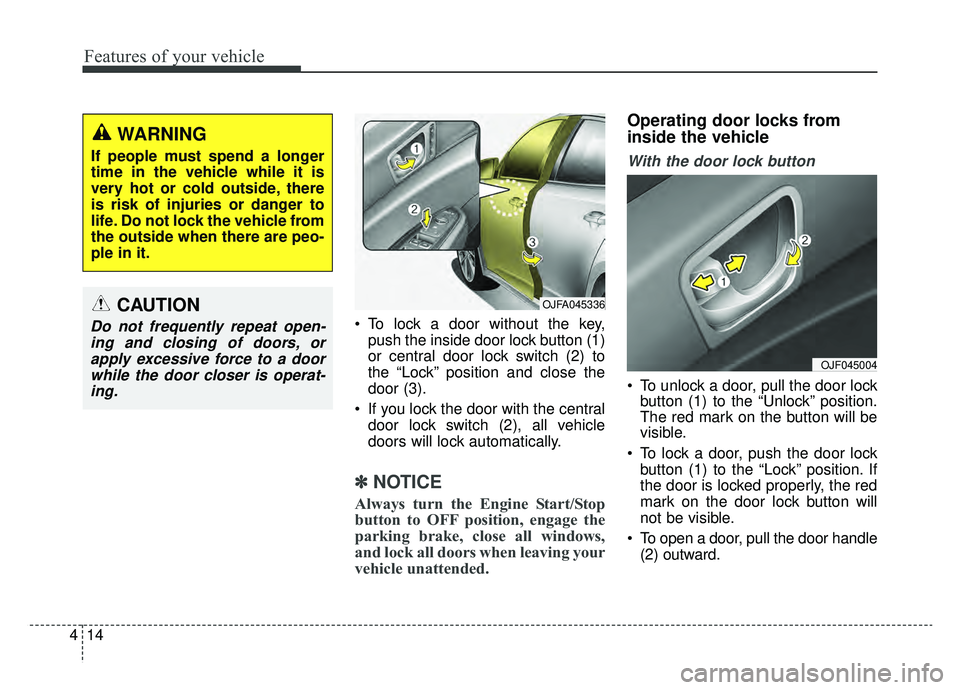
To lock a door without the key,
push the inside door lock button (1)
or central door lock switch (2) to
the “Lock” position and close the
door (3).
If you lock the door with the central door lock switch (2), all vehicle
doors will lock automatically.
✽ ✽ NOTICE
Always turn the Engine Start/Stop
button to OFF position, engage the
parking brake, close all windows,
and lock all doors when leaving your
vehicle unattended.
Operating door locks from
inside the vehicle
With the door lock button
To unlock a door, pull the door lock
button (1) to the “Unlock” position.
The red mark on the button will be
visible.
To lock a door, push the door lock button (1) to the “Lock” position. If
the door is locked properly, the red
mark on the door lock button will
not be visible.
To open a door, pull the door handle (2) outward.
OJF045004
OJFA045336
WARNING
If people must spend a longer
time in the vehicle while it is
very hot or cold outside, there
is risk of injuries or danger to
life. Do not lock the vehicle from
the outside when there are peo-
ple in it.
CAUTION
Do not frequently repeat open-ing and closing of doors, orapply excessive force to a doorwhile the door closer is operat-ing.
Page 154 of 553
Features of your vehicle
24
4
Power windows
The Engine Start/Stop button must
be in the ON position for power win-
dows to operate.
Each door has a power window
switch that controls the door's win-
dow. The driver has a power window
lock button which can block the oper-
ation of passenger windows. The
power windows can be operated for
approximately 30 seconds after the
engine is turned off.
However if the front doors are
opened the power windows cannot
be operated even within the 30 sec-
ond period.
If the window cannot be closed
because it is blocked by objects,
remove the objects and close the
window.
✽ ✽
NOTICE
While driving with the rear windows
down or with the sunroof (if
equipped) in an open (or partially
open) position, your vehicle may
demonstrate a wind buffeting or
pulsation noise. This noise is a nor-
mal occurrence and can be reduced
or eliminated by taking the follow-
ing actions. If the noise occurs with
one or both of the rear windows
down, partially lower both front
windows approximately one inch. If
you experience the noise with the
sunroof open, slightly reduce the
size of the sunroof opening.
CAUTION
Do not install any accessories
in the vehicle that extend intothe open window area. Suchobjects will impact the properfunction of the Automatic rever-sal "jam protection" featuredescribed in this chapter.
WARNING - Power
Windows
Do not extend your face or arms
outside of the window opening
while the vehicle is in motion.
Doing so could result in signifi-
cant injury.
Page 165 of 553
435
Features of your vehicle
1. Stop the engine.
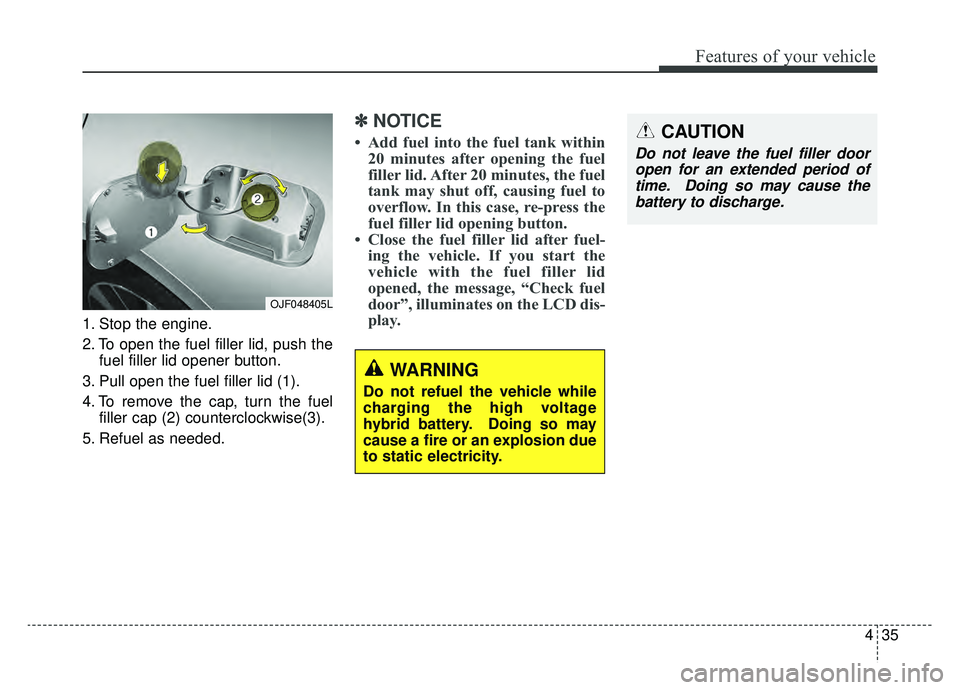
2. To open the fuel filler lid, push thefuel filler lid opener button.
3. Pull open the fuel filler lid (1).
4. To remove the cap, turn the fuel filler cap (2) counterclockwise(3).
5. Refuel as needed.
✽ ✽ NOTICE
• Add fuel into the fuel tank within
20 minutes after opening the fuel
filler lid. After 20 minutes, the fuel
tank may shut off, causing fuel to
overflow. In this case, re-press the
fuel filler lid opening button.
• Close the fuel filler lid after fuel- ing the vehicle. If you start the
vehicle with the fuel filler lid
opened, the message, “Check fuel
door”, illuminates on the LCD dis-
play.
OJF048405L
CAUTION
Do not leave the fuel filler door
open for an extended period oftime. Doing so may cause thebattery to discharge.
WARNING
Do not refuel the vehicle while
charging the high voltage
hybrid battery. Doing so may
cause a fire or an explosion due
to static electricity.
Page 173 of 553
443
Features of your vehicle
Electric power steering (EPS)
The power steering uses a motor to
assist you in steering the vehicle. If
the engine is off or if the power steer-
ing system becomes inoperative, the
vehicle may still be steered, but it will
require increased steering effort.
The motor driven power steering is
controlled by a power steering con-
trol unit which senses the steering
wheel torque and vehicle speed to
command the motor.
The steering becomes heavier as the
vehicle's speed increases and
becomes lighter as the vehicle's
speed decreases for improved steer-
ing control.
Should you notice any change in the
effort required to steer during normal
vehicle operation, have the power
steering checked by an authorized
Kia dealer. If the Electric Power Steering
System does not operate normally,
the warning light will illuminate on
the instrument cluster. The steering
wheel may require increased
steering effort. Take your vehicle to
an authorized Kia dealer and have
the vehicle checked as soon as
possible.
When you operate the steering wheel in low temperature, noise
may occur. If temperature rises, the
noise will likely disappear. This is a
normal condition.
When the vehicle is stationary, and the steering wheel is turned all the
way to the left or right continuous-
ly, the steering wheel becomes
harder to turn. The power assist is
limited to protect the motor from
overheating.
As time passes, the steering wheel
will return to its normal condition.
✽ ✽ NOTICE
The following symptoms may occur
during normal vehicle operation:
• The EPS warning light does not
illuminate.
• The steering gets heavy immedi- ately after turning the Engine
Start/Stop button is ON position.
This happens as the system per-
forms the EPS system diagnostics.
When the diagnostics are complet-
ed, the steering wheel will return
to its normal condition.
• A click noise may be heard from the EPS relay after turning the
Engine Start/Stop button is ON or
OFF position.
• A motor noise may be heard when the vehicle is at a stop or at a low
driving speed.
• If the Electric Power Steering System does not operate normally,
the warning light will illuminate on
the instrument cluster. The steer-
ing wheel may become difficult to
control or operate abnormally.
Take your vehicle to an authorized
Kia dealer and have the vehicle
checked as soon as possible. (Continued)
STEERING WHEEL
Page 175 of 553
445
Features of your vehicle
✽ ✽NOTICE
After adjustment, sometimes the
lock release lever may not lock the
steering wheel. It is not a malfunc-
tion. This occurs when two gears are
not engaged correctly. In this case,
adjust the steering wheel again and
then lock the steering wheel.
Heated steering wheel
(if equipped)
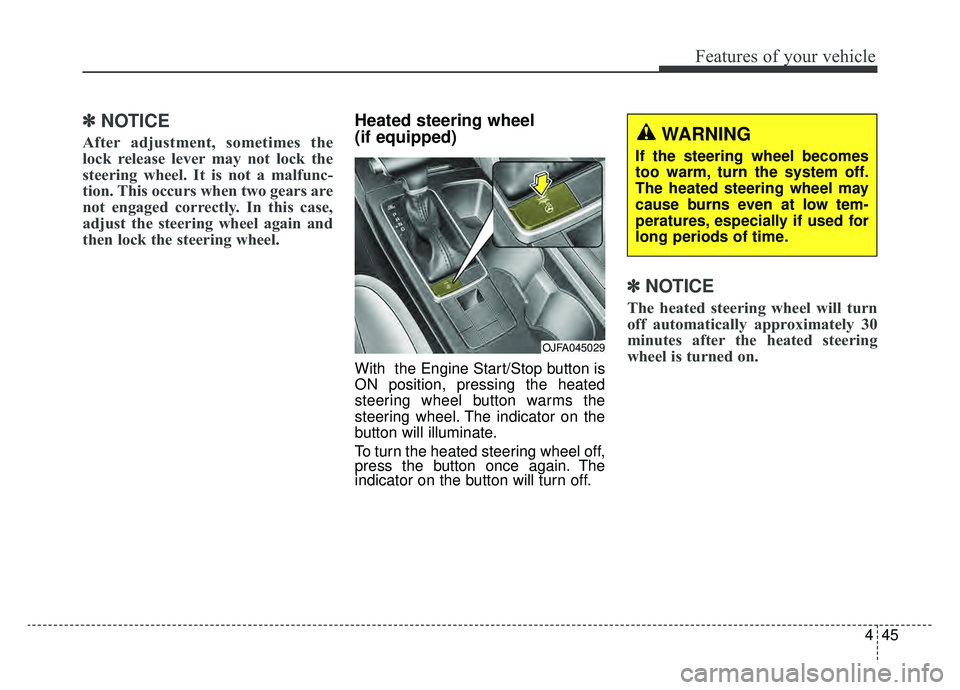
With the Engine Start/Stop button is
ON position, pressing the heated
steering wheel button warms the
steering wheel. The indicator on the
button will illuminate.
To turn the heated steering wheel off,
press the button once again. The
indicator on the button will turn off.
✽ ✽NOTICE
The heated steering wheel will turn
off automatically approximately 30
minutes after the heated steering
wheel is turned on.
OJFA045029
WARNING
If the steering wheel becomes
too warm, turn the system off.
The heated steering wheel may
cause burns even at low tem-
peratures, especially if used for
long periods of time.
Page 180 of 553
Features of your vehicle
50
4
Reverse parking aid function
(if equipped)
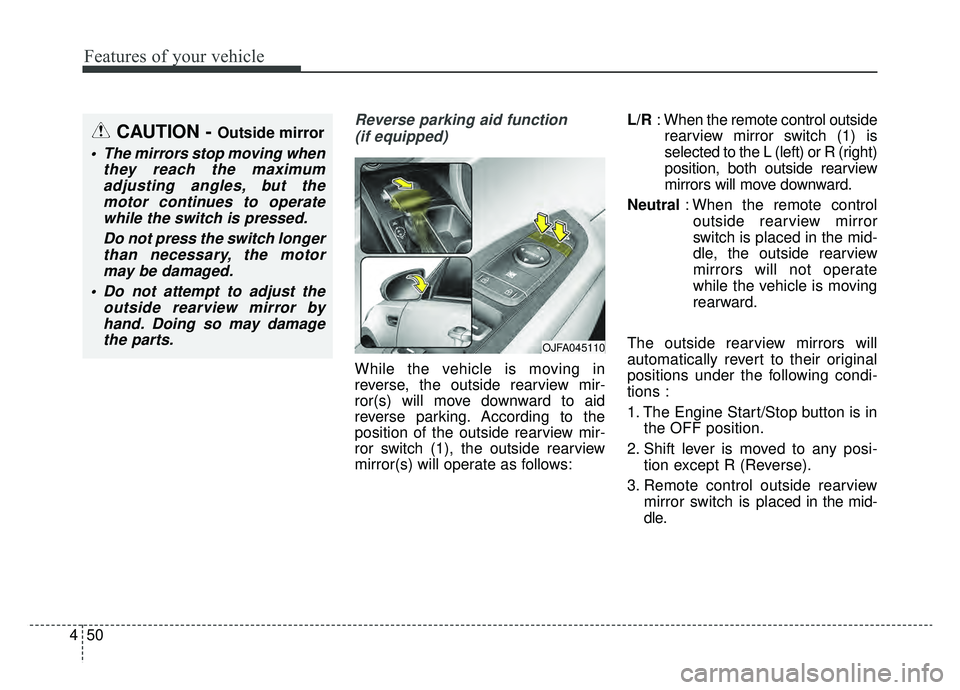
While the vehicle is moving in
reverse, the outside rearview mir-
ror(s) will move downward to aid
reverse parking. According to the
position of the outside rearview mir-
ror switch (1), the outside rearview
mirror(s) will operate as follows: L/R
: When the remote control outside
rearview mirror switch (1) is
selected to the L (left) or R (right)
position, both outside rearview
mirrors will move downward.
Neutral : When the remote control
outside rearview mirror
switch is placed in the mid-
dle, the outside rearview
mirrors will not operate
while the vehicle is moving
rearward.
The outside rearview mirrors will
automatically revert to their original
positions under the following condi-
tions :
1. The Engine Start/Stop button is in the OFF position.
2. Shift lever is moved to any posi- tion except R (Reverse).
3. Remote control outside rearview mirror switch is placed in the mid-
dle.
CAUTION - Outside mirror
The mirrors stop moving when they reach the maximumadjusting angles, but themotor continues to operatewhile the switch is pressed.
Do not press the switch longerthan necessary, the motormay be damaged.
Do not attempt to adjust the outside rearview mirror byhand. Doing so may damagethe parts.
OJFA045110
Page 181 of 553
451
Features of your vehicle
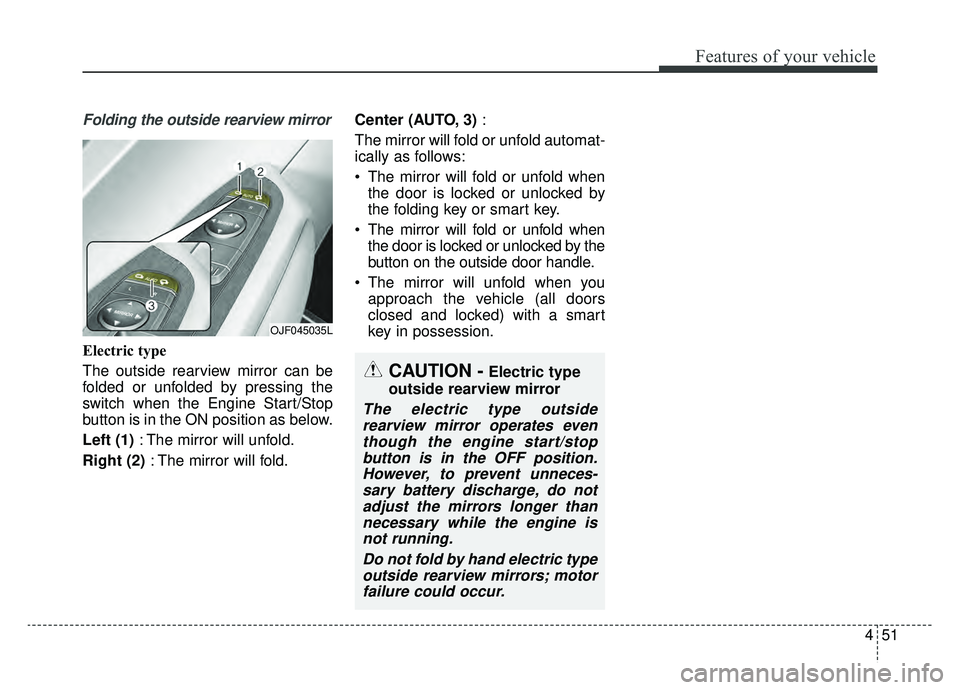
Folding the outside rearview mirror
Electric type
The outside rearview mirror can be
folded or unfolded by pressing the
switch when the Engine Start/Stop
button is in the ON position as below.
Left (1): The mirror will unfold.
Right (2) : The mirror will fold. Center (AUTO, 3)
:
The mirror will fold or unfold automat-
ically as follows:
The mirror will fold or unfold when the door is locked or unlocked by
the folding key or smart key.
The mirror will fold or unfold when the door is locked or unlocked by the
button on the outside door handle.
The mirror will unfold when you approach the vehicle (all doors
closed and locked) with a smart
key in possession.
OJF045035L
CAUTION -Electric type
outside rearview mirror
The electric type outside rearview mirror operates eventhough the engine start/stopbutton is in the OFF position.However, to prevent unneces-sary battery discharge, do notadjust the mirrors longer thannecessary while the engine isnot running.
Do not fold by hand electric typeoutside rearview mirrors; motorfailure could occur.
Page 183 of 553
453
Features of your vehicle
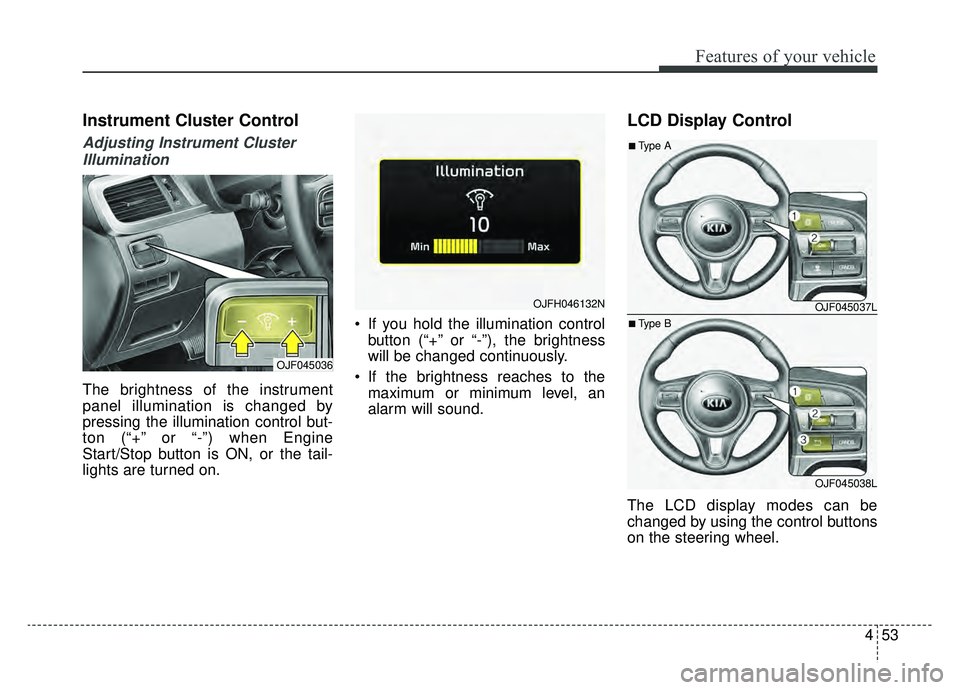
Instrument Cluster Control
Adjusting Instrument ClusterIllumination
The brightness of the instrument
panel illumination is changed by
pressing the illumination control but-
ton (“+” or “-”) when Engine
Start/Stop button is ON, or the tail-
lights are turned on. If you hold the illumination control
button (“+” or “-”), the brightness
will be changed continuously.
If the brightness reaches to the maximum or minimum level, an
alarm will sound.
LCD Display Control
The LCD display modes can be
changed by using the control buttons
on the steering wheel.
OJF045036
OJFH046132NOJF045037L
OJF045038L
■Type A
■Type B