wheel KIA PICANTO 2006 User Guide
[x] Cancel search | Manufacturer: KIA, Model Year: 2006, Model line: PICANTO, Model: KIA PICANTO 2006Pages: 281, PDF Size: 9.89 MB
Page 104 of 281
43
1 23456789
Driving your vehicle
(Continued)
• Never reach for the ignitionswitch, or any other controls
through the steering wheel
while the vehicle is in motion.
The presence of your hand orarm in this area could cause a
loss of vehicle control, an
accident and serious bodily
injury or death.
Do not place any movable objects around the driver’s
seat as they may move while
driving, interfere with the driv-er and lead to an accident.WARNING - Ignition key
Never turn the ignition switch to LOCK or ACC while the
vehicle is moving. This wouldresult in loss of directional
control and braking function,
which could cause an immedi-ate accident.
The anti-theft steering column lock is not a substitute for the
parking brake. Before leaving
the driver’s seat, always make
sure the shift lever is engagedin 1 st
gear for manual transaxle
or P (Park) for automatic
transaxle, set the parking
brake fully and shut the
engine off. Unexpected and
sudden vehicle movement
may occur if these precau-tions are not taken.
(Continued)
Page 110 of 281
49
1 23456789
Driving your vehicle
✽✽
NOTICE
The transaxle may be damaged if
you shift into P (Park) while thevehicle is in motion.
R (reverse)
Use this position to drive the vehicle
backward.
✽✽
NOTICE
Always come to a complete stop
before shifting into or out of R(Reverse); you may damage thetransaxle if you shift into R whilethe vehicle is in motion, except as
explained in “Rocking the Vehicle”,in this manual.
N (neutral)
With the gearshift in the N position,
the wheels and transaxle are not
locked. The vehicle will roll freely
even on the slightest incline unless
the parking brake or service brakesare applied.(Continued) Before leaving the driver ’s
seat, always make sure the
shift lever is in the P (PARK)
position. Set the parking
brake fully, shut the engine off
and take the key with you.
Unexpected and sudden vehi-
cle movement can occur if you
do not follow these precau-
tions in the order specified.
Never leave a child unattend-
ed in a vehicle.
Page 111 of 281
Driving your vehicle
10
4
1 23456789
CAUTION
Do not exceed the recommend-
ed maximum speeds in 2(Second Gear) or L (Low).Operating the vehicle at speeds above the maximum recom-mended, for 2 (Second Gear) orL (Low) may cause excessiveheat to develop which could result in damage to or failure ofthe automatic transaxle.
D (drive)
This is the normal forward driving
position. The transaxle will automati-cally shift through a 4-gear
sequence, providing the best fuel
economy and power.
For extra power when passing anoth-
er vehicle or climbing grades,
depress the accelerator fully, at
which time the transaxle will auto-
matically downshift to the next lower
gear.
2 (Second Gear)
Use 2 (Second Gear) for more power
when climbing hills and for increased
braking when going down hills. Thisposition also helps reduce wheel
spin on slippery surfaces. When the
shift lever is placed in 2 (Second
Gear), the transaxle will automatical-
ly shift from first to second gear.
L (Low)
Move the shift lever to this position in
hard pulling situations and for climb-
ing steep grades.
Page 117 of 281
Driving your vehicle
16
4
1 23456789
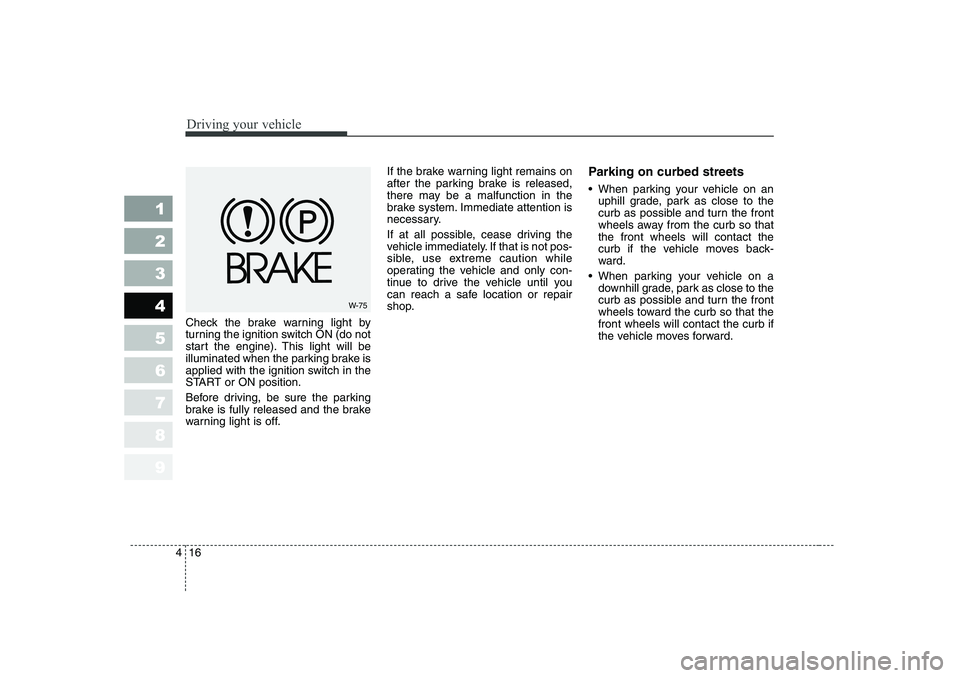
Check the brake warning light by
turning the ignition switch ON (do not
start the engine). This light will be
illuminated when the parking brake is
applied with the ignition switch in the
START or ON position.
Before driving, be sure the parking
brake is fully released and the brake
warning light is off. If the brake warning light remains on
after the parking brake is released,
there may be a malfunction in the
brake system. Immediate attention is
necessary.
If at all possible, cease driving the
vehicle immediately. If that is not pos-
sible, use extreme caution while
operating the vehicle and only con-
tinue to drive the vehicle until you
can reach a safe location or repair
shop.
Parking on curbed streets
When parking your vehicle on an
uphill grade, park as close to the
curb as possible and turn the front
wheels away from the curb so thatthe front wheels will contact the
curb if the vehicle moves back-
ward.
When parking your vehicle on a
downhill grade, park as close to the
curb as possible and turn the front
wheels toward the curb so that thefront wheels will contact the curb if
the vehicle moves forward.
W-75
Page 118 of 281
417
1 23456789
Driving your vehicle
Anti-lock brake system (ABS) (if equipped)The ABS system continuously sens-
es the speed of the wheels. If the
wheels are going to lock, the ABSsystem repeatedly modulates the
hydraulic brake pressure to the
wheels.
When you apply your brakes under
conditions which may lock the
wheels, you may hear a
“tik-tik ’’
sound from the brakes, or feel a cor-
responding sensation in the brake
pedal. This is normal and it means
your ABS system is active.
In order to obtain the maximum ben-
efit from your ABS system in anemergency situation, do not attempt
to modulate your brake pressure and
do not try to pump your brakes.
Press your brake pedal as hard as
possible or as hard as the situation
warrants and allow the ABS system
to control the force being delivered to
the brakes.
WARNING - ABS Brakes
Your ABS is not a substitute for
good driving judgement. You
can still have an accident. In
fact, your ABS system will prob-
ably not be able to prevent an
accident in the following drivingconditions: Dangerous driving, such as
neglecting safety precautions,
speeding, or driving too close
to the vehicle in front of you.
Driving at high speed in situa-
tions providing considerably
less traction, such as wet con-
ditions where hydroplaning
could occur.
(Continued)
(Continued) Driving too fast on poor road
surfaces. The ABS is
designed to improve maxi-
mum braking effectiveness on
typical highways and roads in
good condition. On poor roadsurfaces in poor condition,
the ABS may actually reduce
braking effectiveness.
Page 122 of 281
421
1 23456789
Driving your vehicle
Tilt steering (if equipped)
A tilt steering wheel allows you to
adjust the steering wheel before you
drive. You can also raise it to the
highest level to give your legs more
room when you exit and enter the
vehicle.
The steering wheel should be posi-
tioned so that it is comfortable for
you to drive, while permitting you to
see the instrument panel warning
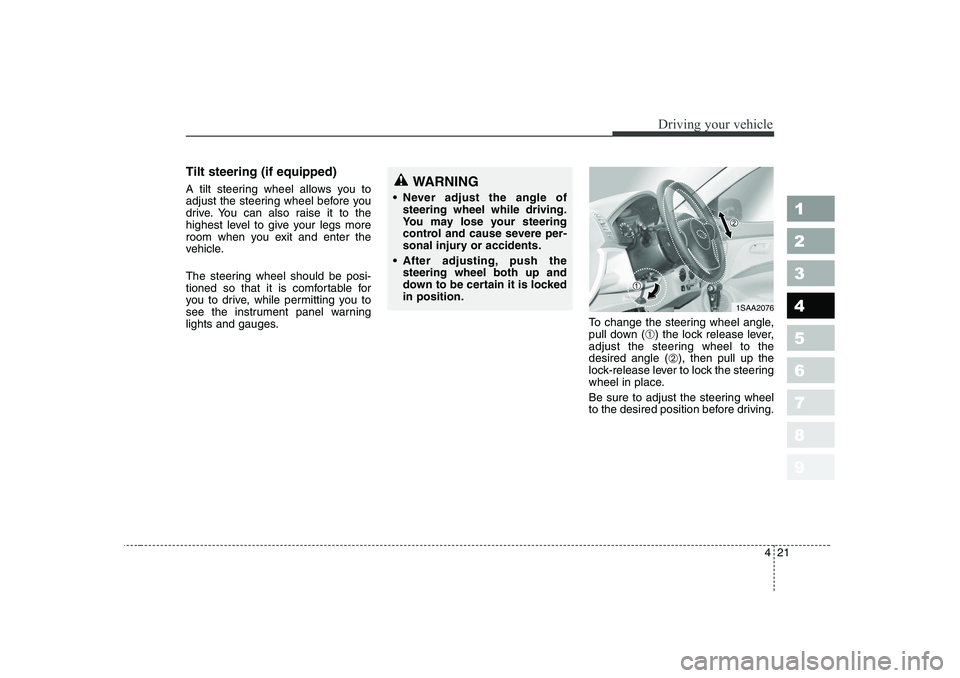
lights and gauges.To change the steering wheel angle,
pull down (
➀) the lock release lever,
adjust the steering wheel to thedesired angle ( ➁), then pull up the
lock-release lever to lock the steering
wheel in place.
Be sure to adjust the steering wheel
to the desired position before driving.WARNING
Never adjust the angle of steering wheel while driving.
You may lose your steering
control and cause severe per-
sonal injury or accidents.
After adjusting, push thesteering wheel both up and
down to be certain it is lockedin position.
1SAA2076
Page 123 of 281
Driving your vehicle
22
4
1 23456789
Horn
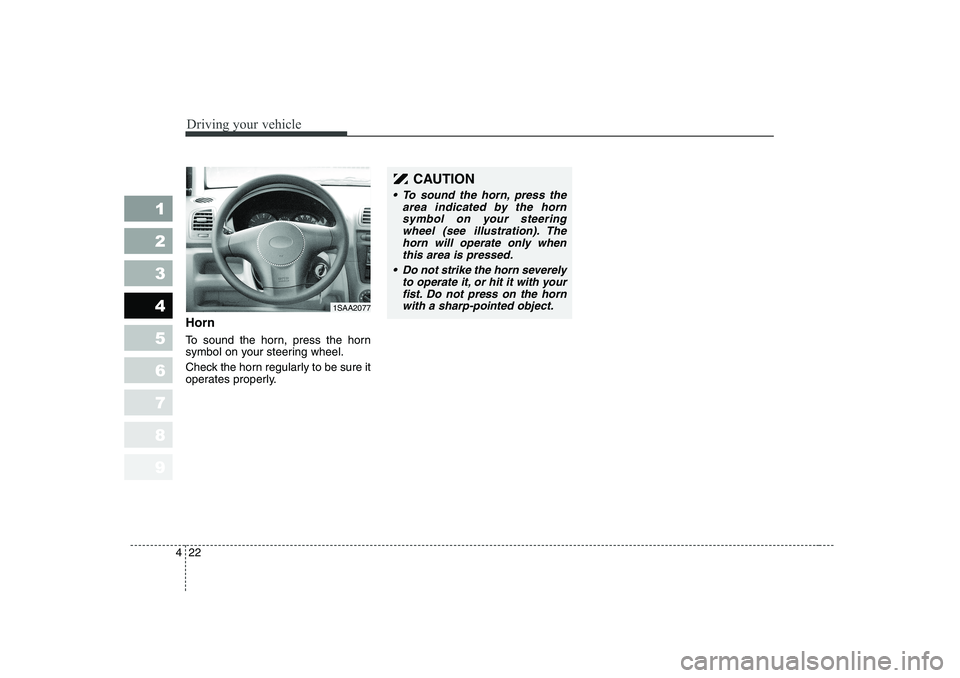
To sound the horn, press the horn
symbol on your steering wheel.
Check the horn regularly to be sure it
operates properly.
CAUTION
To sound the horn, press the
area indicated by the hornsymbol on your steering wheel (see illustration). Thehorn will operate only whenthis area is pressed.
Do not strike the horn severely
to operate it, or hit it with your fist. Do not press on the hornwith a sharp-pointed object.
1SAA2077
Page 132 of 281

431
1 23456789
Driving your vehicle
Malfunction indicator (if equipped)
This indicator light is part of the Engine Control System which moni-
tors various emission control system
components. If this light illuminates
while driving, it indicates that a
potential problem has been detected
somewhere in the emission controlsystem.
Generally, your vehicle will continue
to be drivable and will not need tow-
ing, but have the system checked by
an authorized Kia Dealer as soon as
possible.Electric power steer- ing system(EPS) warn-ing Light (if equipped,
diesel engine only) This indicator light comes on about 3
seconds after the ignition key is
turned to the
“ON ”position or after
the engine is started, it will go out.This light also comes on when the
EPS has some troubles. If this light
illuminates while driving, take your
car to the authorized Kia Dealer and
have the system checked.CAUTION
Prolonged driving with the
Emission Control SystemMalfunction Indicator Light ( ) illuminated may causedamage to the emission con- trol systems which couldeffect drivability and/or fueleconomy.
If the EmissionControl System
Malfunction Indicator Light ( ) begins to flash ON and OFF, potential catalytic con-verter damage is possible which could result in loss ofengine power. Have the Engine Control System inspected assoon as possible by an author- ized Kia Dealer.
EPS
CAUTION
When you move the electric
power steering back-end andforth-end continuously in stop position, steering wheel playsheavily to operate anti-overloadsystem. It is normal condition. It returns to be normal gettingtime.
Page 138 of 281
437
1 23456789
Driving your vehicle
Headlight leveling device (if equipped)
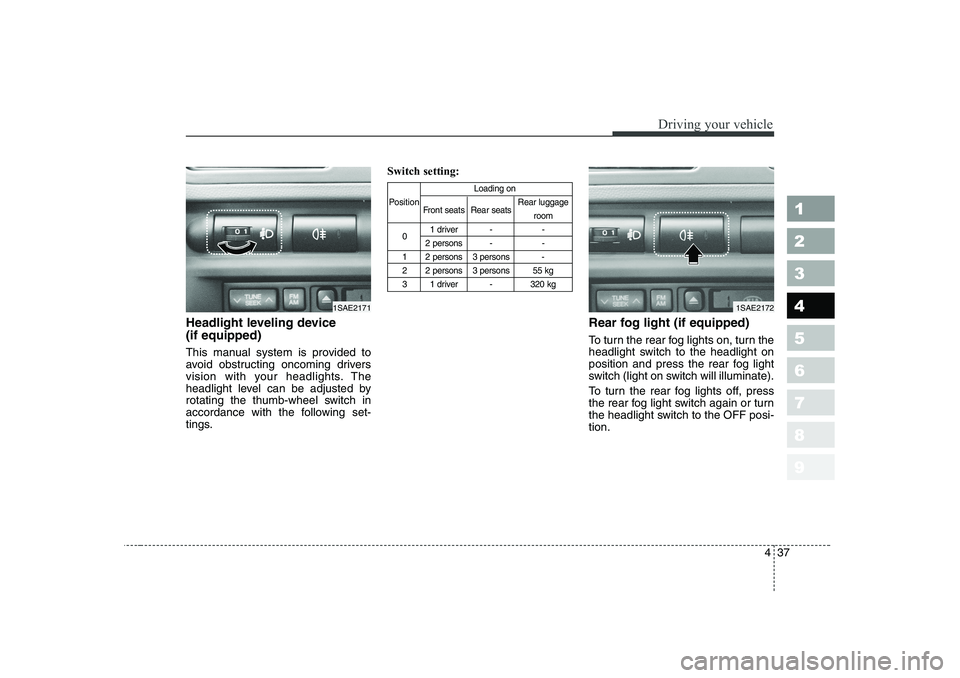
This manual system is provided to
avoid obstructing oncoming drivers
vision with your headlights. The
headlight level can be adjusted by
rotating the thumb-wheel switch in
accordance with the following set-
tings.Switch setting:
Rear fog light (if equipped)
To turn the rear fog lights on, turn the
headlight switch to the headlight on
position and press the rear fog light
switch (light on switch will illuminate).
To turn the rear fog lights off, press
the rear fog light switch again or turn
the headlight switch to the OFF posi-tion.
Loading on
Position Front seats Rear seats Rear luggage
room
0 1 driver - -
2 persons - -
1 2 persons 3 persons -
2 2 persons 3 persons 55 kg
3 1 driver - 320 kg
1SAE21721SAE2171
Page 147 of 281
Driving your vehicle
46
4
1 23456789
Floor position
Most of the air flow is
directed to the floor, with asmall amount of the airbeing directed to the wind-
shield and side window
defroster.
(outlet port: , , )
Floor - defrost position
Most of the air flow is directed to the floor andthe windshield with asmall amount directed to
the side window
defrosters.
(outlet port: , , )
Defrost position
Most of the air flow is directed to the windshieldwith a small amount of airdirected to the side win-
dow defrosters.
(outlet port: , )
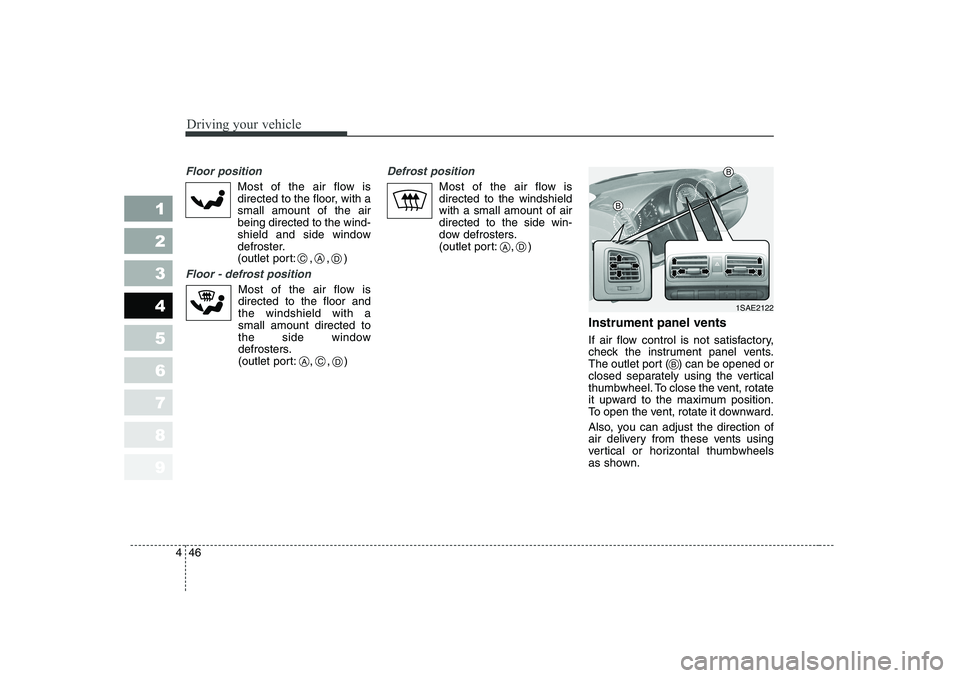
Instrument panel vents
If air flow control is not satisfactory,
check the instrument panel vents.
The outlet port ( ) can be opened or
closed separately using the vertical
thumbwheel. To close the vent, rotate
it upward to the maximum position.
To open the vent, rotate it downward.
Also, you can adjust the direction of
air delivery from these vents using
vertical or horizontal thumbwheels
as shown.
CAD
ACD
AD
1SAE2122
B
B
B