battery KIA PICANTO 2010 User Guide
[x] Cancel search | Manufacturer: KIA, Model Year: 2010, Model line: PICANTO, Model: KIA PICANTO 2010Pages: 336, PDF Size: 33.02 MB
Page 135 of 336

Features of your vehicle
64
4
D240202AUN
Temperature control
The temperature will increase to the
maximum (HI) by turning the knob to the
right extremely.
The temperature will decrease to the
minimum (Lo) by turning the knob to the
left extremely.
When turning the knob, the temperature
will increase or decrease by 0.5°C/1°F.
When set to the lowest temperature set-
ting, the air conditioning will operate con-
tinuously. Temperature conversion
If the battery has been discharged or dis-
connected, the temperature mode dis-
play will reset to Centigrade.
This is a normal condition. You can switch
the temperature mode between
Centigrade to Fahrenheit as follows;
While depressing the AUTO button,
depress the OFF button for 3 seconds or
more. The display will change from
Centigrade to Fahrenheit, or from
Fahrenheit to Centigrade.
D240207AUN
Outside thermometer
The current outside temperature is dis-
played in 1°C (1°F) increments. The tem-
perature range is between -40°C ~ 60°C(-40°F~140°F).
OSA047111OSA047125
Page 140 of 336

469
Features of your vehicle
D250300AUN
Defogging logic
To reduce the possibility of fogging up
the inside of the windshield, the air intakeor air conditioning are controlled auto-
matically according to certain conditions
such as or position. To cancel or
return the defogging logic, do the follow-ing.D250302AUN
Automatic climate control system
1. Turn the ignition switch to the ON posi-tion.
2. Select the defrost position pressing defrost button ( ).
3. While holding the air conditioning but- ton (A/C) pressed, press the air intake
control button ( ) at least 5 times
within 3 seconds.
The A/C display blinks 3 times with 0.5
second of interval. It indicates that the
defogging logic is canceled or returned to
the programmed status.
If the battery has been discharged or dis-
connected, it resets to the defog logic
status.
OSA040122
Page 145 of 336
Features of your vehicle
74
4
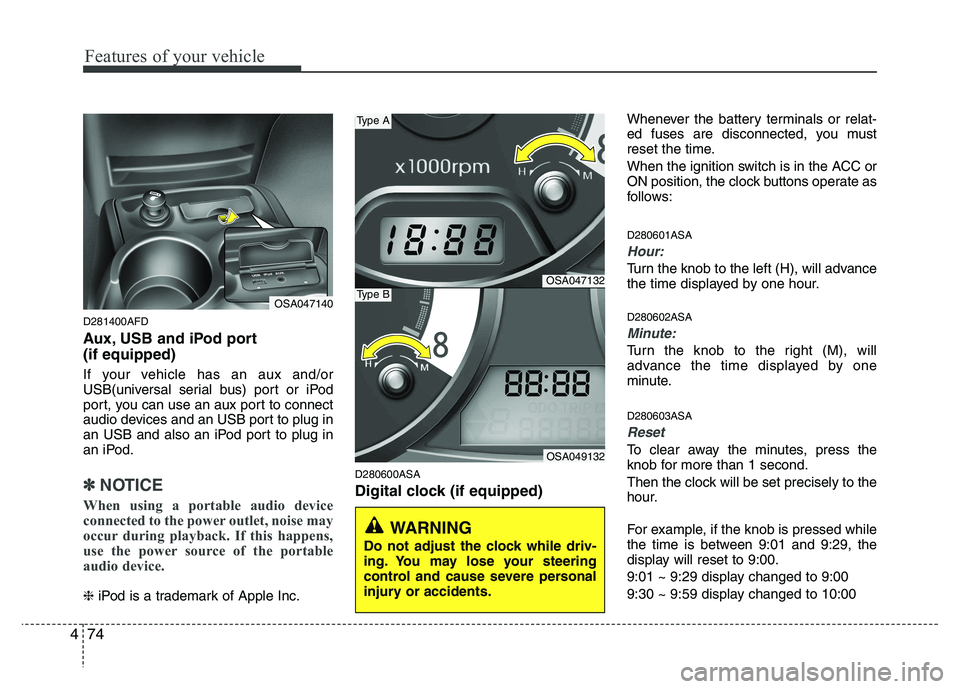
D281400AFD
Aux, USB and iPod port (if equipped)
If your vehicle has an aux and/or
USB(universal serial bus) port or iPod
port, you can use an aux port to connect
audio devices and an USB port to plug in
an USB and also an iPod port to plug in
an iPod.
✽✽
NOTICE
When using a portable audio device
connected to the power outlet, noise may
occur during playback. If this happens,
use the power source of the portable
audio device.
❈ iPod is a trademark of Apple Inc. D280600ASA
Digital clock (if equipped) Whenever the battery terminals or relat-
ed fuses are disconnected, you must
reset the time.
When the ignition switch is in the ACC or
ON position, the clock buttons operate as
follows: D280601ASA
Hour:
Turn the knob to the left (H), will advance
the time displayed by one hour. D280602ASA
Minute:
Turn the knob to the right (M), will
advance the time displayed by one
minute. D280603ASA
Reset
To clear away the minutes, press the
knob for more than 1 second.
Then the clock will be set precisely to the
hour.
For example, if the knob is pressed while
the time is between 9:01 and 9:29, the
display will reset to 9:00.
9:01 ~ 9:29 display changed to 9:00
9:30 ~ 9:59 display changed to 10:00
OSA047140
WARNING
Do not adjust the clock while driv-
ing. You may lose your steering
control and cause severe personal
injury or accidents.
OSA047132
OSA049132
Type A
Type B
Page 146 of 336

475
Features of your vehicle
D280500AUN
Power outlet (if equipped)
The power outlet is designed to provide
power for mobile telephones or other
devices designed to operate with vehicle
electrical systems. The devices should
draw less than 10 amps with the engine
running.D280800BEN
Clothes hanger (if equipped)
OSA047144K
CAUTION
Use the power outlet only whenthe engine is running and remove
the accessory plug after use.Using the accessory plug for pro-longed periods of time with theengine off could cause battery
discharge.
Only use 12V electric accessories which are less than 10A in elec-tric capacity.
Adjust the air-conditioner or heater to the lowest operatinglevel when using the power out- let.
Close the cover when not in use. Some electronic devices can cause electronic interference
when plugged into a vehicle’s power outlet. These devices maycause excessive audio static andmalfunctions in other electronic
systems or devices used in yourvehicle.
CAUTION
Do not hang heavy clothes, since
those may damage the hook.
OSA047133
OSA047133K
Type A
Type B
Page 155 of 336

Features of your vehicle
84
4
✽✽
NOTICE
To assure proper operation of the unit, keep the vehicle interior temperature
within a normal range by using the
vehicle's air conditioning or heating
system.
When replacing the fuse, replace it with a fuse having the correct capaci-
ty.
All stored bookmarks are erased
when the car battery is disconnected
or power to the vehicle is lost. If this
occurs, the bookmarks will have to be
reset.
This equipment is designed to be used only in a 12 volt DC battery system
with negative ground.
This unit is made of precision parts.
Do not attempt to disassemble or
adjust any parts.
Do not expose this equipment (includ- ing the speakers and CD) to water or
excessive moisture.(Continued)
Avoid using recorded compact discs in your audio unit. Originalcompact discs are recommendedfor best results.CAUTION
Do not insert warped or poor quality discs into the CD player
as damage to the unit may occur.
Do not insert anything such as coins into the player slot as dam-age to the unit may occur.
Do not place beverages close to the audio system. It may damagethe playback mechanism if youspill them.
Do not strike or allow anything to impact the audio system, damage
to the system mechanisms couldoccur.
Off-road or rough surface driving may cause the compact disc toskip. Do not use the compact
disc when driving in such condi-tions as damage to the compactdisc face could occur.
Do not attempt to grab or pull the compact disc out while the disc isbeing pulled into the audio unitby self-loading mechanism.
Damage to the audio unit andcompact disc could occur.
(Continued)
WARNING
When driving your vehicle, be sure
to keep the volume of the unit set
low enough to allow you to hear
sounds coming from the outside.
Page 161 of 336

Features of your vehicle
90
4
✽✽
NOTICE
To assure proper operation of the unit, keep the vehicle interior temperature
within a normal range by using the
vehicle's air conditioning or heating
system.
When replacing the fuse, replace it with a fuse having the correct capaci-
ty.
The preset station frequencies are all
erased when the car battery is discon-
nected. Therefore, all data will have to
be set again if this should occur.
Do not add any oil to the rotating
parts. Keep magnets, screwdrivers
and other metallic objects away from
the tape mechanism and head.
This equipment is designed to be used
only in a 12 volt DC battery system
with negative ground.
This unit is made of precision parts. Do not attempt to disassemble or
adjust any parts.
Do not expose this equipment (includ-
ing the speakers and tape) to water or
excessive moisture.(Continued)
Avoid using recorded compact discs in your audio unit. Originalcompact discs are recommendedfor best results.CAUTION
Do not insert warped or poor quality discs into the CD player
as damage to the unit may occur.
Do not insert anything like coins into the player slot as damage tothe unit may occur.
Do not place beverages close to the audio system. It may damagethe playback mechanism if youspill them.
Do not strike or allow anything to impact the audio system, damage
to the system mechanisms couldoccur.
Off-road or rough surface driving may cause the compact disc toskip. Do not use the compact
disc when driving in such condi-tions as damage to the compactdisc face could occur.
Do not attempt to grab or pull the compact disc out while the disc isbeing pulled into the audio unitby self-loading mechanism.
Damage to the audio unit andcompact disc could occur.
(Continued)
WARNING
When driving your vehicle, be sure
to keep the volume of the unit set
low enough to allow you to hear
sounds coming from the outside.
Page 168 of 336
497
Features of your vehicle
CAUTION IN USING iPod DEVICE
You need the power cable exclu-sive for an iPod in order to oper-
ate an iPod with the buttons onthe audio system. The PC cable provided by Apple may cause amalfunction and do not use it for
vehicle use.
When connecting the device with an iPod cable, push in the jackfully to not to interfere with com-
munication.
When adjusting the sound effects of an iPod and the audio system,the sound effects of both devices will overlap and might reduce or
distort the quality of the sound.
Deactivate (turn off) the equalizer function of an iPod when adjust-ing the audio system's volume, and turn off the equalizer of the
audio system when using the equalizer of an iPod.
(Continued)
(Continued) When the iPod cable is connect- ed, the system can be switched tothe AUX mode even without theiPod device and can cause noise.
Disconnect the iPod cable whenyou are not using the iPod device.
When the iPod is not used for the audio system, the iPod cable has
to be separate from iPod devices.Origin display of iPod may not bedisplayed.✽✽ NOTICE FOR USING iPod
DEVICE
Some iPod models might not support the communication protocol and the
files will not be played. (iPod models
supported: Mini, 4G, Photo, Nano,
5G)
The order of search or playback of songs in the iPod can be different
from the order searched in the audio
system.
If the iPod crashes due to its own
trouble, reset the iPod. (Reset: Refer
to iPod manual)
iPod may not operate normally on low battery.
Page 174 of 336

4103
Features of your vehicle
✽✽NOTICE
To assure proper operation of the unit, keep the vehicle interior temperature
within a normal range by using the
vehicle's air conditioning or heating
system.
When replacing the fuse, replace it with a fuse having the correct capaci-
ty.
All stored bookmarks are erased
when the car battery is disconnected
or power to the vehicle is lost. If this
occurs, the bookmarks will have to be
reset.
This equipment is designed to be used only in a 12 volt DC battery system
with negative ground.
This unit is made of precision parts.
Do not attempt to disassemble or
adjust any parts.
Do not expose this equipment (includ- ing the speakers and CD) to water or
excessive moisture.(Continued)
Avoid using recorded compact discs in your audio unit. Originalcompact discs are recommendedfor best results.CAUTION
Do not insert warped or poor quality discs into the CD player
as damage to the unit may occur.
Do not insert anything like coins into the player slot as damage tothe unit may occur.
Do not place beverages close to the audio system. It may damagethe playback mechanism if youspill them.
Do not strike or allow anything to impact the audio system, damage
to the system mechanisms couldoccur.
Off-road or rough surface driving may cause the compact disc toskip. Do not use the compact
disc when driving in such condi- tions as damage to the compactdisc face could occur.
Do not attempt to grab or pull the compact disc out while the disc isbeing pulled into the audio unitby the self-loading mechanism.Damage to the audio unit and
compact disc could occur.
(Continued)
WARNING
When driving your vehicle, be sure
to keep the volume of the unit set
low enough to allow you to hear
sounds coming from the outside.
Page 181 of 336

Features of your vehicle
110
4
CAUTION IN USING iPod DEVICE
You need the power cable exclu-
sive for an iPod in order to oper-
ate an iPod with the buttons onthe audio system. The PC cable provided by Apple may cause amalfunction and do not use it for
vehicle use.
When connecting the device with an iPod cable, push in the jackfully to not to interfere with com-
munication.
When adjusting the sound effects of an iPod and the audio system,the sound effects of both devices will overlap and might reduce or
distort the quality of the sound.
Deactivate (turn off) the equalizer function of an iPod when adjust-ing the audio system's volume, and turn off the equalizer of the
audio system when using the equalizer of an iPod.
(Continued)
(Continued) When the iPod cable is connect- ed, the system can be switched tothe AUX mode even without theiPod device and can cause noise.
Disconnect the iPod cable whenyou are not using the iPod device.
When the iPod is not used for the audio system, the iPod cable has
to be separate from iPod devices.Origin display of iPod may not bedisplayed.✽✽ NOTICE FOR USING iPod
DEVICE
Some iPod models might not support the communication protocol and the
files will not be played. (iPod models
supported: Mini, 4G, Photo, Nano,
5G)
The order of search or playback of songs in the iPod can be different
from the order searched in the audio
system.
If the iPod crashes due to its own
trouble, reset the iPod. (Reset: Refer
to iPod manual)
iPod may not operate normally on low battery.
Page 185 of 336

Driving your vehicle
4
5
Ignition switch position
E030201AUN
LOCK
The steering wheel locks to protect
against theft. The ignition key can be
removed only in the LOCK position.
When turning the ignition switch to the
LOCK position, push the key inward at
the ACC position and turn the key towardthe LOCK position. E030202AUN
ACC (Accessory)
The steering wheel is unlocked and elec-
trical accessories are operative.
✽✽
NOTICE
If difficulty is experienced turning the
ignition switch to the ACC position, turn
the key while turning the steering wheel
right and left to release the tension.
E030203AUN
ON
The warning lights can be checked
before the engine is started. This is the
normal running position after the engine
is started.
Do not leave the ignition switch ON if the engine is not running to prevent battery
discharge.
E030204AUN
START
Turn the ignition switch to the START
position to start the engine. The engine
will crank until you release the key; then
it returns to the ON position. The brake
warning lamp can be checked in thisposition. E030205ASA
KEY POSITIONS
OSA057001WARNING
- Ignition
switch
Never turn the ignition switch to LOCK or ACC while the vehicle is
moving. This would result in loss
of directional control and braking
function, which could cause anaccident.
The anti-theft steering column lock is not a substitute for the parking
brake. Before leaving the driver’s
seat, always make sure the shift
lever is engaged in the 1st gear for
manual transaxle or P (Park) for
the automatic transaxle, set the
parking brake fully and shut the
engine off. Unexpected and sud-
den vehicle movement may occurif these precautions are not taken.
(Continued)