reset KIA PICANTO 2011 User Guide
[x] Cancel search | Manufacturer: KIA, Model Year: 2011, Model line: PICANTO, Model: KIA PICANTO 2011Pages: 336, PDF Size: 24.51 MB
Page 156 of 336
485
Features of your vehicle
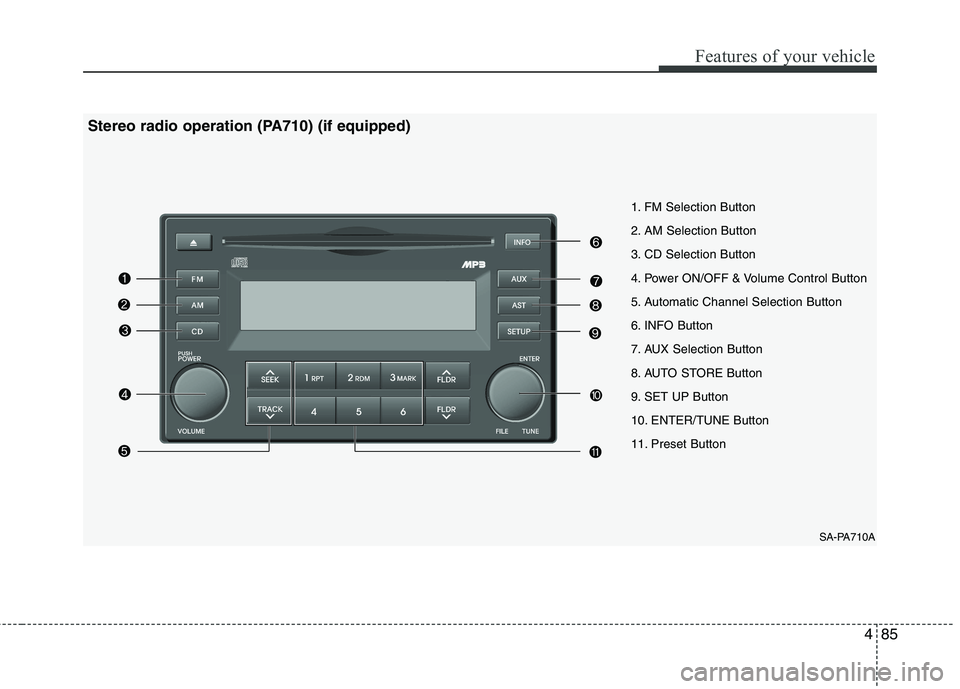
SA-PA710A
1. FM Selection Button
2. AM Selection Button
3. CD Selection Button
4. Power ON/OFF & Volume Control Button
5. Automatic Channel Selection Button
6. INFO Button
7. AUX Selection Button
8. AUTO STORE Button
9. SET UP Button
10. ENTER/TUNE Button
11. Preset Button
Stereo radio operation (PA710) (if equipped)
Page 157 of 336
Features of your vehicle
86
4
1. FM Selection Button
Turns to FM mode and toggles FM1 ➟
FM2 ➟FM1··· when the button is pressed
each time.
2. AM Selection Button
Turns to AM mode and toggles AM when
the button is pressed each time.
3. CD Selection Button
If there is a CD in the CDP deck it turns
to the CD mode when the button is
pressed each time.
4. Power ON/OFF & Volume Control
Button
Turns on/off when the IGNITIONSWITCH is on ACC or ON. If the button
is turned to the right, it increases the
volume and left, decreases the vol-
ume.
(BASS, MID, TRE) are adjusted in a
separate way.
If you pull out AUX from a jack and
insert it again, then only volume goes
back to 10-step.
5. Automatic Channel Selection
Button
When the [SEEK ]button is pressed,
it reduces the band frequency by 100Khz to automatically select a chan-nel.
Stops at the previous frequency if no
channel is found.
When the [SEEK ]button is pressed, it increases the band frequency by100khz to automatically select a chan-nel.
Stops at the previous frequency if no
channel is found.
6. INFO Button
Displays the information of the channel
currently played by RDS.
7. AUX Selection Button
If the auxiliary device is connected, it
turns to AUX MODE to play the sound
from the auxiliary player.
If there is no disc and the auxiliary device
is not connected, it displays "NO MEDIA"
for 5 seconds and returns to the previous
mode.
8. AUTO STORE Button
When the button is pressed, it automati-
cally selects and saves channels with
high reception rate to PRESET buttons
(1~6) and plays the channel saved inPRESET1.
If no channel is saved after the AUTO
STORE button is pressed, it will play the
previous channel.
9. SET UP Button
Press this button to turn to the SOUND,
SCROLL adjustment mode.
If no action is taken for 5 seconds after
pressing the button, it will return to the
play mode.(After entering SET UP mode,
move between items using the left, right
and PUSH functions of the TUNE button.)The SET UP item changes from SOUND
(BASS, MIDDLE, TREBLE, FADER,BALANCE, RETURN) ➟
SCROLL (ON,
OFF) ➟ RETURN.
Page 158 of 336
487
Features of your vehicle
10. TUNE/ENTER Button
Turn this button clockwise by one notch
to increase frequency by 100Khz from
current frequency.
Turn this button counterclockwise by one
notch to decrease frequency by 100Khz
from current frequency.
Press this button while holding SET UP
button to activate / inactivate the item.
Select SET UP item using left and right
function of the Tune button.
11. Preset Button
Push [1]~[6] buttons less than 0.8 second
to play the channel saved in each button.
Push the preset button for 0.8 second or
longer to save the current channel to the
respective button with a beep.
CAUTION
Do not place beverages close tothe audio system. It may damagethe audio system mechanism if
you spill them.
Do not strike or allow anything to impact the audio system, damageto the system mechanisms couldoccur.
Page 161 of 336
Features of your vehicle
90
4
✽✽
NOTICE
To assure proper operation of the unit, keep the vehicle interior temperature
within a normal range by using the
vehicle's air conditioning or heating
system.
When replacing the fuse, replace it with a fuse having the correct capaci-
ty.
The preset station frequencies are all
erased when the car battery is discon-
nected. Therefore, all data will have to
be set again if this should occur.
Do not add any oil to the rotating
parts. Keep magnets, screwdrivers
and other metallic objects away from
the tape mechanism and head.
This equipment is designed to be used
only in a 12 volt DC battery system
with negative ground.
This unit is made of precision parts. Do not attempt to disassemble or
adjust any parts.
Do not expose this equipment (includ-
ing the speakers and tape) to water or
excessive moisture.(Continued)
Avoid using recorded compact discs in your audio unit. Originalcompact discs are recommendedfor best results.CAUTION
Do not insert warped or poor quality discs into the CD player
as damage to the unit may occur.
Do not insert anything like coins into the player slot as damage tothe unit may occur.
Do not place beverages close to the audio system. It may damagethe playback mechanism if youspill them.
Do not strike or allow anything to impact the audio system, damage
to the system mechanisms couldoccur.
Off-road or rough surface driving may cause the compact disc toskip. Do not use the compact
disc when driving in such condi-tions as damage to the compactdisc face could occur.
Do not attempt to grab or pull the compact disc out while the disc isbeing pulled into the audio unitby self-loading mechanism.
Damage to the audio unit andcompact disc could occur.
(Continued)
WARNING
When driving your vehicle, be sure
to keep the volume of the unit set
low enough to allow you to hear
sounds coming from the outside.
Page 168 of 336
497
Features of your vehicle
CAUTION IN USING iPod DEVICE
You need the power cable exclu-sive for an iPod in order to oper-
ate an iPod with the buttons onthe audio system. The PC cable provided by Apple may cause amalfunction and do not use it for
vehicle use.
When connecting the device with an iPod cable, push in the jackfully to not to interfere with com-
munication.
When adjusting the sound effects of an iPod and the audio system,the sound effects of both devices will overlap and might reduce or
distort the quality of the sound.
Deactivate (turn off) the equalizer function of an iPod when adjust-ing the audio system's volume, and turn off the equalizer of the
audio system when using the equalizer of an iPod.
(Continued)
(Continued) When the iPod cable is connect- ed, the system can be switched tothe AUX mode even without theiPod device and can cause noise.
Disconnect the iPod cable whenyou are not using the iPod device.
When the iPod is not used for the audio system, the iPod cable has
to be separate from iPod devices.Origin display of iPod may not bedisplayed.✽✽ NOTICE FOR USING iPod
DEVICE
Some iPod models might not support the communication protocol and the
files will not be played. (iPod models
supported: Mini, 4G, Photo, Nano,
5G)
The order of search or playback of songs in the iPod can be different
from the order searched in the audio
system.
If the iPod crashes due to its own
trouble, reset the iPod. (Reset: Refer
to iPod manual)
iPod may not operate normally on low battery.
Page 169 of 336
Features of your vehicle
98
4
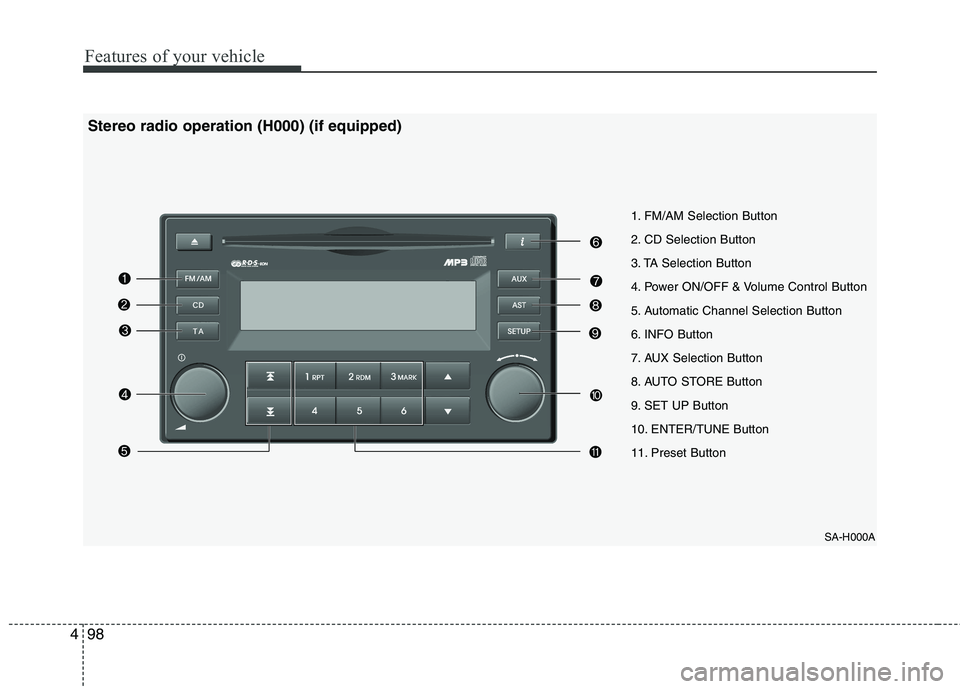
SA-H000A
1. FM/AM Selection Button
2. CD Selection Button
3. TA Selection Button
4. Power ON/OFF & Volume Control Button
5. Automatic Channel Selection Button
6. INFO Button
7. AUX Selection Button
8. AUTO STORE Button
9. SET UP Button
10. ENTER/TUNE Button
11. Preset Button
Stereo radio operation (H000) (if equipped)
Page 170 of 336
499
Features of your vehicle
1. FM/AM Selection Button
Turns to FM/AM mode and toggles in the order of FM1➟FM2 ➟FMA ➟AM ➟AMA ➟
FM1··· when the button is pressed each
time.
2. CD Selection Button
If there is a CD in the CDP DECK it turns
to CD mode when the button is pressed
each time.
3. TA Selection Button
In the FM, CD and AUX mode, you may
turn on/off the reception of the TA chan-
nels of RDS.
4. Power ON/OFF & Volume Control
Button
Turns on/off when the IGNITIONSWITCH is on ACC or ON. If the button
is turned to the right, it increases the
volume and left, decreases the vol-
ume.
(BASS, MID, TRE) are adjusted in a
separate way.
If you pull out AUX from a jack and
insert it again, then only volume goes
back to 10-step.
5. Automatic Channel Selection
Button
When the [SEEK ]button is pressed,
it reduces the band frequency by 50khz to automatically select a chan-
nel. Stops at the previous frequency if
no channel is found.
When the [SEEK ]button is pressed, it increases the band frequency by50khz to automatically select a channel.
Stops at the previous frequency if no
channel is found.
6. INFO Button
Displays the information of the channel
currently played by RDS.
7. AUX Selection Button
If the auxiliary device is connected, it
turns to AUX MODE to play the sound
from the auxiliary player.
If there is no disc and the auxiliary device
is not connected, it displays "NO MEDIA"
for 5 seconds and returns to the previous
mode.
8. AUTO STORE Button
When you press the [AST] button, themode changes to 'Auto store Band'
and it saves the result. (FM1 or FM2changes to FMA, AM changes toAMA.)
When the button is pressed, it auto- matically selects and saves channels
with high reception rate to PRESET
buttons (1~6) and plays the channel
saved in PRESET1.
If no channel is saved after the AUTO
STORE button is pressed, it will play
the previous channel.
9. SET UP Button
Press this button to turn to the SOUND,
RDS option, SCROLL adjustment mode.
If no action is taken for 5 seconds after
pressing the button, it will return to the
play mode.(After entering SET UP mode,
move between items using the left, right
and PUSH functions of the TUNE but-ton.) The SET UP item changes from SOUND
(BASS, MIDDLE, TREBLE, FADER,BALANCE, RETURN) ➟
RDS(AF, REG,
NEWS, PTY, VOLUME, RETURN) ➟
SCROLL (ON, OFF) ➟ RETURN.
Page 171 of 336
Features of your vehicle
100
4
10. ENTER/TUNE Button
Turn this button clockwise by one notch
to increase frequency by 0.05Mhz from
current frequency.
Turn this button counterclockwise by one
notch to decrease frequency by 0.05Mhz
from current frequency.
Press this button while holding the SET
UP button to activate/inactivate the item. Select a SET UP item using the left and
right function of the Tune button.
11. Preset Button
Push [1]~[6] buttons less than 0.8 second
to play the channel saved in each button.
Push the Preset button for 0.8 second or
longer to save the current channel to the
respective button with a beep.
CAUTION
Do not place beverages close to
the audio system. It may damagethe playback mechanism if you
spill them.
Do not strike or allow anything to impact the audio system, damageto the system mechanisms couldoccur.
Page 174 of 336
4103
Features of your vehicle
✽✽NOTICE
To assure proper operation of the unit, keep the vehicle interior temperature
within a normal range by using the
vehicle's air conditioning or heating
system.
When replacing the fuse, replace it with a fuse having the correct capaci-
ty.
All stored bookmarks are erased
when the car battery is disconnected
or power to the vehicle is lost. If this
occurs, the bookmarks will have to be
reset.
This equipment is designed to be used only in a 12 volt DC battery system
with negative ground.
This unit is made of precision parts.
Do not attempt to disassemble or
adjust any parts.
Do not expose this equipment (includ- ing the speakers and CD) to water or
excessive moisture.(Continued)
Avoid using recorded compact discs in your audio unit. Originalcompact discs are recommendedfor best results.CAUTION
Do not insert warped or poor quality discs into the CD player
as damage to the unit may occur.
Do not insert anything like coins into the player slot as damage tothe unit may occur.
Do not place beverages close to the audio system. It may damagethe playback mechanism if youspill them.
Do not strike or allow anything to impact the audio system, damage
to the system mechanisms couldoccur.
Off-road or rough surface driving may cause the compact disc toskip. Do not use the compact
disc when driving in such condi- tions as damage to the compactdisc face could occur.
Do not attempt to grab or pull the compact disc out while the disc isbeing pulled into the audio unitby the self-loading mechanism.Damage to the audio unit and
compact disc could occur.
(Continued)
WARNING
When driving your vehicle, be sure
to keep the volume of the unit set
low enough to allow you to hear
sounds coming from the outside.
Page 181 of 336
Features of your vehicle
110
4
CAUTION IN USING iPod DEVICE
You need the power cable exclu-
sive for an iPod in order to oper-
ate an iPod with the buttons onthe audio system. The PC cable provided by Apple may cause amalfunction and do not use it for
vehicle use.
When connecting the device with an iPod cable, push in the jackfully to not to interfere with com-
munication.
When adjusting the sound effects of an iPod and the audio system,the sound effects of both devices will overlap and might reduce or
distort the quality of the sound.
Deactivate (turn off) the equalizer function of an iPod when adjust-ing the audio system's volume, and turn off the equalizer of the
audio system when using the equalizer of an iPod.
(Continued)
(Continued) When the iPod cable is connect- ed, the system can be switched tothe AUX mode even without theiPod device and can cause noise.
Disconnect the iPod cable whenyou are not using the iPod device.
When the iPod is not used for the audio system, the iPod cable has
to be separate from iPod devices.Origin display of iPod may not bedisplayed.✽✽ NOTICE FOR USING iPod
DEVICE
Some iPod models might not support the communication protocol and the
files will not be played. (iPod models
supported: Mini, 4G, Photo, Nano,
5G)
The order of search or playback of songs in the iPod can be different
from the order searched in the audio
system.
If the iPod crashes due to its own
trouble, reset the iPod. (Reset: Refer
to iPod manual)
iPod may not operate normally on low battery.