warning KIA PICANTO 2011 Manual Online
[x] Cancel search | Manufacturer: KIA, Model Year: 2011, Model line: PICANTO, Model: KIA PICANTO 2011Pages: 336, PDF Size: 24.51 MB
Page 136 of 336
465
Features of your vehicle
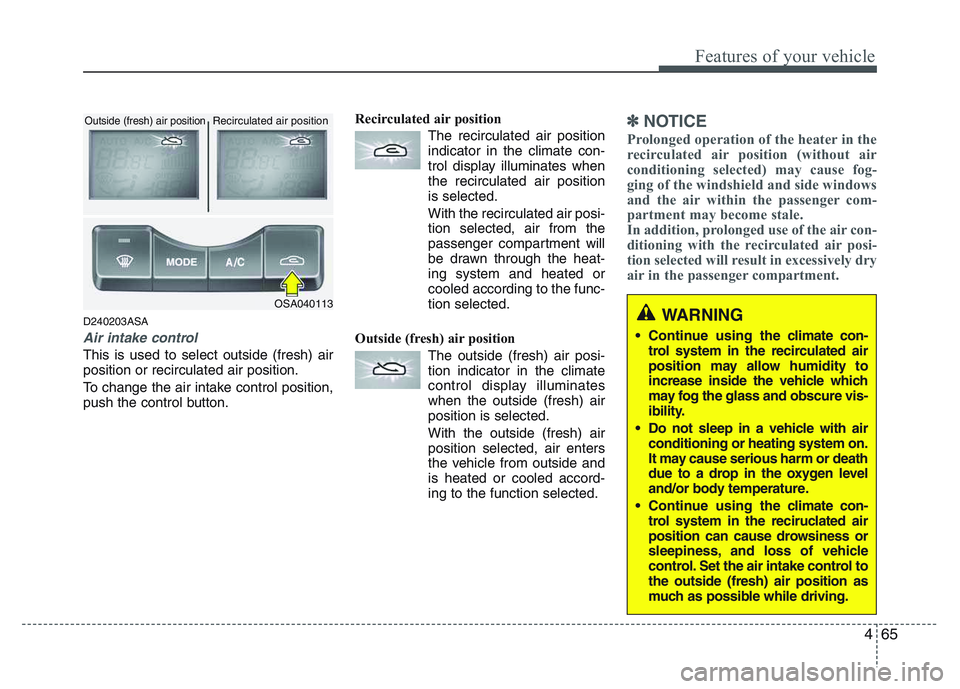
D240203ASA
Air intake control
This is used to select outside (fresh) air position or recirculated air position.
To change the air intake control position,
push the control button.Recirculated air position
The recirculated air positionindicator in the climate con-
trol display illuminates whenthe recirculated air positionis selected.
With the recirculated air posi- tion selected, air from the
passenger compartment will
be drawn through the heat-
ing system and heated orcooled according to the func-tion selected.
Outside (fresh) air position The outside (fresh) air posi-tion indicator in the climate
control display illuminateswhen the outside (fresh) airposition is selected.
With the outside (fresh) air position selected, air enters
the vehicle from outside andis heated or cooled accord-
ing to the function selected.
✽✽ NOTICE
Prolonged operation of the heater in the
recirculated air position (without air
conditioning selected) may cause fog-
ging of the windshield and side windows
and the air within the passenger com-
partment may become stale.
In addition, prolonged use of the air con-
ditioning with the recirculated air posi-
tion selected will result in excessively dry
air in the passenger compartment.
WARNING
Continue using the c limate con-
trol system in the recirculated air
position may allow humidity to
increase inside the vehicle which
may fog the glass and obscure vis-
ibility.
Do not sleep in a vehicle with air conditioning or heating system on.
It may cause serious harm or death
due to a drop in the oxygen level
and/or body temperature.
Continue using the c limate con-
trol system in the reciruclated air
position can cause drowsiness or
sleepiness, and loss of vehicle
control. Set the air intake control tothe outside (fresh) air position as
much as possible while driving.OSA040113
Recirculated air position
Outside (fresh) air position
Page 138 of 336
467
Features of your vehicle
D250000AEN For maximum defrosting, set the tem-
perature control to the extreme
right/hot position and the fan speedcontrol to the highest speed.
If warm air to the floor is desired while defrosting or defogging, set the modeto the floor-defrost position.
Before driving, clear all snow and ice from the windshield, rear window, out-
side rear view mirrors, and all side win-
dows.
Clear all snow and ice from the hood and air inlet in the cowl grill to improveheater and defroster efficiency and to
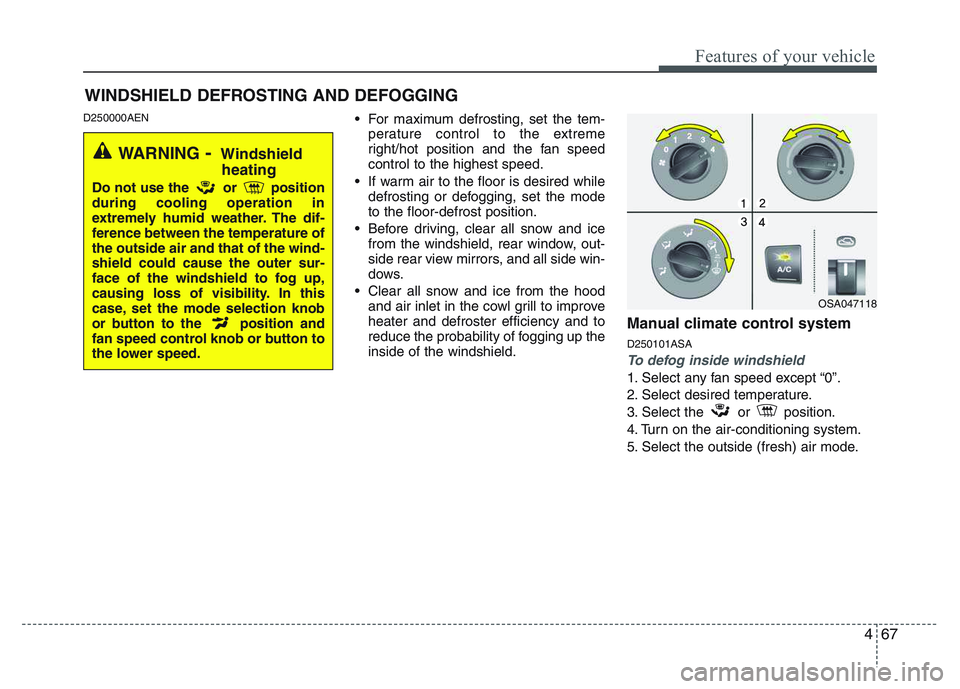
reduce the probability of fogging up theinside of the windshield. Manual climate control system D250101ASA
To defog inside windshield
1. Select any fan speed except “0”.
2. Select desired temperature.
3. Select
the or position.
4. Turn on the air-conditioning system.
5. Select the outside (fresh) air mode.
WINDSHIELD DEFROSTING AND DEFOGGING
OSA047118
WARNING - Windshield
heating
Do not use the or position during cooling operation in
extremely humid weather. The dif-
ference between the temperature ofthe outside air and that of the wind-shield could cause the outer sur-
face of the windshield to fog up,
causing loss of visibility. In this
case, set the mode selection knob
or button to the position and
fan speed control knob or button to
the lower speed.
Page 141 of 336
Features of your vehicle
70
4
STORAGE COMPARTMENT
D270000AHM
These compartments can be used to
store small items.
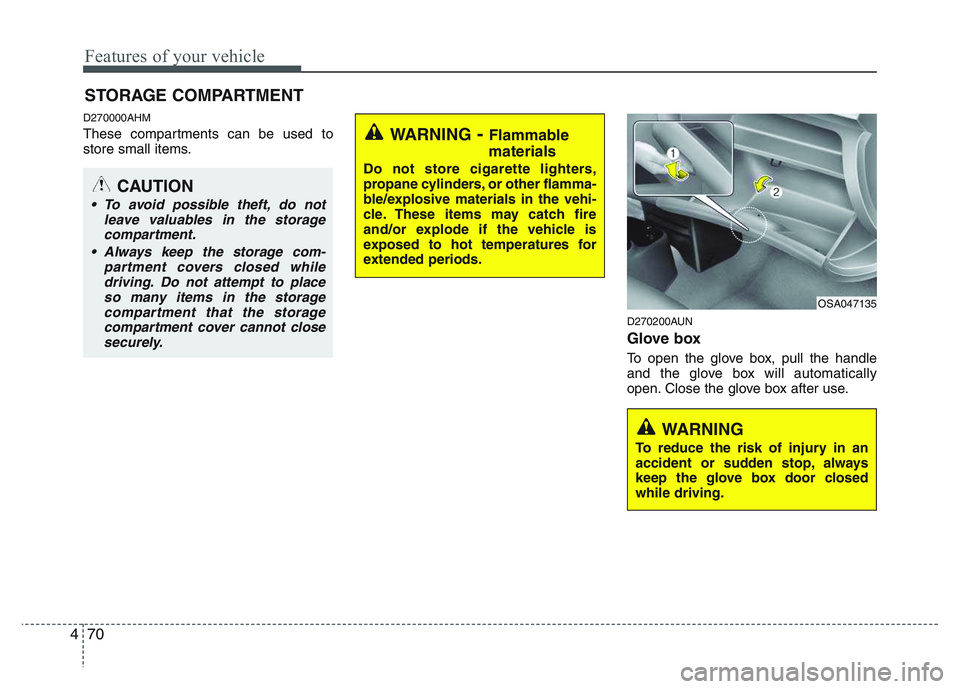
D270200AUN
Glove box
To open the glove box, pull the handle
and the glove box will automatically
open. Close the glove box after use.
WARNING- Flammable
materials
Do not store cigarette lighters,
propane cylinders, or other flamma-
ble/explosive materials in the vehi-
cle. These items may catch fire
and/or explode if the vehicle is
exposed to hot temperatures for
extended periods.
CAUTION
To avoid possible theft, do not leave valuables in the storagecompartment.
Always keep the storage com- partment covers closed whiledriving. Do not attempt to placeso many items in the storage compartment that the storage
compartment cover cannot close securely.
OSA047135
WARNING
To reduce the risk of injury in an
accident or sudden stop, always
keep the glove box door closedwhile driving.
Page 142 of 336
471
Features of your vehicle
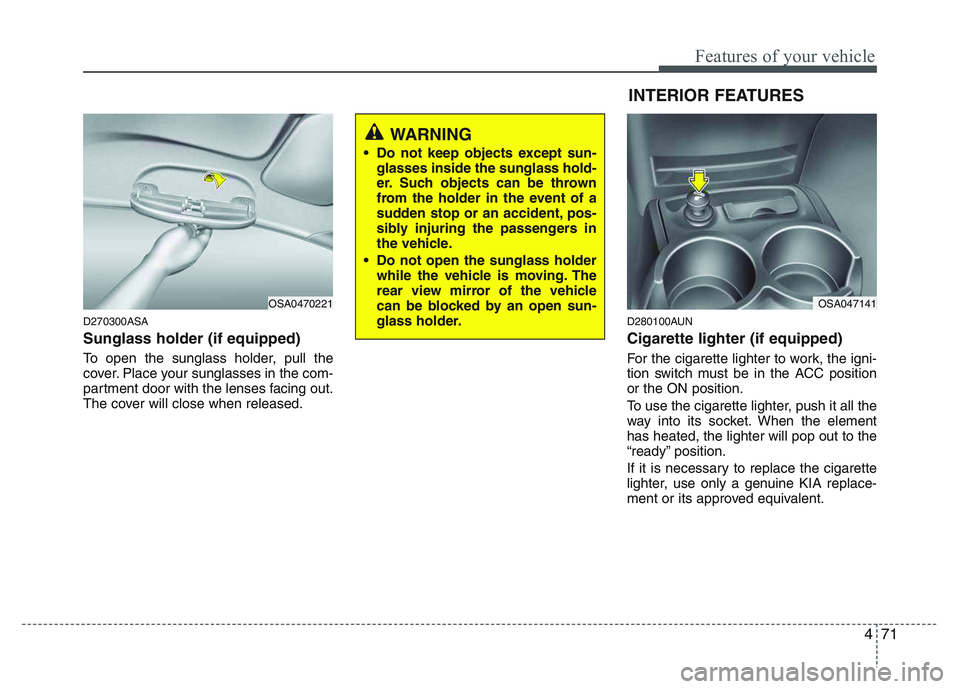
D270300ASA Sunglass holder (if equipped)
To open the sunglass holder, pull the
cover. Place your sunglasses in the com-
partment door with the lenses facing out.
The cover will close when released.D280100AUN Cigarette lighter (if equipped)
For the cigarette lighter to work, the igni-
tion switch must be in the ACC positionor the ON position.
To use the cigarette lighter, push it all the
way into its socket. When the elementhas heated, the lighter will pop out to the
“ready” position.
If it is necessary to replace the cigarette
lighter, use only a genuine KIA replace-
ment or its approved equivalent.
OSA0470221
WARNING
Do not keep objects except sun- glasses inside the sunglass hold-
er. Such objects can be thrown
from the holder in the event of a
sudden stop or an accident, pos-
sibly injuring the passengers in
the vehicle.
Do not open the sunglass holder while the vehicle is moving. The
rear view mirror of the vehicle
can be blocked by an open sun-
glass holder.
OSA047141
INTERIOR FEATURES
Page 143 of 336
Features of your vehicle
72
4
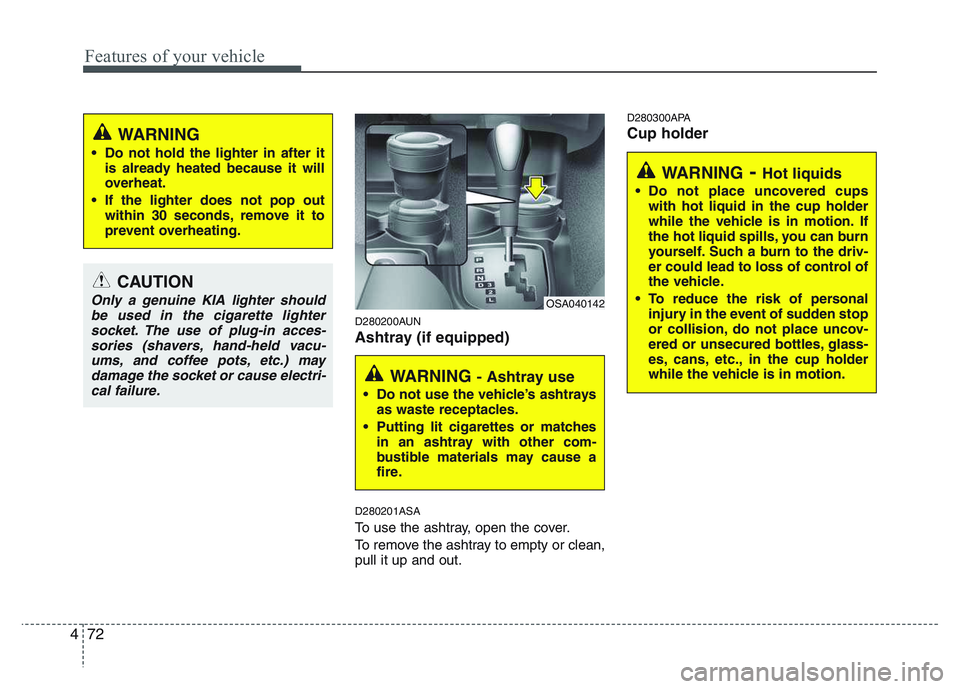
D280200AUN
Ashtray (if equipped) D280201ASA
To use the ashtray, open the cover.
To remove the ashtray to empty or clean, pull it up and out. D280300APA Cup holder
CAUTION
Only a genuine KIA lighter should
be used in the cigarette lighter
socket. The use of plug-in acces-sories (shavers, hand-held vacu-ums, and coffee pots, etc.) may damage the socket or cause electri-
cal failure.
WARNING
Do not hold the lighter in after it is already heated because it will
overheat.
If the lighter does not pop out within 30 seconds, remove it to
prevent overheating.
WARNING - Ashtray use
Do not use the vehicle’s ashtrays as waste receptacles.
Putting lit cigarettes or matches in an ashtray with other com-
bustible materials may cause a
fire.
OSA040142
WARNING - Hot liquids
Do not place uncovered cups with hot liquid in the cup holder
while the vehicle is in motion. If
the hot liquid spills, you can burn
yourself. Such a burn to the driv-
er could lead to loss of control of
the vehicle.
To reduce the risk of personal injury in the event of sudden stop
or collision, do not place uncov-
ered or unsecured bottles, glass-
es, cans, etc., in the cup holder
while the vehicle is in motion.
Page 145 of 336
Features of your vehicle
74
4
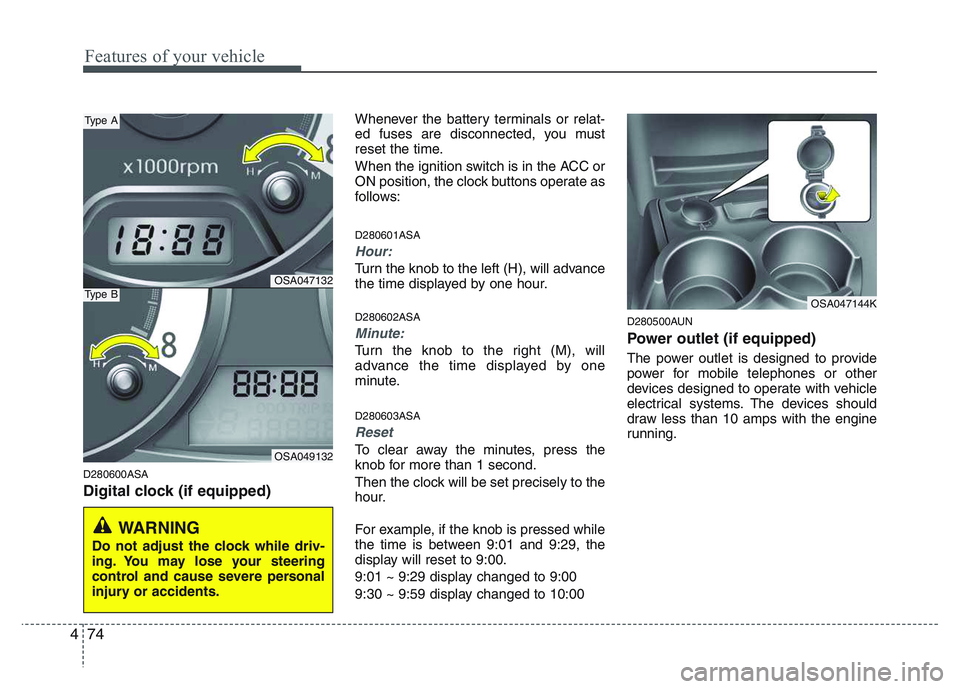
D280600ASA
Digital clock (if equipped) Whenever the battery terminals or relat-
ed fuses are disconnected, you must
reset the time.
When the ignition switch is in the ACC or
ON position, the clock buttons operate as
follows: D280601ASA
Hour:
Turn the knob to the left (H), will advance
the time displayed by one hour. D280602ASA
Minute:
Turn the knob to the right (M), will
advance the time displayed by one
minute. D280603ASA
Reset
To clear away the minutes, press the
knob for more than 1 second.
Then the clock will be set precisely to the
hour.
For example, if the knob is pressed while
the time is between 9:01 and 9:29, the
display will reset to 9:00.
9:01 ~ 9:29 display changed to 9:00
9:30 ~ 9:59 display changed to 10:00
D280500AUN
Power outlet (if equipped)
The power outlet is designed to provide
power for mobile telephones or other
devices designed to operate with vehicle
electrical systems. The devices should
draw less than 10 amps with the engine
running.
WARNING
Do not adjust the clock while driv-
ing. You may lose your steering
control and cause severe personal
injury or accidents.
OSA047132
OSA049132
Type A
Type BOSA047144K
Page 147 of 336
Features of your vehicle
76
4
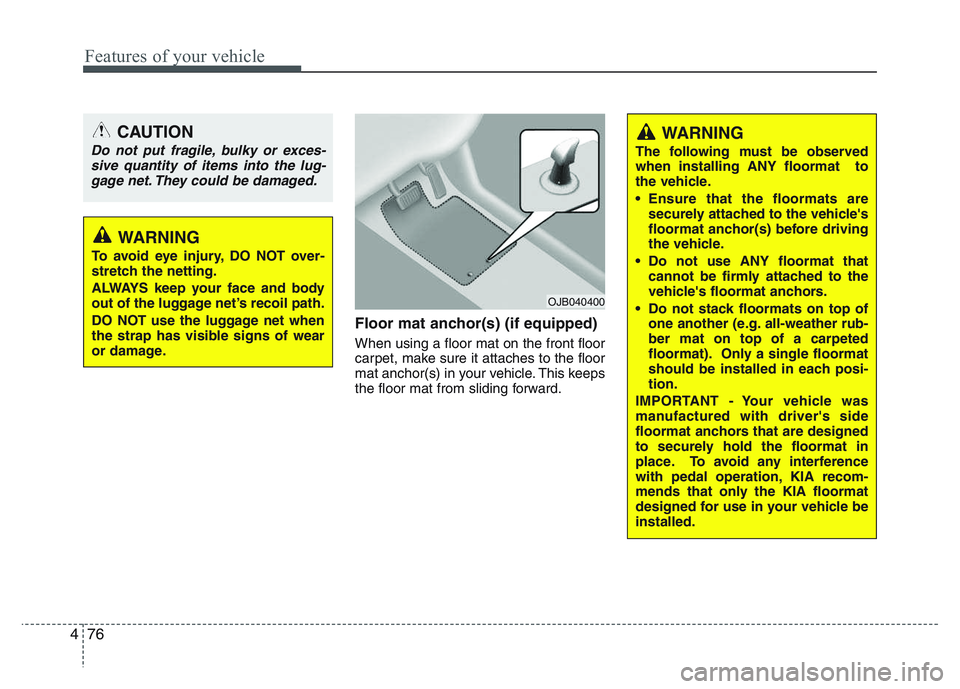
Floor mat anchor(s) (if equipped) When using a floor mat on the front floor
carpet, make sure it attaches to the floor
mat anchor(s) in your vehicle. This keeps
the floor mat from sliding forward.
CAUTION
Do not put fragile, bulky or exces-
sive quantity of items into the lug-
gage net. They could be damaged.
WARNING
To avoid eye injury, DO NOT over-
stretch the netting.
ALWAYS keep your face and body
out of the luggage net’s recoil path.
DO NOT use the luggage net when
the strap has visible signs of wear
or damage.
WARNING
The following must be observed when installing ANY floormat to
the vehicle.
Ensure that the floormats are securely attached to the vehicle's
floormat anchor(s) before driving
the vehicle.
Do not use ANY floormat that cannot be firmly attached to the
vehicle's floormat anchors.
Do not stack floormats on top of one another (e.g. all-weather rub-ber mat on top of a carpeted
floormat). Only a single floormat
should be installed in each posi-tion.
IMPORTANT - Your vehicle was
manufactured with driver's side
floormat anchors that are designed
to securely hold the floormat in
place. To avoid any interference
with pedal operation, KIA recom-
mends that only the KIA floormat
designed for use in your vehicle beinstalled.
OJB040400
Page 150 of 336
479
Features of your vehicle
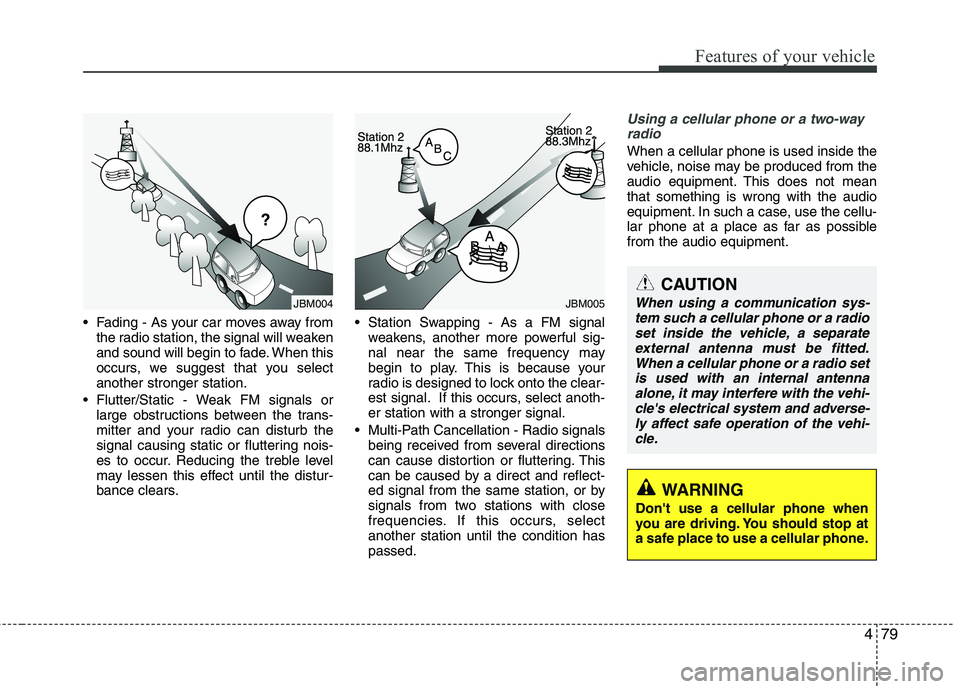
• Fading - As your car moves away fromthe radio station, the signal will weaken
and sound will begin to fade. When this
occurs, we suggest that you selectanother stronger station.
Flutter/Static - Weak FM signals or large obstructions between the trans-
mitter and your radio can disturb the
signal causing static or fluttering nois-
es to occur. Reducing the treble level
may lessen this effect until the distur-
bance clears. Station Swapping - As a FM signal
weakens, another more powerful sig-
nal near the same frequency may
begin to play. This is because your
radio is designed to lock onto the clear-
est signal. If this occurs, select anoth-er station with a stronger signal.
Multi-Path Cancellation - Radio signals being received from several directions
can cause distortion or fluttering. This
can be caused by a direct and reflect-
ed signal from the same station, or by
signals from two stations with close
frequencies. If this occurs, selectanother station until the condition haspassed.
Using a cellular phone or a two-way
radio
When a cellular phone is used inside the
vehicle, noise may be produced from the
audio equipment. This does not meanthat something is wrong with the audio
equipment. In such a case, use the cellu-
lar phone at a place as far as possiblefrom the audio equipment.
¢¢¢
JBM004JBM005
CAUTION
When using a communication sys-tem such a cellular phone or a radio
set inside the vehicle, a separateexternal antenna must be fitted. When a cellular phone or a radio setis used with an internal antenna
alone, it may interfere with the vehi- cle's electrical system and adverse-ly affect safe operation of the vehi- cle.
WARNING
Don't use a cellular phone when
you are driving. You should stop at
a safe place to use a cellular phone.
Page 155 of 336
Features of your vehicle
84
4
✽✽
NOTICE
To assure proper operation of the unit, keep the vehicle interior temperature
within a normal range by using the
vehicle's air conditioning or heating
system.
When replacing the fuse, replace it with a fuse having the correct capaci-
ty.
All stored bookmarks are erased
when the car battery is disconnected
or power to the vehicle is lost. If this
occurs, the bookmarks will have to be
reset.
This equipment is designed to be used only in a 12 volt DC battery system
with negative ground.
This unit is made of precision parts.
Do not attempt to disassemble or
adjust any parts.
Do not expose this equipment (includ- ing the speakers and CD) to water or
excessive moisture.(Continued)
Avoid using recorded compact discs in your audio unit. Originalcompact discs are recommendedfor best results.CAUTION
Do not insert warped or poor quality discs into the CD player
as damage to the unit may occur.
Do not insert anything such as coins into the player slot as dam-age to the unit may occur.
Do not place beverages close to the audio system. It may damagethe playback mechanism if youspill them.
Do not strike or allow anything to impact the audio system, damage
to the system mechanisms couldoccur.
Off-road or rough surface driving may cause the compact disc toskip. Do not use the compact
disc when driving in such condi-tions as damage to the compactdisc face could occur.
Do not attempt to grab or pull the compact disc out while the disc isbeing pulled into the audio unitby self-loading mechanism.
Damage to the audio unit andcompact disc could occur.
(Continued)
WARNING
When driving your vehicle, be sure
to keep the volume of the unit set
low enough to allow you to hear
sounds coming from the outside.
Page 161 of 336
Features of your vehicle
90
4
✽✽
NOTICE
To assure proper operation of the unit, keep the vehicle interior temperature
within a normal range by using the
vehicle's air conditioning or heating
system.
When replacing the fuse, replace it with a fuse having the correct capaci-
ty.
The preset station frequencies are all
erased when the car battery is discon-
nected. Therefore, all data will have to
be set again if this should occur.
Do not add any oil to the rotating
parts. Keep magnets, screwdrivers
and other metallic objects away from
the tape mechanism and head.
This equipment is designed to be used
only in a 12 volt DC battery system
with negative ground.
This unit is made of precision parts. Do not attempt to disassemble or
adjust any parts.
Do not expose this equipment (includ-
ing the speakers and tape) to water or
excessive moisture.(Continued)
Avoid using recorded compact discs in your audio unit. Originalcompact discs are recommendedfor best results.CAUTION
Do not insert warped or poor quality discs into the CD player
as damage to the unit may occur.
Do not insert anything like coins into the player slot as damage tothe unit may occur.
Do not place beverages close to the audio system. It may damagethe playback mechanism if youspill them.
Do not strike or allow anything to impact the audio system, damage
to the system mechanisms couldoccur.
Off-road or rough surface driving may cause the compact disc toskip. Do not use the compact
disc when driving in such condi-tions as damage to the compactdisc face could occur.
Do not attempt to grab or pull the compact disc out while the disc isbeing pulled into the audio unitby self-loading mechanism.
Damage to the audio unit andcompact disc could occur.
(Continued)
WARNING
When driving your vehicle, be sure
to keep the volume of the unit set
low enough to allow you to hear
sounds coming from the outside.