ignition KIA PICANTO 2012 Owners Manual
[x] Cancel search | Manufacturer: KIA, Model Year: 2012, Model line: PICANTO, Model: KIA PICANTO 2012Pages: 840, PDF Size: 41.16 MB
Page 574 of 840
475
Features of your vehicle
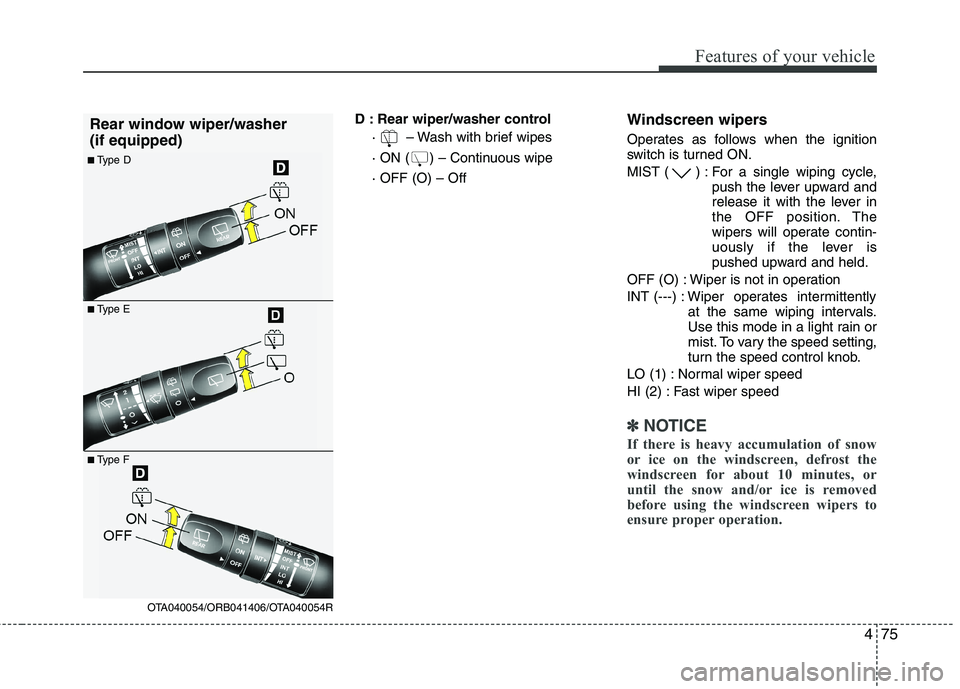
D : Rear wiper/washer control· – Wash with brief wipes
· ON ( ) – Continuous wipe· OFF (O) – Off Windscreen wipers
Operates as follows when the ignition
switch is turned ON.
MIST ( ) : For a single wiping cycle,
push the lever upward and
release it with the lever in
the OFF position. The
wipers will operate contin-
uously if the lever is
pushed upward and held.
OFF (O) : Wiper is not in operation
INT (---) : Wiper operates intermittently at the same wiping intervals.
Use this mode in a light rain or
mist. To vary the speed setting,
turn the speed control knob.
LO (1) : Normal wiper speed
HI (2) : Fast wiper speed
✽✽ NOTICE
If there is heavy accumulation of snow
or ice on the windscreen, defrost the
windscreen for about 10 minutes, or
until the snow and/or ice is removed
before using the windscreen wipers to
ensure proper operation.
■ Type E
■
Type D
Rear window wiper/washer (if equipped)
■
Type F
OTA040054/ORB041406/OTA040054R
Page 577 of 840
Features of your vehicle
78
4
INTERIOR LIGHT
Automatic turn off function (if equipped)
The interior lights automatically turn off
approximately 20 minutes after the igni-
tion switch is turned off. Map lamp (if equipped)
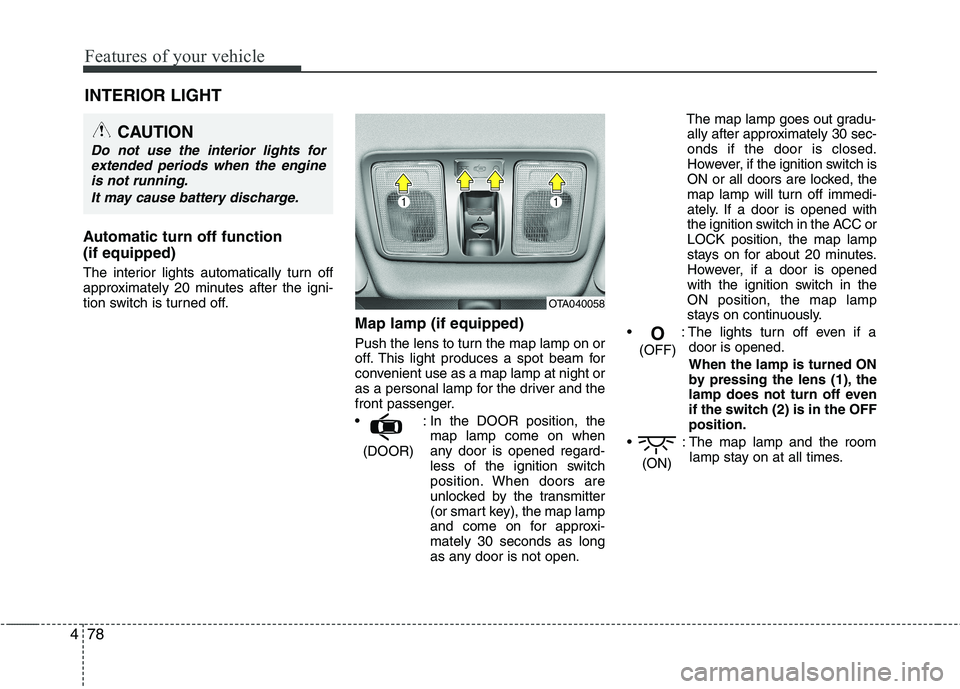
Push the lens to turn the map lamp on or
off. This light produces a spot beam for
convenient use as a map lamp at night or
as a personal lamp for the driver and the
front passenger.
: In the DOOR position, themap lamp come on when
any door is opened regard-
less of the ignition switch
position. When doors are
unlocked by the transmitter
(or smart key), the map lamp
and come on for approxi-mately 30 seconds as long
as any door is not open. The map lamp goes out gradu-
ally after approximately 30 sec-onds if the door is closed.
However, if the ignition switch is
ON or all doors are locked, the
map lamp will turn off immedi-
ately. If a door is opened with
the ignition switch in the ACC orLOCK position, the map lamp
stays on for about 20 minutes.
However, if a door is opened
with the ignition switch in the
ON position, the map lamp
stays on continuously.
: The lights turn off even if a door is opened.
When the lamp is turned ON
by pressing the lens (1), the
lamp does not turn off even
if the switch (2) is in the OFFposition.
: The map lamp and the room lamp stay on at all times.
(ON)
O
(OFF)
(DOOR)
CAUTION
Do not use the interior lights for extended periods when the engine
is not running.
It may cause battery discharge.
OTA040058
Page 578 of 840

479
Features of your vehicle
Room lamp (if equipped)
In the DOOR position, the roomlamp come on when any door is opened regardless of the ignition
switch position. When doors are
unlocked by the transmitter (or
smart key), the room lamp come
on for approximately 30 seconds
as long as any door is not open.
The room lamp goes out gradu-
ally after approximately 30 sec-onds if the door is closed.
However, if the ignition switch is
ON or all doors are locked, the
room lamp will turn off immedi-
ately. If a door is opened with the
ignition switch in the ACC orLOCK position, the room lamp
stays on for about 20 minutes. However, if a door is opened with
the ignition switch in the ON posi-
tion, the room lamp stays on con-
tinuously.
: The lights turn off even if a door is opened.
: The room lamp stay on at all times.
Luggage room lamp (if equipped) The luggage room lamp comes on when the tailgate is opened.
OTA040181OTA040059
CAUTION
The luggage room lamp comes onas long as the tailgate opens. To prevent unnecessary charging sys-tem drain, close the tailgate secure-
ly after using the luggage room.
Page 579 of 840
Features of your vehicle
80
4
DEFROSTER
✽✽
NOTICE
If you want to defrost and defog the
front windscreen, refer to “Windscreen
defrosting and defogging” in this sec-
tion.
Rear window defroster
The defroster heats the window to
remove frost, fog and thin ice from the
rear window, whilst the engine is running.
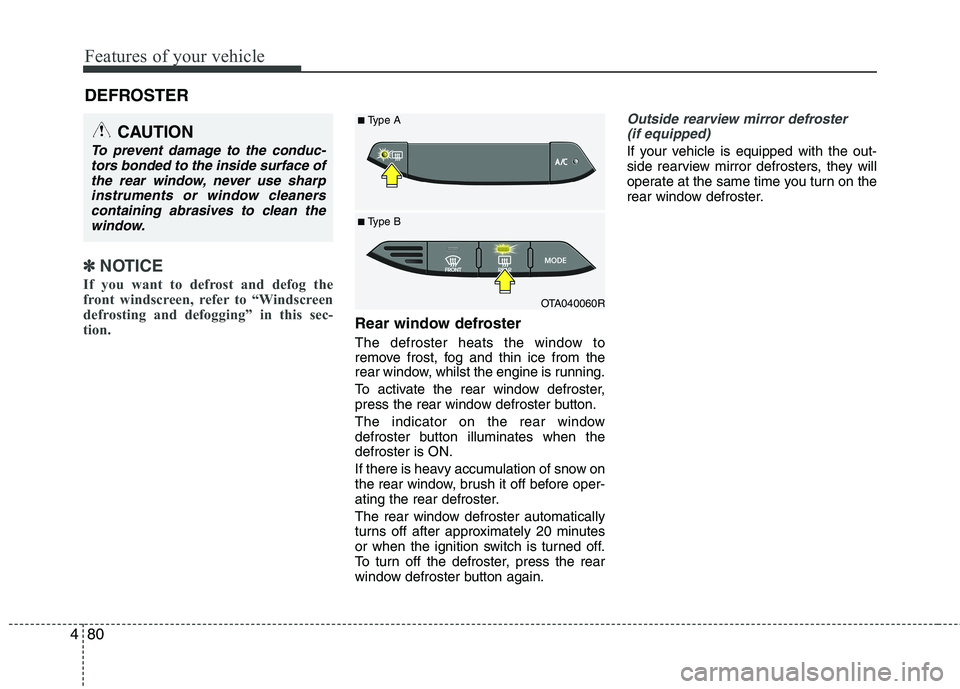
To activate the rear window defroster,
press the rear window defroster button.
The indicator on the rear window
defroster button illuminates when thedefroster is ON.
If there is heavy accumulation of snow on
the rear window, brush it off before oper-
ating the rear defroster.
The rear window defroster automatically
turns off after approximately 20 minutes
or when the ignition switch is turned off.
To turn off the defroster, press the rear
window defroster button again.
Outside rearview mirror defroster (if equipped)
If your vehicle is equipped with the out-
side rearview mirror defrosters, they will
operate at the same time you turn on the
rear window defroster.
CAUTION
To prevent damage to the conduc- tors bonded to the inside surface of
the rear window, never use sharpinstruments or window cleanerscontaining abrasives to clean the window.
OTA040060R
■
Type B
■
Type A
Page 585 of 840
Features of your vehicle
86
4
Fan speed control
The ignition switch must be in the ON
position for fan operation.
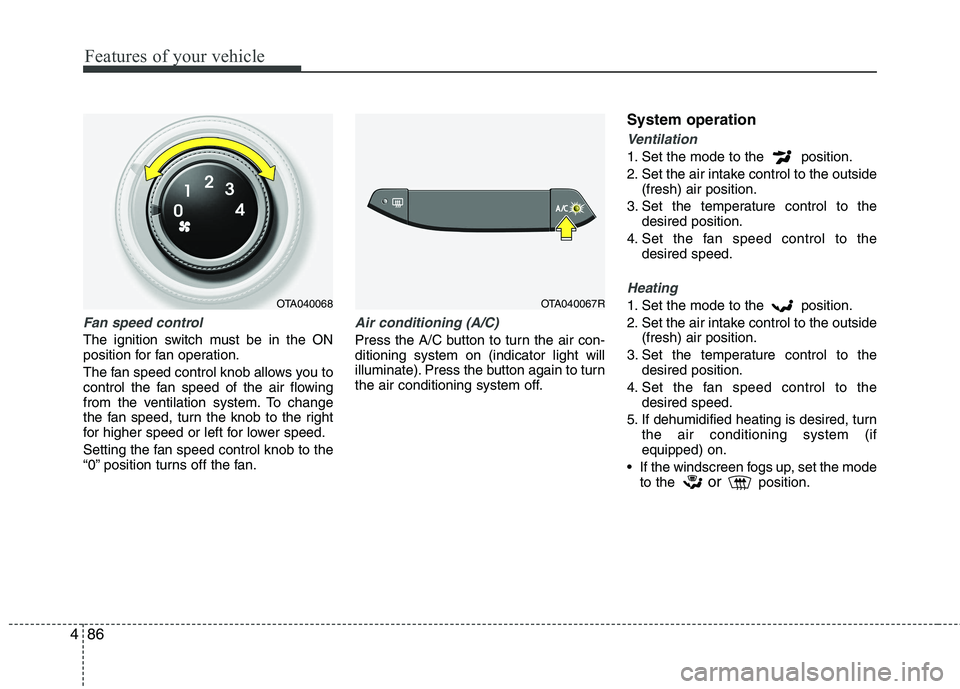
The fan speed control knob allows you to
control the fan speed of the air flowing
from the ventilation system. To change
the fan speed, turn the knob to the right
for higher speed or left for lower speed.
Setting the fan speed control knob to the
“0” position turns off the fan.
Air conditioning (A/C)
Press the A/C button to turn the air con- ditioning system on (indicator light will
illuminate). Press the button again to turn
the air conditioning system off. System operation
Ventilation
1. Set the mode to the position.
2. Set the air intake control to the outside
(fresh) air position.
3. Set the temperature control to the desired position.
4. Set the fan speed control to the desired speed.
Heating
1. Set the mode to the position.
2. Set the air intake control to the outside(fresh) air position.
3. Set the temperature control to the desired position.
4. Set the fan speed control to the desired speed.
5. If dehumidified heating is desired, turn the air conditioning system (if equipped) on.
If the windscreen fogs up, set the mode to the or
position.OTA040068OTA040067R
Page 595 of 840
Features of your vehicle
96
4
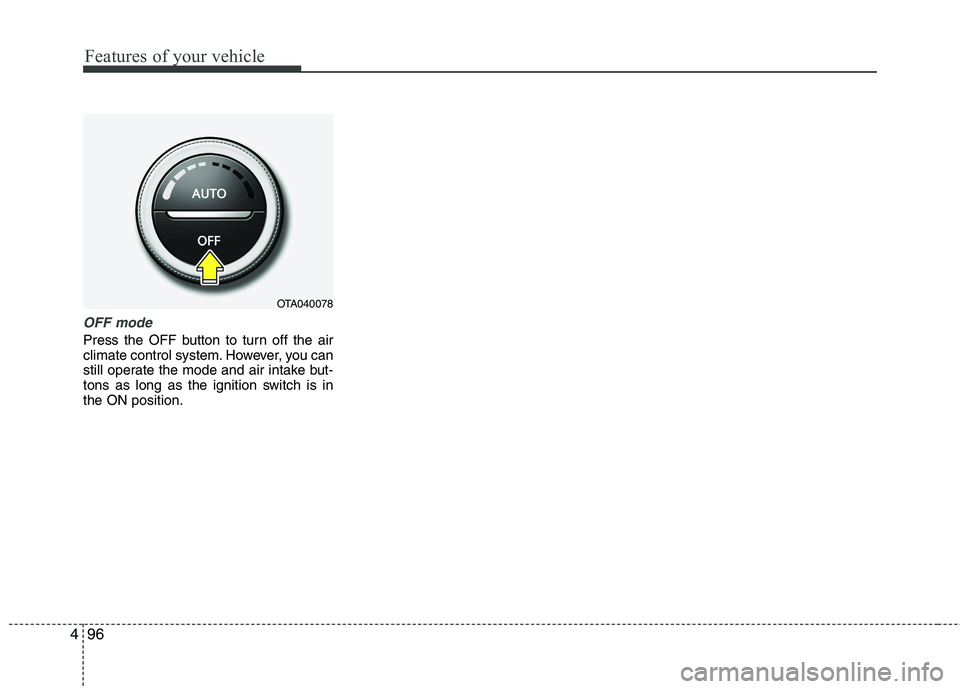
OFF mode
Press the OFF button to turn off the air
climate control system. However, you can
still operate the mode and air intake but-
tons as long as the ignition switch is inthe ON position.
OTA040078
Page 598 of 840
499
Features of your vehicle
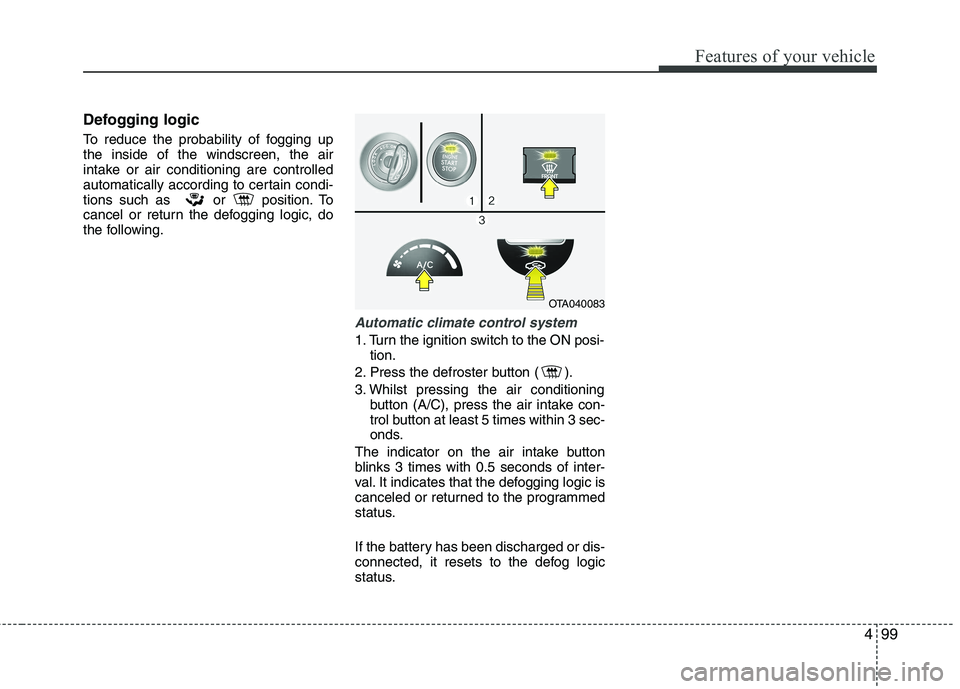
Defogging logic
To reduce the probability of fogging up the inside of the windscreen, the air
intake or air conditioning are controlled
automatically according to certain condi-
tions such as or position. To
cancel or return the defogging logic, do
the following.
Automatic climate control system
1. Turn the ignition switch to the ON posi-tion.
2. Press the defroster button ( ).
3. Whilst pressing the air conditioning button (A/C), press the air intake con-
trol button at least 5 times within 3 sec-
onds.
The indicator on the air intake button
blinks 3 times with 0.5 seconds of inter-
val. It indicates that the defogging logic is
canceled or returned to the programmed
status.
If the battery has been discharged or dis-
connected, it resets to the defog logic
status.
OTA040083
Page 603 of 840
Features of your vehicle
104
4
Digital clock
Whenever the battery terminals or relat-
ed fuses are disconnected, you must
reset the time.
When the ignition switch is in the ACC or
ON position, the clock buttons operate as
follows:
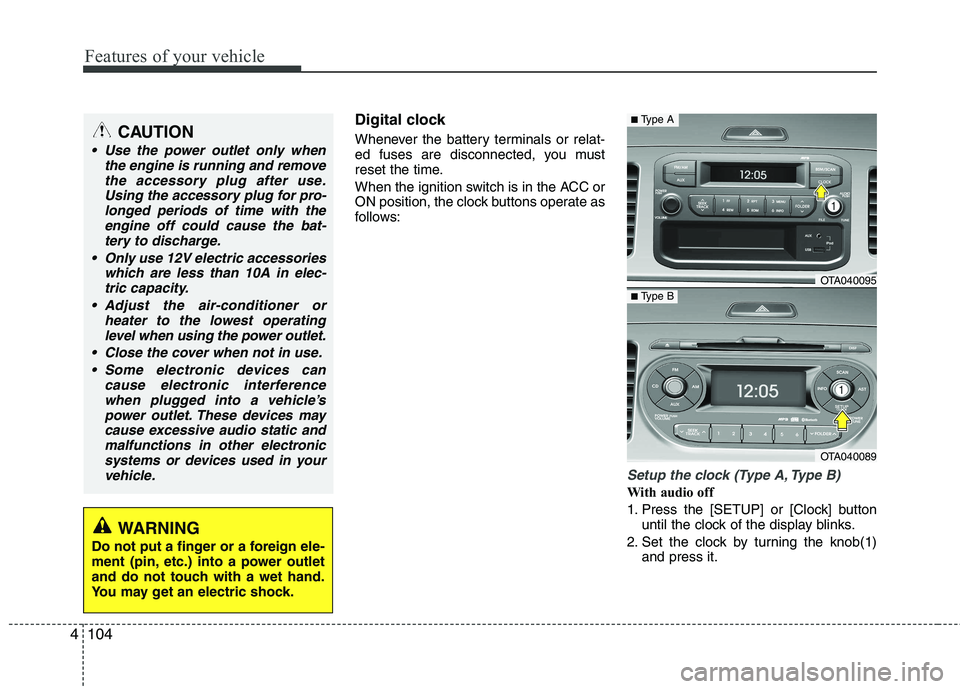
Setup the clock (Type A, Type B)
With audio off
1. Press the [SETUP] or [Clock] button
until the clock of the display blinks.
2. Set the clock by turning the knob(1) and press it.
CAUTION
Use the power outlet only when
the engine is running and remove
the accessory plug after use.Using the accessory plug for pro-longed periods of time with the engine off could cause the bat-
tery to discharge.
Only use 12V electric accessories which are less than 10A in elec-tric capacity.
Adjust the air-conditioner or heater to the lowest operatinglevel when using the power outlet.
Close the cover when not in use. Some electronic devices can cause electronic interference
when plugged into a vehicle’spower outlet. These devices maycause excessive audio static andmalfunctions in other electronic
systems or devices used in yourvehicle.
WARNING
Do not put a finger or a foreign ele-
ment (pin, etc.) into a power outlet
and do not touch with a wet hand.
You may get an electric shock.
OTA040095
OTA040089
■ Type A
■Type B
Page 608 of 840
4109
Features of your vehicle
MODE ( ) (3)
Press the button to change audio source. FM(1~2) ➟ AM ➟ CD ➟ USB AUX(iPod)
➟ FM...
In addition to mode change, Power on/off
can be made by pressing this button
when the ignition switch is on ACC orON.
- Power ON : Press the button when the audio is off
- Power OFF : Press the button for more than 0.8 seconds when the audio is on.
MUTE ( ) (4, if equipped)
Press the button to mute the sound.
Press the button to turn off the micro- phone during a telephone call.
Detailed information for audio control
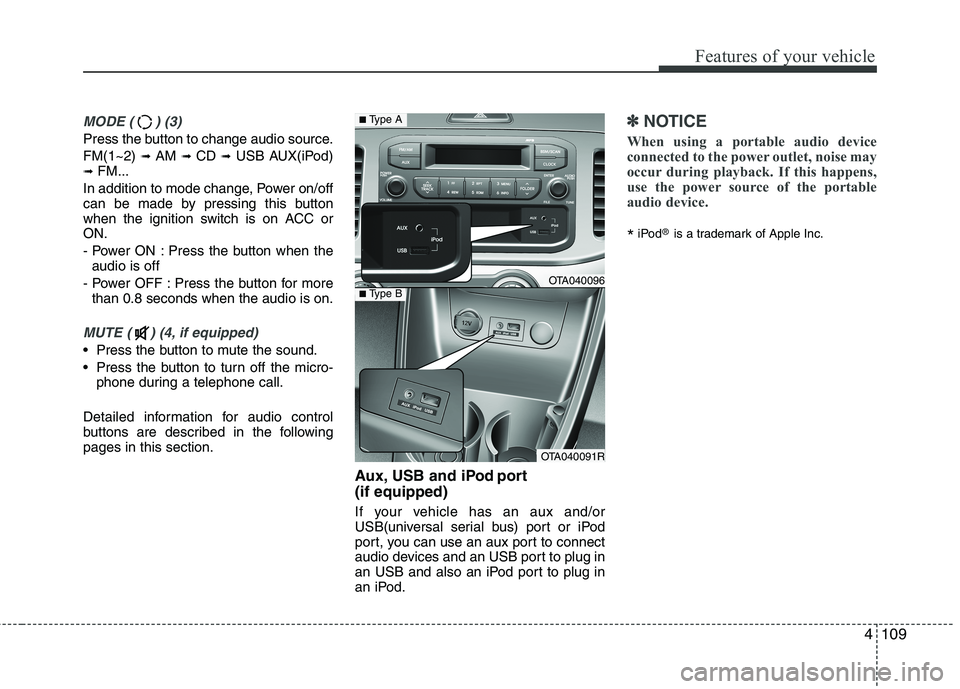
buttons are described in the followingpages in this section. Aux, USB and iPod port (if equipped)
If your vehicle has an aux and/or
USB(universal serial bus) port or iPod
port, you can use an aux port to connect
audio devices and an USB port to plug in
an USB and also an iPod port to plug in
an iPod.
✽✽NOTICE
When using a portable audio device
connected to the power outlet, noise may
occur during playback. If this happens,
use the power source of the portable
audio device.
* iPod
®
is a trademark of Apple Inc.
OTA040096
OTA040091R
■Type A
■Type B
Page 613 of 840
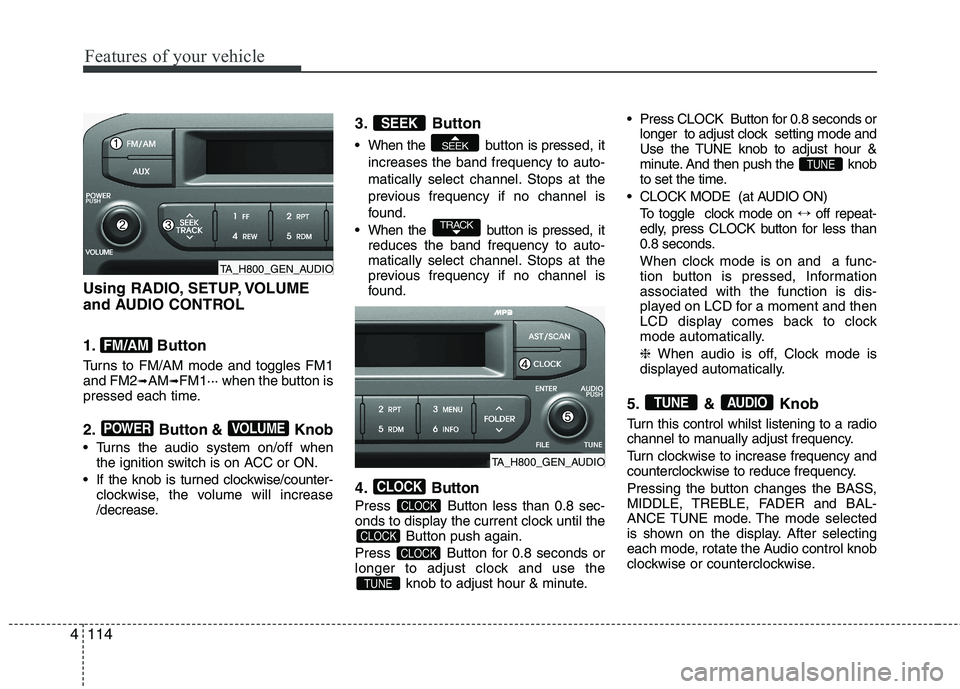
Features of your vehicle
114
4
Using RADIO, SETUP, VOLUME
and AUDIO CONTROL
1. Button
Turns to FM/AM mode and toggles FM1 and FM2 ➟AM ➟FM1··· when the button is
pressed each time.
2. Button & Knob
Turns the audio system on/off when the ignition switch is on ACC or ON.
If the knob is turned clockwise/counter- clockwise, the volume will increase
/decrease. 3. Button
When the button is pre
ssed, it
increases the band frequency to auto-
matically select channel. Stops at the
previous frequency if no channel is
found.
When the button is pressed, it reduces the band frequency to auto-
matically select channel. Stops at the
previous frequency if no channel is
found.
4. Button
Press Button less than 0.8 sec-
onds to display the current clock until the Button push again.
Press Button for 0.8 seconds or
longer to adjust clock and use the knob to adjust hour & minute. Press CLOCK Button for 0.8 seconds or
longer to adjust clock setting mode and
Use the TUNE knob to adjust hour &
minute. And then push the knob
to set the time.
CLOCK MODE (at AUDIO ON) To toggle clock mode on ↔off repeat-
edly, press CLOCK button for less than
0.8 seconds.
When clock mode is on and a func-
tion button is pressed, Informationassociated with the function is dis-
played on LCD for a moment and then
LCD display comes back to clock
mode automatically. ❈ When audio is off, Clock mode is
displayed automatically.
5. & Knob
Turn this control whilst listening to a radio
channel to manually adjust frequency.
Turn clockwise to increase frequency and
counterclockwise to reduce frequency.
Pressing the button changes the BASS,
MIDDLE, TREBLE, FADER and BAL-
ANCE TUNE mode. The mode selected
is shown on the display. After selecting
each mode, rotate the Audio control knob
clockwise or counterclockwise.
AUDIOTUNE
TUNE
TUNE
CLOCK
CLOCK
CLOCK
CLOCK
TRACK
SEEK
SEEK
VOLUMEPOWER
FM/AM
TA_H800_GEN_AUDIO
TA_H800_GEN_AUDIO