change time KIA PICANTO 2012 Owner's Manual
[x] Cancel search | Manufacturer: KIA, Model Year: 2012, Model line: PICANTO, Model: KIA PICANTO 2012Pages: 840, PDF Size: 41.16 MB
Page 427 of 840
kkiiaa ,, tt hh ee cc oo mm ppaa nn yy
Enjoy your vehicle and Kia’s “Family-like Care” experience!
Thank you for becoming the owner of a new Kia vehicle.
As a global car manufacturer focused on building high-quality, value for
money prices, Kia Motors is dedicated to providing you with a customer
service experience that exceeds your expectations.
At all of our Kia dealerships you will be treated with warmth, hospitality
and professionalism by people who care based on our “Family-like Care”
promise.
All information contained in this Owner’s Manual is accurate at the
time of publication. However, Kia reserves the right to make changes
at any time so that our policy of continual product improvement can be
carried out.
This manual applies to all Kia models and includes descriptions and
explanations of optional as well as standard equipment. As a result, you
may encounter material in this manual that is not applicable to your
specific Kia vehicle.
Page 428 of 840
i
Thank you for choosing a KIA vehicle.
When you require service, remember that your dealer
knows your vehicle best. Your dealer has factory-trained
technicians, recommended special tools, genuine KIA
replacement parts and is dedicated to your complete sat-
isfaction.
Because subsequent owners require this important infor-
mation as well, this publication should remain with the
vehicle if it is sold.
This manual will familiarize you with operational, main-
tenance and safety information about your new vehicle. It
is supplemented by a Warranty and Maintenance book
that provides important information on all warranties
regarding your vehicle. We urge you to read these publi-
cations carefully and follow the recommendations to help
assure enjoyable and safe operation of your new vehicle.
KIA offers a great variety of options, components and
features for its various models. Therefore, some of the
equipment described in this manual, along with the vari-
ous illustrations, may not be applicable to your particular
vehicle.
The information and specifications provided in this man-
ual were accurate at the time of printing. KIA reserves
the right to discontinue or change specifications or design
at any time without notice and without incurring any
obligation. If you have questions, always check with your
authorised KIA dealer.
We assure you of our continuing interest in your motor-
ing pleasure and satisfaction in your KIA vehicle.
© 2011 KIA MOTORS Corp.
All rights reserved. Reproduction by any means, elec-
tronic or mechanical, including photocopying, recording,
or by any information storage and retrieval system or
translation in whole or part is not permitted without writ-
ten authorization from KIA MOTORS Corporation.
Printed in Korea
Foreword
Page 443 of 840
35
Safety features of your vehicle
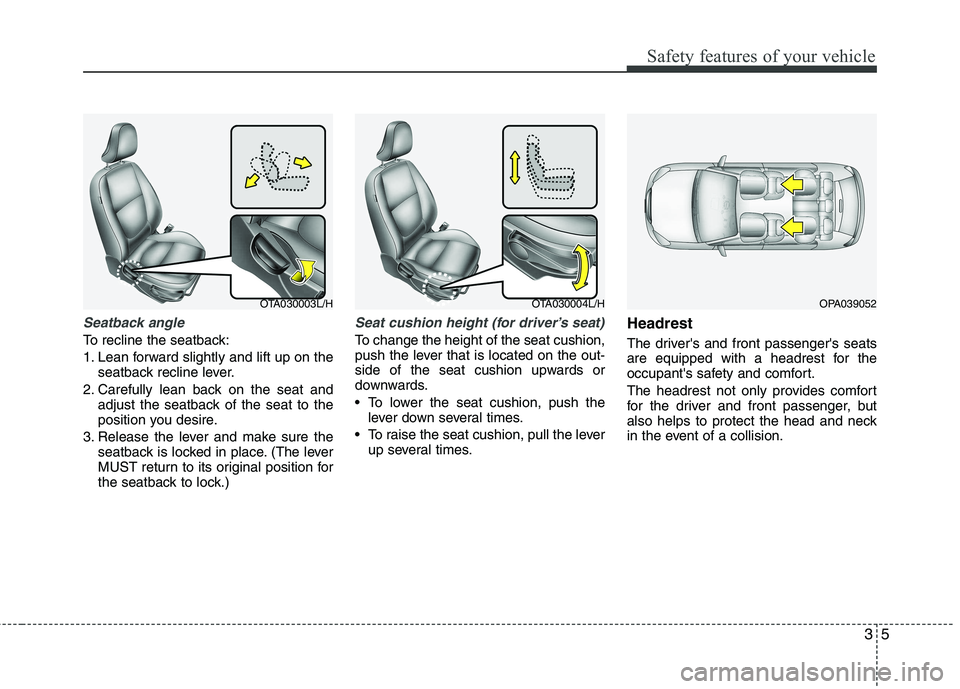
Seatback angle
To recline the seatback:
1. Lean forward slightly and lift up on theseatback recline lever.
2. Carefully lean back on the seat and adjust the seatback of the seat to the
position you desire.
3. Release the lever and make sure the seatback is locked in place. (The lever
MUST return to its original position for
the seatback to lock.)
Seat cushion height (for driver’s seat)
To change the height of the seat cushion,
push the lever that is located on the out-
side of the seat cushion upwards or
downwards.
• To lower the seat cushion, push thelever down several times.
To raise the seat cushion, pull the lever up several times. Headrest
The driver's and front passenger's seats
are equipped with a headrest for the
occupant's safety and comfort.
The headrest not only provides comfort
for the driver and front passenger, but
also helps to protect the head and neck
in the event of a collision.
OPA039052OTA030003L/HOTA030004L/H
Page 445 of 840
37
Safety features of your vehicle
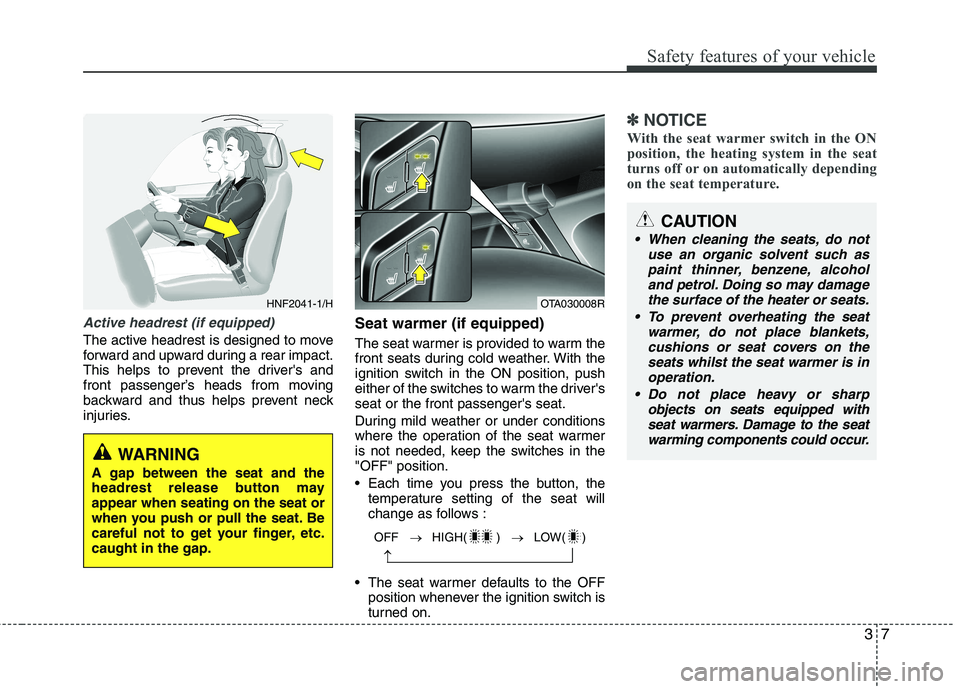
Active headrest (if equipped)
The active headrest is designed to move
forward and upward during a rear impact.
This helps to prevent the driver's and
front passenger’s heads from moving
backward and thus helps prevent neck
injuries.Seat warmer (if equipped)
The seat warmer is provided to warm the
front seats during cold weather. With the
ignition switch in the ON position, push
either of the switches to warm the driver'sseat or the front passenger's seat.
During mild weather or under conditions
where the operation of the seat warmer
is not needed, keep the switches in the"OFF" position.
Each time you press the button, the
temperature setting of the seat will
change as follows :
The seat warmer defaults to the OFF position whenever the ignition switch is
turned on.
✽✽ NOTICE
With the seat warmer switch in the ON
position, the heating system in the seat
turns off or on automatically depending
on the seat temperature.
OFF HIGH( ) LOW( )
HNF2041-1/HOTA030008R
WARNING
A gap between the seat and the
headrest release button mayappear when seating on the seat or
when you push or pull the seat. Be
careful not to get your finger, etc.caught in the gap.
CAUTION
When cleaning the seats, do not use an organic solvent such aspaint thinner, benzene, alcohol and petrol. Doing so may damage
the surface of the heater or seats.
To prevent overheating the seat warmer, do not place blankets,cushions or seat covers on theseats whilst the seat warmer is in
operation.
Do not place heavy or sharp objects on seats equipped withseat warmers. Damage to the seat warming components could occur.
Page 545 of 840
Features of your vehicle
46
4
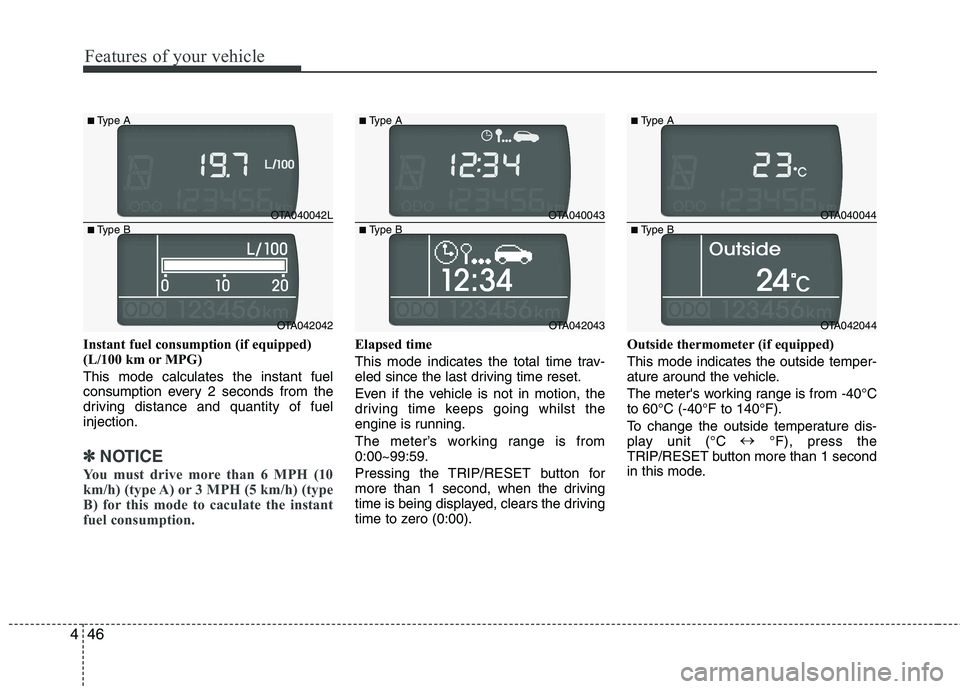
Instant fuel consumption (if equipped)
(L/100 km or MPG) This mode calculates the instant fuel
consumption every 2 seconds from the
driving distance and quantity of fuelinjection.
✽✽
NOTICE
You must drive more than 6 MPH (10
km/h) (type A) or 3 MPH (5 km/h) (type
B) for this mode to caculate the instant
fuel consumption.
Elapsed time
This mode indicates the total time trav-
eled since the last driving time reset.
Even if the vehicle is not in motion, the
driving time keeps going whilst the
engine is running.
The meter’s working range is from 0:00~99:59.
Pressing the TRIP/RESET button for
more than 1 second, when the driving
time is being displayed, clears the driving
time to zero (0:00). Outside thermometer (if equipped) This mode indicates the outside temper-
ature around the vehicle.
The meter's working range is from -40°C to 60°C (-40°F to 140°F).
To change the outside temperature dis-
play unit (°C
°F), press the
TRIP/RESET button more than 1 second
in this mode.
OTA040042L
OTA042042
■
Type A
■ Type B
OTA040043
OTA042043
■
Type A
■ Type B
OTA040044
OTA042044
■
Type A
■ Type B
Page 587 of 840
Features of your vehicle
88
4
Air conditioning system operation tips
If the vehicle has been parked in direct
sunlight during hot weather, open the
windows for a short time to let the hot
air inside the vehicle escape.
To help reduce moisture inside of the windows on rainy or humid days,
decrease the humidity inside the vehi-
cle by operating the air conditioningsystem.
During air conditioning system opera- tion, you may occasionally notice aslight change in engine speed as the
air conditioning compressor cycles.
This is a normal system operation
characteristic.
Use the air conditioning system every month only for a few minutes to ensure
maximum system performance. When using the air conditioning sys-
tem, you may notice clear water drip-
ping (or even puddling) on the ground
under the passenger side of the vehi-
cle. This is a normal system operation
characteristic.
Operating the air conditioning system in the recirculated air position provides
maximum cooling, however, continual
operation in this mode may cause the
air inside the vehicle to become stale.
During cooling operation, you may occasionally notice a misty air flow
because of rapid cooling and humid air
intake. This is a normal system opera-
tion characteristic.
If you operate air conditioner exces- sively, the difference between the tem-
perature of the outside air and that ofthe windscreen could cause the outer
surface of the windscreen to fog up,
causing loss of visibility. In this case,
set the mode selection knob or button
to the position and fan speed con-
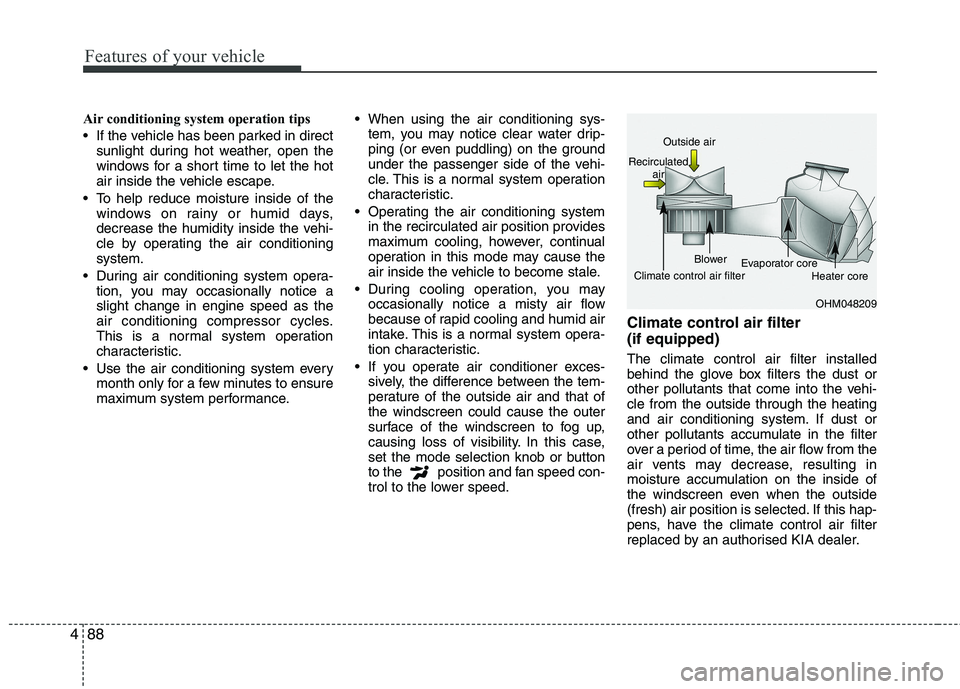
trol to the lower speed. Climate control air filter (if equipped) The climate control air filter installed
behind the glove box filters the dust or
other pollutants that come into the vehi-cle from the outside through the heating
and air conditioning system. If dust or
other pollutants accumulate in the filter
over a period of time, the air flow from the
air vents may decrease, resulting in
moisture accumulation on the inside of
the windscreen even when the outside
(fresh) air position is selected. If this hap-
pens, have the climate control air filter
replaced by an authorised KIA dealer.
OHM048209
Outside air
Recirculated air
Climate control air filter Blower
Evaporator core
Heater core
Page 613 of 840
Features of your vehicle
114
4
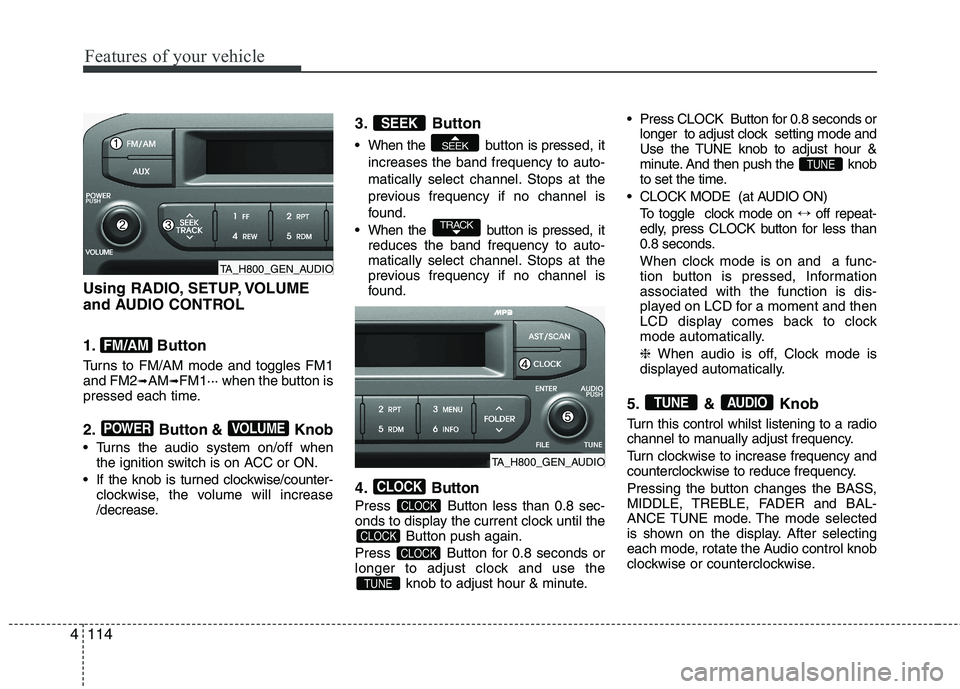
Using RADIO, SETUP, VOLUME
and AUDIO CONTROL
1. Button
Turns to FM/AM mode and toggles FM1 and FM2 ➟AM ➟FM1··· when the button is
pressed each time.
2. Button & Knob
Turns the audio system on/off when the ignition switch is on ACC or ON.
If the knob is turned clockwise/counter- clockwise, the volume will increase
/decrease. 3. Button
When the button is pre
ssed, it
increases the band frequency to auto-
matically select channel. Stops at the
previous frequency if no channel is
found.
When the button is pressed, it reduces the band frequency to auto-
matically select channel. Stops at the
previous frequency if no channel is
found.
4. Button
Press Button less than 0.8 sec-
onds to display the current clock until the Button push again.
Press Button for 0.8 seconds or
longer to adjust clock and use the knob to adjust hour & minute. Press CLOCK Button for 0.8 seconds or
longer to adjust clock setting mode and
Use the TUNE knob to adjust hour &
minute. And then push the knob
to set the time.
CLOCK MODE (at AUDIO ON) To toggle clock mode on ↔off repeat-
edly, press CLOCK button for less than
0.8 seconds.
When clock mode is on and a func-
tion button is pressed, Informationassociated with the function is dis-
played on LCD for a moment and then
LCD display comes back to clock
mode automatically. ❈ When audio is off, Clock mode is
displayed automatically.
5. & Knob
Turn this control whilst listening to a radio
channel to manually adjust frequency.
Turn clockwise to increase frequency and
counterclockwise to reduce frequency.
Pressing the button changes the BASS,
MIDDLE, TREBLE, FADER and BAL-
ANCE TUNE mode. The mode selected
is shown on the display. After selecting
each mode, rotate the Audio control knob
clockwise or counterclockwise.
AUDIOTUNE
TUNE
TUNE
CLOCK
CLOCK
CLOCK
CLOCK
TRACK
SEEK
SEEK
VOLUMEPOWER
FM/AM
TA_H800_GEN_AUDIO
TA_H800_GEN_AUDIO
Page 638 of 840
4139
Features of your vehicle
Before using Bluetooth®
features, the
phone must be paired (registered) with
the audio system. Up to 5 phones can bepaired with the system.
NOTE:
The pairing procedure of the phone
varies according to each phone
model. Before attempting to pair
phone, please see your phone’s
User’s Guide for instructions.
Once pairing with the phone is com-
pleted, there is no need to pair with
that phone again unless the phone
is deleted manually from the audio
system (refer “Deleting a Phone”
section) or the vehicle’s information
is removed from the phone.
1. Press button to enter SETUP mode.
2. Select “PHONE”, then “PAIR” in PHONE menu.
3. The audio displays “searching ----
passkey: 0000”
4. Search the Bluetooth ®
system on your
phone .Your phone should display your
[vehicle model name] on theBluetooth ®
device list. Then attempt
pairing on your phone. NOTE:
If the phone is paired with two or
more vehicles of the same model,
some phones may not handleBluetooth ®
devices of that name
correctly. In this case, you may need
to change the name displayed on
your phone.
For example, if the vehicles' name is
KIA PICANTO, you may need to change
the name displayed on you phone from
KIA_PICANTO to JOHNS_PICANTO or
KIA PICANTO1 to avoid ambiguity.
Refer to your phone User’s Guide,
or contact your mobile carrier or
phone manufacturer for instruc-tions.
When the Bluetooth ®
system is enabled,
the phone previously used is automati-
cally selected and re-connected. If you
want to select different phone previouslypaired, the phone can be selected
through “Select Phone” menu. Only a selected phone can be used with
the hands-free system at a time.
1. Press button to enter SETUP mode.
2. Select “PHONE”, then “SELECT” in PHONE menu. 3. Select desired phone name from the list
shown.
The paired phone can be deleted.
- When the phone is deleted, all the infor- mation associated with that phone is also deleted (including phonebook).
- If you want to use the deleted phone with the audio system again, pairing
procedure must be completed once
more.
1. Press button to enter SETUP mode.
2. Select “PHONE”, then “DELETE” in PHONE menu.
3. Select desired phone name from the list shown.
If several phones are paired with theaudio system, the system attempts to
connect following order when theBluetooth ®
system is enabled:
1) “Priority” checked phone.
2) Previously connected phone
3) Gives up auto connection.
1. Press button to enter SETUP mode.
SETUP
SETUP
SETUP
SETUP
Page 639 of 840
Features of your vehicle
140
4
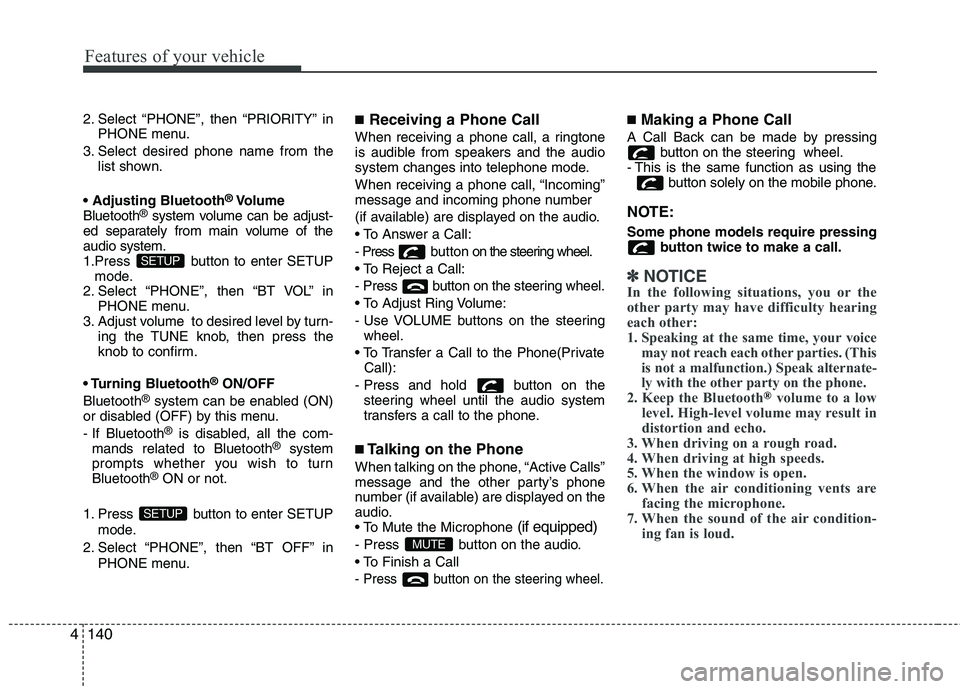
2. Select “PHONE”, then “PRIORITY” in
PHONE menu.
3. Select desired phone name from the list shown.
®
Volume
Bluetooth ®
system volume can be adjust-
ed separately from main volume of the audio system.
1.Press button to enter SETUP
mode.
2. Select “PHONE”, then “BT VOL” in PHONE menu.
3. Adjust volume to desired level by turn-
ing the TUNE knob, then press the
knob to confirm.
Bluetooth ®
ON/OFF
Bluetooth ®
system can be enabled (ON)
or disabled (OFF) by this menu.
- If Bluetooth ®
is disabled, all the com-
mands related to Bluetooth ®
system
prompts whether you wish to turn Bluetooth ®
ON or not.
1. Press button to enter SETUP mode.
2. Select “PHONE”, then “BT OFF” in PHONE menu. ■
Receiving a Phone Call
When receiving a phone call, a ringtone
is audible from speakers and the audio
system changes into telephone mode.
When receiving a phone call, “Incoming”
message and incoming phone number
(if available) are displayed on the audio.
- Press bu t t o n on the steering wheel.
- Press button on the steering wheel.
- Use VOLUME buttons on the steering wheel.
Call):
- Press and hold button on the steering wheel until the audio system
transfers a call to the phone.
■ Talking on the Phone
When talking on the phone, “Active Calls”
message and the other party’s phone
number (if available) are displayed on the
audio.
(if equipped)
- Press button on the audio.
- Press button on the steering wheel.
■ Making a Phone Call
A Call Back can be made by pressing button on the steering wheel.
- This is the same function as using the button solely on the mobile phone.
NOTE: Some phone models require pressing button twice to make a call.
✽✽NOTICE
In the following situations, you or the
other party may have difficulty hearing
each other:
1. Speaking at the same time, your voice may not reach each other parties. (This
is not a malfunction.) Speak alternate-
ly with the other party on the phone.
2. Keep the Bluetooth
®volume to a low
level. High-level volume may result in
distortion and echo.
3. When driving on a rough road.
4. When driving at high speeds.
5. When the window is open.
6. When the air conditioning vents are facing the microphone.
7. When the sound of the air condition- ing fan is loud.
MUTE
SETUP
SETUP
Page 659 of 840
Features of your vehicle
160
4
■
Bluetooth ®
Language Setting
The system language can be changed by
the following steps:
1. Power on the audio system with the volume set to an audible level.
2. Press and hold button on the steering wheel until the audio displays
“Please Wait”.
- The Bluetooth ®
system will reply in
currently selected language that it is
changing to the next language.
- System language cycles between
FRENCH/GERMAN/UK ENGLISH
SPANISH /DUTCH/ITALIAN/DANISH/
RUSSIAN/POLISH/SWEDISH.
3. When completed, the audio display returns to normal.
4. Repeat steps 2 and 3 for the next lan- guage selection.
NOTE:
The phone needs to be paired again
after changing system language.
- Avoid resting your thumb or finger on the button as the language
could unintentionally change. ■
Voice Recognition Activation
in the Bluetooth ®
System can be acti-
vated in the following conditions:
- Button Activation
The voice recognition system will be
active when the button is pressed
and after the sound of a Beep.
- Active Listening The voice recognition system will be
active for a period of time when the
Voice Recognition system has asked
for a customer response.
from zero to nine whilst number greater
than ten will not be recognized.
system will announce "Pardon" or No
input voice signal from microphone. (Noresponse)
tion mode in following cases : When
pressing the button and saying
cancel following the beep. When notmaking a call and pressing the
button. When voice recognition has
failed 3 consecutive times.
will announce what commands are
available.
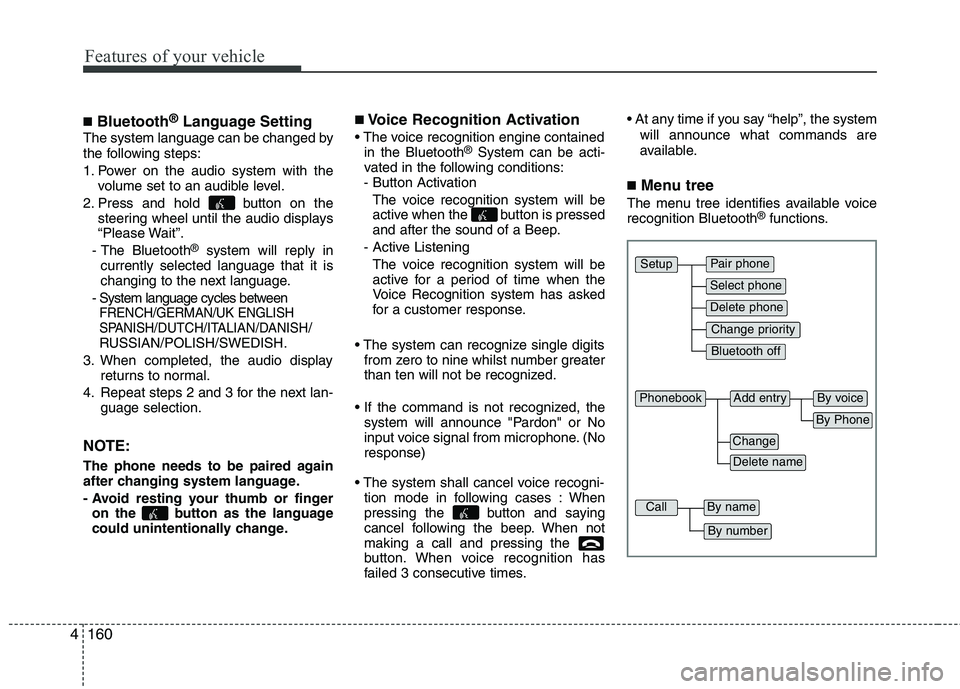
■ Menu tree
The menu tree identifies available voice recognition Bluetooth ®
functions.
Pair phone
Select phone
Change priority
Delete phone
Bluetooth off
Setup
Add entryPhonebook
Change
Delete name
By Phone
By voice
CallBy name
By number