child lock KIA PICANTO 2012 Owner's Manual
[x] Cancel search | Manufacturer: KIA, Model Year: 2012, Model line: PICANTO, Model: KIA PICANTO 2012Pages: 840, PDF Size: 41.16 MB
Page 516 of 840
417
Features of your vehicle
Impact sensing door unlock sys- tem (if equipped)
All doors will automatically unlock after
an impact causes the air bags to deploy.
Speed sensing door lock system (if equipped)
All doors will be automatically locked
after the vehicle speed exceeds 15 km/h.And all doors will be automatically
unlocked when you turn the engine off
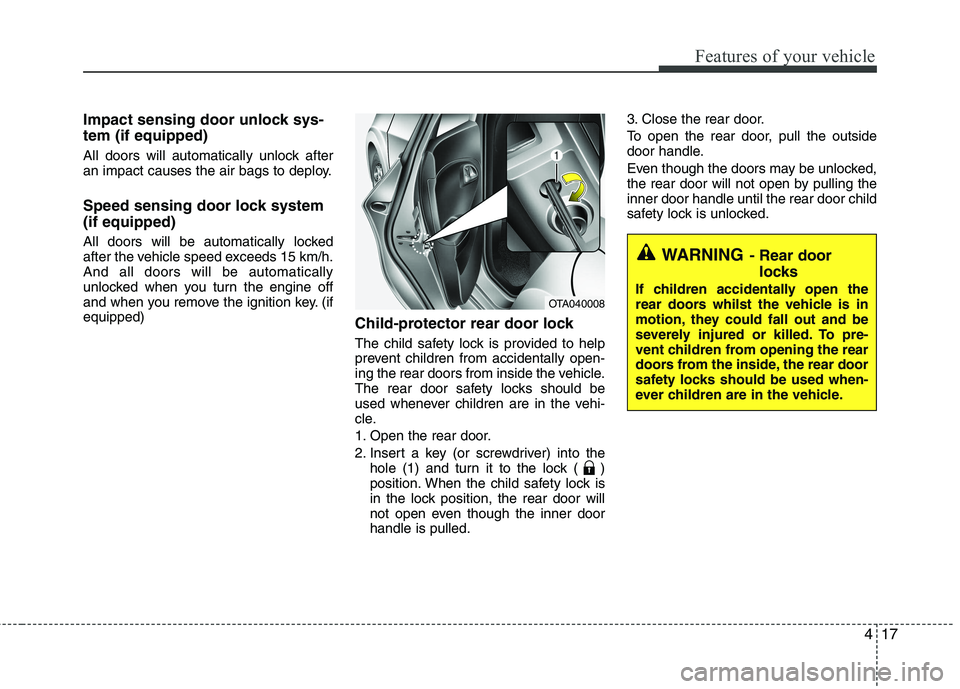
and when you remove the ignition key. (ifequipped)Child-protector rear door lock
The child safety lock is provided to help
prevent children from accidentally open-
ing the rear doors from inside the vehicle.
The rear door safety locks should be
used whenever children are in the vehi-
cle.
1. Open the rear door.
2. Insert a key (or screwdriver) into the
hole (1) and turn it to the lock ( )
position. When the child safety lock is
in the lock position, the rear door will
not open even though the inner doorhandle is pulled. 3. Close the rear door.
To open the rear door, pull the outside
door handle.
Even though the doors may be unlocked,
the rear door will not open by pulling theinner door handle until the rear door child
safety lock is unlocked.
WARNING
- Rear door
locks
If children accidentally open the
rear doors whilst the vehicle is in
motion, they could fall out and be
severely injured or killed. To pre-
vent children from opening the rear
doors from the inside, the rear door
safety locks should be used when-
ever children are in the vehicle.
OTA040008
Page 522 of 840
423
Features of your vehicle
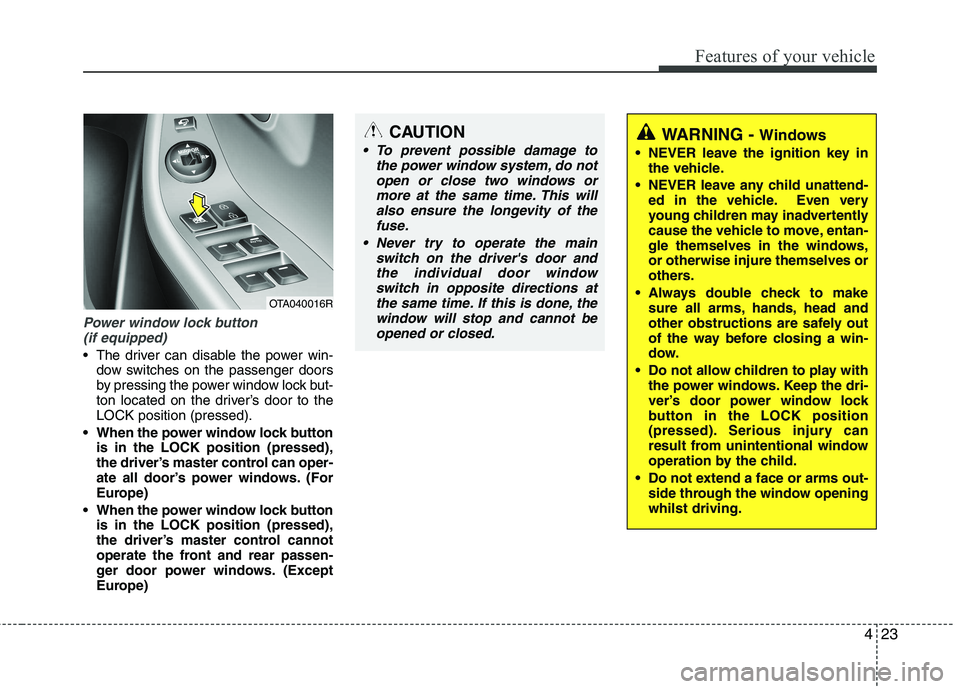
Power window lock button (if equipped)
The driver can disable the power win- dow switches on the passenger doors
by pressing the power window lock but-
ton located on the driver’s door to theLOCK position (pressed).
When the power window lock button is in the LOCK position (pressed),
the driver’s master control can oper-
ate all door’s power windows. (For
Europe)
When the power window lock button is in the LOCK position (pressed),
the driver’s master control cannot
operate the front and rear passen-
ger door power windows. (Except
Europe)
CAUTION
To prevent possible damage to
the power window system, do not
open or close two windows ormore at the same time. This willalso ensure the longevity of the fuse.
Never try to operate the main switch on the driver's door andthe individual door windowswitch in opposite directions at
the same time. If this is done, the window will stop and cannot beopened or closed.WARNING - Windows
NEVER leave the ignition key in the vehicle.
NEVER leave any child unattend- ed in the vehicle. Even very
young children may inadvertently
cause the vehicle to move, entan-
gle themselves in the windows,or otherwise injure themselves or
others.
Always double check to make sure all arms, hands, head and
other obstructions are safely out
of the way before closing a win-
dow.
Do not allow children to play with the power windows. Keep the dri-
ver’s door power window lock
button in the LOCK position
(pressed). Serious injury can
result from unintentional window
operation by the child.
Do not extend a face or arms out- side through the window openingwhilst driving.
OTA040016R
Page 618 of 840
4119
Features of your vehicle
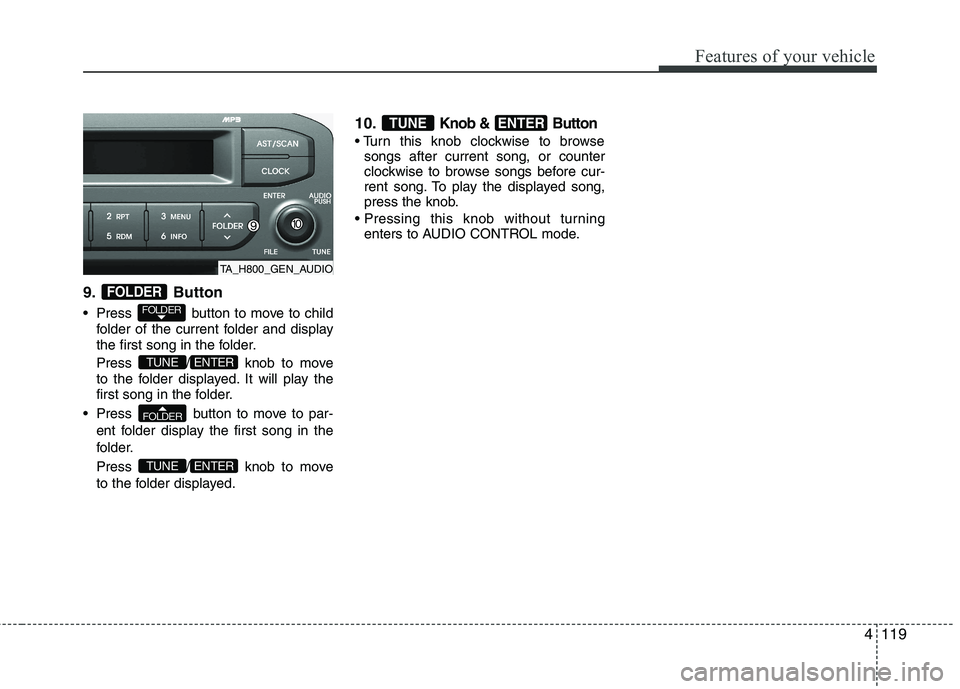
9. Button
Press button to move to childfolder of the current folder and display
the first song in the folder.
Press / knob to move
to the folder displayed. It will play the
first song in the folder.
Press button to move to par- ent folder display the first song in the
folder.
Press / knob to move
to the folder displayed. 10.
Knob & Button
songs after current song, or counter
clockwise to browse songs before cur-
rent song. To play the displayed song,
press the knob.
enters to AUDIO CONTROL mode.
ENTERTUNE
ENTERTUNE
FOLDER
ENTERTUNE
FOLDER
FOLDER
TA_H800_GEN_AUDIO
Page 627 of 840
Features of your vehicle
128
4
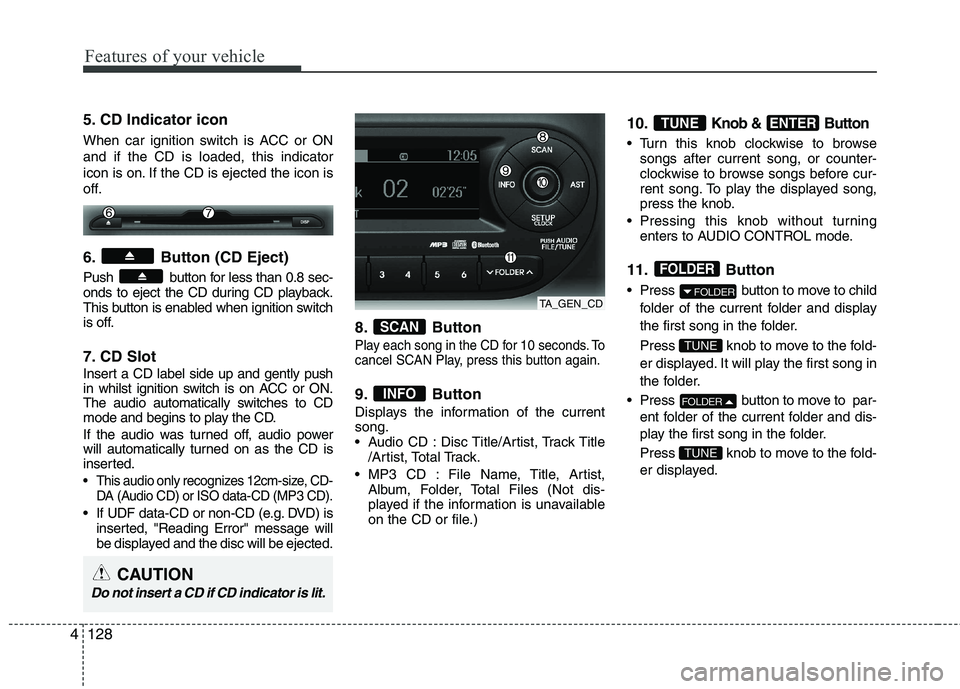
5. CD Indicator icon
When car ignition switch is ACC or ON and if the CD is loaded, this indicator
icon is on. If the CD is ejected the icon is
off.
6. Button (CD Eject)
Push button for less than 0.8 sec-
onds to eject the CD during CD playback.
This button is enabled when ignition switch
is off.
7. CD Slot
Insert a CD label side up and gently push
in whilst ignition switch is on ACC or ON.
The audio automatically switches to CD
mode and begins to play the CD.
If the audio was turned off, audio power
will automatically turned on as the CD is
inserted.
This audio only recognizes 12cm-size, CD-
DA (Audio CD) or ISO data-CD (MP3 CD).
If UDF data-CD or non-CD (e.g. DVD) isinserted, "Reading Error" message will
be displayed and the disc will be ejected. 8. Button
Play each song in the CD for 10 seconds. To
cancel SCAN Play, press this button again.
9. Button
Displays the information of the current song.
Audio CD : Disc Title/Artist, Track Title
/Artist, Total Track.
MP3 CD : File Name, Title, Artist, Album, Folder, Total Files (Not dis-
played if the information is unavailable
on the CD or file.) 10.
Knob & Button
Turn this knob clockwise to browse
songs after current song, or counter-
clockwise to browse songs before cur-
rent song. To play the displayed song,
press the knob.
Pressing this knob without turning enters to AUDIO CONTROL mode.
11. Button
Press button to move to child folder of the current folder and display
the first song in the folder.
Press knob to move to the fold-
er displayed. It will play the first song in
the folder.
Press button to move to par- ent folder of the current folder and dis-
play the first song in the folder.
Press knob to move to the fold-
er displayed.
TUNE
FOLDER
TUNE
FOLDER
FOLDER
ENTERTUNE
INFO
SCAN
TA_GEN_CD
CAUTION
Do not insert a CD if CD indicator is lit.
Page 632 of 840
4133
Features of your vehicle
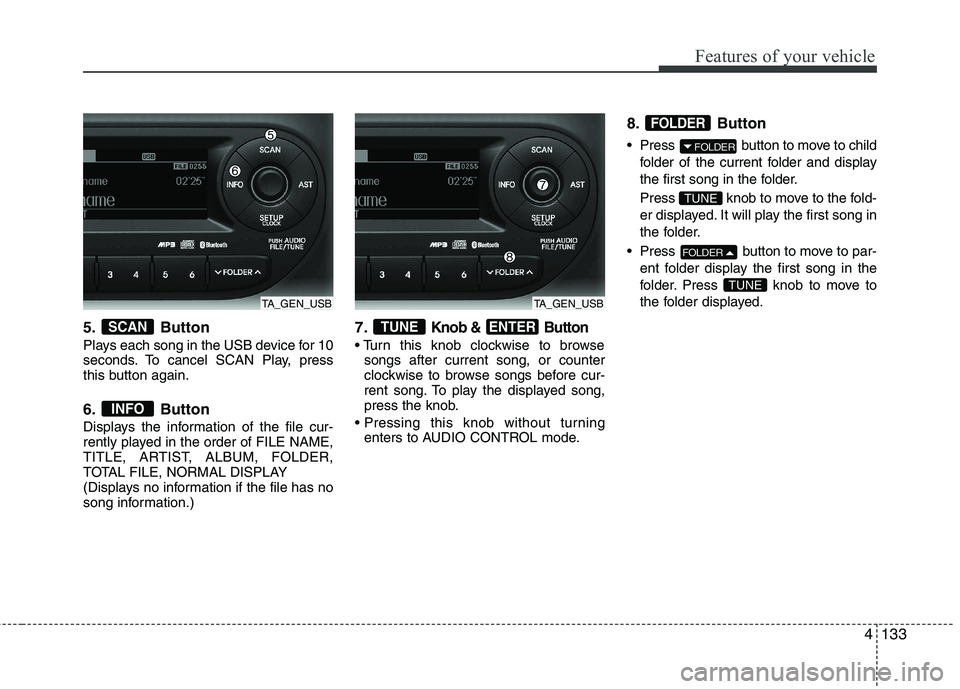
5. Button
Plays each song in the USB device for 10
seconds. To cancel SCAN Play, press
this button again.
6. Button
Displays the information of the file cur-
rently played in the order of FILE NAME,
TITLE, ARTIST, ALBUM, FOLDER,
TOTAL FILE, NORMAL DISPLAY
(Displays no information if the file has no
song information.)7.Knob & Button
songs after current song, or counter
clockwise to browse songs before cur-
rent song. To play the displayed song,
press the knob.
enters to AUDIO CONTROL mode. 8. Button
Press button to move to child
folder of the current folder and display
the first song in the folder.
Press knob to move to the fold-
er displayed. It will play the first song in
the folder.
Press button to move to par- ent folder display the first song in the
folder. Press knob to move to
the folder displayed.
TUNE
FOLDER
TUNE
FOLDER
FOLDER
ENTERTUNE
INFO
SCAN
TA_GEN_USBTA_GEN_USB
Page 648 of 840
4149
Features of your vehicle
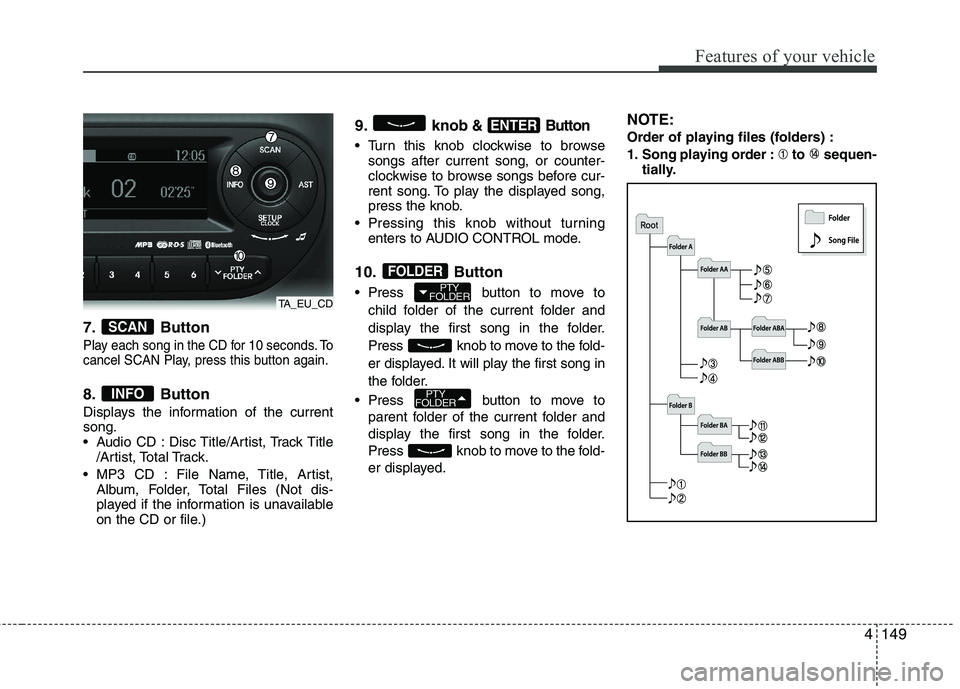
7. Button
Play each song in the CD for 10 seconds. To
cancel SCAN Play, press this button again.
8. Button
Displays the information of the current song.
Audio CD : Disc Title/Artist, Track Title/Artist, Total Track.
MP3 CD : File Name, Title, Artist, Album, Folder, Total Files (Not dis-
played if the information is unavailable
on the CD or file.) 9. knob
& Button
Turn this knob clockwise to browse
songs after current song, or counter-
clockwise to browse songs before cur-
rent song. To play the displayed song,
press the knob.
Pressing this knob without turning enters to AUDIO CONTROL mode.
10. Button
Press button to move to child folder of the current folder and
display the first song in the folder.
Press knob to move to the fold-
er displayed. It will play the first song in
the folder.
Press button to move to parent folder of the current folder and
display the first song in the folder.
Press knob to move to the fold-
er displayed. NOTE:
Order of playing files (folders) :
1. Song playing order : to sequen-
tially.
PTY
FOLDER
PTY
FOLDER
FOLDER
ENTER
INFO
SCAN
TA_EU_CD
Page 653 of 840
Features of your vehicle
154
4
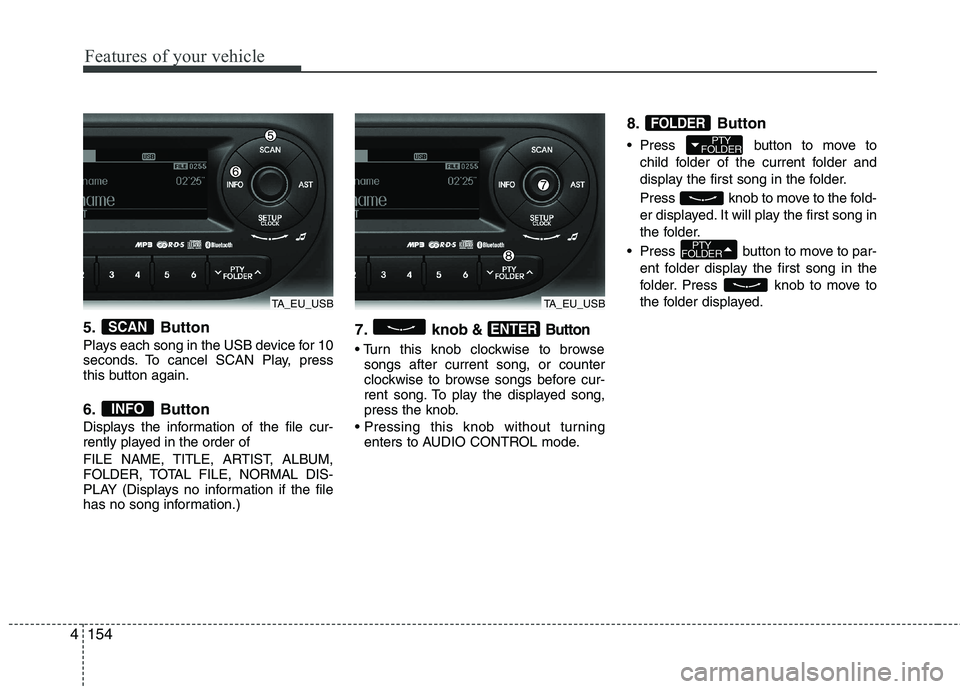
5. Button
Plays each song in the USB device for 10
seconds. To cancel SCAN Play, press
this button again.
6. Button
Displays the information of the file cur-
rently played in the order of
FILE NAME, TITLE, ARTIST, ALBUM,
FOLDER, TOTAL FILE, NORMAL DIS-
PLAY (Displays no information if the file
has no song information.) 7. knob& Button
songs after current song, or counter
clockwise to browse songs before cur-
rent song. To play the displayed song,
press the knob.
enters to AUDIO CONTROL mode. 8. Button
Press button to move to
child folder of the current folder and
display the first song in the folder.
Press knob to move to the fold-
er displayed. It will play the first song in
the folder.
Press button to move to par- ent folder display the first song in the
folder. Press knob to move to
the folder displayed.
PTY
FOLDER
PTY
FOLDER
FOLDER
ENTER
INFO
SCAN
TA_EU_USBTA_EU_USB
Page 670 of 840
53
Driving your vehicle
Before entering vehicle
• Be sure that all windows, outside mir-ror(s), and outside lights are clean.
Check the condition of the tyres.
Check under the vehicle for any sign of leaks.
Be sure there are no obstacles behind you if you intend to back up.
Necessary inspections
Fluid levels, such as engine oil, engine
coolant, brake fluid, and washer fluid
should be checked on a regular basis,
with the exact interval depending on the
fluid. Further details are provided in sec-
tion 7, “Maintenance”. Before starting
Close and lock all doors.
Position the seat so that all controls are
easily reached.
Adjust the inside and outside rearview mirrors.
Be sure that all lights work.
Check all gauges.
Check the operation of warning lights when the ignition switch is turned to the ON position.
Release the parking brake and make sure the brake warning light goes out.
For safe operation, be sure you are famil-
iar with your vehicle and its equipment.
BEFORE DRIVING
WARNING
All passengers must be properly
belted whenever the vehicle is mov-
ing. Refer to “Seat belts” in section
3 for more information on their
proper use.
WARNING
Always check the surrounding
areas near your vehicle for people,
especially children, before putting a
car into D (Drive) or R (Reverse).
WARNING - Driving under
the influence of alcohol or drugs
Drinking and driving is dangerous.
Drunk driving is the number one
contributor to the highway death
toll each year. Even a small amount
of alcohol will affect your reflexes,
perceptions and judgment. Drivingwhilst under the influence of drugs
is as dangerous or more dangerousthan driving drunk.
You are much more likely to have a
serious accident if you drink or
take drugs and drive.
If you are drinking or taking drugs,
do not drive. Do not ride with a driv-er who has been drinking or taking
drugs. Choose a designated driveror call a cab.
WARNING
Driving whilst distracted can result in
a loss of vehicle control, that may
lead to an accident, severe personal
injury, and death. The driver’s pri-
mary responsibility is in the safe and
legal operation of a vehicle, and use
of any handheld devices, other
equipment, or vehicle systems which
take the driver’s eyes, attention and
focus away from the safe operation
of a vehicle or which are not permis-
sible by law should never be used
during operation of the vehicle.
Page 687 of 840
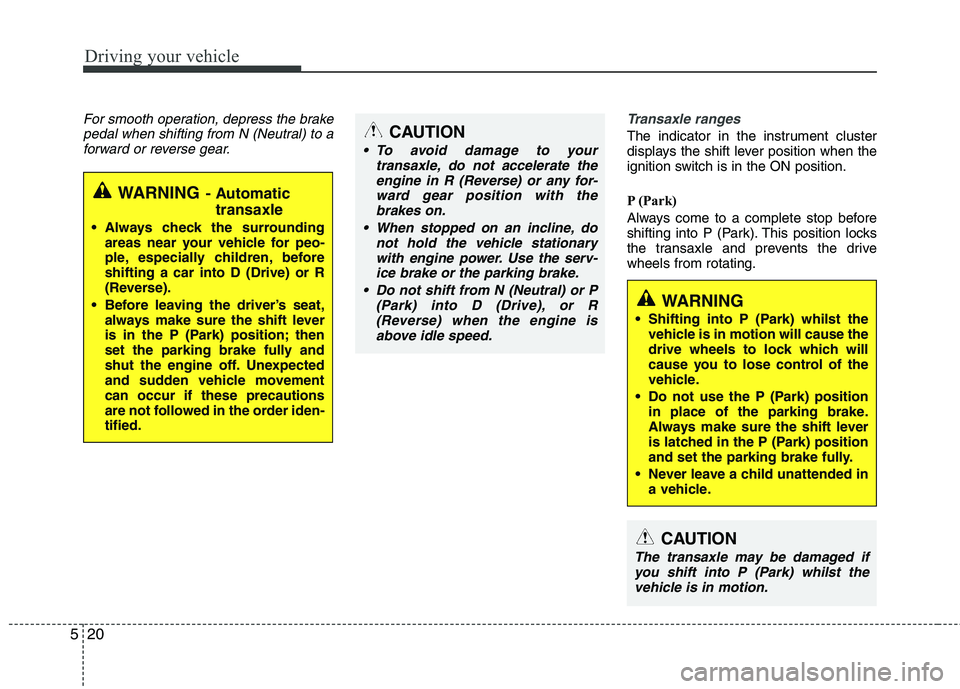
Driving your vehicle
20
5
For smooth operation, depress the brake
pedal when shifting from N (Neutral) to aforward or reverse gear.Transaxle ranges
The indicator in the instrument cluster
displays the shift lever position when the
ignition switch is in the ON position.
P (Park)
Always come to a complete stop before
shifting into P (Park). This position locks
the transaxle and prevents the drivewheels from rotating.
WARNING - Automatic
transaxle
Always check the surrounding areas near your vehicle for peo-
ple, especially children, beforeshifting a car into D (Drive) or R
(Reverse).
Before leaving the driver’s seat, always make sure the shift lever
is in the P (Park) position; then
set the parking brake fully and
shut the engine off. Unexpected
and sudden vehicle movementcan occur if these precautions
are not followed in the order iden-tified.
CAUTION
To avoid damage to your
transaxle, do not accelerate the
engine in R (Reverse) or any for-ward gear position with thebrakes on.
When stopped on an incline, do not hold the vehicle stationarywith engine power. Use the serv-ice brake or the parking brake.
Do not shift from N (Neutral) or P (Park) into D (Drive), or R
(Reverse) when the engine isabove idle speed.
WARNING
Shifting into P (Park) whilst the vehicle is in motion will cause the
drive wheels to lock which will
cause you to lose control of the
vehicle.
Do not use the P (Park) position in place of the parking brake.
Always make sure the shift lever
is latched in the P (Park) position
and set the parking brake fully.
Never leave a child unattended in a vehicle.
CAUTION
The transaxle may be damaged if
you shift into P (Park) whilst the vehicle is in motion.
Page 834 of 840
I3
Index
Cargo weight ..................................................................5-55
Central door lock switch ................................................4-16
Changing tyres ..................................................................6-9Chains
Tyre chains ................................................................5-44
Checking tyre inflation pressure ....................................7-41
Child restraint system ....................................................3-28 Lap belt......................................................................3-31
Lap/shoulder belt ......................................................3-30
Child-protector rear door lock ........................................4-17
Climate control system (Automatic) ..............................4-90 Air conditioning ........................................................4-95
Automatic heating and air conditioning....................4-91
Manual heating and air conditioning ........................4-92
Climate control system (Manual) ..................................4-81 Air conditioning ........................................................4-86
Climate control air filter............................................4-88
Heating and air conditioning ....................................4-82
Cigarette lighter ............................................................4-101
Climate control air filter ........................................4-88, 7-32
Clock (Digital) ..............................................................4-104
Clothes hanger ..............................................................4-105
Combined instrument, see instrument cluster ................4-41
Coolant ............................................................................7-23
Cooling fluid, see engine coolant ..................................7-23
Crankcase emission control system ................................7-75
Cup holder ....................................................................4-102
Curtain air bag ................................................................3-52 Dashboard, see instrument cluster ..................................4-41
Daytime running light ....................................................4-67
Defogging (Windscreen) ................................................4-97
Defogging logic (Windscreen)........................................4-99
Defroster (Rear window) ................................................4-80
Defrosting (Windscreen) ................................................4-97
Digital clock..................................................................4-104
Dimensions ......................................................................8-2
Displays, see instrument cluster ....................................4-41
Door locks ......................................................................4-14
Central door lock switch ..........................................4-16
Child-protector rear door lock ..................................4-17
Drink holders, see cup holders ....................................4-102
Driver's air bag ................................................................3-46
Driving at night ..............................................................5-40
Driving in flooded areas ................................................5-42
Driving in the rain ..........................................................5-41D