turn signal KIA PICANTO 2012 Owner's Manual
[x] Cancel search | Manufacturer: KIA, Model Year: 2012, Model line: PICANTO, Model: KIA PICANTO 2012Pages: 840, PDF Size: 41.16 MB
Page 434 of 840
15
Introduction
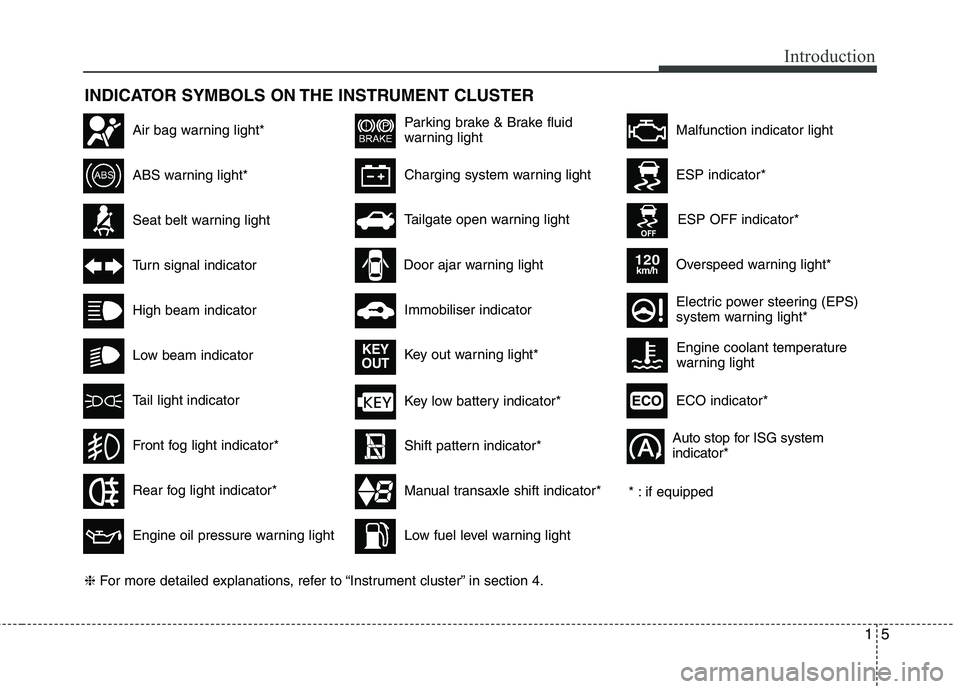
INDICATOR SYMBOLS ON THE INSTRUMENT CLUSTER
Seat belt warning light
High beam indicator
Turn signal indicator
ABS warning light*
Parking brake & Brake fluid
warning light
Engine oil pressure warning light
ESP indicator*
ESP OFF indicator*
Malfunction indicator lightAir bag warning light*
Immobiliser indicator
Low fuel level warning light* : if equipped
Charging system warning light
Overspeed warning light*
120km/h
Tail light indicator
Tailgate open warning light
Front fog light indicator*
Electric power steering (EPS)
system warning light*
Key low battery indicator*
Rear fog light indicator*
Door ajar warning light
Shift pattern indicator*
Manual transaxle shift indicator*
Key out warning light*
KEY
OUT
ECO indicator*ECO
Auto stop for ISG system indicator*
Low beam indicator Engine coolant temperature
warning light
❈
For more detailed explanations, refer to “Instrument cluster” in section 4.
Page 437 of 840
23
Your vehicle at a glance
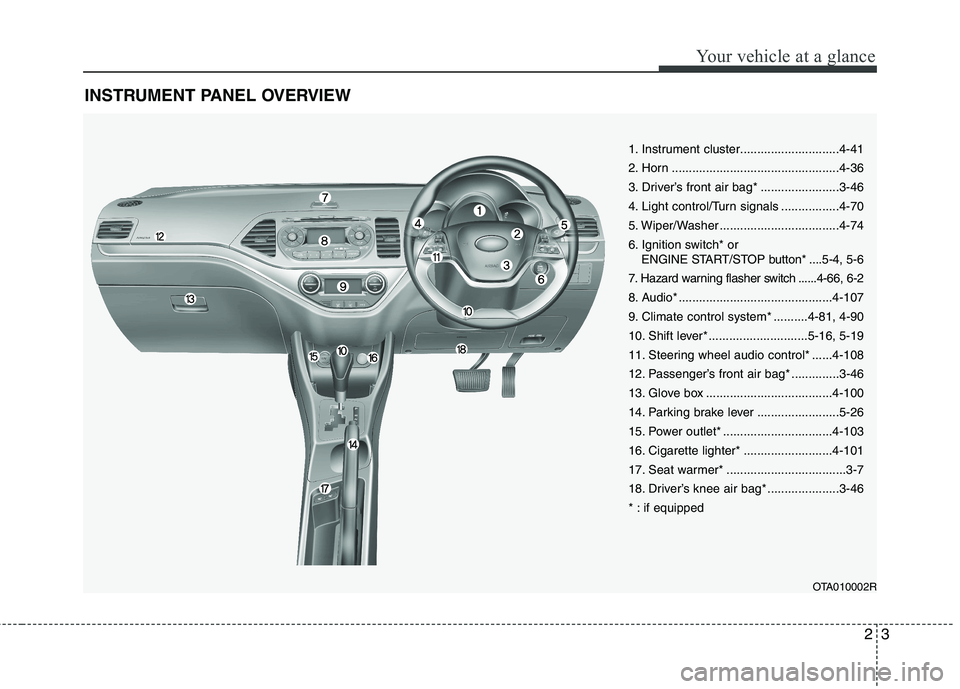
INSTRUMENT PANEL OVERVIEW
OTA010002R
1. Instrument cluster.............................4-41
2. Horn .................................................4-36
3. Driver’s front air bag* .......................3-46
4. Light control/Turn signals .................4-70
5. Wiper/Washer ...................................4-74
6. Ignition switch* or ENGINE START/STOP button* ....5-4, 5-6
7. Hazard warning flasher switch ......4-66, 6-2
8. Audio* .............................................4-107
9. Climate control system* ..........4-81, 4-90
10. Shift lever* .............................5-16, 5-19
11. Steering wheel audio control* ......4-108
12. Passenger’s front air bag* ..............3-46
13. Glove box .....................................4-100
14. Parking brake lever ........................5-26
15. Power outlet* ................................4-103
16. Cigarette lighter* ..........................4-101
17. Seat warmer* ...................................3-7
18. Driver’s knee air bag* .....................3-46
* : if equipped
Page 478 of 840
Safety features of your vehicle
40
3
How does the air bag system operate
Air bags are activated (able to inflate if
necessary) only when the ignition
switch is turned to the ON or STARTposition.
Air bags inflate instantly in the event of a serious frontal or side collision (if
equipped with side air bag or curtainair bag) in order to help protect the
occupants from serious physical injury.
There is no single speed at which the air bags will inflate.
Generally, air bags are designed to
inflate based upon the severity of a col-
lision and its direction. These two fac-
tors determine whether the sensors
produce an electronic deployment/inflation signal.
Air bag deployment depends on a number of factors including vehiclespeed, angles of impact and the densi-
ty and stiffness of the vehicles or
objects which your vehicle hits in the
collision. The determining factors are
not limited to those mentioned above.
The front air bags will completely inflate and deflate in an instant.
It is virtually impossible for you to see
the air bags inflate during an accident. It is much more likely that you will sim-ply see the deflated air bags hanging
out of their storage compartments afterthe collision.
In order to help provide protection in a severe collision, the air bags must
inflate rapidly. The speed of air baginflation is a consequence of the
extremely short time in which a collisionoccurs and the need to inflate the air
bag between the occupant and the
vehicle structures before the occupant
impacts those structures. This speed of
inflation reduces the risk of serious or
life-threatening injuries in a severe col-
lision and is thus a necessary part of airbag design.
However, air bag inflation can also
cause injuries which can include facial
abrasions, bruises and broken bonesbecause the inflation speed also caus-
es the air bags to expand with a great
deal of force.
There are even circumstances under which contact with the steer-
ing wheel air bag can cause fatal
injuries, especially if the occupant
is positioned excessively close tothe steering wheel.
WARNING
To avoid severe personal injury or death caused by deploying air
bags in a collision, the driver
should sit as far back from the
steering wheel air bag as possi-
ble (at least 250 mm (10 inches)
away). The front passengers
should always move their seats
as far back as possible and sit
back in their seat.
Air bags inflate instantly in the event of collision, and passen-
gers may be injured by the air bag
expansion force if they are not in
a proper position.
Air bag inflation may cause injuries including facial or bodily
abrasions, injuries from broken
glasses or burns.
Page 504 of 840
45
Features of your vehicle
To activate the immobiliser system:
Turn the ignition key to the OFF position.
The immobiliser system activates auto-
matically. Without a valid ignition key for
your vehicle, the engine will not start.
To deactivate the immobiliser sys-tem:
Insert the ignition key into the key cylin-
der and turn it to the ON position.
✽✽ NOTICE
When starting the engine, do not use the
key with other immobiliser keys around.
Otherwise the engine may not start or
may stop soon after it starts. Keep each
key separate in order to avoid a starting
malfunction. ✽
✽
NOTICE
If you need additional keys or lose your
keys, consult an authorised KIA dealer.
WARNING
In order to prevent theft of your vehi-
cle, do not leave spare keys any-
where in your vehicle. Your immo-
biliser password is a customer
unique password and should be kept
confidential. Do not leave this num-
ber anywhere in your vehicle.
CAUTION
The transponder in your ignition key is an important part of theimmobiliser system. It is designedto give years of trouble-free service,
however you should avoid expo-sure to moisture, static electricity and rough handling. Immobilisersystem malfunction could occur.
CAUTION
Do not put metal accessories near the ignition switch. Metal acces-
sories may interrupt the transpon-der signal and may prevent theengine from being started.
CAUTION
Do not change, alter or adjust the immobiliser system because it
could cause the immobiliser sys- tem to malfunction and should onlybe serviced by an authorised KIAdealer.
Malfunctions caused by improperalterations, adjustments or modifi-cations to the immobiliser system are not covered by your vehicle
manufacturer warranty.
Page 540 of 840
441
Features of your vehicle
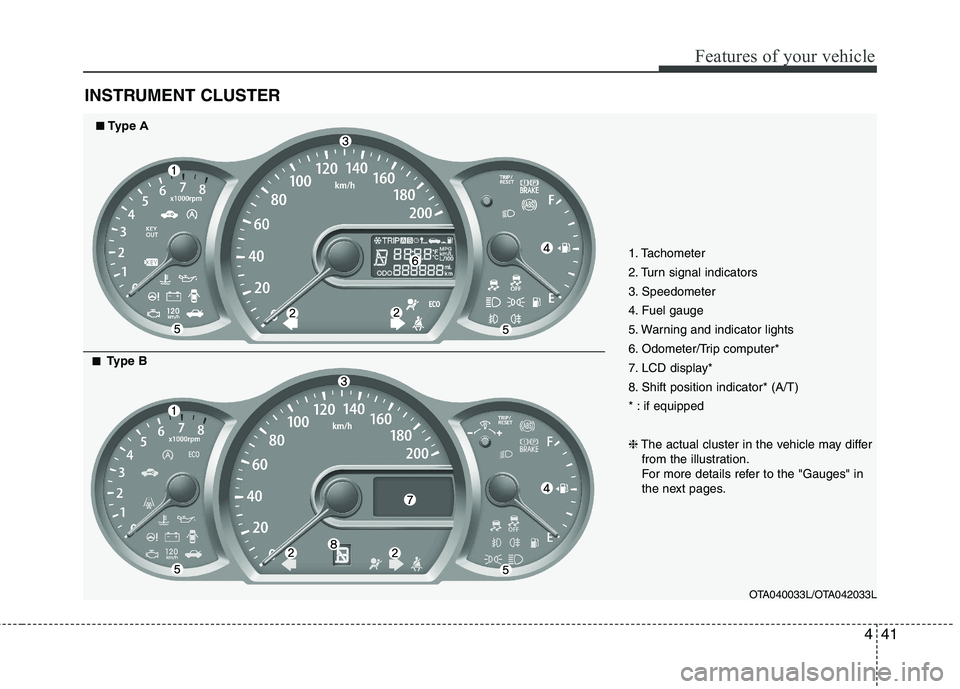
INSTRUMENT CLUSTER
1. Tachometer
2. Turn signal indicators
3. Speedometer
4. Fuel gauge
5. Warning and indicator lights
6. Odometer/Trip computer*
7. LCD display*
8. Shift position indicator* (A/T)
* : if equipped ❈The actual cluster in the vehicle may differ
from the illustration.
For more details refer to the "Gauges" in
the next pages.
OTA040033L/OTA042033L
■■Type A
■■
Type B
Page 555 of 840
Features of your vehicle
56
4
WARNING
Driving the vehicle with a warning
light on is dangerous. If the brake
warning light remains on, have the
brakes checked and repaired imme-
diately by an authorised KIA dealer.
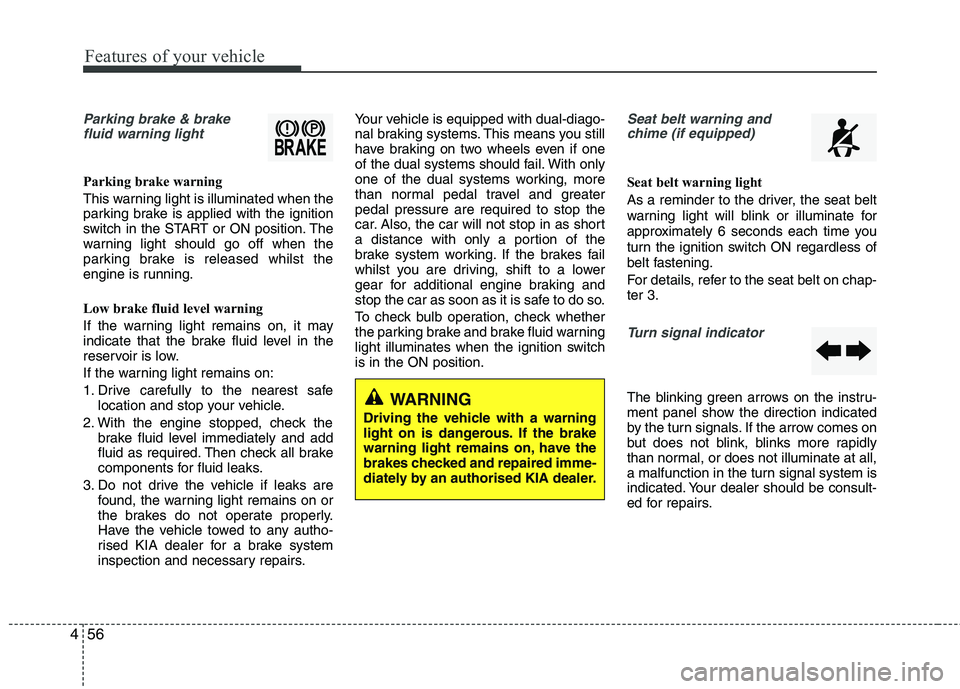
Parking brake & brake fluid warning light
Parking brake warning
This warning light is illuminated when the
parking brake is applied with the ignition
switch in the START or ON position. The
warning light should go off when the
parking brake is released whilst the
engine is running.
Low brake fluid level warning
If the warning light remains on, it may
indicate that the brake fluid level in the
reservoir is low.
If the warning light remains on:
1. Drive carefully to the nearest safe location and stop your vehicle.
2. With the engine stopped, check the brake fluid level immediately and add
fluid as required. Then check all brake
components for fluid leaks.
3. Do not drive the vehicle if leaks are found, the warning light remains on or
the brakes do not operate properly.
Have the vehicle towed to any autho-
rised KIA dealer for a brake system
inspection and necessary repairs. Your vehicle is equipped with dual-diago-
nal braking systems. This means you still
have braking on two wheels even if one
of the dual systems should fail. With only
one of the dual systems working, more
than normal pedal travel and greaterpedal pressure are required to stop the
car. Also, the car will not stop in as short
a distance with only a portion of the
brake system working. If the brakes fail
whilst you are driving, shift to a lower
gear for additional engine braking and
stop the car as soon as it is safe to do so.
To check bulb operation, check whether
the parking brake and brake fluid warning
light illuminates when the ignition switchis in the ON position.
Seat belt warning and
chime (if equipped)
Seat belt warning light
As a reminder to the driver, the seat belt
warning light will blink or illuminate for
approximately 6 seconds each time you
turn the ignition switch ON regardless of
belt fastening.
For details, refer to the seat belt on chap- ter 3.
Turn signal indicator
The blinking green arrows on the instru-
ment panel show the direction indicated
by the turn signals. If the arrow comes on
but does not blink, blinks more rapidly
than normal, or does not illuminate at all,
a malfunction in the turn signal system is
indicated. Your dealer should be consult-
ed for repairs.
Page 556 of 840
457
Features of your vehicle
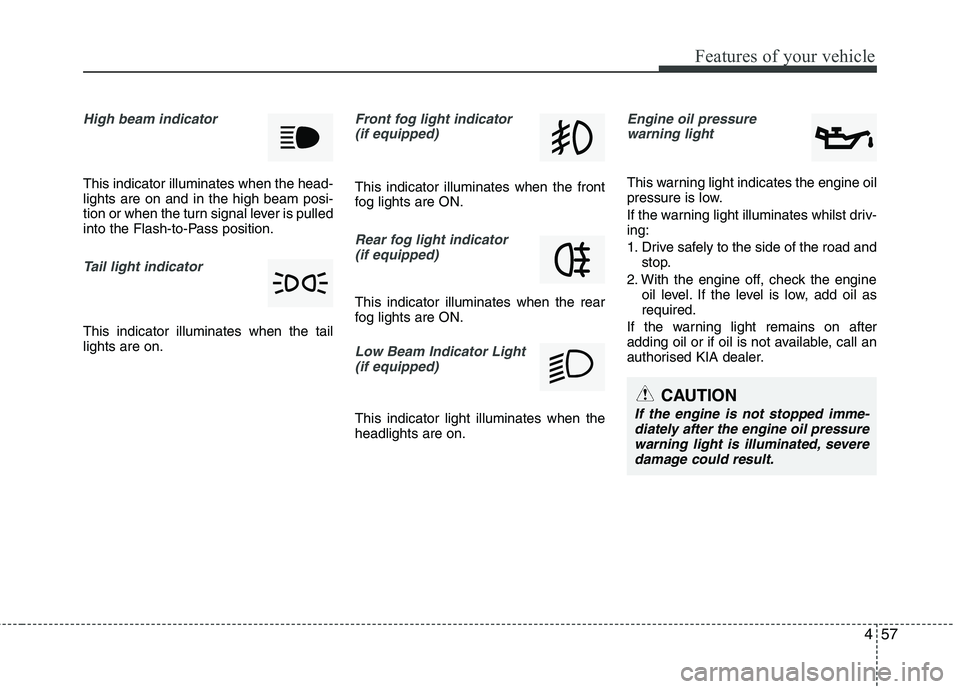
High beam indicator
This indicator illuminates when the head- lights are on and in the high beam posi-
tion or when the turn signal lever is pulled
into the Flash-to-Pass position.
Tail light indicator
This indicator illuminates when the tail lights are on.
Front fog light indicator (if equipped)
This indicator illuminates when the front
fog lights are ON.
Rear fog light indicator (if equipped)
This indicator illuminates when the rear
fog lights are ON.
Low Beam Indicator Light
(if equipped)
This indicator light illuminates when the headlights are on.
Engine oil pressure warning light
This warning light indicates the engine oil
pressure is low.
If the warning light illuminates whilst driv- ing:
1. Drive safely to the side of the road and stop.
2. With the engine off, check the engine oil level. If the level is low, add oil as required.
If the warning light remains on after
adding oil or if oil is not available, call an
authorised KIA dealer.
CAUTION
If the engine is not stopped imme- diately after the engine oil pressure
warning light is illuminated, severedamage could result.
Page 565 of 840
Features of your vehicle
66
4
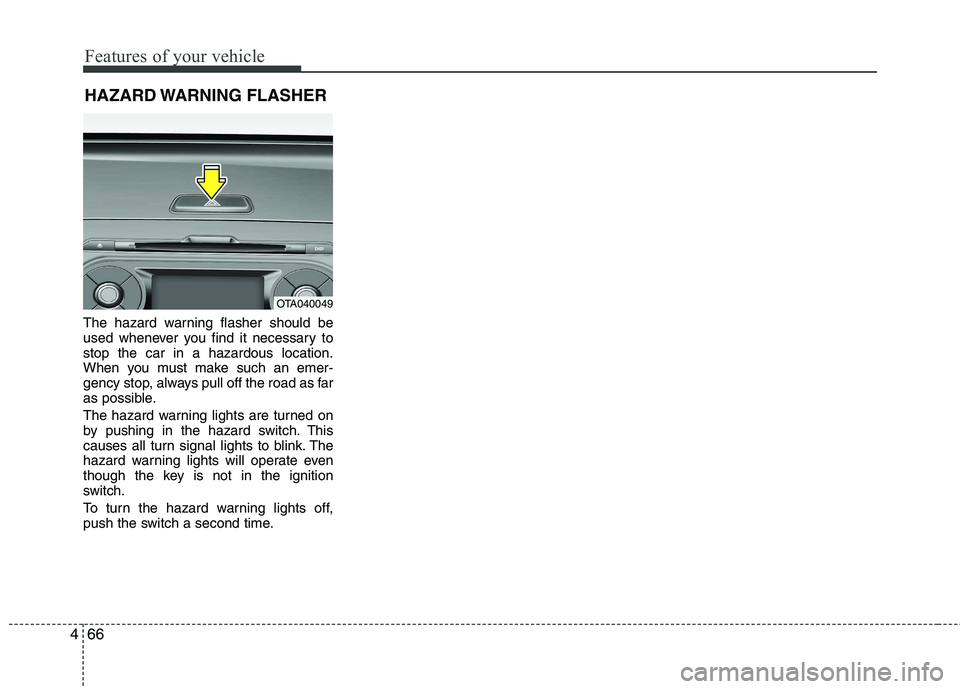
The hazard warning flasher should be
used whenever you find it necessary tostop the car in a hazardous location.
When you must make such an emer-
gency stop, always pull off the road as far
as possible.
The hazard warning lights are turned on
by pushing in the hazard switch. This
causes all turn signal lights to blink. The
hazard warning lights will operate even
though the key is not in the ignition
switch.
To turn the hazard warning lights off,
push the switch a second time. HAZARD WARNING FLASHER
OTA040049
Page 569 of 840
Features of your vehicle
70
4
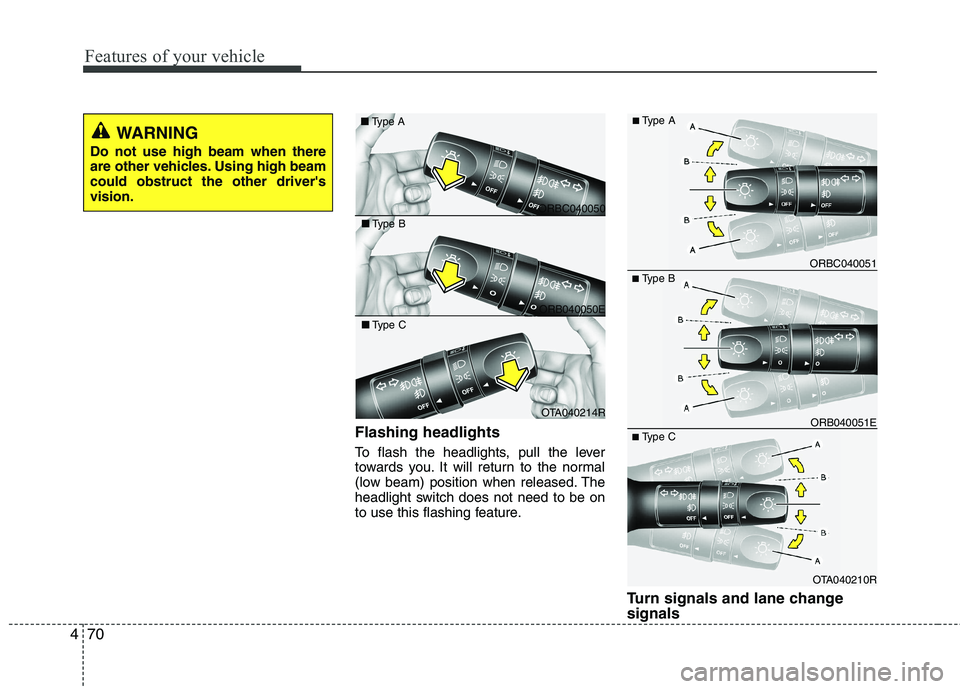
Flashing headlights
To flash the headlights, pull the lever
towards you. It will return to the normal
(low beam) position when released. The
headlight switch does not need to be on
to use this flashing feature.
Turn signals and lane change signals
■Type B
OTA040210R
ORB040051E
ORBC040051
■ Type C
■
Type A
ORBC040050
■
Type A
ORB040050E
■
Type B
OTA040214R
■
Type C
WARNING
Do not use high beam when there
are other vehicles. Using high beamcould obstruct the other driver'svision.
Page 570 of 840
471
Features of your vehicle
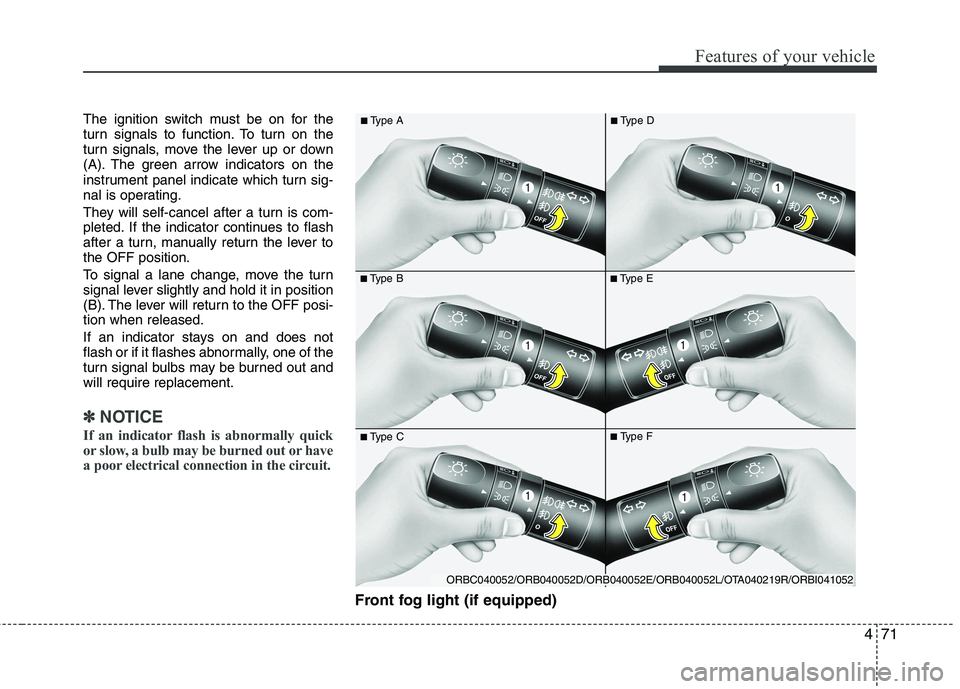
The ignition switch must be on for the
turn signals to function. To turn on the
turn signals, move the lever up or down
(A). The green arrow indicators on the
instrument panel indicate which turn sig-
nal is operating.
They will self-cancel after a turn is com-
pleted. If the indicator continues to flash
after a turn, manually return the lever tothe OFF position.
To signal a lane change, move the turn
signal lever slightly and hold it in position
(B). The lever will return to the OFF posi-tion when released.
If an indicator stays on and does not
flash or if it flashes abnormally, one of the
turn signal bulbs may be burned out andwill require replacement.
✽✽NOTICE
If an indicator flash is abnormally quick
or slow, a bulb may be burned out or have
a poor electrical connection in the circuit.
Front fog light (if equipped)
■ Type B
■
Type A■Type E
■Type C■Type F
■
Type D
ORBC040052/ORB040052D/ORB040052E/ORB040052L/OTA040219R/ORBI041052