remote KIA PICANTO 2012 Owners Manual
[x] Cancel search | Manufacturer: KIA, Model Year: 2012, Model line: PICANTO, Model: KIA PICANTO 2012Pages: 840, PDF Size: 41.16 MB
Page 74 of 840
4
Keys / 4-3
Remote keyless entry / 4-6
Smart key / 4-9
Theft-alarm system / 4-12
Door locks / 4-15
Tailgate / 4-19
Windows / 4-21
Hood / 4-26
Fuel filler lid / 4-28
Sunroof / 4-31
Steering wheel / 4-35
Mirrors / 4-38
Instrument cluster / 4-42
Rear parking assist system / 4-66
Hazard warning flasher / 4-69
Lighting / 4-70
Wipers and washers / 4-77
Interior light / 4-81
Defroster / 4-83
Manual climate control system / 4-84
Automatic climate control system / 4-93
Windshield defrosting and defogging / 4-100
Features of your vehicle
Page 79 of 840
Features of your vehicle
6
4
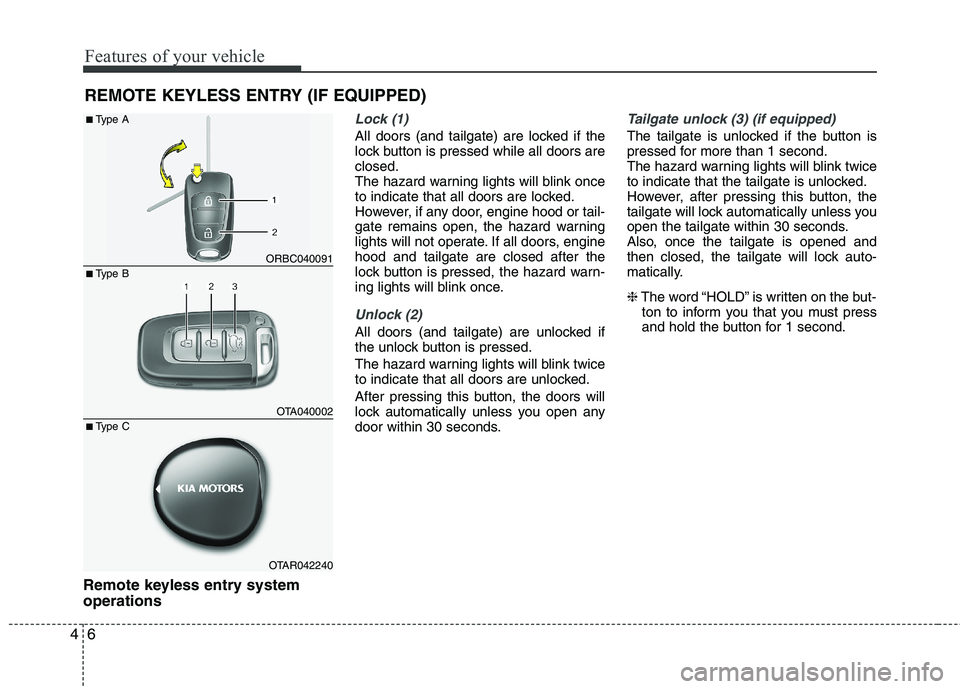
Remote keyless entry system operations
Lock (1)
All doors (and tailgate) are locked if the
lock button is pressed while all doors areclosed.
The hazard warning lights will blink once
to indicate that all doors are locked.
However, if any door, engine hood or tail-
gate remains open, the hazard warning
lights will not operate. If all doors, enginehood and tailgate are closed after the
lock button is pressed, the hazard warn-
ing lights will blink once.
Unlock (2)
All doors (and tailgate) are unlocked if
the unlock button is pressed.
The hazard warning lights will blink twice
to indicate that all doors are unlocked.
After pressing this button, the doors will
lock automatically unless you open any
door within 30 seconds.
Tailgate unlock (3) (if equipped)
The tailgate is unlocked if the button is
pressed for more than 1 second.
The hazard warning lights will blink twice
to indicate that the tailgate is unlocked.
However, after pressing this button, the
tailgate will lock automatically unless you
open the tailgate within 30 seconds.
Also, once the tailgate is opened and
then closed, the tailgate will lock auto-
matically. ❈ The word “HOLD” is written on the but-
ton to inform you that you must press
and hold the button for 1 second.
REMOTE KEYLESS ENTRY (IF EQUIPPED)
ORBC040091
OTA040002
OTAR042240
■
Type B
■
Type A
■ Type C
Page 82 of 840
49
Features of your vehicle
With a smart key, you can lock or unlock
a door (and tailgate) and even start the
engine without inserting the key.
The functions of buttons on a smart key
are similar to the remote keyless entry.
(Refer to the “Remote keyless entry” inthis section.)
There are no buttons on the accessory
smart key(type B)Smart key functions
Carrying the smart key, you may lock and
unlock the vehicle doors (and tailgate).
Also, you may start the engine. Refer to
the following, for more details.
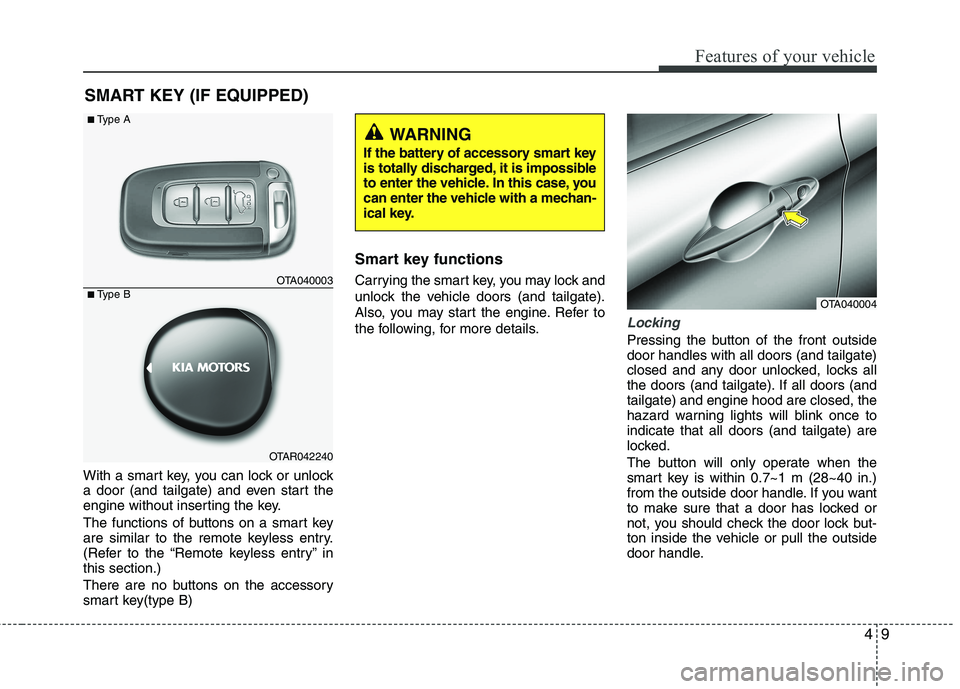
Locking
Pressing the button of the front outside door handles with all doors (and tailgate)
closed and any door unlocked, locks all
the doors (and tailgate). If all doors (andtailgate) and engine hood are closed, the
hazard warning lights will blink once toindicate that all doors (and tailgate) are
locked.
The button will only operate when the
smart key is within 0.7~1 m (28~40 in.)
from the outside door handle. If you want
to make sure that a door has locked or
not, you should check the door lock but-
ton inside the vehicle or pull the outside
door handle.
SMART KEY (IF EQUIPPED)
OTA040004
OTA040003
OTAR042240
■
Type A
■ Type B
WARNING
If the battery of accessory smart key
is totally discharged, it is impossible
to enter the vehicle. In this case, you
can enter the vehicle with a mechan-
ical key.
Page 111 of 840
Features of your vehicle
38
4
Inside rearview mirror
Adjust the rearview mirror to center on
the view through the rear window. Make
this adjustment before you start driving.
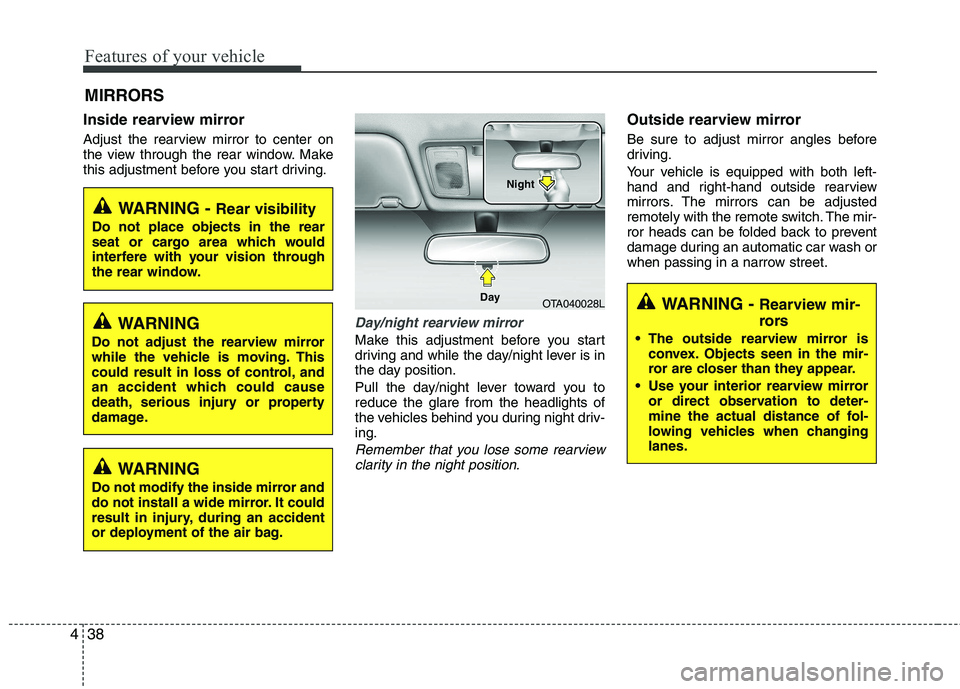
Day/night rearview mirror
Make this adjustment before you start
driving and while the day/night lever is in
the day position.
Pull the day/night lever toward you to reduce the glare from the headlights of
the vehicles behind you during night driv-ing.
Remember that you lose some rearview
clarity in the night position.
Outside rearview mirror
Be sure to adjust mirror angles before
driving.
Your vehicle is equipped with both left-
hand and right-hand outside rearview
mirrors. The mirrors can be adjusted
remotely with the remote switch. The mir-
ror heads can be folded back to prevent
damage during an automatic car wash or
when passing in a narrow street.
MIRRORS
WARNING -
Rear visibility
Do not place objects in the rear
seat or cargo area which would
interfere with your vision through
the rear window.
OTA040028L
Day Night
WARNING
Do not adjust the rearview mirror
while the vehicle is moving. This
could result in loss of control, and
an accident which could cause
death, serious injury or property
damage.
WARNING
Do not modify the inside mirror and
do not install a wide mirror. It could
result in injury, during an accident
or deployment of the air bag.
WARNING - Rearview mir-
rors
The outside rearview mirror is convex. Objects seen in the mir-
ror are closer than they appear.
Use your interior rearview mirror or direct observation to deter-
mine the actual distance of fol-
lowing vehicles when changinglanes.
Page 112 of 840
439
Features of your vehicle
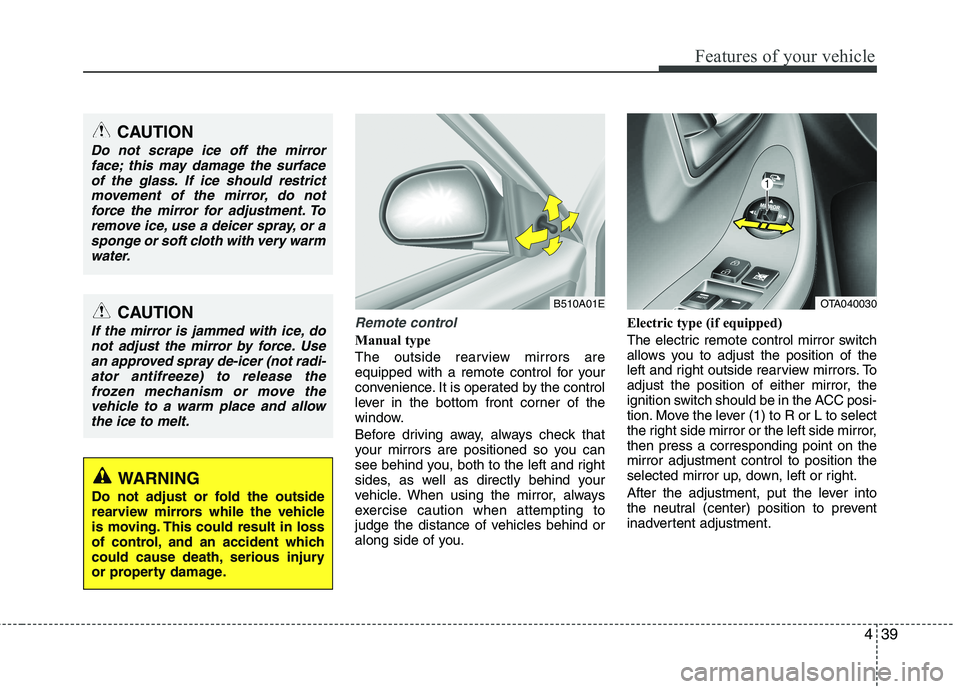
Remote control
Manual type
The outside rearview mirrors are
equipped with a remote control for your
convenience. It is operated by the control
lever in the bottom front corner of the
window.
Before driving away, always check that
your mirrors are positioned so you can
see behind you, both to the left and right
sides, as well as directly behind your
vehicle. When using the mirror, always
exercise caution when attempting to
judge the distance of vehicles behind or
along side of you.Electric type (if equipped)
The electric remote control mirror switch
allows you to adjust the position of the
left and right outside rearview mirrors. To
adjust the position of either mirror, the
ignition switch should be in the ACC posi-
tion. Move the lever (1) to R or L to select
the right side mirror or the left side mirror,then press a corresponding point on themirror adjustment control to position the
selected mirror up, down, left or right.
After the adjustment, put the lever into
the neutral (center) position to prevent
inadvertent adjustment.
CAUTION
Do not scrape ice off the mirror
face; this may damage the surface
of the glass. If ice should restrictmovement of the mirror, do notforce the mirror for adjustment. To remove ice, use a deicer spray, or a
sponge or soft cloth with very warmwater.
CAUTION
If the mirror is jammed with ice, donot adjust the mirror by force. Use
an approved spray de-icer (not radi-ator antifreeze) to release thefrozen mechanism or move thevehicle to a warm place and allow
the ice to melt.
WARNING
Do not adjust or fold the outside
rearview mirrors while the vehicle
is moving. This could result in loss
of control, and an accident which
could cause death, serious injury
or property damage.
B510A01EOTA040030
Page 184 of 840
4111
Features of your vehicle
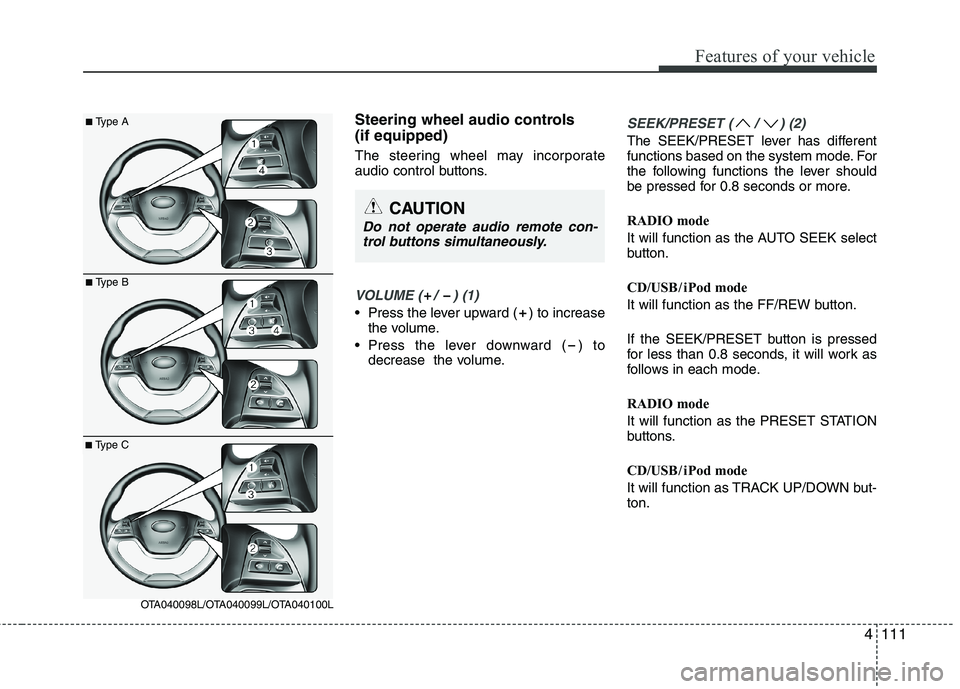
Steering wheel audio controls (if equipped)
The steering wheel may incorporate
audio control buttons.
VOLUME ( / ) (1)
• Press the lever upward ( ) to increasethe volume.
Press the lever downward ( ) to decrease the volume.
SEEK/PRESET ( / ) (2)
The SEEK/PRESET lever has different
functions based on the system mode. For
the following functions the lever should
be pressed for 0.8 seconds or more.
RADIO mode
It will function as the AUTO SEEK select
button.
CD/USB / i Pod mode
It will function as the FF/REW button.
If the SEEK/PRESET button is pressed
for less than 0.8 seconds, it will work as
follows in each mode.
RADIO mode
It will function as the PRESET STATION
buttons.
CD/USB / i Pod mode
It will function as TRACK UP/DOWN but- ton.
CAUTION
Do not operate audio remote con-
trol buttons simultaneously.
■ Type A
■Type B
■Type C
OTA040098L/OTA040099L/OTA040100L
Page 214 of 840
4141
Features of your vehicle
BLUETOOTH®
PHONE OPERATION
(if equipped)
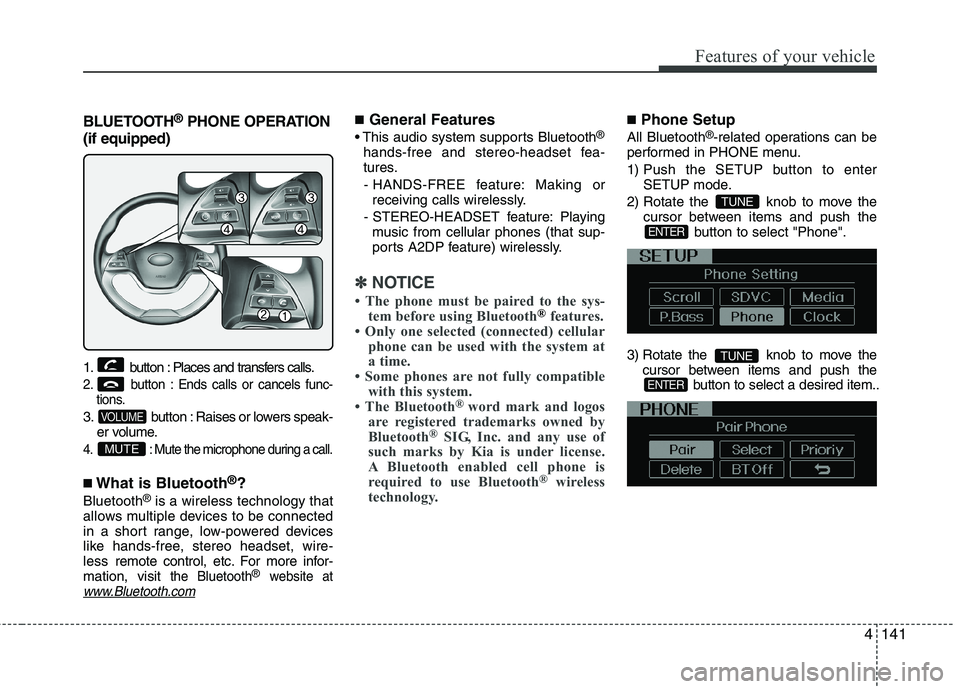
1. button : Places and transfers calls.
2. button : Ends calls or cancels func- tions.
3. button : Raises or lowers speak-er volume.
4. : Mute the microphone during a call.
■What is Bluetooth ®
?
Bluetooth ®
is a wireless technology that
allows multiple devices to be connected
in a short range, low-powered devices
like hands-free, stereo headset, wire-less remote control, etc. For more infor-
mation, visit
the Bluetooth®website atwww.Bluetooth.com
■ General Features
®
hands-free and stereo-headset fea-
tures. - HANDS-FREE feature: Making or receiving calls wirelessly.
- STEREO-HEADSET feature: Playing music from cellular phones (that sup-
ports A2DP feature) wirelessly.
✽✽ NOTICE
The phone must be paired to the sys- tem before using Bluetooth
®features.
Only one selected (connected) cellular phone can be used with the system at
a time.
Some phones are not fully compatible
with this system.
The Bluetooth ®
word mark and logos
are registered trademarks owned by
Bluetooth ®
SIG, Inc. and any use of
such marks by Kia is under license.
A Bluetooth enabled cell phone is
required to use Bluetooth ®
wireless
technology.
■ Phone Setup
All Bluetooth ®
-related operations can be
performed in PHONE menu.
1) Push the SETUP button to enter SETUP mode.
2) Rotate the knob to move the cursor between items and push the
button to select "Phone".
3) Rotate the knob to move the cursor between items and push the button to select a desired item..
ENTER
TUNE
ENTER
TUNE
MUTE
VOLUME
Page 217 of 840
Features of your vehicle
144
4
■
Using the head unit as Bluetooth ®
music
This audio system supports A2DP (Audio
Advanced Distribution Profile) and
AVRCP(Audio Video Remote ControlProfile).
Both profiles are available for listening to
the MP3 music via Bluetooth cellular phone
supporting above Bluetooth profiles.
To play MP3 music from the Bluetooth
cellular phone, press the button
until “MP3 Play” is displayed on the LCD.
Then try playing music by phone.
When playing music from the Bluetooth
cellular phone, the head unit displays MP3 MODE. NOTE:
all the sounds that the phone supports can be
heard by the audio system.
feature A2DP and AVRCP functions.
cellular phones may not play music
through the head unit on first try.
Please try the below;
i.e : Menu ➟
Filemanager ➟Music ➟
Option ➟Play via Bluetooth
phone for more.
To stop music, try stop playing
music from the phone then change
the audio mode to other than “MP3
Play” mode (e.g. FM, AM, CD, etc.)
AUX
Page 235 of 840
Features of your vehicle
162
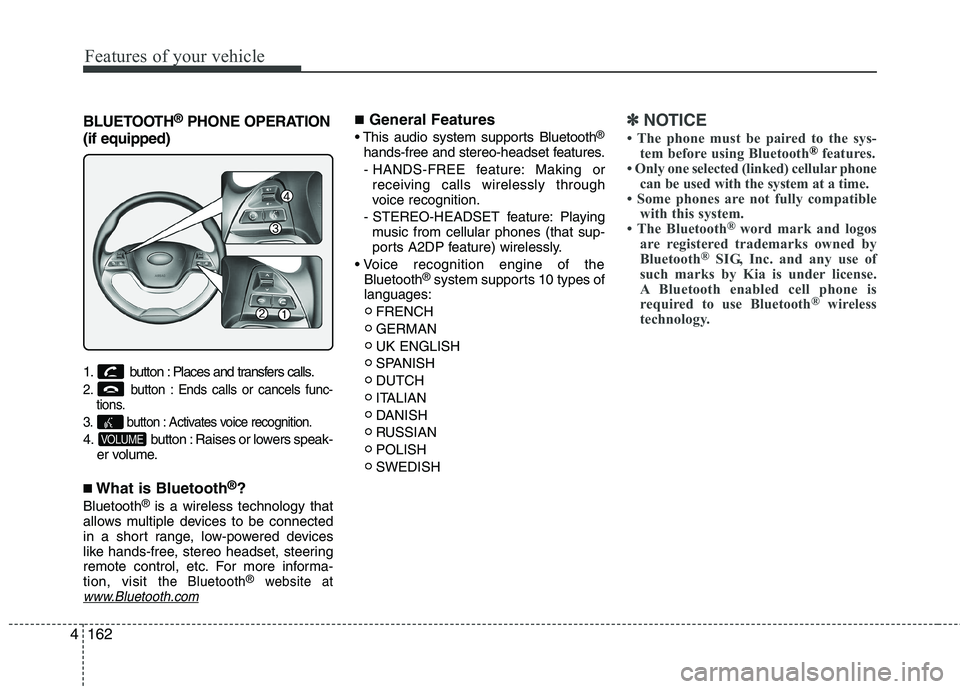
4
BLUETOOTH ®
PHONE OPERATION
(if equipped)
1. button : Places and transfers calls.
2. button : Ends calls or cancels func- tions.
3. button : Activates voice recognition.
4. button : Raises or lowers speak- er volume.
■ What is Bluetooth ®
?
Bluetooth ®
is a wireless technology that
allows multiple devices to be connected
in a short range, low-powered devices
like hands-free, stereo headset, steering
remote control, etc. For more informa-tion, visit
the Bluetooth®website atwww.Bluetooth.com
■ General Features
®
hands-free and stereo-headset features. - HANDS-FREE feature: Making or receiving calls wirelessly through
voice recognition.
- STEREO-HEADSET feature: Playing music from cellular phones (that sup-
ports A2DP feature) wirelessly.
Bluetooth ®
system supports 10 types of
languages:
FRENCH GERMANUK ENGLISH
SPANISHDUTCH
ITALIAN
DANISH
RUSSIANPOLISHSWEDISH✽✽ NOTICE
The phone must be paired to the sys- tem before using Bluetooth
®features.
Only one selected (linked) cellular phone can be used with the system at a time.
Some phones are not fully compatible with this system.
The Bluetooth ®
word mark and logos
are registered trademarks owned by
Bluetooth ®
SIG, Inc. and any use of
such marks by Kia is under license.
A Bluetooth enabled cell phone is
required to use Bluetooth ®
wireless
technology.
VOLUME
Page 243 of 840
Features of your vehicle
170
4
■
Bluetooth®Audio Music Streaming
The audio system supports Bluetooth ®
A2DP (Audio Advanced Distribution
Profile) and AVRCP (Audio Video
Remote Control Profile) technologies.
Both profiles provide steaming of music
via compatible “PAIRED” Bluetooth ®
Cellular phone.
To stream music from the Bluetooth ®
cel-
lular phone, play your music files on your
cellular phone according to your cellular
phone user’s manual and press the button on the audio system until
“MP3 play” is displayed on the LCD.
The audio system head unit displays ‘MP3 MODE’. NOTE:
all music and sound files your cellu-
lar phone supports can be played
by the audio system.
®
compatible cellular
phones must include A2DP and
AVRCP capabilities.
AVRCP compatible
Bluetooth ®
cellular phones may not
play music through the audio sys-
tem initially. These cellular phones
may need to have the Bluetooth ®
streaming enabled, for example;
i.e : Menu ➟Filemanager ➟Music ➟
Option ➟Play via Bluetooth
cellular phone for more information.
To cancel Bluetooth ®
cellular phone
music streaming, stop music play-
back on the cellular phone or
change the audio mode to AM/FM,
CD, iPod, ect.
MEDIA