capacity KIA PICANTO 2014 User Guide
[x] Cancel search | Manufacturer: KIA, Model Year: 2014, Model line: PICANTO, Model: KIA PICANTO 2014Pages: 1003, PDF Size: 44.67 MB
Page 379 of 1003
Maintenance
54
7
✽✽
NOTICE
Not all fuse panel descriptions in this
manual may be applicable to your vehi-
cle. It is accurate at the time of printing.
When you inspect the fuse panel in your
vehicle, refer to the fuse panel label.
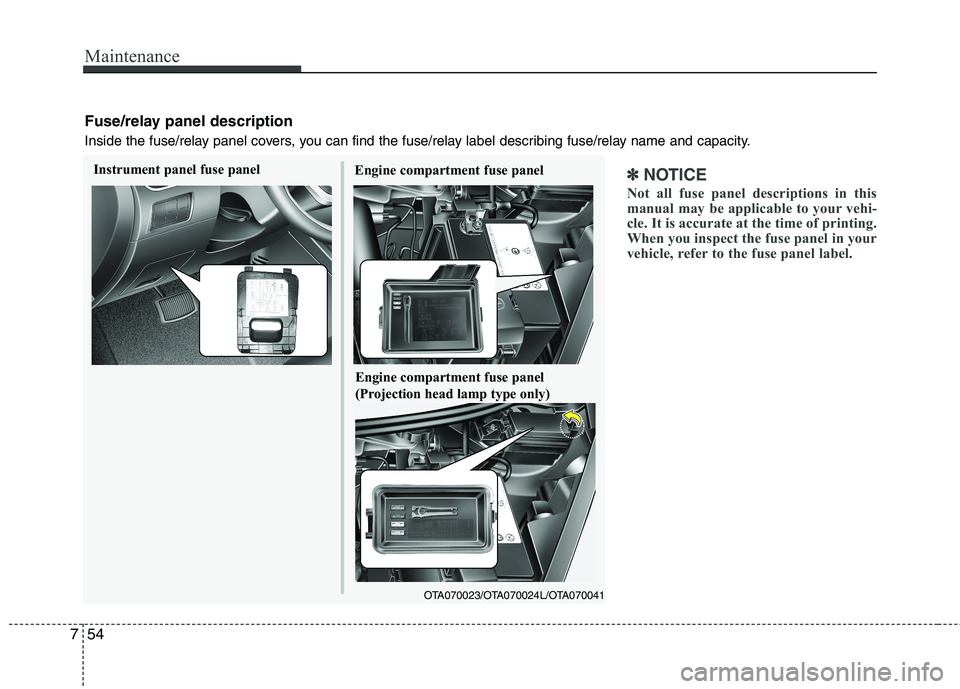
Fuse/relay panel description
Inside the fuse/relay panel covers, you can find the fuse/relay label describing fuse/relay name and capacity.
Engine compartment fuse panel
OTA070023/OTA070024L/OTA070041
Instrument panel fuse panel
Engine compartment fuse panel
(Projection head lamp type only)
Page 442 of 1003
311
Safety features of your vehicle
Folding the rear seat (if equipped)
The rear seatbacks (or cushions) may be
folded to facilitate carrying long items orto increase the luggage capacity of the
vehicle.To fold the rear seat cushion and seat
back:
The rear seatbacks may be folded for-
ward to provide additional cargo space
and to provide access to the cargo area.
To raise the seatback, lift and push it
firmly until it clicks into place.
When you return the seatback to its upright position, reposition the rear
safety belts so that they can be used
by rear seat passengers.
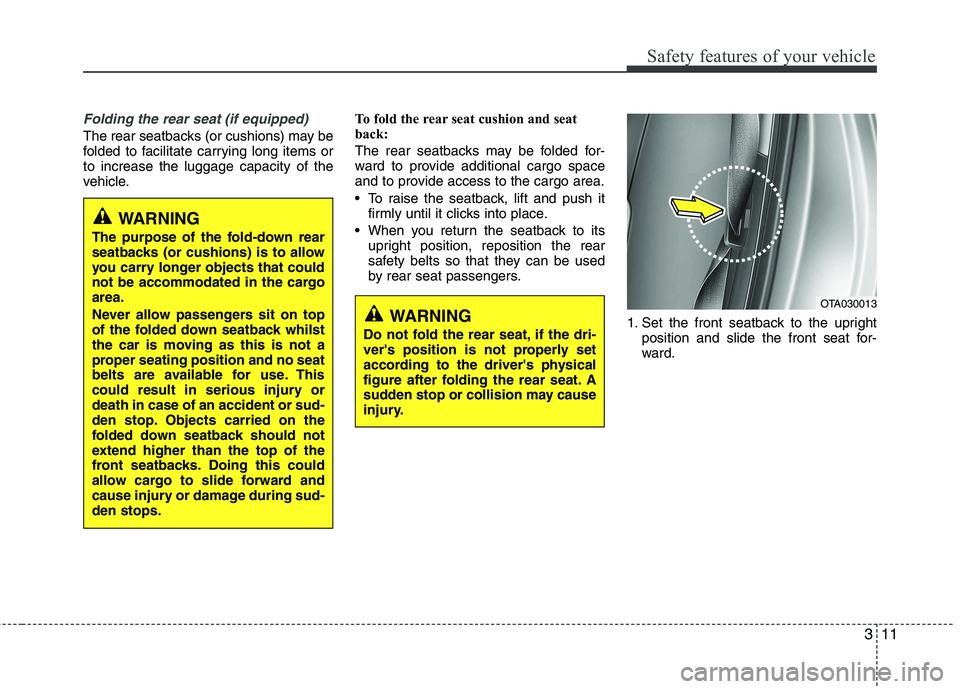
1. Set the front seatback to the uprightposition and slide the front seat for-
ward.
WARNING
Do not fold the rear seat, if the dri-
ver's position is not properly set
according to the driver's physical
figure after folding the rear seat. A
sudden stop or collision may cause
injury.OTA030013
WARNING
The purpose of the fold-down rear
seatbacks (or cushions) is to allow
you carry longer objects that could
not be accommodated in the cargoarea.
Never allow passengers sit on top
of the folded down seatback whilst
the car is moving as this is not a
proper seating position and no seat
belts are available for use. This
could result in serious injury ordeath in case of an accident or sud-
den stop. Objects carried on the
folded down seatback should not
extend higher than the top of the
front seatbacks. Doing this could
allow cargo to slide forward and
cause injury or damage during sud-den stops.
Page 535 of 1003
443
Features of your vehicle
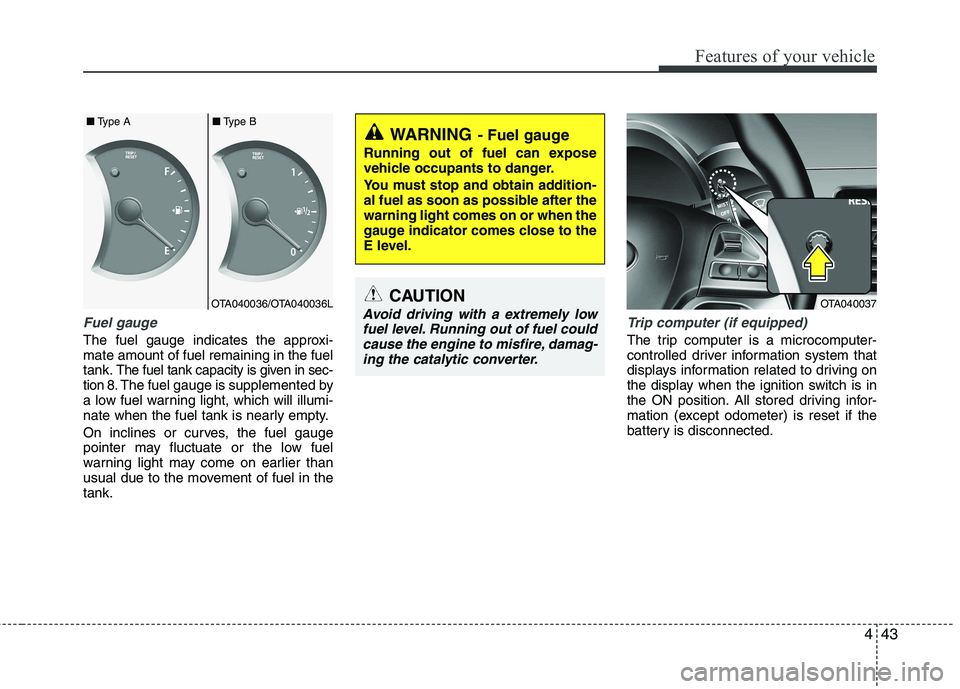
Fuel gauge
The fuel gauge indicates the approxi- mate amount of fuel remaining in the fueltank.
The fuel tank capacity is given in sec-
tion 8.The fuel gauge is supplemented by
a low fuel warning light, which will illumi-
nate when the fuel tank is nearly empty.
On inclines or curves, the fuel gauge
pointer may fluctuate or the low fuel
warning light may come on earlier than
usual due to the movement of fuel in thetank.
Trip computer (if equipped)
The trip computer is a microcomputer-
controlled driver information system that
displays information related to driving on
the display when the ignition switch is in
the ON position. All stored driving infor-
mation (except odometer) is reset if the
battery is disconnected.
WARNING - Fuel gauge
Running out of fuel can expose
vehicle occupants to danger.
You must stop and obtain addition-
al fuel as soon as possible after thewarning light comes on or when the
gauge indicator comes close to the
E level.
CAUTION
Avoid driving with a extremely low fuel level. Running out of fuel couldcause the engine to misfire, damag-ing the catalytic converter.OTA040036/OTA040036L
■
Type A ■Type BOTA040037
Page 596 of 1003
Features of your vehicle
104
4
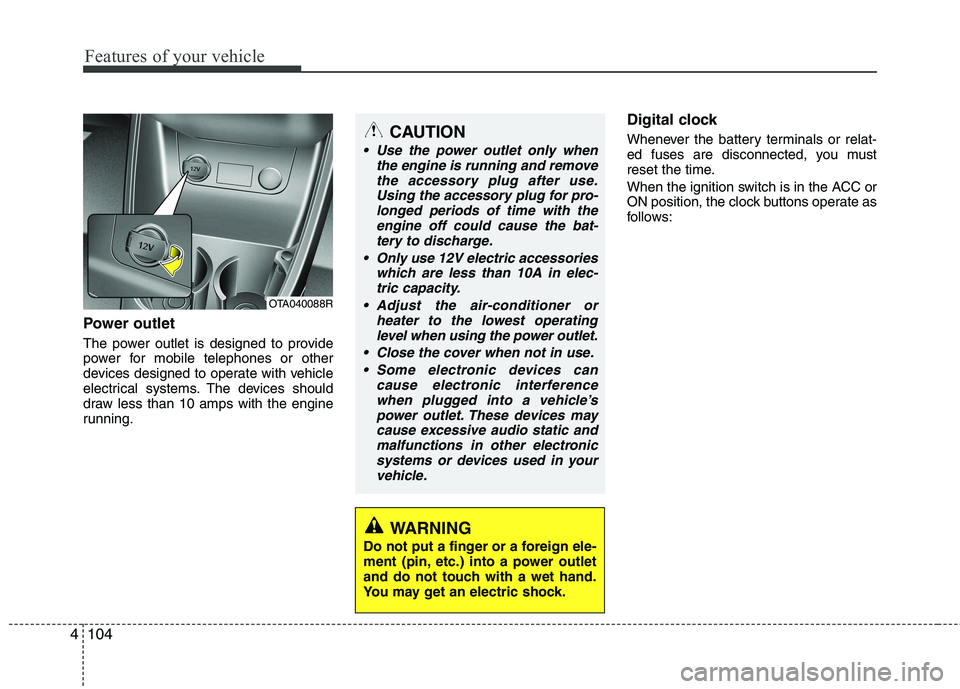
Power outlet
The power outlet is designed to provide
power for mobile telephones or other
devices designed to operate with vehicle
electrical systems. The devices should
draw less than 10 amps with the engine
running. Digital clock
Whenever the battery terminals or relat-
ed fuses are disconnected, you must
reset the time.
When the ignition switch is in the ACC or
ON position, the clock buttons operate as
follows:
CAUTION
Use the power outlet only when
the engine is running and remove
the accessory plug after use.Using the accessory plug for pro-longed periods of time with the engine off could cause the bat-
tery to discharge.
Only use 12V electric accessories which are less than 10A in elec-tric capacity.
Adjust the air-conditioner or heater to the lowest operatinglevel when using the power outlet.
Close the cover when not in use. Some electronic devices can cause electronic interference
when plugged into a vehicle’spower outlet. These devices maycause excessive audio static andmalfunctions in other electronic
systems or devices used in yourvehicle.
WARNING
Do not put a finger or a foreign ele-
ment (pin, etc.) into a power outlet
and do not touch with a wet hand.
You may get an electric shock.
OTA040088R
Page 608 of 1003
Features of your vehicle
116
4
CAUTION IN USING
USB DEVICE
To use an external USB device, make sure the device is not con-nected when starting up the vehi-cle. Connect the device afterstarting up.
If you start the engine when the USB device is connected, it maydamage the USB device. (USBflashdrives are very sensitive to
electric shock.)
If the engine is started up or turned off whilst the external USBdevice is connected, the external USB device may not work.
It may not play inauthentic MP3 or WMA files.
1) It can only play MP3 files with the compression rate between8Kbps~320Kbps.
2) It can only play WMA music files with the compression ratebetween 8Kbps~320Kbps.
Take precautions for static electrici- ty when connecting or disconnect-ing the external USB device.
(Continued)
(Continued) An encrypted MP3 PLAYER is not recognizable.
Depending on the condition of the external USB device, the con-
nected external USB device can be unrecognizable.
When the formatted byte/sector setting of External USB device isnot either 512BYTE or 2048BYTE,
then the device will not be recog- nized.
Use only a USB device formatted to FAT 12/16/32.
USB devices without USB I/F authentication may not be recog-nizable.
Make sure the USB connection terminal does not come in contactwith the human body or other
objects.
If you repeatedly connect or dis- connect the USB device in a shortperiod of time, it may break the device.
You may hear a strange noise when connecting or disconnect-ing a USB device.
(Continued)(Continued) If you disconnect the external USB device during playback in USBmode, the external USB device canbe damaged or may malfunction.
Therefore, disconnect the externalUSB device when the audio is turned off or in another mode. (e.g,
Radio or CD)
Depending on the type and capacity of the external USB device or the
type of the files stored in the device,there is a difference in the timetaken for recognition of the device.
Do not use the USB device for pur-
poses other than playing music files.
Playing videos through the USB is
not supported.
Use of USB accessories such as rechargers or heaters using USB
I/F may lower performance or cause trouble.
If you use devices such as a USB hub purchased separately, thevehicle’s audio system may not
recognize the USB device. In that case, connect the USB devicedirectly to the multimedia termi-nal of the vehicle.
(Continued)
Page 622 of 1003
Features of your vehicle
130
4
CAUTION IN USING
USB DEVICE
To use an external USB device, make sure the device is not con-nected when starting up the vehi-cle. Connect the device afterstarting up.
If you start the engine when the USB device is connected, it maydamage the USB device. (USBflashdrives are very sensitive to
electric shock.)
If the engine is started up or turned off whilst the external USBdevice is connected, the external USB device may not work.
It may not play inauthentic MP3 or WMA files.
1) It can only play MP3 files with the compression rate between8Kbps~320Kbps.
2) It can only play WMA music files with the compression ratebetween 8Kbps~320Kbps.
Take precautions for static electrici- ty when connecting or disconnect-ing the external USB device.
(Continued)
(Continued) An encrypted MP3 PLAYER is not recognizable.
Depending on the condition of the external USB device, the con-
nected external USB device can be unrecognizable.
When the formatted byte/sector setting of External USB device isnot either 512BYTE or 2048BYTE,
then the device will not be recog- nized.
Use only a USB device formatted to FAT 12/16/32.
USB devices without USB I/F authentication may not be recog-nizable.
Make sure the USB connection terminal does not come in contactwith the human body or other
objects.
If you repeatedly connect or dis- connect the USB device in a shortperiod of time, it may break the device.
You may hear a strange noise when connecting or disconnect-ing a USB device.
(Continued)(Continued) If you disconnect the external USB device during playback in USBmode, the external USB device canbe damaged or may malfunction.
Therefore, disconnect the externalUSB device when the audio is turned off or in another mode. (e.g,
Radio or CD)
Depending on the type and capacity of the external USB device or the
type of the files stored in the device,there is a difference in the timetaken for recognition of the device.
Do not use the USB device for pur-
poses other than playing music files.
Playing videos through the USB is
not supported.
Use of USB accessories such as rechargers or heaters using USB
I/F may lower performance or cause trouble.
If you use devices such as a USB hub purchased separately, thevehicle’s audio system may not
recognize the USB device. In that case, connect the USB devicedirectly to the multimedia termi-nal of the vehicle.
(Continued)
Page 643 of 1003
4151
Features of your vehicle
CAUTION IN USING
USB DEVICE
To use an external USB device, make sure the device is not con-nected when starting up the vehi-cle. Connect the device afterstarting up.
If you start the engine when the USB device is connected, it maydamage the USB device. (USBflashdrives are very sensitive to
electric shock.)
If the engine is started up or turned off whilst the external USBdevice is connected, the external USB device may not work.
It may not play inauthentic MP3 or WMA files.
1) It can only play MP3 files with the compression rate between8Kbps~320Kbps.
2) It can only play WMA music files with the compression ratebetween 8Kbps~320Kbps.
Take precautions for static electrici- ty when connecting or disconnect-ing the external USB device.
(Continued)
(Continued) An encrypted MP3 PLAYER is not recognizable.
Depending on the condition of the external USB device, the con-
nected external USB device can be unrecognizable.
When the formatted byte/sector setting of External USB device isnot either 512BYTE or 2048BYTE,
then the device will not be recog- nized.
Use only a USB device formatted to FAT 12/16/32.
USB devices without USB I/F authentication may not be recog-nizable.
Make sure the USB connection terminal does not come in contactwith the human body or other
objects.
If you repeatedly connect or dis- connect the USB device in a shortperiod of time, it may break the device.
You may hear a strange noise when connecting or disconnect-ing a USB device.
(Continued)(Continued) If you disconnect the external USB device during playback in USBmode, the external USB device canbe damaged or may malfunction.
Therefore, disconnect the externalUSB device when the audio is turned off or in another mode. (e.g,
Radio or CD)
Depending on the type and capacity of the external USB device or the
type of the files stored in the device,there is a difference in the timetaken for recognition of the device.
Do not use the USB device for pur-
poses other than playing music files.
Playing videos through the USB is
not supported.
Use of USB accessories such as rechargers or heaters using USB
I/F may lower performance or cause trouble.
If you use devices such as a USB hub purchased separately, thevehicle’s audio system may not
recognize the USB device. In that case, connect the USB devicedirectly to the multimedia termi-nal of the vehicle.
(Continued)
Page 707 of 1003
547
Driving your vehicle
If you are considering towing with with
your car, you should first check with your
country’s Department of Motor Vehicles
to determine their legal requirements.
Since laws vary the requirements for tow-
ing trailers, cars, or other types of vehi-
cles or apparatus may differ. Ask an
authorised Kia dealer for further details
before towing.✽✽NOTICE - For Europe
The technically permissible maximum load on the rear axle(s) may be
exceeded by not more than 15 % and
the technically permissible maximum
laden mass of the vehicle may be
exceeded by not more than 10 % or
100 kg (220.4 lbs), whichever value is
lower. In this case, do not exceed 100
km/h (62.1 mph) for vehicle of catego-
ry M1 or 80 km/h (49.7 mph) for vehi-
cle of category N1.
When a vehicle of category M1 is tow- ing a trailer, the additional load
imposed at the trailer coupling device
may cause the tyre maximum load
ratings to be exceeded, but not by
more than 15 %. In this case, do not
exceed 100 km/h (62.1 mph) and
increase the tyre inflation pressure by
at least 0.2 bar.Your vehicle can tow a trailer. To identify
what the vehicle trailering capacity is for
your vehicle, you should read the infor-
mation in “Weight of the trailer” thatappears later in this section.
Remember that trailering is different than
just driving your vehicle by itself.
Trailering means changes in handling,
durability, and fuel economy. Successful,
safe trailering requires correct equip-
ment, and it has to be used properly.
This section contains many time-tested,
important trailering tips and safety rules.
Many of these are important for your
safety and that of your passengers.
Please read this section carefully before
you pull a trailer. Load-pulling components such as the
engine, transaxle, wheel assemblies, and
tyres are forced to work harder against
the load of the added weight. The engine
is required to operate at relatively higher
speeds and under greater loads. This
additional burden generates extra heat.
The trailer also considerably adds wind
resistance, increasing pulling require-
ments.
TRAILER TOWING (IF EQUIPPED)
WARNING
- Towing a trail-
er
If you don't use the correct equip-
ment and drive improperly, you can
lose control when you pull a trailer.
For example, if the trailer is too
heavy, the brakes may not work
well - or even at all. You and your
passengers could be seriously or
fatally injured. Pull a trailer only if
you have followed all the steps inthis section.
WARNING - Weight limits
Before towing, make sure the total
trailer weight, gross combination
weight, gross vehicle weight, grossaxle weight and trailer tongue loadare all within the limits.
CAUTION
Pulling a trailer improperly can damage your vehicle and result in
costly repairs not covered by yourwarranty. To pull a trailer correctly,follow the advice in this section.
Page 729 of 1003
What to do in an emergency
14
6
When using a compact spare tyre,
observe the following precautions:
Under no circumstances should
you exceed 80 km/h (50 mph); a higher speed could damage the
tyre.
Ensure that you drive slowly enough for the road conditions to
avoid all hazards. Any road hazard,
such as a pothole or debris, could
seriously damage the compact
spare.
Any continuous road use of this tyre could result in tyre failure, loss
of vehicle control, and possible
personal injury.
Do not exceed the vehicle’s maxi- mum load rating or the load-carry-
ing capacity shown on the sidewall
of the compact spare tyre.
Avoid driving over obstacles. The compact spare tyre diameter issmaller than the diameter of a con-
ventional tyre and reduces the
ground clearance approximately25 mm (1 inch), which could result
in damage to the vehicle. Do not take this vehicle through an
automatic car wash whilst the com-pact spare tyre is installed.
Do not use tyre chains on the com- pact spare tyre. Because of the
smaller size, a tyre chain will not fit
properly. This could damage the
vehicle and result in loss of thechain.
The compact spare tyre should not be installed on the front axle if the
vehicle must be driven in snow or
on ice.
Do not use the compact spare tyre on any other vehicle because thistyre has been designed especially
for your vehicle.
The compact spare tyre’s tread life is shorter than a regular tyre.
Inspect your compact spare tyre
regularly and replace worn com-
pact spare tyres with the same sizeand design, mounted on the samewheel. The compact spare tyre should not
be used on any other wheels, nor
should standard tyres, snow tyres,
wheel covers or trim rings be used
with the compact spare wheel. Ifsuch use is attempted, damage tothese items or other car compo-
nents may occur.
Do not use more than one tempo- rary spare tyre at a time.
Do not tow a trailer whilst the tem- porary spare tyre is installed.
Page 778 of 1003
Maintenance
38
7
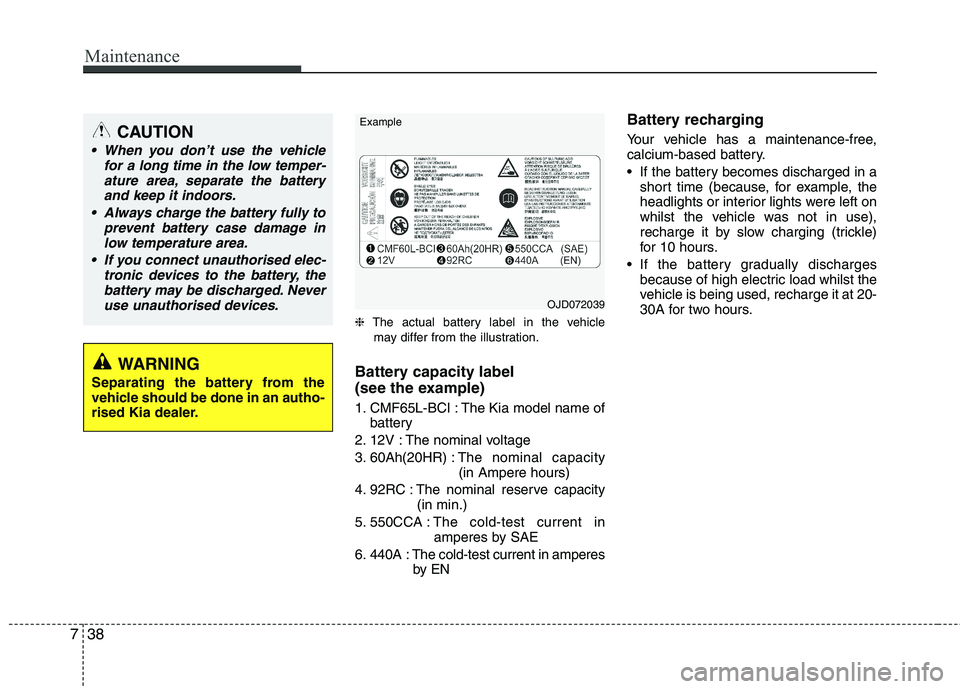
❈ The actual battery label in the vehicle
may differ from the illustration.
Battery capacity label
(see the example)
1. CMF65L-BCI : The Kia model name of battery
2. 12V : The nominal voltage
3. 60Ah(20HR) : The nominal capacity
(in Ampere hours)
4. 92RC : The nominal reserve capacity (in min.)
5. 550CCA : The cold-test current in
amperes by SAE
6. 440A : The cold-test current in amperes by EN Battery recharging
Your vehicle has a maintenance-free,
calcium-based battery.
If the battery becomes discharged in a
short time (because, for example, the
headlights or interior lights were left on
whilst the vehicle was not in use),
recharge it by slow charging (trickle)
for 10 hours.
If the battery gradually discharges because of high electric load whilst the
vehicle is being used, recharge it at 20-
30A for two hours.
CAUTION
When you don’t use the vehicle
for a long time in the low temper-
ature area, separate the batteryand keep it indoors.
Always charge the battery fully to prevent battery case damage in
low temperature area.
If you connect unauthorised elec- tronic devices to the battery, thebattery may be discharged. Never use unauthorised devices.
WARNING
Separating the battery from the
vehicle should be done in an autho-
rised Kia dealer.
OJD072039
Example