USB KIA PICANTO 2014 Service Manual
[x] Cancel search | Manufacturer: KIA, Model Year: 2014, Model line: PICANTO, Model: KIA PICANTO 2014Pages: 1003, PDF Size: 44.67 MB
Page 943 of 1003
Features of your vehicle
110
4
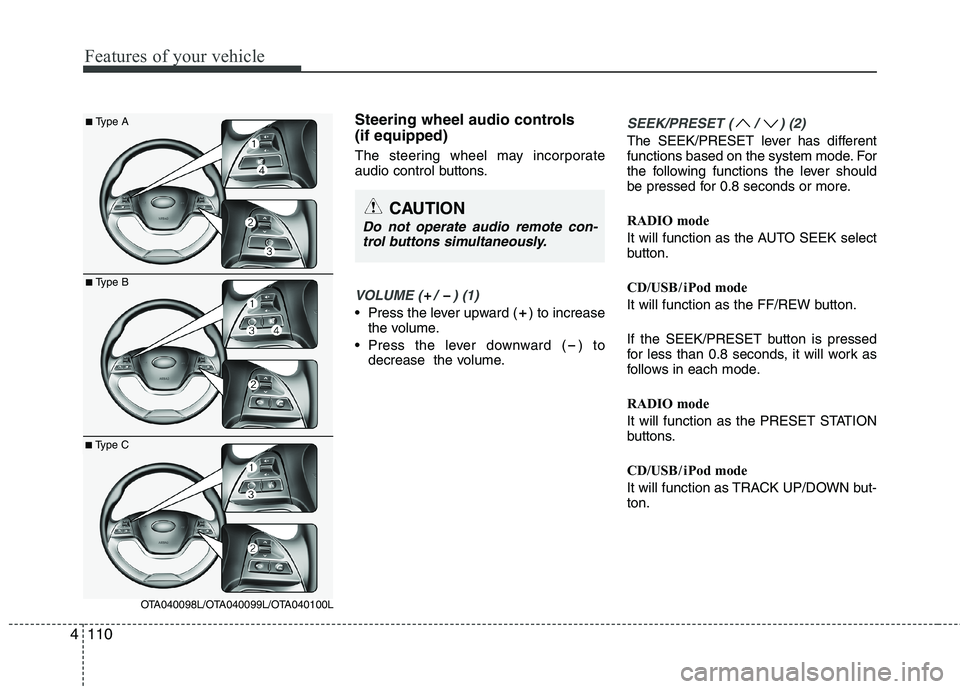
Steering wheel audio controls (if equipped)
The steering wheel may incorporate
audio control buttons.
VOLUME ( / ) (1)
• Press the lever upward ( ) to increase
the volume.
Press the lever downward ( ) to decrease the volume.
SEEK/PRESET ( / ) (2)
The SEEK/PRESET lever has different
functions based on the system mode. For
the following functions the lever should
be pressed for 0.8 seconds or more.
RADIO mode
It will function as the AUTO SEEK select
button.
CD/USB / i Pod mode
It will function as the FF/REW button.
If the SEEK/PRESET button is pressed
for less than 0.8 seconds, it will work as
follows in each mode.
RADIO mode
It will function as the PRESET STATION
buttons.
CD/USB / i Pod mode
It will function as TRACK UP/DOWN but- ton.
CAUTION
Do not operate audio remote con-
trol buttons simultaneously.
■ Type A
■Type B
■Type C
OTA040098L/OTA040099L/OTA040100L
Page 944 of 1003
4111
Features of your vehicle
MODE ( ) (3)
Press the button to change audio source. FM(1~2) ➟ AM ➟ CD ➟ USB AUX(iPod)
➟ FM...
In addition to mode change, Power on/off
can be made by pressing this button
when the ignition switch is on ACC orON.
- Power ON : Press the button when the audio is off
- Power OFF : Press the button for more than 0.8 seconds when the audio is on.
MUTE ( ) (4, if equipped)
Press the button to mute the sound.
Press the button to turn off the micro- phone during a telephone call.
Detailed information for audio control
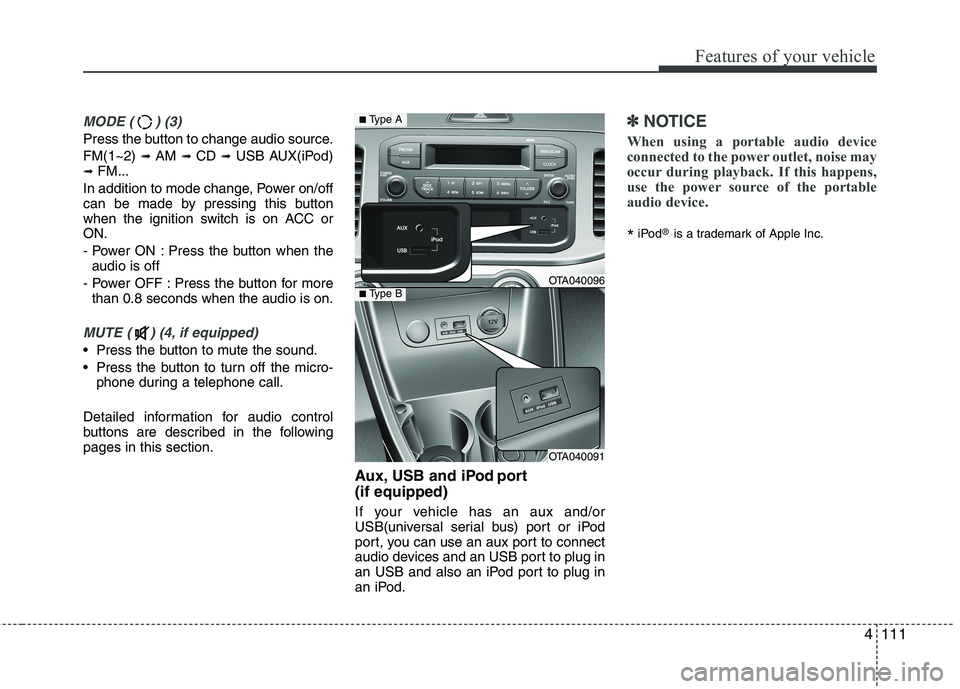
buttons are described in the followingpages in this section. Aux, USB and iPod port (if equipped)
If your vehicle has an aux and/or
USB(universal serial bus) port or iPod
port, you can use an aux port to connect
audio devices and an USB port to plug in
an USB and also an iPod port to plug in
an iPod.
✽✽NOTICE
When using a portable audio device
connected to the power outlet, noise may
occur during playback. If this happens,
use the power source of the portable
audio device.
* iPod
®
is a trademark of Apple Inc.
OTA040096
OTA040091
■Type A
■Type B
Page 951 of 1003
Features of your vehicle
118
4
CAUTION IN USING
USB DEVICE
To use an external USB device, make sure the device is not con-nected when starting up the vehi-cle. Connect the device afterstarting up.
If you start the engine when the USB device is connected, it maydamage the USB device. (USBflashdrives are very sensitive to
electric shock.)
If the engine is started up or turned off while the external USBdevice is connected, the external USB device may not work.
It may not play inauthentic MP3 or WMA files.
1) It can only play MP3 files with the compression rate between8Kbps~320Kbps.
2) It can only play WMA music files with the compression ratebetween 8Kbps~320Kbps.
Take precautions for static electrici- ty when connecting or disconnect-ing the external USB device.
(Continued)
(Continued) An encrypted MP3 PLAYER is not recognizable.
Depending on the condition of the external USB device, the con-
nected external USB device can be unrecognizable.
When the formatted byte/sector setting of External USB device isnot either 512BYTE or 2048BYTE,
then the device will not be recog- nized.
Use only a USB device formatted to FAT 12/16/32.
USB devices without USB I/F authentication may not be recog-nizable.
Make sure the USB connection terminal does not come in contactwith the human body or other
objects.
If you repeatedly connect or dis- connect the USB device in a shortperiod of time, it may break the device.
You may hear a strange noise when connecting or disconnect-ing a USB device.
(Continued)(Continued) If you disconnect the external USB device during playback in USBmode, the external USB device canbe damaged or may malfunction.
Therefore, disconnect the externalUSB device when the audio is turned off or in another mode. (e.g,
Radio or CD)
Depending on the type and capacity of the external USB device or the
type of the files stored in the device,there is a difference in the timetaken for recognition of the device.
Do not use the USB device for pur-
poses other than playing music files.
Playing videos through the USB is
not supported.
Use of USB accessories such as rechargers or heaters using USB
I/F may lower performance or cause trouble.
If you use devices such as a USB hub purchased separately, thevehicle’s audio system may not
recognize the USB device. In that case, connect the USB devicedirectly to the multimedia termi-nal of the vehicle.
(Continued)
Page 952 of 1003
4119
Features of your vehicle
(Continued) If the USB device is divided by logical drives, only the music fileson the highest-priority drive arerecognized by car audio.
Devices such as MP3 Player/ Cellular phone/Digital camera canbe unrecognizable by standardUSB I/F can be unrecognizable.
Charging through the USB may not be supported in some mobile
devices.
❋ A car exclusive cable (Provided orsold separately : USB / AUX detach-able cable only) is required to usethe iPod.
Some non-standard USB devices
(METAL COVER TYPE USB) can beunrecognizable.
Some USB flash memory readers (such as CF, SD, microSD, etc.) or
external-HDD type devices can beunrecognizable.
Music files protected by DRM (DIGITAL RIGHTS MANAGEMENT)
are not recognizable.
(Continued)
(Continued) The data in the USB memory may be lost while using this audio.Always back up important data on a personal storage device.
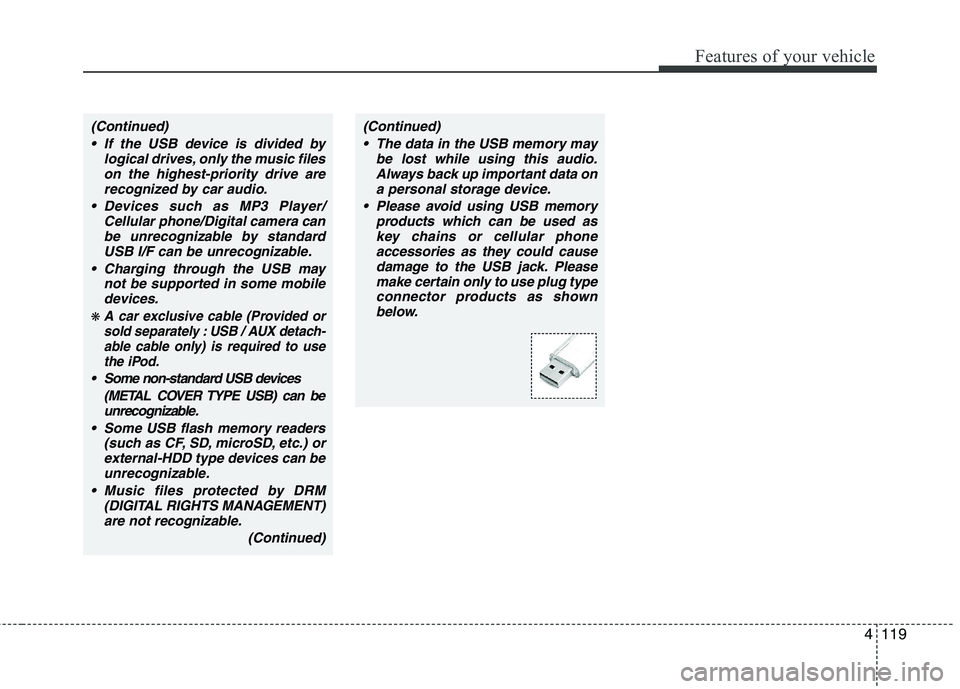
Please avoid using USB memory products which can be used askey chains or cellular phone accessories as they could cause
damage to the USB jack. Pleasemake certain only to use plug type connector products as shownbelow.
Page 953 of 1003
Features of your vehicle
120
4
Using USB device
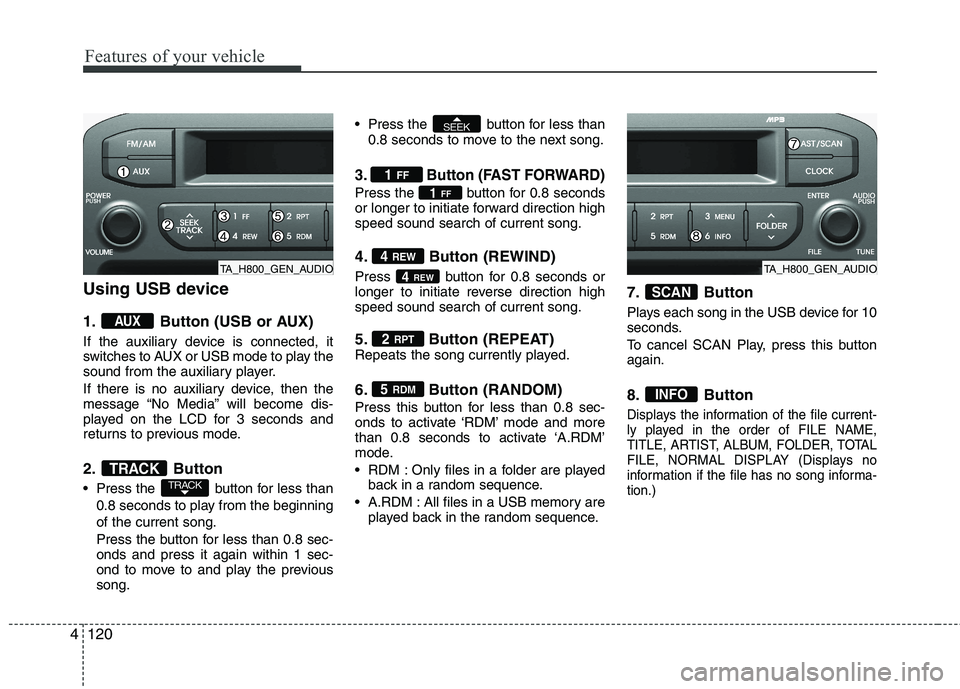
1. Button (USB or AUX)
If the auxiliary device is connected, it
switches to AUX or USB mode to play the
sound from the auxiliary player.
If there is no auxiliary device, then the
message “No Media” will become dis-
played on the LCD for 3 seconds and
returns to previous mode.
2. Button
Press the button for less than
0.8 seconds to play from the beginning of the current song.
Press the button for less than 0.8 sec- onds and press it again within 1 sec-
ond to move to and play the previoussong. Press the button for less than
0.8 seconds to move to the next song.
3. Button (FAST FORWARD)
Press the button for 0.8 seconds
or longer to initiate forward direction highspeed sound search of current song.
4. Button (REWIND)
Press button for 0.8 seconds or
longer to initiate reverse direction highspeed sound search of current song.
5. Button (REPEAT)
Repeats the song currently played.
6. Button (RANDOM)
Press this button for less than 0.8 sec-
onds to activate ‘RDM’ mode and more
than 0.8 seconds to activate ‘A.RDM’
mode.
RDM : Only files in a folder are playedback in a random sequence.
A.RDM : All files in a USB memory are played back in the random sequence. 7. Button
Plays each song in the USB device for 10
seconds.
To cancel SCAN Play, press this button again.
8. Button
Displays the information of the file current-
ly played in the order of FILE NAME,
TITLE, ARTIST, ALBUM, FOLDER, TOTAL
FILE, NORMAL DISPLAY (Displays no
information if the file has no song informa-tion.)
INFO
SCAN
5
RDM
2 RPT
4REW
4
REW
1FF
1
FF
SEEK
TRACKTRACK
AUX
TA_H800_GEN_AUDIOTA_H800_GEN_AUDIO
Page 955 of 1003
Features of your vehicle
122
4
✽✽
NOTICE FOR USING THE
iPod DEVICE
Some iPod models might not sup- port the communication protocol
and the files will not be played.
Supported iPod models:
- iPod Mini
- iPod 4th(Photo) ~ 6th(Classic)generation
- iPod Nano 1st~4th generation
- iPod Touch 1st~2nd generation
The order of search or playback of songs in the iPod can be different
from the order searched in the
audio system.
If the iPod disabled due to its own malfunction, reset the iPod. (Reset:
Refer to iPod manual)
An iPod may not operate normally
on low battery.
Some iPod devices, such as the
iPhone, can be connected through
the Bluetooth ®
Wireless Technology
interface. The device must have
audio Bluetooth®
Wireless
Technology capability (such as for
stereo headphone Bluetooth®
Wireless Technology). The device
can play, but it will not be con-
trolled by the audio system.CAUTION IN USING THE
iPod DEVICE
The Kia iPod Power Cable is needed in order to operate iPodwith the audio buttons on the audio system. The USB cable pro-
vided by Apple may cause mal-function and should not be usedfor Kia vehicles.
❋ The Kia iPod Power Cable maybe purchased through your KiaDealership.
When connecting iPod with the iPod Power Cable, insert the con-
nector to the multimedia socket completely. If not inserted com-pletely, communications betweeniPod and audio may be interrupted.
When adjusting the sound effects of the iPod and the audio system, thesound effects of both devices willoverlap and might reduce or distort the quality of the sound.
Deactivate (turn off) the equalizer function of an iPod when adjust-ing the audio system’s volume,and turn off the equalizer of the
audio system when using theequalizer of an iPod.
(Continued)
(Continued) When the iPod cable is connected, the system can be switched to AUXmode even without iPod deviceand may cause noise. Disconnect
the iPod cable when you are not using the iPod device.
When not using iPod with car audio, detach the iPod cable from
iPod. Otherwise, iPod may remainin accessory mode, and may not work properly.
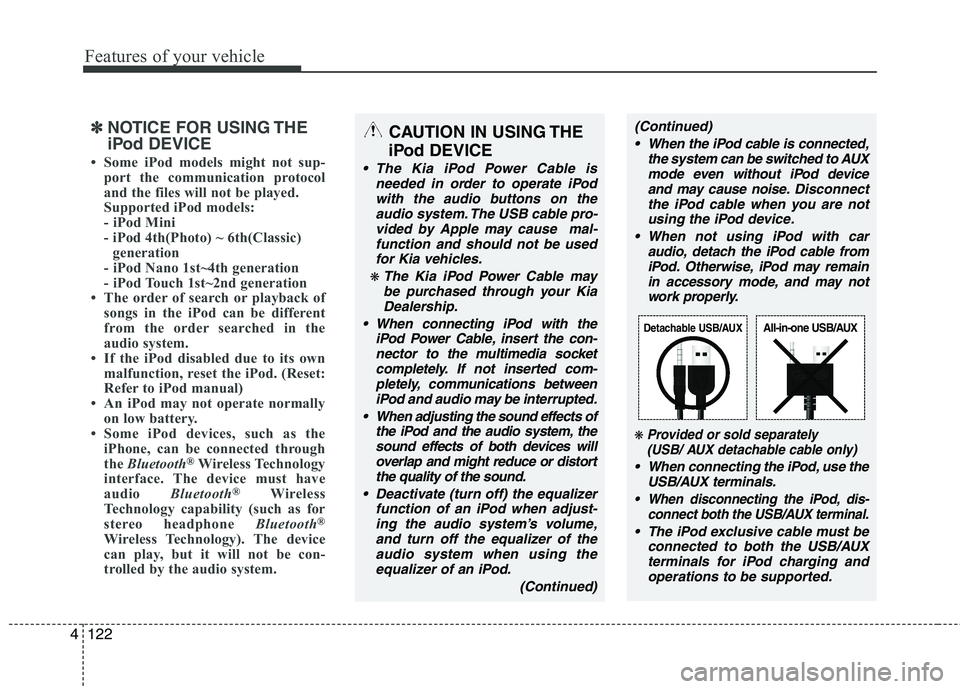
❋ Provided or sold separately(USB/ AUX detachable cable only)
When connecting the iPod, use the
USB/AUX terminals.
When disconnecting the iPod, dis- connect both the USB/AUX terminal.
The iPod exclusive cable must be
connected to both the USB/AUXterminals for iPod charging andoperations to be supported.
Detachable USB/AUXAll-in-one USB/AUX
Page 965 of 1003
Features of your vehicle
132
4
CAUTION IN USING
USB DEVICE
To use an external USB device, make sure the device is not con-nected when starting up the vehi-cle. Connect the device afterstarting up.
If you start the engine when the USB device is connected, it maydamage the USB device. (USBflashdrives are very sensitive to
electric shock.)
If the engine is started up or turned off while the external USBdevice is connected, the external USB device may not work.
It may not play inauthentic MP3 or WMA files.
1) It can only play MP3 files with the compression rate between8Kbps~320Kbps.
2) It can only play WMA music files with the compression ratebetween 8Kbps~320Kbps.
Take precautions for static electrici- ty when connecting or disconnect-ing the external USB device.
(Continued)
(Continued) An encrypted MP3 PLAYER is not recognizable.
Depending on the condition of the external USB device, the con-
nected external USB device can be unrecognizable.
When the formatted byte/sector setting of External USB device isnot either 512BYTE or 2048BYTE,
then the device will not be recog- nized.
Use only a USB device formatted to FAT 12/16/32.
USB devices without USB I/F authentication may not be recog-nizable.
Make sure the USB connection terminal does not come in contactwith the human body or other
objects.
If you repeatedly connect or dis- connect the USB device in a shortperiod of time, it may break the device.
You may hear a strange noise when connecting or disconnect-ing a USB device.
(Continued)(Continued) If you disconnect the external USB device during playback in USBmode, the external USB device canbe damaged or may malfunction.
Therefore, disconnect the externalUSB device when the audio is turned off or in another mode. (e.g,
Radio or CD)
Depending on the type and capacity of the external USB device or the
type of the files stored in the device,there is a difference in the timetaken for recognition of the device.
Do not use the USB device for pur-
poses other than playing music files.
Playing videos through the USB is
not supported.
Use of USB accessories such as rechargers or heaters using USB
I/F may lower performance or cause trouble.
If you use devices such as a USB hub purchased separately, thevehicle’s audio system may not
recognize the USB device. In that case, connect the USB devicedirectly to the multimedia termi-nal of the vehicle.
(Continued)
Page 966 of 1003
4133
Features of your vehicle
(Continued) If the USB device is divided by logical drives, only the music fileson the highest-priority drive arerecognized by car audio.
Devices such as MP3 Player/ Cellular phone/Digital camera canbe unrecognizable by standardUSB I/F can be unrecognizable.
Charging through the USB may not be supported in some mobiledevices.
❋ A car exclusive cable (Provided orsold separately : USB / AUX detach-able cable only) is required to use
the iPod.
Some non-standard USB devices
(METAL COVER TYPE USB) can beunrecognizable.
Some USB flash memory readers (such as CF, SD, microSD, etc.) orexternal-HDD type devices can beunrecognizable.
Music files protected by DRM (DIGITAL RIGHTS MANAGEMENT)are not recognizable.
(Continued)
(Continued) The data in the USB memory may be lost while using this audio.Always back up important data on
a personal storage device.
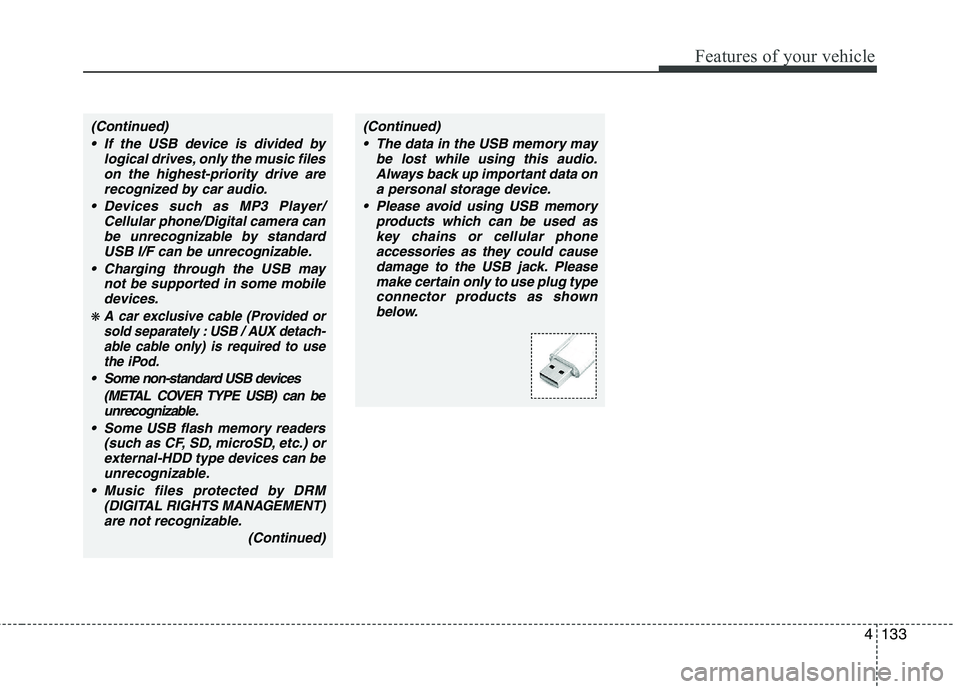
Please avoid using USB memory products which can be used askey chains or cellular phone
accessories as they could causedamage to the USB jack. Please make certain only to use plug typeconnector products as shown
below.
Page 967 of 1003
Features of your vehicle
134
4
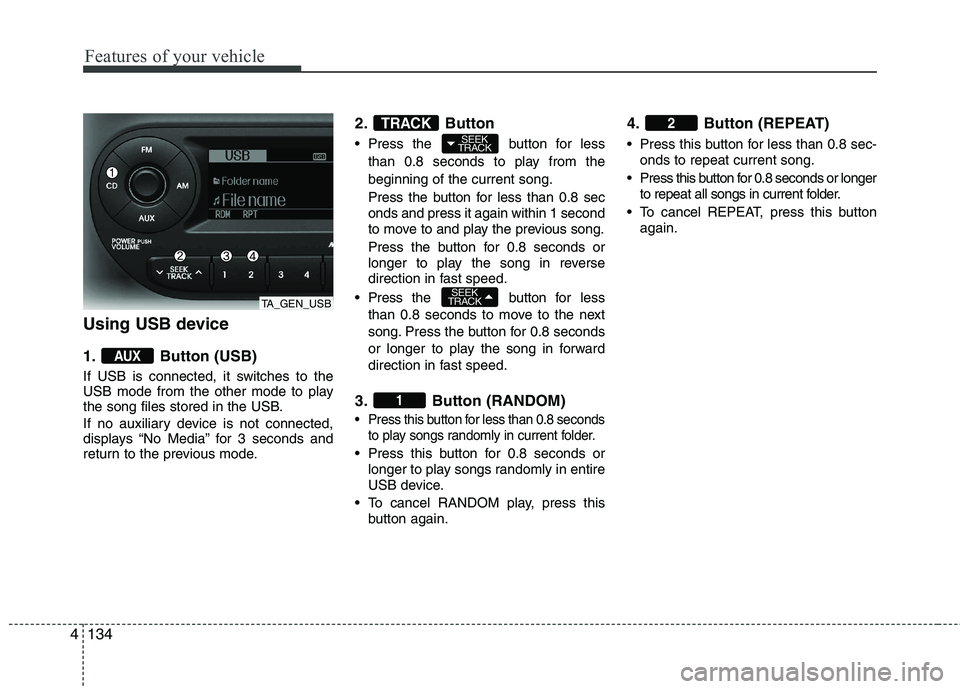
Using USB device
1. Button (USB)
If USB is connected, it switches to the
USB mode from the other mode to play
the song files stored in the USB.
If no auxiliary device is not connected,
displays “No Media” for 3 seconds and
return to the previous mode. 2. Button
Press the button for less
than 0.8 seconds to play from the beginning of the current song.
Press the button for less than 0.8 sec onds and press it again within 1 second
to move to and play the previous song.
Press the button for 0.8 seconds or
longer to play the song in reverse
direction in fast speed.
Press the button for less
than 0.8 seconds to move to the next
song. Press the button for 0.8 seconds
or longer to play the song in forward
direction in fast speed.
3. Button (RANDOM)
Press this button for less than 0.8 seconds to play songs randomly in current folder.
Press this button for 0.8 seconds orlonger to play songs randomly in entire
USB device.
To cancel RANDOM play, press this button again. 4. Button (REPEAT)
Press this button for less than 0.8 sec-
onds to repeat current song.
Press this button for 0.8 seconds or longer to repeat all songs in current folder.
To cancel REPEAT, press this button again.
2
1
SEEK
TRACK
SEEK
TRACKTRACK
AUX
TA_GEN_USB
Page 968 of 1003
4135
Features of your vehicle
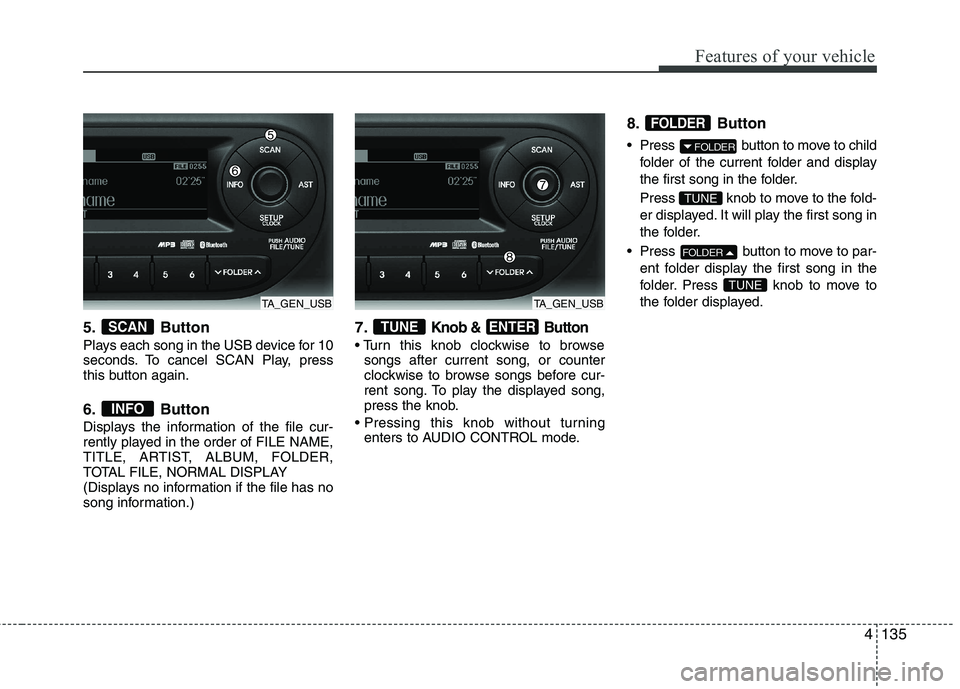
5. Button
Plays each song in the USB device for 10
seconds. To cancel SCAN Play, press
this button again.
6. Button
Displays the information of the file cur-
rently played in the order of FILE NAME,
TITLE, ARTIST, ALBUM, FOLDER,
TOTAL FILE, NORMAL DISPLAY
(Displays no information if the file has no
song information.)7.Knob & Button
songs after current song, or counter
clockwise to browse songs before cur-
rent song. To play the displayed song,
press the knob.
enters to AUDIO CONTROL mode. 8. Button
Press button to move to child
folder of the current folder and display
the first song in the folder.
Press knob to move to the fold-
er displayed. It will play the first song in
the folder.
Press button to move to par- ent folder display the first song in the
folder. Press knob to move to
the folder displayed.
TUNE
FOLDER
TUNE
FOLDER
FOLDER
ENTERTUNE
INFO
SCAN
TA_GEN_USBTA_GEN_USB