light KIA PICANTO 2015 Owners Manual
[x] Cancel search | Manufacturer: KIA, Model Year: 2015, Model line: PICANTO, Model: KIA PICANTO 2015Pages: 846, PDF Size: 49.67 MB
Page 566 of 846
467
Features of your vehicle
Battery saver function
The purpose of this feature is to pre-vent the battery from being dis-
charged. The system automatically
turns off the parking lights when the
driver removes the ignition key (smart
key: turns off the engine) and opens
the driver-side door.
With this feature, the parking lights will be turned off automatically if the driver
parks on the side of road at night.
If necessary, to keep the lights on
when the ignition key is removed,
(smart key: turns off the engine) per-
form the following:
1) Open the driver-side door.
2) Turn the parking lights OFF and ON again using the light switch on the
steering column. Headlight escort function (if equipped) The headlights (and/or taillights) will
remain on for approximately 20 minutes
after the ignition key is removed when
the engine is turned off. However, if the
driver’s door is opened and closed, the
headlights are turned off after 30 sec-
onds.
The headlights can be turned off by
pressing the lock button on the transmit-
ter (or smart key) twice or turning off the
light switch from the headlight or Autolight position.
Headlight welcome function (if equipped)
When the headlight switch is in the ON or
AUTO position and all doors (and tail-
gate) are closed and locked, if you press
the door unlock button on the transmitter
(or smart key), the headlights will come
on for about 15 seconds.
If the headlight switch is in the AUTO
position, the function can only operate atnight.
At this time, if you press the door unlock
button again or door lock button on the
transmitter (or smart key), the headlights
will turn off immediately.
Daytime running light (if equipped)
Daytime Running Lights (DRL) can make
it easier for others to see the front of your
vehicle during the day. DRL can be help-
ful in many different driving conditions,
and it is especially helpful after dawn and
before sunset.
The DRL system will make the head-
lights light turn OFF when:
1. The position or head light switch is ON.
2. Engine off or ACC.
LIGHTING
CAUTION
If the driver gets out of the vehicle
through other doors (except dri-
ver's door), the battery saver func- tion does not operate and the head-light escort function does not turnoff automatically. Therefore, It caus-
es the battery to be discharged. In this case, make sure to turn off thelamp before getting out of the vehi- cle.
Page 567 of 846
Features of your vehicle
68
4
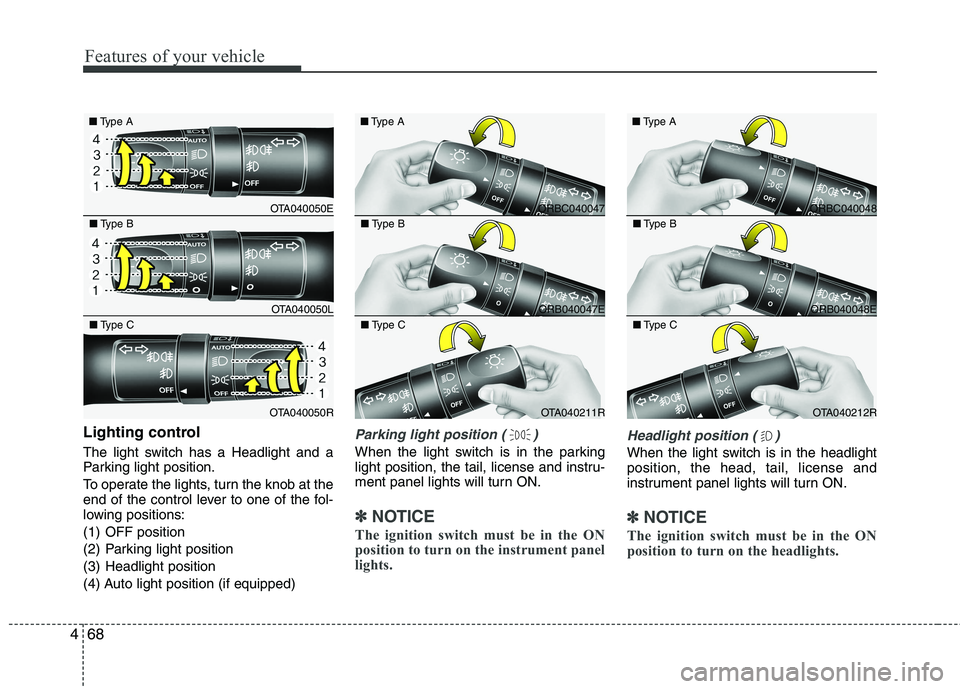
Lighting control
The light switch has a Headlight and a
Parking light position.
To operate the lights, turn the knob at the
end of the control lever to one of the fol-
lowing positions:
(1) OFF position
(2) Parking light position
(3) Headlight position
(4) Auto light position (if equipped)Parking light position ( )
When the light switch is in the parking
light position, the tail, license and instru-
ment panel lights will turn ON.
✽✽
NOTICE
The ignition switch must be in the ON
position to turn on the instrument panel
lights.
Headlight position ( )
When the light switch is in the headlight position, the head, tail, license and
instrument panel lights will turn ON.
✽✽ NOTICE
The ignition switch must be in the ON
position to turn on the headlights.
OTA040050E
■
Type A
OTA040050L
■
Type B
OTA040050R
■
Type C
ORBC040047
■
Type A
ORB040047E
■
Type B
OTA040211R
■
Type C
ORBC040048
■
Type A
ORB040048E
■
Type B
OTA040212R
■
Type C
Page 568 of 846
469
Features of your vehicle
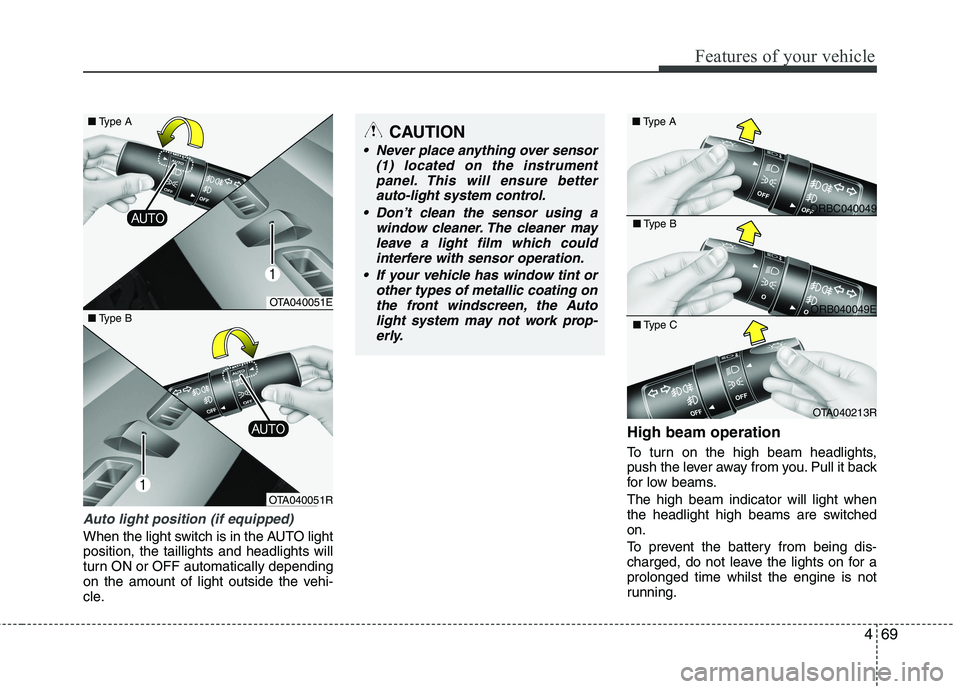
Auto light position (if equipped)
When the light switch is in the AUTO light position, the taillights and headlights will
turn ON or OFF automatically depending
on the amount of light outside the vehi-
cle.High beam operation
To turn on the high beam headlights,
push the lever away from you. Pull it back
for low beams. The high beam indicator will light when
the headlight high beams are switchedon.
To prevent the battery from being dis-
charged, do not leave the lights on for aprolonged time whilst the engine is not
running.
CAUTION
Never place anything over sensor
(1) located on the instrument
panel. This will ensure betterauto-light system control.
Don’t clean the sensor using a window cleaner. The cleaner may
leave a light film which could interfere with sensor operation.
If your vehicle has window tint or other types of metallic coating onthe front windscreen, the Auto
light system may not work prop-erly.
OTA040051E
OTA040051R
■
Type B
ORBC040049
■
Type A
ORB040049E
■
Type B
OTA040213R
■
Type C
■ Type A
Page 569 of 846
Features of your vehicle
70
4
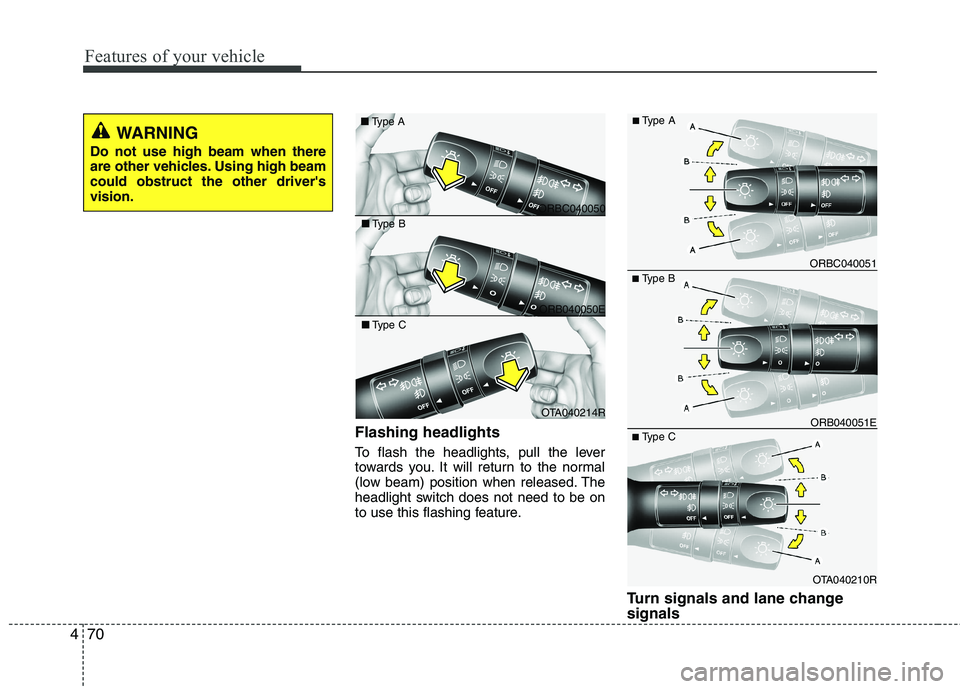
Flashing headlights
To flash the headlights, pull the lever
towards you. It will return to the normal
(low beam) position when released. The
headlight switch does not need to be on
to use this flashing feature.
Turn signals and lane change signals
■Type B
OTA040210R
ORB040051E
ORBC040051
■ Type C
■
Type A
ORBC040050
■
Type A
ORB040050E
■
Type B
OTA040214R
■
Type C
WARNING
Do not use high beam when there
are other vehicles. Using high beamcould obstruct the other driver'svision.
Page 570 of 846

471
Features of your vehicle
The ignition switch must be on for the
turn signals to function. To turn on the
turn signals, move the lever up or down
(A). The green arrow indicators on the
instrument panel indicate which turn sig-
nal is operating.
They will self-cancel after a turn is com-
pleted. If the indicator continues to flash
after a turn, manually return the lever tothe OFF position.
To signal a lane change, move the turn
signal lever slightly and hold it in position
(B). The lever will return to the OFF posi-tion when released.
If an indicator stays on and does not
flash or if it flashes abnormally, one of the
turn signal bulbs may be burned out andwill require replacement.
One-touch lane change function (if equipped)
To activate an one-touch lane change
function, move the turn signal lever
slightly and then release it. The lane
change signals will blink 3 times.
✽✽ NOTICE
If an indicator flash is abnormally quick
or slow, a bulb may be burned out or have
a poor electrical connection in the circuit.
Front fog light (if equipped)
■ Type B
■
Type A■Type E
■Type C■Type F
■
Type D
ORBC040052/ORB040052D/ORB040052E/ORB040052L/OTA040219R/ORBI041052
Page 571 of 846
Features of your vehicle
72
4
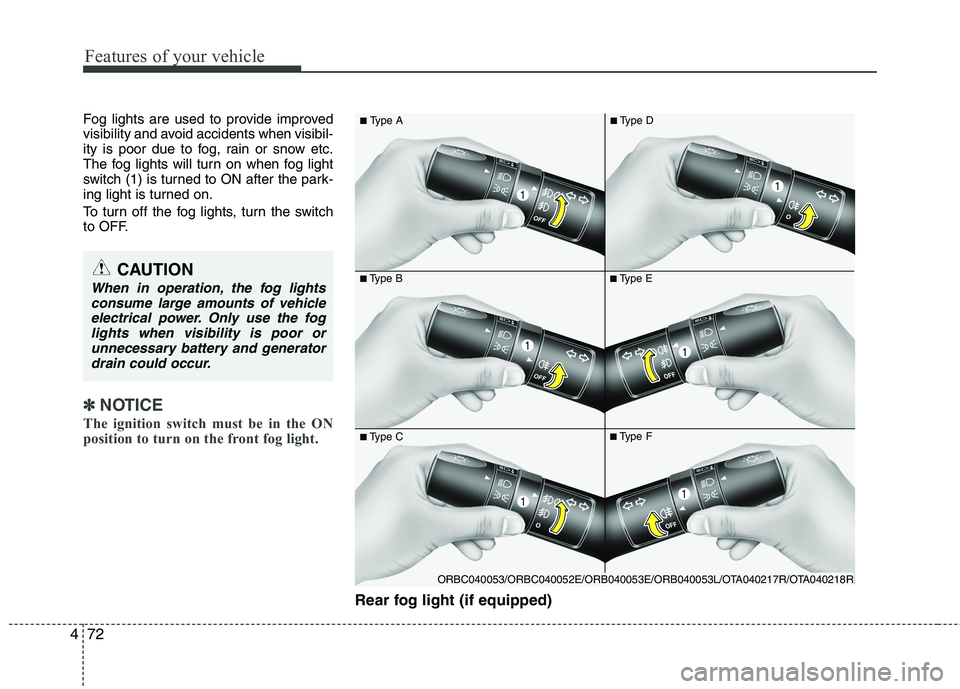
Fog lights are used to provide improved
visibility and avoid accidents when visibil-
ity is poor due to fog, rain or snow etc.
The fog lights will turn on when fog light
switch (1) is turned to ON after the park-
ing light is turned on.
To turn off the fog lights, turn the switch
to OFF.
✽✽
NOTICE
The ignition switch must be in the ON
position to turn on the front fog light.
Rear fog light (if equipped)
■ Type B
■
Type A■Type E
■Type C■Type F
■
Type D
CAUTION
When in operation, the fog lights
consume large amounts of vehicleelectrical power. Only use the foglights when visibility is poor or
unnecessary battery and generatordrain could occur.
ORBC040053/ORBC040052E/ORB040053E/ORB040053L/OTA040217R/OTA040218R
Page 572 of 846
473
Features of your vehicle
To turn the rear fog lights on, turn the
headlight switch to the headlight on posi-
tion and turn the rear fog light switch (1)to the on position.
The rear fog lights turn on when the rear
fog light switch is turned on after the
headlight switch is in the parklight posi-tion or highlight position.
To turn the rear fog lights off, turn the rear
fog light switch to the on position again or
turn the headlight switch off. (with Autolight)
To turn off the rear fog lights, turn the
switch to OFF (without Auto light)
✽✽NOTICE
To turn on the rear fog light switch, the
ignition switch must be in the ON position.
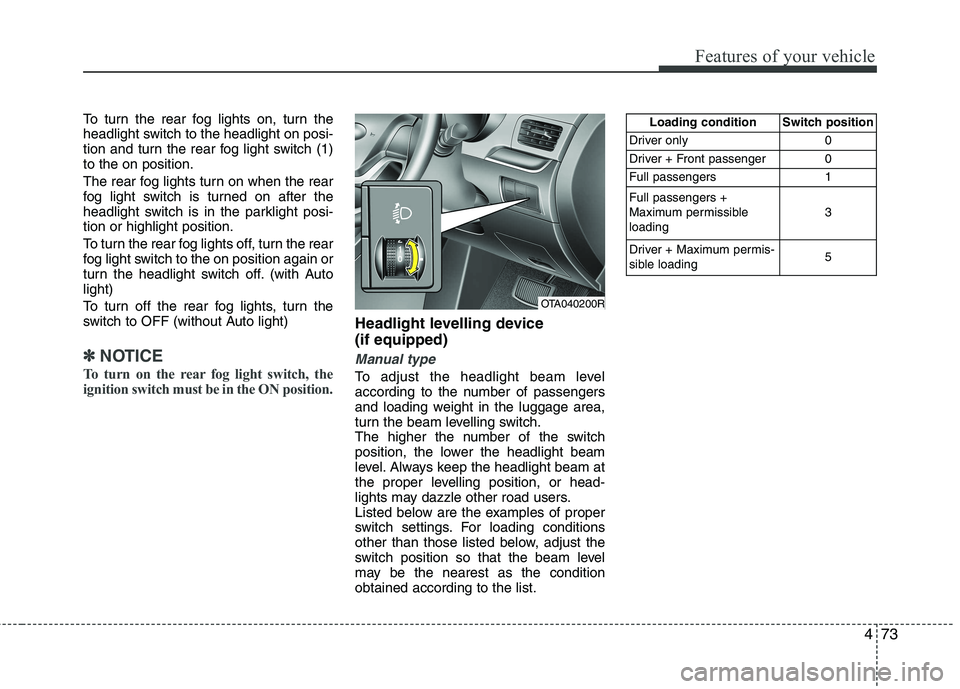
Headlight levelling device (if equipped)
Manual type
To adjust the headlight beam level
according to the number of passengers
and loading weight in the luggage area,
turn the beam levelling switch.
The higher the number of the switch
position, the lower the headlight beam
level. Always keep the headlight beam at
the proper levelling position, or head-
lights may dazzle other road users.
Listed below are the examples of proper
switch settings. For loading conditions
other than those listed below, adjust the
switch position so that the beam level
may be the nearest as the conditionobtained according to the list.
OTA040200R Loading condition Switch position
Driver only 0
Driver + Front passenger 0
Full passengers 1 Full passengers +
Maximum permissibleloading 3
Driver + Maximum permis-
sible loading 5
Page 574 of 846
475
Features of your vehicle
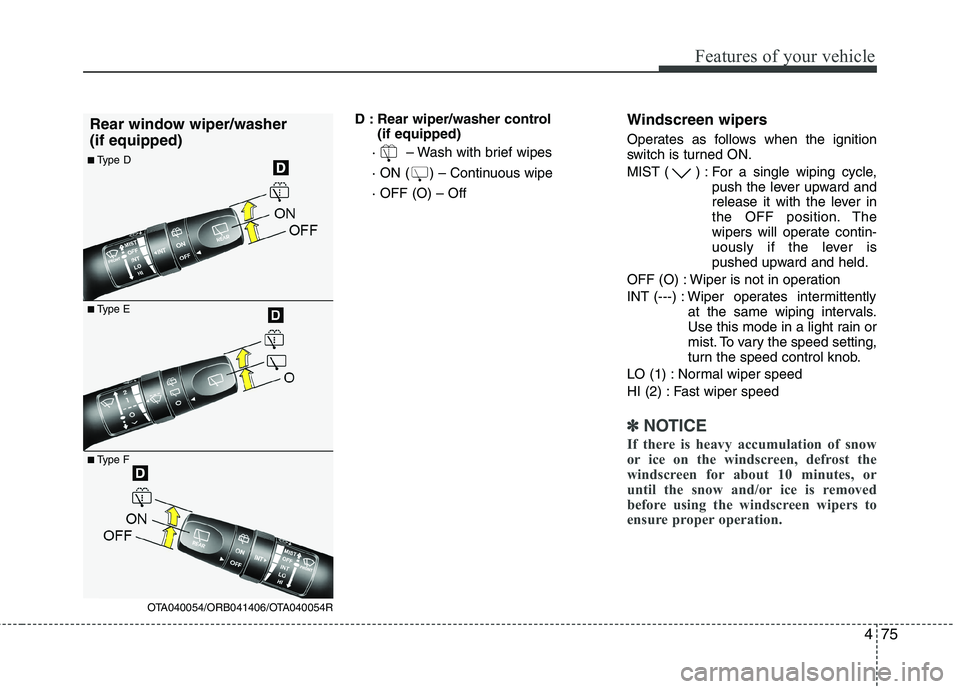
D : Rear wiper/washer control (if equipped)
· – Wash with brief wipes
· ON ( ) – Continuous wipe· OFF (O) – Off Windscreen wipers
Operates as follows when the ignition
switch is turned ON.
MIST ( ) : For a single wiping cycle,
push the lever upward and
release it with the lever in
the OFF position. The
wipers will operate contin-
uously if the lever is
pushed upward and held.
OFF (O) : Wiper is not in operation
INT (---) : Wiper operates intermittently at the same wiping intervals.
Use this mode in a light rain or
mist. To vary the speed setting,
turn the speed control knob.
LO (1) : Normal wiper speed
HI (2) : Fast wiper speed
✽✽ NOTICE
If there is heavy accumulation of snow
or ice on the windscreen, defrost the
windscreen for about 10 minutes, or
until the snow and/or ice is removed
before using the windscreen wipers to
ensure proper operation.
■ Type E
■
Type D
Rear window wiper/washer (if equipped)
■
Type F
OTA040054/ORB041406/OTA040054R
Page 577 of 846
Features of your vehicle
78
4
INTERIOR LIGHT
Automatic turn off function (if equipped)
The interior lights automatically turn off
approximately 20 minutes after the igni-
tion switch is turned off. Map lamp (if equipped)
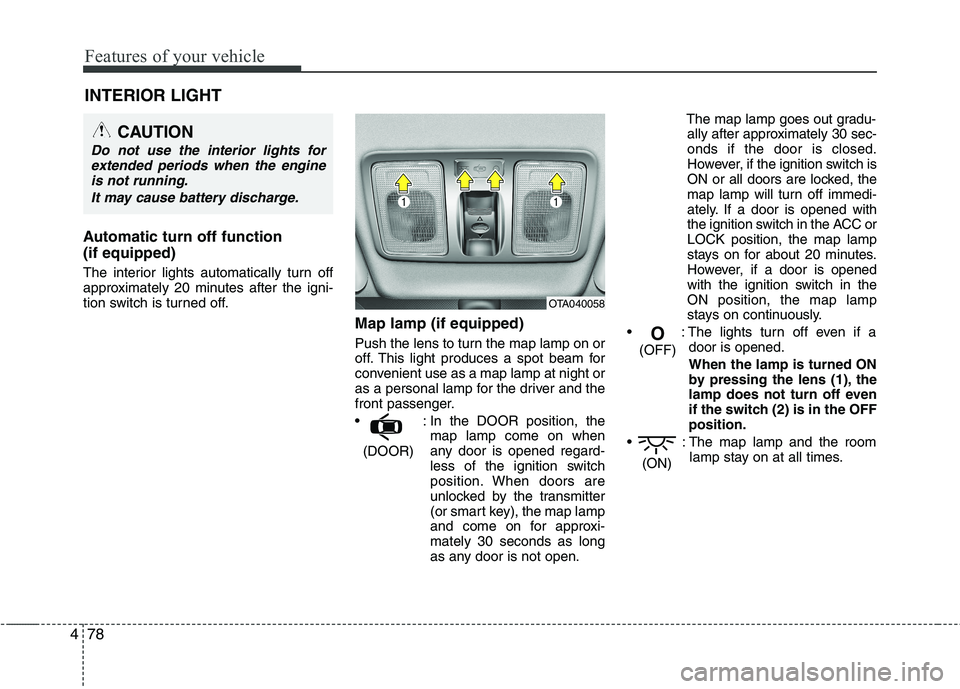
Push the lens to turn the map lamp on or
off. This light produces a spot beam for
convenient use as a map lamp at night or
as a personal lamp for the driver and the
front passenger.
: In the DOOR position, themap lamp come on when
any door is opened regard-
less of the ignition switch
position. When doors are
unlocked by the transmitter
(or smart key), the map lamp
and come on for approxi-mately 30 seconds as long
as any door is not open. The map lamp goes out gradu-
ally after approximately 30 sec-onds if the door is closed.
However, if the ignition switch is
ON or all doors are locked, the
map lamp will turn off immedi-
ately. If a door is opened with
the ignition switch in the ACC orLOCK position, the map lamp
stays on for about 20 minutes.
However, if a door is opened
with the ignition switch in the
ON position, the map lamp
stays on continuously.
: The lights turn off even if a door is opened.
When the lamp is turned ON
by pressing the lens (1), the
lamp does not turn off even
if the switch (2) is in the OFFposition.
: The map lamp and the room lamp stay on at all times.
(ON)
O
(OFF)
(DOOR)
CAUTION
Do not use the interior lights for extended periods when the engine
is not running.
It may cause battery discharge.
OTA040058
Page 578 of 846
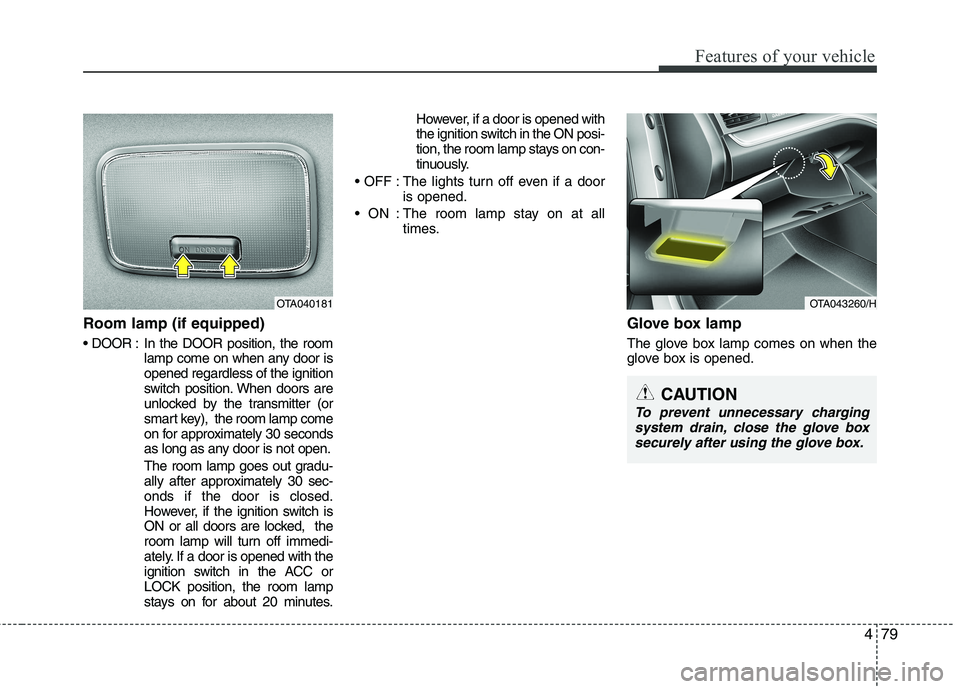
479
Features of your vehicle
Room lamp (if equipped)
In the DOOR position, the roomlamp come on when any door is opened regardless of the ignition
switch position. When doors are
unlocked by the transmitter (or
smart key), the room lamp come
on for approximately 30 seconds
as long as any door is not open.
The room lamp goes out gradu-
ally after approximately 30 sec-onds if the door is closed.
However, if the ignition switch is
ON or all doors are locked, the
room lamp will turn off immedi-
ately. If a door is opened with the
ignition switch in the ACC orLOCK position, the room lamp
stays on for about 20 minutes. However, if a door is opened with
the ignition switch in the ON posi-
tion, the room lamp stays on con-
tinuously.
: The lights turn off even if a door is opened.
: The room lamp stay on at all times.
Glove box lamp
The glove box lamp comes on when the
glove box is opened.
OTA040181OTA043260/H
CAUTION
To prevent unnecessary chargingsystem drain, close the glove boxsecurely after using the glove box.