clock KIA PICANTO 2017 User Guide
[x] Cancel search | Manufacturer: KIA, Model Year: 2017, Model line: PICANTO, Model: KIA PICANTO 2017Pages: 488, PDF Size: 31.26 MB
Page 219 of 488

Features of your vehicle
1444(19)
- Shortly press the key (under 0.8 sec-
onds) : Moves to the Display, Sound,
Clock, Phone, System setting modes
- Press and hold the key (over 0.8 sec- onds) : Move to the Time settingscreen (20) TUNE knob
Radio mode : Changes frequency by
turning the knob left/right
CD, USB, iPod
®
mode: Searches songs
(files) by turning the knob left/right.❈ When the desired song is displayed,
press the knob to play the song.
Moves focus in all selection menus and
selects menus
Page 222 of 488
147
Features of your vehicle
4
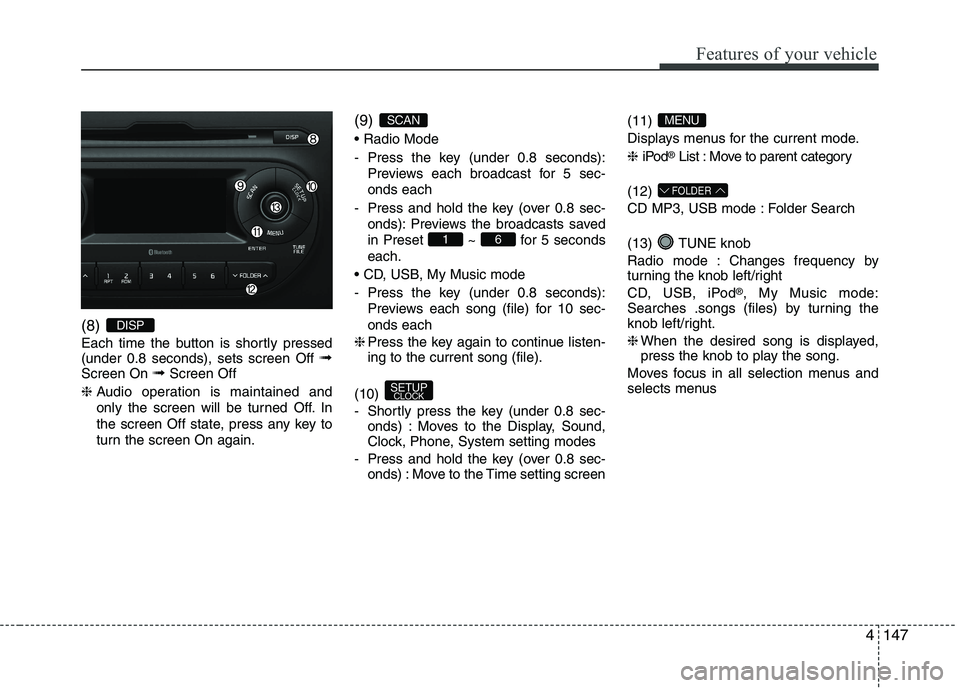
(8)
Each time the button is shortly pressed (under 0.8 seconds), sets screen Off
➟
Screen On ➟Screen Off
❈ Audio operation is maintained and
only the screen will be turned Off. In
the screen Off state, press any key to
turn the screen On again. (9)
- Press the key (under 0.8 seconds):
Previews each broadcast for 5 sec- onds each
- Press and hold the key (over 0.8 sec- onds): Previews the broadcasts saved
in Preset ~ for 5 secondseach.
- Press the key (under 0.8 seconds): Previews each song (file) for 10 sec- onds each
❈ Press the key again to continue listen- ing to the current song (file).
(10)
- Shortly press the key (under 0.8 sec- onds) : Moves to the Display, Sound,
Clock, Phone, System setting modes
- Press and hold the key (over 0.8 sec- onds) : Move to the Time setting screen (11)
Displays menus for the current mode. ❈
iPod ®
List : Move to parent category
(12)
CD MP3, USB mode : Folder Search
(13) TUNE knob
Radio mode : Changes frequency by
turning the knob left/right
CD, USB, iPod ®
, My Music mode:
Searches .songs (files) by turning the
knob left/right. ❈ When the desired song is displayed,
press the knob to play the song.
Moves focus in all selection menus and
selects menus
FOLDER
MENU
SETUP CLOCK
61
SCAN
DISP
Page 224 of 488
149
Features of your vehicle
4
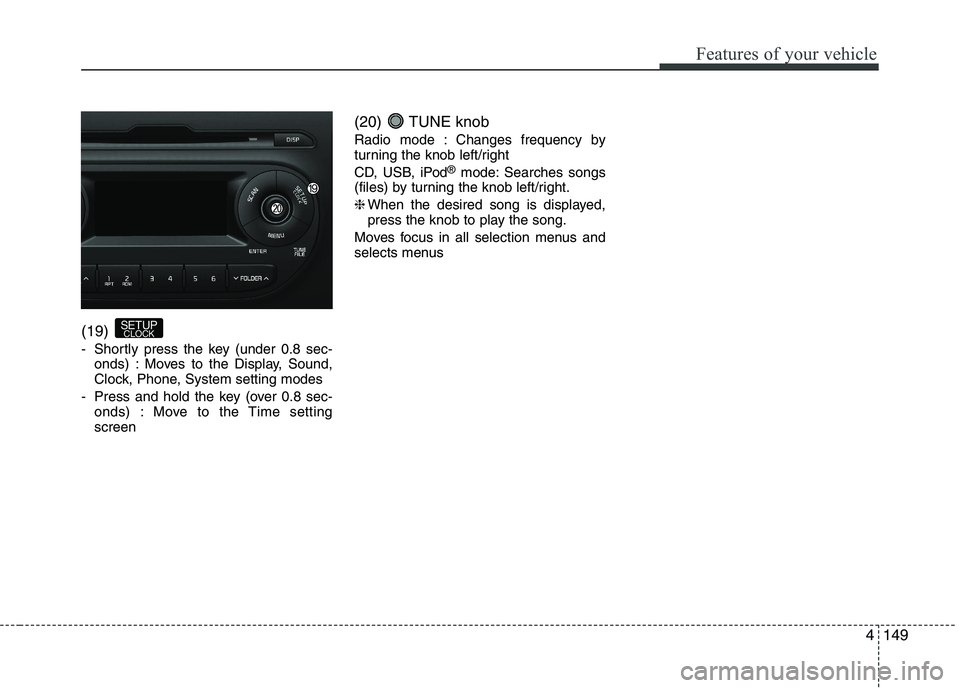
(19)
- Shortly press the key (under 0.8 sec-
onds) : Moves to the Display, Sound,
Clock, Phone, System setting modes
- Press and hold the key (over 0.8 sec- onds) : Move to the Time settingscreen (20) TUNE knob
Radio mode : Changes frequency by
turning the knob left/right
CD, USB, iPod
®
mode: Searches songs
(files) by turning the knob left/right.❈ When the desired song is displayed,
press the knob to play the song.
Moves focus in all selection menus and
selects menus
SETUP CLOCK
Page 227 of 488
![KIA PICANTO 2017 User Guide Features of your vehicle
1524CLOCK SETTINGS
Press the key Select [Clock]
through TUNE knob or key
Select menu through TUNE knob
❈
Display and settings may differ
depending on the selected audio](/img/2/57964/w960_57964-226.png "KIA PICANTO 2017 User Guide Features of your vehicle
1524CLOCK SETTINGS
Press the key Select [Clock]
through TUNE knob or key
Select menu through TUNE knob
❈
Display and settings may differ
depending on the selected audio")
Features of your vehicle
1524CLOCK SETTINGS
Press the key Select [Clock]
through TUNE knob or key
Select menu through TUNE knob
❈
Display and settings may differ
depending on the selected audio. Clock Settings
This menu is used to set the time.
Select [Clock Settings] Set through
TUNE knob Press TUNE knob
❈
Adjust the number currently in focus to set the [hour] and press the tune knob
to set the [minute]. Day/Calendar Settings
This menu is used to set the date (DD/MM/YYYY).
Select [Day Settings] Set through
TUNE knob Press TUNE knob
❈Display and settings may differ
depending on the selected audio.
❈ Adjust the number currently in focus to
make the settings and press the tune
knob to move to the next setting. (Set
in order of Year/Month/Day)
3
Page 228 of 488
![KIA PICANTO 2017 User Guide 153
Features of your vehicle
4
Time Format This function is used to set the 12/24
hour time format of the audio system.
Select [Time Format] Set 12Hr / 24Hr
through TUNE knob
Clock Display when Powe](/img/2/57964/w960_57964-227.png "KIA PICANTO 2017 User Guide 153
Features of your vehicle
4
Time Format This function is used to set the 12/24
hour time format of the audio system.
Select [Time Format] Set 12Hr / 24Hr
through TUNE knob
Clock Display when Powe")
153
Features of your vehicle
4
Time Format This function is used to set the 12/24
hour time format of the audio system.
Select [Time Format] Set 12Hr / 24Hr
through TUNE knob
Clock Display when Power is OFF
Select [Clock Disp.(Pwr Off) Set
/through TUNEknob
: Displays time/date on screen
: Turn off. Automatic RDS Time
(for RDS model) This option is used to automatically set
the time by synchronizing with RDS.
Select [Automatic RDS Time] Set
/ through TUNE knob
: Turn on Automatic Time
Turn off.✽✽
NOTICE
Because some local radio stations do not
support an automatic RDS time func-
tion, some RDS Transmitters may not
provide correct time.
If incorrect time is displayed, set it man-
ually following the Step "Clock Setting"
in previous page.
Off
On
OffOn
Off
On
Off
On
Page 235 of 488
![KIA PICANTO 2017 User Guide Features of your vehicle
1604Language
This menu is used to set the display and
voice recognition language.
Select [Language] Set through TUNE knob ❈
The system will reboot after the lan-
guage i](/img/2/57964/w960_57964-234.png "KIA PICANTO 2017 User Guide Features of your vehicle
1604Language
This menu is used to set the display and
voice recognition language.
Select [Language] Set through TUNE knob ❈
The system will reboot after the lan-
guage i")
Features of your vehicle
1604Language
This menu is used to set the display and
voice recognition language.
Select [Language] Set through TUNE knob ❈
The system will reboot after the lan-
guage is changed.
❈ Language support by region SETUP
Type A-3, Type A-4
(for Colombia model)
Display Settings
Press the key Select [Display]
through TUNE knob or key
Select menu through TUNE knob
Mode Pop up
[Mode Pop up] Changes / selection mode
or
key to display the mode
change pop up screen.
Media Display
When playing an MP3 file, select the
desired display info from ‘Folder/File’ or
‘Album/Artist/Song’.
MEDIA
RADIO
OffOn
1
RPT
SETUP
CLOCK
Page 236 of 488
![KIA PICANTO 2017 User Guide 161
Features of your vehicle
4
SOUND SETTINGS
Press the key Select [Sound]
through TUNE knob or key Select
menu through TUNE knob
Sound Settings
This menu allows you to set the ‘Bass,
Middle,](/img/2/57964/w960_57964-235.png "KIA PICANTO 2017 User Guide 161
Features of your vehicle
4
SOUND SETTINGS
Press the key Select [Sound]
through TUNE knob or key Select
menu through TUNE knob
Sound Settings
This menu allows you to set the ‘Bass,
Middle,")
161
Features of your vehicle
4
SOUND SETTINGS
Press the key Select [Sound]
through TUNE knob or key Select
menu through TUNE knob
Sound Settings
This menu allows you to set the ‘Bass,
Middle, Treble’ and the Sound Fader and
Balance.
Select [Sound Settings] Select menu through
TUNE knobTu r n TUNE
knob
left/right to set
Bass, Middle, Treble : Selects the sound tone.
Fader, Balance : Moves the sound fader and balance.
Default : Restores default settings. ❈ Return : While adjusting values, press-
ing the TUNE knob will restore the
parent menu. Speed Dependent Volume Control
This feature is used to automatically con-
trol the volume level according to the
speed of the vehicle.
Select [Speed Dependent Vol.] Set [Off/On] of
TUNEknob
2
RDM
SETUP
CLOCK
Page 237 of 488
![KIA PICANTO 2017 User Guide Features of your vehicle
1624CLOCK SETTINGS
Press the key Select [Clock]
through TUNE knob or key
Select menu through TUNE knob
Clock Settings
This menu is used to set the time.
Select [Clock Se](/img/2/57964/w960_57964-236.png "KIA PICANTO 2017 User Guide Features of your vehicle
1624CLOCK SETTINGS
Press the key Select [Clock]
through TUNE knob or key
Select menu through TUNE knob
Clock Settings
This menu is used to set the time.
Select [Clock Se")
Features of your vehicle
1624CLOCK SETTINGS
Press the key Select [Clock]
through TUNE knob or key
Select menu through TUNE knob
Clock Settings
This menu is used to set the time.
Select [Clock Settings] Set through
TUNE knob Press TUNE knob
❈
Adjust the number currently in focus to
set the [hour] and press the tune knob
to set the [minute] and [AM/PM]. Calendar Settings
This menu is used to set the date (YYYY/MM/DD).
Select [Calendar Settings] Set through
TUNE knob Press TUNE knob
❈
Adjust the number currently in focus to
make the settings and press the tune
knob to move to the next setting. (Set
in order of Year/Month/Day)
3
SETUP CLOCK
Page 238 of 488
![KIA PICANTO 2017 User Guide 163
Features of your vehicle
4
Time Format This function is used to set the 12/24
hour time format of the audio system.
Select [Time Format] Set 12Hr / 24Hr
through TUNE knob.
Clock Display when P](/img/2/57964/w960_57964-237.png "KIA PICANTO 2017 User Guide 163
Features of your vehicle
4
Time Format This function is used to set the 12/24
hour time format of the audio system.
Select [Time Format] Set 12Hr / 24Hr
through TUNE knob.
Clock Display when P")
163
Features of your vehicle
4
Time Format This function is used to set the 12/24
hour time format of the audio system.
Select [Time Format] Set 12Hr / 24Hr
through TUNE knob.
Clock Display when Power is OFF
Select [Clock Disp.(Pwr Off) Set
/through TUNEknob
: Displays time/date on screen
: Turn off. Phone Setup (
Bluetooth®Wireless Technology
equipped model)
Press the key Select [Phone] Pair Phone
Select [Pair Phone] Set through TUNE knob ➀
Search for device names as displayed
on your mobile phone and connect.
SETUP CLOCK
Off
On
Off
On
CAUTION
To pair a Bluetooth ®
Wireless
Technology enabled mobile phone, authentication and connection
processes are first required. As aresult, you cannot pair your mobile phone while driving the vehicle.First park your vehicle before use.
Page 242 of 488
![KIA PICANTO 2017 User Guide 167
Features of your vehicle
4
Bluetooth®Wireless Technology
System Off
This feature is used when you do not wish to use the
Bluetooth®Wireless
Technology system.
Select [Bluetooth System Off] Se](/img/2/57964/w960_57964-241.png "KIA PICANTO 2017 User Guide 167
Features of your vehicle
4
Bluetooth®Wireless Technology
System Off
This feature is used when you do not wish to use the
Bluetooth®Wireless
Technology system.
Select [Bluetooth System Off] Se")
167
Features of your vehicle
4
Bluetooth®Wireless Technology
System Off
This feature is used when you do not wish to use the
Bluetooth®Wireless
Technology system.
Select [Bluetooth System Off] Set
through TUNE knob ❈ If a phone is already connected, dis-
connect the currently connected phone
and turn the
Bluetooth®Wireless
Technology system off.
Using the
Bluetooth®Wireless
Technology System
To use
Bluetooth®Wireless Technology
when the system is currently off, follow
these next steps.
Turning On
Bluetooth®Wireless
Technology through the Key
Press the key Screen Guidance ❈ Moves to the screen where
Bluetooth®
Wireless Technology functions can be
used and displays guidance. Turning On
Bluetooth®Wireless
Technology through the Key
Press the key Select [Phone] ➀ A screen asking whether to turn on
Bluetooth®Wireless Technology will be
displayed.
➁ On the screen, select to turn on
Bluetooth®Wireless Technology and
display guidance.
❈ If the
Bluetooth®Wireless Technology
system is turned on, the system will
automatically try to connect the mostrecently connected
Bluetooth®
Wireless Technology mobile phone. YES
SETUP
CLOCK
SETUP
CLOCK
PHONE
PHONE
CAUTION
Bluetooth®Wireless Technology
connection may become intermit-
tently disconnected in some mobile phones. Follow these nextsteps to try again.
1) Turn the Bluetooth
®Wireless
Technology function within the mobile phone ON/OFF and try toconnect again.
2) Turn the mobile phone power ON/OFF and try to connect again.
3) Completely remove the mobile phone battery, reboot, and thentry to connect again.
4) Reboot the audio system and try to connect again
5) Delete all paired devices in your mobile phone and the audio sys-tem and pair again for use.