instrument panel KIA PICANTO 2017 User Guide
[x] Cancel search | Manufacturer: KIA, Model Year: 2017, Model line: PICANTO, Model: KIA PICANTO 2017Pages: 488, PDF Size: 31.26 MB
Page 119 of 488

Features of your vehicle
44
4
Instrument Cluster Control
Adjusting Instrument Cluster
Illumination (if equipped)
The brightness of the instrument panel
illumination is changed by rotating theillumination control knob when the igni-
tion switch or Engine Start/Stop button is
ON, or the tale lights are turned on. The brightness of the instrument panel
illumination is displayed (Type B Cluster).
If the brightness reaches to the maxi-
mum or minimum level, an alarm willsound (if equipped).
WARNING
Never adjust the instrument cluster
while driving. This could result in
loss of control and lead to an acci-
dent that may cause death, serious
injury, or property damage.
OTA042209LOTA045427L
Page 151 of 488
Features of your vehicle
76
4
Daytime running light (if equipped)
Daytime Running Lights (DRL) can make
it easier for others to see the front of your
vehicle during the day. DRL can be help-
ful in many different driving conditions,
and it is especially helpful after dawn and
before sunset.
The DRL system will make the head-
lights light turn OFF when:
1. The position or head light switch is ON.
2. Engine off or ACC.
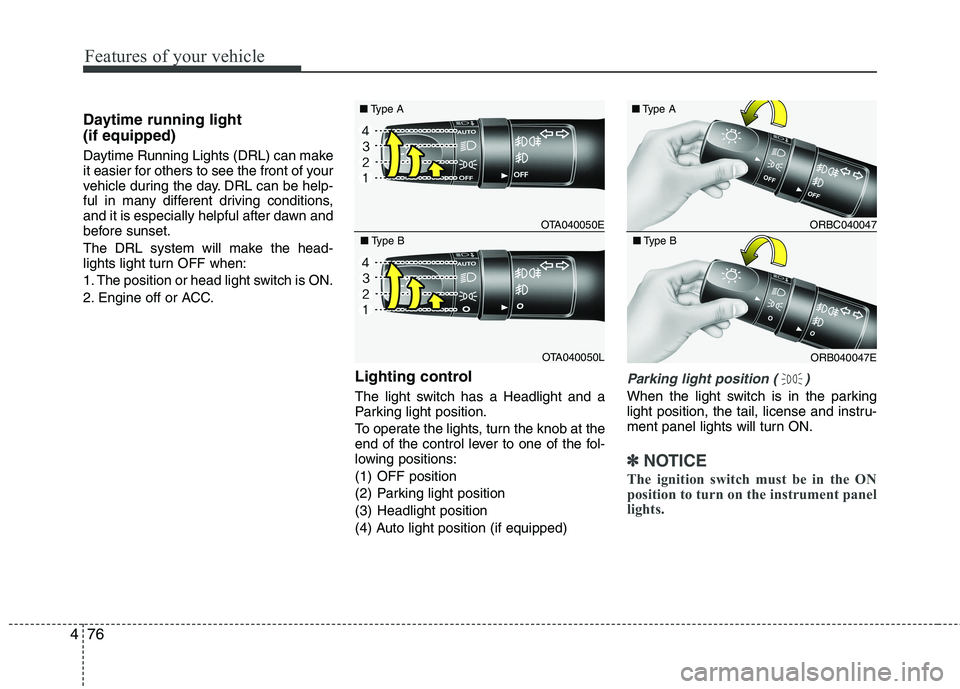
Lighting control
The light switch has a Headlight and a
Parking light position.
To operate the lights, turn the knob at the
end of the control lever to one of the fol-
lowing positions:
(1) OFF position
(2) Parking light position
(3) Headlight position
(4) Auto light position (if equipped)
Parking light position ( )
When the light switch is in the parking
light position, the tail, license and instru-
ment panel lights will turn ON.
✽✽NOTICE
The ignition switch must be in the ON
position to turn on the instrument panel
lights.
OTA040050E
■
Type A
OTA040050L
■
Type B
ORBC040047
■
Type A
ORB040047E
■
Type B
Page 152 of 488
477
Features of your vehicle
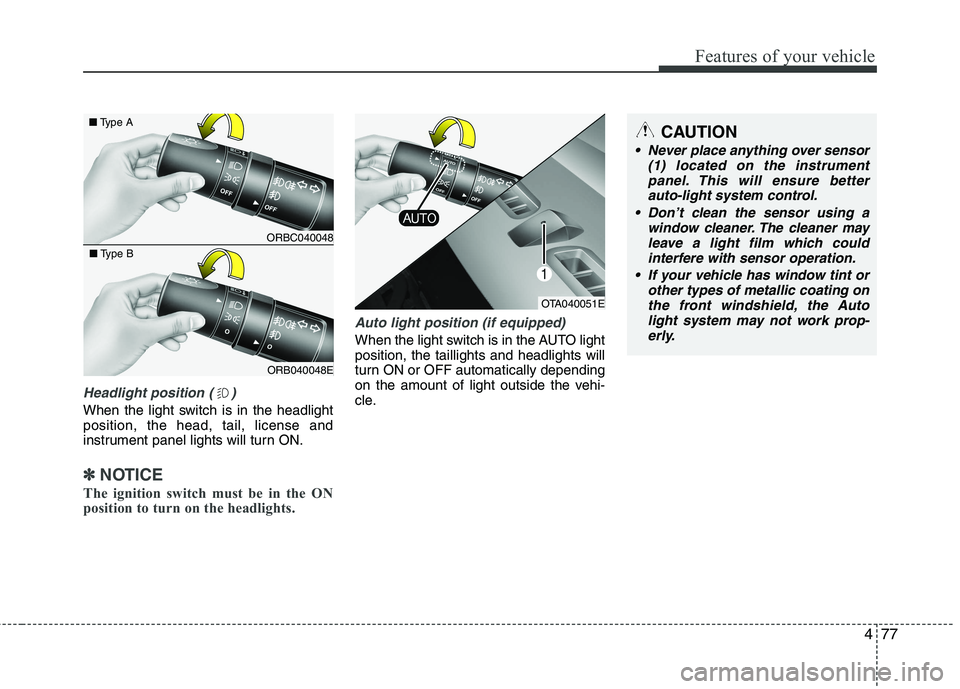
Headlight position ( )
When the light switch is in the headlight position, the head, tail, license and
instrument panel lights will turn ON.
✽✽NOTICE
The ignition switch must be in the ON
position to turn on the headlights.
Auto light position (if equipped)
When the light switch is in the AUTO light position, the taillights and headlights will
turn ON or OFF automatically depending
on the amount of light outside the vehi-
cle.
CAUTION
Never place anything over sensor (1) located on the instrument
panel. This will ensure better auto-light system control.
Don’t clean the sensor using a window cleaner. The cleaner may
leave a light film which could interfere with sensor operation.
If your vehicle has window tint or other types of metallic coating onthe front windshield, the Auto
light system may not work prop-erly.
OTA040051E
ORBC040048
■
Type A
ORB040048E
■
Type B
Page 154 of 488
479
Features of your vehicle
Turn signals and lane change sig- nals
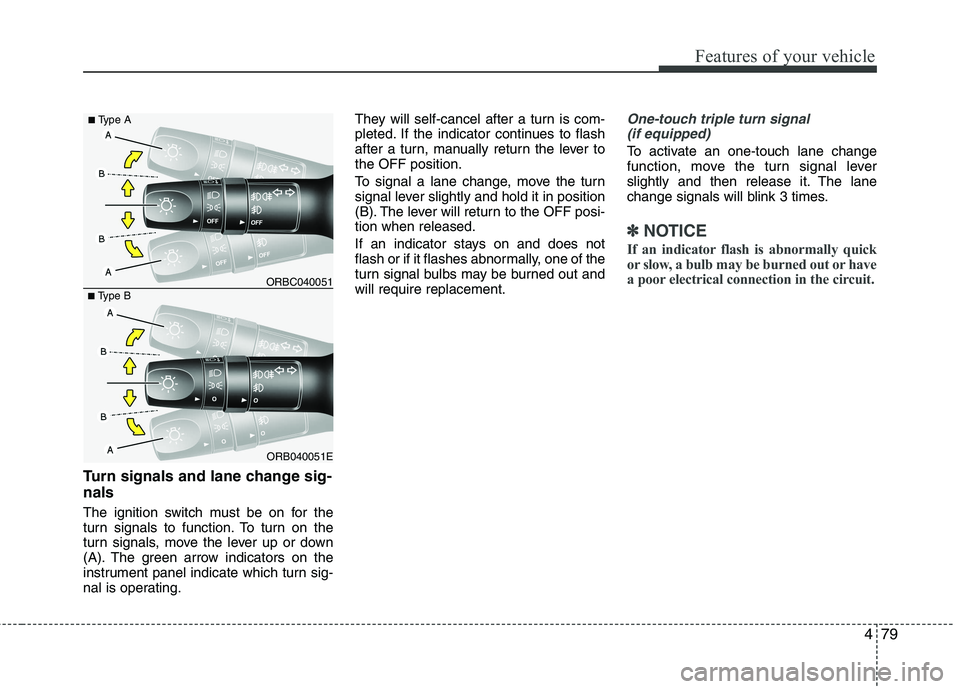
The ignition switch must be on for the
turn signals to function. To turn on the
turn signals, move the lever up or down
(A). The green arrow indicators on the
instrument panel indicate which turn sig-
nal is operating.They will self-cancel after a turn is com-
pleted. If the indicator continues to flash
after a turn, manually return the lever tothe OFF position.
To signal a lane change, move the turn
signal lever slightly and hold it in position
(B). The lever will return to the OFF posi-tion when released.
If an indicator stays on and does not
flash or if it flashes abnormally, one of the
turn signal bulbs may be burned out andwill require replacement.
One-touch triple turn signal
(if equipped)
To activate an one-touch lane change
function, move the turn signal lever
slightly and then release it. The lane
change signals will blink 3 times.
✽✽ NOTICE
If an indicator flash is abnormally quick
or slow, a bulb may be burned out or have
a poor electrical connection in the circuit.
ORB040051E
■
Type B ORBC040051
■
Type A
Page 169 of 488
Features of your vehicle
94
4
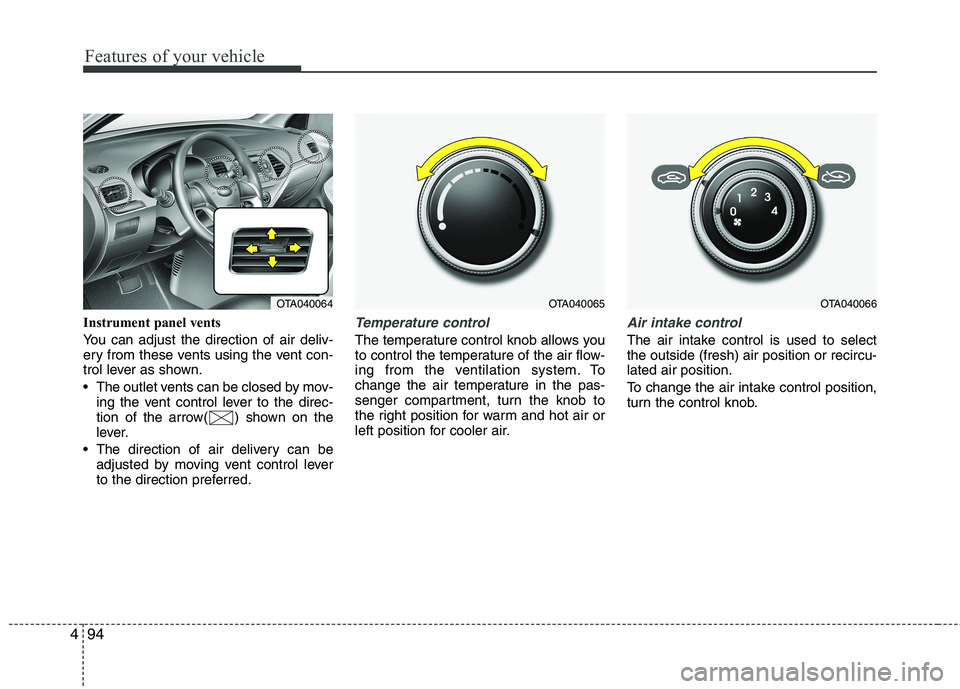
Instrument panel vents
You can adjust the direction of air deliv-
ery from these vents using the vent con-
trol lever as shown.
The outlet vents can be closed by mov-
ing the vent control lever to the direc-
tion of the arrow( ) shown on the
lever.
The direction of air delivery can be adjusted by moving vent control lever
to the direction preferred.Temperature control
The temperature control knob allows you
to control the temperature of the air flow-
ing from the ventilation system. To
change the air temperature in the pas-
senger compartment, turn the knob to
the right position for warm and hot air or
left position for cooler air.
Air intake control
The air intake control is used to select the outside (fresh) air position or recircu-lated air position.
To change the air intake control position,
turn the control knob.
OTA040065OTA040066OTA040064
Page 177 of 488

Features of your vehicle
102
4
✽✽
NOTICE
Never place anything over the sensor
located on the instrument panel to
ensure better control of the heating and
cooling system.
Manual heating and air condition- ing The heating and cooling system can be
controlled manually by pushing buttons
other than the AUTO button. In this case,
the system works sequentially according
to the order of buttons selected.
When pressing any button (or turning
any knob) except the AUTO button while
using automatic operation, the functionsnot selected will be controlled automati-
cally.
1. Start the engine.
2. Set the mode to the desired position. To improve the effectiveness of heat-ing and cooling:
- Heating:- Cooling:
3. Set the temperature control to the desired position.
4. Set the air intake control to the outside (fresh) air position.
5. Set the fan speed control to the desired speed.
6. If air conditioning is desired, turn the air conditioning system on.
Press the AUTO button in order to con-
vert to full automatic control of the sys-tem.
Mode selection
The mode selection button controls the
direction of the air flow through the venti-lation system.
The air flow outlet port is converted as
follows:
Refer to the illustration in the “Manual cli- mate control system”.
OTA040072OTA040071
Page 178 of 488

4103
Features of your vehicle
Floor & Defrost (A, C, D)
Most of the air flow is directed to the floor and the windshield with a small amount
directed to the side window defrosters. Face-Level (B, D)
Air flow is directed toward the upper body
and face. Additionally, each outlet can becontrolled to direct the air dischargedfrom the outlet. Bi-Level (B, D, C)
Air flow is directed towards the face and
the floor. Floor-Level (C, A, D)
Most of the air flow is directed to the
floor, with a small amount of the air beingdirected to the windshield and side win-
dow defrosters. Defrost-Level
Most of the air flow is directed to the windshield with a small amount of air
directed to the side window defrosters.
Instrument panel vents
You can adjust the direction of air deliv-
ery from these vents using the vent con-
trol lever as shown.
The outlet vents can be closed by mov-
ing the vent control lever to the direc-
tion of the arrow shown ( ) on the
lever.
The direction of air delivery can be adjusted by moving vent control lever
to the direction preferred.
OTA040073OTA040064
Page 433 of 488

755
Maintenance
Instrument panel fuse replace- ment
1. Turn the ignition switch and all otherswitches off.
2. Open the fuse panel cover.
3. Pull the suspected fuse straight out.Use the removal tool provided in the
engine compartment fuse panel.
4. Check the removed fuse; replace it if it is blown.
5. Push in a new fuse of the same rating, and make sure it fits tightly in the clips.
If it fits loosely, we recommend that you
consult an authorized Kia dealer.
OTA070018
OTA070043L
OTA070019
■ Type A
■ Type BCAUTION
When replacing a blown fuse or
relay with a new one, make sure
the new fuse or relay fits tightlyinto the clips. The incomplete fas-tening fuse or relay may cause the vehicle wiring and electric sys-
tems damage and a possible fire.
Do not remove fuses, relays and terminals fastened with bolts ornuts. The fuses, relays and termi-
nals may be fastened incomplete-ly, and it may cause a possible fire.If fuses, relays and terminals fas-tened with bolts or nuts are blown,
we recommend that you consult with an authorized Kia dealer.
Do not input any other objects except fuses or relays intofuse/relay terminals such as a driv-
er or wiring. It may cause contactfailure and system malfunction.
Do not plug in screwdrivers or aftermarket wiring into the terminaloriginally designed for fuse and
relays only. The electrical systemand wiring of the vehicle interiormay be damaged or burned due to
contact failure.
Page 437 of 488

759
Maintenance
Fuse NameSymbolFuse ratingProtected Component
ROOM110ALuggage Lamp, A/C Control Module, BCM/TACM, Auto Light & Photo Sensor, Cup Holder
ILL., Instrument Cluster, Ignition Key ILL. & Door Warning Switch, Driver Vanity Lamp,
Overhead Console Lamp (With Sunroof), Room Lamp(W/O Sunroof)
AUDIO20AAudio (W/O ISG), Low DC-DC Convertor (With ISG)
P WDW LH25ARear Power Window Switch LH, Power Window Main Switch, Driver Safety Power Window
Module, Passenger Power Window Switch
P WDW RH25ARear Power Window Switch RH, Power Window Main Switch, Passenger Power Window Switch
HTD MIRR10ADiver/Passenger Power Outside Mirror, ECM/PCM, A/C Control Module
A/CON10AA/C Control Module
BLOWER10AECM/PCM, Blower Switch, Blower Resistor
DOOR LOCK20ADoor Lock/Unlock Relay, Tailgate Unlock Relay
SAFETY P/WDW25ADriver Safety Power Window Module
S/HTD15ADriver/Passenger Seat Heater
BRAKE SWITCHBRAKE
SWITCH10ABrake Switch, Smart Key Control Module
TAIL LH10AInstrument Cluster, Rear Combination Lamp LH, License Lamp, Rear Bumper Lamp, Projection Lamp LH, Head Lamp LH
TAIL RH10ARear Combination Lamp LH, License Lamp, ILL.(+), Rear Bumper Lamp, Projection Lamp LH, Head Lamp LH
STARTS110AIgnition Lock Switch, ECM/PCM, PCB fuse & Relay Box (Start Relay)
Instrument panel (Driver’s side fuse panel)
Page 443 of 488

765
Maintenance
SymbolFuse ratingProtected Component
MULTI FUSE80AEPS Control Module
125AAlternator, PCB Fuse & Relay Box
FUSE
50AI/P Junction Box (Power Connector Fuse : F1 10A / F2 20A,
Fuse : F24 10A / F25 10A / F26 10A / F27 15A, Tail Lamp Relay)
40AProjection Type : E/R Sub Fuse Box (Fuse : F1 10A / F2 20A / F4 15A / F5 10A / F7 10A )
50AI/P Junction Box (Fuse : F8 20A / F9 25A / F10 15A / F16 15A / F17 25A / F18 15A / F19 10A
/ F35 10A, Power Window Relay)
40AE/R Junction Box (Fuse : F11 15A), Ignition Switch, PDM Relay Box (ESCL Relay)
40AABS Control Relay, ESC Control Relay
30AABS Control Relay, ESC Control Relay
40ARear Defogger Relay
40APCB Fuse & Relay Box (Start Relay), Ignition Switch, PDM Relay Box (ESCL Relay)
30APCB Fuse & Relay Box (Engine Control Relay, Fuse : F23 10A)
40APCB Fuse & Relay Box (Blower Relay)
40APCB Fuse & Relay Box (Cooling Fan Relay)
FUSE
(General head light type)10AInstrument Cluster, Head Lamp RH, PCB Fuse & Relay Box (Head Lamp (HI) Relay)
2FUEL PUMP
(FFV)
VACCUM PUMP (EU K3 AT)
15APCB Fuse & Relay Box (Fuel Pump #2 Relay)
Engine compartment main fuse panel