ECO mode KIA PICANTO 2017 Owner's Manual
[x] Cancel search | Manufacturer: KIA, Model Year: 2017, Model line: PICANTO, Model: KIA PICANTO 2017Pages: 488, PDF Size: 31.26 MB
Page 212 of 488

137
Features of your vehicle
5. Button
Plays each song in the USB device for 10
seconds.
To cancel SCAN Play, press this button again.
6. Knob & Button
Turn this knob clockwise to browsesongs after current song, or counter
clockwise to browse songs before cur-
rent song. To play the displayed song,
press the knob. 7. Button
Displays menus for the current mode.
RPT : Repeats the current song.
F.RDM : Plays all song within current
Folder in random order.
F.RPT : Repeats all song within current Folder.
A.RDM : Plays all song within all F olders
in random order.
Info : Displays information of the current song.
MENU
ENTERTUNE
SCAN
4
Page 214 of 488

139
Features of your vehicle
Using iPod®
❋ iPod ®
is a trademark of Apple Inc.
1. Button
Press the button for less than 0.8 seconds to play from the
beginning of the song currently played.
Press the button for less than 0.8 sec- onds and press it again within 3 second
to move to and play the previous track.
Press the button for 0.8 seconds or
longer to play the song in reverse
direction in fast speed.
Press the button for less than 0.8 seconds to move to the next track.
Press the button for 0.8 seconds or
longer to play the song in forward
direction in fast speed. 2. Button (RAPEAT)
Repeats the song currently played.
3. Button (RANDOM)
Press this button to shuffle order of all
songs in current category.
To cancel RANDOM Play, press this button again.
4. Button
(MENU)
Repeats the current song.
Plays all songs within the current- ly playing category in random order.
INFO : Displays information of the cur- rent song. Search : Moves to the upper category
from currently played category of the
iPod ®
. To move to (play) the category
(song) displayed, press knob.
You will be able to search through the
lower category of the selected category.
The order of iPod’s category is Playlist,
Artist, Albums, Genres, Songs,
Composers.
5.
Knob & Button
When you rotate the knob clockwise, it
will display the songs (category) ahead
of the song currently played (category in
the same level).
Also, when you rotate the knob counter-
clockwise, it will display the songs (cate-
gory) before the song currently played
(category in the same level).
To listen to the song displayed in the
song category, press the button to playthe selected song.
AUX
This feature is used to play external
MEDIA currently connected with the AUX
terminal. ❈ AUX mode cannot be started unless
there is an external device connected
to the AUX terminal.
ENTERTUNE
TUNE
MENU
2
RDM
1
RPT
SEEK
TRACK
SEEK
TRACKTRACK
4
Page 217 of 488

Features of your vehicle
1424(8)
Each time the button is shortly pressed (under 0.8 seconds), sets screen Off
➟
Screen On ➟Screen Off
❈ Audio operation is maintained and
only the screen will be turned Off. In
the screen Off state, press any key to
turn the screen On again. (9) Radio Mode
- Shortly press the key (under 0.8 sec-
onds): TA On/Off
- Press and hold the key (over 0.8 sec- onds): Previews each broadcast for 5 seconds each
Media mode
- Press and hold the key (over 0.8 sec- onds): Previews each song (file) for 10 seconds each
❈ Press and holding the key again to
continue listening to the current song(file).
(10)
- Shortly press the key (under 0.8 sec- onds) : Moves to the Display, Sound,
Clock, Phone, System setting modes
- Press and hold the key (over 0.8 sec- onds) : Move to the Time settingscreen (11)
Displays menus for the current
mode. ❈
iPod ®
List : Move to parent category
(12)
CD MP3, USB mode : Folder Search
(13) TUNE knob
Radio mode : Changes frequency by
turning the knob left/right
CD, USB, iPod ®
, My Music mode:
Searches .songs (files) by turning the
knob left/right. ❈ When the desired song is dis-
played, press the knob to play the song.
Moves focus in all selection menus and
selects menus
FOLDER
MENUTA
SCAN
Page 222 of 488
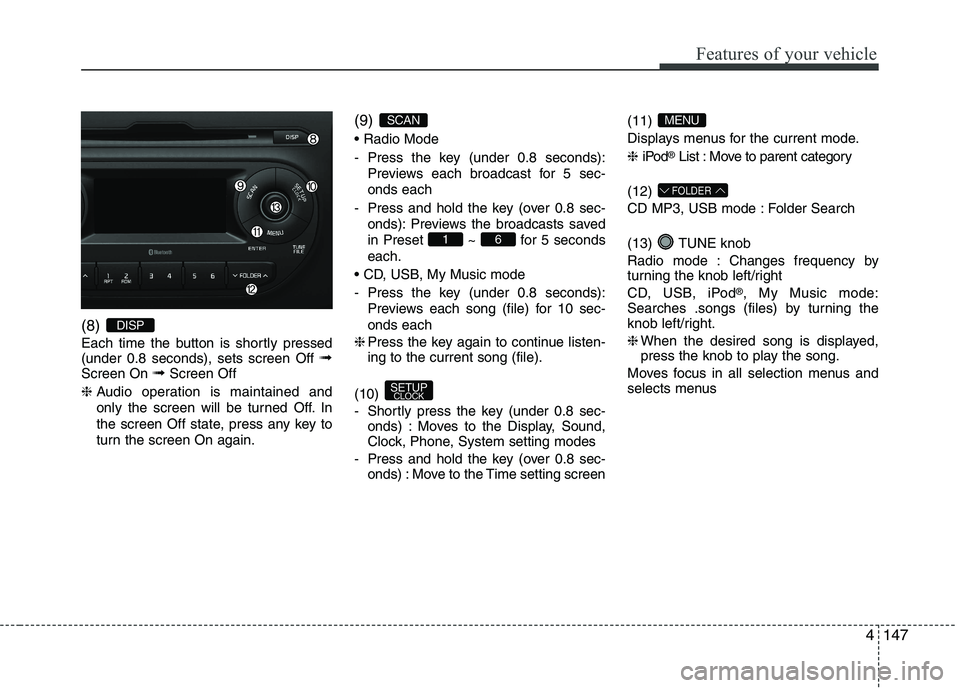
147
Features of your vehicle
4
(8)
Each time the button is shortly pressed (under 0.8 seconds), sets screen Off
➟
Screen On ➟Screen Off
❈ Audio operation is maintained and
only the screen will be turned Off. In
the screen Off state, press any key to
turn the screen On again. (9)
- Press the key (under 0.8 seconds):
Previews each broadcast for 5 sec- onds each
- Press and hold the key (over 0.8 sec- onds): Previews the broadcasts saved
in Preset ~ for 5 secondseach.
- Press the key (under 0.8 seconds): Previews each song (file) for 10 sec- onds each
❈ Press the key again to continue listen- ing to the current song (file).
(10)
- Shortly press the key (under 0.8 sec- onds) : Moves to the Display, Sound,
Clock, Phone, System setting modes
- Press and hold the key (over 0.8 sec- onds) : Move to the Time setting screen (11)
Displays menus for the current mode. ❈
iPod ®
List : Move to parent category
(12)
CD MP3, USB mode : Folder Search
(13) TUNE knob
Radio mode : Changes frequency by
turning the knob left/right
CD, USB, iPod ®
, My Music mode:
Searches .songs (files) by turning the
knob left/right. ❈ When the desired song is displayed,
press the knob to play the song.
Moves focus in all selection menus and
selects menus
FOLDER
MENU
SETUP CLOCK
61
SCAN
DISP
Page 235 of 488
![KIA PICANTO 2017 Owners Manual Features of your vehicle
1604Language
This menu is used to set the display and
voice recognition language.
Select [Language] Set through TUNE knob ❈
The system will reboot after the lan-
guage i](/img/2/57964/w960_57964-234.png "KIA PICANTO 2017 Owners Manual Features of your vehicle
1604Language
This menu is used to set the display and
voice recognition language.
Select [Language] Set through TUNE knob ❈
The system will reboot after the lan-
guage i")
Features of your vehicle
1604Language
This menu is used to set the display and
voice recognition language.
Select [Language] Set through TUNE knob ❈
The system will reboot after the lan-
guage is changed.
❈ Language support by region SETUP
Type A-3, Type A-4
(for Colombia model)
Display Settings
Press the key Select [Display]
through TUNE knob or key
Select menu through TUNE knob
Mode Pop up
[Mode Pop up] Changes / selection mode
or
key to display the mode
change pop up screen.
Media Display
When playing an MP3 file, select the
desired display info from ‘Folder/File’ or
‘Album/Artist/Song’.
MEDIA
RADIO
OffOn
1
RPT
SETUP
CLOCK
Page 252 of 488
![KIA PICANTO 2017 Owners Manual 177
Features of your vehicle
4
SYSTEM SETTINGS
Press the key Select [System]
Memory Information
Displays currently used memory and
total system memory.
Select [Memory Information] OK
The curren](/img/2/57964/w960_57964-251.png "KIA PICANTO 2017 Owners Manual 177
Features of your vehicle
4
SYSTEM SETTINGS
Press the key Select [System]
Memory Information
Displays currently used memory and
total system memory.
Select [Memory Information] OK
The curren")
177
Features of your vehicle
4
SYSTEM SETTINGS
Press the key Select [System]
Memory Information
Displays currently used memory and
total system memory.
Select [Memory Information] OK
The currently used memory is displayed on the left side while the total system
memory is displayed on the right side.
RADIO (for RDS model) ❈
RADIO may differ depending on the
selected audio.
Changing RADIO mode SEEK
Press the key
Shortly pressing the key (under 0.8 seconds): Changes the frequency.
Pressing and holding the key (over 0.8 seconds): Automatically searches for
the next frequency. Preset SEEK Press
the ~ key
seconds): Plays the frequency saved in
the corresponding key.
seconds): Pressing and holding thedesired key from ~ will
save the currently playing broadcast to
the selected key and sound a BEEP.
SCAN
Press the key
seconds): The broadcast frequency
increases and previews each broadcast
for 5 seconds each. After scanning all
frequencies, returns and plays the cur-
rent broadcast frequency.
TA
SCAN
61
61
SEEK
TRACK
SETUP
CLOCK
Page 253 of 488
Features of your vehicle
1784Selecting through manual search
Turn the TUNE knob left/right to adjust
the frequency.
Traffic Announcement (TA)
Shortly pressing the key (under
0.8 seconds): Set / TA Traffic
Announcement) mode. MENU
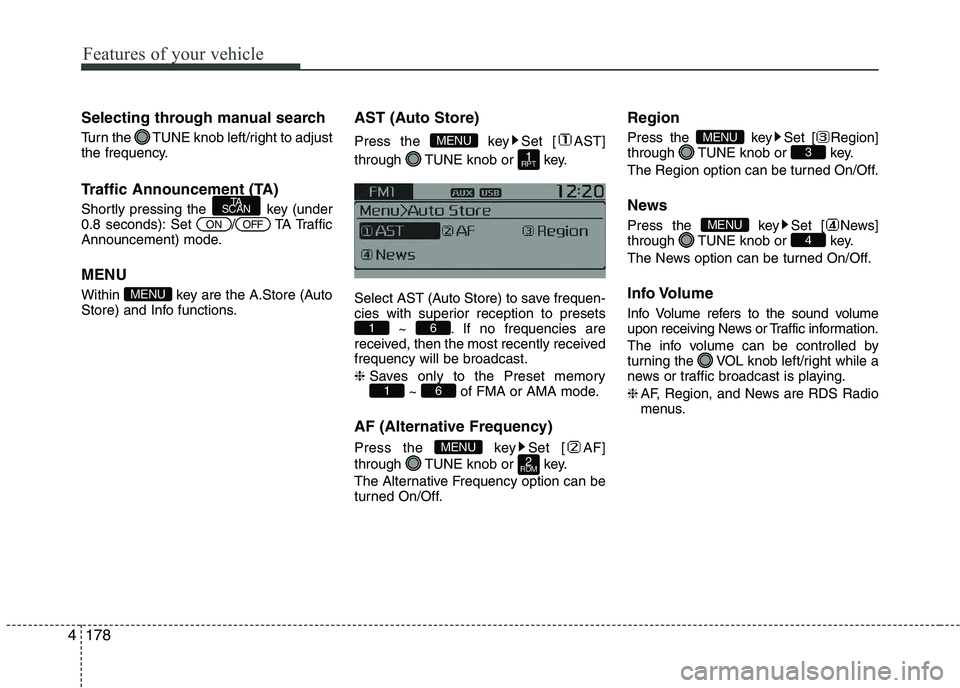
Within key are the A.Store (Auto
Store) and Info functions.
AST (Auto Store)
Press the key Set [ AST]
through TUNE knob or key.
Select AST (Auto Store) to save frequen-
cies with superior reception to presets
~ . If no frequencies are
received, then the most recently receivedfrequency will be broadcast. ❈ Saves only to the Preset memory
~ of FMA or AMA mode.
AF (Alternative Frequency)
Press the key Set [ AF]
through TUNE knob or key.
The Alternative Frequency option can be
turned On/Off. Region
Press the key Set [ Region]
through TUNE knob or key.
The Region option can be turned On/Off.
News
Press the key Set [ News]
through TUNE knob or key.
The News option can be turned On/Off.
Info Volume
Info Volume refers to the sound volume
upon receiving News or Traffic information.
The info volume can be controlled by
turning the VOL knob left/right while a
news or traffic broadcast is playing. ❈
AF, Region, and News are RDS Radio
menus.
4MENU
3MENU
2
RDMMENU
61
61
1
RPT
MENU
MENU
OFFON
TA
SCAN
Page 254 of 488
179
Features of your vehicle
4
RADIO ❈
RADIO may differ depending on the
selected audio.
Changing RADIO mode SEEK
Press the key
Shortly pressing the key (under 0.8 seconds): Changes the frequency.
Pressing and holding the key (over 0.8 seconds): Automatically searches for the
next frequency. Preset SEEK Press
the ~ key
Shortly pressing the key (under 0.8 seconds): Plays the frequency saved in
the corresponding key.
Pressing and holding the key (over 0.8 seconds): Pressing and holding thedesired key from ~ will
save the currently playing broadcast to
the selected key and sound a BEEP.
SCAN
Press the key
Shortly pressing the key (under 0.8 seconds): The broadcast frequency
increases and previews each broad-
cast for 5 seconds each. After scan-
ning all frequencies, returns and plays
the current broadcast frequency.
Pressing and holding the key (over 0.8 seconds): Previews the broadcasts
saved in Preset ~ for 5seconds each. Selecting through manual search
Turn the TUNE knob left/right to adjust
the frequency. MENU
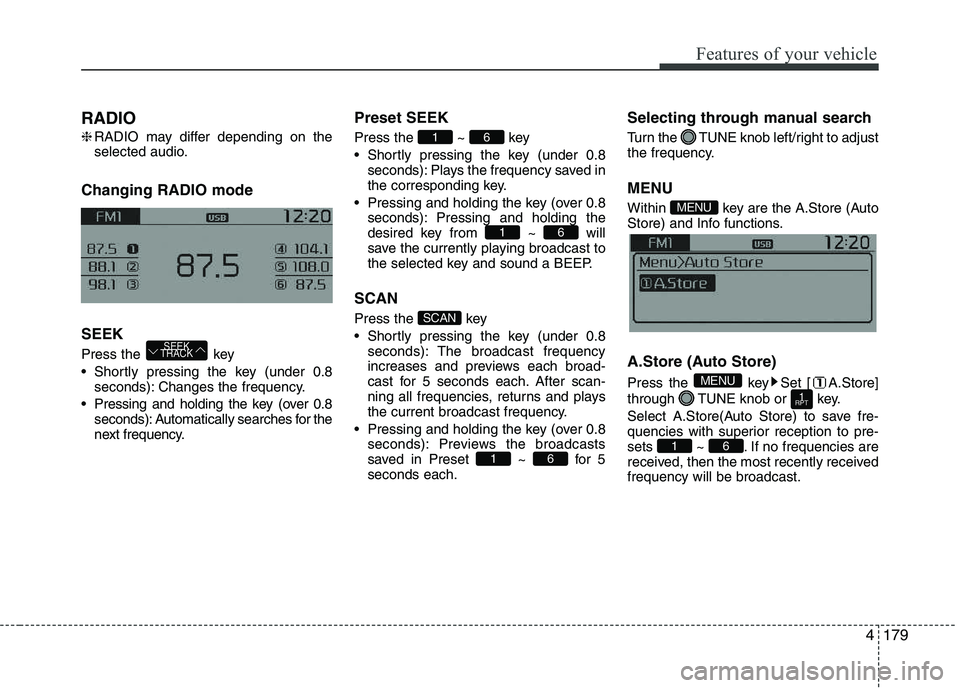
Within key are the A.Store (Auto
Store) and Info functions.
A.Store (Auto Store)
Press the key Set [ A.Store]
through TUNE knob or key.
Select A.Store(Auto Store) to save fre-
quencies with superior reception to pre-
sets ~ . If no frequencies are
received, then the most recently receivedfrequency will be broadcast.
61
1
RPT
MENU
MENU
61
SCAN
61
61
SEEK
TRACK
Page 255 of 488
Features of your vehicle
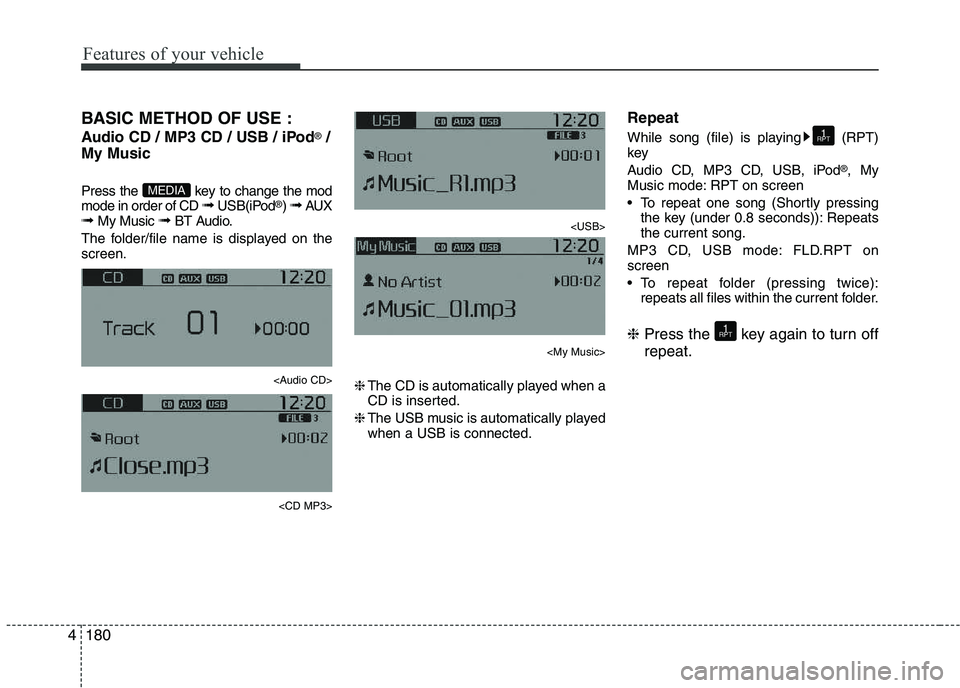
1804BASIC METHOD OF USE :
Audio CD / MP3 CD / USB / iPod
®
/
My Music
Press the key to change the mod mode in order of CD ➟ USB(iPod ®
) ➟ AUX
➟ My Music ➟ BT Audio.
The folder/file name is displayed on thescreen.
Page 256 of 488
181
Features of your vehicle
4
Random
While song (file) is playing (RDM) key
Audio CD, My Music mode: RDM on screen
Random (Shortly pressing the key):
Plays all songs in random order.
MP3 CD, USB mode: FLD.RDM on screen
Folder Random (Shortly pressing the key): Plays all files within the current
folder in random order.
MP3 CD, USB mode: ALL RDM onscreen
Plays all files in random order.
iPod ®
mode: RDM on screen
Random (Shortly pressing the key): Plays all files in random order.
❈ Press the key again to turn off ran- dom. Changing Song/File
While song (file) is playing key
Plays the cur-
rent song from the beginning.
❈ If the key is pressed again
within 1 second, the previous song is
played.
Pressing and holding the key (over 0.8 seconds): Rewinds the song.
While song (file) is playingkey
Shortly pressing the key : Plays the next song.
Pressing and holding the key (over 0.8 seconds): Fast forwards the song. Scan (for RDS model)
Pressing and holding the key
(over 0.8 seconds) : Scans all songs
for 10 seconds starting from the nextsong.
❈ Pressing and holding the key
again to turn off.
Scan
Shortly pressing the the key : Scans all songs from the next song for 10 seconds each.
❈ Press the key again to turn
off.
❈ The SCAN function is not supported in
iPod ®
mode.
SCAN
SCAN
TA
SCAN
TA
SCAN
SEEK
TRACK
SEEK
TRACK
SEEK
TRACK
2
RDM
2
RDM