USB KIA PICANTO 2017 Owner's Manual
[x] Cancel search | Manufacturer: KIA, Model Year: 2017, Model line: PICANTO, Model: KIA PICANTO 2017Pages: 488, PDF Size: 31.26 MB
Page 256 of 488
181
Features of your vehicle
4
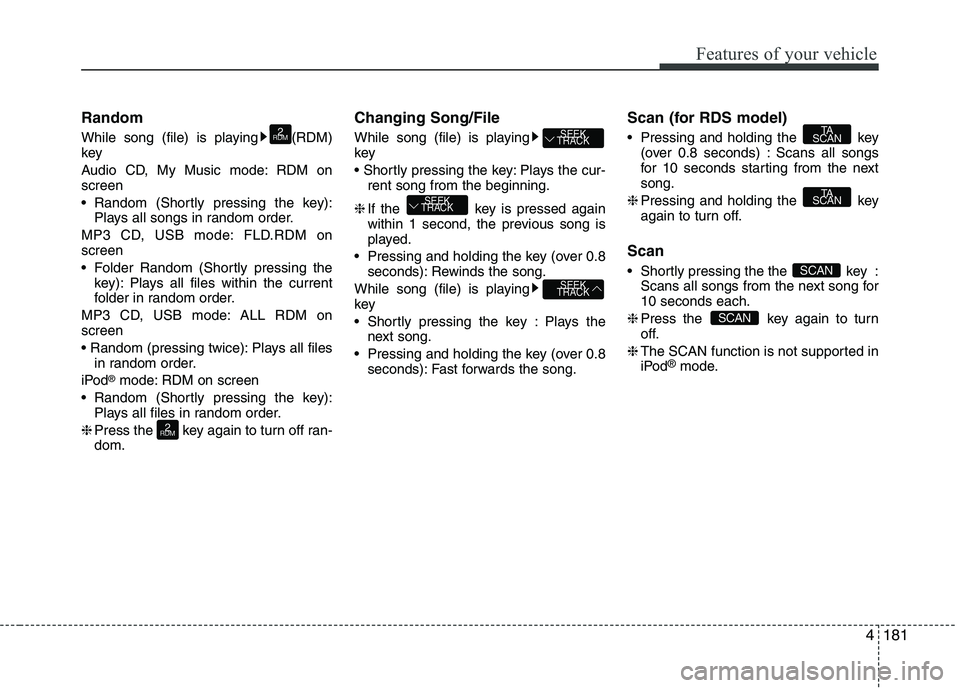
Random
While song (file) is playing (RDM) key
Audio CD, My Music mode: RDM on screen
Random (Shortly pressing the key):
Plays all songs in random order.
MP3 CD, USB mode: FLD.RDM on screen
Folder Random (Shortly pressing the key): Plays all files within the current
folder in random order.
MP3 CD, USB mode: ALL RDM onscreen
Plays all files in random order.
iPod ®
mode: RDM on screen
Random (Shortly pressing the key): Plays all files in random order.
❈ Press the key again to turn off ran- dom. Changing Song/File
While song (file) is playing key
Plays the cur-
rent song from the beginning.
❈ If the key is pressed again
within 1 second, the previous song is
played.
Pressing and holding the key (over 0.8 seconds): Rewinds the song.
While song (file) is playingkey
Shortly pressing the key : Plays the next song.
Pressing and holding the key (over 0.8 seconds): Fast forwards the song. Scan (for RDS model)
Pressing and holding the key
(over 0.8 seconds) : Scans all songs
for 10 seconds starting from the nextsong.
❈ Pressing and holding the key
again to turn off.
Scan
Shortly pressing the the key : Scans all songs from the next song for 10 seconds each.
❈ Press the key again to turn
off.
❈ The SCAN function is not supported in
iPod ®
mode.
SCAN
SCAN
TA
SCAN
TA
SCAN
SEEK
TRACK
SEEK
TRACK
SEEK
TRACK
2
RDM
2
RDM
Page 257 of 488
Features of your vehicle
1824Folder Search : MP3 CD, USB Mode
While file is playing (Folder
Up) key
While file is playing (Folder
Down) key
❈
If a folder is selected by pressing the
TUNE knob, the first file within the
selected folder will be played.
Searching Songs (File)
TUNE knob : Searches for songs (files)
TUNE knob : Plays select- ed song (file). MENU : Audio CD
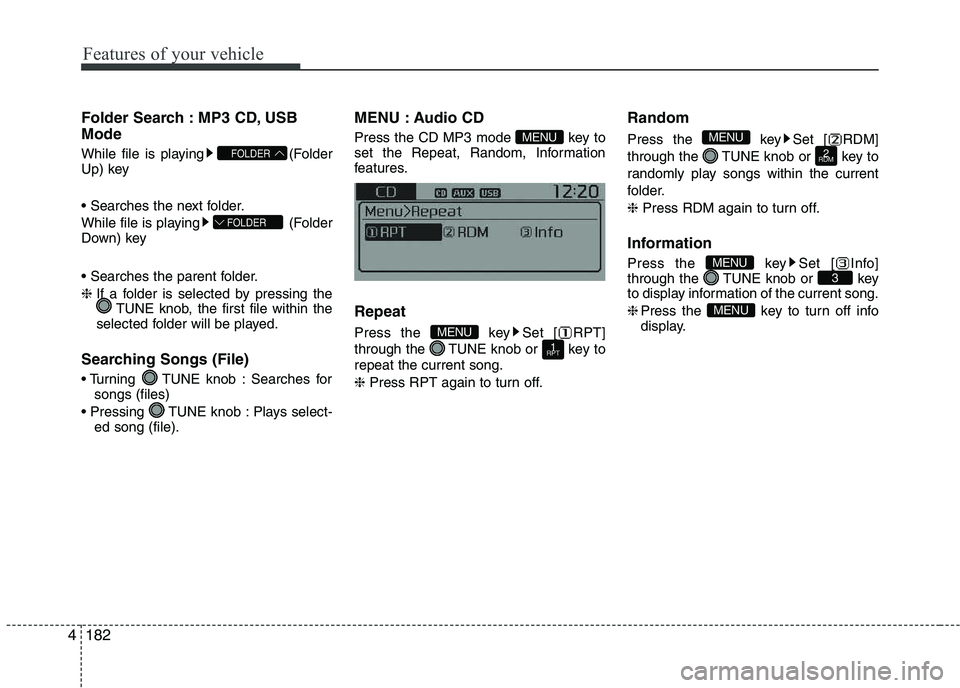
Press the CD MP3 mode key to
set the Repeat, Random, Information
features. Repeat
Press the key Set [ RPT]
through the TUNE knob or key torepeat the current song. ❈
Press RPT again to turn off. Random
Press the key Set [ RDM]
through the TUNE knob or key to
randomly play songs within the current
folder. ❈
Press RDM again to turn off.
Information
Press the key Set [ Info]
through the TUNE knob or key
to display information of the current song. ❈ Press the key to turn off info
display.
MENU
3MENU
2
RDM
MENU
1
RPTMENU
MENU
FOLDER
FOLDER
Page 258 of 488
183
Features of your vehicle
4
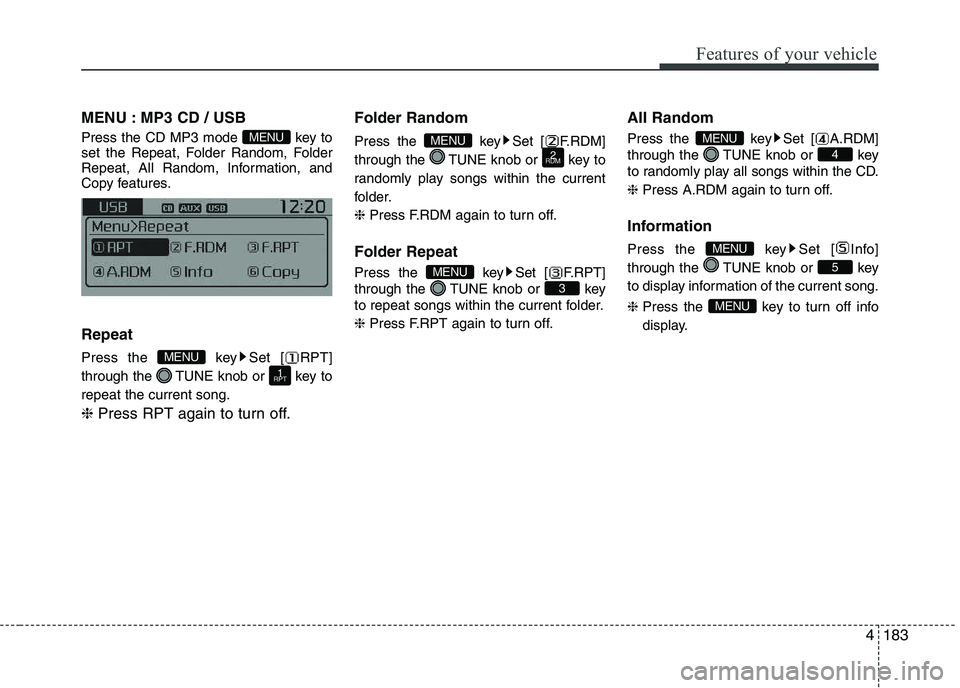
MENU : MP3 CD / USB
Press the CD MP3 mode key to
set the Repeat, Folder Random, Folder
Repeat, All Random, Information, and
Copy features. Repeat
Press the key Set [ RPT]
through the TUNE knob or key torepeat the current song. ❈
Press RPT again to turn off. Folder Random
Press the key Set [ F.RDM]
through the TUNE knob or key to
randomly play songs within the current
folder. ❈
Press F.RDM again to turn off.
Folder Repeat
Press the key Set [ F.RPT]
through the TUNE knob or key
to repeat songs within the current folder. ❈ Press F.RPT again to turn off. All Random
Press the key Set [ A.RDM]
through the TUNE knob or key
to randomly play all songs within the CD. ❈
Press A.RDM again to turn off.
Information
Press the key Set [ Info]
through the TUNE knob or key
to display information of the current song. ❈ Press the key to turn off info
display.
MENU
5
MENU
4
MENU
3
MENU
2
RDMMENU
1
RPT
MENU
MENU
Page 259 of 488
![KIA PICANTO 2017 Owners Manual Features of your vehicle
1844Copy (if equipped)
Press the key Set [ Copy]
through the TUNE knob or key.
This is used to copy the current song into
My Music. You can play the copied Music
in My](/img/2/57964/w960_57964-258.png "KIA PICANTO 2017 Owners Manual Features of your vehicle
1844Copy (if equipped)
Press the key Set [ Copy]
through the TUNE knob or key.
This is used to copy the current song into
My Music. You can play the copied Music
in My")
Features of your vehicle
1844Copy (if equipped)
Press the key Set [ Copy]
through the TUNE knob or key.
This is used to copy the current song into
My Music. You can play the copied Music
in My Music mode. ❈
If another key is pressed while
copying is in progress, a pop up
asking you whether to cancel
copying is displayed.
❈ If another media is connected or
inserted (USB, CD, iPod ®
, AUX)
while copying is in progress, copy-ing is canceled.
❈ Music will not be played while
copying is in progress. MENU : iPod
®
In iPod ®
mode, press the key to
set the Repeat, Random, Information and
Search features. Repeat
Press the key Set [ RPT]
through the TUNE knob or key torepeat the current song. ❈ Press RPT again to turn repeat off. Random
Press the key Set [ RDM]
through the TUNE knob or key.
Plays all songs within the currently play-
ing category in random order. ❈
Press RDM again to turn off.
Information
Press the key Set [ Info]
through the TUNE knob or key.
Displays information of the current song. ❈ Press the key to turn off
info display.
Search
Press the key Set [ Search]
through the TUNE knob or key.
Displays iPod ®
category list.
❈ Searching iPod ®
category is
key pressed, move to par-
ent category.
MENU
4MENU
MENU
3MENU
2
RDM
MENU
1
RPT
MENU
MENU6MENU
Page 263 of 488
![KIA PICANTO 2017 Owners Manual Features of your vehicle
1884
Bluetooth®Wireless Technology audio
can be used only when the [Audio
Streaming] of Phone is turned On.
❈ Setting
Bluetooth®Wireless
Technology Audio Streaming : Pre](/img/2/57964/w960_57964-262.png "KIA PICANTO 2017 Owners Manual Features of your vehicle
1884
Bluetooth®Wireless Technology audio
can be used only when the [Audio
Streaming] of Phone is turned On.
❈ Setting
Bluetooth®Wireless
Technology Audio Streaming : Pre")
Features of your vehicle
1884
Bluetooth®Wireless Technology audio
can be used only when the [Audio
Streaming] of Phone is turned On.
❈ Setting
Bluetooth®Wireless
Technology Audio Streaming : Press the /key Select
[Phone] through the tune knob
Select [Audio Streaming] through the TUNE knob Set / Starting
Bluetooth®Wireless
Technology Audio
Press the key to change the mode in order of CD ➟USB ➟AUX ➟
My Music ➟BT Audio.
If BT Audio is selected,
Bluetooth®
Wireless Technology audio will start
playing.
❈ Audio may not automatically start play-
ing in some mobile phones. Using the
Bluetooth®Wireless
Technology audio features
Press the TUNE knob to play and pause the current song. ❈ The previous song / next song / play /
pause functions may not be supported
in some mobile phones.
MEDIA
OFFON
SETUP CLOCK
Page 273 of 488
Features of your vehicle
1984❈
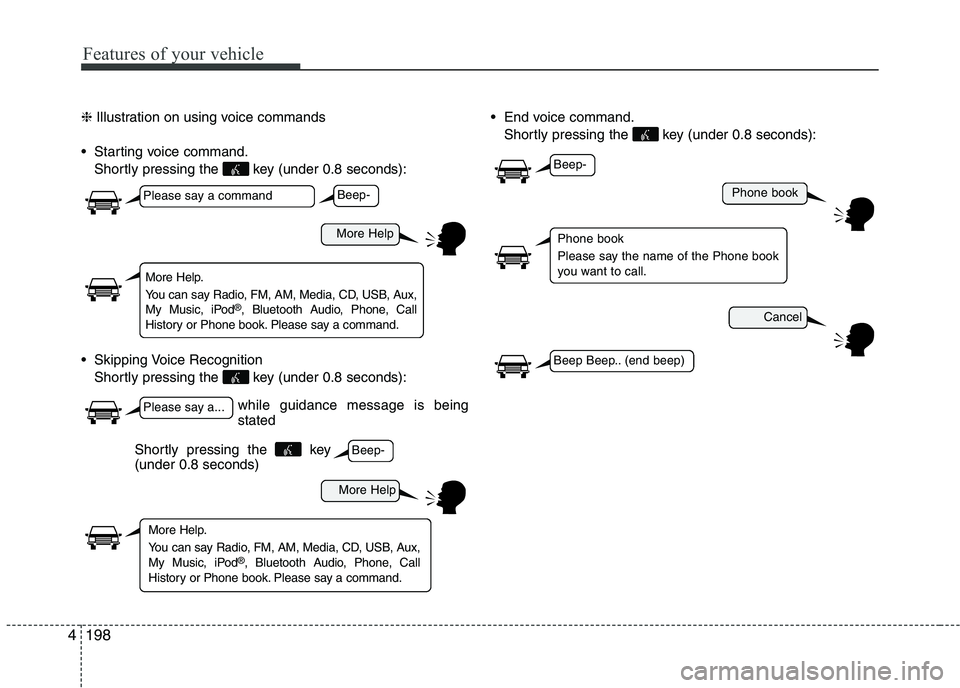
Illustration on using voice commands
Starting voice command. Shortly pressing the key (under 0.8 seconds):
Skipping Voice Recognition Shortly pressing the key (under 0.8 seconds): End voice command.
Shortly pressing the key (under 0.8 seconds):
while guidance message is being stated
More Help
Phone book
Cancel
More Help
Please say a command
Please say a...
More Help.
You can say Radio, FM, AM, Media, CD, USB, Aux,
My Music, iPod ®
, Bluetooth Audio, Phone, Call
History or Phone book. Please say a command.
Phone book
Please say the name of the Phone book
you want to call.
More Help.
You can say Radio, FM, AM, Media, CD, USB, Aux,
My Music, iPod ®
, Bluetooth Audio, Phone, Call
History or Phone book. Please say a command.
Beep-
Beep-
Beep-
Beep Beep.. (end beep)
Shortly pressing the key (under 0.8 seconds)
Page 275 of 488
Features of your vehicle
2004
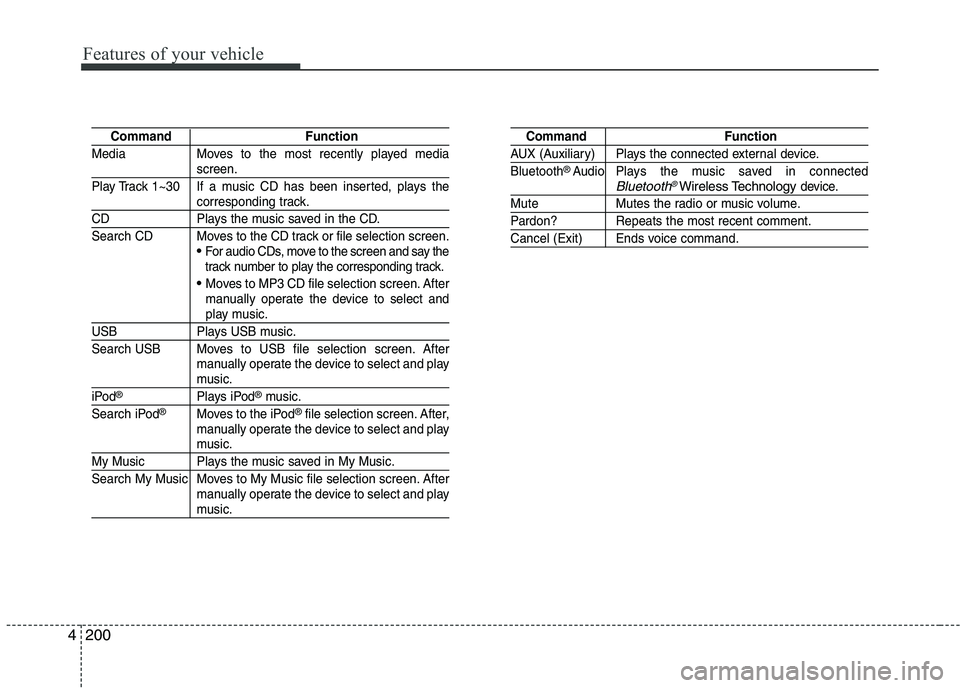
Command Function
Media Moves to the most recently played media
screen.
Play Track 1~30 If a music CD has been inserted, plays the
corresponding track.
CD Plays the music saved in the CD.
Search CD Moves to the CD track or file selection screen.
For audio CDs, move to the screen and say the
track number to play the corresponding track.
Moves to MP3 CD file selection screen. After
manually operate the device to select and
play music.
USB Plays USB music.
Search USB Moves to USB file selection screen. After manually operate the device to select and play
music.
iPod®Plays iPod®music.
Search iPod®Moves to the iPod®file selection screen. After,
manually operate the device to select and play
music.
My Music Plays the music saved in My Music.
Search My Music Moves to My Music file selection screen. After manually operate the device to select and play
music.
Command Function
AUX (Auxiliary) Plays the connected external device. Bluetooth®Audio Plays the music saved in connectedBluetooth®Wireless Technologydevice.
Mute Mutes the radio or music volume.
Pardon? Repeats the most recent comment.
Cancel (Exit) Ends voice command.
Page 277 of 488
Features of your vehicle
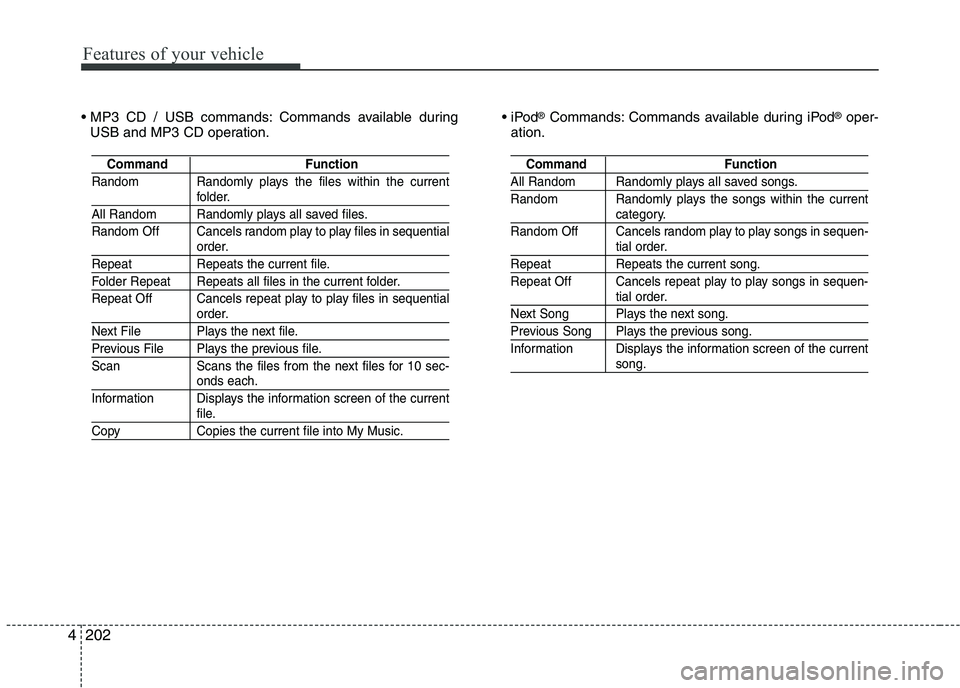
2024 Commands available during
USB and MP3 CD operation.
®
Commands: Commands available during iPod ®
oper-
ation.
Command Function
Random Randomly plays the files within the current
folder.
All Random Randomly plays all saved files.
Random Off Cancels random play to play files in sequential
order.
Repeat Repeats the current file.
Folder Repeat Repeats all files in the current folder.
Repeat Off Cancels repeat play to play files in sequential
order.
Next File Plays the next file.
Previous File Plays the previous file.
Scan Scans the files from the next files for 10 sec-
onds each.
Information Displays the information screen of the current
file.
Copy Copies the current file into My Music.
Command Function
All Random Randomly plays all saved songs.
Random Randomly plays the songs within the current
category.
Random Off Cancels random play to play songs in sequen-
tial order.
Repeat Repeats the current song.
Repeat Off Cancels repeat play to play songs in sequen-
tial order.
Next Song Plays the next song.
Previous Song Plays the previous song.
Information Displays the information screen of the current
song.
Page 481 of 488
Index
2
I
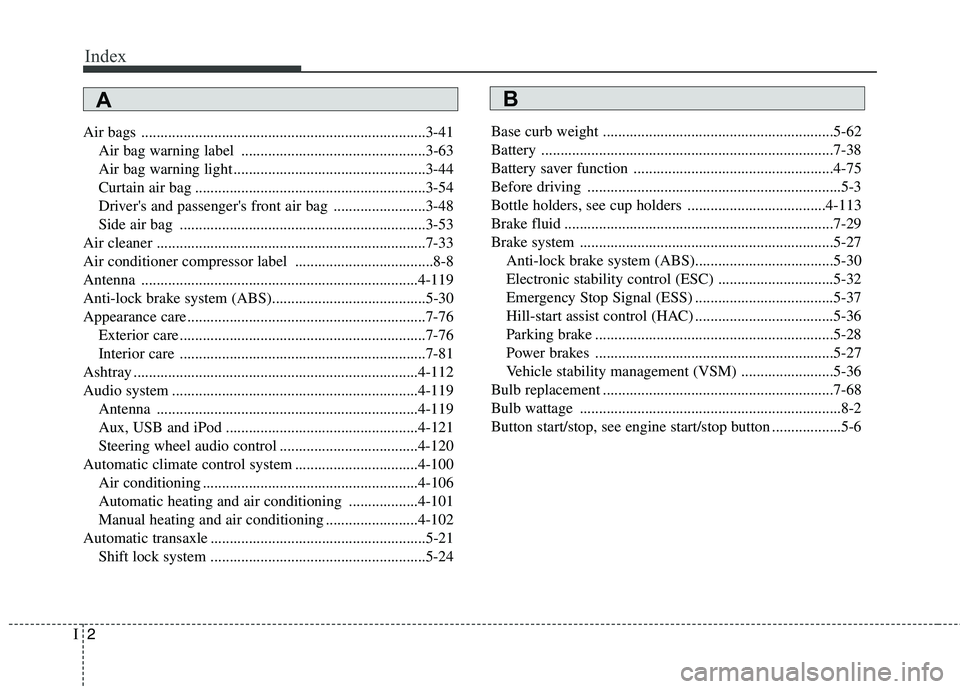
Air bags ..........................................................................3-41
Air bag warning label ................................................3-63
Air bag warning light ..................................................3-44
Curtain air bag ............................................................3-54
Driver's and passenger's front air bag ........................3-48
Side air bag ................................................................3-53
Air cleaner ......................................................................7-33
Air conditioner compressor label ....................................8-8
Antenna ........................................................................4-119
Anti-lock brake system (ABS)........................................5-30
Appearance care..............................................................7-76 Exterior care ................................................................7-76
Interior care ................................................................7-81
Ashtray ..........................................................................4-112
Audio system ................................................................4-119 Antenna ....................................................................4-119
Aux, USB and iPod ..................................................4-121
Steering wheel audio control ....................................4-120
Automatic climate control system ................................4-100 Air conditioning ........................................................4-106
Automatic heating and air conditioning ..................4-101
Manual heating and air conditioning ........................4-102
Automatic transaxle ........................................................5-21 Shift lock system ........................................................5-24 Base curb weight ............................................................5-62
Battery ............................................................................7-38
Battery saver function ....................................................4-75
Before driving ..................................................................5-3
Bottle holders, see cup holders ....................................4-113
Brake fluid ......................................................................7-29
Brake system ..................................................................5-27
Anti-lock brake system (ABS)....................................5-30
Electronic stability control (ESC) ..............................5-32
Emergency Stop Signal (ESS) ....................................5-37
Hill-start assist control (HAC) ....................................5-36
Parking brake ..............................................................5-28
Power brakes ..............................................................5-27
Vehicle stability management (VSM) ........................5-36
Bulb replacement ............................................................7-68
Bulb wattage ....................................................................8-2
Button start/stop, see engine start/stop button ..................5-6
AB