light KIA PICANTO 2017 Owner's Guide
[x] Cancel search | Manufacturer: KIA, Model Year: 2017, Model line: PICANTO, Model: KIA PICANTO 2017Pages: 488, PDF Size: 31.26 MB
Page 107 of 488

Features of your vehicle
32
4
Sliding the sunroof
To open the sunroof, pull the sunroof
control lever backward.
To close the sunroof, push the sunroof
control lever forward. To open the sunroof automatically:
Pull the sunroof control lever backward to the second detent position and then
release it. The sunroof will slide all the
way open.
To stop the sunroof sliding at any point,
pull or push the sunroof control lever
momentarily.
To close the sunroof automatically:
Push the sunroof control lever forward to the second detent position and then
release it. The sunroof will automatically
close all the way.
To stop the sunroof sliding at any point,
pull or push the sunroof control lever
momentarily.
✽✽
NOTICE
While driving with the sunroof in an
open (or partially open position), your
vehicle may demonstrate a wind buffet-
ing or pulsation noise. This noise is a
normal occurrence and can be reduced
or eliminated by taking the following
actions. If you experience the noise with
the sunroof open, slightly reduce the size
of the sunroof opening
Automatic reversal
If an object or part of the body is detect- ed while the sunroof is closing automati-
cally, it will reverse the direction, and then
stop.
The auto reverse function does not work
if a tiny obstacle is between the sliding
glass and the sunroof sash. You should
always check that all passengers and
objects are away from the sunroof beforeclosing it.
OTA040023ORBC040096
Page 110 of 488

435
Features of your vehicle
Electronic power steering (if equipped)
Power steering uses the motor to assist
you in steering the vehicle. If the engine
is off or if the power steering system
becomes inoperative, the vehicle may
still be steered, but it will require
increased steering effort.
The motor driven power steering is con-
trolled by the power steering control unit
which senses the steering wheel torque,
steering wheel position and vehicle
speed to command the motor.
The steering wheel becomes heavier as
the vehicle’s speed increases and
becomes lighter as the vehicle’s speed
decreases for better control of the steer-ing wheel.
Should you notice any change in the
effort required to steer during normal
vehicle operation, we recommend that
the system be checked by an authorized
Kia dealer.✽✽NOTICE
The following symptoms may occur dur-
ing normal vehicle operation:
The EPS warning light does not illu- minate.
The steering effort is high immediate- ly after turning the ignition switch on.
This happens as the system performs
the EPS system diagnostics. When the
diagnostics is completed, the steering
wheel will return to its normal condi-
tion.
A click noise may be heard from the
EPS relay after the ignition switch is
turned to the ON or LOCK position.
Motor noise may be heard when the vehicle is at a stop or at a low driving
speed.
If the Electric Power Steering System
does not operate normally, the warn-
ing light will illuminate on the instru-
ment cluster. The steering wheel may
become difficult to control or operate
abnormally. We recommend that you
contact an authorized Kia dealer. (Continued)(Continued)
The steering effort increases if the
steering wheel is rotated continuously
when the vehicle is not in motion.
However, after a few minutes, it will
return to its normal conditions.
When you operate the steering wheel in low temperature, abnormal noise
could occur. If temperature rises, the
noise will disappear. This is a normal
condition.
STEERING WHEEL
Page 111 of 488

Features of your vehicle
36
4
Tilt steering (if equipped)
Tilt steering allows you to adjust the
steering wheel before you drive. You can
also raise it to give your legs more room
when you exit and enter the vehicle.
The steering wheel should be positioned
so that it is comfortable for you to drive,
while permitting you to see the instru-
ment panel warning lights and gauges.
Manual type
To change the steering wheel angle, pull
down the lock release lever (1), adjust
the steering wheel to the desired angle
(2), then pull up the lock-release lever to
lock the steering wheel in place . Be sure
to adjust the steering wheel to the
desired position before driving. Heated steering wheel (if equipped)
When the ignition switch is in the ON
position, pressing the heated steering
wheel button warms the steering wheel.
The indicator on the button will illuminate.
To turn the steering wheel off, press the
button once again. The indicator on the
button will turn off.
It will turn off automatically approximate-
ly 30 minutes after the heated steering
wheel is turned on.
If you turn on the ignition again after turn
off your engine in half an hour (after oper-
ating heater button), the heating systemwill be maintained in its 'on' condition.
OTA040025OTA040026WARNING
Never adjust the angle of the steering wheel while driving. You
may lose steering control and
cause severe personal injury,death or accidents.
After adjusting, push the steering wheel both up and down to be
certain it is locked in position.
Page 113 of 488

Features of your vehicle
38
4
MIRRORS
Inside rearview mirror
Adjust the rearview mirror to center on
the view through the rear window. Make
this adjustment before you start driving.
Day/night rearview mirror
Make this adjustment before you start
driving and while the day/night lever is in
the day position.
Pull the day/night lever toward you to reduce the glare from the headlights of
the vehicles behind you during night driv-ing.
Remember that you lose some rearview clarity in the night position.
WARNING - Rear visibility
Do not place objects in the rear
seat or cargo area which would
interfere with your vision through
the rear window.
WARNING
Do not adjust the rearview mirror
while the vehicle is moving. This
could result in loss of control, and an
accident which could cause death,
serious injury or property damage.
WARNING
Do not modify the inside mirror and
do not install a wide mirror. It could
result in injury, during an accident
or deployment of the air bag.
OTA040028L
Day Night
Page 117 of 488

Features of your vehicle
42
4
INSTRUMENT CLUSTER
1. Tachometer
2. Speedometer
3. Engine coolant temperature gauge*
4. Gasoline fuel gauge
5. LPG fuel gauge*
6. Warning and indicator lights
7. Turn signal indicators
8. LCD display*
* : if equipped ❈ The actual cluster in the vehicle may differ
from the illustration.
For more details refer to the "Gauges" in
the next pages.
OTA045515/OTA045516
■■Type A
- For Gasoline engine
- For LPG engine
Page 118 of 488

443
Features of your vehicle
1. Tachometer
2. Speedometer
3. Engine coolant temperature gauge*
4. Gasoline fuel gauge
5. LPG fuel gauge*
6. Warning and indicator lights
7. Turn signal indicators
8. LCD display*
* : if equipped ❈The actual cluster in the vehicle may differ
from the illustration.
For more details refer to the "Gauges" in
the next pages.
OTA045525L/OTA045526L
■■Type B
- For Gasoline engine
- For LPG engine
Page 119 of 488

Features of your vehicle
44
4
Instrument Cluster Control
Adjusting Instrument Cluster
Illumination (if equipped)
The brightness of the instrument panel
illumination is changed by rotating theillumination control knob when the igni-
tion switch or Engine Start/Stop button is
ON, or the tale lights are turned on. The brightness of the instrument panel
illumination is displayed (Type B Cluster).
If the brightness reaches to the maxi-
mum or minimum level, an alarm willsound (if equipped).
WARNING
Never adjust the instrument cluster
while driving. This could result in
loss of control and lead to an acci-
dent that may cause death, serious
injury, or property damage.
OTA042209LOTA045427L
Page 120 of 488

445
Features of your vehicle
Tachometer
The tachometer indicates the approxi-
mate number of engine revolutions per
minute (rpm). Use the tachometer to select the correct
shift points and to prevent lugging and/or
over-revving the engine.
The tachometer pointer may move slight-
ly when the ignition switch is in ACC or
ON position with the engine OFF. This
movement is normal and will not affect
the accuracy of the tachometer once the
engine is running.
OTA045504K
OTA045505K
■Type A (km/h)
■Type B (km/h)OTA045517
OTA045518
■Type A (MPH, km/h)
■Type B (MPH, km/h)
Gauges
Speedometer
The speedometer indicates the forward speed of the vehicle.
The speedometer is calibrated in kilometers per hour and/or miles per hour.
OTA045506L
CAUTION
Do not operate the engine within
the tachometer's RED ZONE. This
may cause severe engine damage.
Page 121 of 488
Features of your vehicle
46
4
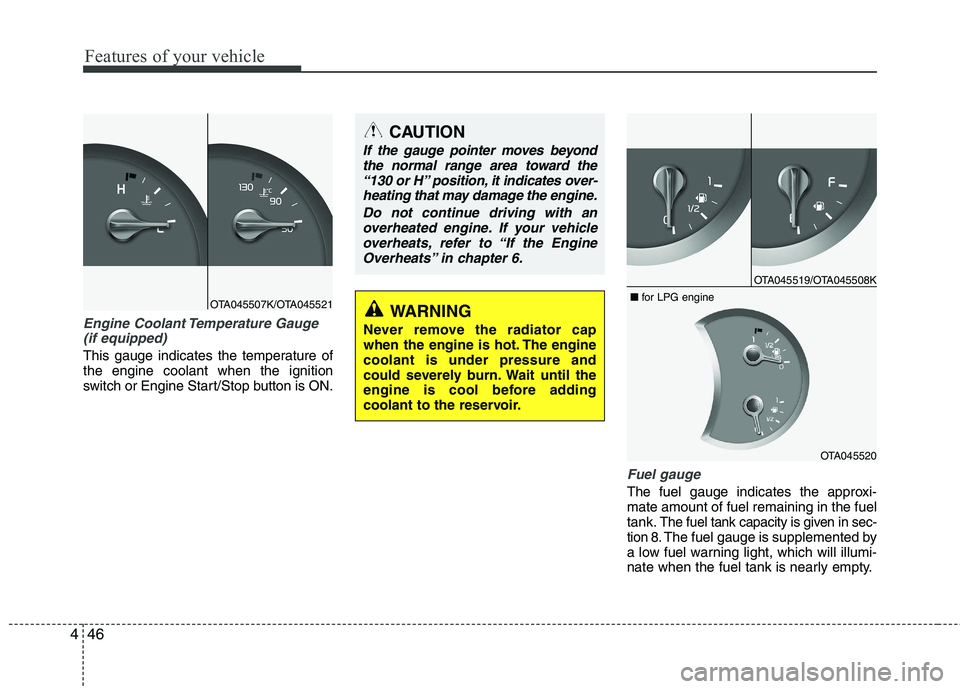
Engine Coolant Temperature Gauge
(if equipped)
This gauge indicates the temperature of the engine coolant when the ignition
switch or Engine Start/Stop button is ON.
Fuel gauge
The fuel gauge indicates the approxi- mate amount of fuel remaining in the fueltank.
The fuel tank capacity is given in sec-
tion 8.The fuel gauge is supplemented by
a low fuel warning light, which will illumi-
nate when the fuel tank is nearly empty.
OTA045507K/OTA045521
CAUTION
If the gauge pointer moves beyond
the normal range area toward the
“130 or H” position, it indicates over-heating that may damage the engine.
Do not continue driving with anoverheated engine. If your vehicle
overheats, refer to “If the Engine Overheats” in chapter 6.
WARNING
Never remove the radiator cap
when the engine is hot. The enginecoolant is under pressure and
could severely burn. Wait until the
engine is cool before adding
coolant to the reservoir.
OTA045519/OTA045508K
OTA045520
■
for LPG engine
Page 122 of 488
447
Features of your vehicle
On inclines or curves, the fuel gauge
pointer may fluctuate or the low fuel warn-
ing light may come on earlier than usual
due to the movement of fuel in the tank.
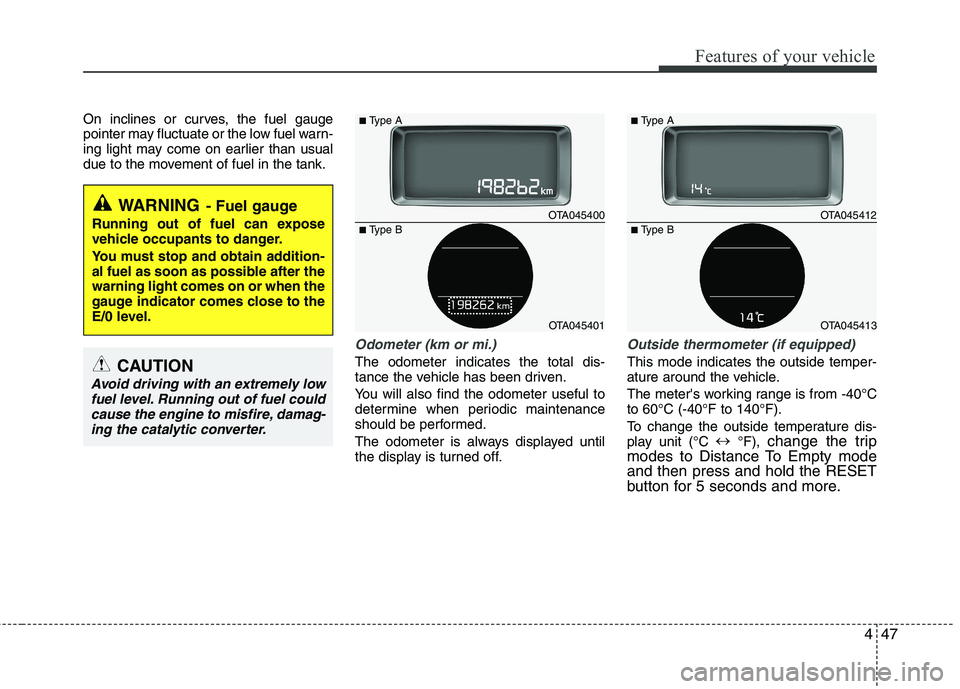
Odometer (km or mi.)
The odometer indicates the total dis-
tance the vehicle has been driven.
You will also find the odometer useful to
determine when periodic maintenance
should be performed.
The odometer is always displayed until
the display is turned off.
Outside thermometer (if equipped)
This mode indicates the outside temper-
ature around the vehicle.
The meter's working range is from -40°C to 60°C (-40°F to 140°F).
To change the outside temperature dis-
play unit (°C
°F), change the trip
modes to Distance To Empty modeand then press and hold the RESET
button for 5 seconds and more.
WARNING - Fuel gauge
Running out of fuel can expose
vehicle occupants to danger.
You must stop and obtain addition-
al fuel as soon as possible after thewarning light comes on or when the
gauge indicator comes close to the
E/0 level.
CAUTION
Avoid driving with an extremely low fuel level. Running out of fuel couldcause the engine to misfire, damag-
ing the catalytic converter.
OTA045400
OTA045401
■
Type A
■ Type B
OTA045412
OTA045413
■
Type A
■ Type B