lock KIA PICANTO 2017 Workshop Manual
[x] Cancel search | Manufacturer: KIA, Model Year: 2017, Model line: PICANTO, Model: KIA PICANTO 2017Pages: 488, PDF Size: 31.26 MB
Page 186 of 488
4111
Features of your vehicle
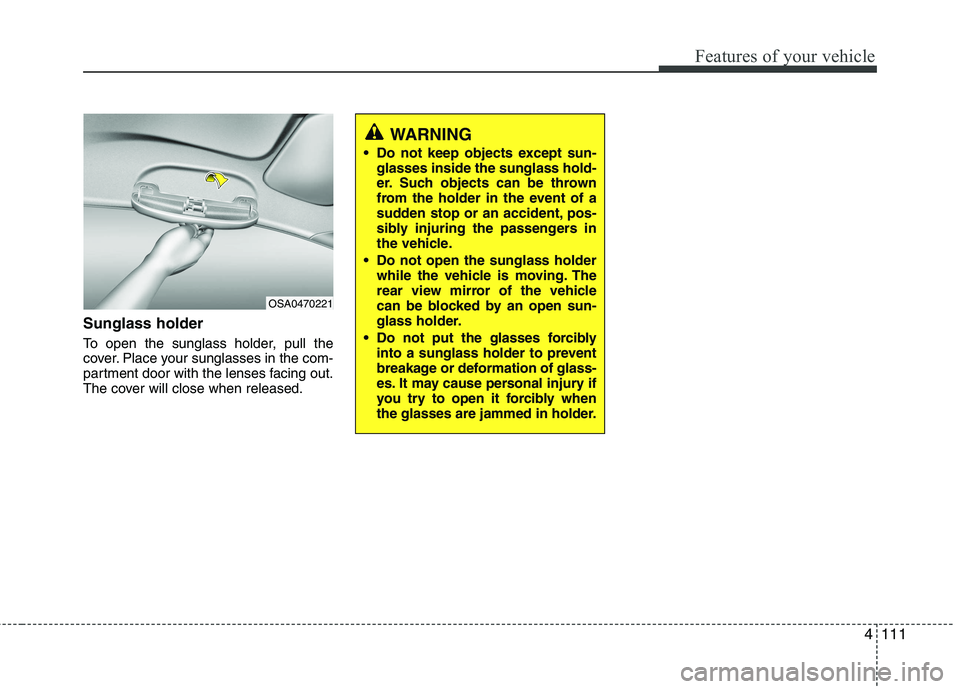
Sunglass holder
To open the sunglass holder, pull the
cover. Place your sunglasses in the com-
partment door with the lenses facing out.
The cover will close when released.
OSA0470221
WARNING
Do not keep objects except sun- glasses inside the sunglass hold-
er. Such objects can be thrown
from the holder in the event of a
sudden stop or an accident, pos-
sibly injuring the passengers in
the vehicle.
Do not open the sunglass holder while the vehicle is moving. The
rear view mirror of the vehicle
can be blocked by an open sun-
glass holder.
Do not put the glasses forcibly into a sunglass holder to prevent
breakage or deformation of glass-
es. It may cause personal injury if
you try to open it forcibly when
the glasses are jammed in holder.
Page 191 of 488

Features of your vehicle
116
4
Digital clock
Whenever the battery terminals or relat-
ed fuses are disconnected, you must
reset the time.
When the ignition switch is in the ACC or
ON position, the clock buttons operate as
follows:
Setup the clock (Type A, Type B)
With audio off
1. Press the [SETUP] / [CLOCK] button
until the clock of the display blinks.
2. Set the clock by turning the knob(1) and press it.
WARNING
Do not put a finger or a foreign ele-
ment (pin, etc.) into a power outlet
and do not touch with a wet hand.
You may get electrocuted or fire
may occur.
(Continued)
Make sure that the electric devices are plugged in securely. Ifnot, it could cause a malfunctionof electric systems.
If you use an electric device with a battery, electric current mayflow from the electric device intothe vehicle and may cause a mal-
function of electric systems. Onlyuse electric devices which couldprevent flowing of current into the vehicle.
OTA045545K
OTA045089K
■ Type A
■Type B
Page 192 of 488
![KIA PICANTO 2017 Workshop Manual 4117
Features of your vehicle
With audio on
1. Press the [SETUP] / [CLOCK] buttonuntil the clock adjust mode displayed.
2. Set the clock by turning the knob(1) and press it.
Setup the clock (Type C)](/img/2/57964/w960_57964-191.png "KIA PICANTO 2017 Workshop Manual 4117
Features of your vehicle
With audio on
1. Press the [SETUP] / [CLOCK] buttonuntil the clock adjust mode displayed.
2. Set the clock by turning the knob(1) and press it.
Setup the clock (Type C)")
4117
Features of your vehicle
With audio on
1. Press the [SETUP] / [CLOCK] buttonuntil the clock adjust mode displayed.
2. Set the clock by turning the knob(1) and press it.
Setup the clock (Type C)
Hour:
Turn the knob to the left (H), will advance
the time displayed by one hour.
Minute:
Turn the knob to the right (M), will
advance the time displayed by one
minute. Clothes hanger (if equipped)
To use the hanger, pull down the upper
portion of hanger.
OTA045522
■
Type C
WARNING
Do not adjust the clock while driv-
ing. You may lose your steering
control and cause an accident that
results in severe personal injury ordeath.
CAUTION
Do not hang heavy clothes, since those may damage the hook.
OUN026348
WARNING
Do not hang other objects except
clothes. In an accident it may cause
vehicle damage or personal injury.
Page 194 of 488

119
Features of your vehicle
4
✽✽NOTICE
If you install an aftermarket HID head
lamp, your vehicle’s audio and electron-
ic device may malfunction.
Antenna
Roof antenna
Your car uses a roof antenna to receive
both AM and FM broadcast signals. This
antenna is a removable type. To remove
the antenna, turn it counterclockwise. To
install the antenna, turn it clockwise.
AUDIO SYSTEM
CAUTION
• Before entering a place with a low
height clearance or a car wash,
remove surely the antenna by rotating it counter-clockwise. Ifnot, the antenna may be damaged.
When reinstalling your antenna, it is important that it is fully tight-ened and adjusted to the uprightposition to ensure proper recep- tion. But it could be removed
when parking the vehicle or when loading cargo on the roof rack.
When cargo is loaded on the roof rack, do not place the cargo nearthe antenna pole to ensure proper
reception.
OUB041162
OHM048154N
■ Type A
■Type B
Page 198 of 488

123
Features of your vehicle
Fading - As your car moves away fromthe radio station, the signal will weaken
and sound will begin to fade. When this
occurs, we suggest that you selectanother stronger station.
Flutter/Static - Weak FM signals or large obstructions between the trans-
mitter and your radio can disturb the
signal causing static or fluttering nois-
es to occur. Reducing the treble level
may lessen this effect until the distur-
bance clears. Station Swapping - As a FM signal
weakens, another more powerful sig-
nal near the same frequency may
begin to play. This is because your
radio is designed to lock onto the clear-
est signal. If this occurs, select anotherstation with a stronger signal.
Multi-Path Cancellation - Radio signals being received from several directions
can cause distortion or fluttering. This
can be caused by a direct and reflect-
ed signal from the same station, or by
signals from two stations with close
frequencies. If this occurs, selectanother station until the condition haspassed.
Using a cellular phone or a two-way
radio
When a cellular phone is used inside the
vehicle, noise may be produced from the
audio equipment. This does not meanthat something is wrong with the audio
equipment. In such a case, use the cellu-
lar phone at a place as far as possiblefrom the audio equipment.
4
JBM005JBM004
CAUTION
When using a communication sys-tem such a cellular phone or a radio set inside the vehicle, a separateexternal antenna must be fitted.
When a cellular phone or a radio setis used with an internal antenna alone, it may interfere with the vehi-cle's electrical system and adversely
affect safe operation of the vehicle.
WARNING
Don't use a cellular phone when you
are driving. You should stop at a safe
place to use a cellular phone.
Page 207 of 488
Features of your vehicle
132
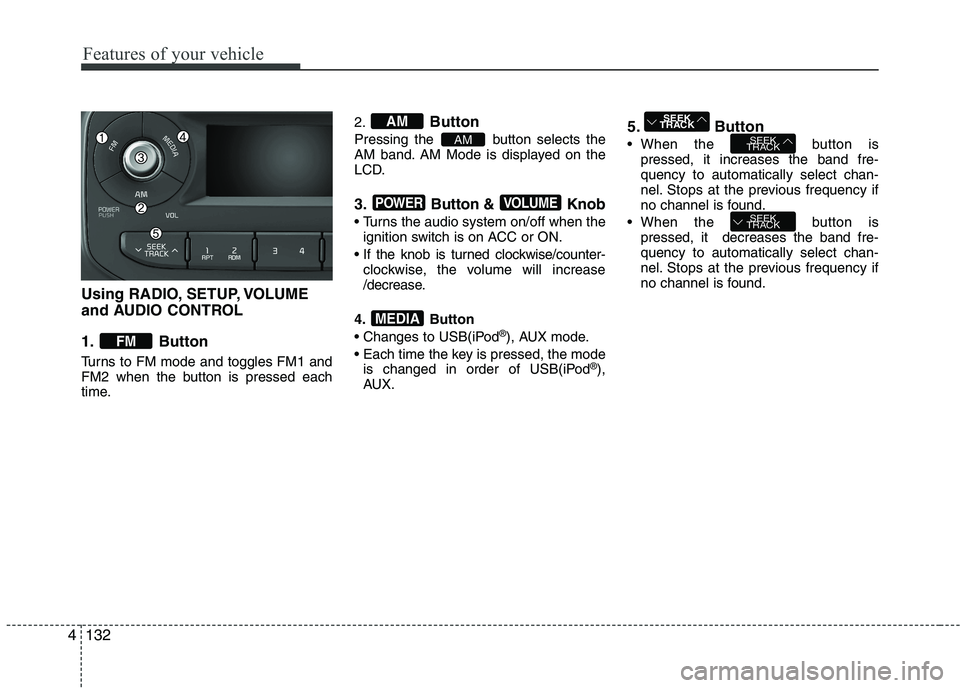
Using RADIO, SETUP, VOLUME
and AUDIO CONTROL
1. Button
Turns to FM mode and toggles FM1 and
FM2 when the button is pressed each
time.2.
Button
Pressing the button selects the
AM band. AM Mode is displayed on the
LCD.
3. Button & Knob
Turns the audio system on/off when the ignition switch is on ACC or ON.
If the knob is turned clockwise/counter- clockwise, the volume will increase
/decrease.
4. Button
Changes to USB(iPod ®
), AUX mode.
Each time the key is pressed, the mode is changed in order of USB(iPod ®
),
AUX. 5. Button
When the button is
pressed, it increases the band fre- quency to automatically select chan-
nel. Stops at the previous frequency if
no channel is found.
When the button is pressed, it decreases the band fre-quency to automatically select chan-
nel. Stops at the previous frequency if
no channel is found.
SEEK
TRACK
SEEK
TRACK
SEEK
TRACK
MEDIA
VOLUMEPOWER
AM
AM
FM
4
Page 208 of 488
133
Features of your vehicle
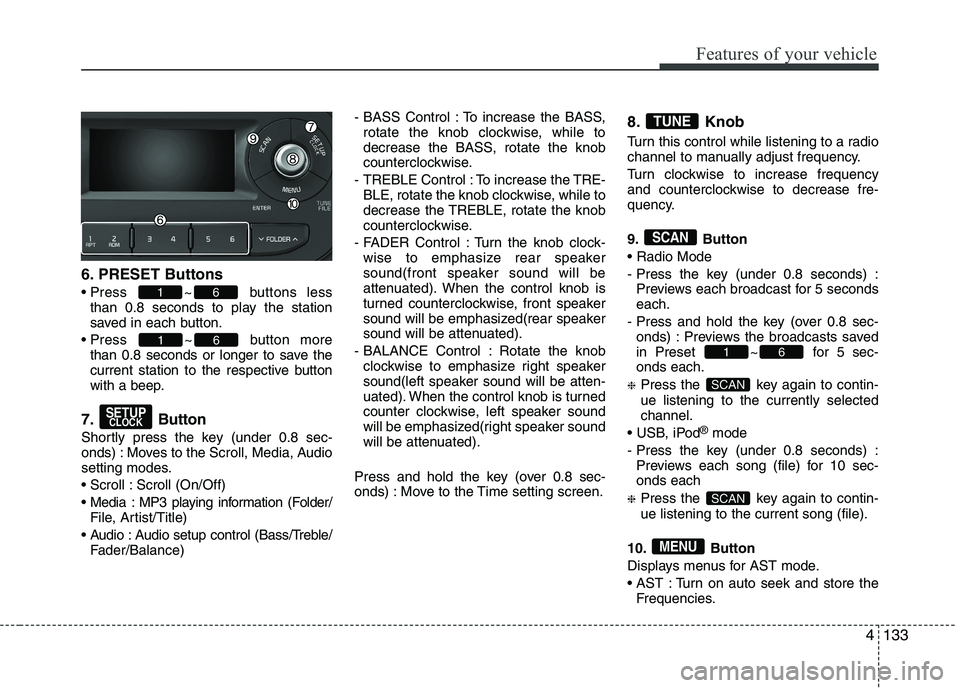
6. PRESET Buttons
Press ~ buttons less
than 0.8 seconds to play the station
saved in each button.
Press ~ button more than 0.8 seconds or longer to save the
current station to the respective button
with a beep.
7. Button
Shortly press the key (under 0.8 sec-
onds) : Moves to the Scroll, Media, Audio
setting modes.
Scroll : Scroll (On/Off)
Media : MP3 playing information (Folder/ File, Artist/Title)
Audio : Audio setup control (Bass/Treble/ Fader/Balance) - BASS Control : To increase the BASS,
rotate the knob clockwise, while to
decrease the BASS, rotate the knob
counterclockwise.
- TREBLE Control : To increase the TRE- BLE, rotate the knob clockwise, while to
decrease the TREBLE, rotate the knob
counterclockwise.
- FADER Control : Turn the knob clock- wise to emphasize rear speaker
sound(front speaker sound will be
attenuated). When the control knob is
turned counterclockwise, front speaker
sound will be emphasized(rear speaker
sound will be attenuated).
- BALANCE Control : Rotate the knob clockwise to emphasize right speaker
sound(left speaker sound will be atten-
uated). When the control knob is turned
counter clockwise, left speaker sound
will be emphasized(right speaker sound
will be attenuated).
Press and hold the key (over 0.8 sec-
onds) : Move to the Time setting screen. 8. Knob
Turn this control while listening to a radio
channel to manually adjust frequency.
Turn clockwise to increase frequency
and counterclockwise to decrease fre-
quency.
9. Button
- Press the key (under 0.8 seconds) :
Previews each broadcast for 5 seconds each.
- Press and hold the key (over 0.8 sec- onds) : Previews the broadcasts saved
in Preset ~ for 5 sec-onds each.
❈ Press the key again to contin- ue listening to the currently selectedchannel.
®
mode
- Press the key (under 0.8 seconds) : Previews each song (file) for 10 sec- onds each
❈ Press the key again to contin- ue listening to the current song (file).
10. Button
Displays menus for AST mode.
AST : Turn on auto seek and store the Frequencies.
MENU
SCAN
SCAN
61
SCAN
TUNE
SETUPCLOCK
61
61
4
Page 212 of 488

137
Features of your vehicle
5. Button
Plays each song in the USB device for 10
seconds.
To cancel SCAN Play, press this button again.
6. Knob & Button
Turn this knob clockwise to browsesongs after current song, or counter
clockwise to browse songs before cur-
rent song. To play the displayed song,
press the knob. 7. Button
Displays menus for the current mode.
RPT : Repeats the current song.
F.RDM : Plays all song within current
Folder in random order.
F.RPT : Repeats all song within current Folder.
A.RDM : Plays all song within all F olders
in random order.
Info : Displays information of the current song.
MENU
ENTERTUNE
SCAN
4
Page 214 of 488

139
Features of your vehicle
Using iPod®
❋ iPod ®
is a trademark of Apple Inc.
1. Button
Press the button for less than 0.8 seconds to play from the
beginning of the song currently played.
Press the button for less than 0.8 sec- onds and press it again within 3 second
to move to and play the previous track.
Press the button for 0.8 seconds or
longer to play the song in reverse
direction in fast speed.
Press the button for less than 0.8 seconds to move to the next track.
Press the button for 0.8 seconds or
longer to play the song in forward
direction in fast speed. 2. Button (RAPEAT)
Repeats the song currently played.
3. Button (RANDOM)
Press this button to shuffle order of all
songs in current category.
To cancel RANDOM Play, press this button again.
4. Button
(MENU)
Repeats the current song.
Plays all songs within the current- ly playing category in random order.
INFO : Displays information of the cur- rent song. Search : Moves to the upper category
from currently played category of the
iPod ®
. To move to (play) the category
(song) displayed, press knob.
You will be able to search through the
lower category of the selected category.
The order of iPod’s category is Playlist,
Artist, Albums, Genres, Songs,
Composers.
5.
Knob & Button
When you rotate the knob clockwise, it
will display the songs (category) ahead
of the song currently played (category in
the same level).
Also, when you rotate the knob counter-
clockwise, it will display the songs (cate-
gory) before the song currently played
(category in the same level).
To listen to the song displayed in the
song category, press the button to playthe selected song.
AUX
This feature is used to play external
MEDIA currently connected with the AUX
terminal. ❈ AUX mode cannot be started unless
there is an external device connected
to the AUX terminal.
ENTERTUNE
TUNE
MENU
2
RDM
1
RPT
SEEK
TRACK
SEEK
TRACKTRACK
4
Page 217 of 488

Features of your vehicle
1424(8)
Each time the button is shortly pressed (under 0.8 seconds), sets screen Off
➟
Screen On ➟Screen Off
❈ Audio operation is maintained and
only the screen will be turned Off. In
the screen Off state, press any key to
turn the screen On again. (9) Radio Mode
- Shortly press the key (under 0.8 sec-
onds): TA On/Off
- Press and hold the key (over 0.8 sec- onds): Previews each broadcast for 5 seconds each
Media mode
- Press and hold the key (over 0.8 sec- onds): Previews each song (file) for 10 seconds each
❈ Press and holding the key again to
continue listening to the current song(file).
(10)
- Shortly press the key (under 0.8 sec- onds) : Moves to the Display, Sound,
Clock, Phone, System setting modes
- Press and hold the key (over 0.8 sec- onds) : Move to the Time settingscreen (11)
Displays menus for the current
mode. ❈
iPod ®
List : Move to parent category
(12)
CD MP3, USB mode : Folder Search
(13) TUNE knob
Radio mode : Changes frequency by
turning the knob left/right
CD, USB, iPod ®
, My Music mode:
Searches .songs (files) by turning the
knob left/right. ❈ When the desired song is dis-
played, press the knob to play the song.
Moves focus in all selection menus and
selects menus
FOLDER
MENUTA
SCAN