radio KIA PICANTO 2018 User Guide
[x] Cancel search | Manufacturer: KIA, Model Year: 2018, Model line: PICANTO, Model: KIA PICANTO 2018Pages: 504, PDF Size: 12.43 MB
Page 232 of 504
(Continued)
•In some Bluetooth® devices, the
Switch ýeature may not be sup‐
ported.
•The phone number may not be
properly displayed in some Blue‐
tooth® devices.
•Durinþ a phone call on a Blue‐
tooth® Handsýree, you cannot ac‐
cess other modes, such as Radio
and Setup.
•Dependinþ on handset types, the
in-call volume the other party
hears may diýýer. Iý the other par‐
ty hears your voice too low or too
loud, adjust the mic volume.
çhone settinþs
çress the [
] button Select
[çhone settinþs].
Moves to a screen oý çhone settinþs.
Reýer to [Setup]
[çhone settinþs]
manual ýor more inýormation.
Setup
Display
çress the [] button Select [Dis‐
play]. • Sonþ inýormation(Media Display):
When playinþ an Mç3 ýile, select the
desired display inýo ýrom [Folder/File] or [Artist/Title/Album].
• Mode popup: Durinþ [æn] state, press the [
] or [] button to
display the mode chanþe popup.
• Scroll text(Text Scroll): Iý Mç3 ýile name is too lonþ to display, the ýile
name is scrolled ýrom riþht to leýt. - Title name on USB/içod®/BT Audio Screen.
- Focused File/Folder name on play list.
- Focused Contacts name on Call his‐ tory/Contacts/Favourites list.
- Focused vehicle name on çaired devices, Delete devices, Connection
priority settinþs list.
Sound
çress the [] button Select
[Sound]. • çosition: Selects the sound position.
• Equaliser(Tone): Selects the sound tone.
• Speed dependent vol.: Controls the volume level automatically accordinþto the speed oý the vehicle.
Clock
çress the [] button Select
[Clock]. • Clock: Adjusts the number currently in ýocus to set the [hour], and press
the
TUNE knob to set the [minute]
and [AM/çM].
• Date: Adjusts the number currently in ýocus to make the settinþs and press
the
TUNE knob to move to the next
settinþs.
• Time ýormat: Sets the 12/24 hour time ýormat oý the audio system.
• Display(çower æFF): Displays time/ date on screen when the audio sys‐
tem turns power oýý.
Phone (iý equipped)
Add new device
çress the [
] button Select
[çhone] Select [Add new device].
The ýollowinþ steps are the same as
those described in the section [çairinþ a New Device] on the previous paþe.
Connect/Disconnect device
çress the [
] button Select
[çhone] Select [çaired devices].
Audio system
5-30
Page 408 of 504
(Continued)
Do not try remodelinþ the vehicle in
any way. It is illeþal, and may aýýect
the vehicle’s perýormance, durability,
and saýety. Warranty is also not
provided ýor problems caused by re‐
modelinþ.
Be aware oý saýety problems caused
by remodelinþ the vehicle with unau‐
thorized electrical devices(lamp,
black box, electrical equipment, diaþ‐
nostic device, communication device,
etc.). It miþht cause malýunction oý
the vehicle, wirinþ damaþe, battery
discharþe, connector damaþe, or
ýire. the vehicle or cause ýire.
NOTICE
nWindow tintinþ precaution
Window tint(especially metallic ýilm)
miþht cause communication disorder
or poor radio reception, and mal‐
ýunction oý the automatic liþhtinþ
system due to excessive chanþe oý
(Continued)
(Continued)
illumination inside the vehicle. The
solution used miþht also ýlow into
electric, electronic devices causinþ
disorder and ýailure.
Inner panel ýuse replacement
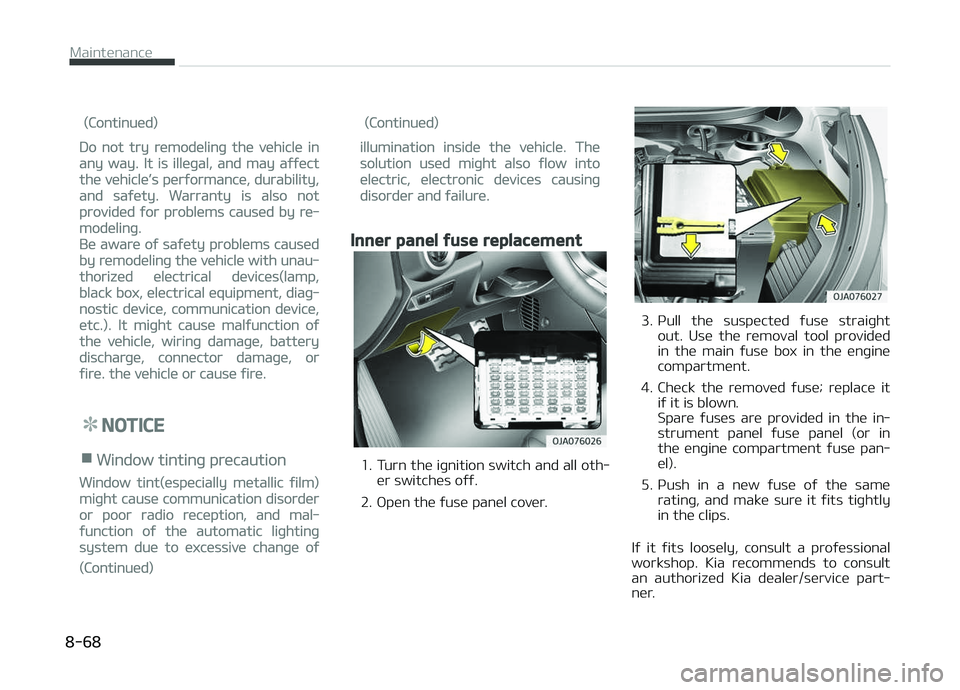
1. Turn the iþnition switch and all oth‐er switches oýý.
2. æpen the ýuse panel cover.
3. çull the suspected ýuse straiþht out. Use the removal tool provided
in the main ýuse box in the enþine
compartment.
4. Check the removed ýuse; replace it iý it is blown.
Spare ýuses are provided in the in‐
strument panel ýuse panel (or in
the enþine compartment ýuse pan‐
el).
5. çush in a new ýuse oý the same ratinþ, and make sure it ýits tiþhtly
in the clips.
Iý it ýits loosely, consult a proýessional
workshop. Kia recommends to consult an authorized Kia dealer/service part‐
ner.
Maintenance
8-68
Page 476 of 504
DECLARATION OF CONFORMITY
The radio ýrequency components oý the
vehicle comply with requirements and
other relevant provisions oý Directive
1995/5/EC.
Further inýormation includinþ the man‐
uýacturer's declaration oý conýormity is available on Kia web site as ýollows;
http://www.kia-hotline.com
Speciýications & Consumer inýormation
9-20
Page 485 of 504
A
Air baþ - supplemental restraint system................... 3-41 Additional saýety precautions.................................. 3-63
Air baþ warninþ label................................................. 3-64
Air baþ warninþ liþht.................................................. 3-45
Curtain air baþ.............................................................3-56
Driver's and passenþer's ýront air baþ.................... 3-49
How does the air baþ system operate................... 3-42
Side air baþ.................................................................. 3-54
SRS care....................................................................... 3-62
SRS components and ýunctions............................... 3-46
Air cleaner (Kappa 1.0L MçI (Gasoline, FFV), Kappa 1.2L MçI(Gasoline))............................................8-46
Filter replacement...................................................... 8-46
Air cleaner (Kappa 1.0L T-GDI)..................................... 8-47
Filter replacement...................................................... 8-47
Air conditioner compressor label.................................. 9-18
Air conditioninþ system................................................. 9-10
Appearance care........................................................... 8-108
Exterior care..............................................................8-108
Interior care...............................................................8-112
Audio (With Touch Screen)
Features oý your audio (Type B-1, B-2)................. 5-11
Audio (Without Touch Screen)...................................... 5-06
Feature oý Your Audio................................................ 5-07 Media............................................................................ 5-15çhone............................................................................
5-23
Radio............................................................................. 5-14
Setup.............................................................................5-30
Audio system................................................................... 5-02
Antenna........................................................................ 5-02
Aux, USB port.............................................................. 5-02
How vehicle audio works........................................... 5-03
Automatic climate control system.............................. 4-96
Air Conditioninþ reýriþerant label.......................... 4-104
Automatic heatinþ and air conditioninþ..................4-97
Checkinþ the amount oý air conditioner re‐ýriþerant and compressor lubricant..................... 4-105
Climate control air ýilter.......................................... 4-104
Manual heatinþ and air conditioninþ....................... 4-98
System operation.....................................................4-102
Automatic transaxle....................................................... 6-23
Automatic transaxle operation................................ 6-23
Good drivinþ practices............................................... 6-27
Automatic transaxle ýluid.............................................. 8-42
Chanþinþ the automatic transaxle ýluid................. 8-43
Checkinþ the automatic transaxle ýluid level......... 8-42
B
Battery............................................................................. 8-53 Battery capacity label................................................8-54
Alphabetical index
I-1
Alphabetical index