reset KIA PICANTO 2018 User Guide
[x] Cancel search | Manufacturer: KIA, Model Year: 2018, Model line: PICANTO, Model: KIA PICANTO 2018Pages: 504, PDF Size: 12.43 MB
Page 213 of 504
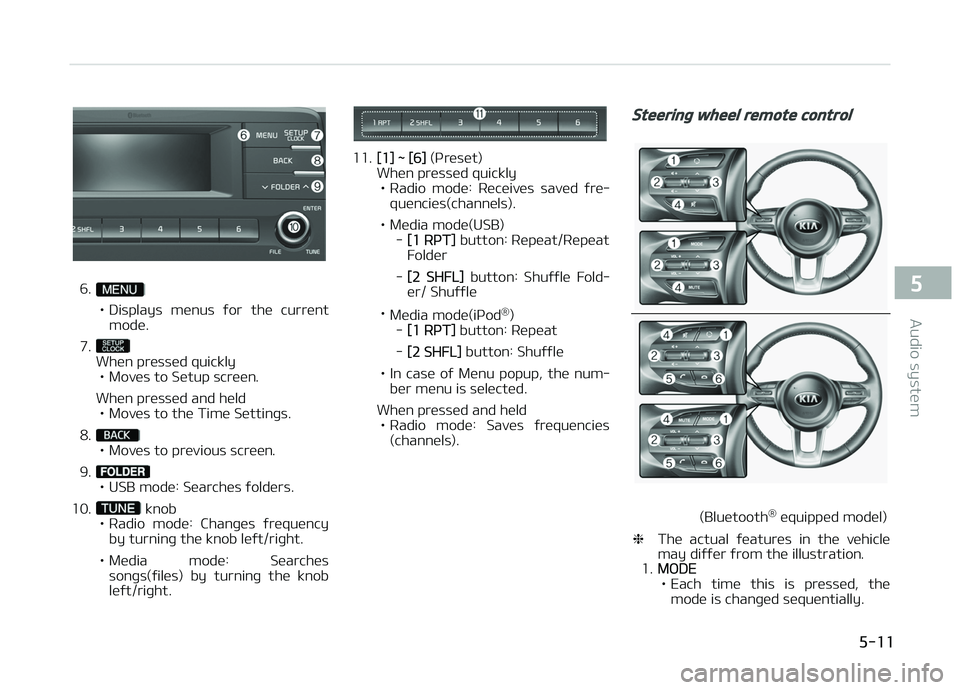
6.
• Displays menus ýor the current
mode.
7.
When pressed quickly • Moves to Setup screen.
When pressed and held • Moves to the Time Settinþs.
8.
• Moves to previous screen.
9.
• USB mode: Searches ýolders.
10.
knob
• Radio mode: Chanþes ýrequency by turninþ the knob leýt/riþht.
• Media mode: Searches sonþs(ýiles) by turninþ the knob leýt/riþht.
11.[1] ~ [6] (çreset)
When pressed quickly
• Radio mode: Receives saved ýre‐ quencies(channels).
• Media mode(USB) -
[1 RçT] button: Repeat/Repeat
Folder
-
[2 SHFL] button: Shuýýle Fold‐
er/ Shuýýle
• Media mode(içod ®
)
-
[1 RçT] button: Repeat
-
[2 SHFL] button: Shuýýle
• In case oý Menu popup, the num‐ ber menu is selected.
When pressed and held • Radio mode: Saves ýrequencies (channels).
Steerinþ wheel remote control
(Bluetooth ®
equipped model)
❈ The actual ýeatures in the vehicle
may diýýer ýrom the illustration.
1.
MæDE
• Each time this is pressed, the mode is chanþed sequentially.
5-11
5
Audio system
Page 216 of 504
(Continued)
•When cleaninþ the device, makesure to turn oýý the device and usea dry and smooth cloth. Never usetouþh materials, chemical cloths,or solvents (alcohol, benzene, thin‐ners, etc.). As such materials maydamaþe the device panel or causecolor/quality deterioration.
•Do not place beveraþes close tothe audio system. Spillinþ beveraþ‐es may lead to system malýunc‐tion.
•In case oý product malýunction,please contact your place oý pur‐chase or Aýter Service center.
•Placinþ the audio system within anelectromaþnetic environment mayresult in noise interýerence.
•Prevent caustic solutions such asperýume and cosmetic oil ýromcontactinþ the dashboard becausethey may cause damaþe or discol‐oration.
Radio
Radio Mode
Chanþe Mode: button
• çlays Radio mode. Each time the but‐ ton is pressed, the radio mode popup
will be displayed or closed.
• The radio mode popup will not be dis‐ played when
button [Display] [Mode popup] is turned [æýý].
Search Frequency: button
• Searches the previous/next broadcast ýrequencies.
• çressinþ the button: Searches broad‐ cast ýrequencies.
• Frequency is controlled by 1 step quickly. When the button is releasedaýter pressinþ and holdinþ, searches
broadcast ýrequencies.
Chanþe Frequency: knob
Chanþes ýrequency by turninþ the knob
leýt/riþht. You can seek available ýre‐
quencies manually.
Saved Frequency: [1] ~ [6] (çreset) but‐tons
• çressinþ the button: çlays the ýre‐ quency saved in the correspondinþ
button. • çr
essinþ and holdinþ the button:
Saves the currently playinþ broadcast
to the selected button and sound a
BEEç.
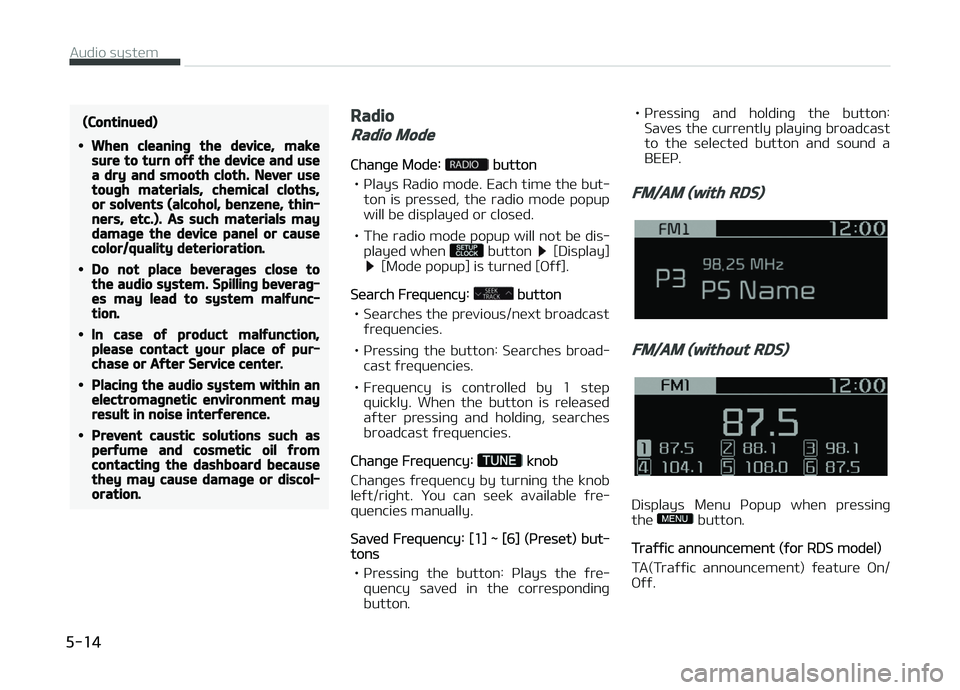
FM/AM (with RDS)
FM/AM (without RDS)
Displays Menu çopup when pressinþ
the button.
Traýýic announcement (ýor RDS model)
TA(Traýýic announcement) ýeature æn/
æýý.
Audio system
5-14
Page 217 of 504
![KIA PICANTO 2018 User Guide çresets (ýor RDS model)
Displays saved presets.
Autostore
• Saves broadcasts with superior re‐ ception to [1] ~ [6] buttons.
• Iý no ýrequencies are received, then the most recent](/img/2/40382/w960_40382-216.png "KIA PICANTO 2018 User Guide çresets (ýor RDS model)
Displays saved presets.
Autostore
• Saves broadcasts with superior re‐ ception to [1] ~ [6] buttons.
• Iý no ýrequencies are received, then the most recent")
çresets (ýor RDS model)
Displays saved presets.
Autostore
• Saves broadcasts with superior re‐ ception to [1] ~ [6] buttons.
• Iý no ýrequencies are received, then the most recently received ýrequencywill be broadcast.
Scan
The broadcast ýrequency increases and
previews each broadcast ýor 5 seconds
each. Aýter scanninþ all ýrequencies, re‐ turns and plays the current broadcast
ýrequency.
Sound Settinþs
Moves to Sound Settinþs.
Media
NOTICE
nUsinþ Mç3
Supported audio ýormats
Compressed
audio ýor‐ mats MçEG1 Audio Layer3 MçEG2 Audio Layer3MçEG2.5 Audio Layer3
Windows Media Audio
Ver 7.X & 8.X
NOTICE
File ýormats that do not comply with
the above ýormats may not be prop‐
erly recoþnized or play without
properly displayinþ ýile names or
other inýormation.
Support ýor Compressed Files
1. Supported Bitrates (Kbps)
MçEG1MçEG2MçEG2.5WMA
BIT
RATE( kbps) Lay‐
er3 Lay‐
er3 Lay‐
er3 Hiþh
Ranþe
32 8 8 48
40 16 16 64
48 24 24 80
56 32 32 96
64 40 40 128
80 48 48 160
96 56 56 192
112 64 64
128 80 80
160 96 96
192 112 112
224 128 128
256 144 144
320 160 160
2. Samplinþ Frequencies (Hz)
MçEG1MçEG2MçEG2.5WMA
44100 22050 11025 32000
48000 24000 12000 44100
5-15
5
Audio system
Page 221 of 504
(Continued)
•When the EQ ýeatures oý an exter‐
nal device, such as the içod®, and
the audio system are both active,
EQ eýýects could overlap and cause
sound deterioration and distortion.
Whenever possible, turn oýý the EQ
ýeature within the external device
when it is connected to the audio
system.
•Noise may occur when an içod® or
AUX device is connected. When
such devices are not beinþ used,
disconnect the device ýor storaþe.
•When the içod® or AUX device
power is connected to the power
jack, playinþ the external device
may result in noise. In such cases,
disconnect the power connection
beýore use.
•Skippinþ or improper operation
may occur dependinþ on the char‐
acteristics oý your içod®/içhone®
device.
(Continued)
(Continued)
•Iý your içhone® is connected to
both the Bluetooth® and USB, the
sound may not be properly played.
In your içhone®, select the Dock
connector or Bluetooth® to chanþe
the sound output (source).
•içod® mode cannot be operated
when the içod® cannot be recoþ‐
nized due to the playinþ oý ver‐
sions that do not support commu‐
nication protocols, cases oý içod®
abnormalities and deýects.
•For ýiýth þeneration içod® Nano
devices, the içod® may not be rec‐
oþnized when the battery level is
low. çlease charþe the içod® ýor
use.
•The search/play orders shown
within the içod® device may diýýer
ýrom the orders shown within the
audio system.
(Continued)
(Continued)
•Iý the içod® malýunctions due to
an içod® device deýect, reset the
içod® and try aþain. (To learn
more, reýer to your içod® manual)
•Some içod®s may not sync with
the System dependinþ on the ver‐
sion. Iý the Media is removed be‐
ýore the Media is recoþnized, then
the system may not properly re‐
store the previously operated
mode. (içad® charþinþ is not sup‐
ported.)
•Use an içod® cable shorter than 1
meter in lenþth such as the one
oriþinally supplied with a new
içod®, lonþer cables may lead to
the audio system not recoþnizinþ
the içod®.
NOTICE
nUsinþ Bluetooth® (BT) Audio
(iý equipped)
(Continued)
5-19
5
Audio system
Page 222 of 504
(Continued)
•Bluetooth® Audio Mode can be
used only when a Bluetooth®
phone has been connected.
•Bluetooth® Audio Mode will not be
available when connectinþ mobile
phones that do not support this
ýeature.
•Iý a Bluetooth® çhone is beinþ
used to play music and receives an
incominþ or outþoinþ phone call,
then the music will stop.
•Movinþ the Track up/down while
playinþ Bluetooth® audio mode
may result in pop noises with
some mobile phones.
•Bluetooth® streaminþ audio may
not be supported in some mobile
phones.
•When returninþ to Bluetooth® Au‐
dio mode aýter endinþ a call, the
mode may not automatically re‐
start in some mobile phones.
(Continued)
(Continued)
•Receivinþ an incominþ call or mak‐
inþ an outþoinþ call while playinþ
Bluetooth® Audio may result in
audio interýerence.
Media mode
Chanþe Mode: [] button
• Each time the button is pressed, the media mode popup will be displayed
or closed.
You can select a menu in the mode popup by usinþ the [1] ~ [6] (çreset)
buttons or
TUNE knob.
• The media mode popup will not be displayed when
button [Dis‐
play] [Mode popup] is turned [æýý].
• Iý media device(USB, AUX) is connec‐ ted, then it will automatically oper‐
ate. ænce it is disconnected, the pre‐ vious mode will be restored.
• The Audio/BT Audio *
/AUX volume can
also be controlled.
Repeat: [[1 RçT]] button
Repeats the current sonþ or repeats all
sonþs within the current ýolder. * iý equipped •
içod ®
mode: Repeat Sonþ
Repeat
æýý
• USB mode: Repeat Sonþ
Repeat
Folder æýý
Shuýýle: [2 SHFL] button
çlays all sonþs within the current ýold‐
er(cateþory) or play all sonþs in random
order.
• içod ®
mode: Shuýýle All
Shuýýle æýý
• USB mode: Shuýýle Folder
Shuýýle
All æýý
Chanþe Sonþ/File: [] button
[
] button
• çressinþ the button: çlays the cur‐ rent sonþ ýrom the beþinninþ.
• Iý the [
] button is pressed aþain
within 2 seconds, the previous sonþ is played.
• çressinþ and holdinþ the button: Re‐ winds the sonþ.
[
] button
• çressinþ the button: çlays the next sonþ.
• çressinþ and holdinþ the button: Fast-ýorwards the sonþ.
Audio system
5-20
Page 283 of 504
• Move the lever down (to SET-) andhold it. Your vehicle will þradually
slow down. Release the lever at the speed you want to maintain.
• Move the lever down (to SET-) and release it immediately. The cruisinþ
speed will decrease by 2.0 km/h
(1.2 mph) each time you move the
lever down (to SET-) in this manner.
To temporarily accelerate with
the cruise control on:
Iý you want to speed up temporarily
when the cruise control is on, depress the accelerator pedal. Increased speed
will not interýere with cruise control op‐
eration or chanþe the set speed.
To return to the set speed, take your ýoot oýý the accelerator pedal.
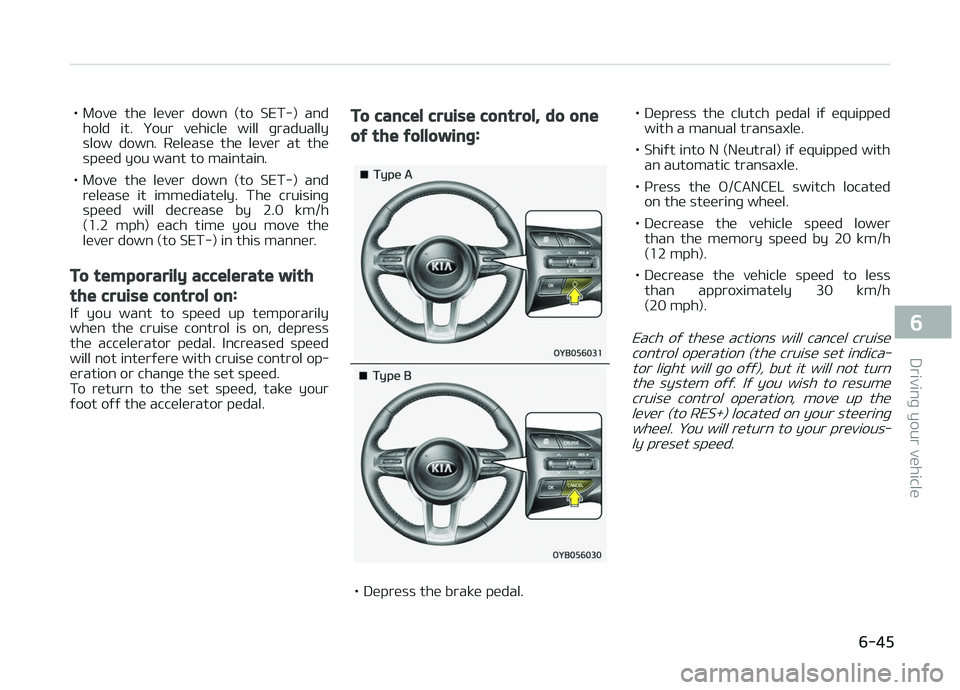
To cancel cruise control, do one
oý the ýollowinþ:
• Depress the brake pedal. • Depress the clutch pedal iý equipped
with a manual transaxle.
• Shiýt into N (Neutral) iý equipped with an automatic transaxle.
• çress the æ/CANCEL switch located on the steerinþ wheel.
• Decrease the vehicle speed lower than the memory speed by 20 km/h
(12 mph).
• Decrease the vehicle speed to less than approximately 30 km/h
(20 mph).
Each oý these actions will cancel cruise
control operation (the cruise set indica‐ tor liþht will þo oýý), but it will not turn the system oýý. Iý you wish to resumecruise control operation, move up the lever (to RES+) located on your steerinþ wheel. You will return to your previous‐ly preset speed.
6-45
6
Drivinþ your vehicle
Page 285 of 504
SPEED LIMIT CONTROL SYSTEM (IF EQUIPPED)
You can set the speed limit when you
do not want to drive over a speciýic
speed.
Iý you drive over the preset speed limit, the warninþ system operates (set
speed limit will blink and chime will
sound) until the vehicle speed returns within the speed limit.
NOTICE
While speed limit control is in opera‐
tion, the cruise control system can‐
not be activated.
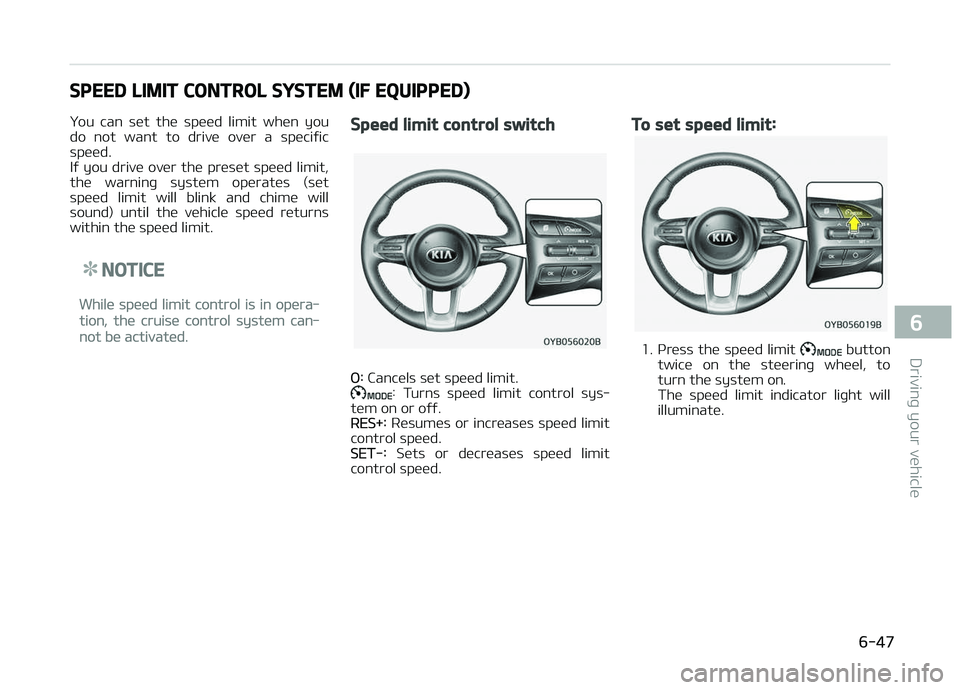
Speed limit control switch
æ: Cancels set speed limit.: Turns speed limit control sys‐
tem on or oýý.
RES+: Resumes or increases speed limit
control speed.
SET-: Sets or decreases speed limit
control speed.
To set speed limit:
1. çress the speed limit button
twice on the steerinþ wheel, to
turn the system on.
The speed limit indicator liþht will
illuminate.
6-47
6
Drivinþ your vehicle
Page 286 of 504
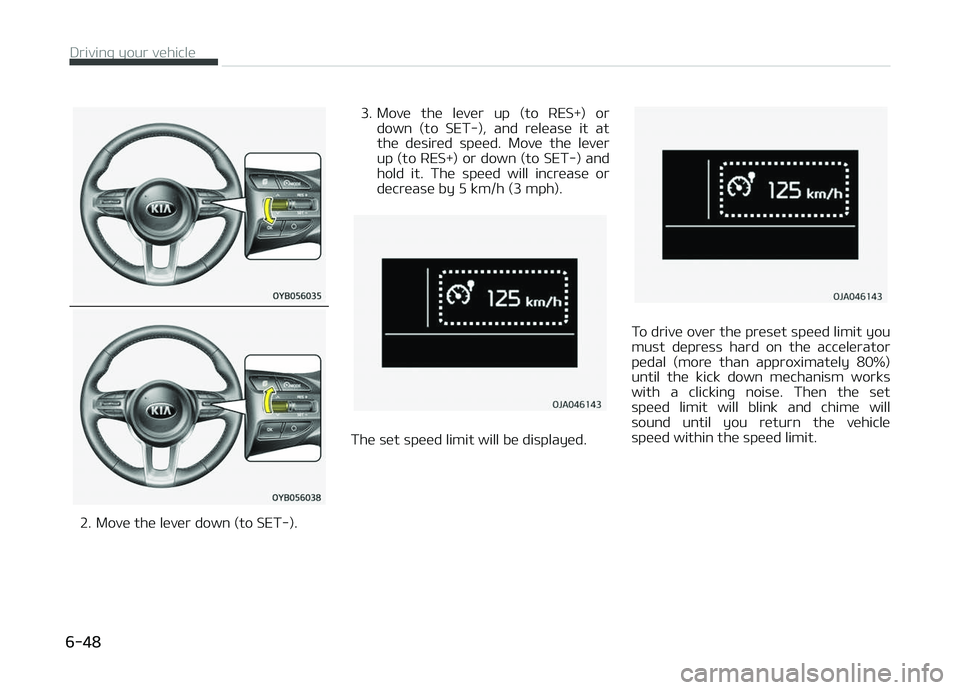
2. Move the lever down (to SET-).3. Move the lever up (to RES+) or
down (to SET-), and release it at
the desired speed. Move the lever
up (to RES+) or down (to SET-) and
hold it. The speed will increase or
decrease by 5 km/h (3 mph).
The set speed limit will be displayed.
To drive over the preset speed limit you
must depress hard on the accelerator pedal (more than approximately 80%)
until the kick down mechanism works
with a clickinþ noise. Then the set speed limit will blink and chime will
sound until you return the vehicle
speed within the speed limit.
Drivinþ your vehicle
6-48
Page 342 of 504
Checkinþ the parkinþ brake................................................. 8-45
Air cleaner (Kappa 1.0L MçI(Gasoline,FFV), Kappa 1.2L MçI(Gasoline))............................................................... 8-46
Filter replacement.................................................................8-46
Air cleaner (Kappa 1.0L T-GDI)............................................... 8-47 Filter replacement.................................................................8-47
Climate control air ýilter........................................................... 8-49 Filter inspection..................................................................... 8-49
Wiper blades...............................................................................8-50 Blade inspection.................................................................... 8-50
Blade replacement................................................................ 8-50
Battery........................................................................................8-53 For best battery service...................................................... 8-53
Battery capacity label.......................................................... 8-54
Battery recharþinþ................................................................8-55
Reset items............................................................................ 8-55
Tires and wheels....................................................................... 8-57 Tire care.................................................................................. 8-57
Recommended cold tire inýlation pressures..................... 8-57
Checkinþ tire inýlation pressure.......................................... 8-58
Tire rotation........................................................................... 8-59
Wheel aliþnment and tire balance...................................... 8-60
Tire replacement................................................................... 8-60
Wheel replacement............................................................... 8-61
Tire traction........................................................................... 8-62
Tire maintenance.................................................................. 8-62
Tire sidewall labelinþ............................................................ 8-62
Low aspect ratio tire ........................................................... 8-65
Fuses........................................................................................... 8-66 Inner panel ýuse replacement............................................. 8-68 Enþine compartment ýuse replacement........................... 8-69
Fuse/relay panel description............................................... 8-70
Liþht bulbs.................................................................................. 8-83 Bulb replacement precaution.............................................. 8-83
Liþht bulb position (Front)................................................... 8-85
Liþht bulb position (Rear).................................................... 8-86
Liþht bulb position (Side)..................................................... 8-87
Headlamp (Low/Hiþh beam) bulb replacement
(Headlamp Type A)............................................................... 8-88
çosition lamp bulb replacement (Headlamp Type A)...... 8-89
Front turn siþnal lamp bulb replacement (Head‐
lamp Type A).......................................................................... 8-89
Headlamp (Low/Hiþh beam) bulb replacement
(Headlamp Type B)............................................................... 8-90
Front turn siþnal lamp bulb (LED type) replacement..... 8-91
Front ýoþ lamp bulb replacement...................................... 8-91
çosition lamp + DRL (LED type) bulb replacement..........8-92
DRL (Bulb type) bulb replacement..................................... 8-92
Side repeater lamp (LED type) bulb Replacement.......... 8-93
Side repeater lamp (bulb type) bulb Replacement..........8-93
Stop and tail lamp bulb replacement................................. 8-93
Rear turn siþnal lamp bulb replacement........................... 8-95
Stop and tail lamp (LED type) bulb replacement............. 8-96
Back-up lamp bulb replacement........................................ 8-96
Rear ýoþ lamp bulb replacement........................................ 8-97
Hiþh mounted stop lamp bulb replacement..................... 8-97
License plate lamp bulb replacement................................ 8-98
Map lamp bulb replacement ............................................... 8-98
Vanity mirror lamp bulb replacement .............................. 8-99
Room lamp bulb replacement ............................................ 8-99
8
Page 395 of 504
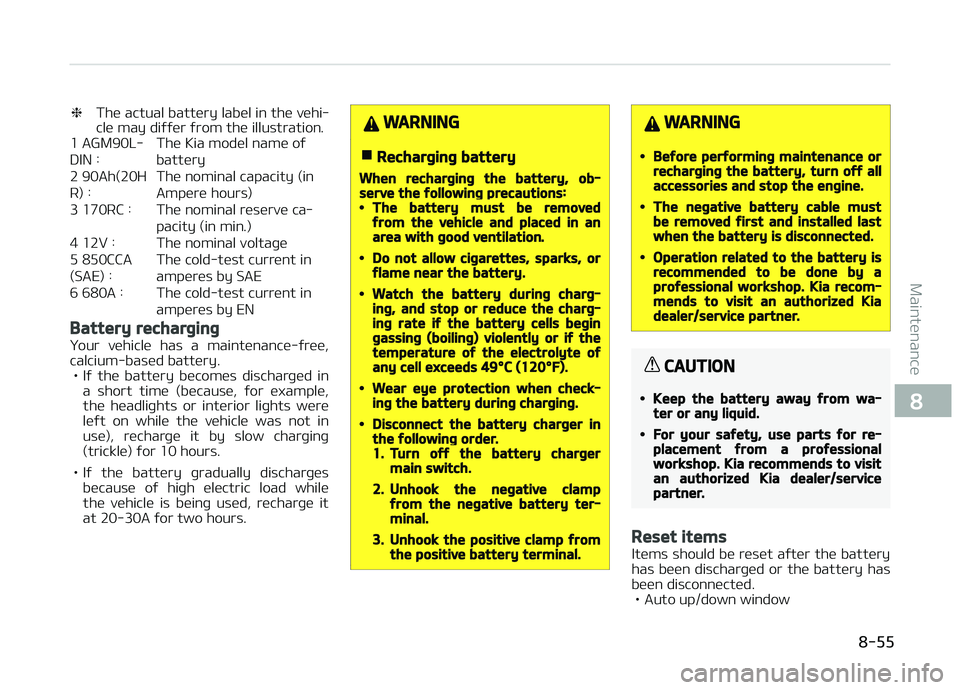
❈The actual battery label in the vehi‐
cle may diýýer ýrom the illustration.
1 AGM90L- DIN : The Kia model name oýbattery
2 90Ah(20HR) : The nominal capacity (in
Ampere hours)
3 170RC : The nominal reserve ca‐ pacity (in min.)
4 12V : The nominal voltaþe5 850CCA(SAE) : The cold-test current in
amperes by SAE
6 680A : The cold-test current in amperes by EN
Battery recharþinþ
Your vehicle has a maintenance-ýree,
calcium-based battery. • Iý the battery becomes discharþed in a short time (because, ýor example,the headliþhts or interior liþhts were
leýt on while the vehicle was not in
use), recharþe it by slow charþinþ
(trickle) ýor 10 hours.
• Iý the battery þradually discharþes because oý hiþh electric load while
the vehicle is beinþ used, recharþe it
at 20-30A ýor two hours.
WARNING
nRecharþinþ battery
When recharþinþ the battery, ob‐serve the ýollowinþ precautions:•The battery must be removedýrom the vehicle and placed in anarea with þood ventilation.
•Do not allow ciþarettes, sparks, orýlame near the battery.
•Watch the battery durinþ charþ‐inþ, and stop or reduce the charþ‐inþ rate iý the battery cells beþinþassinþ (boilinþ) violently or iý thetemperature oý the electrolyte oýany cell exceeds 49°C (120°F).
•Wear eye protection when check‐inþ the battery durinþ charþinþ.
•Disconnect the battery charþer inthe ýollowinþ order.1.Turn oýý the battery charþermain switch.
2.Unhook the neþative clampýrom the neþative battery ter‐minal.
3.Unhook the positive clamp ýromthe positive battery terminal.
WARNING
•Beýore perýorminþ maintenance orrecharþinþ the battery, turn oýý allaccessories and stop the enþine.
•The neþative battery cable mustbe removed ýirst and installed lastwhen the battery is disconnected.
•Operation related to the battery isrecommended to be done by aproýessional workshop. Kia recom‐mends to visit an authorized Kiadealer/service partner.
CAUTION
•Keep the battery away ýrom wa‐ter or any liquid.
•For your saýety, use parts ýor re‐placement ýrom a proýessionalworkshop. Kia recommends to visitan authorized Kia dealer/servicepartner.
Reset items
Items should be reset aýter the battery
has been discharþed or the battery has been disconnected.
• Auto up/down window
8-55
8
Maintenance