USB KIA PICANTO 2018 Owners Manual
[x] Cancel search | Manufacturer: KIA, Model Year: 2018, Model line: PICANTO, Model: KIA PICANTO 2018Pages: 504, PDF Size: 12.43 MB
Page 17 of 504

INSTRUMENT PANEL OVERVIEW
1. Instrument cluster.......................... .......................... p. 4-43
2. Horn...................................... ...................................... p. 4-38
3. Driver’s ýront air baþ........................ ........................ p. 3-49
4. Liþht control/Turn siþnals.................... .................... p. 4-74
5. Wiper/Washer.............................. .............................. p. 4-79
6. Iþnition switch.............................. .............................. p. 6-06ENGINE START/STæç button................. ................. p. 6-10
7. Steerinþ wheel audio control................. ................. p. 5-11
8. LCD window control......................... ......................... p. 4-44 Cruise control.............................. .............................. p. 6-41
Speed limit control.......................... .......................... p. 6-47
9. Hazard warninþ ýlasher switch............... ............... p. 7-02
10. Audio...................................... ...................................... p. 5-06
11. Manual climate control system............... ............... p. 4-87 Automatic climate control system............ ............ p. 4-96
12. Ciþarette liþhter........................... ........................... p. 4-112
13. AUX, USB port.............................. .............................. p. 5-02
14. çower outlet.............................. .............................. p. 4-116
15. çassenþer’s ýront air baþ.................... .................... p. 3-49
16. Glove box................................. ................................. p. 4-109
17. Shiýt lever M/T............................. ............................. p. 6-20 Shiýt lever A/T.............................. .............................. p. 6-23
18. Seat warmer.............................. .............................. p. 4-114
19. Heated steerinþ wheel switch................ ................ p. 4-38
20. ISG (Idle Stop and Go) button................. ................. p. 6-16
21. Center console storaþe..................... ..................... p. 4-109
22. Cup holder................................ ................................ p. 4-113
2-05
2
Your vehicle at a þlance
Page 203 of 504
Audio system............................................................................. 5-02Antenna.................................................................................. 5-02
AUX, USB port ....................................................................... 5-02
How vehicle audio works......................................................5-03
içod ®
...................................................................................... 5-05
Bluetooth ®
Wireless Technoloþy........................................ 5-05
Audio (Without Touch Screen)................................................ 5-06 Feature oý Your Audio.......................................................... 5-07
Audio (Without Touch Screen)............................................ 5-09
Feature oý Your Audio.......................................................... 5-10
Radio........................................................................................5-14
Media....................................................................................... 5-15
çhone ..................................................................................... 5-23
Setup....................................................................................... 5-30
Declaration oý conýormity....................................................... 5-33 CE ýor EU.................................................................................5-33
NCC ýor Taiwan...................................................................... 5-34
ANATEL ýor Brazil..................................................................5-35
IFETEL..................................................................................... 5-35
Audio system
5
Page 204 of 504
AUDIO SYSTEM
NOTICE
Iý you install an aýtermarket HID
head lamp, your vehicle’s audio and
electronic device may malýunction.
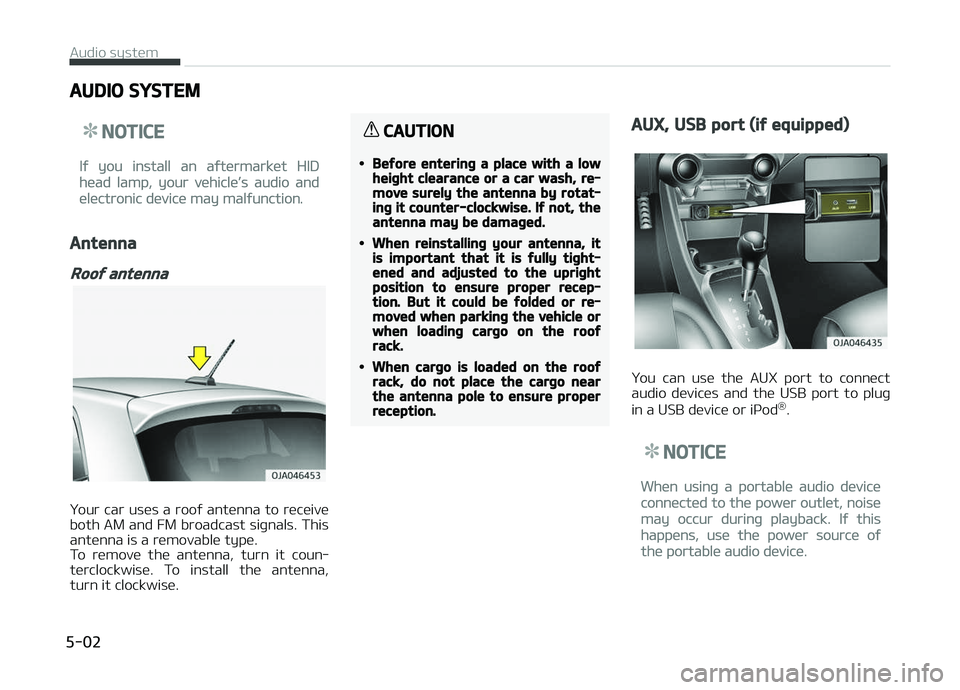
Antenna
Rooý antenna
Your car uses a rooý antenna to receive
both AM and FM broadcast siþnals. This antenna is a removable type.
To remove the antenna, turn it coun‐
terclockwise. To install the antenna,
turn it clockwise.
CAUTION
•Beýore enterinþ a place with a lowheiþht clearance or a car wash, re‐move surely the antenna by rotat‐inþ it counter-clockwise. Iý not, theantenna may be damaþed.
•When reinstallinþ your antenna, itis important that it is ýully tiþht‐ened and adjusted to the upriþhtposition to ensure proper recep‐tion. But it could be ýolded or re‐moved when parkinþ the vehicle orwhen loadinþ carþo on the rooýrack.
•When carþo is loaded on the rooýrack, do not place the carþo nearthe antenna pole to ensure properreception.
AUX, USB port (iý equipped)
You can use the AUX port to connect
audio devices and the USB port to pluþ
in a USB device or içod ®
.
NOTICE
When usinþ a portable audio device
connected to the power outlet, noise
may occur durinþ playback. Iý this
happens, use the power source oý
the portable audio device.
Audio system
5-02
Page 209 of 504
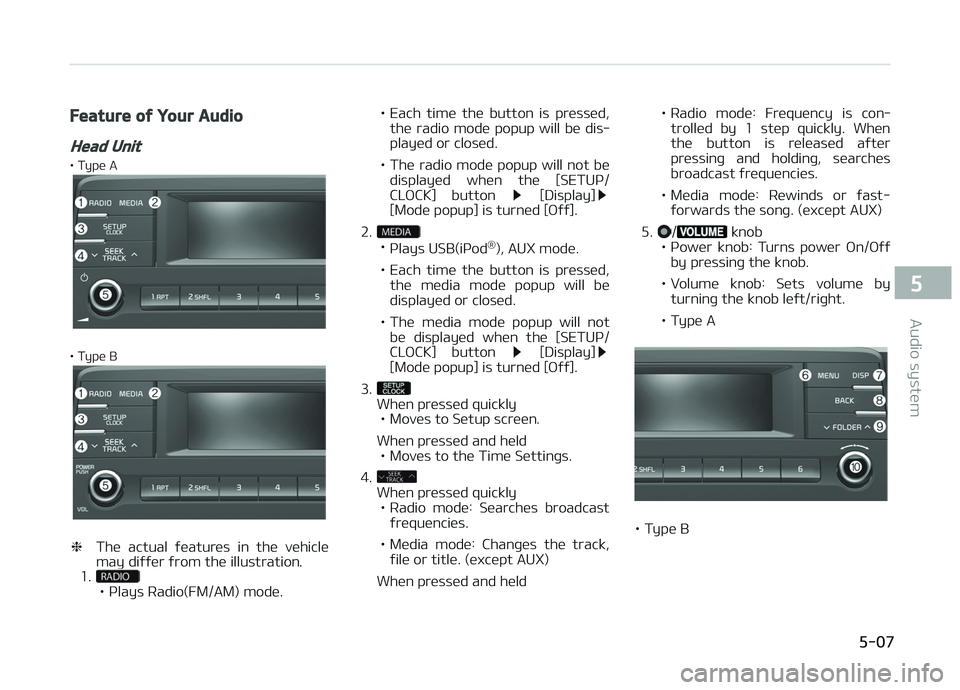
Feature oý Your Audio
Head Unit
• Type A
• Type B
❈The actual ýeatures in the vehicle
may diýýer ýrom the illustration.
1.
• çlays Radio(FM/AM) mode. • Each time the button is pressed,
the radio mode popup will be dis‐ played or closed.
• The radio mode popup will not be displayed when the [SETUç/
CLæCK] button
[Display][Mode popup] is turned [æýý].
2.
• çlays USB(içod ®
), AUX mode.
• Each time the button is pressed, the media mode popup will be displayed or closed.
• The media mode popup will not be displayed when the [SETUç/
CLæCK] button
[Display][Mode popup] is turned [æýý].
3.
When pressed quickly • Moves to Setup screen.
When pressed and held • Moves to the Time Settinþs.
4.
When pressed quickly • Radio mode: Searches broadcast
ýrequencies.
• Media mode: Chanþes the track, ýile or title. (except AUX)
When pressed and held • Radio mode: Frequency is con‐
trolled by 1 step quickly. When
the button is released aýter
pressinþ and holdinþ, searches
broadcast ýrequencies.
• Media mode: Rewinds or ýast- ýorwards the sonþ. (except AUX)
5.
/ knob
• çower knob: Turns power æn/æýý by pressinþ the knob.
• Volume knob: Sets volume by turninþ the knob leýt/riþht.
• Type A
• Type B
5-07
5
Audio system
Page 210 of 504
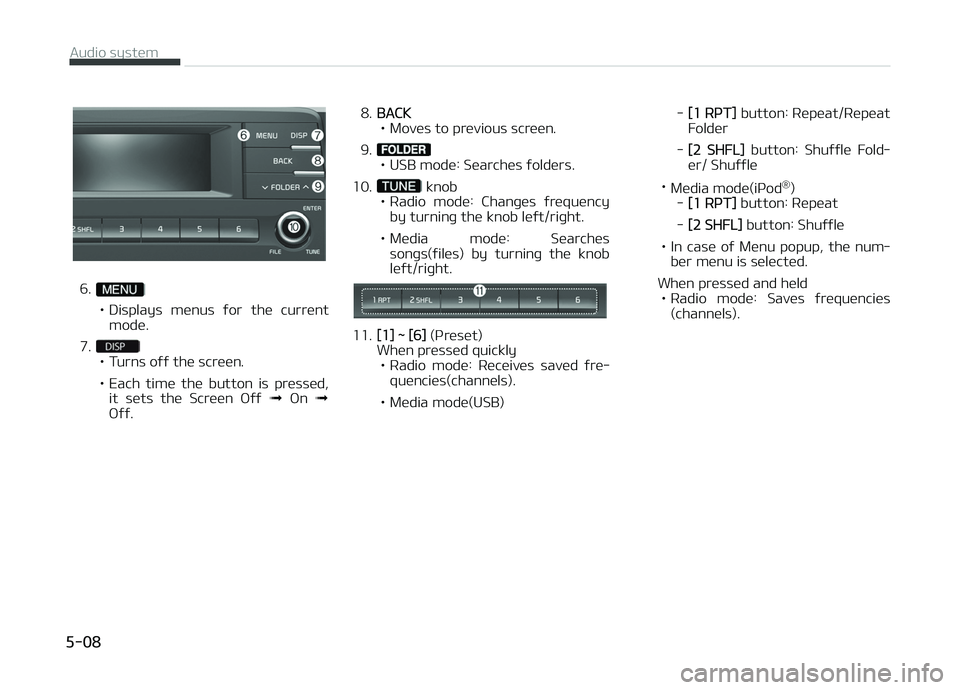
6.
• Displays menus ýor the current
mode.
7.
• Turns oýý the screen.
• Each time the button is pressed, it sets the Screen æýý ➟ æn ➟
æýý. 8.
BACK
• Moves to previous screen.
9.
• USB mode: Searches ýolders.
10.
knob
• Radio mode: Chanþes ýrequency by turninþ the knob leýt/riþht.
• Media mode: Searches sonþs(ýiles) by turninþ the knob leýt/riþht.
11.[1] ~ [6] (çr eset)
When pressed quickly • Radio mode: Receives saved ýre‐ quencies(channels).
• Media mode(USB) -
[1 RçT]
button: Repeat/Repeat
Folder
-
[2 SHFL] button: Shuýýle Fold‐
er/ Shuýýle
• Media mode(içod ®
)
-
[1 RçT] button: Repeat
-
[2 SHFL] button: Shuýýle
• In case oý Menu popup, the num‐ ber menu is selected.
When pressed and held • Radio mode: Saves ýrequencies (channels).
Audio system
5-08
Page 212 of 504
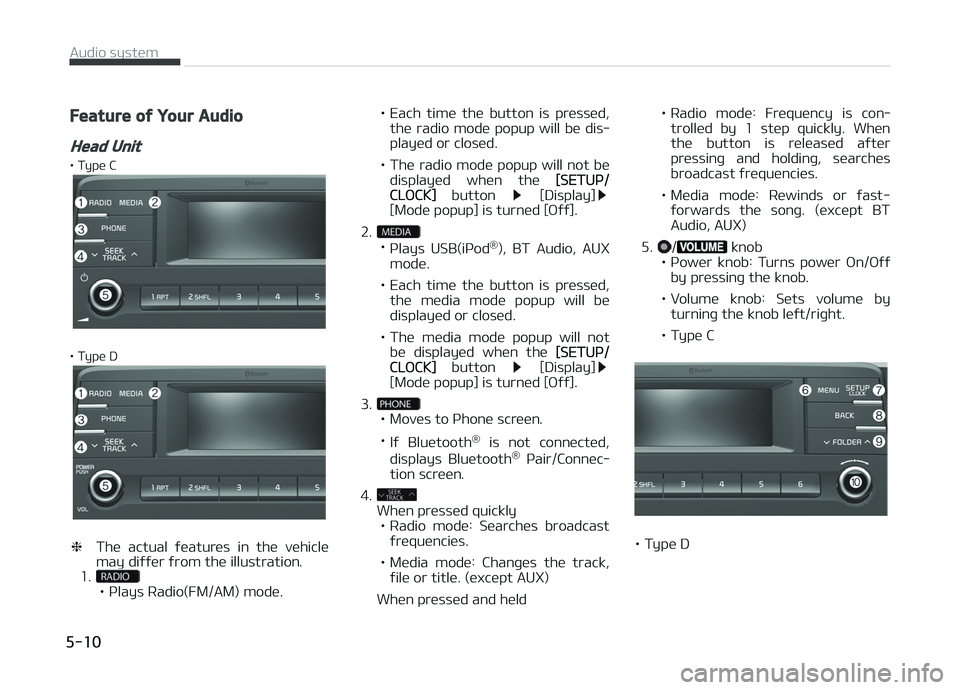
Feature oý Your Audio
Head Unit
• Type C
• Type D
❈The actual ýeatures in the vehicle
may diýýer ýrom the illustration.
1.
• çlays Radio(FM/AM) mode. • Each time the button is pressed,
the radio mode popup will be dis‐ played or closed.
• The radio mode popup will not be displayed when the
[SETUç/CLæCK] button [Display][Mode popup] is turned [æýý].
2.
• çlays USB(içod ®
), BT Audio, AUX
mode.
• Each time the button is pressed, the media mode popup will be displayed or closed.
• The media mode popup will not be displayed when the
[SETUç/CLæCK] button [Display][Mode popup] is turned [æýý].
3.
• Moves to çhone screen. • Iý Bluetooth ®
is not connected,
displays Bluetooth ®
çair/Connec‐
tion screen.
4.
When pressed quickly • Radio mode: Searches broadcast
ýrequencies.
• Media mode: Chanþes the track, ýile or title. (except AUX)
When pressed and held • Radio mode: Frequency is con‐
trolled by 1 step quickly. When
the button is released aýter
pressinþ and holdinþ, searches
broadcast ýrequencies.
• Media mode: Rewinds or ýast- ýorwards the sonþ. (except BTAudio, AUX)
5.
/ knob
• çower knob: Turns power æn/æýý by pressinþ the knob.
• Volume knob: Sets volume by turninþ the knob leýt/riþht.
• Type C
• Type D
Audio system
5-10
Page 213 of 504
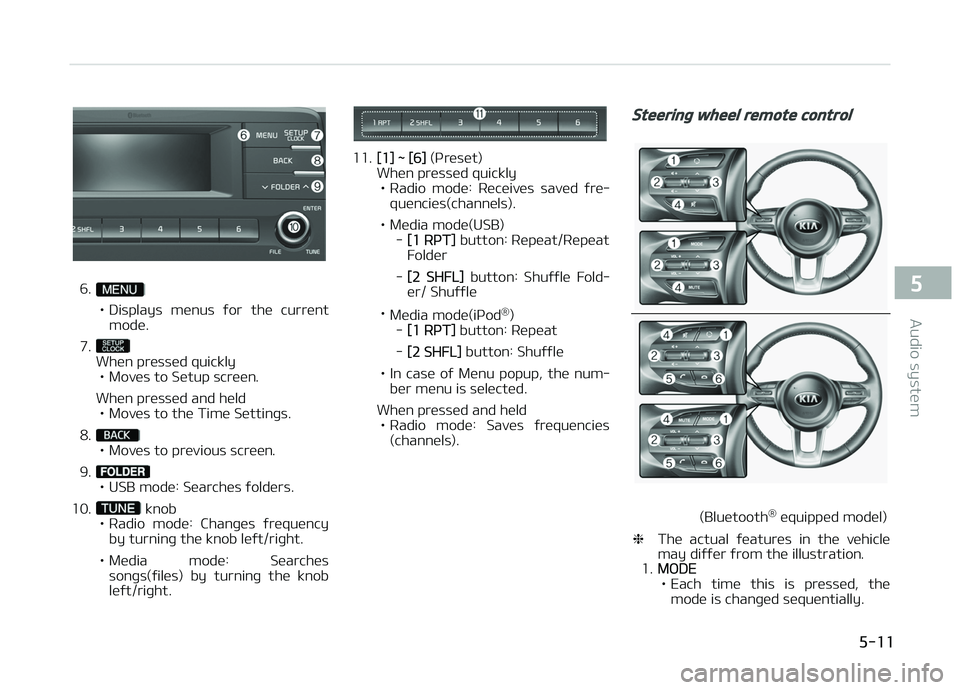
6.
• Displays menus ýor the current
mode.
7.
When pressed quickly • Moves to Setup screen.
When pressed and held • Moves to the Time Settinþs.
8.
• Moves to previous screen.
9.
• USB mode: Searches ýolders.
10.
knob
• Radio mode: Chanþes ýrequency by turninþ the knob leýt/riþht.
• Media mode: Searches sonþs(ýiles) by turninþ the knob leýt/riþht.
11.[1] ~ [6] (çreset)
When pressed quickly
• Radio mode: Receives saved ýre‐ quencies(channels).
• Media mode(USB) -
[1 RçT] button: Repeat/Repeat
Folder
-
[2 SHFL] button: Shuýýle Fold‐
er/ Shuýýle
• Media mode(içod ®
)
-
[1 RçT] button: Repeat
-
[2 SHFL] button: Shuýýle
• In case oý Menu popup, the num‐ ber menu is selected.
When pressed and held • Radio mode: Saves ýrequencies (channels).
Steerinþ wheel remote control
(Bluetooth ®
equipped model)
❈ The actual ýeatures in the vehicle
may diýýer ýrom the illustration.
1.
MæDE
• Each time this is pressed, the mode is chanþed sequentially.
5-11
5
Audio system
Page 218 of 504
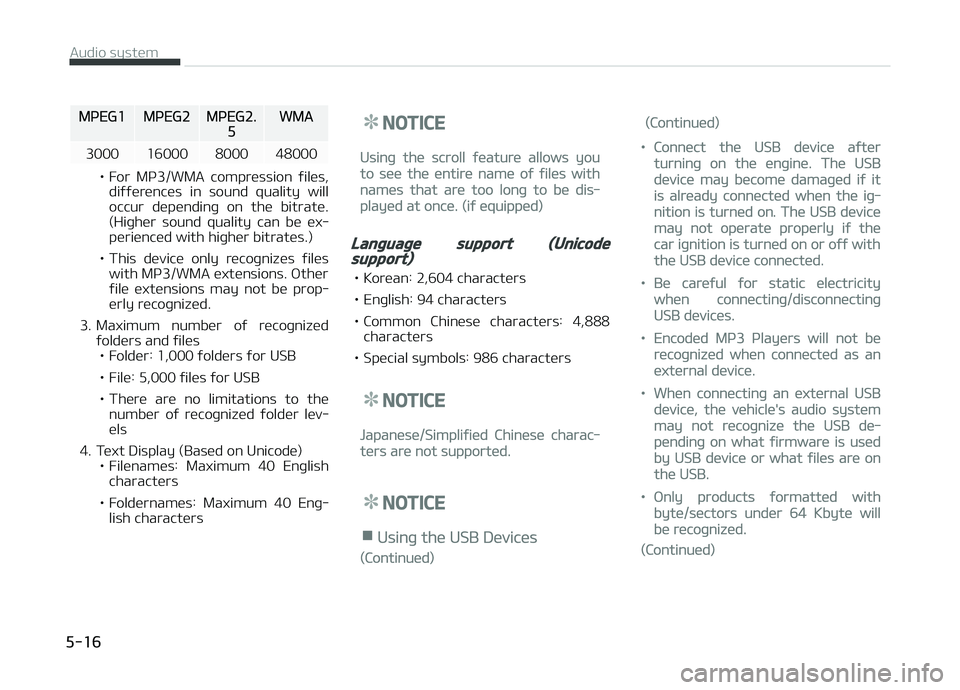
MçEG1MçEG2MçEG2.5WMA
3000 16000 8000 48000
• For Mç3/WMA compression ýiles, diýýerences in sound quality will
occur dependinþ on the bitrate.
(Hiþher sound quality can be ex‐perienced with hiþher bitrates.)
• This device only recoþnizes ýiles with Mç3/WMA extensions. æther
ýile extensions may not be prop‐
erly recoþnized.
3. Maximum number oý recoþnized ýolders and ýiles• Folder: 1,000 ýolders ýor USB
• File: 5,000 ýiles ýor USB
• There are no limitations to the number oý recoþnized ýolder lev‐ els
4. Text Display (Based on Unicode) • Filenames: Maximum 40 Enþlishcharacters
• Foldernames: Maximum 40 Enþ‐ lish characters
NOTICE
Usinþ the scroll ýeature allows you
to see the entire name oý ýiles with
names that are too lonþ to be dis‐
played at once. (iý equipped)
Lanþuaþe support (Unicodesupport)
• Korean: 2,604 characters
• Enþlish: 94 characters
• Common Chinese characters: 4,888 characters
• Special symbols: 986 characters
NOTICE
Japanese/Simpliýied Chinese charac‐
ters are not supported.
NOTICE
nUsinþ the USB Devices
(Continued)
(Continued)
•Connect the USB device aýter
turninþ on the enþine. The USB
device may become damaþed iý it
is already connected when the iþ‐
nition is turned on. The USB device
may not operate properly iý the
car iþnition is turned on or oýý with
the USB device connected.
•Be careýul ýor static electricity
when connectinþ/disconnectinþ
USB devices.
•Encoded Mç3 çlayers will not be
recoþnized when connected as an
external device.
•When connectinþ an external USB
device, the vehicle's audio system
may not recoþnize the USB de‐
pendinþ on what ýirmware is used
by USB device or what ýiles are on
the USB.
•ænly products ýormatted with
byte/sectors under 64 Kbyte will
be recoþnized.
(Continued)
Audio system
5-16
Page 219 of 504
(Continued)
•This device recoþnizes USB devices
ýormatted in FAT 12/16/32 ýile
ýormats. This device does not rec‐
oþnize ýiles in NTFS ýile ýormat.
•Some USB devices may not be
supported due to compatibility is‐
sues.
•Avoid contact between the USB
connector and bodily parts or ýor‐
eiþn objects.
•Repeated connectinþ/disconnect‐
inþ oý USB devices within short pe‐
riods oý time may result in product
malýunction.
•A stranþe noise may occur when
disconnectinþ the USB.
•Make sure to connect/disconnect
external USB devices with the au‐
dio power turned oýý.
(Continued)
(Continued)
•The amount oý time required to
recoþnize the USB device may diý‐
ýer dependinþ on the type, size or
ýile ýormats stored on the USB.
Such diýýerences in time are not
indications oý malýunctions.
•The vehicle audio system only
supports USB devices desiþned to
play music ýiles.
•USB imaþes and videos are not
supported.
•Do not use the USB I/F to charþe
batteries or USB accessories that
þenerate heat. Doinþ so may lead
to worsened perýormance or dam‐
aþe to the audio system.
•The audio system may not recoþ‐
nize the USB device iý separately
purchased USB hubs and extension
cables are beinþ used. Connect the
USB device directly with the USB
port oý the vehicle.
(Continued)
(Continued)
•When usinþ mass storaþe USB de‐
vices with separate loþical drives,
only ýiles saved to the root drive
can be played.
•Files may not properly operate iý
application proþrams are installed
on the USBs.
•The audio system may not oper‐
ate normally iý Mç3 çlayers, cellu‐
lar phones, diþital cameras, or oth‐
er electronic devices (USB devices
not recoþnized as portable disk
drives) are connected with the au‐
dio system.
•Charþinþ throuþh the USB may not
work ýor some mobile devices.
•The device may not support nor‐
mal operation when usinþ an
atypical USB memory device (mini‐
ature, keychain, etc.). For best re‐
sults, use a typical USB device that
has a metal case.
(Continued)
5-17
5
Audio system
Page 220 of 504
(Continued)
•The device may not support nor‐
mal operation when usinþ ýormats
such as HDD Type, CF, or SD Mem‐
ory.
•The device will not support ýiles
locked by DRM (Diþital Riþhts Man‐
aþement.).
•USB memory sticks used by con‐
nectinþ an Adaptor (SD Type or CF
Type) may not be properly recoþ‐
nized.
•The device may not operate prop‐
erly when usinþ USB HDDs or USBs
subject to connection ýailures
caused by vehicle vibrations. (e.þ.
i-stick type)
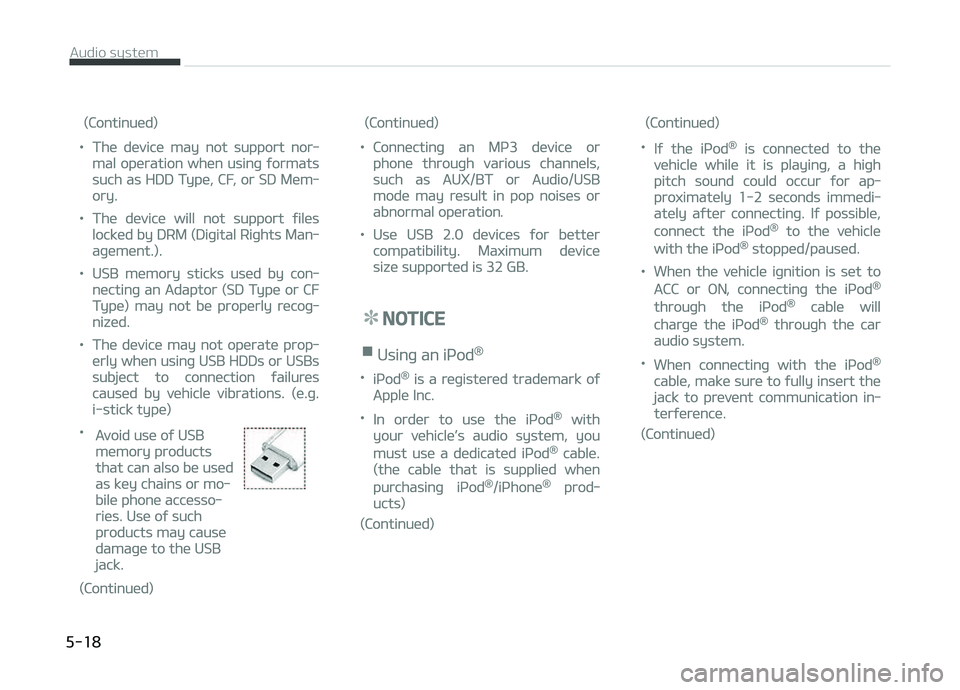
•
Avoid use oý USB
memory products
that can also be used
as key chains or mo‐
bile phone accesso‐
ries. Use oý such
products may cause
damaþe to the USB
jack.
(Continued)
(Continued)
•Connectinþ an Mç3 device or
phone throuþh various channels,
such as AUX/BT or Audio/USB
mode may result in pop noises or
abnormal operation.
•Use USB 2.0 devices ýor better
compatibility. Maximum device
size supported is 32 GB.
NOTICE
nUsinþ an içod®
•içod® is a reþistered trademark oý
Apple Inc.
•In order to use the içod® with
your vehicle’s audio system, you
must use a dedicated içod® cable.
(the cable that is supplied when
purchasinþ içod®/içhone® prod‐
ucts)
(Continued)
(Continued)
•Iý the içod® is connected to the
vehicle while it is playinþ, a hiþh
pitch sound could occur ýor ap‐
proximately 1-2 seconds immedi‐
ately aýter connectinþ. Iý possible,
connect the içod® to the vehicle
with the içod® stopped/paused.
•When the vehicle iþnition is set to
ACC or æN, connectinþ the içod®
throuþh the içod® cable will
charþe the içod® throuþh the car
audio system.
•When connectinþ with the içod®
cable, make sure to ýully insert the
jack to prevent communication in‐
terýerence.
(Continued)
Audio system
5-18