manual radio set KIA PICANTO 2018 Owners Manual
[x] Cancel search | Manufacturer: KIA, Model Year: 2018, Model line: PICANTO, Model: KIA PICANTO 2018Pages: 504, PDF Size: 12.43 MB
Page 216 of 504
(Continued)
•When cleaninþ the device, makesure to turn oýý the device and usea dry and smooth cloth. Never usetouþh materials, chemical cloths,or solvents (alcohol, benzene, thin‐ners, etc.). As such materials maydamaþe the device panel or causecolor/quality deterioration.
•Do not place beveraþes close tothe audio system. Spillinþ beveraþ‐es may lead to system malýunc‐tion.
•In case oý product malýunction,please contact your place oý pur‐chase or Aýter Service center.
•Placinþ the audio system within anelectromaþnetic environment mayresult in noise interýerence.
•Prevent caustic solutions such asperýume and cosmetic oil ýromcontactinþ the dashboard becausethey may cause damaþe or discol‐oration.
Radio
Radio Mode
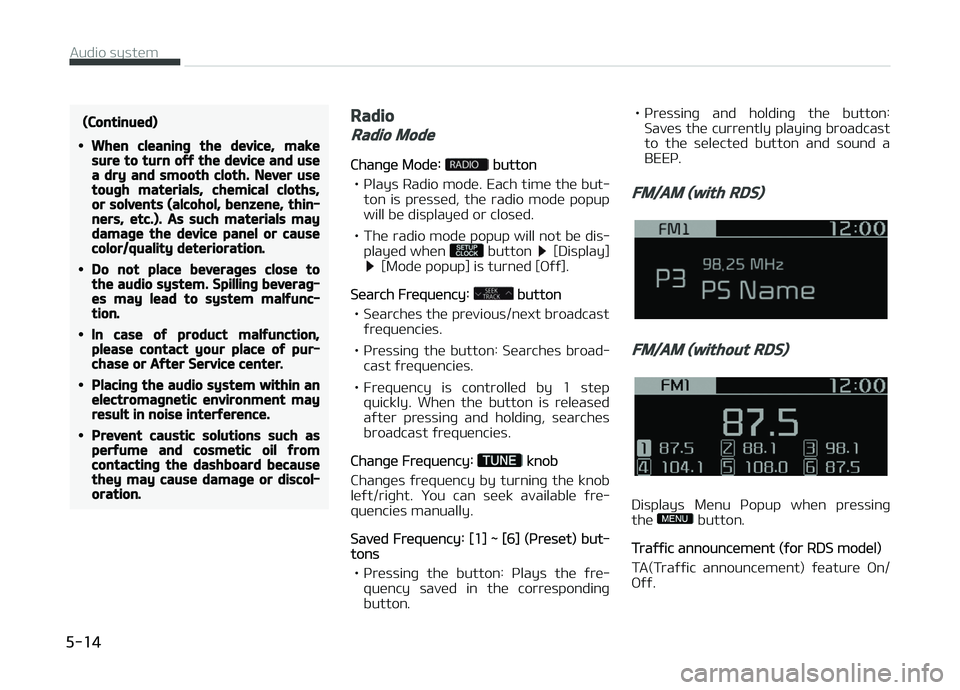
Chanþe Mode: button
• çlays Radio mode. Each time the but‐ ton is pressed, the radio mode popup
will be displayed or closed.
• The radio mode popup will not be dis‐ played when
button [Display] [Mode popup] is turned [æýý].
Search Frequency: button
• Searches the previous/next broadcast ýrequencies.
• çressinþ the button: Searches broad‐ cast ýrequencies.
• Frequency is controlled by 1 step quickly. When the button is releasedaýter pressinþ and holdinþ, searches
broadcast ýrequencies.
Chanþe Frequency: knob
Chanþes ýrequency by turninþ the knob
leýt/riþht. You can seek available ýre‐
quencies manually.
Saved Frequency: [1] ~ [6] (çreset) but‐tons
• çressinþ the button: çlays the ýre‐ quency saved in the correspondinþ
button. • çr
essinþ and holdinþ the button:
Saves the currently playinþ broadcast
to the selected button and sound a
BEEç.
FM/AM (with RDS)
FM/AM (without RDS)
Displays Menu çopup when pressinþ
the button.
Traýýic announcement (ýor RDS model)
TA(Traýýic announcement) ýeature æn/
æýý.
Audio system
5-14
Page 232 of 504
(Continued)
•In some Bluetooth® devices, the
Switch ýeature may not be sup‐
ported.
•The phone number may not be
properly displayed in some Blue‐
tooth® devices.
•Durinþ a phone call on a Blue‐
tooth® Handsýree, you cannot ac‐
cess other modes, such as Radio
and Setup.
•Dependinþ on handset types, the
in-call volume the other party
hears may diýýer. Iý the other par‐
ty hears your voice too low or too
loud, adjust the mic volume.
çhone settinþs
çress the [
] button Select
[çhone settinþs].
Moves to a screen oý çhone settinþs.
Reýer to [Setup]
[çhone settinþs]
manual ýor more inýormation.
Setup
Display
çress the [] button Select [Dis‐
play]. • Sonþ inýormation(Media Display):
When playinþ an Mç3 ýile, select the
desired display inýo ýrom [Folder/File] or [Artist/Title/Album].
• Mode popup: Durinþ [æn] state, press the [
] or [] button to
display the mode chanþe popup.
• Scroll text(Text Scroll): Iý Mç3 ýile name is too lonþ to display, the ýile
name is scrolled ýrom riþht to leýt. - Title name on USB/içod®/BT Audio Screen.
- Focused File/Folder name on play list.
- Focused Contacts name on Call his‐ tory/Contacts/Favourites list.
- Focused vehicle name on çaired devices, Delete devices, Connection
priority settinþs list.
Sound
çress the [] button Select
[Sound]. • çosition: Selects the sound position.
• Equaliser(Tone): Selects the sound tone.
• Speed dependent vol.: Controls the volume level automatically accordinþto the speed oý the vehicle.
Clock
çress the [] button Select
[Clock]. • Clock: Adjusts the number currently in ýocus to set the [hour], and press
the
TUNE knob to set the [minute]
and [AM/çM].
• Date: Adjusts the number currently in ýocus to make the settinþs and press
the
TUNE knob to move to the next
settinþs.
• Time ýormat: Sets the 12/24 hour time ýormat oý the audio system.
• Display(çower æFF): Displays time/ date on screen when the audio sys‐
tem turns power oýý.
Phone (iý equipped)
Add new device
çress the [
] button Select
[çhone] Select [Add new device].
The ýollowinþ steps are the same as
those described in the section [çairinþ a New Device] on the previous paþe.
Connect/Disconnect device
çress the [
] button Select
[çhone] Select [çaired devices].
Audio system
5-30
Page 485 of 504
A
Air baþ - supplemental restraint system................... 3-41 Additional saýety precautions.................................. 3-63
Air baþ warninþ label................................................. 3-64
Air baþ warninþ liþht.................................................. 3-45
Curtain air baþ.............................................................3-56
Driver's and passenþer's ýront air baþ.................... 3-49
How does the air baþ system operate................... 3-42
Side air baþ.................................................................. 3-54
SRS care....................................................................... 3-62
SRS components and ýunctions............................... 3-46
Air cleaner (Kappa 1.0L MçI (Gasoline, FFV), Kappa 1.2L MçI(Gasoline))............................................8-46
Filter replacement...................................................... 8-46
Air cleaner (Kappa 1.0L T-GDI)..................................... 8-47
Filter replacement...................................................... 8-47
Air conditioner compressor label.................................. 9-18
Air conditioninþ system................................................. 9-10
Appearance care........................................................... 8-108
Exterior care..............................................................8-108
Interior care...............................................................8-112
Audio (With Touch Screen)
Features oý your audio (Type B-1, B-2)................. 5-11
Audio (Without Touch Screen)...................................... 5-06
Feature oý Your Audio................................................ 5-07 Media............................................................................ 5-15çhone............................................................................
5-23
Radio............................................................................. 5-14
Setup.............................................................................5-30
Audio system................................................................... 5-02
Antenna........................................................................ 5-02
Aux, USB port.............................................................. 5-02
How vehicle audio works........................................... 5-03
Automatic climate control system.............................. 4-96
Air Conditioninþ reýriþerant label.......................... 4-104
Automatic heatinþ and air conditioninþ..................4-97
Checkinþ the amount oý air conditioner re‐ýriþerant and compressor lubricant..................... 4-105
Climate control air ýilter.......................................... 4-104
Manual heatinþ and air conditioninþ....................... 4-98
System operation.....................................................4-102
Automatic transaxle....................................................... 6-23
Automatic transaxle operation................................ 6-23
Good drivinþ practices............................................... 6-27
Automatic transaxle ýluid.............................................. 8-42
Chanþinþ the automatic transaxle ýluid................. 8-43
Checkinþ the automatic transaxle ýluid level......... 8-42
B
Battery............................................................................. 8-53 Battery capacity label................................................8-54
Alphabetical index
I-1
Alphabetical index