key KIA QUORIS 2013 Owner's Manual
[x] Cancel search | Manufacturer: KIA, Model Year: 2013, Model line: QUORIS, Model: KIA QUORIS 2013Pages: 485, PDF Size: 31.55 MB
Page 100 of 485
421
Features of your vehicle
✽✽NOTICE
In cold and wet climates, door lock
and door mechanisms may not work
properly due to freezing conditions.Closing the trunk
To close, lower the trunk lid, then
press down on it until it locks. To be
sure the trunk lid is securely fas-
tened, always check by trying to pullit up again.
✽✽ NOTICE
If the trunk is closed with the smart
key in it, the chime will sound for
approximately 3 seconds and the
trunk can be opened.
CAUTION
Make certain that you close the trunk before driving your vehi-cle. Possible damage may occur to the trunk lift cylinders andattached hardware if the trunk isnot closed prior to driving.
WARNING
The trunk swings upward. Make sure no objects or people are
near the rear of the vehiclewhen opening the trunk.
WARNING
The trunk lid should be always
kept completely closed while
the vehicle is in motion. If it is
left open or ajar, poisonous
exhaust gases may enter thecar and serious illness or death
may result.
Page 101 of 485
Features of your vehicle
22
4
WARNING
Never leave children or animals
unattended in your vehicle.Children or animals might oper-
ate the power trunk that could
result in injury to themselves or
others, or damage to the vehicle.
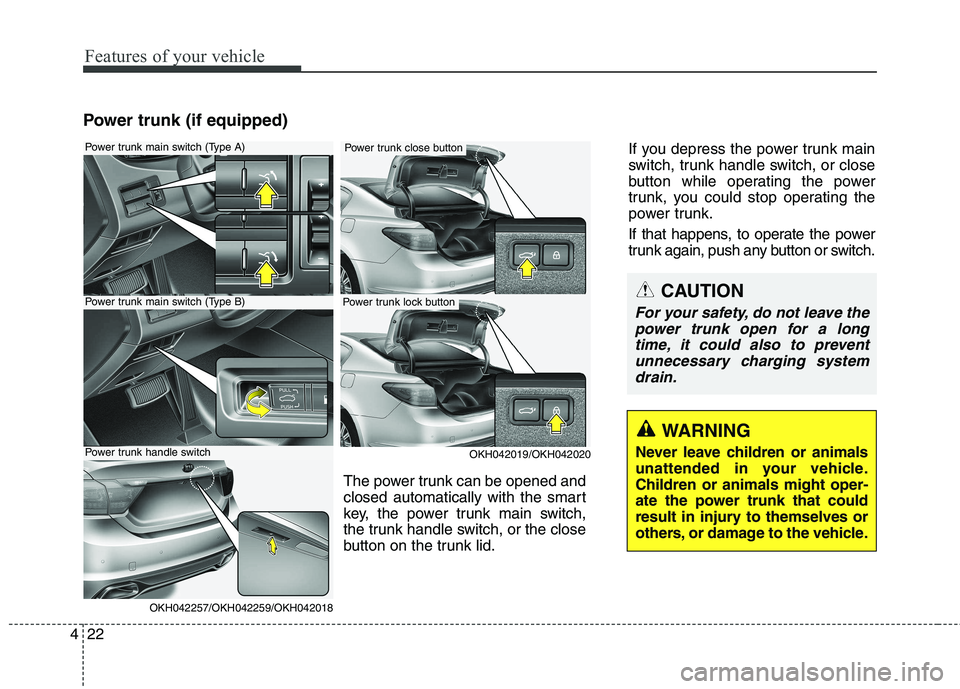
Power trunk (if equipped)
OKH042019/OKH042020
Power trunk main switch (Type A)
Power trunk main switch (Type B)
OKH042257/OKH042259/OKH042018
Power trunk handle switch
Power trunk lock button
Power trunk close button If you depress the power trunk main
switch, trunk handle switch, or close
button while operating the power
trunk, you could stop operating the
power trunk.
If that happens, to operate the power
trunk again, push any button or switch.
The power trunk can be opened and
closed automatically with the smart
key, the power trunk main switch,
the trunk handle switch, or the close
button on the trunk lid.
CAUTION
For your safety, do not leave the power trunk open for a longtime, it could also to preventunnecessary charging system drain.
Page 102 of 485
423
Features of your vehicle
✽✽NOTICE
In cold and wet climates, the power
trunk may not work properly due to
freezing conditions.Opening the trunk
The power trunk will open automati-
cally by doing one of the following:
Press the trunk open button on the smart key more than 1 second. The
chime will sound twice.
Press the open button of the power trunk main switch (Type A). The
chime will sound twice.
Pull the power trunk main switch (Type B). The chime will sound twice.
Press the trunk handle switch car- rying the smart key with you. If all
doors have unlocked, you can
open the trunk by pressing the
trunk handle switch without the
smart key.
WARNING
Make sure there are no people
or objects around the trunk
before operating the power
trunk. Wait until the trunk is
open fully and stopped before
loading or unloading cargo or
passengers from the vehicle.
WARNING
Make sure the trunk is closed
firmly before driving. If the trunk
is open, you will draw danger-
ous exhaust fumes into your
vehicle which can cause seri-
ous injury or death to vehicleoccupants.
CAUTION
Do not close or open the power trunk manually. This may cause damage to the power trunk. If itis necessary to close or openthe power trunk manually when the battery is discharged or dis-connected, do not apply exces-sive force.
Page 103 of 485
Features of your vehicle
24
4
Closing the trunk
To close the power trunk, do one of
the following:
Press the close button of the power
trunk main switch until the power
trunk is closed securely (Type A).
The chime will sound twice.
Press the power trunk main switch until the power trunk is closed
securely (Type B). The chime will
sound twice.
Press the power trunk close button.
Press the power trunk lock button when all doors and engine hood
are closed with the smart key in
your possession. After closing, all
doors and trunk lock automatically.
✽✽ NOTICE
The chime sound will operate if you
press the power trunk lock button
when:
- Any door is open.
- The engine start/stop button is not in the OFF position.
- The smart key is in the vehicle.
Power trunk non-opening condi-
tions
The power trunk will not open or
close automatically, when the vehicle
is moving more than 3 km/h (2 mph).
✽✽ NOTICE
If there are obstacles such as snow
on the power trunk, it may not open
automatically. After remove the
obstacle, try to open it again. ✽
✽
NOTICE
The power trunk can be operated when the engine is not running.
However the power trunk opera-
tion consumes large amounts of
vehicle electric power. To prevent
the battery from being discharged,
do not operate it excessively e.g.:
more than approximately 10 times
repeatedly.
To prevent the battery from being discharged, do not leave the power
trunk in the open position for a
long lime.
Do not apply excessive force while operating the power trunk. This
could cause damage to the power
trunk.
Do not modify or repair any part of the power trunk by yourself. We
recommend that the system be
serviced by an authorized Kia
dealer.
When jacking up the vehicle to change a tire or repair the vehicle,
do not operate the power trunk.
This could cause the power trunk
to operate improperly.
CAUTION
The chime will sound 10 times if
you drive over 3km/h(2mph)with the trunk opened. Stop your vehicle immediately at asafe place and check if yourtrunk is opened.
Page 105 of 485
Features of your vehicle
26
4
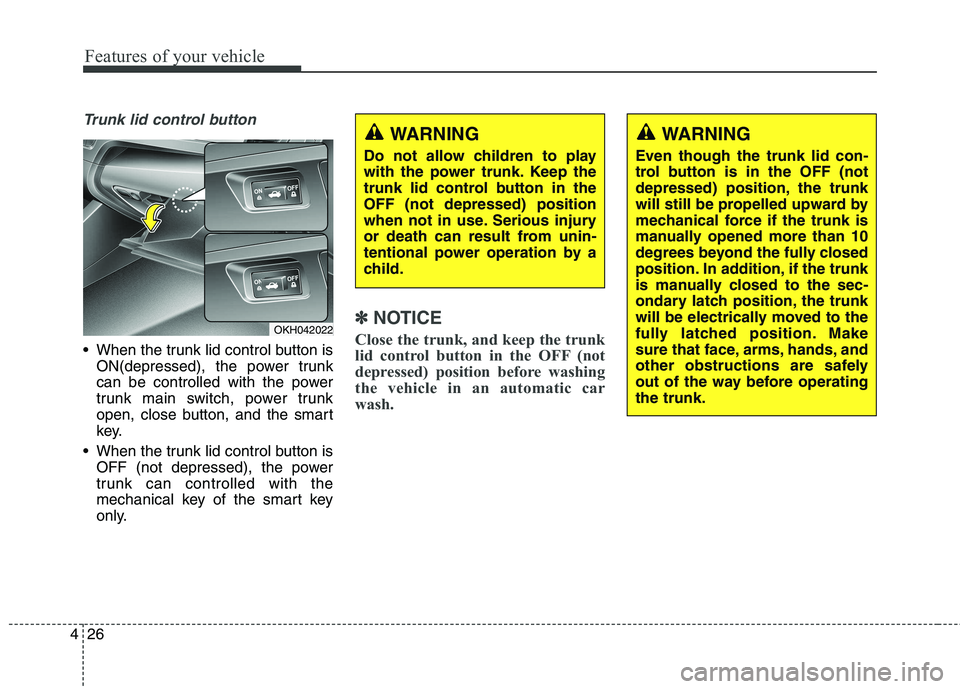
Trunk lid control button
When the trunk lid control button is
ON(depressed), the power trunk
can be controlled with the power
trunk main switch, power trunk
open, close button, and the smart
key.
When the trunk lid control button is OFF (not depressed), the power
trunk can controlled with the
mechanical key of the smart key
only.
✽✽ NOTICE
Close the trunk, and keep the trunk
lid control button in the OFF (not
depressed) position before washing
the vehicle in an automatic car
wash.OKH042022
WARNING
Do not allow children to play
with the power trunk. Keep the
trunk lid control button in theOFF (not depressed) position
when not in use. Serious injury
or death can result from unin-
tentional power operation by a
child.WARNING
Even though the trunk lid con-
trol button is in the OFF (not
depressed) position, the trunk
will still be propelled upward by
mechanical force if the trunk is
manually opened more than 10
degrees beyond the fully closed
position. In addition, if the trunk
is manually closed to the sec-
ondary latch position, the trunk
will be electrically moved to the
fully latched position. Make
sure that face, arms, hands, and
other obstructions are safely
out of the way before operatingthe trunk.
Page 110 of 485
431
Features of your vehicle
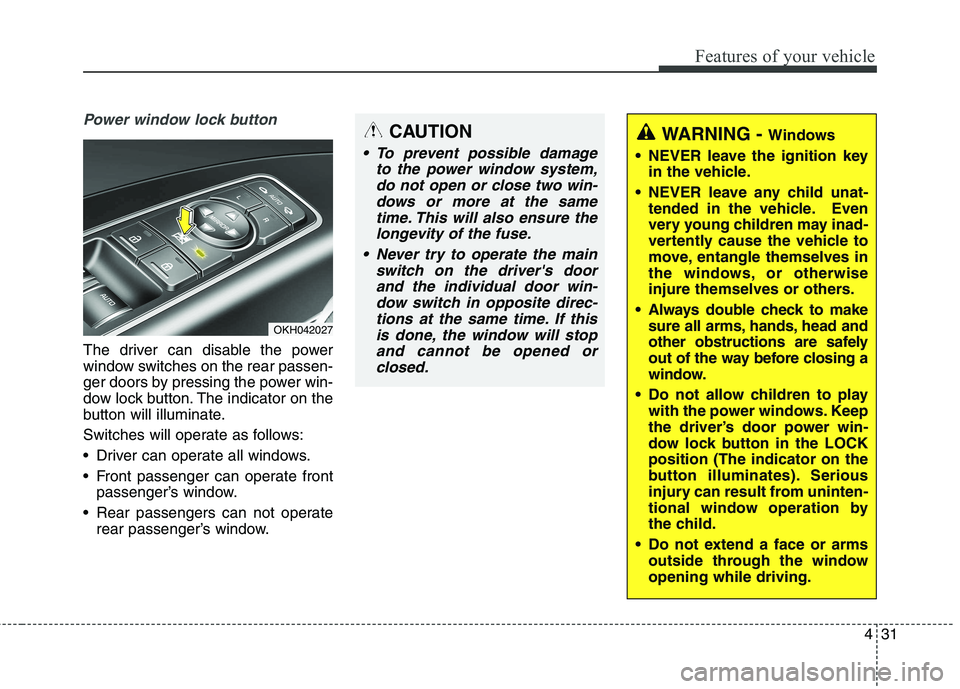
Power window lock button
The driver can disable the power
window switches on the rear passen-
ger doors by pressing the power win-
dow lock button. The indicator on the
button will illuminate.
Switches will operate as follows:
Driver can operate all windows.
Front passenger can operate frontpassenger’s window.
Rear passengers can not operate rear passenger’s window.
OKH042027
CAUTION
To prevent possible damage
to the power window system,do not open or close two win-dows or more at the sametime. This will also ensure the longevity of the fuse.
Never try to operate the main switch on the driver's doorand the individual door win-dow switch in opposite direc- tions at the same time. If thisis done, the window will stopand cannot be opened orclosed.
WARNING - Windows
NEVER leave the ignition key in the vehicle.
NEVER leave any child unat- tended in the vehicle. Even
very young children may inad-
vertently cause the vehicle to
move, entangle themselves in
the windows, or otherwise
injure themselves or others.
Always double check to make sure all arms, hands, head and
other obstructions are safely
out of the way before closing a
window.
Do not allow children to play with the power windows. Keep
the driver’s door power win-
dow lock button in the LOCKposition (The indicator on the
button illuminates). Serious
injury can result from uninten-
tional window operation by
the child.
Do not extend a face or arms outside through the windowopening while driving.
Page 127 of 485
Features of your vehicle
48
4
Center (AUTO) :
The mirror will fold or unfold auto-
matically as follows:
- The mirror will fold or unfold when the door is locked or unlocked by
the smart key.
- The mirror will fold or unfold when the door is locked or unlocked by
the button on the outside door han-
dle.
- The mirror will unfold when you approach the vehicle (all doors
closed and locked) with a smart
key in possession.
CAUTION
In case it is an electric type out-
side rearview mirror, don’t fold itby hand. It could cause motor failure.
CAUTION
The electric type outsiderearview mirror operates eventhough the ignition switch is in the OFF position. However, toprevent unnecessary batterydischarge, do not adjust themirrors longer than necessary while the engine is not running.
Page 147 of 485
Features of your vehicle
68
4
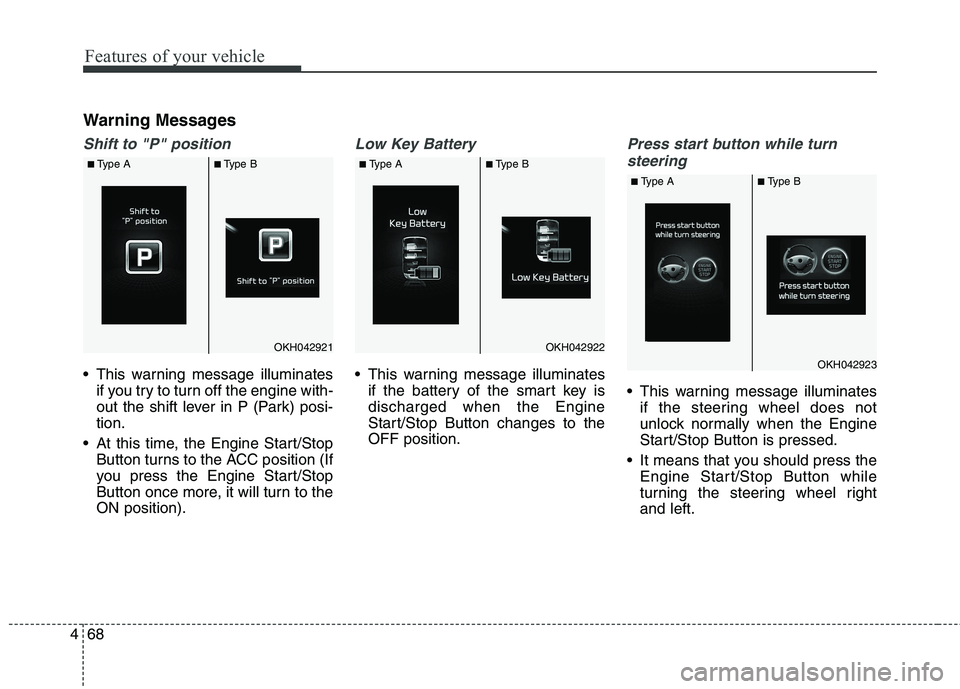
Warning Messages
Shift to "P" position
This warning message illuminates
if you try to turn off the engine with-
out the shift lever in P (Park) posi-tion.
At this time, the Engine Start/Stop Button turns to the ACC position (If
you press the Engine Start/Stop
Button once more, it will turn to theON position).
Low Key Battery
This warning message illuminatesif the battery of the smart key is discharged when the Engine
Start/Stop Button changes to theOFF position.
Press start button while turn
steering
This warning message illuminates if the steering wheel does not
unlock normally when the Engine
Start/Stop Button is pressed.
It means that you should press the Engine Start/Stop Button while
turning the steering wheel rightand left.
OKH042921OKH042922
OKH042923
■Type A ■Type B ■Type A ■Type B
■Type A ■Type B
Page 149 of 485
Features of your vehicle
70
4
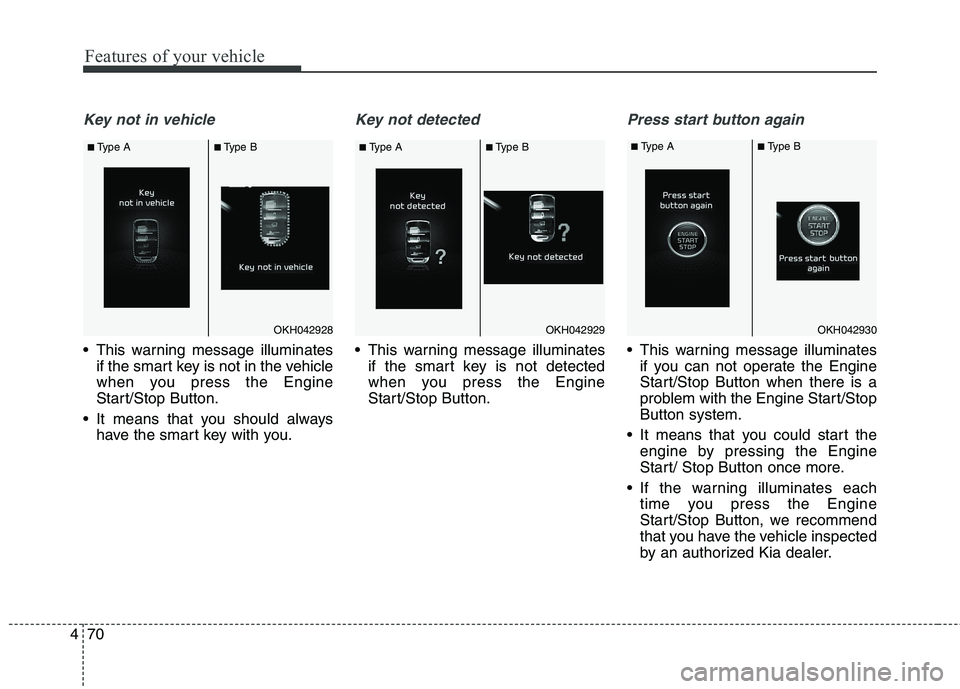
Key not in vehicle
This warning message illuminates
if the smart key is not in the vehicle
when you press the Engine
Start/Stop Button.
It means that you should always have the smart key with you.
Key not detected
This warning message illuminatesif the smart key is not detected
when you press the Engine
Start/Stop Button.
Press start button again
This warning message illuminatesif you can not operate the Engine
Start/Stop Button when there is a
problem with the Engine Start/StopButton system.
It means that you could start the engine by pressing the Engine
Start/ Stop Button once more.
If the warning illuminates each time you press the Engine
Start/Stop Button, we recommend
that you have the vehicle inspected
by an authorized Kia dealer.
OKH042928OKH042929OKH042930
■Type A ■Type B ■Type A ■Type B ■
Type A ■Type B
Page 150 of 485
471
Features of your vehicle
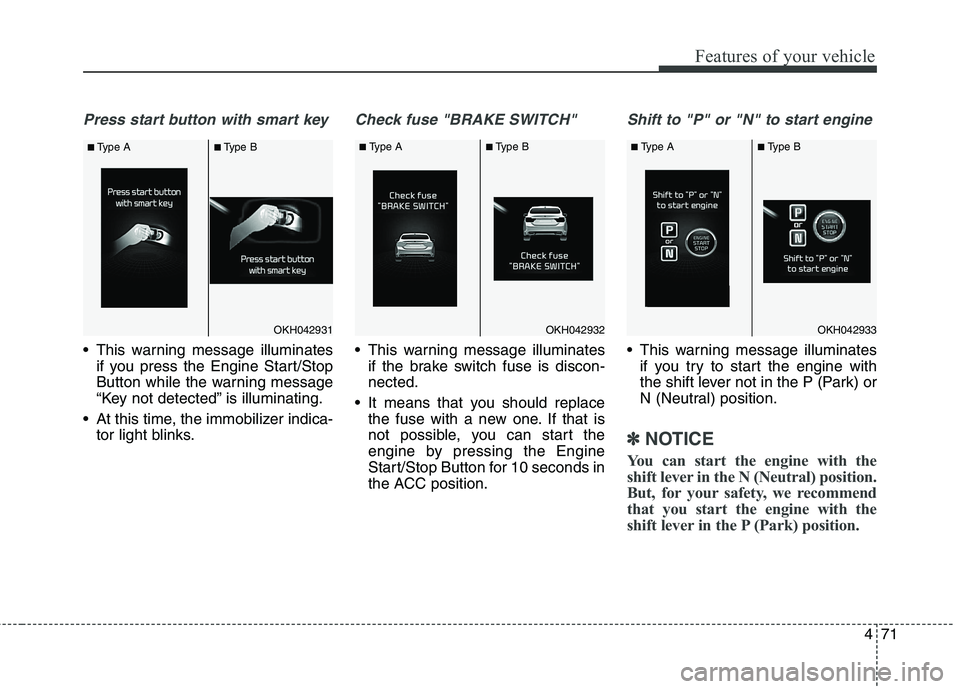
Press start button with smart key
This warning message illuminatesif you press the Engine Start/Stop
Button while the warning message
“Key not detected” is illuminating.
At this time, the immobilizer indica- tor light blinks.
Check fuse "BRAKE SWITCH"
This warning message illuminatesif the brake switch fuse is discon- nected.
It means that you should replace the fuse with a new one. If that is
not possible, you can start the
engine by pressing the Engine
Start/Stop Button for 10 seconds in
the ACC position.
Shift to "P" or "N" to start engine
This warning message illuminatesif you try to start the engine with
the shift lever not in the P (Park) or
N (Neutral) position.
✽✽ NOTICE
You can start the engine with the
shift lever in the N (Neutral) position.
But, for your safety, we recommend
that you start the engine with the
shift lever in the P (Park) position.
OKH042931OKH042932OKH042933
■ Type A ■Type B ■
Type A ■Type B ■Type A ■Type B