wheel KIA QUORIS 2013 Owner's Manual
[x] Cancel search | Manufacturer: KIA, Model Year: 2013, Model line: QUORIS, Model: KIA QUORIS 2013Pages: 485, PDF Size: 31.55 MB
Page 143 of 485
Features of your vehicle
64
4
Seat Easy Access
On:
The driver’s seat will automatically
move forward or rearward for the
driver to enter or exit the vehicle
comfortably.
Off: The seat easy access function will
be deactivated.
For more details, refer to “Seat” inchapter 3.
Steering Easy Access
On: The steering wheel will automati-
cally move forward or rearward for
the driver to enter or exit the vehi-
cle comfortably.
Off: The steering easy access function
will be deactivated.
For more details, refer to “Steering
Wheel” in this chapter. Head Lamp Delay (Headlight Escort)
On:
The headlight escort escort func-
tion will be activated.
Off:
The headlight escort function will
be deactivated.
For more details, refer to “Lighting” in
this chapter.
Welcome Light
On: The welcome light function will be
activated.
Off: The welcome light function will be
deactivated.
For more details, refer to “Welcome
System” in this chapter. One Touch Turn Lamp
Off:
The one touch turn lamp function
will be deactivated.
3, 5, 7 Flashing : The lane change signals will blink
3, 5, or 7 times when the turn sig-
nal lever is moved slight.
For more details, refer to “Lighting” in
this chapter.
Travel Mode (Traffic Change)
(if equipped)
On: The traffic change function will be
activated.
Off: The traffic change function will be
deactivated.
For more details, refer to “Lighting” in
this chapter.
Page 147 of 485
Features of your vehicle
68
4
Warning Messages
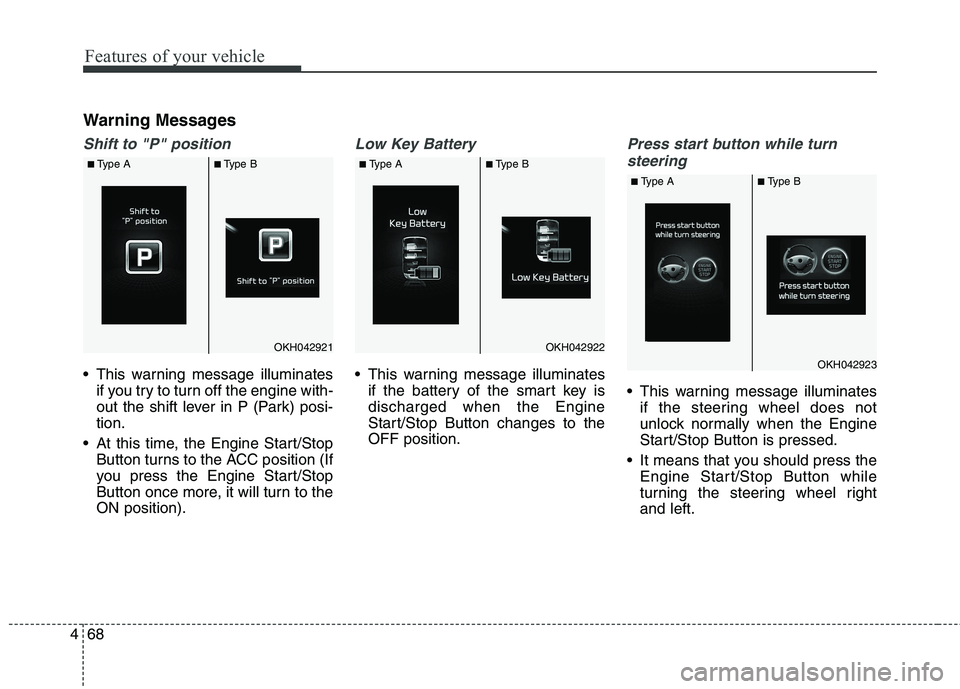
Shift to "P" position
This warning message illuminates
if you try to turn off the engine with-
out the shift lever in P (Park) posi-tion.
At this time, the Engine Start/Stop Button turns to the ACC position (If
you press the Engine Start/Stop
Button once more, it will turn to theON position).
Low Key Battery
This warning message illuminatesif the battery of the smart key is discharged when the Engine
Start/Stop Button changes to theOFF position.
Press start button while turn
steering
This warning message illuminates if the steering wheel does not
unlock normally when the Engine
Start/Stop Button is pressed.
It means that you should press the Engine Start/Stop Button while
turning the steering wheel rightand left.
OKH042921OKH042922
OKH042923
■Type A ■Type B ■Type A ■Type B
■Type A ■Type B
Page 148 of 485
469
Features of your vehicle
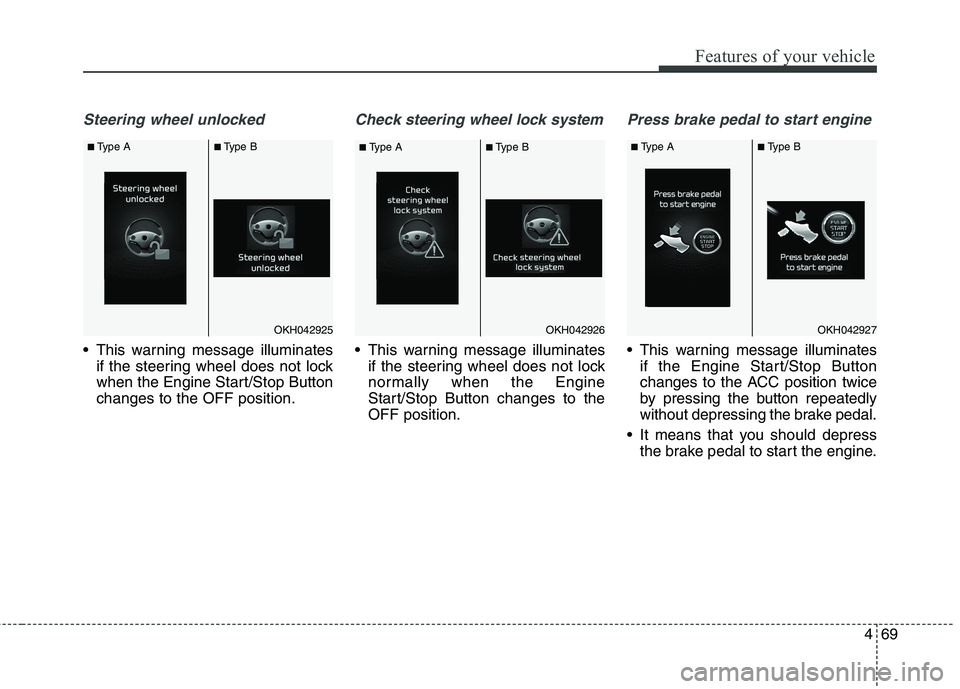
Steering wheel unlocked
This warning message illuminatesif the steering wheel does not lock
when the Engine Start/Stop Buttonchanges to the OFF position.
Check steering wheel lock system
This warning message illuminatesif the steering wheel does not lock
normally when the Engine
Start/Stop Button changes to theOFF position.
Press brake pedal to start engine
This warning message illuminatesif the Engine Start/Stop Button
changes to the ACC position twice
by pressing the button repeatedly
without depressing the brake pedal.
It means that you should depress the brake pedal to start the engine.
OKH042926OKH042925OKH042927
■Type A ■Type B
■Type A ■Type B ■
Type A ■Type B
Page 152 of 485
473
Features of your vehicle
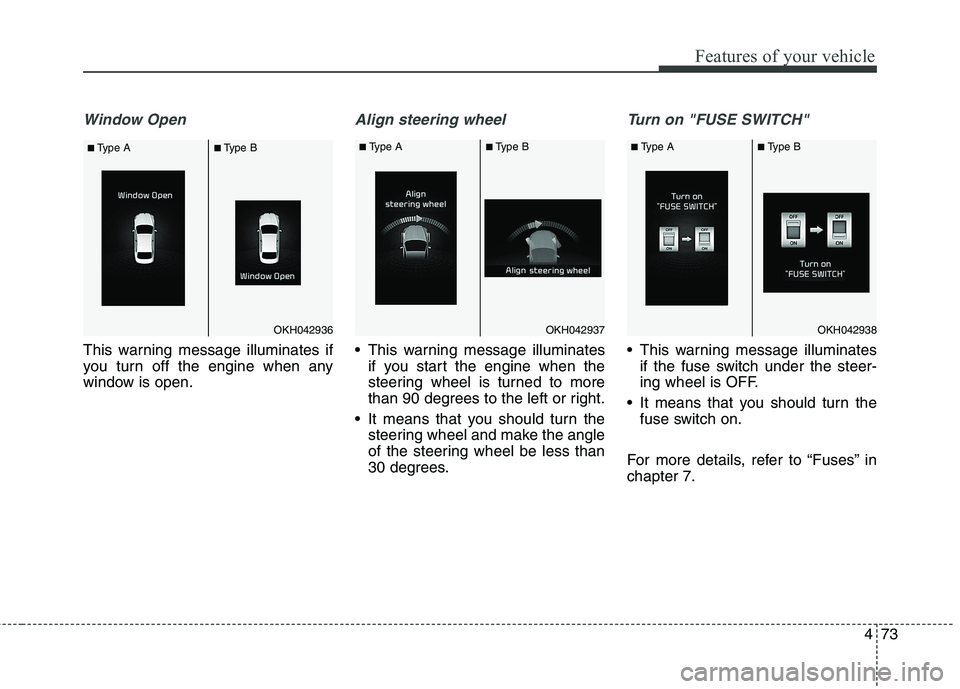
Window Open
This warning message illuminates if
you turn off the engine when any
window is open.
Align steering wheel
This warning message illuminatesif you start the engine when the
steering wheel is turned to more
than 90 degrees to the left or right.
It means that you should turn the steering wheel and make the angle
of the steering wheel be less than
30 degrees.
Turn on "FUSE SWITCH"
This warning message illuminatesif the fuse switch under the steer-
ing wheel is OFF.
It means that you should turn the fuse switch on.
For more details, refer to “Fuses” inchapter 7.
OKH042936OKH042937OKH042938
■ Type A ■Type B ■
Type A ■Type B ■Type A ■Type B
Page 154 of 485
475
Features of your vehicle
Overview
Description
The trip computer is a microcomput-
er-controlled driver information sys-
tem that displays information related
to driving.
✽✽NOTICE
Some driving information stored in
the trip computer (for example
Average Vehicle Speed) resets if the
battery is disconnected.
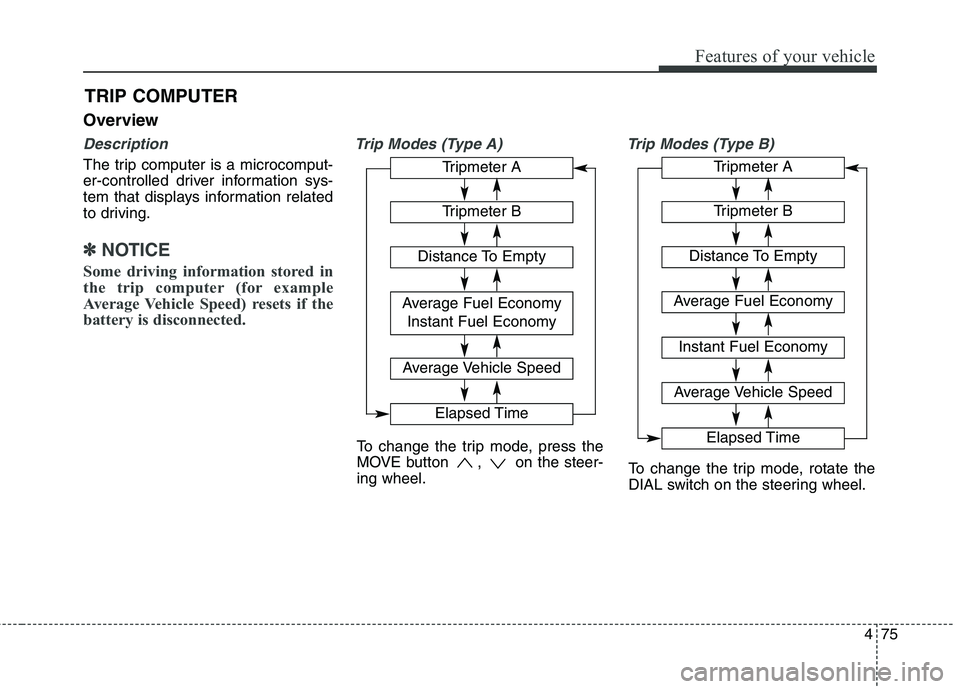
Trip Modes (Type A) Trip Modes (Type B)
TRIP COMPUTER
To change the trip mode, press the
MOVE button , on the steer-ing wheel.
To change the trip mode, rotate the
DIAL switch on the steering wheel.
Tripmeter A
Tripmeter B
Distance To Empty
Average Fuel Economy
Instant Fuel Economy
Average Vehicle Speed
Elapsed Time
Tripmeter A
Tripmeter B
Distance To Empty
Average Fuel Economy Instant Fuel Economy
Average Vehicle Speed
Elapsed Time
Page 155 of 485
Features of your vehicle
76
4
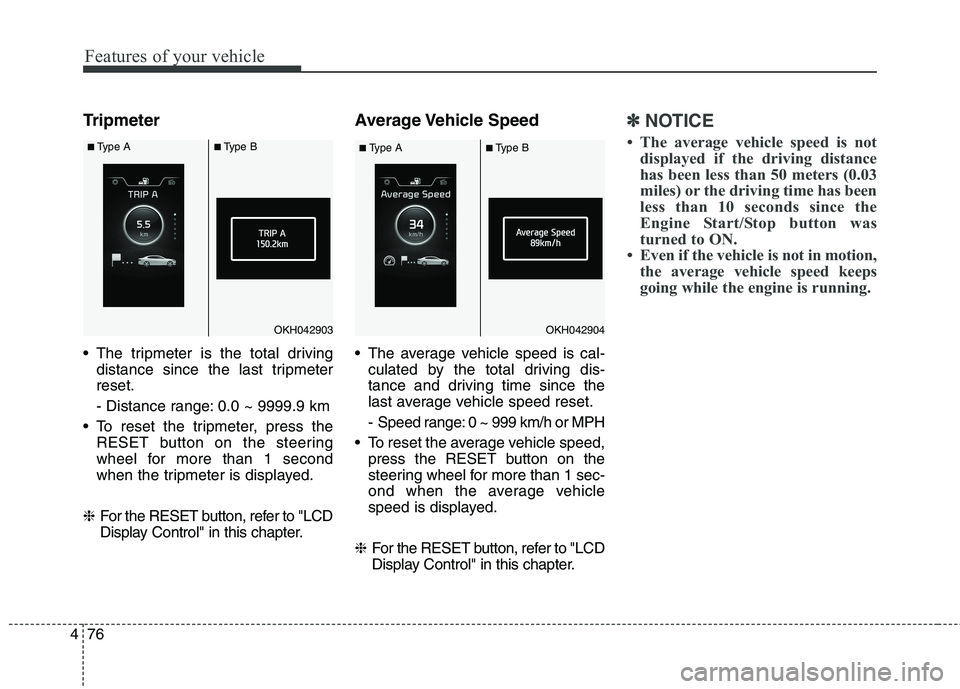
Tripmeter
The tripmeter is the total driving
distance since the last tripmeter reset.
- Distance range: 0.0 ~ 9999.9 km
To reset the tripmeter, press the RESET button on the steering
wheel for more than 1 second
when the tripmeter is displayed.
❈ For the RESET button, refer to "LCD
Display Control" in this chapter. Average Vehicle Speed
The average vehicle speed is cal-
culated by the total driving dis-
tance and driving time since the
last average vehicle speed reset.
- Speed range: 0 ~ 999 km/h or MPH
To reset the average vehicle speed, press the RESET button on the
steering wheel for more than 1 sec-
ond when the average vehicle
speed is displayed.
❈ For the RESET button, refer to "LCD
Display Control" in this chapter.✽✽
NOTICE
The average vehicle speed is not displayed if the driving distance
has been less than 50 meters (0.03
miles) or the driving time has been
less than 10 seconds since the
Engine Start/Stop button was
turned to ON.
Even if the vehicle is not in motion, the average vehicle speed keeps
going while the engine is running.
OKH042903OKH042904
■Type A ■Type B
■Type A ■Type B
Page 156 of 485
477
Features of your vehicle
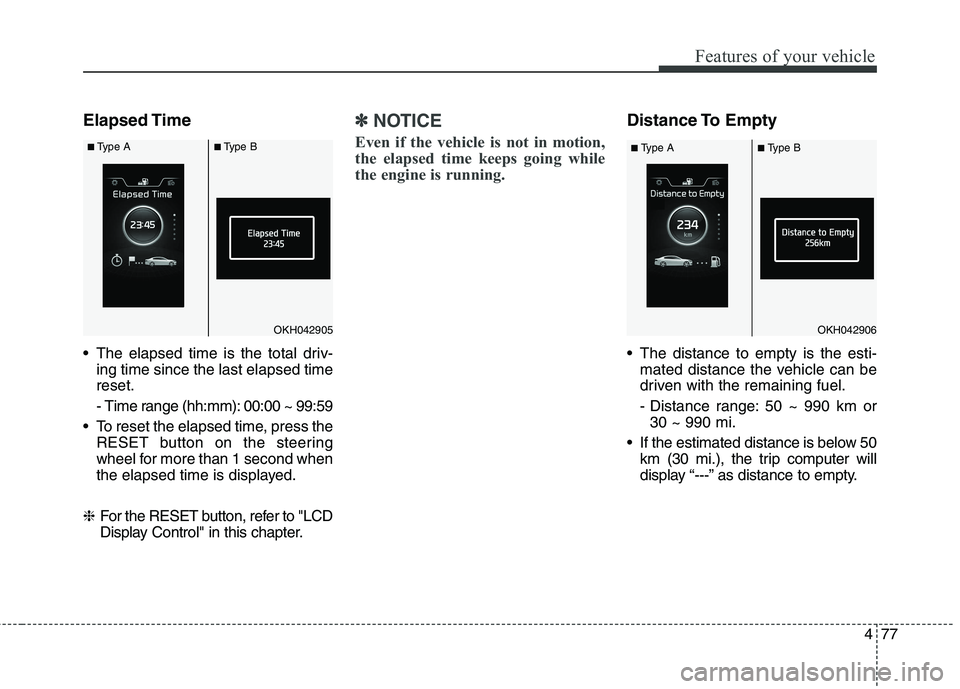
Elapsed Time
The elapsed time is the total driv-ing time since the last elapsed time reset.
- Time range (hh:mm): 00:00 ~ 99:59
To reset the elapsed time, press the RESET button on the steering
wheel for more than 1 second when
the elapsed time is displayed.
❈ For the RESET button, refer to "LCD
Display Control" in this chapter.✽✽
NOTICE
Even if the vehicle is not in motion,
the elapsed time keeps going while
the engine is running.Distance To Empty
The distance to empty is the esti- mated distance the vehicle can be
driven with the remaining fuel.
- Distance range: 50 ~ 990 km or30 ~ 990 mi.
If the estimated distance is below 50 km (30 mi.), the trip computer will
display “---” as distance to empty.
OKH042905OKH042906
■Type A ■Type B
■Type A ■Type B
Page 157 of 485
Features of your vehicle
78
4
✽✽
NOTICE
If the vehicle is not on level ground or the battery power has been
interrupted, the distance to empty
function may not operate correctly.
The distance to empty may differ from the actual driving distance as
it is an estimate of the available
driving distance.
The trip computer may not regis- ter additional fuel if less than 6
liters (1.6 gallons) of fuel are
added to the vehicle.
The fuel economy and distance to empty may vary significantly based
on driving conditions, driving
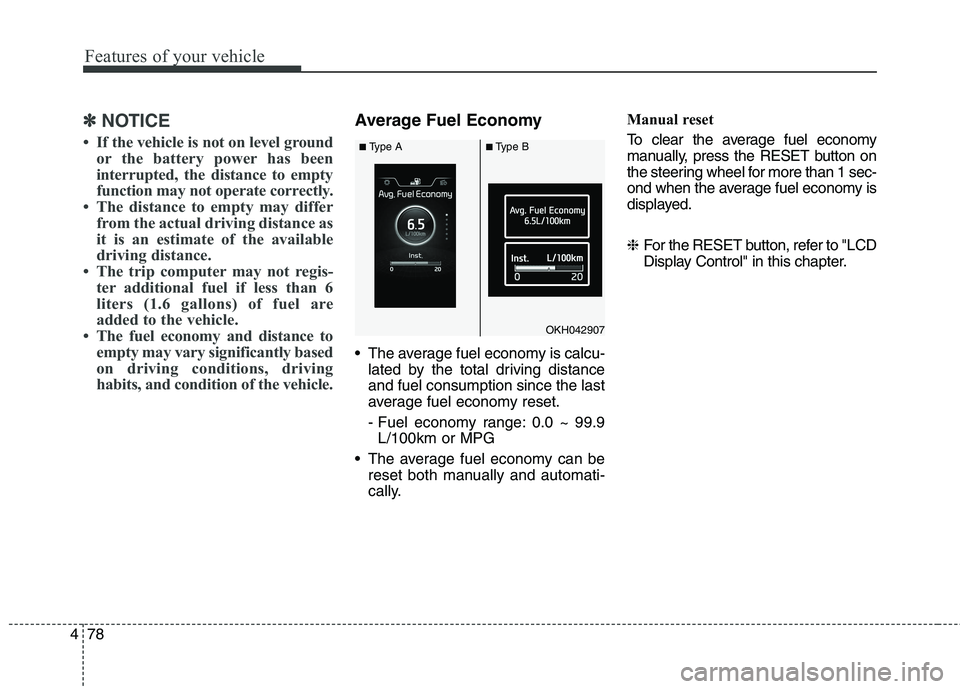
habits, and condition of the vehicle.Average Fuel Economy
The average fuel economy is calcu-lated by the total driving distance and fuel consumption since the last
average fuel economy reset.
- Fuel economy range: 0.0 ~ 99.9L/100km or MPG
The average fuel economy can be reset both manually and automati-
cally. Manual reset
To clear the average fuel economy
manually, press the RESET button on
the steering wheel for more than 1 sec-
ond when the average fuel economy is
displayed. ❈
For the RESET button, refer to "LCD
Display Control" in this chapter.
OKH042907
■Type A ■Type B
Page 160 of 485
481
Features of your vehicle
Parking Brake & BrakeFluid Warning Light
This warning light illuminates:
Once you set the ignition switch or Engine Start/Stop Button to the ON position.
- It illuminates for approximately 3seconds
- It remains on if the parking brake is applied.
When the parking brake is applied.
When the brake fluid level in the reservoir is low.
- If the warning light illuminateswith the parking brake released, it
indicates the brake fluid level in
reservoir is low. If the brake fluid level in the reservoir
is low:
1. Drive carefully to the nearest safe
location and stop your vehicle.
2. With the engine stopped, check the brake fluid level immediately
and add fluid as required (For
more details, refer to “Brake Fluid”
in chapter 7). Then check all brake
components for fluid leaks. If any
leak on the brake system is still
found, the warning light remains
on, or the brakes do not operate
properly, do not drive the vehicle.
In this case, we recommend that
you have the vehicle towed to an
authorized Kia dealer and inspect-ed. Dual-diagonal braking system
Your vehicle is equipped with dual-
diagonal braking systems. This
means you still have braking on two
wheels even if one of the dual sys-
tems should fail. With only one of the dual systems
working, more than normal pedal
travel and greater pedal pressure are
required to stop the vehicle.
Also, the vehicle will not stop in as
short a distance with only a portion
of the brake system working.
If the brakes fail while you are driv-
ing, shift to a lower gear for addition-
al engine braking and stop the vehi-
cle as soon as it is safe to do so.
Page 185 of 485
Features of your vehicle
106
4
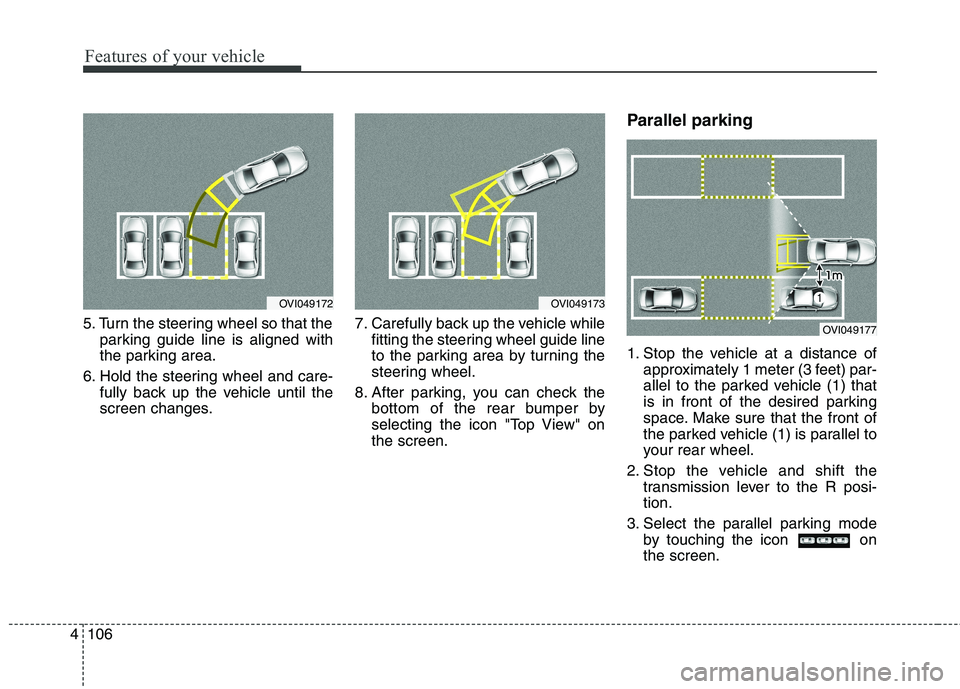
5. Turn the steering wheel so that the
parking guide line is aligned with
the parking area.
6. Hold the steering wheel and care- fully back up the vehicle until the
screen changes. 7. Carefully back up the vehicle while
fitting the steering wheel guide line
to the parking area by turning the
steering wheel.
8. After parking, you can check the bottom of the rear bumper by
selecting the icon "Top View" onthe screen. Parallel parking
1. Stop the vehicle at a distance of
approximately 1 meter (3 feet) par-
allel to the parked vehicle (1) that
is in front of the desired parking
space. Make sure that the front of
the parked vehicle (1) is parallel to
your rear wheel.
2. Stop the vehicle and shift the transmission lever to the R posi-tion.
3. Select the parallel parking mode by touching the icon onthe screen.
OVI049173OVI049172
OVI049177