open KIA QUORIS 2013 Owners Manual
[x] Cancel search | Manufacturer: KIA, Model Year: 2013, Model line: QUORIS, Model: KIA QUORIS 2013Pages: 485, PDF Size: 31.55 MB
Page 12 of 485
Your vehicle at a glance
4
2
INTERIOR OVERVIEW
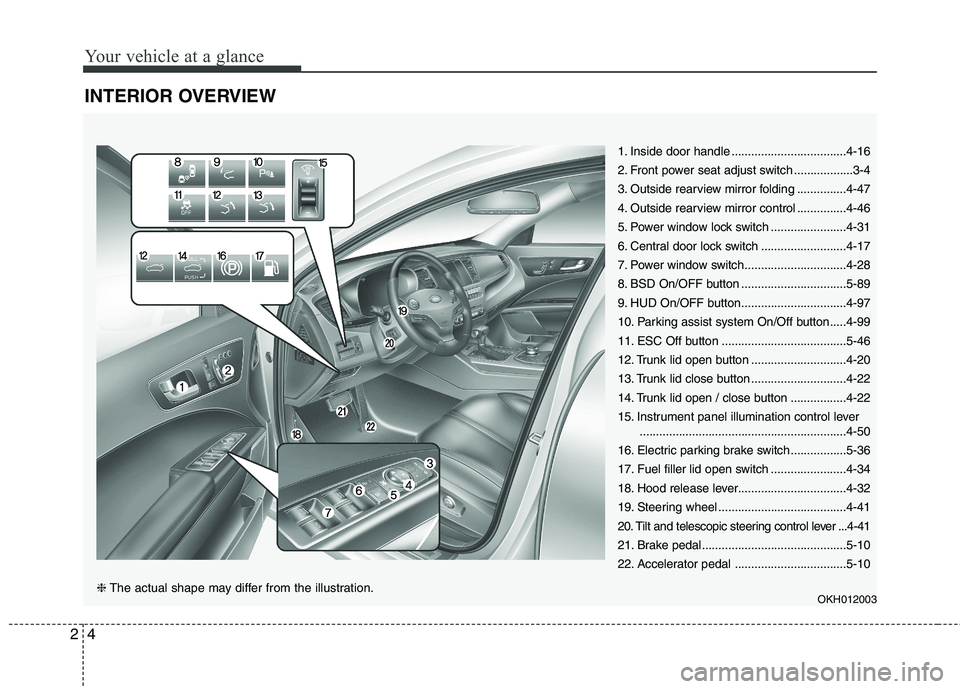
1. Inside door handle ...................................4-16
2. Front power seat adjust switch ..................3-4
3. Outside rearview mirror folding ...............4-47
4. Outside rearview mirror control ...............4-46
5. Power window lock switch .......................4-31
6. Central door lock switch ..........................4-17
7. Power window switch...............................4-28
8. BSD On/OFF button ................................5-89
9. HUD On/OFF button................................4-97
10. Parking assist system On/Off button.....4-99
11. ESC Off button ......................................5-46
12. Trunk lid open button .............................4-20
13. Trunk lid close button .............................4-22
14. Trunk lid open / close button .................4-22
15. Instrument panel illumination control lever
...............................................................4-50
16. Electric parking brake switch .................5-36
17. Fuel filler lid open switch .......................4-34
18. Hood release lever.................................4-32
19. Steering wheel .......................................4-41
20. Tilt and telescopic steering control lever ...4-41
21. Brake pedal............................................5-10
22. Accelerator pedal ..................................5-10
OKH012003
❈The actual shape may differ from the illustration.
Page 23 of 485
Safety features of your vehicle
8
3
Recalling positions from memory
1. Shift the shift lever into P while the
engine start/stop button is ON.
2. To recall the position in memory, press the desired memory button
(1 or 2). The system will beep
once, then the driver seat, outside
rearview mirror and steeringwheel will automatically adjust to
the stored positions.
Adjusting one of the control knobs for
the driver seat, outside rearview mir-
ror and steering wheel while the sys-tem is recalling the stored positions
will cause the movement for that
component to stop and move in thedirection that the control knob is
moved. Other components will con-
tinue to the recalled position.Easy access function
The steering wheel will move away
from the driver and the seat will
move rearward, when the engine
start/stop button is turned to the OFF
position and front driver’s door isopened.
The steering wheel will move toward
the driver and the seat will move for-
ward, when the engine start/stop but-
ton is turned to the ACC position or
when you insert the smart key into
the smart key holder with the shift
lever in the P position.
✽✽ NOTICE
You can activate or deactivate the
easy access function in the instru-
ment cluster.
If you want detailed informations,
refer to the chapter 4.
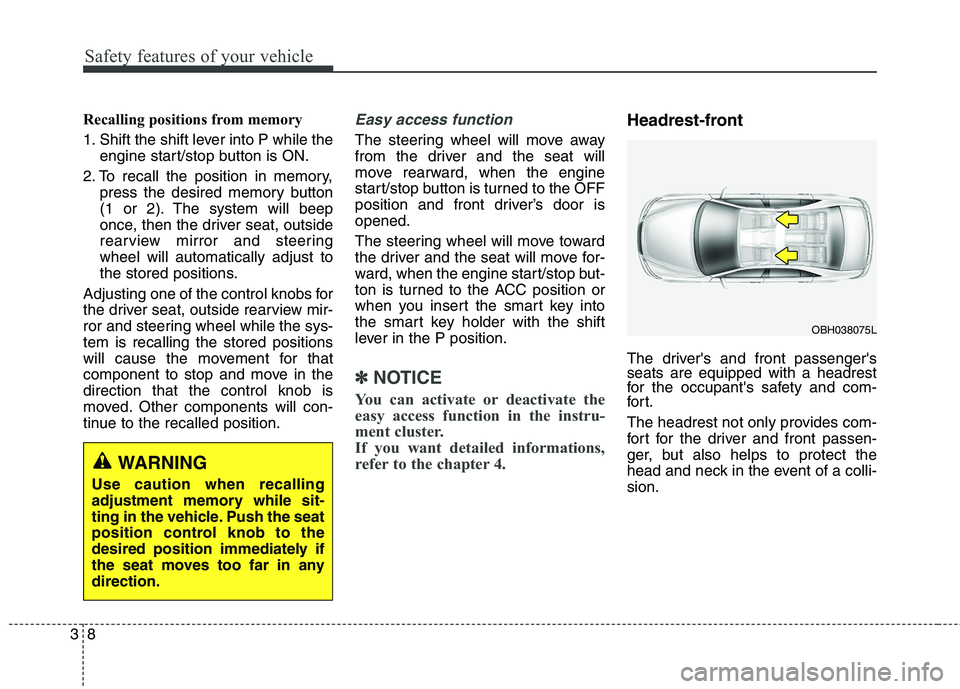
Headrest-front
The driver's and front passenger's seats are equipped with a headrest
for the occupant's safety and com-
for t.
The headrest not only provides com-
fort for the driver and front passen-
ger, but also helps to protect the
head and neck in the event of a colli-sion.
WARNING
Use caution when recalling
adjustment memory while sit-
ting in the vehicle. Push the seat
position control knob to the
desired position immediately if
the seat moves too far in anydirection.
OBH038075L
Page 28 of 485
313
Safety features of your vehicle
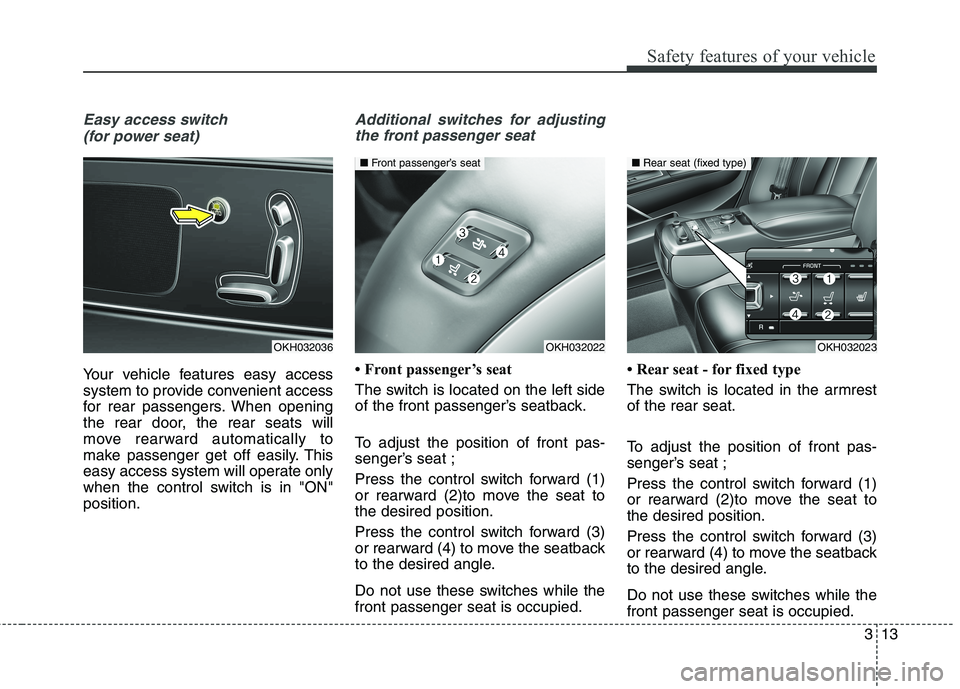
Easy access switch (for power seat)
Your vehicle features easy access
system to provide convenient access
for rear passengers. When opening
the rear door, the rear seats will
move rearward automatically to
make passenger get off easily. This
easy access system will operate only
when the control switch is in "ON"position.
Additional switches for adjustingthe front passenger seat
Front passenger’s seat
The switch is located on the left side
of the front passenger’s seatback.
To adjust the position of front pas-
senger’s seat ;
Press the control switch forward (1)
or rearward (2)to move the seat tothe desired position.
Press the control switch forward (3)
or rearward (4) to move the seatback
to the desired angle.
Do not use these switches while the front passenger seat is occupied. Rear seat - for fixed type
The switch is located in the armrest of the rear seat.
To adjust the position of front pas-
senger’s seat ;
Press the control switch forward (1)
or rearward (2)to move the seat tothe desired position.
Press the control switch forward (3)
or rearward (4) to move the seatback
to the desired angle.
Do not use these switches while the front passenger seat is occupied.
OKH032036OKH032022
■
Front passenger’s seat
OKH032023
■ Rear seat (fixed type)
Page 29 of 485
Safety features of your vehicle
14
3
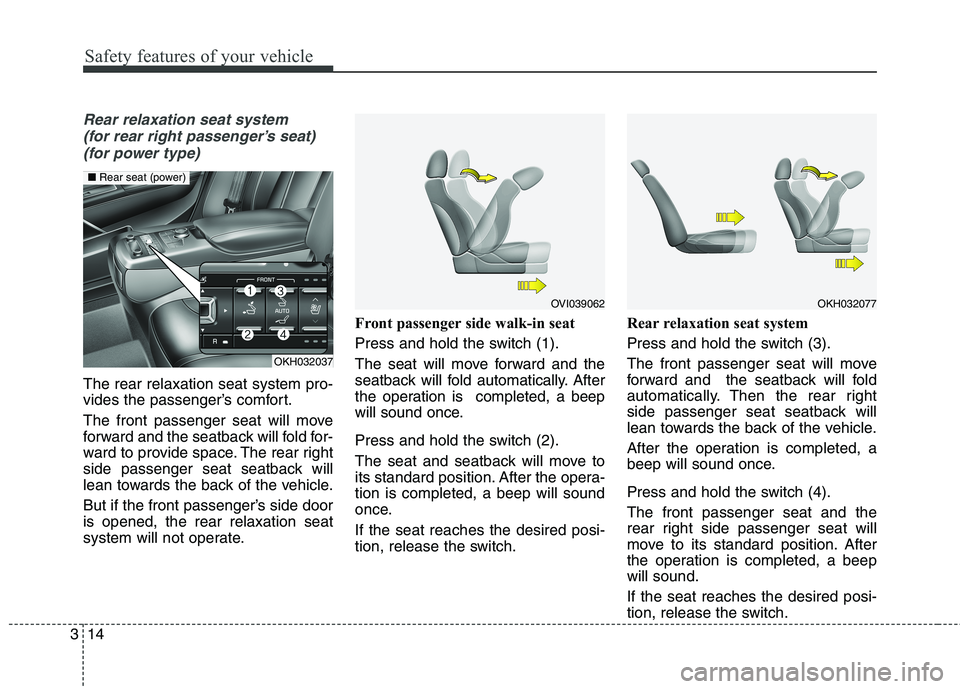
Rear relaxation seat system
(for rear right passenger’s seat) (for power type)
The rear relaxation seat system pro-
vides the passenger’s comfort.
The front passenger seat will move
forward and the seatback will fold for-
ward to provide space. The rear right
side passenger seat seatback will
lean towards the back of the vehicle.
But if the front passenger’s side door is opened, the rear relaxation seat
system will not operate. Front passenger side walk-in seat
Press and hold the switch (1).
The seat will move forward and the
seatback will fold automatically. After
the operation is completed, a beep
will sound once.
Press and hold the switch (2).
The seat and seatback will move to
its standard position. After the opera-tion is completed, a beep will sound
once. If the seat reaches the desired posi-
tion, release the switch.Rear relaxation seat system
Press and hold the switch (3).
The front passenger seat will move
forward and the seatback will fold
automatically. Then the rear right
side passenger seat seatback will
lean towards the back of the vehicle.
After the operation is completed, a
beep will sound once.
Press and hold the switch (4). The front passenger seat and the
rear right side passenger seat will
move to its standard position. After
the operation is completed, a beepwill sound. If the seat reaches the desired posi-
tion, release the switch.
OVI039062OKH032077
OKH032037
■
Rear seat (power)
Page 60 of 485
345
Safety features of your vehicle
Noise and smoke
When the air bags inflate, they make
a loud noise and they leave smoke
and powder in the air inside of the
vehicle. This is normal and is a result
of the ignition of the air bag inflator.
After the air bag inflates, you may
feel substantial discomfort in breath-
ing due to the contact of your chestwith both the seat belt and the air
bag, as well as from breathing the
smoke and powder.Open your
doors and/or windows as soon as
possible after impact in order to
reduce discomfort and prevent
prolonged exposure to the smoke
and powder.
Though the smoke and powder are
non-toxic, they may cause irritation
to the skin (eyes, nose and throat,
etc). If this is the case, wash and
rinse with cold water immediatelyand consult a doctor if the symptom
persists.
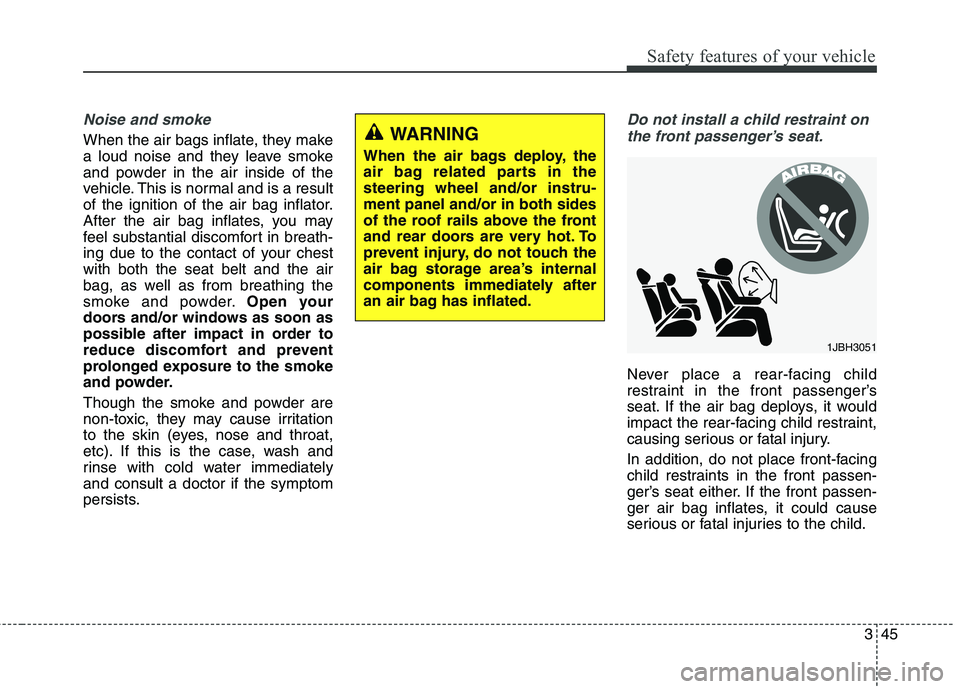
Do not install a child restraint on
the front passenger’s seat.
Never place a rear-facing child
restraint in the front passenger’s
seat. If the air bag deploys, it would
impact the rear-facing child restraint,
causing serious or fatal injury.
In addition, do not place front-facing
child restraints in the front passen-
ger’s seat either. If the front passen-
ger air bag inflates, it could cause
serious or fatal injuries to the child.
1JBH3051
WARNING
When the air bags deploy, the
air bag related parts in thesteering wheel and/or instru-ment panel and/or in both sides
of the roof rails above the front
and rear doors are very hot. To
prevent injury, do not touch the
air bag storage area’s internal
components immediately after
an air bag has inflated.
Page 63 of 485
Safety features of your vehicle
48
3
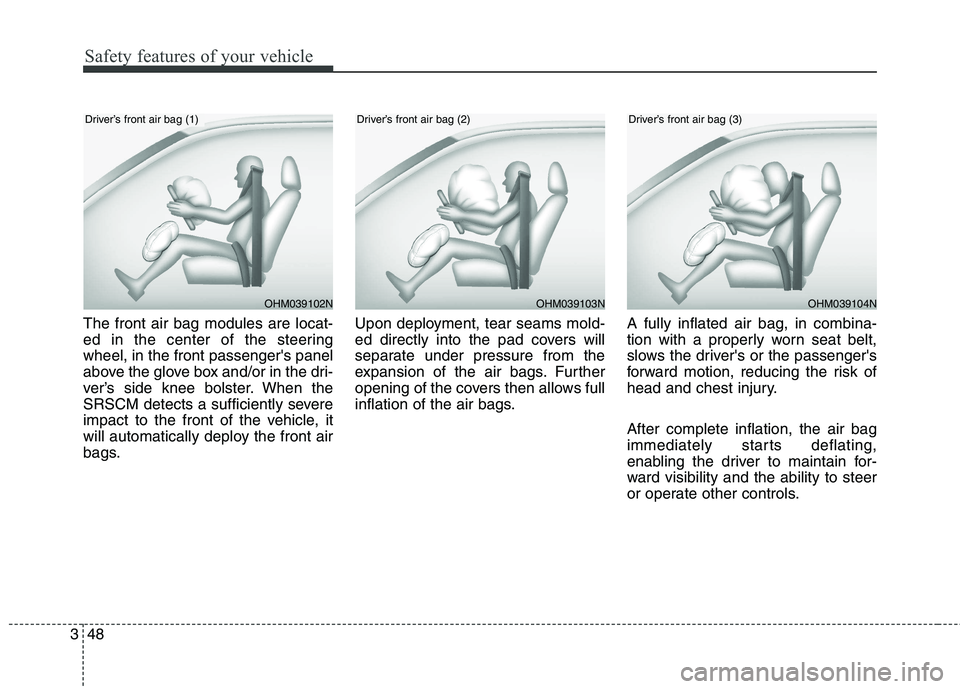
The front air bag modules are locat-
ed in the center of the steeringwheel, in the front passenger's panel
above the glove box and/or in the dri-
ver’s side knee bolster. When the
SRSCM detects a sufficiently severe
impact to the front of the vehicle, it
will automatically deploy the front air
bags. Upon deployment, tear seams mold-
ed directly into the pad covers will
separate under pressure from the
expansion of the air bags. Further
opening of the covers then allows full
inflation of the air bags.
A fully inflated air bag, in combina-
tion with a properly worn seat belt,
slows the driver's or the passenger's
forward motion, reducing the risk of
head and chest injury. After complete inflation, the air bag
immediately starts deflating,
enabling the driver to maintain for-
ward visibility and the ability to steer
or operate other controls.
OHM039102N
Driver’s front air bag (1)
OHM039103NOHM039104N
Driver’s front air bag (2)Driver’s front air bag (3)
Page 71 of 485
Safety features of your vehicle
56
3
WARNING
In order for side and curtain air bags to provide the best
protection, front seat occu-
pants and outboard rear occu-pants should sit in an uprightposition with the seat belts
properly fastened.
Importantly, children should
sit in a proper child restraintsystem in the rear seat.
When children are seated in the rear outboard seats, they
must be seated in the proper
child restraint system. Make
sure to position the child
restraint system as far away
from the door side as possi-
ble, and secure the child
restraint system in a lockedposition.
(Continued)(Continued)
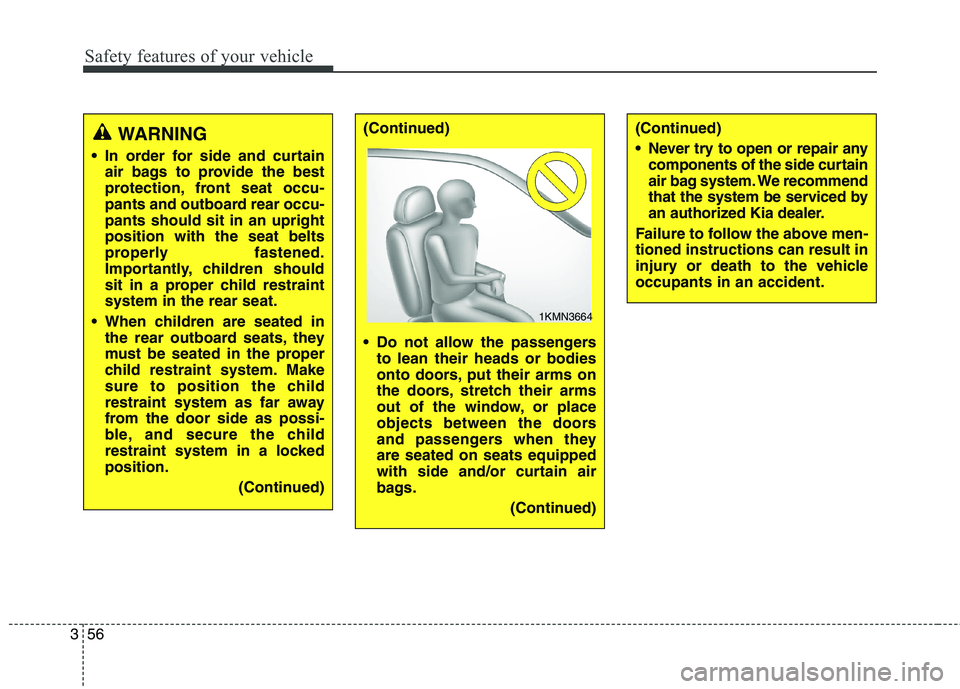
Do not allow the passengersto lean their heads or bodies
onto doors, put their arms on
the doors, stretch their arms
out of the window, or place
objects between the doors
and passengers when theyare seated on seats equipped
with side and/or curtain air
bags.
(Continued)(Continued)
Never try to open or repair anycomponents of the side curtain
air bag system. We recommend
that the system be serviced by
an authorized Kia dealer.
Failure to follow the above men-tioned instructions can result in
injury or death to the vehicleoccupants in an accident.
1KMN3664
Page 83 of 485
Features of your vehicle
4
4
Record your key number
The key code number is stamped on the barcode tag attached to
the key set. Should
you lose your keys, we recommend
that you contact an authorized Kia
dealer. Remove the bar code tag and
store it in a safe place. Also, record
the code number and keep it in a
safe and handy place, but not in the
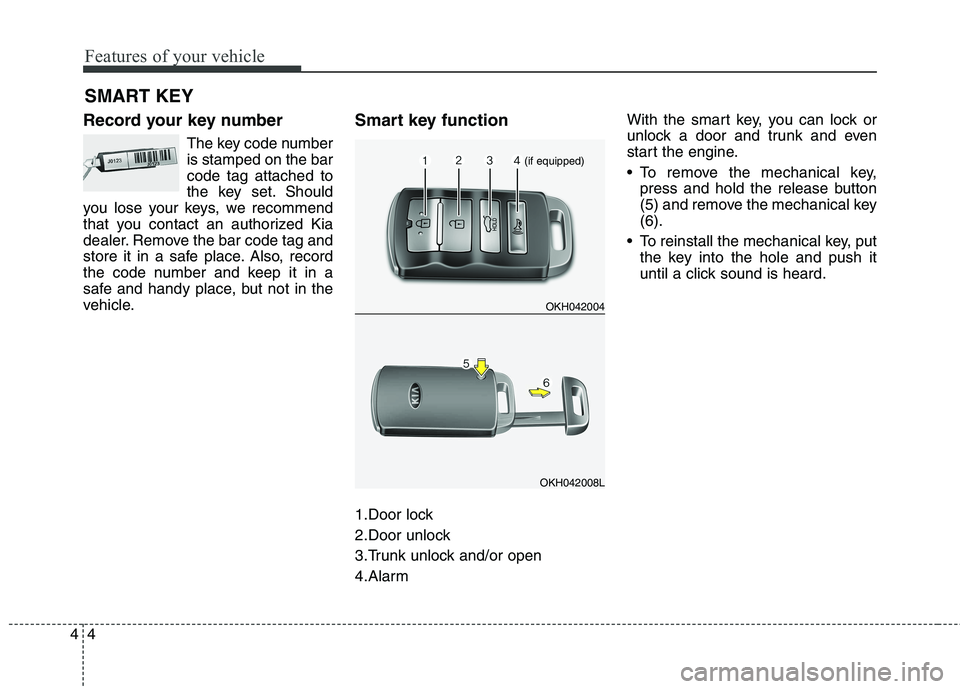
vehicle. Smart key function
1.Door lock
2.Door unlock
3.Trunk unlock and/or open
4.AlarmWith the smart key, you can lock or
unlock a door and trunk and even
start the engine.
• To remove the mechanical key,
press and hold the release button
(5) and remove the mechanical key(6).
To reinstall the mechanical key, put the key into the hole and push it
until a click sound is heard.
SMART KEY
OKH042004
OKH042008L
(if equipped)
Page 84 of 485
45
Features of your vehicle
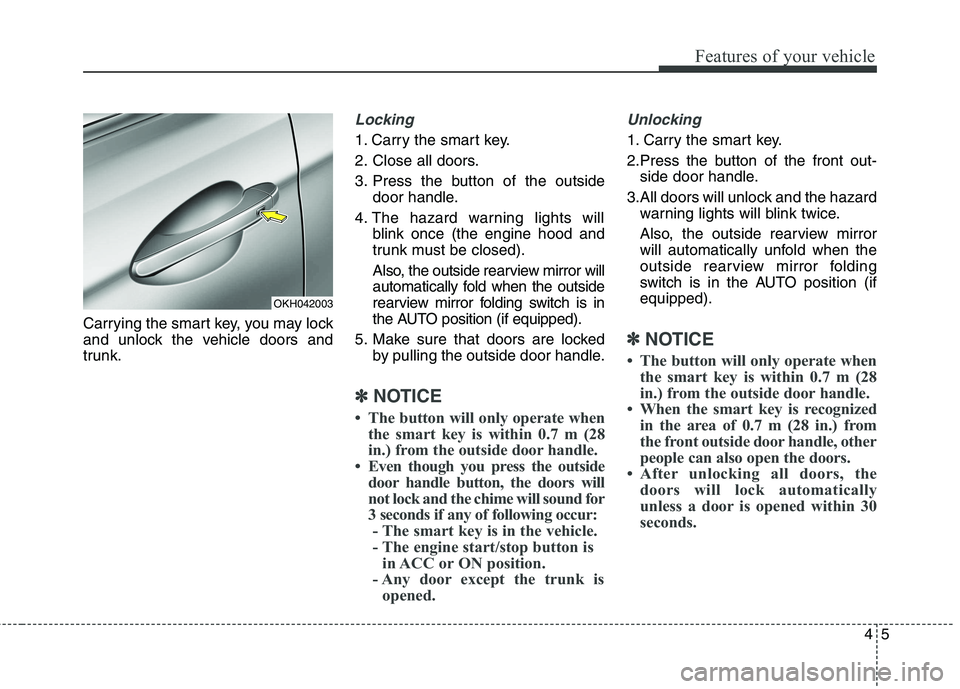
Carrying the smart key, you may lock
and unlock the vehicle doors and
trunk.
Locking
1. Carry the smart key.
2. Close all doors.
3. Press the button of the outsidedoor handle.
4. The hazard warning lights will blink once (the engine hood and
trunk must be closed).
Also, the outside rearview mirror will
automatically fold when the outside
rearview mirror folding switch is in
the AUTO position (if equipped).
5. Make sure that doors are locked by pulling the outside door handle.
✽✽ NOTICE
The button will only operate when the smart key is within 0.7 m (28
in.) from the outside door handle.
Even though you press the outside door handle button, the doors will
not lock and the chime will sound for
3 seconds if any of following occur:- The smart key is in the vehicle.
- The engine start/stop button is in ACC or ON position.
- Any door except the trunk is opened.
Unlocking
1. Carry the smart key.
2.Press the button of the front out- side door handle.
3.All doors will unlock and the hazard warning lights will blink twice.
Also, the outside rearview mirror
will automatically unfold when the
outside rearview mirror folding
switch is in the AUTO position (ifequipped).
✽✽ NOTICE
The button will only operate when the smart key is within 0.7 m (28
in.) from the outside door handle.
When the smart key is recognized in the area of 0.7 m (28 in.) from
the front outside door handle, other
people can also open the doors.
After unlocking all doors, the doors will lock automatically
unless a door is opened within 30
seconds.
OKH042003
Page 85 of 485
Features of your vehicle
6
4
Trunk unlocking
Power trunk
1. Carry the smart key.
2. Press the trunk handle switch.
3. The trunk will unlock and open.
Non-powered trunk
1. Carry the smart key.
2. Press the trunk handle switch.
3. The trunk will unlock.
✽✽
NOTICE
Once the trunk is opened and then closed, the trunk will lock auto-
matically.
The button will only operate when the smart key is within 0.7 m (28
in.) from the trunk handle.
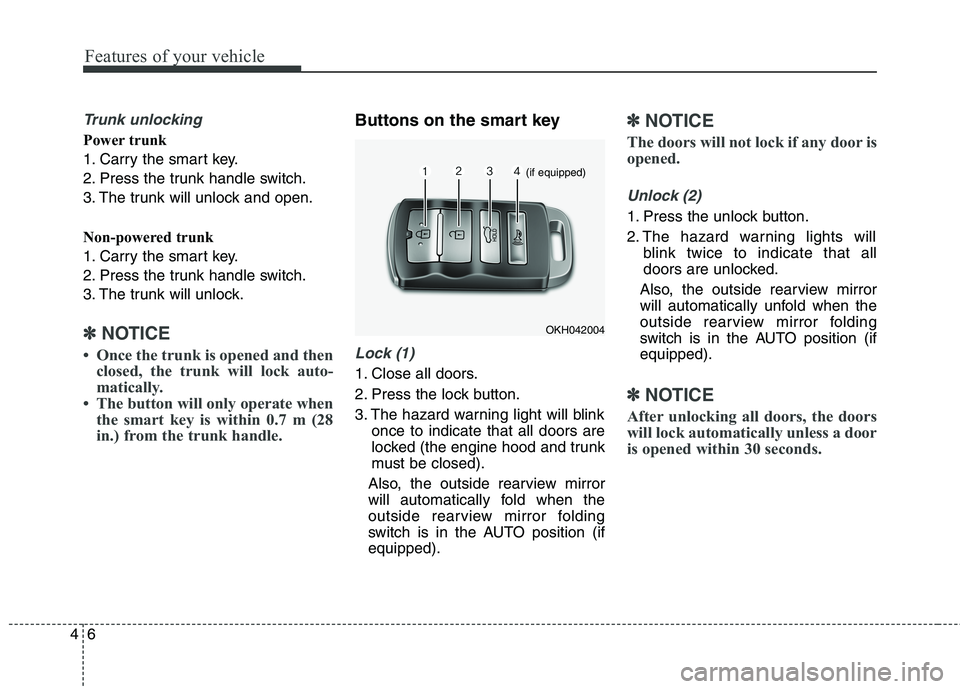
Buttons on the smart key
Lock (1)
1. Close all doors.
2. Press the lock button.
3. The hazard warning light will blink once to indicate that all doors are
locked (the engine hood and trunk
must be closed).
Also, the outside rearview mirror
will automatically fold when the
outside rearview mirror folding
switch is in the AUTO position (ifequipped).
✽✽ NOTICE
The doors will not lock if any door is
opened.
Unlock (2)
1. Press the unlock button.
2. The hazard warning lights will blink twice to indicate that all
doors are unlocked.
Also, the outside rearview mirror
will automatically unfold when the
outside rearview mirror folding
switch is in the AUTO position (ifequipped).
✽✽ NOTICE
After unlocking all doors, the doors
will lock automatically unless a door
is opened within 30 seconds.
OKH042004
(if equipped)