LCD display KIA QUORIS 2014 User Guide
[x] Cancel search | Manufacturer: KIA, Model Year: 2014, Model line: QUORIS, Model: KIA QUORIS 2014Pages: 486, PDF Size: 31.74 MB
Page 155 of 486
Features of your vehicle
76
4
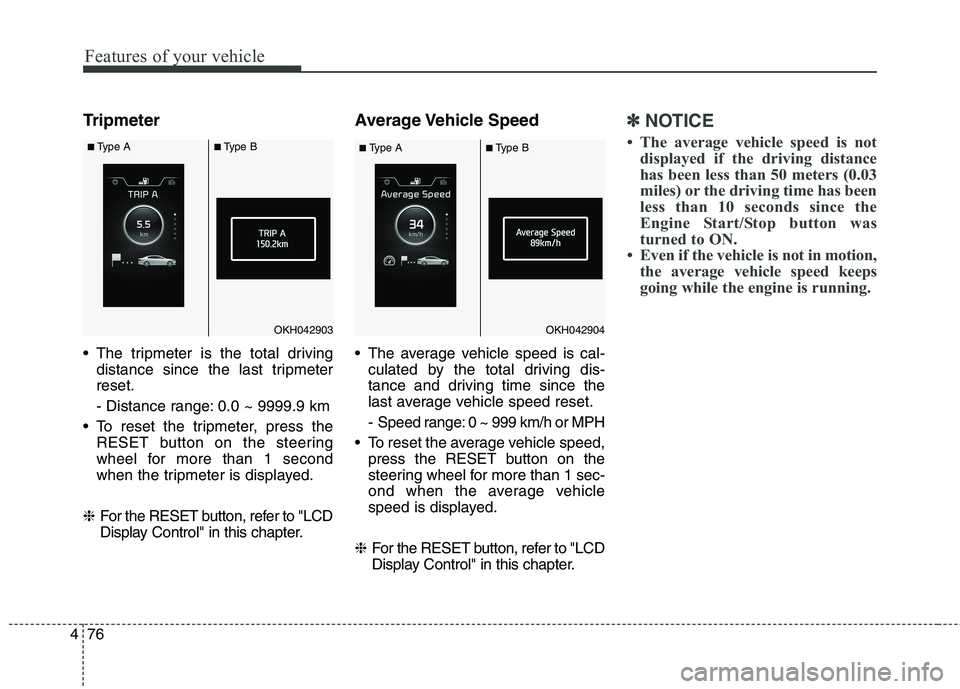
Tripmeter
The tripmeter is the total driving
distance since the last tripmeter reset.
- Distance range: 0.0 ~ 9999.9 km
To reset the tripmeter, press the RESET button on the steering
wheel for more than 1 second
when the tripmeter is displayed.
❈ For the RESET button, refer to "LCD
Display Control" in this chapter. Average Vehicle Speed
The average vehicle speed is cal-
culated by the total driving dis-
tance and driving time since the
last average vehicle speed reset.
- Speed range: 0 ~ 999 km/h or MPH
To reset the average vehicle speed, press the RESET button on the
steering wheel for more than 1 sec-
ond when the average vehicle
speed is displayed.
❈ For the RESET button, refer to "LCD
Display Control" in this chapter.✽✽
NOTICE
The average vehicle speed is not displayed if the driving distance
has been less than 50 meters (0.03
miles) or the driving time has been
less than 10 seconds since the
Engine Start/Stop button was
turned to ON.
Even if the vehicle is not in motion, the average vehicle speed keeps
going while the engine is running.
OKH042903OKH042904
■Type A ■Type B
■Type A ■Type B
Page 156 of 486
477
Features of your vehicle
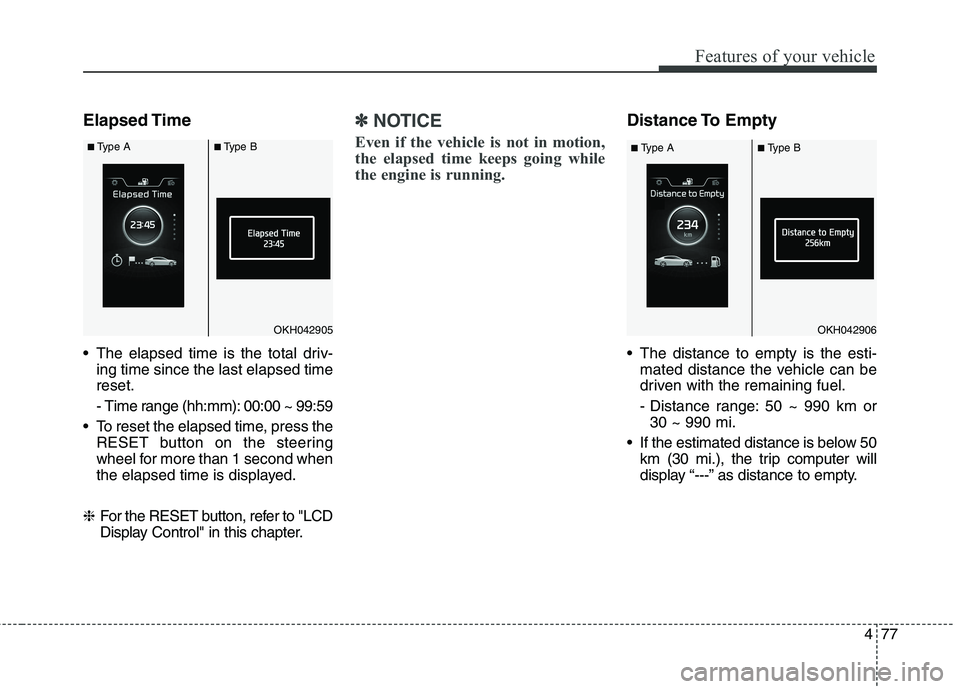
Elapsed Time
The elapsed time is the total driv-ing time since the last elapsed time reset.
- Time range (hh:mm): 00:00 ~ 99:59
To reset the elapsed time, press the RESET button on the steering
wheel for more than 1 second when
the elapsed time is displayed.
❈ For the RESET button, refer to "LCD
Display Control" in this chapter.✽✽
NOTICE
Even if the vehicle is not in motion,
the elapsed time keeps going while
the engine is running.Distance To Empty
The distance to empty is the esti- mated distance the vehicle can be
driven with the remaining fuel.
- Distance range: 50 ~ 990 km or30 ~ 990 mi.
If the estimated distance is below 50 km (30 mi.), the trip computer will
display “---” as distance to empty.
OKH042905OKH042906
■Type A ■Type B
■Type A ■Type B
Page 157 of 486

Features of your vehicle
78
4
✽✽
NOTICE
If the vehicle is not on level ground or the battery power has been
interrupted, the distance to empty
function may not operate correctly.
The distance to empty may differ from the actual driving distance as
it is an estimate of the available
driving distance.
The trip computer may not regis- ter additional fuel if less than 6
liters (1.6 gallons) of fuel are
added to the vehicle.
The fuel economy and distance to empty may vary significantly based
on driving conditions, driving
habits, and condition of the vehicle.Average Fuel Economy
The average fuel economy is calcu-lated by the total driving distance and fuel consumption since the last
average fuel economy reset.
- Fuel economy range: 0.0 ~ 99.9L/100km or MPG
The average fuel economy can be reset both manually and automati-
cally. Manual reset
To clear the average fuel economy
manually, press the RESET button on
the steering wheel for more than 1 sec-
ond when the average fuel economy is
displayed. ❈
For the RESET button, refer to "LCD
Display Control" in this chapter.
OKH042907
■Type A ■Type B
Page 158 of 486

479
Features of your vehicle
Automatic reset
To make the average fuel economy
be reset automatically whenever refu-
eling, select the “Auto Reset” mode in
"User Settings" mode (Type A) or
"Cluster Settings" menu (Type B) of
the LCD display. ❈For more defails, refer to "LCD
Display" in this chapter.
Under “Auto Reset” mode, the aver-
age fuel economy will be cleared to
zero (---) when the vehicle speed
exceeds 1 km/h after refueling morethan 6 liters (1.6 gallons).
✽✽ NOTICE
The average fuel economy is not dis-
played for more accurate calculation
if the vehicle does not drive more
than 10 seconds or 50 meters (0.03
miles) since the ignition switch or
Engine Start/Stop button is turned
to ON.
Instant Fuel Economy
This mode displays the instant fuel economy during the last few sec-
onds when the vehicle speed ismore than 10 km/h (6.2 MPH).
- Fuel economy range: 0.0 ~ 20.0L/100km or 0.0 ~ 50.0 MPG
Page 165 of 486

Features of your vehicle
86
4
Low Tire Pressure
Warning Light (if equipped)
This warning light illuminates:
Once you set the ignition switch or Engine Start/Stop Button to the ON position.
- It illuminates for approximately 3seconds and then goes off.
When one or more of your tires are significantly underinflated (The
location of the underinflated tires
are displayed on the LCD display).
For more details, refer to “Tire
Pressure Monitoring System
(TPMS)” in chapter 6. This warning light remains on after
blinking for approximately 60 seconds
or repeats blinking and off at the
intervals of approximately 3 seconds:
When there is a malfunction with
the TPMS.
In this case, we recommend that
you have the vehicle inspected by
an authorized Kia dealer as soon
as possible.
For more details, refer to “Tire
Pressure Monitoring System
(TPMS)” in chapter 6.
Door Ajar Warning Light
This warning light illuminates:
When a door is not closed securely.
Trunk Open Warning
Light
This warning light illuminates:
When the trunk is not closed secure-
ly.
WARNING - Safe Stopping
The TPMS cannot alert you to severe and sudden tire damage
caused by external factors.
If you notice any vehicle insta- bility, immediately take your
foot off the accelerator pedal,
apply the brakes gradually with
light force, and slowly move to
a safe position off the road.
Page 173 of 486
![KIA QUORIS 2014 User Guide Features of your vehicle
94
4
AUTO HOLD Indicator
Light (if equipped)
This indicator light illuminates:
[White] When you activate the auto hold system by pressing the AUTO
HOLD button.
[Green] Whe](/img/2/57974/w960_57974-172.png "KIA QUORIS 2014 User Guide Features of your vehicle
94
4
AUTO HOLD Indicator
Light (if equipped)
This indicator light illuminates:
[White] When you activate the auto hold system by pressing the AUTO
HOLD button.
[Green] Whe")
Features of your vehicle
94
4
AUTO HOLD Indicator
Light (if equipped)
This indicator light illuminates:
[White] When you activate the auto hold system by pressing the AUTO
HOLD button.
[Green] When you stop the vehicle completely by depressing the
brake pedal with the auto hold sys-
tem activated.
[Yellow] When there is a malfunc- tion with the auto hold system.
In this case, we recommend that
you have the vehicle inspected by
an authorized Kia dealer.
❈ For more details, refer to “Auto
Hold” in chapter 5.
Lane Departure Warning
System (LDWS) Indicator Light (if equipped)
This indicator light illuminates:
[Green] When you activate the lane departure warning system by
pressing the LDWS button.
[Yellow] When there is a malfunc- tion with the lane departure warn-ing system.
In this case, we recommend that
you have the vehicle inspected by
an authorized Kia dealer.
❈ For more details, refer to “Lane
Departure Warning System
(LDWS)” in chapter 5.
Advanced Vehicle Safety
Management (AVSM) OFF Indicator Light (if equipped)
This indicator light illuminates:
Once you set the Engine Start/Stop Button to the ON position.
- It illuminates for approximately 3seconds and then goes off.
When you deactivate the AVSM sys- tem by setting on the LCD display.
❈ For more details, refer to “LCD
Display” in this chapter.
If this indicator stays on when AVSM
OFF is not selected, the AVSM may
have malfunctioned.
In this case, we recommend that you
have the vehicle inspected by an
authorized Kia dealer. ❈ For more details, refer to “Advanced
Vehicle Safety Management
(AVSM) System” in chapter 5.
AUTO
HOLDAVSM OFF
Page 175 of 486

Features of your vehicle
96
4
Description
The head up display is a transparent
display which projects a shadow of
some information of the instrument
cluster and navigation on the wind-
shield glass. The head up display image on the
windshield glass may be invisiblewhen: - Sitting posture is bad.
- Wearing a polarized sunglasses.
- There is an object on the cover ofthe head up display.
- Driving on a wet road.
- An inadequate lighting is turned on inside the vehicle.
- Any light comes from the outside.
- Wearing an inadequate glasses to your eyesight.
If the head up display image is not shown well, adjust the height or
illumination of the head up display
in the LCD display.
❈ For more details, refer to “LCD
Display” in this chapter.
When the head up display needs inspection or repair, we recom-
mend that you consult an author-
ized Kia dealer.
HEAD UP DISPLAY (HUD) (IF EQUIPPED)
OKH042164
WARNING - Head Up
Display
Do not make the front wind- shield glass have window tint or other types of metallic coat-
ing. Otherwise, the head up
display image may be invisible.
Do not place any accessories on the clash pad or attach anyobjects on the windshieldglass.
As the Blind Spot Detection (BSD) system is a supplemen-
tal device for your safe driving,
it may be dangerous to rely on
only the BSD information of the
head up display image when
changing the lane. Always pay
attention to drive safely.
Page 177 of 486

Features of your vehicle
98
4
Head Up Display Setting
On the LCD display, you can change
the head up display settings as fol-
lows.
1. Display height
2. Illumination
3. Speedometer color
4. Font size
5. Contents setting ❈ For more details, refer to “LCD
Display” in this chapter.
Page 194 of 486

4115
Features of your vehicle
Turn signals and lane change signals
The ignition switch must be on for the
turn signals to function. To turn on
the turn signals, move the lever up or
down (A). The green arrow indicators
on the instrument panel indicate
which turn signal is operating.They will self-cancel after a turn is
completed. If the indicator continues
to flash after a turn, manually return
the lever to the OFF position.
To signal a lane change, move the
turn signal lever slightly and hold it in
position (B). The lever will return tothe OFF position when released.
If an indicator stays on and does not
flash or if it flashes abnormally, one
of the turn signal bulbs may be
burned out and will require replace-ment.One-touch turn signal
To activate an one-touch turn signal
move the turn signal lever slightly
and then release it. The lane change
signals will blink 3, 5 or 7 times.
You can set the number of operating
times. Refer to "LCD Display" in this
chapter.
✽✽
NOTICE
If an indicator flash is abnormally
quick or slow, a bulb may be burned
out or have a poor electrical connec-
tion in the circuit.
OKH042196
Page 207 of 486

Features of your vehicle
128
4
AUTOMATIC CLIMATE CONTROL SYSTEM (IF EQUIPPED)
1. Driver’s temperature control button
2. AUTO (automatic control) button)
3. OFF button
4. Fan speed control button
5. Air conditioning button
6. Mode selection button
7. Front windshield defrost button
8. Air intake control button
9. 3 ZONE (Driver, passenger and rear side)
temperature control button
10. Passenger’s temperature control button
11. Rear window defrost button
12. AQS (Air quality system) button
13. Climate information screen selection button
14. Fan speed control button (Rear)
15. OFF button (Rear)
16. LCD display
17. Rear side temperature control knob
18. AUTO (automatic control) button
OKH042208L/OKH042209
■ Front
■ Rear
CAUTION
Operating the blower when the
ignition switch is in the ON posi- tion could cause the battery todischarge. Operate the blowerwhen the engine is run
ning.