instrument cluster KIA QUORIS 2015 User Guide
[x] Cancel search | Manufacturer: KIA, Model Year: 2015, Model line: QUORIS, Model: KIA QUORIS 2015Pages: 486, PDF Size: 35.55 MB
Page 304 of 486
Driving your vehicle
60
5
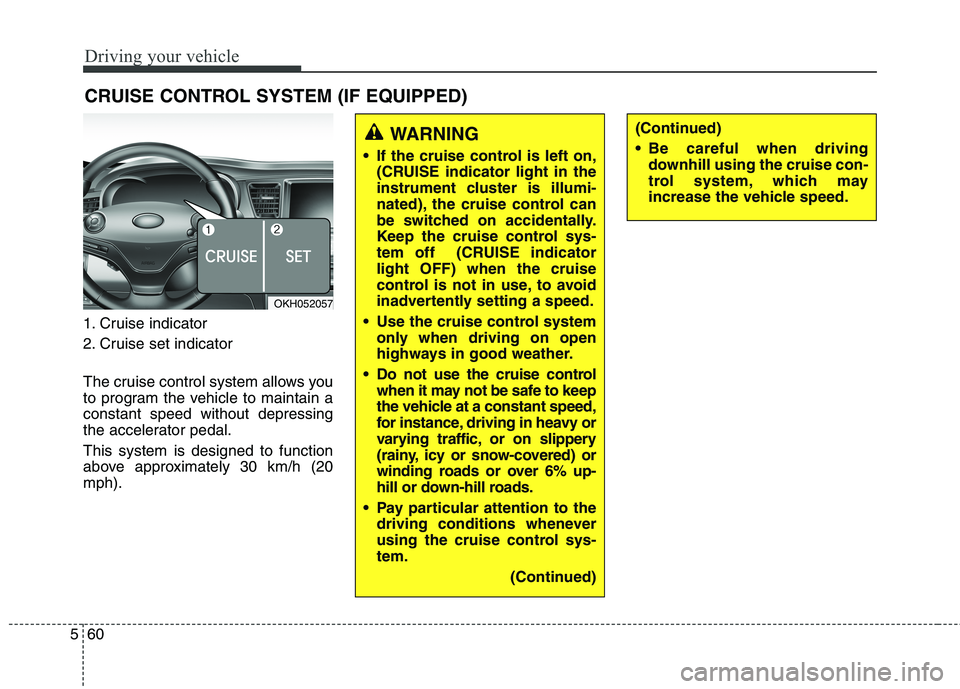
1. Cruise indicator
2. Cruise set indicator
The cruise control system allows you
to program the vehicle to maintain aconstant speed without depressing
the accelerator pedal. This system is designed to function
above approximately 30 km/h (20mph). CRUISE CONTROL SYSTEM (IF EQUIPPED)
WARNING
If the cruise control is left on, (CRUISE indicator light in the
instrument cluster is illumi-
nated), the cruise control can
be switched on accidentally.
Keep the cruise control sys-
tem off (CRUISE indicatorlight OFF) when the cruise
control is not in use, to avoid
inadvertently setting a speed.
Use the cruise control system only when driving on open
highways in good weather.
Do not use the cruise control when it may not be safe to keep
the vehicle at a constant speed,
for instance, driving in heavy or
varying traffic, or on slippery
(rainy, icy or snow-covered) or
winding roads or over 6% up-
hill or down-hill roads.
Pay particular attention to the driving conditions whenever
using the cruise control sys-tem.
(Continued)(Continued)
Be careful when drivingdownhill using the cruise con-
trol system, which may
increase the vehicle speed.
OKH052057
Page 308 of 486
Driving your vehicle
64
5
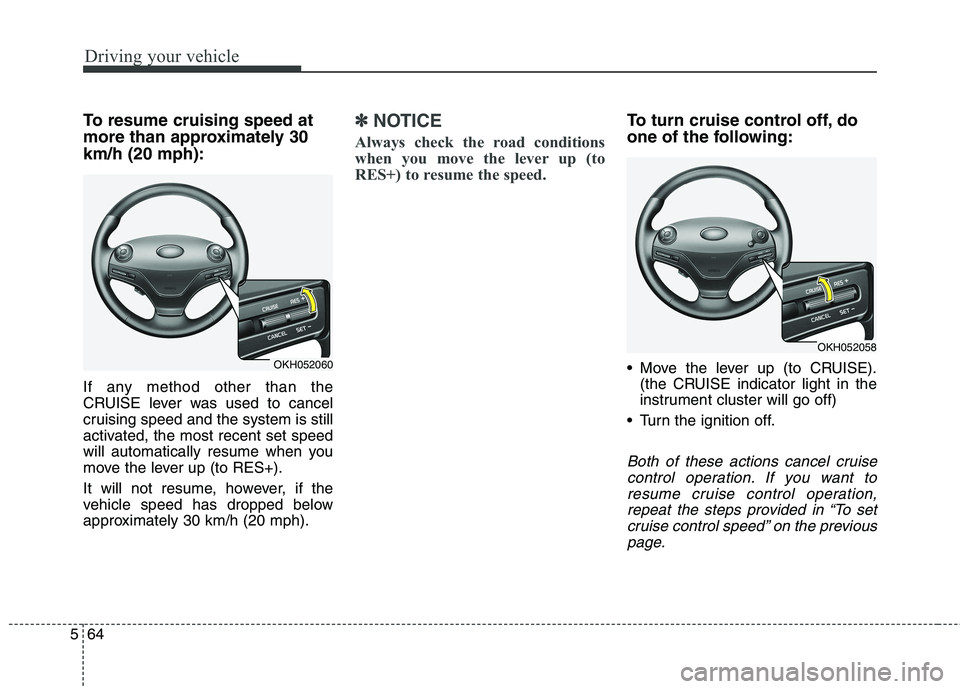
To resume cruising speed at
more than approximately 30km/h (20 mph):
If any method other than the
CRUISE lever was used to cancel
cruising speed and the system is still
activated, the most recent set speed
will automatically resume when you
move the lever up (to RES+).
It will not resume, however, if the
vehicle speed has dropped below
approximately 30 km/h (20 mph).✽✽
NOTICE
Always check the road conditions
when you move the lever up (to
RES+) to resume the speed.To turn cruise control off, do
one of the following:
Move the lever up (to CRUISE). (the CRUISE indicator light in the
instrument cluster will go off)
Turn the ignition off.
Both of these actions cancel cruise control operation. If you want toresume cruise control operation,repeat the steps provided in “To set cruise control speed” on the previouspage.
OKH052060
OKH052058
Page 309 of 486
565
Driving your vehicle
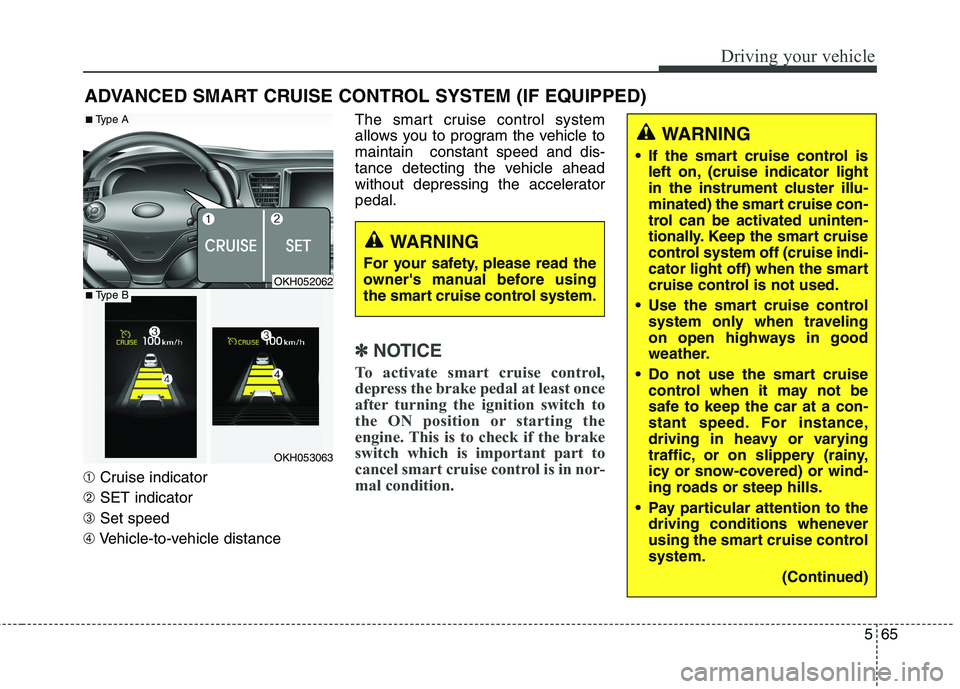
➀Cruise indicator
➁ SET indicator
➂ Set speed
➃ Vehicle-to-vehicle distance The smart cruise control system
allows you to program the vehicle tomaintain constant speed and dis-
tance detecting the vehicle ahead
without depressing the acceleratorpedal.
✽✽
NOTICE
To activate smart cruise control,
depress the brake pedal at least once
after turning the ignition switch to
the ON position or starting the
engine. This is to check if the brake
switch which is important part to
cancel smart cruise control is in nor-
mal condition.
ADVANCED SMART CRUISE CONTROL SYSTEM (IF EQUIPPED)
WARNING
If the smart cruise control is left on, (cruise indicator light
in the instrument cluster illu-
minated) the smart cruise con-
trol can be activated uninten-
tionally. Keep the smart cruise
control system off (cruise indi-
cator light off) when the smart
cruise control is not used.
Use the smart cruise control system only when traveling
on open highways in good
weather.
Do not use the smart cruise control when it may not be
safe to keep the car at a con-
stant speed. For instance,
driving in heavy or varying
traffic, or on slippery (rainy,
icy or snow-covered) or wind-
ing roads or steep hills.
Pay particular attention to the driving conditions whenever
using the smart cruise controlsystem.
(Continued)
WARNING
For your safety, please read the
owner's manual before using
the smart cruise control system.
OKH052062
OKH053063
■ Type A
■Type B
Page 310 of 486
Driving your vehicle
66
5
Speed setting
To set cruise control speed:
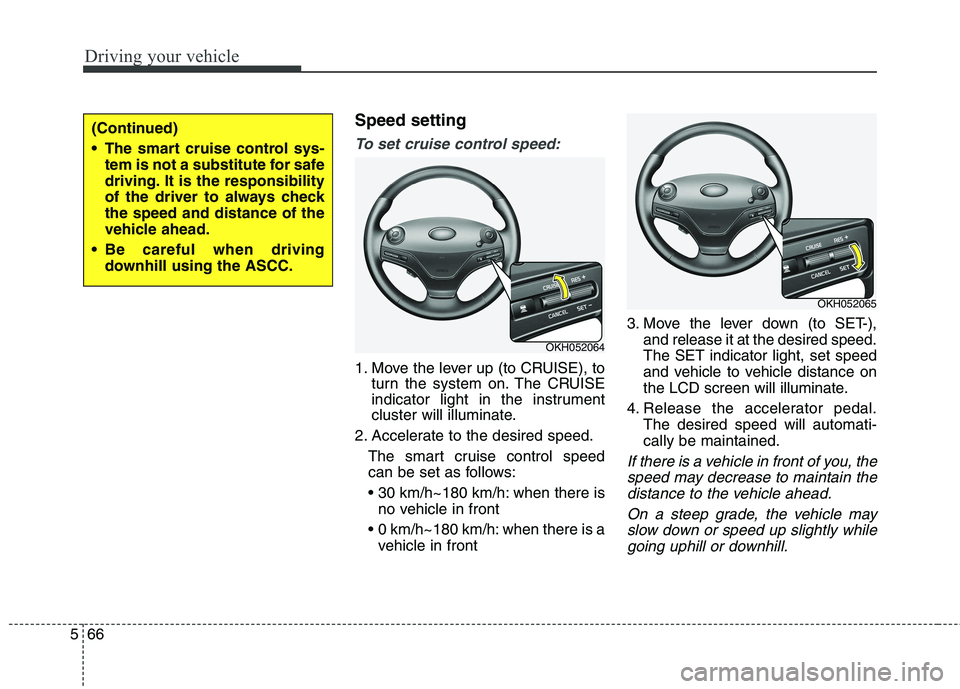
1. Move the lever up (to CRUISE), to
turn the system on. The CRUISE
indicator light in the instrument
cluster will illuminate.
2. Accelerate to the desired speed. The smart cruise control speed
can be set as follows:
when there isno vehicle in front
0 km/h~180 km/h: when there is a vehicle in front 3. Move the lever down (to SET-),
and release it at the desired speed. The SET indicator light, set speed
and vehicle to vehicle distance on
the LCD screen will illuminate.
4. Release the accelerator pedal. The desired speed will automati-cally be maintained.
If there is a vehicle in front of you, the
speed may decrease to maintain thedistance to the vehicle ahead.
On a steep grade, the vehicle mayslow down or speed up slightly while going uphill or downhill.
OKH052064
OKH052065
(Continued)
The smart cruise control sys- tem is not a substitute for safe
driving. It is the responsibility
of the driver to always checkthe speed and distance of the
vehicle ahead.
Be careful when driving downhill using the ASCC.
Page 438 of 486
761
Maintenance
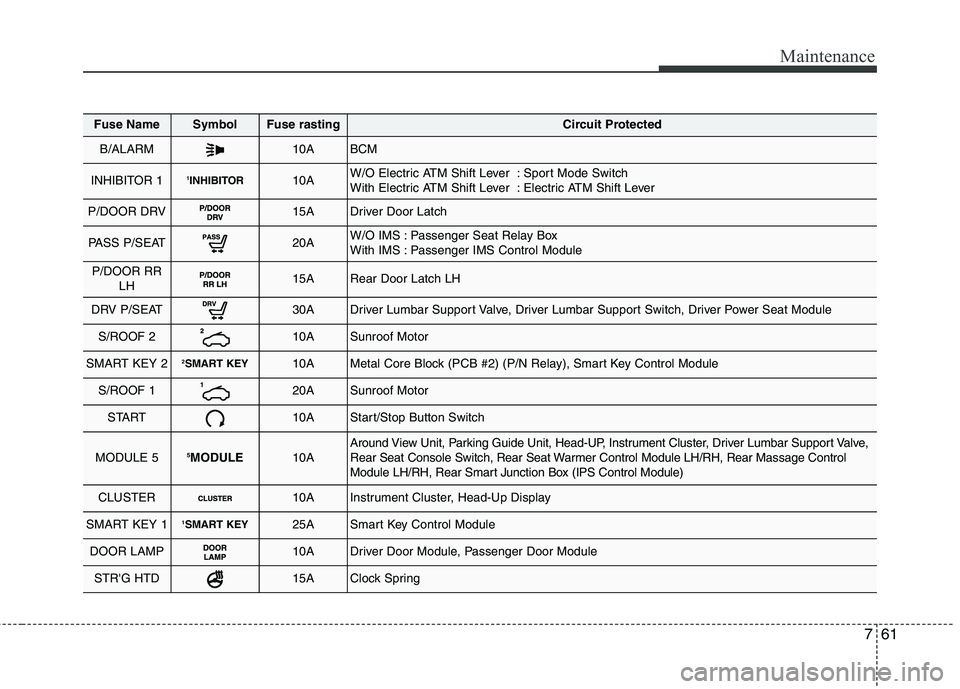
Fuse NameSymbolFuse rastingCircuit Protected
B/ALARM10ABCM
INHIBITOR 11INHIBITOR10AW/O Electric ATM Shift Lever : Sport Mode Switch
With Electric ATM Shift Lever : Electric ATM Shift Lever
P/DOOR DRV15ADriver Door Latch
PASS P/SEAT20AW/O IMS : Passenger Seat Relay Box
With IMS : Passenger IMS Control Module
P/DOOR RR
LH15ARear Door Latch LH
DRV P/SEAT30ADriver Lumbar Support Valve, Driver Lumbar Support Switch, Driver Power Seat Module
S/ROOF 210ASunroof Motor
SMART KEY 22SMART KEY10AMetal Core Block (PCB #2) (P/N Relay), Smart Key Control Module
S/ROOF 120ASunroof Motor
START10AStart/Stop Button Switch
MODULE 55
MODULE10AAround View Unit, Parking Guide Unit, Head-UP, Instrument Cluster, Driver Lumbar Support Valve,
Rear Seat Console Switch, Rear Seat Warmer Control Module LH/RH, Rear Massage Control
Module LH/RH, Rear Smart Junction Box (IPS Control Module)
CLUSTER10AInstrument Cluster, Head-Up Display
SMART KEY 11SMART KEY25ASmart Key Control Module
DOOR LAMP10ADriver Door Module, Passenger Door Module
STR'G HTD15AClock Spring
Page 439 of 486
Maintenance
62
7
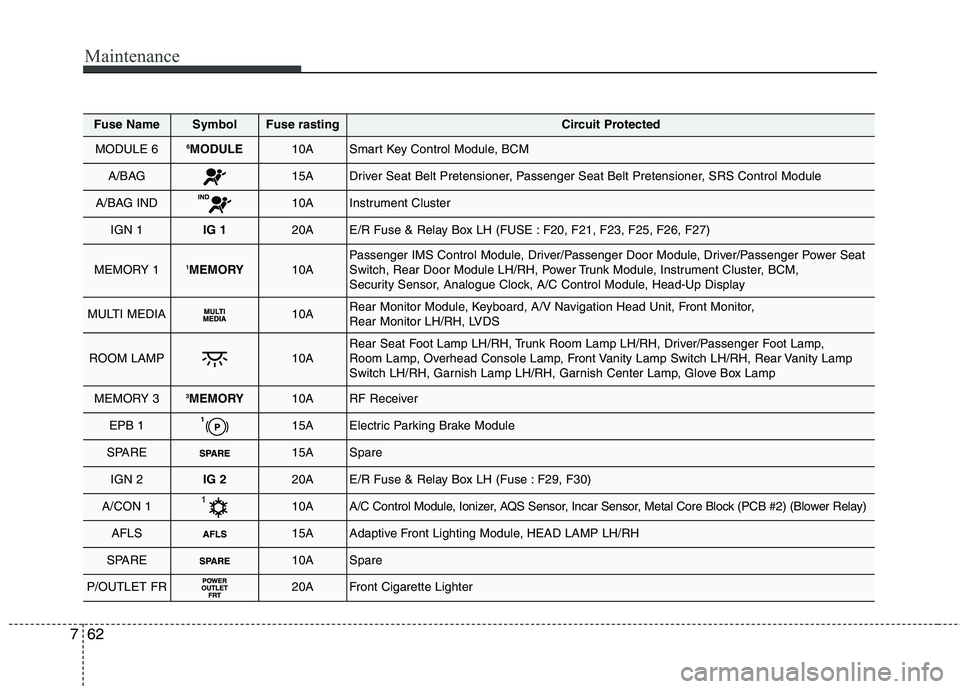
Fuse NameSymbolFuse rastingCircuit Protected
MODULE 66
MODULE10ASmart Key Control Module, BCM
A/BAG15ADriver Seat Belt Pretensioner, Passenger Seat Belt Pretensioner, SRS Control Module
A/BAG IND10AInstrument Cluster
IGN 1IG 120AE/R Fuse & Relay Box LH (FUSE : F20, F21, F23, F25, F26, F27)
MEMORY 11 MEMORY10APassenger IMS Control Module, Driver/Passenger Door Module, Driver/Passenger Power Seat
Switch, Rear Door Module LH/RH, Power Trunk Module, Instrument Cluster, BCM,
Security Sensor, Analogue Clock, A/C Control Module, Head-Up Display
MULTI MEDIA10ARear Monitor Module, Keyboard, A/V Navigation Head Unit, Front Monitor,
Rear Monitor LH/RH, LVDS
ROOM LAMP10ARear Seat Foot Lamp LH/RH, Trunk Room Lamp LH/RH, Driver/Passenger Foot Lamp,
Room Lamp, Overhead Console Lamp, Front Vanity Lamp Switch LH/RH, Rear Vanity Lamp
Switch LH/RH, Garnish Lamp LH/RH, Garnish Center Lamp, Glove Box Lamp
MEMORY 33MEMORY10ARF Receiver
EPB 115AElectric Parking Brake Module
SPARE15ASpare
IGN 2IG 220AE/R Fuse & Relay Box LH (Fuse : F29, F30)
A/CON 110AA/C Control Module, Ionizer, AQS Sensor, Incar Sensor, Metal Core Block (PCB #2) (Blower Relay)
AFLS15AAdaptive Front Lighting Module, HEAD LAMP LH/RH
SPARE10ASpare
P/OUTLET FR20AFront Cigarette Lighter
Page 479 of 486
Index
4
I
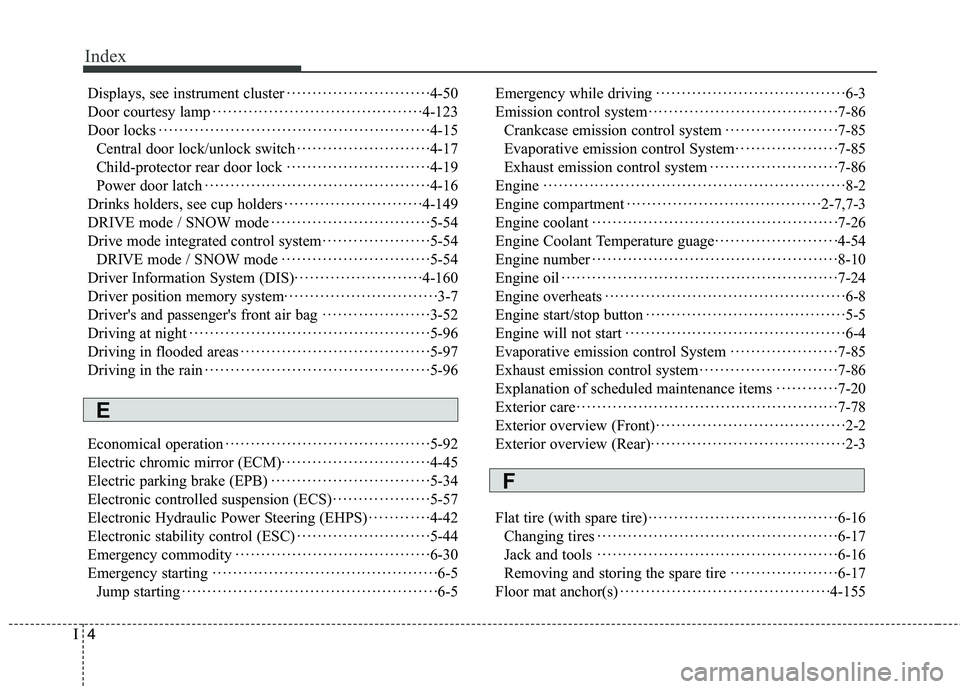
Displays, see instrument cluster