warning light KIA QUORIS 2015 Owner's Manual
[x] Cancel search | Manufacturer: KIA, Model Year: 2015, Model line: QUORIS, Model: KIA QUORIS 2015Pages: 486, PDF Size: 35.55 MB
Page 97 of 486

Features of your vehicle
16
4
Power door latch (if equipped)
If a door isn’t closed completely but is closed to the first detent position,
the door will close automatically. Operating door locks from
inside the vehicle
With the door lock button
To unlock a door, push the door
lock button (1) to the “Unlock” posi-
tion. The red mark (2) on the door
lock button will be visible.
To lock a door, push the door lock button (1) to the “Lock” position. If
the door is locked properly, the red
mark (2) on the door lock button
will not be visible.
To open a door, pull the door han- dle (3) outward. If the inner door handle of the dri-
ver’s (or front passenger’s) door is
pulled when the door lock button is
in lock position, the button is
unlocked and door opens.
Doors cannot be locked if the smart key is in the vehicle and anydoor is opened.
OKH042012
Lock Unlock
WARNING - Door lock
malfunction
If a power door lock ever fails to
function while you are in the
vehicle, try one or more of the
following techniques to exit:
Operate the door unlock fea- ture repeatedly (both electron-
ic and manual) while simulta-
neously pulling on the door
handle.
Operate the other door locks and handles, front and rear.
Lower a front window and use the key to unlock the door
from outside.
OKH042011
WARNING
If the door is open slightly, be
careful not to nip fingers in the
door.
CAUTION
Before closing the door, ensure that all obstructions are removed.
Page 113 of 486
Features of your vehicle
32
4
Opening the hood
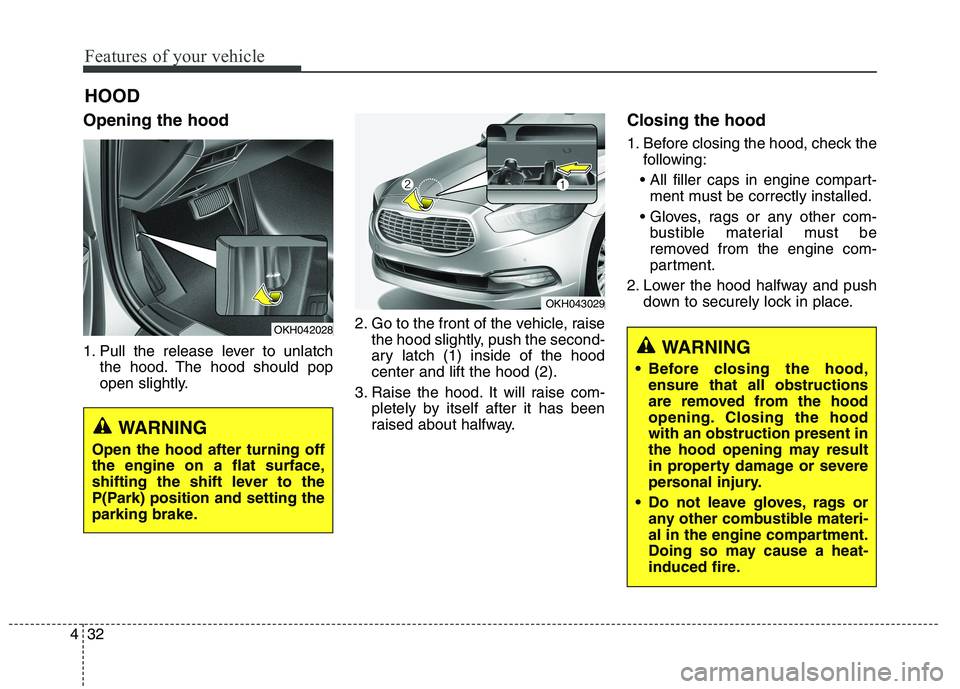
1. Pull the release lever to unlatch
the hood. The hood should pop
open slightly. 2. Go to the front of the vehicle, raise
the hood slightly, push the second-
ary latch (1) inside of the hoodcenter and lift the hood (2).
3. Raise the hood. It will raise com- pletely by itself after it has been
raised about halfway. Closing the hood
1. Before closing the hood, check the
following:
ment must be correctly installed.
bustible material must be
removed from the engine com-
partment.
2. Lower the hood halfway and push down to securely lock in place.
HOOD
OKH042028
OKH043029
WARNING
Before closing the hood, ensure that all obstructions
are removed from the hood
opening. Closing the hoodwith an obstruction present in
the hood opening may result
in property damage or severe
personal injury.
Do not leave gloves, rags or any other combustible materi-
al in the engine compartment.
Doing so may cause a heat-
induced fire.
WARNING
Open the hood after turning off
the engine on a flat surface,
shifting the shift lever to the
P(Park) position and setting the
parking brake.
Page 115 of 486

Features of your vehicle
34
4
Opening the fuel filler lid
The fuel filler lid must be opened
from inside the vehicle by pushing
the fuel filler lid opener button.
✽✽
NOTICE
If the fuel filler lid will not open
because ice has formed around it,
tap lightly or push on the lid to break
the ice and release the lid. Do not pry
on the lid. If necessary, spray around
the lid with an approved de-icer fluid
(do not use radiator anti-freeze) or
move the vehicle to a warm place
and allow the ice to melt.
1. Stop the engine.
2. Push the fuel filler lid opener but- ton, then the fuel filler lid slowly open (1).
3. To remove the cap, turn the fuel tank cap (2) counterclockwise.
4. Refuel as needed. Closing the fuel filler lid
1. To install the cap, turn it clockwise
until it “clicks”. This indicates that the cap is securely tightened.
2. Close the fuel filler lid and push it lightly and make sure that it issecurely closed.
FUEL FILLER LID OKH042030
OKH042032
WARNING
- Refueling
If pressurized fuel sprays out, it can cover your clothes or
skin and thus subject you to
the risk of fire and burns.
Always remove the fuel cap
carefully and slowly. If the cap
is venting fuel or if you hear a
hissing sound, wait until the
condition stops before com-
pletely removing the cap.
Do not "top off" after the noz- zle automatically shuts offwhen refueling.
Always check that the fuel cap is installed securely to prevent
fuel spillage in the event of anaccident.
Page 123 of 486

Features of your vehicle
42
4
Electronic Hydraulic Power Steering (EHPS) EHPS uses an electromotor to assist
you in steering the vehicle. It senses
the vehicle speed and road condition.
If the engine is off or if the power
steering system becomes inoperative,
the vehicle may still be steered, but it
will require increased steering effort.
Should you notice any change in the
effort required to steer during normal
vehicle operation, we recommend
that the system be checked by an
authorized Kia dealer.✽✽
NOTICE
If the power steering drive belt
breaks or if the power steering
pump malfunctions, the steering
effort will greatly increase.
✽
✽ NOTICE
If the vehicle is parked for extended
periods outside in cold weather
(below -10°C/14°F), the power steer-
ing may require increased effort
when the engine is first started. This
is caused by increased fluid viscosity
due to the cold weather and does not
indicate a malfunction.
When this happens, increase the
engine RPM by depressing accelera-
tor until the RPM reaches 1,500 rpm
then release or let the engine idle for
two or three minutes to warm up the
fluid.
Tilt steering
Tilt steering allows you to adjust the
steering wheel before you drive. You
can also raise it to give your legs
more room when you exit and enter
the vehicle.
The steering wheel should be posi-
tioned so that it is comfortable for
you to drive, while permitting you to
see the instrument panel warning
lights and gauges.
STEERING WHEEL
WARNING
Never adjust the angle of the steering wheel while driving.
You may lose steering control
and cause severe personal
injury, death or accidents.
After adjusting, push the steering wheel both up and
down to be certain it is lockedin position.
CAUTION
Never hold the steering wheel
against a stop (extreme right orleft turn) for more than 5 sec- onds with the engine running.Holding the steering wheel formore than 5 seconds in either position may cause damage tothe power steering pump.
Page 126 of 486
445
Features of your vehicle
Inside rearview mirror
Adjust the rearview mirror to center
on the view through the rear window.
Make this adjustment before you
start driving.Electric chromic mirror (ECM)
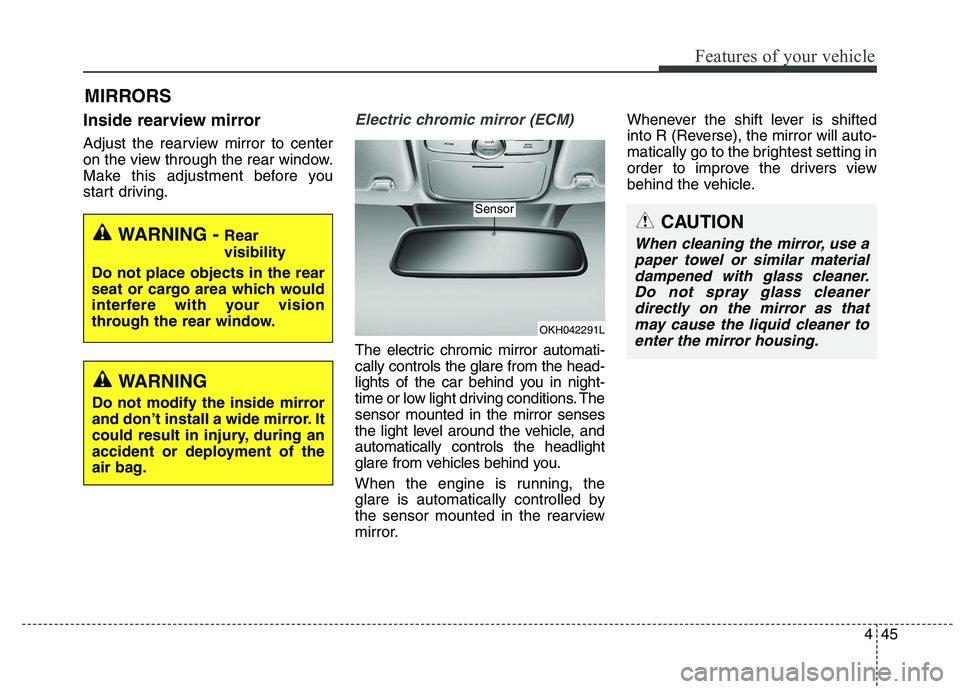
The electric chromic mirror automati- cally controls the glare from the head-
lights of the car behind you in night-
time or low light driving conditions. Thesensor mounted in the mirror senses
the light level around the vehicle, andautomatically controls the headlight
glare from vehicles behind you.
When the engine is running, the
glare is automatically controlled by
the sensor mounted in the rearview
mirror.Whenever the shift lever is shifted
into R (Reverse), the mirror will auto-
matically go to the brightest setting in
order to improve the drivers view
behind the vehicle.
MIRRORS
CAUTION
When cleaning the mirror, use a
paper towel or similar materialdampened with glass cleaner. Do not spray glass cleanerdirectly on the mirror as thatmay cause the liquid cleaner toenter the mirror housing.WARNING - Rear visibility
Do not place objects in the rear
seat or cargo area which would
interfere with your vision
through the rear window.
WARNING
Do not modify the inside mirror
and don’t install a wide mirror. It
could result in injury, during an
accident or deployment of the
air bag.
OKH042291L
Sensor
Page 131 of 486
Features of your vehicle
50
4
INSTRUMENT CLUSTER
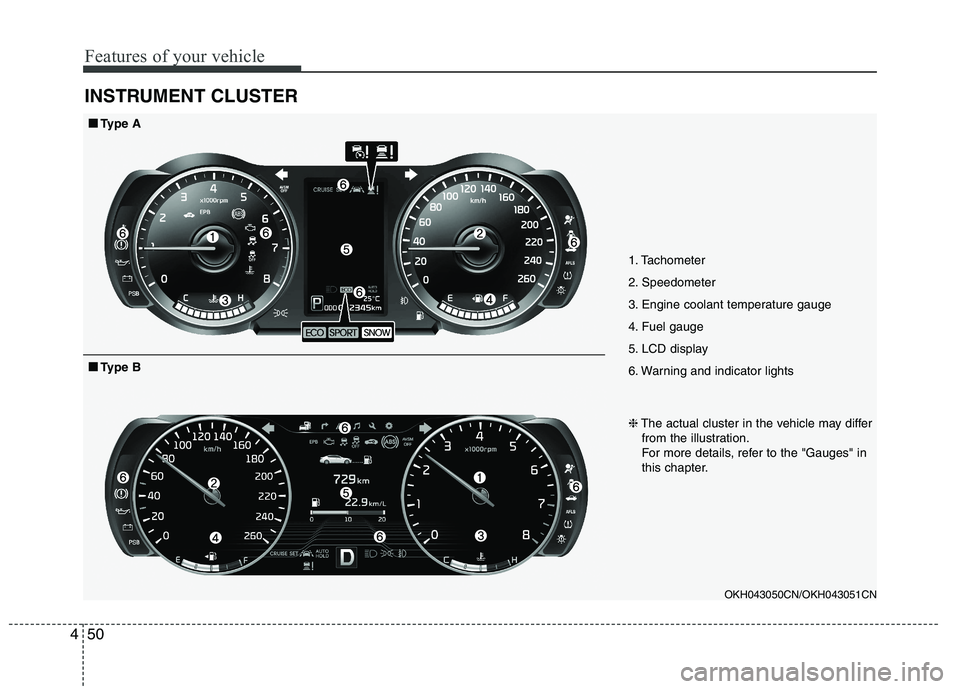
1. Tachometer
2. Speedometer
3. Engine coolant temperature gauge
4. Fuel gauge
5. LCD display
6. Warning and indicator lights
OKH043050CN/OKH043051CN
■■Type A
❈The actual cluster in the vehicle may differ
from the illustration.
For more details, refer to the "Gauges" in
this chapter.
■■ Type B
Page 132 of 486
451
Features of your vehicle
Instrument Cluster ControlAdjusting Instrument ClusterIllumination
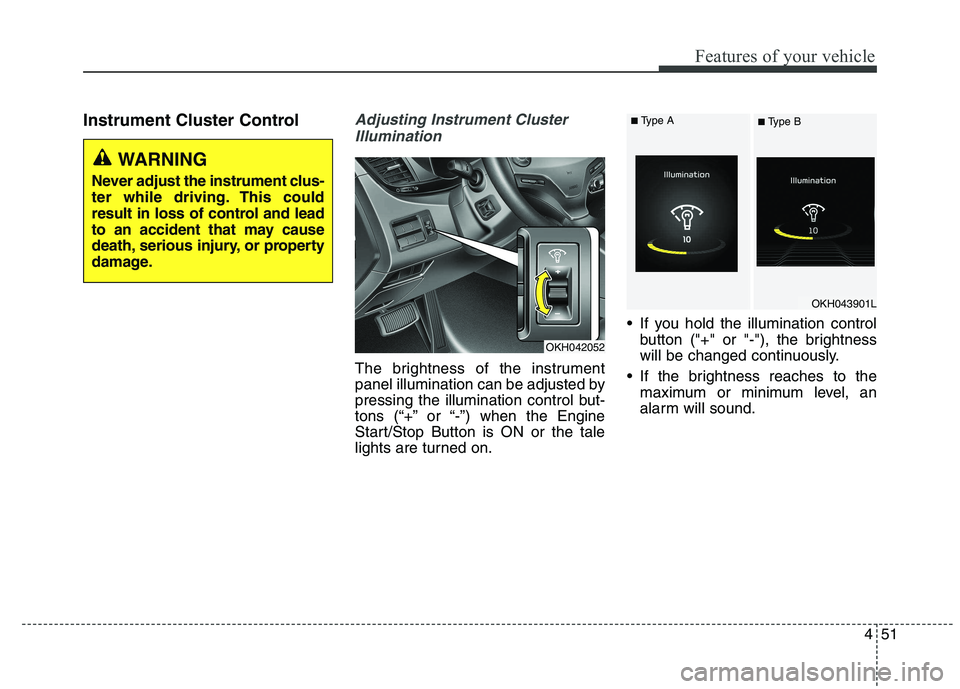
The brightness of the instrument
panel illumination can be adjusted by
pressing the illumination control but-
tons (“+” or “-”) when the Engine
Start/Stop Button is ON or the tale
lights are turned on. If you hold the illumination control
button ("+" or "-"), the brightness
will be changed continuously.
If the brightness reaches to the maximum or minimum level, an
alarm will sound.
OKH042052
OKH043901L
WARNING
Never adjust the instrument clus-
ter while driving. This could
result in loss of control and lead
to an accident that may cause
death, serious injury, or property
damage.
■ Type A
■ Type B
Page 136 of 486
455
Features of your vehicle
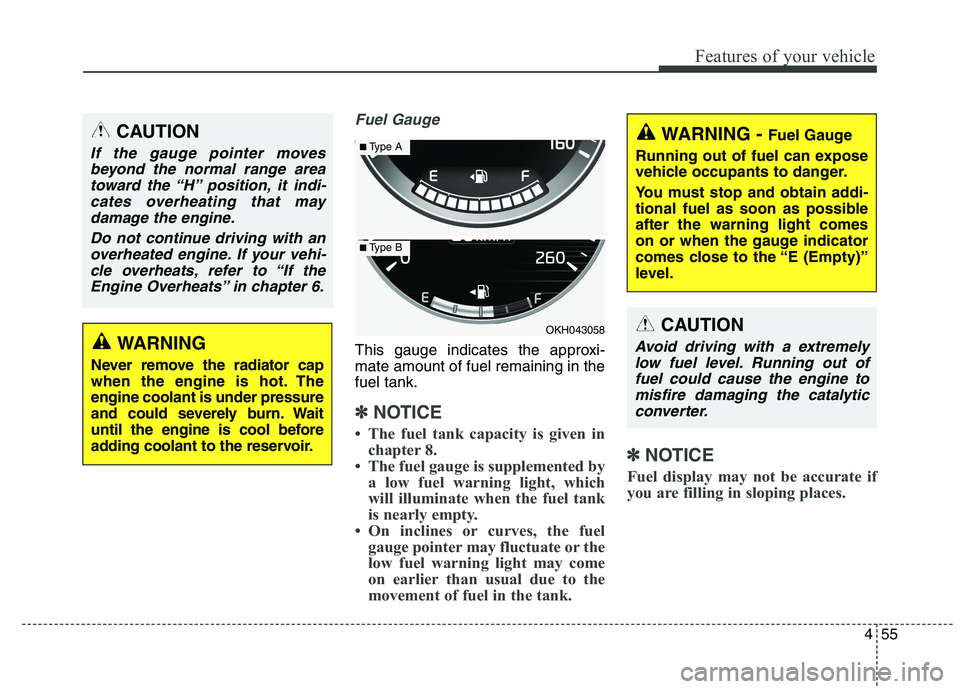
Fuel Gauge
This gauge indicates the approxi- mate amount of fuel remaining in thefuel tank.
✽✽NOTICE
The fuel tank capacity is given in chapter 8.
The fuel gauge is supplemented by a low fuel warning light, which
will illuminate when the fuel tank
is nearly empty.
On inclines or curves, the fuel gauge pointer may fluctuate or the
low fuel warning light may come
on earlier than usual due to the
movement of fuel in the tank. ✽
✽
NOTICE
Fuel display may not be accurate if
you are filling in sloping places.
WARNING
Never remove the radiator cap
when the engine is hot. Theengine coolant is under pressure
and could severely burn. Wait
until the engine is cool before
adding coolant to the reservoir.
CAUTION
If the gauge pointer moves beyond the normal range area toward the “H” position, it indi-cates overheating that maydamage the engine.
Do not continue driving with anoverheated engine. If your vehi- cle overheats, refer to “If theEngine Overheats” in chapter 6.
OKH043058
■ Type A
■Type B
WARNING - Fuel Gauge
Running out of fuel can expose
vehicle occupants to danger.
You must stop and obtain addi-
tional fuel as soon as possibleafter the warning light comes
on or when the gauge indicator
comes close to the “E (Empty)”
level.
CAUTION
Avoid driving with a extremely low fuel level. Running out offuel could cause the engine tomisfire damaging the catalytic converter.
Page 142 of 486
461
Features of your vehicle
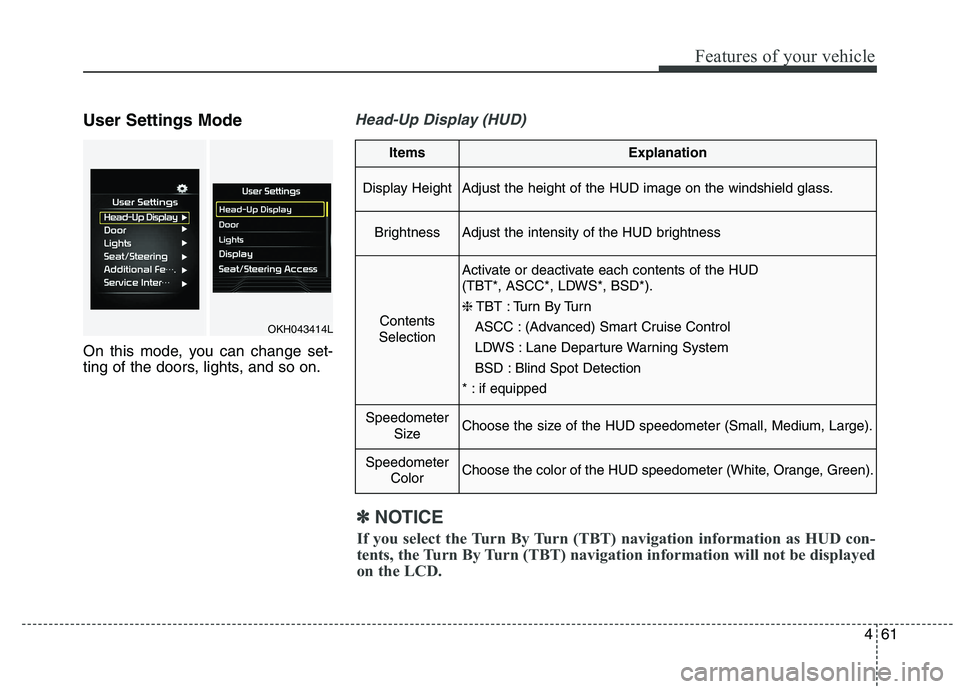
User Settings Mode
On this mode, you can change set-
ting of the doors, lights, and so on.Head-Up Display (HUD)
ItemsExplanation
Display HeightAdjust the height of the HUD image on the windshield glass.
BrightnessAdjust the intensity of the HUD brightness
Contents
Selection
Activate or deactivate each contents of the HUD
(TBT*, ASCC*, LDWS*, BSD*). ❈ TBT : Turn By Turn
ASCC : (Advanced) Smart Cruise Control
LDWS : Lane Departure Warning System
BSD : Blind Spot Detection
* : if equipped
Speedometer SizeChoose the size of the HUD speedometer (Small, Medium, Large).
SpeedometerColorChoose the color of the HUD speedometer (White, Orange, Green).
✽✽NOTICE
If you select the Turn By Turn (TBT) navigation information as HUD con-
tents, the Turn By Turn (TBT) navigation information will not be displayed
on the LCD.
OKH043414L
Page 151 of 486

Features of your vehicle
70
4
Press START button again
This warning message illuminates
if you can not operate the Engine
Start/Stop Button when there is a
problem with the Engine Start/StopButton system.
It means that you could start the engine by pressing the Engine
Start/ Stop Button once more.
If the warning illuminates each time you press the Engine Start/Stop
Button, we recommend that you
have the vehicle inspected by an
authorized Kia dealer.
Press START button with key
This warning message illuminatesif you press the Engine Start/Stop
Button while the warning message
“Key not detected” is illuminating.
At this time, the immobilizer indica- tor light blinks.
Check BRAKE SWITCH fuse
This warning message illuminatesif the brake switch fuse is discon- nected.
It means that you should replace the fuse with a new one. If that is
not possible, you can start the
engine by pressing the Engine
Start/Stop Button for 10 seconds in
the ACC position.
OKH043425L
■Type A■Type B
OKH043424L
■ Type A■Type B
OKH043426L
■Type A■Type B