tire pressure KIA QUORIS 2017 Owners Manual
[x] Cancel search | Manufacturer: KIA, Model Year: 2017, Model line: QUORIS, Model: KIA QUORIS 2017Pages: 514, PDF Size: 35.2 MB
Page 148 of 514

461
Features of your vehicle
LCD ModesLCD DISPLAY
Modes SymbolExplanation
Trip Computer This mode displays driving information like the tripmeter, fuel economy,
and so on. For more details, refer to “Trip Computer” in this chapter.
Tu r n B y Tu r n
(if equipped)This mode displays the state of the navigation.
ASCC
(if equipped)This mode displays the state of the Advanced Smart Cruise Control system (ASCC).
For more details, refer to "Advanced Smart Cruise Control system (ASCC)" in chapter 5.
A/VThis mode displays the state of the A/V system.
Information
This mode informs of the tire pressure information, service interval (mileage or days) and
warning messages related to the advanced smart cruise control system, pre-active seatbelt, and so on.
User SettingsOn this mode, you can change settings of the doors, lamps and so on.
❈ For controlling the LCD modes, refer to "LCD Display Control" in this chapter.
or
Page 151 of 514
Features of your vehicle
64
4
Information Mode
This mode shows the service interval
(mileage and days) and pressure of
each tire.
To change the information mode,
press the . (MOVE) button. ❈ For the setting of the service inter-
val, refer to "User Settings Mode"
of the LCD display.Service Interval
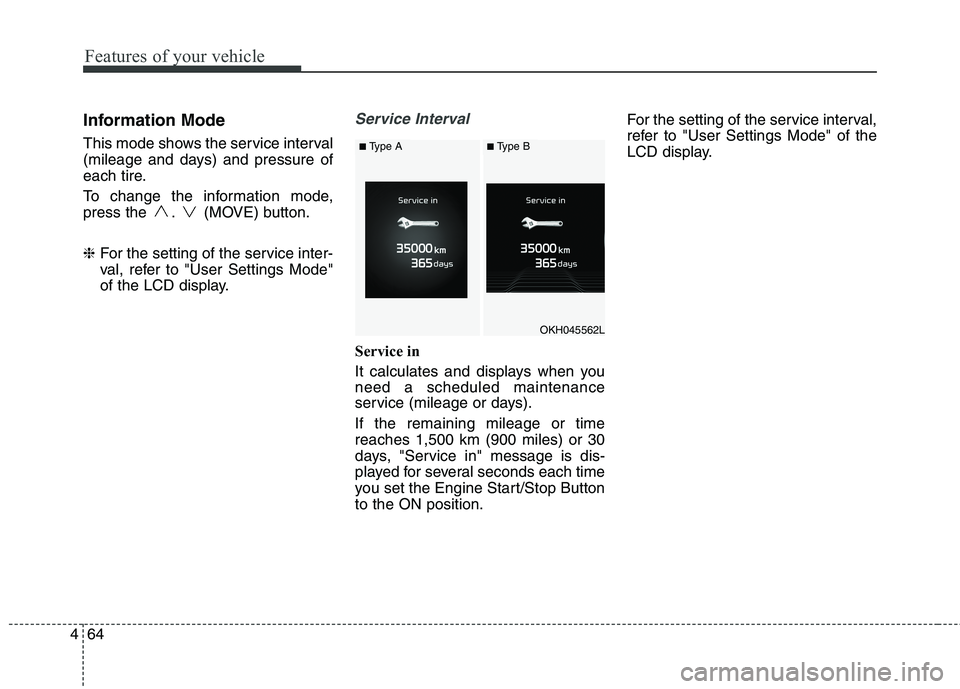
Service in
It calculates and displays when you need a scheduled maintenance
service (mileage or days). If the remaining mileage or time reaches 1,500 km (900 miles) or 30
days, "Service in" message is dis-
played for several seconds each time
you set the Engine Start/Stop Buttonto the ON position. For the setting of the service interval,
refer to "User Settings Mode" of the
LCD display.
OKH045562L
■
Type A■Type B
Page 153 of 514

Features of your vehicle
66
4
Tire Pressure information
This mode displays the pressure sta-
tus of each tire.
You can change the tire pressure unit
in "User settings" mode. ❈ For more details, refer to "User
Settings mode" in this chapter.
Warning Message
If one of followings occurs, warning
messages will be displayed on the
information mode for several seconds.
- Malfunction of below systems
Blind Spot Detection (BSD)
Preactive Seat Belt (PSB)
Electronic Control Suspension
(ECS)
Tire Pressure Monitoring System
Advanced Smart Cruise Control
Low washer fluid
LED Headlamp (LED) User Settings Mode
On this mode, you can change set-
ting of the doors, lights, and so on.
OKH045525LOKH043415L
■
Type A■Type B■ Type A■Type B
WARNING
Do not adjust the User Setting
while driving. You may lose your
steering control and cause
severe personal injury or acci-dents.
Page 160 of 514

473
Features of your vehicle
Other Features
ItemsExplanation
Fuel Economy Auto Reset
The average fuel economy will not reset automatically whenever refueling.
The average fuel economy will reset automatically when refueling.
For more details, refer to “Trip Computer” in this chapter.
Wiper/Light DisplayChoose the Wiper or Light Display.
Tire Pressure UnitChoose the tire pressure unit. (psi, kPa, Bar)
Haptic Steering SystemSwitch (if equipped)Adjust the rotating effort of the haptic switch on the steering wheel for LCD display control
(Strong, Normal, Soft).
For the haptic switch, refer to "LCD Display Control" in this chapter.
ItemsExplanation
Service Interval
(Except Europe)
On this mode, you can activate the service interval function with mileage (km or mi.) and period (months).
The service interval function will be deactivated.
Service interval
Page 168 of 514

481
Features of your vehicle
Turn on FUSE SWITCH
This warning message illuminatesif the fuse switch on the fuse box is
OFF.
It means that you should turn the fuse switch on.
For more details, refer to “Fuses” inchapter 7.
Low Tire Pressure (if equipped)
This warning message illuminates if the tire pressure is low with the
Engine Start/Stop button in ONposition.
For more details, refer to "Tire
Pressure Monitoring System (TPMS)"in chapter 6.
Align steering wheel
This warning message illuminates if you start the engine when the
steering wheel is turned to more
than 90 degrees to the left or right.
It means that you should turn the steering wheel and make the angle
of the steering wheel be less than
30 degrees.
OKH043433L
■Type A■Type B
OKH043415L
■Type A■Type B
OKH045435L
■Type A■Type B
Page 182 of 514

495
Features of your vehicle
Low Tire PressureWarning Light (if equipped)
This warning light illuminates:
Once you set the Engine Start/Stop Button to the ON position.
- It illuminates for approximately 3seconds and then goes off.
When one or more of your tires are significantly underinflated (The
location of the underinflated tires
are displayed on the LCD display).
For more details, refer to “Tire
Pressure Monitoring System
(TPMS)” in chapter 6. This warning light remains on after
blinking for approximately 60 seconds
or repeats blinking and off at the
intervals of approximately 3 seconds:
When there is a malfunction with
the TPMS.
In this case, we recommend that
you have the vehicle inspected by
an authorized Kia dealer as soon
as possible.
For more details, refer to “Tire
Pressure Monitoring System
(TPMS)” in chapter 6.
Autonomous Emergency
Braking (AEB) Warning light (if equipped)
This indicator light illuminates:
When there is a malfunction with the AEB.
In this case, we recommend that you
have the vehicle inspected by an
authorized Kia dealer.
Master Warning Light
This indicator light illuminates:
When there is a malfunction on the pre-active seat belt, electronic con-
trol suspension, or advanced smart
cruise control or other systems etc.
To identify the details of the warn-
ing, look at the LCD display.WARNING - Safe Stopping
The TPMS cannot alert you to severe and sudden tire damage
caused by external factors.
If you notice any vehicle insta- bility, immediately take your
foot off the accelerator pedal,
apply the brakes gradually with
light force, and slowly move to
a safe position off the road.
Page 303 of 514

Driving your vehicle
42
5
Anti-lock brake system (ABS)
The ABS continuously senses the
speed of the wheels. If the wheels
are going to lock, the ABS system
repeatedly modulates the hydraulic
brake pressure to the wheels.
When you apply your brakes under
conditions which may lock the wheels,
you may hear a “tik-tik’’ sound from the
brakes, or feel a corresponding sensa-
tion in the brake pedal. This is normal
and it means your ABS is active.
In order to obtain the maximum ben-
efit from your ABS in an emergencysituation, do not attempt to modulate
your brake pressure and do not try to
pump your brakes.Press your brake pedal as hard as
possible or as hard as the situation
warrants and allow the ABS to con-
trol the force being delivered to the
brakes.
✽✽
NOTICE
A click sound may be heard in the
engine compartment when the vehi-
cle begins to move after the engine is
started. These conditions are normal
and indicate that the anti-lock brake
system is functioning properly.
Even with the anti-lock brake sys- tem, your vehicle still requires suf-
ficient stopping distance. Always
maintain a safe distance from the
vehicle in front of you.
Always slow down when cornering. The anti-lock brake system cannot
prevent accidents resulting from
excessive speeds.
On loose or uneven road surfaces, operation of the anti-lock brake sys-
tem may result in a longer stopping
distance than for vehicles equipped
with a conventional brake system.
(Continued)
On roads where the road sur-face is pitted or has different surface height.
The safety features of an ABS
(or ESC) equipped vehicle
should not be tested by high
speed driving or cornering. This
could endanger the safety of
yourself or others.
WARNING
ABS (or ESC) will not prevent
accidents due to improper or
dangerous driving maneuvers.
Even though vehicle control is
improved during emergency
braking, always maintain a safe
distance between you and
objects ahead. Vehicle speeds
should always be reduced dur-
ing extreme road conditions.
The braking distance for cars
equipped with an anti-lock brak-
ing system (or Electronic
Stability Control system) may be
longer than for those without it
in the following road conditions. During these conditions the
vehicle should be driven atreduced speeds:
Rough, gravel or snow-cov- ered roads.
With tire chains installed.
(Continued)
Page 357 of 514

Driving your vehicle
96
5
Non-operating condition
Driver's Attention
The driver must be cautious in the
below situations for the system may
not assist the driver and may not
work properly.
- Curved roads, tollgates, etc.
- The surrounding of the sensor is
polluted with rain, snow, mud, etc
- The rear bumper near the sensor is covered or hidden with a foreign
matter such as a sticker, bumperguard, bicycle stand etc.
- The rear bumper is damaged or the sensor is out of place.
- The height of the vehicle is altered such as when the trunk is loaded
with heavy objects, or there is lowtire pressure etc.
- Bad weather such as heavy rain or snow.
- A fixed object is near such as a guardrail, tunnel, human and ani-mal etc.
CAUTION
The system may not work prop-
erly if the bumper has beenreplaced or if repair work has been done near the sensor.
The detection area differs according to the roads width.If the road is narrow the sys-tem may detect other vehicles in the next lane.
in addition, if the road is very wide the system may notdetect other vehicles.
The system may turn off due to strong electromagnetic waves.
(Continued)
The Blind Spot DetectionSystem (BSD) and Rear Cross
Traffic Alert (RCTA) are not a
substitute for proper and safe
driving. Always drive safely
and use caution when chang-
ing lanes or backing the vehi-
cles up. The Blind Spot
Detection System (BSD) may
not detect every object along-
side the vehicle.
Page 359 of 514

Driving your vehicle
98
5
ECONOMICAL OPERATION
Your vehicle's fuel economy depends
mainly on your style of driving, where
you drive and when you drive.
Each of these factors affects how
many kilometers (miles) you can get
from a liter (gallon) of fuel. To operate
your vehicle as economically as pos-
sible, use the following driving sug-
gestions to help save money in bothfuel and repairs:
Drive smoothly. Accelerate at a moderate rate. Do not make "jack-
rabbit" starts or full-throttle shifts and
maintain a steady cruising speed.
Do not race between stoplights. Try
to adjust your speed to the traffic so
you do not have to change speeds
unnecessarily. Avoid heavy traffic
whenever possible. Always maintain
a safe distance from other vehicles
so you can avoid unnecessary brak-
ing. This also reduces brake wear.
Drive at a moderate speed. The faster you drive, the more fuel your
vehicle uses. Driving at a moderate
speed, especially on the highway,
is one of the most effective ways toreduce fuel consumption. Do not "ride" the brake pedal. This
can increase fuel consumption and
also increase wear on these com-
ponents. In addition, driving with
your foot resting on the brake pedal
may cause the brakes to overheat,
which reduces their effectiveness
and may lead to more serious con-
sequences.
Take care of your tires. Keep them inflated to the recommended pres-
sure. Incorrect inflation, either too
much or too little, results in unnec-
essary tire wear. Check the tirepressures at least once a month.
Be sure that the wheels are aligned correctly. Improper align-ment can result from hitting curbs
or driving too fast over irregular
surfaces. Poor alignment causes
faster tire wear and may also result
in other problems as well as
greater fuel consumption. Keep your vehicle in good condi-
tion. For better fuel economy and
reduced maintenance costs, main-
tain your vehicle in accordancewith the maintenance schedule in
section 7. If you drive your vehicle
in severe conditions, more frequentmaintenance is required (see sec-
tion 7 for details).
Keep your vehicle clean. For maxi- mum service, your vehicle should
be kept clean and free of corrosive
materials. It is especially important
that mud, dirt, ice, etc. not be
allowed to accumulate on the
underside of the vehicle. This extra
weight can result in increased fuel
consumption and also contribute tocorrosion.
Travel lightly. Do not carry unnec- essary weight in your vehicle.
Weight reduces fuel economy.
Do not let the engine idle longer than necessary. If you are waiting
(and not in traffic), turn off your
engine and restart only when
you're ready to go.
Page 364 of 514
5103
Driving your vehicle
If your tires are not in good condi-tion, making a quick stop on wet
pavement can cause a skid and
possibly lead to an accident. Be
sure your tires are in good shape.
Turn on your headlights to make it easier for others to see you.
Driving too fast through large pud- dles can affect your brakes. If you
must go through puddles, try to
drive through them slowly.
If you believe you may have gotten your brakes wet, apply them lightly
while driving until normal braking
operation returns. Driving in flooded areas
Avoid driving through flooded areas
unless you are sure the water is nohigher than the bottom of the wheel
hub. Drive through any water slowly.
Allow adequate stopping distance
because brake performance may be
affected.
After driving through water, dry the
brakes by gently applying them sev-
eral times while the vehicle is moving
slowly.
Driving off-road
Drive carefully off-road because your
vehicle may be damaged by rocks of
roots of trees. Become familiar with
the off-road conditions where you
are going to drive before you begin
driving. Highway driving
Tires
Adjust the tire inflation pressures to
specification. Low tire inflation pres-
sures will result in overheating and
possible failure of the tires.
Avoid using worn or damaged tires
which may result in reduced traction
or tire failure.
✽✽
NOTICE
Never exceed the maximum tire
inflation pressure shown on the tires.
OKH055097K