ignition KIA Rio 2006 2.G Owner's Guide
[x] Cancel search | Manufacturer: KIA, Model Year: 2006, Model line: Rio, Model: KIA Rio 2006 2.GPages: 220, PDF Size: 2.69 MB
Page 86 of 220
377
Knowing your vehicle
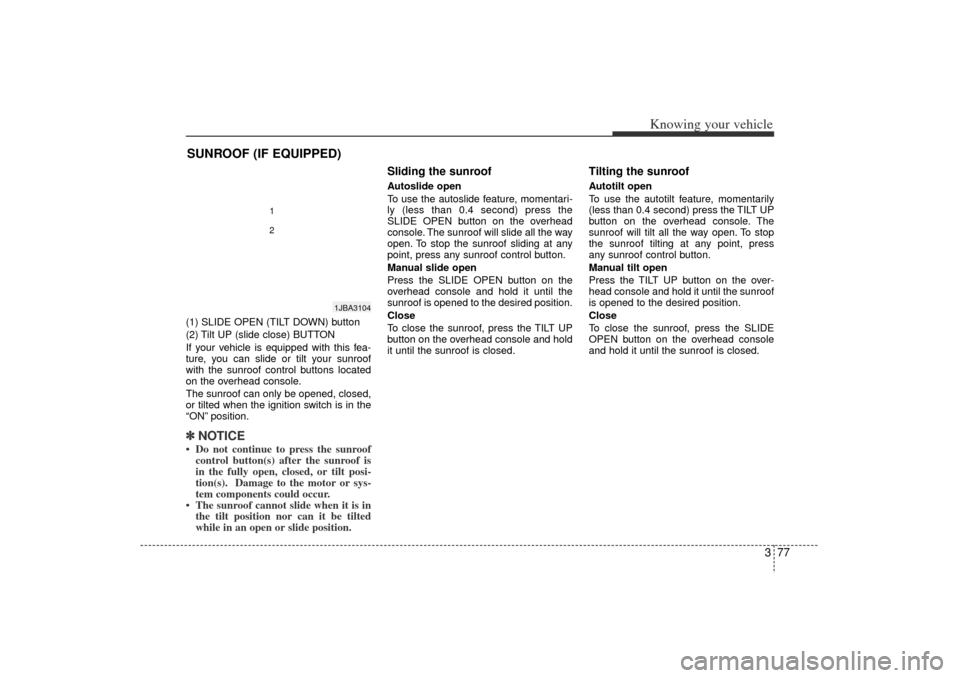
(1) SLIDE OPEN (TILT DOWN) button
(2) Tilt UP (slide close) BUTTON
If your vehicle is equipped with this fea-
ture, you can slide or tilt your sunroof
with the sunroof control buttons located
on the overhead console.
The sunroof can only be opened, closed,
or tilted when the ignition switch is in the
“ON”position.✽ ✽
NOTICE Do not continue to press the sunroof
control button(s) after the sunroof is
in the fully open, closed, or tilt posi-
tion(s). Damage to the motor or sys-
tem components could occur.
The sunroof cannot slide when it is in the tilt position nor can it be tilted
while in an open or slide position.
Sliding the sunroof Autoslide open
To use the autoslide feature, momentari-
ly (less than 0.4 second) press the
SLIDE OPEN button on the overhead
console. The sunroof will slide all the way
open. To stop the sunroof sliding at any
point, press any sunroof control button.
Manual slide open
Press the SLIDE OPEN button on the
overhead console and hold it until the
sunroof is opened to the desired position.
Close
To close the sunroof, press the TILT UP
button on the overhead console and hold
it until the sunroof is closed.
Tilting the sunroof Autotilt open
To use the autotilt feature, momentarily
(less than 0.4 second) press the TILT UP
button on the overhead console. The
sunroof will tilt all the way open. To stop
the sunroof tilting at any point, press
any sunroof control button.
Manual tilt open
Press the TILT UP button on the over-
head console and hold it until the sunroof
is opened to the desired position.
Close
To close the sunroof, press the SLIDE
OPEN button on the overhead console
and hold it until the sunroof is closed.
SUNROOF (IF EQUIPPED)
1JBA3104
12
JB CAN 3.qxd 7/29/05 8:57 AM Page 77
Page 88 of 220
379
Knowing your vehicle
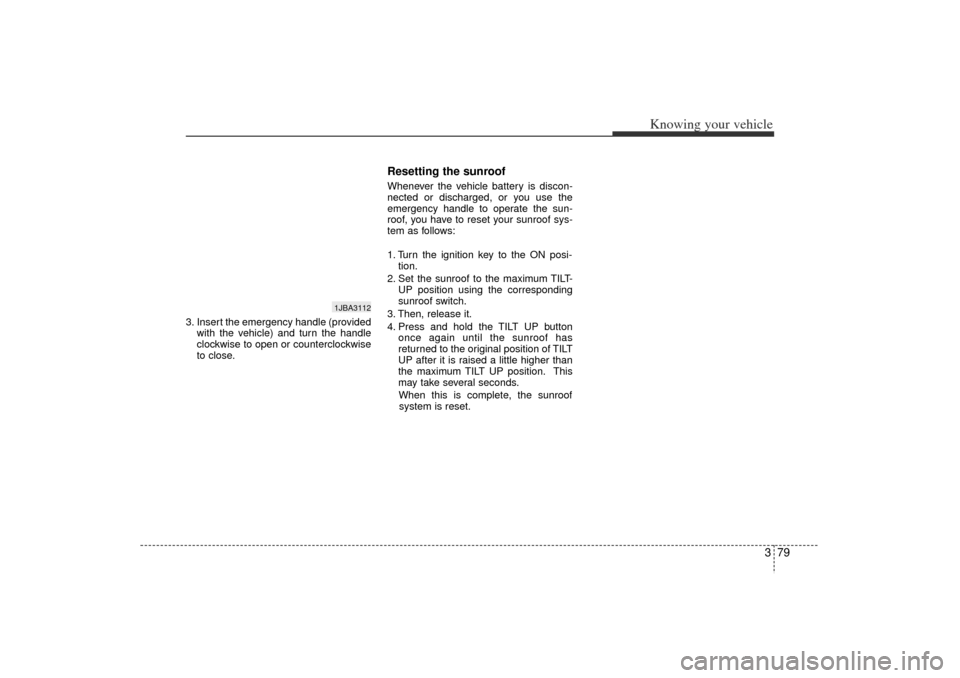
3. Insert the emergency handle (providedwith the vehicle) and turn the handle
clockwise to open or counterclockwise
to close.
Resetting the sunroofWhenever the vehicle battery is discon-
nected or discharged, or you use the
emergency handle to operate the sun-
roof, you have to reset your sunroof sys-
tem as follows:
1. Turn the ignition key to the ON posi-tion.
2. Set the sunroof to the maximum TILT- UP position using the corresponding
sunroof switch.
3. Then, release it.
4. Press and hold the TILT UP button once again until the sunroof has
returned to the original position of TILT
UP after it is raised a little higher than
the maximum TILT UP position. This
may take several seconds.
When this is complete, the sunroof system is reset.
1JBA3112
JB CAN 3.qxd 7/29/05 8:57 AM Page 79
Page 94 of 220
385
Knowing your vehicle
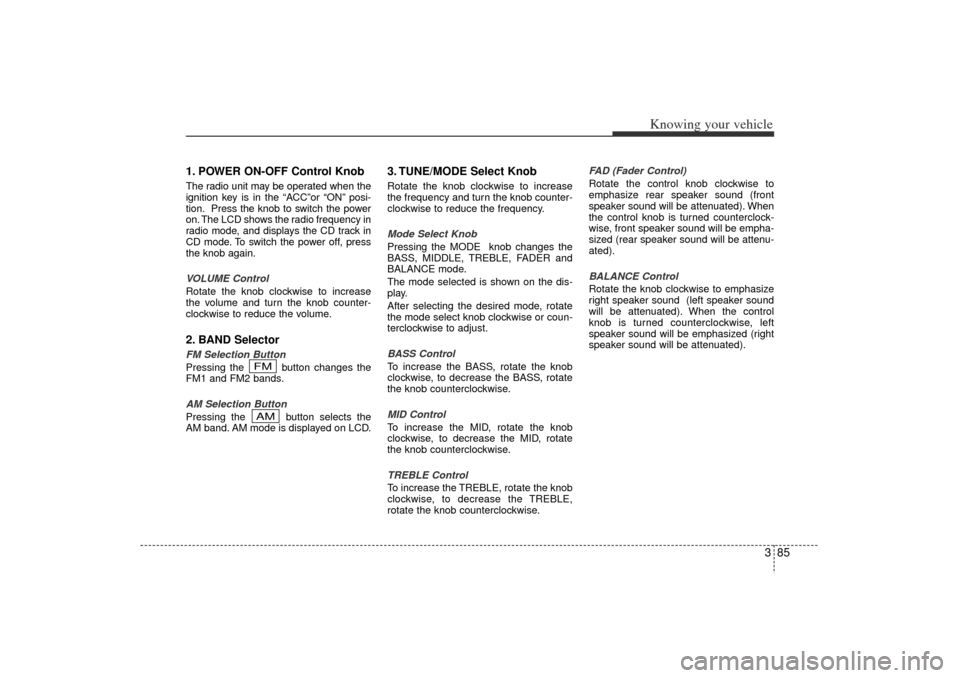
1. POWER ON-OFF Control KnobThe radio unit may be operated when the
ignition key is in the “ACC ”or “ON” posi-
tion. Press the knob to switch the power
on. The LCD shows the radio frequency in
radio mode, and displays the CD track in
CD mode. To switch the power off, press
the knob again.
VOLUME Control
Rotate the knob clockwise to increase
the volume and turn the knob counter-
clockwise to reduce the volume.2. BAND SelectorFM Selection Button
Pressing the button changes the
FM1 and FM2 bands.
AM Selection Button
Pressing the button selects the
AM band. AM mode is displayed on LCD.
3. TUNE/MODE Select KnobRotate the knob clockwise to increase
the frequency and turn the knob counter-
clockwise to reduce the frequency.
Mode Select Knob
Pressing the MODE knob changes the
BASS, MIDDLE, TREBLE, FADER and
BALANCE mode.
The mode selected is shown on the dis-
play.
After selecting the desired mode, rotate
the mode select knob clockwise or coun-
terclockwise to adjust.
BASS Control
To increase the BASS, rotate the knob
clockwise, to decrease the BASS, rotate
the knob counterclockwise.
MID Control
To increase the MID, rotate the knob
clockwise, to decrease the MID, rotate
the knob counterclockwise.
TREBLE Control
To increase the TREBLE, rotate the knob
clockwise, to decrease the TREBLE,
rotate the knob counterclockwise. FAD (Fader Control)
Rotate the control knob clockwise to
emphasize rear speaker sound (front
speaker sound will be attenuated). When
the control knob is turned counterclock-
wise, front speaker sound will be empha-
sized (rear speaker sound will be attenu-
ated).
BALANCE Control
Rotate the knob clockwise to emphasize
right speaker sound (left speaker sound
will be attenuated). When the control
knob is turned counterclockwise, left
speaker sound will be emphasized (right
speaker sound will be attenuated).
AMFM
JB CAN 3.qxd 7/29/05 8:57 AM Page 85
Page 97 of 220
Knowing your vehicle88
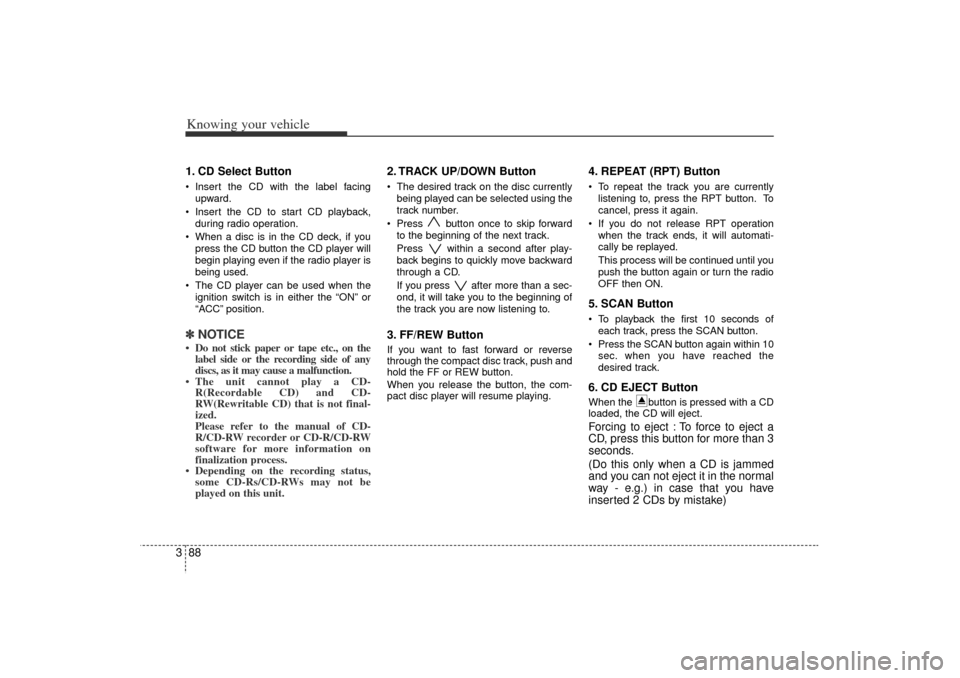
31. CD Select Button Insert the CD with the label facing
upward.
Insert the CD to start CD playback,
during radio operation.
When a disc is in the CD deck, if you
press the CD button the CD player will
begin playing even if the radio player is
being used.
The CD player can be used when the
ignition switch is in either the “ON”or
“ACC ”position.✽ ✽
NOTICE Do not stick paper or tape etc., on the
label side or the recording side of any
discs, as it may cause a malfunction.
The unit cannot play a CD- R(Recordable CD) and CD-
RW(Rewritable CD) that is not final-
ized.
Please refer to the manual of CD-
R/CD-RW recorder or CD-R/CD-RW
software for more information on
finalization process.
Depending on the recording status, some CD-Rs/CD-RWs may not be
played on this unit.
2. TRACK UP/DOWN Button The desired track on the disc currently
being played can be selected using the
track number.
Press button once to skip forward
to the beginning of the next track.
Press within a second after play-
back begins to quickly move backward
through a CD.
If you press after more than a sec-
ond, it will take you to the beginning of
the track you are now listening to.3. FF/REW Button If you want to fast forward or reverse
through the compact disc track, push and
hold the FF or REW button.
When you release the button, the com-
pact disc player will resume playing.
4. REPEAT (RPT) ButtonTo repeat the track you are currently
listening to, press the RPT button. To
cancel, press it again.
If you do not release RPT operation
when the track ends, it will automati-
cally be replayed.
This process will be continued until you
push the button again or turn the radio
OFF then ON.5. SCAN ButtonTo playback the first 10 seconds of
each track, press the SCAN button.
Press the SCAN button again within 10
sec. when you have reached the
desired track.6. CD EJECT ButtonWhen the button is pressed with a CD
loaded, the CD will eject.Forcing to eject : To force to eject a
CD, press this button for more than 3
seconds.
(Do this only when a CD is jammed
and you can not eject it in the normal
way - e.g.) in case that you have
inserted 2 CDs by mistake)
JB CAN 3.qxd 7/29/05 8:57 AM Page 88
Page 100 of 220
391
Knowing your vehicle
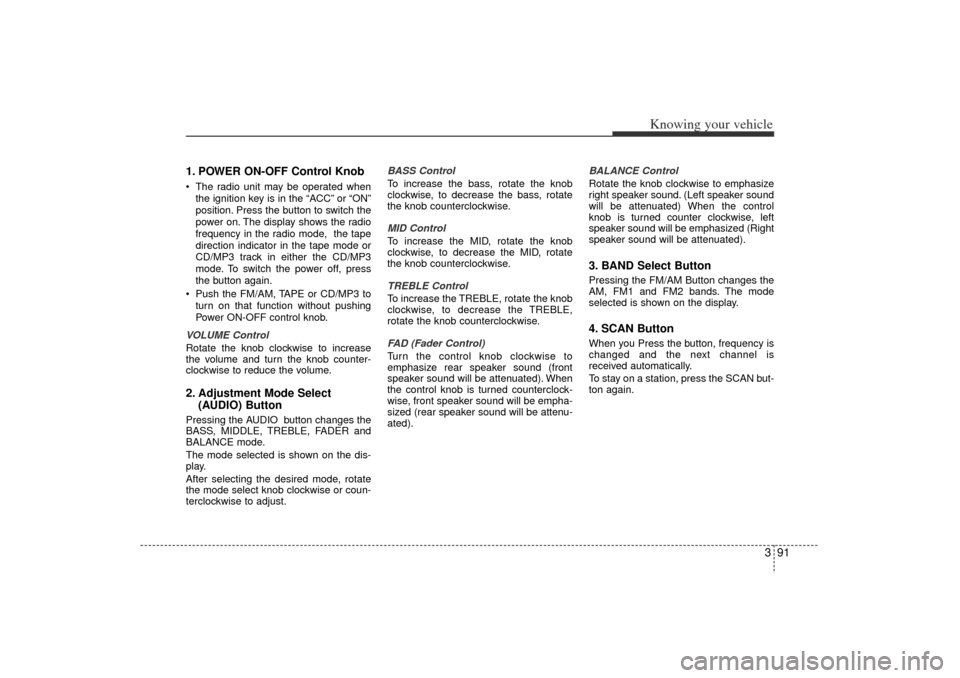
1. POWER ON-OFF Control KnobThe radio unit may be operated when
the ignition key is in the “ACC”or “ON”
position. Press the button to switch the
power on. The display shows the radio
frequency in the radio mode, the tape
direction indicator in the tape mode or
CD/MP3 track in either the CD/MP3
mode. To switch the power off, press
the button again.
Push the FM/AM, TAPE or CD/MP3 to
turn on that function without pushing
Power ON-OFF control knob.
VOLUME Control
Rotate the knob clockwise to increase
the volume and turn the knob counter-
clockwise to reduce the volume.2. Adjustment Mode Select (AUDIO) ButtonPressing the AUDIO button changes the
BASS, MIDDLE, TREBLE, FADER and
BALANCE mode.
The mode selected is shown on the dis-
play.
After selecting the desired mode, rotate
the mode select knob clockwise or coun-
terclockwise to adjust. BASS Control
To increase the bass, rotate the knob
clockwise, to decrease the bass, rotate
the knob counterclockwise.
MID Control
To increase the MID, rotate the knob
clockwise, to decrease the MID, rotate
the knob counterclockwise.
TREBLE Control
To increase the TREBLE, rotate the knob
clockwise, to decrease the TREBLE,
rotate the knob counterclockwise.
FAD (Fader Control)
Turn the control knob clockwise to
emphasize rear speaker sound (front
speaker sound will be attenuated). When
the control knob is turned counterclock-
wise, front speaker sound will be empha-
sized (rear speaker sound will be attenu-
ated).
BALANCE Control
Rotate the knob clockwise to emphasize
right speaker sound. (Left speaker sound
will be attenuated) When the control
knob is turned counter clockwise, left
speaker sound will be emphasized (Right
speaker sound will be attenuated).
3. BAND Select ButtonPressing the FM/AM Button changes the
AM, FM1 and FM2 bands. The mode
selected is shown on the display.4. SCAN ButtonWhen you Press the button, frequency is
changed and the next channel is
received automatically.
To stay on a station, press the SCAN but-
ton again.
JB CAN 3.qxd 7/29/05 8:57 AM Page 91
Page 106 of 220
397
Knowing your vehicle
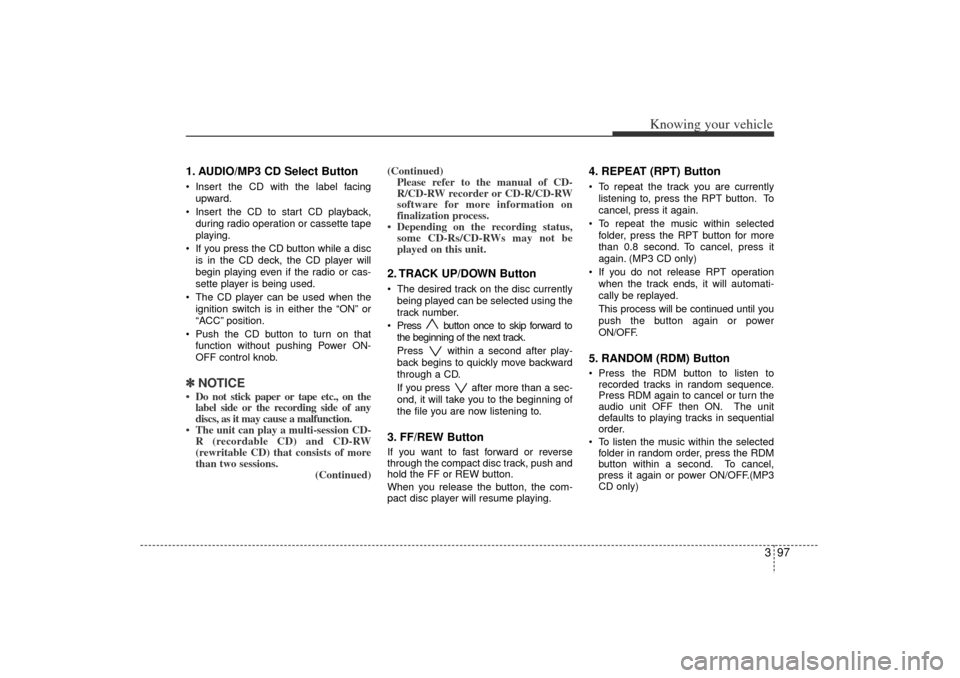
1. AUDIO/MP3 CD Select ButtonInsert the CD with the label facing
upward.
Insert the CD to start CD playback,
during radio operation or cassette tape
playing.
If you press the CD button while a disc
is in the CD deck, the CD player will
begin playing even if the radio or cas-
sette player is being used.
The CD player can be used when the
ignition switch is in either the “ON”or
“ACC ”position.
Push the CD button to turn on that
function without pushing Power ON-
OFF control knob.✽ ✽
NOTICE Do not stick paper or tape etc., on the
label side or the recording side of any
discs, as it may cause a malfunction.
The unit can play a multi-session CD- R (recordable CD) and CD-RW
(rewritable CD) that consists of more
than two sessions. (Continued)(Continued)
Please refer to the manual of CD-
R/CD-RW recorder or CD-R/CD-RW
software for more information on
finalization process.
Depending on the recording status, some CD-Rs/CD-RWs may not be
played on this unit.
2. TRACK UP/DOWN Button The desired track on the disc currently
being played can be selected using the
track number.
Press button once to skip forward to
the beginning of the next track.
Press within a second after play-
back begins to quickly move backward
through a CD.
If you press after more than a sec-
ond, it will take you to the beginning of
the file you are now listening to.3. FF/REW Button If you want to fast forward or reverse
through the compact disc track, push and
hold the FF or REW button.
When you release the button, the com-
pact disc player will resume playing.
4. REPEAT (RPT) ButtonTo repeat the track you are currently
listening to, press the RPT button. To
cancel, press it again.
To repeat the music within selected
folder, press the RPT button for more
than 0.8 second. To cancel, press it
again. (MP3 CD only)
If you do not release RPT operation
when the track ends, it will automati-
cally be replayed.
This process will be continued until you
push the button again or power
ON/OFF.5. RANDOM (RDM) ButtonPress the RDM button to listen to
recorded tracks in random sequence.
Press RDM again to cancel or turn the
audio unit OFF then ON. The unit
defaults to playing tracks in sequential
order.
To listen the music within the selected
folder in random order, press the RDM
button within a second. To cancel,
press it again or power ON/OFF.(MP3
CD only)
JB CAN 3.qxd 7/29/05 8:57 AM Page 97
Page 109 of 220
4
Ignition switch / 4-2
Starting the engine / 4-3
Manual transaxle / 4-4
Automatic transaxle / 4-6
Brake system / 4-9
Steering wheel / 4-14
Instrument cluster / 4-16
Gauges / 4-17
Warnings and indicators / 4-19
Lighting / 4-23
Wipers and washers / 4-26
Defroster / 4-29
Hazard warning flasher / 4-29
Climate control system / 4-30
Windshield defrosting and defogging / 4-37
Driving your vehicle
JB CAN 4.qxd 7/29/05 8:58 AM Page 1
Page 110 of 220
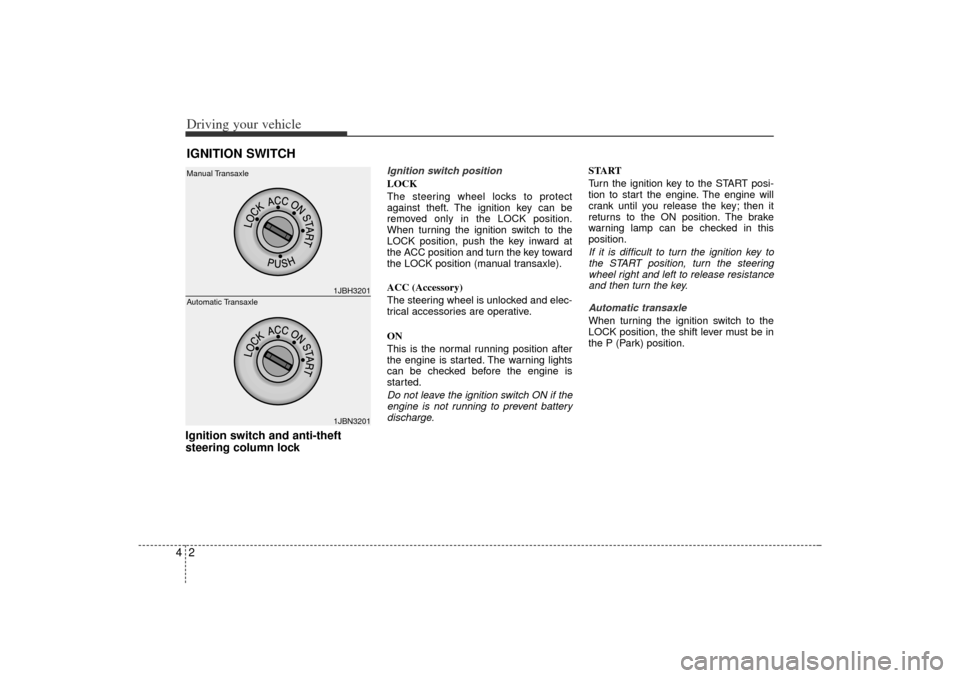
Driving your vehicle24Ignition switch and anti-theft
steering column lock
Ignition switch position
LOCK
The steering wheel locks to protect
against theft. The ignition key can be
removed only in the LOCK position.
When turning the ignition switch to the
LOCK position, push the key inward at
the ACC position and turn the key toward
the LOCK position (manual transaxle).
ACC (Accessory)
The steering wheel is unlocked and elec-
trical accessories are operative.
ON
This is the normal running position after
the engine is started. The warning lights
can be checked before the engine is
started.
Do not leave the ignition switch ON if the
engine is not running to prevent battery
discharge.START
Turn the ignition key to the START posi-
tion to start the engine. The engine will
crank until you release the key; then it
returns to the ON position. The brake
warning lamp can be checked in this
position.
If it is difficult to turn the ignition key to
the START position, turn the steering
wheel right and left to release resistance
and then turn the key.
Automatic transaxle
When turning the ignition switch to the
LOCK position, the shift lever must be in
the P (Park) position.
IGNITION SWITCH
1JBH32011JBN3201
Manual Transaxle
Automatic Transaxle
JB CAN 4.qxd 7/29/05 8:58 AM Page 2
Page 111 of 220
43
Driving your vehicle
STARTING THE ENGINE 1. Make sure the parking brake isapplied.
2. Manual Transaxle - Depress the
clutch pedal fully and shift the
transaxle into Neutral. Keep the clutch
pedal depressed while turning the
ignition switch to the start position.
The starter will not operate if the
clutch pedal is not fully depressed.
Automatic Transaxle - Place the
transaxle shift lever in P (Park).
Depress the brake pedal fully.
You can also start the engine when
the shift lever is in the N (Neutral)
position.
3. Turn the ignition switch to START and hold it there until the engine starts (a
maximum of 10 seconds), then
release the key.
4. In extremely cold weather (below -18°C / 0°F) or after the vehicle has
not been operated for several days, let
the engine warm up without depress-
ing the accelerator.
Whether the engine is cold or warm, it
should be started without depressing
the accelerator.
✽ ✽ NOTICEDo not engage the starter for more than
10 seconds. If the engine stalls or fails to
start, wait 5 to 10 seconds before re-
engaging the starter. Excessive or
improper use of the starter may damage
it. The starter will not operate if:
Manual Transaxle - the clutch pedal is
not fully depressed.
Automatic Transaxle - the shift lever
is NOT in the P (Park) or N (Neutral)
position.
WARNING
- Ignition key
• Never turn the ignition switch to LOCK or ACC while the vehicle is
moving. This would result in loss
of directional control and braking
function, which could cause an
accident or collision.
Before leaving the driver’s seat, always make sure the shift lever
is engaged in 1
stgear for manual
transaxle or P (Park) for automat-
ic transaxle. Then, set the parking
brake fully and shut the engine
off. Unexpected and sudden vehi-
cle movement may occur if these
precautions are not taken.
Never reach for the ignition switch, or any other controls
through the steering wheel while
the vehicle is in motion. The pres-
ence of your hand or arm in this
area could cause a loss of vehicle
control, an accident and serious
bodily injury or death.
Do not place any movable objects around the driver’s seat as they
may move while driving, interfere
with the driver and lead to an
accident.
CAUTION -
Stall
If the engine stalls while you are in
motion, do not attempt to move the
shift lever to the P (Park) position. If
traffic and road conditions permit,
you may put the shift lever in the N
(Neutral) position while the vehicle
is still moving and turn the ignition
switch to the START position in an
attempt to restart the engine.
JB CAN 4.qxd 7/29/05 8:58 AM Page 3
Page 116 of 220
Driving your vehicle842 (Second Gear)
Use 2 (Second Gear) for more power
when climbing hills and for increased
braking when going down hills. This posi-
tion also helps reduce wheel spin on slip-
pery surfaces. When the shift lever is
placed in 2 (Second Gear), the transaxle
will automatically shift from first to sec-
ond gear.
L (Low)
Move the shift lever to this position in
hard pulling situations and for climbing
steep grades.
O/D (Over Drive) system
(if equipped)Pressing the O/D system button cancels
and engages the overdrive system.
When the O/D system is cancelled, the
O/D OFF indicator illuminates and the
transaxle gear range is limited to 1st
through 3rd. The transaxle will not shift to
4th gear until the O/D system button is
pressed again to release the switch.
When driving down a sloping road with
the transaxle in O/D (4th), you can
decrease the vehicle speed without using
the brakes by pressing the O/D button.
When the ignition is switched OFF, O/D
OFF mode is automatically cancelled.O/D OFF Indicator ( )
This indicator light illuminates in the
instrument panel when the O/D mode is
cancelled.
Moving up a steep grade from a
standing startTo move up a steep grade from a stand-
ing start, depress the brake pedal, shift
the shift lever to D (Drive). Select the
appropriate gear depending on load
weight and steepness of the grade, and
release the parking brake. Depress the
accelerator gradually while releasing the
service brakes.
O/D
OFF
1JBA4004
CAUTION
Do not exceed the recommended
maximum speeds in 2 (Second
Gear) or L (Low). Operating the
vehicle at speeds above the maxi-
mum recommended, for 2 (Second
Gear) or L (Low) may cause exces-
sive heat to develop which could
result in damage to or failure of the
automatic transaxle.
JB CAN 4.qxd 7/29/05 8:58 AM Page 8