warning KIA Rio 2011 2.G Workshop Manual
[x] Cancel search | Manufacturer: KIA, Model Year: 2011, Model line: Rio, Model: KIA Rio 2011 2.GPages: 240, PDF Size: 4.68 MB
Page 90 of 240
381
Knowing your vehicle
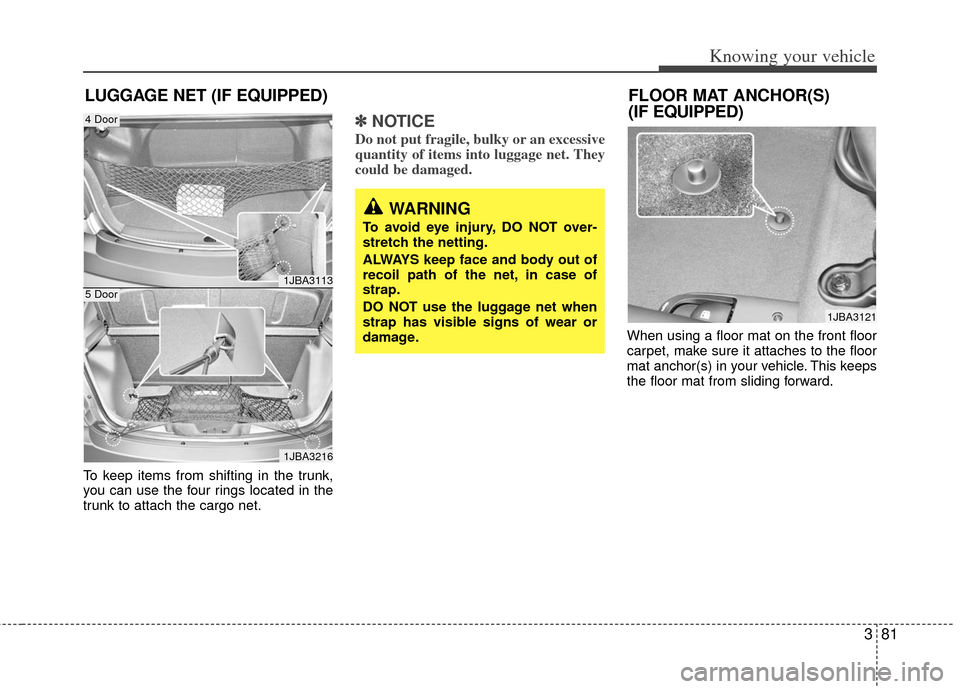
To keep items from shifting in the trunk,
you can use the four rings located in the
trunk to attach the cargo net.
✽ ✽NOTICE
Do not put fragile, bulky or an excessive
quantity of items into luggage net. They
could be damaged.
When using a floor mat on the front floor
carpet, make sure it attaches to the floor
mat anchor(s) in your vehicle. This keeps
the floor mat from sliding forward.
LUGGAGE NET (IF EQUIPPED)
1JBA3113
1JBA3216
4 Door
5 Door
WARNING
To avoid eye injury, DO NOT over-
stretch the netting.
ALWAYS keep face and body out of
recoil path of the net, in case of
strap.
DO NOT use the luggage net when
strap has visible signs of wear or
damage.
FLOOR MAT ANCHOR(S)
(IF EQUIPPED)
1JBA3121
Page 91 of 240
Knowing your vehicle
82
3
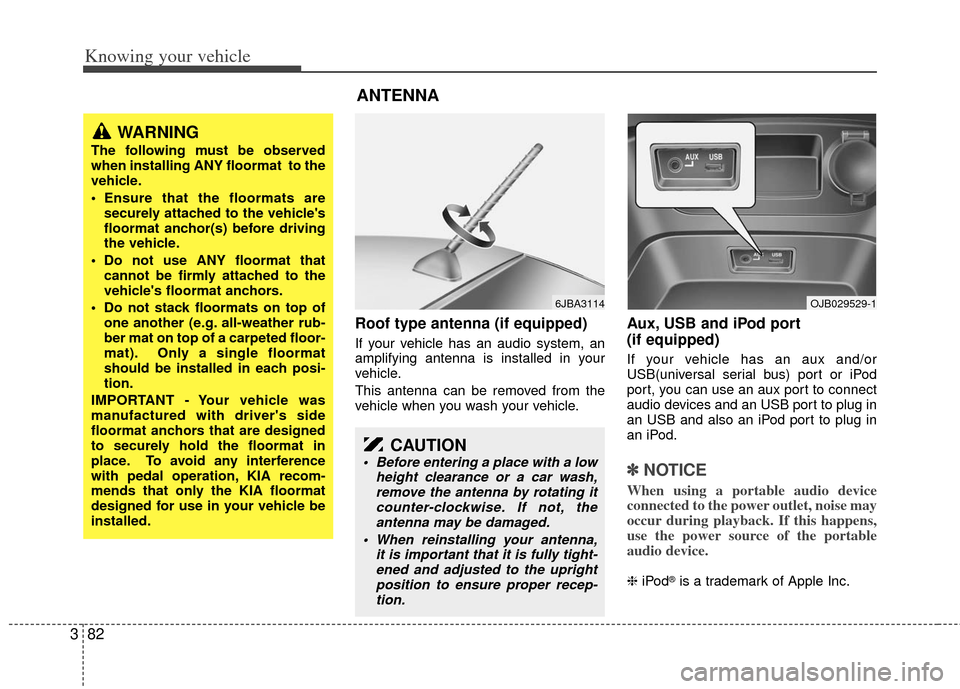
Roof type antenna (if equipped)
If your vehicle has an audio system, an
amplifying antenna is installed in your
vehicle.
This antenna can be removed from the
vehicle when you wash your vehicle.
Aux, USB and iPod port
(if equipped)
If your vehicle has an aux and/or
USB(universal serial bus) port or iPod
port, you can use an aux port to connect
audio devices and an USB port to plug in
an USB and also an iPod port to plug in
an iPod.
✽ ✽
NOTICE
When using a portable audio device
connected to the power outlet, noise may
occur during playback. If this happens,
use the power source of the portable
audio device.
❈ iPod®is a trademark of Apple Inc.
6JBA3114OJB029529-1
WARNING
The following must be observed
when installing ANY floormat to the
vehicle.
Ensure that the floormats are
securely attached to the vehicle's
floormat anchor(s) before driving
the vehicle.
Do not use ANY floormat that cannot be firmly attached to the
vehicle's floormat anchors.
Do not stack floormats on top of one another (e.g. all-weather rub-
ber mat on top of a carpeted floor-
mat). Only a single floormat
should be installed in each posi-
tion.
IMPORTANT - Your vehicle was
manufactured with driver's side
floormat anchors that are designed
to securely hold the floormat in
place. To avoid any interference
with pedal operation, KIA recom-
mends that only the KIA floormat
designed for use in your vehicle be
installed.
CAUTION
Before entering a place with a low height clearance or a car wash,remove the antenna by rotating itcounter-clockwise. If not, the antenna may be damaged.
it is important that it is fully tight-ened and adjusted to the uprightposition to ensure proper recep-tion.
ANTENNA
Page 95 of 240
Knowing your vehicle
86
3
Satellite radio reception
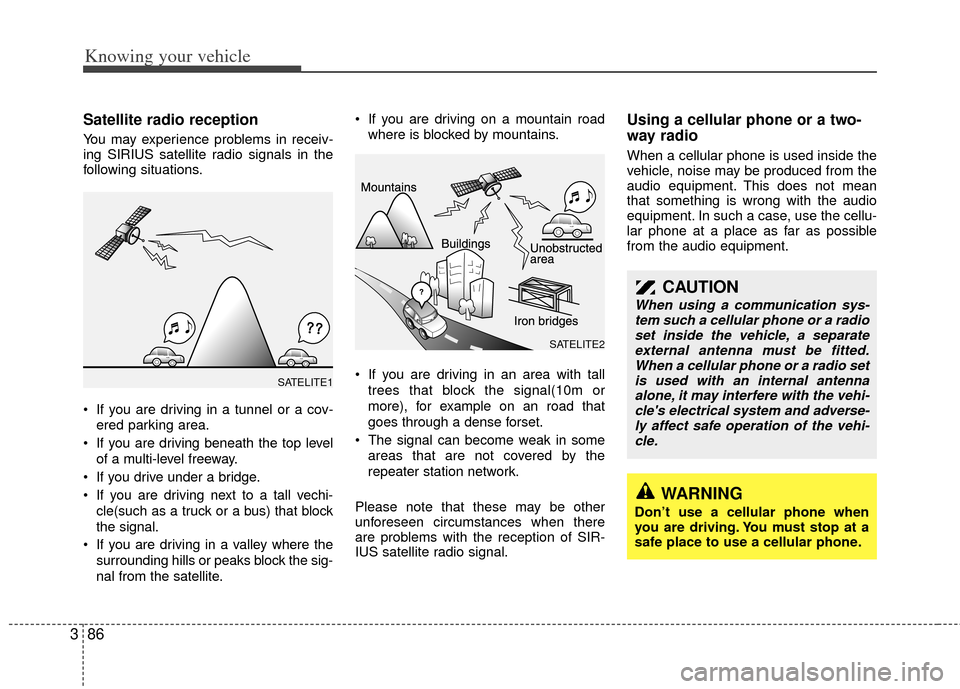
You may experience problems in receiv-
ing SIRIUS satellite radio signals in the
following situations.
If you are driving in a tunnel or a cov-
ered parking area.
If you are driving beneath the top level of a multi-level freeway.
If you drive under a bridge.
If you are driving next to a tall vechi- cle(such as a truck or a bus) that block
the signal.
If you are driving in a valley where the surrounding hills or peaks block the sig-
nal from the satellite. If you are driving on a mountain road
where is blocked by mountains.
If you are driving in an area with tall trees that block the signal(10m or
more), for example on an road that
goes through a dense forset.
The signal can become weak in some areas that are not covered by the
repeater station network.
Please note that these may be other
unforeseen circumstances when there
are problems with the reception of SIR-
IUS satellite radio signal.
Using a cellular phone or a two-
way radio
When a cellular phone is used inside the
vehicle, noise may be produced from the
audio equipment. This does not mean
that something is wrong with the audio
equipment. In such a case, use the cellu-
lar phone at a place as far as possible
from the audio equipment.
CAUTION
When using a communication sys- tem such a cellular phone or a radioset inside the vehicle, a separateexternal antenna must be fitted. When a cellular phone or a radio setis used with an internal antennaalone, it may interfere with the vehi- cle's electrical system and adverse-ly affect safe operation of the vehi- cle.
WARNING
Don’t use a cellular phone when
you are driving. You must stop at a
safe place to use a cellular phone.
SATELITE2
SATELITE1
Page 113 of 240
4
Ignition switch / 4-2
Starting the engine / 4-3
Manual transaxle / 4-4
Automatic transaxle / 4-6
Brake system / 4-9
Cruise control system / 4-14
Steering wheel / 4-18
Instrument cluster / 4-20
Gauges / 4-21
Warnings and indicators / 4-25
Lighting / 4-31
Wipers and washers / 4-35
Defroster / 4-38
Hazard warning flasher / 4-38
Climate control system / 4-39
Windshield defrosting and defogging / 4-46
Driving your vehicle
Page 114 of 240
Driving your vehicle
24
Ignition switch and anti-theft
steering column lock
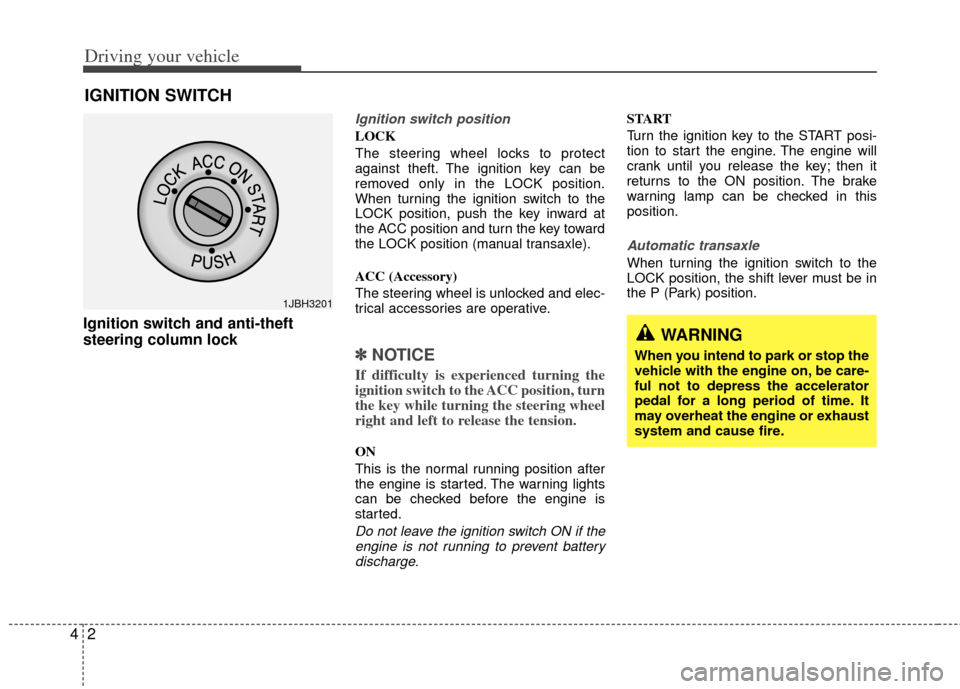
Ignition switch position
LOCK
The steering wheel locks to protect
against theft. The ignition key can be
removed only in the LOCK position.
When turning the ignition switch to the
LOCK position, push the key inward at
the ACC position and turn the key toward
the LOCK position (manual transaxle).
ACC (Accessory)
The steering wheel is unlocked and elec-
trical accessories are operative.
✽ ✽
NOTICE
If difficulty is experienced turning the
ignition switch to the ACC position, turn
the key while turning the steering wheel
right and left to release the tension.
ON
This is the normal running position after
the engine is started. The warning lights
can be checked before the engine is
started.
Do not leave the ignition switch ON if the
engine is not running to prevent batterydischarge.
START
Turn the ignition key to the START posi-
tion to start the engine. The engine will
crank until you release the key; then it
returns to the ON position. The brake
warning lamp can be checked in this
position.
Automatic transaxle
When turning the ignition switch to the
LOCK position, the shift lever must be in
the P (Park) position.
IGNITION SWITCH
WARNING
When you intend to park or stop the
vehicle with the engine on, be care-
ful not to depress the accelerator
pedal for a long period of time. It
may overheat the engine or exhaust
system and cause fire.
1JBH3201
Page 115 of 240
43
Driving your vehicle
1. Make sure the parking brake isapplied.
2. Manual Transaxle - Depress the
clutch pedal fully and shift the
transaxle into Neutral. Keep the clutch
pedal depressed while turning the
ignition switch to the start position.
The starter will not operate if the
clutch pedal is not fully depressed.
Automatic Transaxle - Place the
transaxle shift lever in P (Park).
Depress the brake pedal fully.
You can also start the engine when the shift lever is in the N (Neutral)position.
3. Turn the ignition switch to START and hold it there until the engine starts (a
maximum of 10 seconds), then
release the key.
4. In extremely cold weather (below -18°C / 0°F) or after the vehicle has
not been operated for several days, let
the engine warm up without depress-
ing the accelerator.
Whether the engine is cold or warm, it
should be started without depressing the accelerator.
✽ ✽ NOTICE
Do not engage the starter for more than
10 seconds. If the engine stalls or fails to
start, wait 5 to 10 seconds before re-
engaging the starter. Excessive or
improper use of the starter may damage
it.
The starter will not operate if:
Manual Transaxle - the clutch pedal is
not fully depressed.
Automatic Transaxle - the shift lever
is NOT in the P (Park) or N (Neutral)
position.
WARNING - Ignition key
• Never turn the ignition switch to LOCK or ACC while the vehicle is
moving. This would result in loss
of directional control and braking
function, which could cause an
accident or collision.
Before leaving the driver’s seat, always make sure the shift lever
is engaged in 1
stgear for manual
transaxle or P (Park) for automat-
ic transaxle. Then, set the parking
brake fully and shut the engine
off. Unexpected and sudden vehi-
cle movement may occur if these
precautions are not taken.
Never reach for the ignition switch, or any other controls
through the steering wheel while
the vehicle is in motion. The pres-
ence of your hand or arm in this
area could cause a loss of vehicle
control, an accident and serious
bodily injury or death.
Do not place any movable objects around the driver’s seat as they
may move while driving, interfere
with the driver and lead to an
accident.
CAUTION - Stall
If the engine stalls while you are inmotion, do not attempt to move theshift lever to the P (Park) position. If traffic and road conditions permit,you may put the shift lever in the N (Neutral) position while the vehicleis still moving and turn the ignition switch to the START position in anattempt to restart the engine.
STARTING THE ENGINE
CAUTION
Always wear appropriate shoes whenoperating your vehicle. Unsuitable shoes (high heels, ski boots,etc.) mayinterfere with your ability to use the brake and accelerator pedal, and theclutch (if equipped).
Page 117 of 240
45
Driving your vehicle
✽
✽NOTICE
To avoid premature clutch wear and
damage, do not drive with your foot
resting on the clutch pedal. Also, don’t
use the clutch to hold the vehicle
stopped on an uphill grade, while wait-
ing for a traffic light, etc..
Downshifting
When you must slow down in heavy traf-
fic or while driving up steep hills, down-
shift before the engine starts to labor.
Downshifting reduces the chance of
stalling and gives better acceleration
when you again need to increase your
speed. When the vehicle is traveling
down steep hills, downshifting helps
maintain safe speed and prolongs brake
life.
WARNING- Manual
transaxle
Before leaving the driver’s seat,
always set the parking brake fully
and shut the engine off. Then make
sure the transaxle is shifted into 1
st
gear when the vehicle is parked on
a level or uphill grade, and shifted
into R (Reverse) on a downhill
grade. Unexpected and sudden
vehicle movement can occur if
these precautions are not followed
in the order identified.
Page 118 of 240
Driving your vehicle
64
Automatic transaxle operation
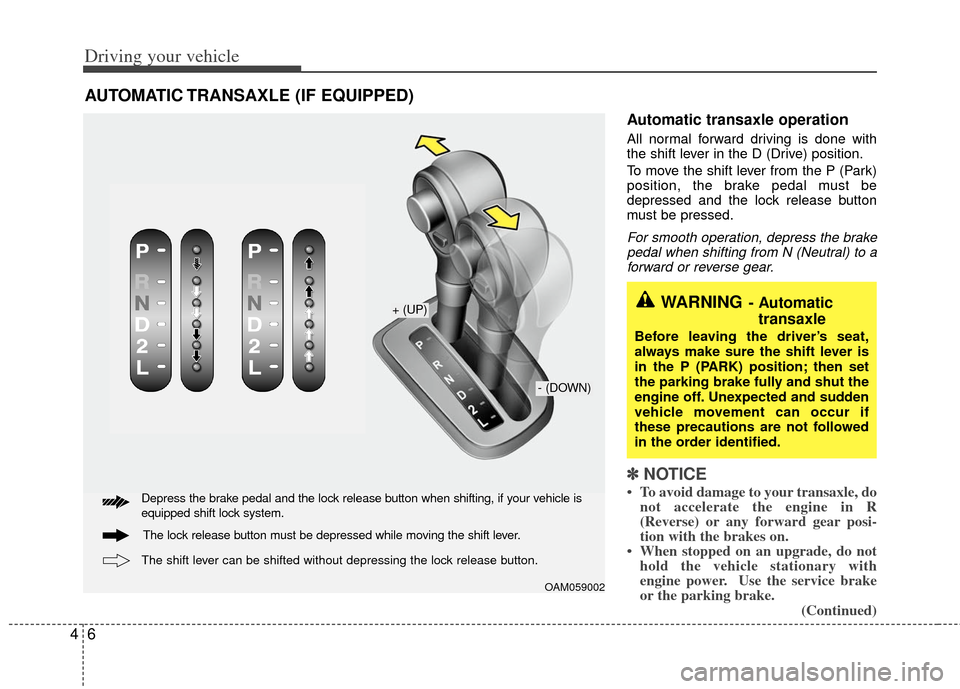
All normal forward driving is done with
the shift lever in the D (Drive) position.
To move the shift lever from the P (Park)
position, the brake pedal must be
depressed and the lock release button
must be pressed.
For smooth operation, depress the brakepedal when shifting from N (Neutral) to aforward or reverse gear.
✽ ✽ NOTICE
• To avoid damage to your transaxle, do
not accelerate the engine in R
(Reverse) or any forward gear posi-
tion with the brakes on.
• When stopped on an upgrade, do not hold the vehicle stationary with
engine power. Use the service brake
or the parking brake.
(Continued)
AUTOMATIC TRANSAXLE (IF EQUIPPED)
WARNING- Automatic
transaxle
Before leaving the driver’s seat,
always make sure the shift lever is
in the P (PARK) position; then set
the parking brake fully and shut the
engine off. Unexpected and sudden
vehicle movement can occur if
these precautions are not followed
in the order identified.
OAM059002
+ (UP)
- (DOWN)
Depress the brake pedal and the lock release button when shifting, if your vehicle is
equipped shift lock system. The shift lever can be shifted without depressing the lock release button.
The lock release button must be depressed while moving the shift lever.
Page 119 of 240
47
Driving your vehicle
(Continued)
• Do not shift from N (Neutral) or P(Park) into D (Drive), or R (Reverse)
when the engine is above idle speed.
Transaxle ranges
P (Park)
This position locks the transaxle and pre-
vents the front wheels from rotating.
Always come to a complete stop before
shifting into this position.
✽ ✽ NOTICE
The transaxle may be damaged if you
shift into P (Park) while the vehicle is in
motion.
R (Reverse)
Use this position to drive the vehicle
backward.
✽ ✽NOTICE
Always come to a complete stop before
shifting into or out of R (Reverse); you
may damage the transaxle if you shift
into R while the vehicle is in motion.
N (Neutral)
With the gearshift in the N position, the
wheels and transaxle are not locked. The
vehicle will roll freely even on the slight-
est incline unless the parking brake or
service brakes are applied.
D (Drive)
This is the normal forward driving posi-
tion. The transaxle will automatically shift
through a 4-gear sequence, providing the
best fuel economy and power.
For extra power when passing another
vehicle or climbing grades, depress the
accelerator fully, at which time the
transaxle will automatically downshift to
the next lower gear.
✽ ✽NOTICE
Always come to a complete stop before
shifting into D (Drive).
(Continued)
Before leaving the driver’s seat,
always make sure the shift lever
is in the P (Park) position. Set the
parking brake fully, shut the
engine off and take the key with
you. Unexpected and sudden
vehicle movement can occur if
you do not follow these precau-
tions in the order specified.
Never leave a child unattended in a vehicle.
WARNING
Shifting into P (Park) while thevehicle is in motion will cause the
drive wheels to lock which will
cause you to lose control of the
vehicle.
Do not use the P (Park) position in place of the parking brake.
Always make sure the shift lever
is latched in the P (Park) position
so that it cannot be moved unless
the lock release button is pushed
in, AND set the parking brake fully.
(Continued)
Page 121 of 240
49
Driving your vehicle
Shift lock system
For your safety, the Automatic Transaxle
has a shift lock system which prevents
shifting the transaxle out of P (Park)
unless the brake pedal is depressed.
To shift the transaxle out of P (Park):
1. Depress and hold the brake pedal.
2. Start the engine or turn the ignition tothe ON position.
3. Depress the lock release button and move the shift lever.
If the brake pedal is repeatedly
depressed and released with the shift
lever in the P (Park) position, a chattering
sound near the shift lever may be heard.
This is a normal condition.
Ignition key interlock system
The ignition key cannot be removed
unless the shift lever is in the P (Park)
position. If the ignition switch is in any
other position, the key cannot be
removed.
BRAKE SYSTEM
Power brakes
Your vehicle has power-assisted brakes
that adjust automatically through normal
usage.
In the event that the power-assisted
brakes lose power because of a stalled
engine or some other reason, you can
still stop your vehicle by applying greater
force to the brake pedal than you nor-
mally would. The stopping distance, how-
ever, will be longer.
When the engine is not running, the
reserve brake power is partially depleted
each time the brake pedal is applied. Do
not pump the brake pedal when the
power assist has been interrupted.
Pump the brake pedal only when neces-
sary to maintain steering control on slip-
pery surfaces.
In the event of brake failure
If service brakes fail to operate while the
vehicle is in motion, you can make an
emergency stop with the parking brake.
The stopping distance, however, will be
much greater than normal.
WARNING- Parking brake
Pulling the parking brake while the
vehicle is moving at normal speeds
can cause a sudden loss of control
of the vehicle. If you must use the
parking brake to stop the vehicle,
use great caution in applying the
brake.
WARNING - Brakes
Do not drive with your foot rest- ing on the brake pedal. This will
create abnormal high brake tem-
peratures, excessive brake lining
and pad wear, and increased
stopping distances.
When descending a long or steep hill, shift to a lower gear and
avoid continuous application of
the brakes. Continuous brake
application will cause the brakes
to overheat and could result in a
temporary loss of braking per-
formance.
(Continued)