disc KIA Rio 2012 3.G Owner's Guide
[x] Cancel search | Manufacturer: KIA, Model Year: 2012, Model line: Rio, Model: KIA Rio 2012 3.GPages: 385, PDF Size: 9.68 MB
Page 182 of 385
4107
Features of your vehicle
Care of disc (if equipped)
If the temperature inside the car is toohigh, open the car windows for ventila-
tion before using your car audio.
It is illegal to copy and use MP3/WMA/AAC/WAVE files without
permission. Use CDs that are created
only by lawful means.
Do not apply volatile agents such as benzene and thinner, normal cleaners
and magnetic sprays made for ana-
logue disc onto CDs.
To prevent the disc surface from get- ting damaged. Hold and carry CDs by
the edges or the edges of the center
hole only.
Clean the disc surface with a piece of soft cloth before playback (wipe it from
the center to the outside edge).
Do not damage the disc surface or attach pieces of sticky tape or paper
onto it.
Make sure on undesirable matter other than CDs are inserted into the CD
player (Do not insert more than one
CD at a time).
Keep CDs in their cases after use to protect them from scratches or dirt. Depending on the type of CD-R/CD-
RW CDs, certain CDs may not operate
normally according to manufacturing
companies or making and recording
methods. In such circumstances, if you
still continue to use those CDs, they
may cause the malfunction of your car
audio system.
✽ ✽ NOTICE- Playing an
Incompatible Copy-Protected
Audio CD
Some copy protected CDs, which do not
comply with the international audio CD
standards (Red Book), may not play on
your car audio. Please note that if you
try to play copy protected CDs and the
CD player does not perform correctly
the CDs maybe defective, not the CD
player.
NOTE:
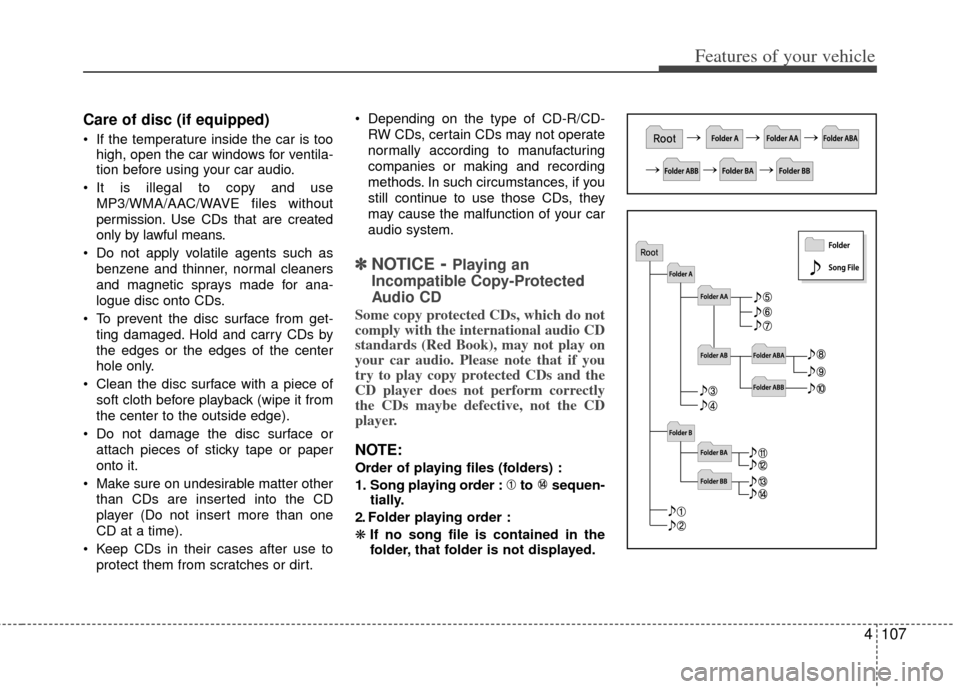
Order of playing files (folders) :
1. Song playing order : to sequen-
tially.
2. Folder playing order :
❋ If no song file is contained in the
folder, that folder is not displayed.
Page 190 of 385
![KIA Rio 2012 3.G Owners Guide 4115
Features of your vehicle
Phone List
The names of up to 5 paired phones will
be displayed.
A [ ] is displayed in front of the currently
connected phone.
Select the desired name to setup the
select](/img/2/2935/w960_2935-189.png "KIA Rio 2012 3.G Owners Guide 4115
Features of your vehicle
Phone List
The names of up to 5 paired phones will
be displayed.
A [ ] is displayed in front of the currently
connected phone.
Select the desired name to setup the
select")
4115
Features of your vehicle
Phone List
The names of up to 5 paired phones will
be displayed.
A [ ] is displayed in front of the currently
connected phone.
Select the desired name to setup the
selected phone.
Connecting a phone
Select [Phone List] Select mobile
phone through TUNE knob Select
[Connect Phone]
➀Select a mobile phone that is not cur-
rently connected.
➁ Connect the selected mobile phone.
\bConnection completion is displayed.
❈ If a phone is already connected, dis-
connect the currently connected
phone and select a new phone to con-
nect.
Disconnecting a connected phone
Select [Phone List] Select mobile
phone through TUNE knob Select
[Disconnect Phone]
➀Select the currently connected mobile
phone.
➁ Disconnect the selected mobile
phone.
\bDisconnection completion is dis-
played.
Changing connection sequence
(Priority)
This is used to change the order (priori-
ty) of automatic connection for the paired
mobile phones.
Select [Phone List] Select [Priority]
through TUNE knob Select No. 1
Priority mobile phone
➀Select [Priority].
➁ From the paired phones, select the
phone desired for No.1 priority.
\b The changed priority sequence is dis-
played.
❈ Once the connection sequence (priori-
ty) is changed, the new no. 1 priority
mobile phone will be connected.
- when the no. 1 priority cannot be con- nected: Automatically attempts to con-
nect the most recently connected
phone.
- Cases when the most recently con- nected phone cannot be connected:
Attempts to connect in the order in
which paired phones are listed.
- The connected phone will automati- cally be changed to No. 1 priority.
Page 191 of 385
![KIA Rio 2012 3.G Owners Guide Features of your vehicle
116
4
Delete
Select [Phone List] Select mobile
phone through TUNE knob Select
[Delete]
➀Select the desired mobile phone.
➁Delete the selected mobile phone.
\bDeletion co](/img/2/2935/w960_2935-190.png "KIA Rio 2012 3.G Owners Guide Features of your vehicle
116
4
Delete
Select [Phone List] Select mobile
phone through TUNE knob Select
[Delete]
➀Select the desired mobile phone.
➁Delete the selected mobile phone.
\bDeletion co")
Features of your vehicle
116
4
Delete
Select [Phone List] Select mobile
phone through TUNE knob Select
[Delete]
➀Select the desired mobile phone.
➁Delete the selected mobile phone.
\bDeletion completion is displayed.
❈ When attempting to delete a currently
connected phone, the phone is first
disconnected.
Contacts Download
This feature is used to download con-
tacts and call histories into the audio sys-
tem.
Select [Contacts Download] Select
through
TUNEknob
Auto Download
When connecting a mobile phone, it is
possible to automatically download new
Contacts and Call Histories.
Select [Auto Download] Set /
through TUNE knob
Audio Streaming
Songs (files) saved in your Bluetooth®
wireless technology mobile phone can
be played through the audio system.
Select [Audio Streaming] Set / through TUNE knob
Outgoing Volume
This is used to set the volume of your
voice as heard by the other party while
on a Bluetooth
®wireless technology
handsfree call.
Select [Outgoing Volume] Set vol-
ume through
TUNEknob
❈ Even while on a call, the volume can
be changed by using the
key.SEEK
TRACK
Off
On
Off
On
CAUTION
The download feature may not be
supported in some mobilephones.
If a different operation is per- formed while Contacts are beingdownloaded, downloading will bediscontinued. Contacts already downloaded will be saved.
When downloading new Contacts, delete all previously savedContacts before starting down- load.CAUTION
The Bluetooth®wireless technolo-
gyaudio streaming feature may not be supported in some mobilephones.
CAUTION
When you delete a mobile phone, the mobile phone contacts willalso be erased.
For stable Bluetooth
®communi-
cation, delete the mobile phone from the audio and also delete theaudio from your mobile phone.
Page 192 of 385
![KIA Rio 2012 3.G Owners Guide 4117
Features of your vehicle
Bluetooth®wireless technology
System Off
This feature is used when you do not
wish to use the Bluetooth®wireless tech-
nology system.
Select [Bluetooth System Off] Set](/img/2/2935/w960_2935-191.png "KIA Rio 2012 3.G Owners Guide 4117
Features of your vehicle
Bluetooth®wireless technology
System Off
This feature is used when you do not
wish to use the Bluetooth®wireless tech-
nology system.
Select [Bluetooth System Off] Set")
4117
Features of your vehicle
Bluetooth®wireless technology
System Off
This feature is used when you do not
wish to use the Bluetooth®wireless tech-
nology system.
Select [Bluetooth System Off] Set
through TUNE knob
❈ If a phone is already connected, dis-
connect the currently connected phone
and turn the Bluetooth
®wireless tech-
nology system off.
Using the Bluetooth®wireless
technology System
To use Bluetooth wireless technology
when the system is currently off, follow
these next steps.
®wireless tech-
nology through the Key
Press the key Screen Guidance
❈ Moves to the screen where Bluetooth®
wireless technology func tions can be
used and displays guidance.
®wireless tech-
nology through the Key
Press the key Select [Phone]
through TUNE knob or key
➀A screen asking whether to turn on
Bluetooth®wireless technology will be
displayed.
➁ On the screen, select to turn on
Bluetooth®wireless technology and
display guidance.
❈ If the Bluetooth
®wireless technology
system is turned on, the system will
automatically try to connect the most
recently connected Bluetooth
®wire-
less technology mobile phone.
YES
4
SETUP
SETUP
PHONE
PHONE
CAUTION
Bluetooth® wireless technology
connection may become intermit- tently disconnected in some mobile phones. Follow these next steps totry again.
1) Turn the Bluetooth
®wireless
technology function within the mobile phone ON/OFF and try toconnect again.
2) Turn the mobile phone power ON/OFF and try to connect again.
3) Completely remove the mobile phone battery, reboot, and thentry to connect again.
4) Reboot the audio system and try to connect again
5) Delete all paired devices in your mobile phone and the audio sys-tem and pair again for use.
Page 199 of 385
Features of your vehicle
124
4
Care of disc
If the temperature inside the car is too
high, open the car windows to ventilate
before using the system.
It is illegal to copy and use MP3/WMA files without permission. Use CDs that
are created only by lawful means.
Do not apply volatile agents, such as benzene and thinner, normal cleaners
and magnetic sprays made for ana-
logue disc onto CDs.
To prevent the disc surface from get- ting damaged, hold CDs by the edges
or the center hole only.
Clean the disc surface with a piece of soft cloth before playback (wipe it from
the center to the outside edge).
Do not damage the disc surface or attach pieces of sticky tape or paper.
Make certain only CDs are inserted into the CD player (Do not insert more
than one CD at a time).
Keep CDs in their cases after use to protect them from scratches or dirt.
Depending on the type of CD-R/CD-RW
CDs, certain CDs may not operate nor-
mally according to manufacturing compa-
nies or making and recording methods. In
such circumstances, continued use may
cause malfunctions to your audio system.
✽ ✽ NOTICE- Playing an
Incompatible Copy
Protected Audio CD
Some copy protected CDs, which do not
comply with international audio CD
standards (Red Book), may not play on
your car audio. Please note that inabili-
ties to properly play a copy protected
CD may indicate that the CD is defec-
tive, not the CD player.
NOTE:
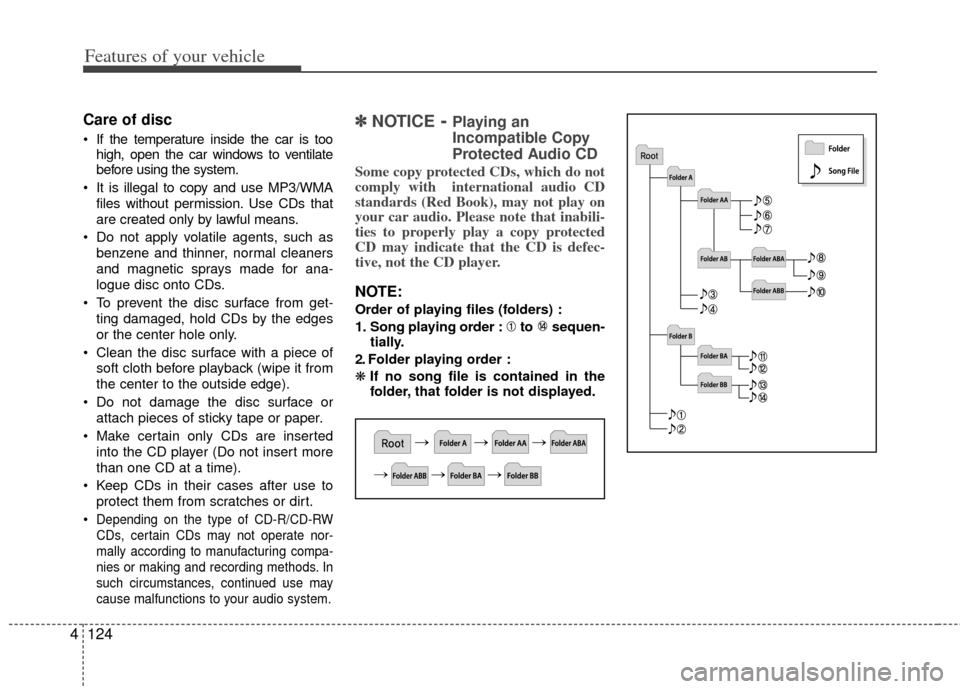
Order of playing files (folders) :
1. Song playing order : to sequen-
tially.
2. Folder playing order :
❋ If no song file is contained in the
folder, that folder is not displayed.
Page 200 of 385
4125
Features of your vehicle
CAUTION IN USING
USB DEVICE
To use an external USB device,
make sure the device is not con-nected when starting up the vehi-cle. Connect the device afterstarting up.
If you start the engine when the USB device is connected, it maydamage the USB device. (USBflashdrives are very sensitive toelectric shock.)
If the engine is started up or turned off while the external USBdevice is connected, the externalUSB device may not work.
The System may not play inau- thentic MP3 or WMA files.
1) It can only play MP3 files with the compression rate between8Kbps~320Kbps.
2) It can only play WMA music files with the compression ratebetween 8Kbps~320Kbps.
Take precautions for static electrici- ty when connecting or disconnect-ing the external USB device.
(Continued)
(Continued) An encrypted MP3 PLAYER is not recognizable.
Depending on the condition of the external USB device, the con-nected external USB device canbe unrecognizable.
When the formatted byte/sector setting of External USB device isnot either 512BYTE or 2048BYTE,then the device will not be recog- nized.
Use only a USB device formatted to FAT 12/16/32.
USB devices without USB I/F authentication may not be recog-nizable.
Make sure the USB connection terminal does not come in contactwith the human body or otherobjects.
If you repeatedly connect or dis- connect the USB device in a shortperiod of time, it may break thedevice.
You may hear a strange noise when connecting or disconnect-ing a USB device.
(Continued)(Continued) If you disconnect the external USB device during playback in USBmode, the external USB device canbe damaged or may malfunction. Therefore, disconnect the externalUSB device when the audio is turned off or in another mode. (e.g,Radio, SIRIUS or CD)
Depending on the type and capacity of the external USB device or thetype of the files stored in the device, there is a difference in the timetaken for recognition of the device.
Do not use the USB device for pur- poses other than playing music files.
Playing videos through the USB isnot supported.
Use of USB accessories such as rechargers or heaters using USBI/F may lower performance or cause trouble.
If you use devices such as a USB hub purchased separately, thevehicle’s audio system may notrecognize the USB device. In that case, connect the USB devicedirectly to the multimedia termi-nal of the vehicle.
(Continued)
Page 211 of 385
Features of your vehicle
136
4
CAUTION IN USING
BLUETOOTH®WIRELESS
TECHNOLOGY CELLU-
LAR PHONE
Do not use a cellular phone or
perform Bluetooth®wireless tech-
nology settings (e.g. pairing a phone) while driving.
Some Bluetooth
® wireless tech-
nology-enabled phones may not be recognized by the system or fully compatible with the system.
Before using Bluetooth
®wireless
technology related features of the audio system, refer your phone’sUser’s Manual for phone-sideBluetooth
®wireless technology
operations.
The phone must be paired to the audio system to use Bluetooth®
wireless technology related fea-
tures.
You will not be able to use the hands-free feature when yourphone (in the car) is outside ofthe cellular service area (e.g. in a tunnel, in a underground, in amountainous area, etc.).
(Continued)
(Continued) If the cellular phone signal is poor or the vehicles interior noise istoo loud, it may be difficult to hearthe other person’s voice during acall.
Do not place the phone near or inside metallic objects, otherwise
communications with Bluetooth
®
wireless technology system orcellular service stations can be disturbed.
While a phone is connected through Bluetooth
®wireless technology
your phone may discharge quicker than usual for additional Bluetooth
®
wireless technology-rel ated opera-
tions.
Some cellular phones or other devices may cause interferencenoise or malfunction to audiosystem. In this case, store thedevice in a different location mayresolve the condition.
Phone contact names should be saved in English or they may notbe displayed correctly.
(Continued)
(Continued) If Priority is set upon vehicle igni- tion(IGN/ACC ON), the Bluetooth
®
wireless technology phone willbe automatically connected. Even if you are outside, theBluetooth
®wireless technology-
phone will be automatically con- nected once you are in the vicini-ty of the vehicle.
If you do not want automaticBluetooth
®wireless technology-
connection, turn the Bluetooth®
wireless technology feature off.
The hands-free call volume and quality may differ depending onthe mobile phone type.
Page 212 of 385
4137
Features of your vehicle
NOTE:
If you need more information about
Kia’s Bluetooth® wireless technol-
ogy
Contact kia website
“www.kia.com” (OWNERS>General
Info>BLUETOOTH).
What is Bluetooth®?
Bluetooth®wireless technology that
allows multiple devices to be connected
in a short range, low-powered devices
like hands-free, stereo headset, wireless
remote controller, etc. For more informa-
tion, visit the Bluetooth
®wireless tech-
nology website at www.Bluetooth.com
CAUTION
Bluetooth®wireless technology
features can be used only when the mobile phone has been pairedand connected with the device.For more information on pairing and connecting Bluetooth
®wire-
less technology mobile phones, refer to the “Phone Setup” sec-tion.
When a Bluetooth
®wireless tech-
nology mobile phone is connect- ed, a ( ) icon will appear at thetop of the screen. If a ( ) icon isnot displayed, this indicates thata Bluetooth
®wireless technology
device has not been connected. Your must connect the devicebefore use. For more informationon Bluetooth
® wireless technolo-
gy mobile phones, refer to the “Phone Setup” section.
(Continued)
(Continued) Pairing and connecting a Bluetooth
® wireless technology
mobile phone will work only when the Bluetooth
® wireless technolo-
gy option within your mobile phone has been turned on. (Methods of turning on the Bluetooth
® wireless
technology f eature may differ
depending on the mobile phone.)
In some mobile phones, starting the ignition while talking throughBluetooth
® wireless technology
handsfree call will result in the call becoming disconnected. (Switch the call back to yourmobile phone when starting the ignition.)
Some features may not be sup- ported in some Bluetooth
® wire-
less technology mobile phone and devices.
Bluetooth
® wireless technology
operation may be unstable depend- ing on the communication state.
Page 217 of 385
Features of your vehicle
142
4
Skipping the Guidance Message
While the guidance message is being
stated, shortly press the key (under
0.8 seconds) to discontinue the guidance
message and sound the “beep”.
After the “beep”, say the voice command.
Ending Voice Command
hold the key (over 0.8 seconds) to
end voice command.
the steering wheel remote controller or
a different key will end voice command.
for your voice command, say “cancel” or
“end” to end voice command.
for your voice command, shortly press
the key (under 0.8 seconds) to end
voice command.
Page 228 of 385
55
Driving your vehicle
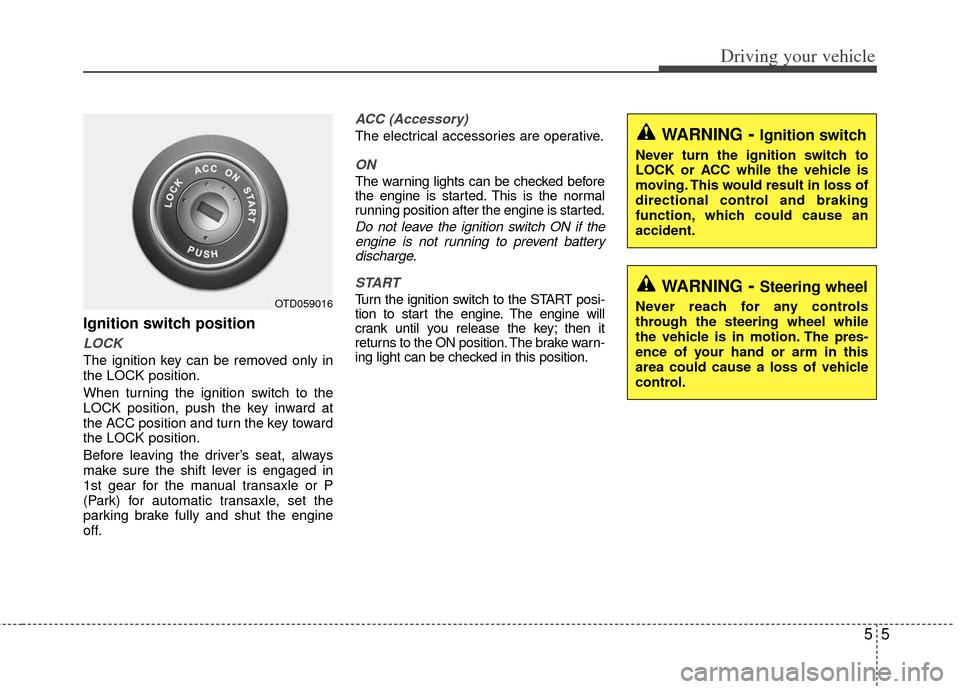
Ignition switch position
LOCK
The ignition key can be removed only in
the LOCK position.
When turning the ignition switch to the
LOCK position, push the key inward at
the ACC position and turn the key toward
the LOCK position.
Before leaving the driver’s seat, always
make sure the shift lever is engaged in
1st gear for the manual transaxle or P
(Park) for automatic transaxle, set the
parking brake fully and shut the engine
off.
ACC (Accessory)
The electrical accessories are operative.
ON
The warning lights can be checked before
the engine is started. This is the normal
running position after the engine is started.
Do not leave the ignition switch ON if theengine is not running to prevent batterydischarge.
START
Turn the ignition switch to the START posi-
tion to start the engine. The engine will
crank until you release the key; then it
returns to the ON position. The brake warn-
ing light can be checked in this position.OTD059016
WARNING- Ignition switch
Never turn the ignition switch to
LOCK or ACC while the vehicle is
moving. This would result in loss of
directional control and braking
function, which could cause an
accident.
WARNING- Steering wheel
Never reach for any controls
through the steering wheel while
the vehicle is in motion. The pres-
ence of your hand or arm in this
area could cause a loss of vehicle
control.