door lock KIA Rio 2013 3.G Owner's Manual
[x] Cancel search | Manufacturer: KIA, Model Year: 2013, Model line: Rio, Model: KIA Rio 2013 3.GPages: 385, PDF Size: 9.68 MB
Page 6 of 385

I3
Index
Cargo capacity ··················\
··················\
··················\
·········5-52
Cargo weight ··················\
··················\
··················\
············5-56
Center console storage ··················\
··················\
···············4-92
Central door lock switch··················\
··················\
············4-17
Certification label ··················\
··················\
···············5-54, 8-7
Changing tires ··················\
··················\
··················\
··········6-14
Checking tire inflation pressure··················\
··················\
·7-38
Child restraint system ··················\
··················\
················3-22Lower anchor ··················\
··················\
··················\
·········3-27
Seat belt ··················\
··················\
··················\
·················3-24\
Tether anchor system ··················\
··················\
···············3-26
Child-protector rear door lock ··················\
··················\
···4-18
Cigarette lighter ··················\
··················\
··················\
·······4-96
Climate control air filter ··················\
··················\
···4-81, 7-32
Clock (Digital) ··················\
··················\
··················\
·········4-99
Clothes hanger ··················\
··················\
··················\
·······4-100
Combined instrument, see instrument cluster ···············4-41
Compact spare tire ··················\
··················\
··················\
···6-19
Compact spare tire replacement ··················\
··················\
7-41
Coolant ··················\
··················\
··················\
··················\
···7-26
Cooling fluid, see engine coolant ··················\
················7-26
Crankcase emission control system ··················\
·············7-66
Cruise control system ··················\
··················\
················5-32
Cup holder ··················\
··················\
··················\
···············4-97
Curtain air bag ··················\
··················\
··················\
·········3-45 Dashboard illumination, see instrument panel
illumination··················\
··················\
··················\
············4-42
Dashboard, see instrument cluster ··················\
···············4-41
Defogging (Windshield) ··················\
··················\
············4-90
Defogging logic (Windshield) ··················\
··················\
···4-91
Defroster (Rear window) ··················\
··················\
···········4-80
Defrosting (Windshield) ··················\
··················\
············4-90
Digital clock··················\
··················\
··················\
·············4-99
Dimensions ··················\
··················\
··················\
················8-2
Display illumination, see instrument panel illumination··················\
··················\
··················\
············4-42
Displays, see instrument cluster ··················\
··················\
4-41
Door locks··················\
··················\
··················\
················4-15 Central door lock switch ··················\
··················\
·········4-17
Child-protector rear door lock ··················\
··················\
·4-18
Drinks holders, see cup holders··················\
··················\
·4-97
Driver's 3-point seat belt ··················\
··················\
············3-14
Driver's and passenger's front air bag ··················\
··········3-41
Driving at night ··················\
··················\
··················\
········5-45
Driving in flooded areas ··················\
··················\
············5-46
Driving in the rain··················\
··················\
··················\
····5-46D
Page 20 of 385
Your vehicle at a glance
22
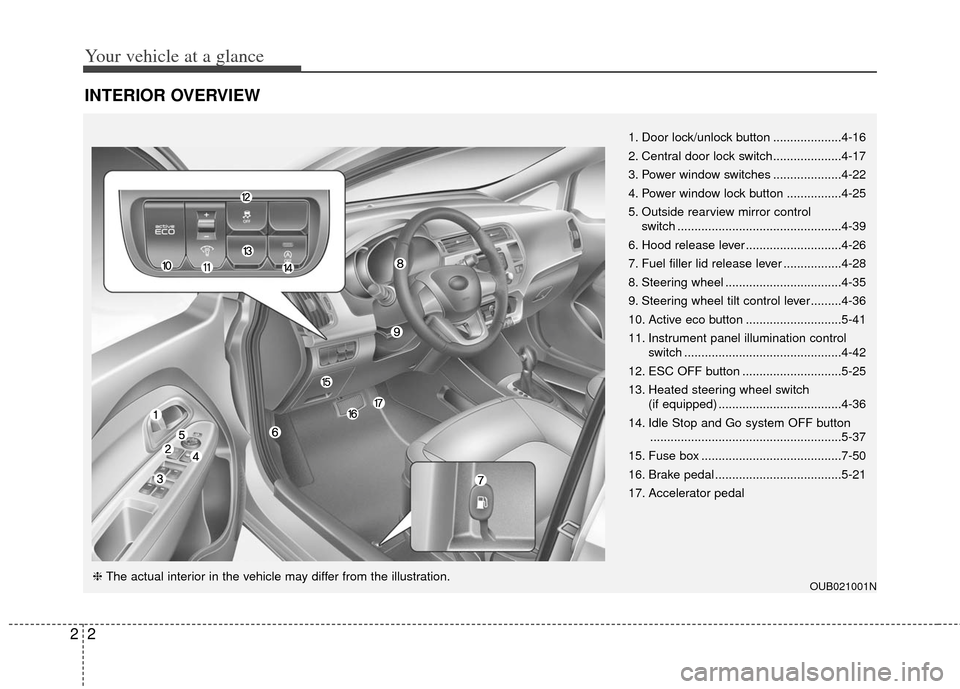
INTERIOR OVERVIEW
OUB021001N
1. Door lock/unlock button ....................4-16
2. Central door lock switch....................4-17
3. Power window switches ....................4-22
4. Power window lock button ................4-25
5. Outside rearview mirror control switch ................................................4-39
6. Hood release lever ............................4-26
7. Fuel filler lid release lever .................4-28
8. Steering wheel ..................................4-35
9. Steering wheel tilt control lever.........4-36
10. Active eco button ............................5-41
11. Instrument panel illumination control switch ..............................................4-42
12. ESC OFF button .............................5-25
13. Heated steering wheel switch (if equipped) ....................................4-36
14. Idle Stop and Go system OFF button ........................................................5-37
15. Fuse box .........................................7-50
16. Brake pedal .....................................5-21
17. Accelerator pedal
❈ The actual interior in the vehicle may differ from the illustration.
Page 37 of 385
315
Safety features of your vehicle
Height adjustment
You can adjust the height of the shoulder
belt anchor to one of the 4 positions for
maximum comfort and safety.
The height of the adjusting seat belt
should not be too close to your neck. The
shoulder portion should be adjusted so
that it lies across your chest and midway
over your shoulder near the door and not
your neck.
To adjust the height of the seat belt
anchor, lower or raise the height adjuster
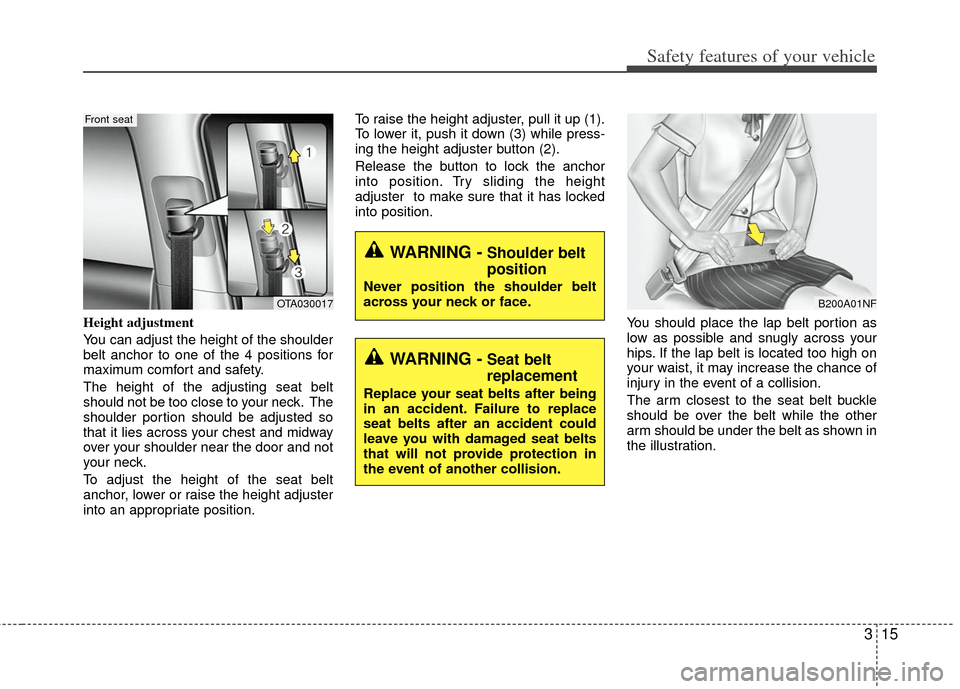
into an appropriate position.To raise the height adjuster, pull it up (1).
To lower it, push it down (3) while press-
ing the height adjuster button (2).
Release the button to lock the anchor
into position. Try sliding the height
adjuster to make sure that it has locked
into position.
You should place the lap belt portion as
low as possible and snugly across your
hips. If the lap belt is located too high on
your waist, it may increase the chance of
injury in the event of a collision.
The arm closest to the seat belt buckle
should be over the belt while the other
arm should be under the belt as shown in
the illustration.
OTA030017
Front seat
WARNING -Shoulder belt
position
Never position the shoulder belt
across your neck or face.
WARNING -Seat belt
replacement
Replace your seat belts after being
in an accident. Failure to replace
seat belts after an accident could
leave you with damaged seat belts
that will not provide protection in
the event of another collision.
B200A01NF
Page 76 of 385
4
Keys / 4-2
Smart key / 4-4
Remote keyless entry / 4-7
Theft-alarm system / 4-12
Door locks / 4-15
Tailgate / 4-20
Windows / 4-22
Hood / 4-26
Fuel filler lid / 4-28
Sunroof / 4-31
Steering wheel / 4-35
Mirrors / 4-38
Instrument cluster / 4-41
Rearview camera / 4-69
Hazard warning flasher / 4-70
Lighting / 4-70
Wipers and washers / 4-74
Interior light / 4-78
Defroster / 4-80
Manual climate control system / 4-81
Windshield defrosting and defogging / 4-90
Storage compartment / 4-92
Interior features / 4-96
Audio system / 4-102
Features of your vehicle
Page 77 of 385
Features of your vehicle
24
Record your key number
The key code number is stamped on the
bar code tag attached to the key set.
Should you lose your keys, this number
will enable an authorized Kia dealer to
duplicate the keys easily. Remove the bar
code tag and store it in a safe place. Also,
record the code number and keep it in a
safe place (not in the vehicle).
Key operations
Type A
Used to start the engine, lock and unlock
the doors.
Type B
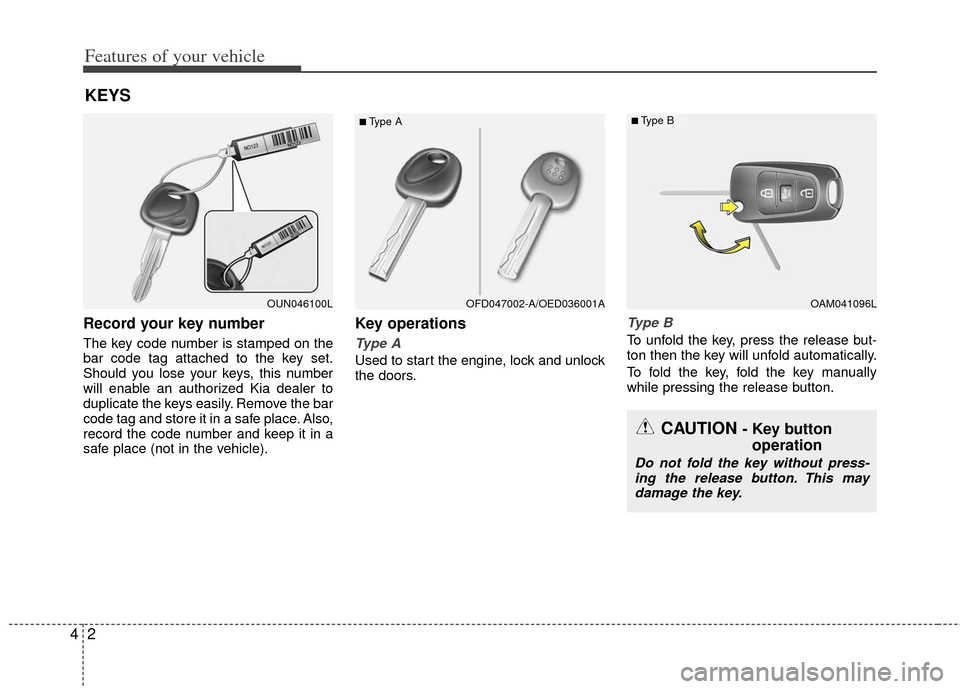
To unfold the key, press the release but-
ton then the key will unfold automatically.
To fold the key, fold the key manually
while pressing the release button.
KEYS
OUN046100L
■Type A
OAM041096L
■Type B
OFD047002-A/OED036001A
CAUTION - Key buttonoperation
Do not fold the key without press-
ing the release button. This may damage the key.
Page 79 of 385
Features of your vehicle
44
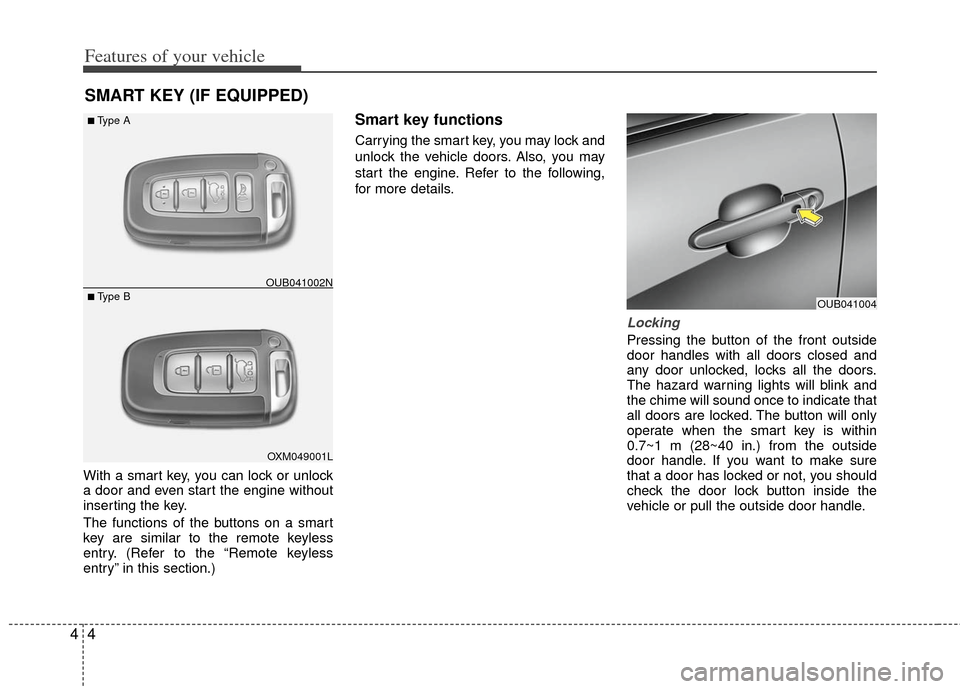
With a smart key, you can lock or unlock
a door and even start the engine without
inserting the key.
The functions of the buttons on a smart
key are similar to the remote keyless
entry. (Refer to the “Remote keyless
entry” in this section.)
Smart key functions
Carrying the smart key, you may lock and
unlock the vehicle doors. Also, you may
start the engine. Refer to the following,
for more details.
Locking
Pressing the button of the front outside
door handles with all doors closed and
any door unlocked, locks all the doors.
The hazard warning lights will blink and
the chime will sound once to indicate that
all doors are locked. The button will only
operate when the smart key is within
0.7~1 m (28~40 in.) from the outside
door handle. If you want to make sure
that a door has locked or not, you should
check the door lock button inside the
vehicle or pull the outside door handle.
SMART KEY (IF EQUIPPED)
OXM049001L
■ Type B
■Type AOUB041002N
OUB041004
Page 80 of 385
45
Features of your vehicle
Even though you press the button, the
doors will not lock and the chime will
sound for 3 seconds if any of the follow-
ing occurs:
The smart key is in the vehicle.
The ignition switch is in the ACC or ONposition.
Any door except the trunk (or tailgate) is opened.Unlocking
Pressing the button of the driver's out-
side door handle with all doors closed
and locked, unlocks the driver's door. The
hazard warning lights will blink and the
chime will sound twice to indicate that the
driver's door is unlocked. All doors are
unlocked if the button is pressed once
more within 4 seconds. The hazard warn-
ing lights will blink and the chime will
sound twice to indicate that all the doors
are unlocked.
Pressing the button in the front passen-
ger's outside door handle with all doors
closed and locked, unlocks all the doors.
The hazard warning lights will blink and
the chime will sound twice to indicate that
all doors are unlocked. The button will
only operate when the smart key is with-
in 0.7~1 m (28~40 in.) from the outside
door handle.
Tailgate unlocking (if equipped)
If you are within 0.7 m (28 in.) from the
outside tailgate handle, with your smart
key in possession, the tailgate will unlock
and open when you press the tailgate
handle switch.
The hazard warning lights will blink twice
to indicate that the tailgate is unlocked.
Also, once the tailgate is opened and
then closed, the tailgate will lock auto-
matically.
Start-up
You can start the engine without inserting
the key. For detailed information refer to
“Starting the engine with a smart key” in
section 5.
Page 82 of 385
47
Features of your vehicle
Remote keyless entry system
operations
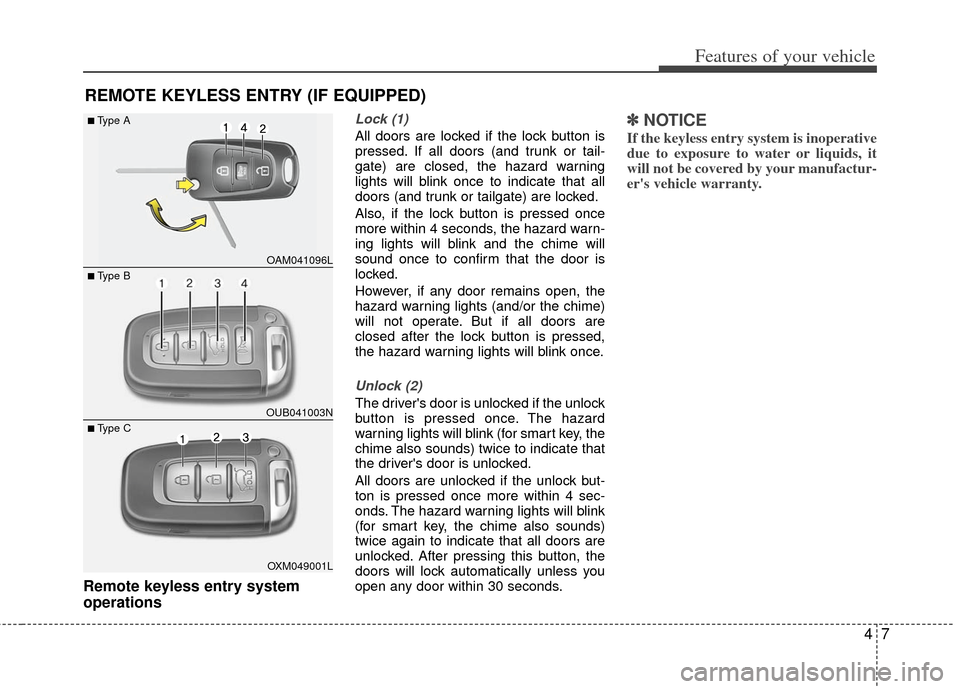
Lock (1)
All doors are locked if the lock button is
pressed. If all doors (and trunk or tail-
gate) are closed, the hazard warning
lights will blink once to indicate that all
doors (and trunk or tailgate) are locked.
Also, if the lock button is pressed once
more within 4 seconds, the hazard warn-
ing lights will blink and the chime will
sound once to confirm that the door is
locked.
However, if any door remains open, the
hazard warning lights (and/or the chime)
will not operate. But if all doors are
closed after the lock button is pressed,
the hazard warning lights will blink once.
Unlock (2)
The driver's door is unlocked if the unlock
button is pressed once. The hazard
warning lights will blink (for smart key, the
chime also sounds) twice to indicate that
the driver's door is unlocked.
All doors are unlocked if the unlock but-
ton is pressed once more within 4 sec-
onds. The hazard warning lights will blink
(for smart key, the chime also sounds)
twice again to indicate that all doors are
unlocked. After pressing this button, the
doors will lock automatically unless you
open any door within 30 seconds.
✽ ✽NOTICE
If the keyless entry system is inoperative
due to exposure to water or liquids, it
will not be covered by your manufactur-
er's vehicle warranty.
REMOTE KEYLESS ENTRY (IF EQUIPPED)
OAM041096L
OUB041003N
■Type A
■ Type B
OXM049001L
■ Type C
Page 83 of 385
Features of your vehicle
84
Tailgate open (3) (if equipped)
The tailgate is opened if the button is
pressed for more than 1 second.
Once the tailgate is opened and then
closed, the tailgate will lock automatical-
ly.
Alarm (4)
The horn sounds and the hazard warning
lights blink for about 30 seconds if this
button is pressed for more than 0.5 sec-
onds. To stop the horn and lights, press
any button on the transmitter.
Transmitter precautions
The transmitter (or smart key) will not
work if any of following occurs:
The ignition key is in the ignitionswitch.
You exceed the operating distance limit (about 30 m [90 feet]).
The battery in the transmitter (or smart key) is weak.
Other vehicles or objects may be blocking the signal.
The weather is extremely cold.
The transmitter (or smart key) is close to a radio transmitter such as a radio
station or an airport which can interfere
with normal operation of the transmit-
ter.
When the transmitter (or smart key) does
not work properly, open and close the
door with the ignition key. If you have a
problem with the transmitter (or smart
key), contact an authorized Kia dealer. This device complies with Industry
Canada Standard RSS-210.
Operation is subject to the following two
conditions:
1. This device may not cause harmful
interference, and
2. This device must accept any interfer- ence received, including interference
that may cause undesired operation.
✽ ✽NOTICE
Changes or modifications not expressly
approved by the party responsible for
compliance could void the user’s
authority to operate the equipment. If
the keyless entry system is inoperative
due to changes or modifications not
expressly approved by the party respon-
sible for compliance, it will not be cov-
ered by your manufacturer’s vehicle
warranty.
Page 87 of 385
Features of your vehicle
12
4
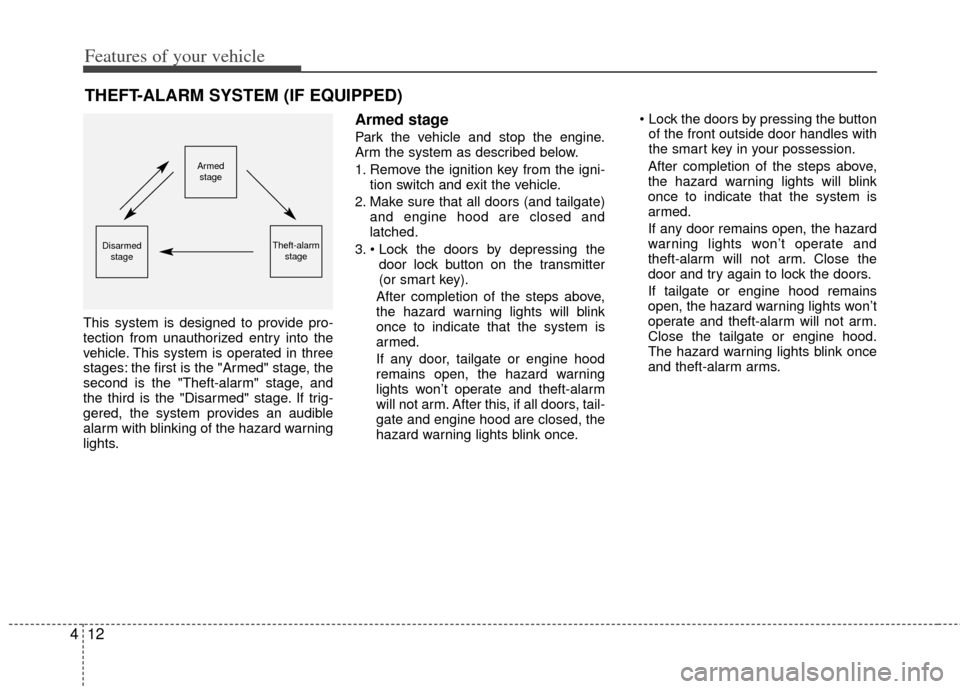
This system is designed to provide pro-
tection from unauthorized entry into the
vehicle. This system is operated in three
stages: the first is the "Armed" stage, the
second is the "Theft-alarm" stage, and
the third is the "Disarmed" stage. If trig-
gered, the system provides an audible
alarm with blinking of the hazard warning
lights.
Armed stage
Park the vehicle and stop the engine.
Arm the system as described below.
1. Remove the ignition key from the igni-
tion switch and exit the vehicle.
2. Make sure that all doors (and tailgate) and engine hood are closed and
latched.
3. door lock button on the transmitter
(or smart key).
After completion of the steps above,
the hazard warning lights will blink
once to indicate that the system is
armed.
If any door, tailgate or engine hood
remains open, the hazard warning
lights won’t operate and theft-alarm
will not arm. After this, if all doors, tail-
gate and engine hood are closed, the
hazard warning lights blink once.
of the front outside door handles with
the smart key in your possession.
After completion of the steps above,
the hazard warning lights will blink
once to indicate that the system is
armed.
If any door remains open, the hazard
warning lights won’t operate and
theft-alarm will not arm. Close the
door and try again to lock the doors.
If tailgate or engine hood remains
open, the hazard warning lights won’t
operate and theft-alarm will not arm.
Close the tailgate or engine hood.
The hazard warning lights blink once
and theft-alarm arms.
THEFT-ALARM SYSTEM (IF EQUIPPED)
Armed stage
Theft-alarm stageDisarmedstage