USB KIA Rio 2014 3.G User Guide
[x] Cancel search | Manufacturer: KIA, Model Year: 2014, Model line: Rio, Model: KIA Rio 2014 3.GPages: 397, PDF Size: 7.56 MB
Page 198 of 397
4133
Features of your vehicle
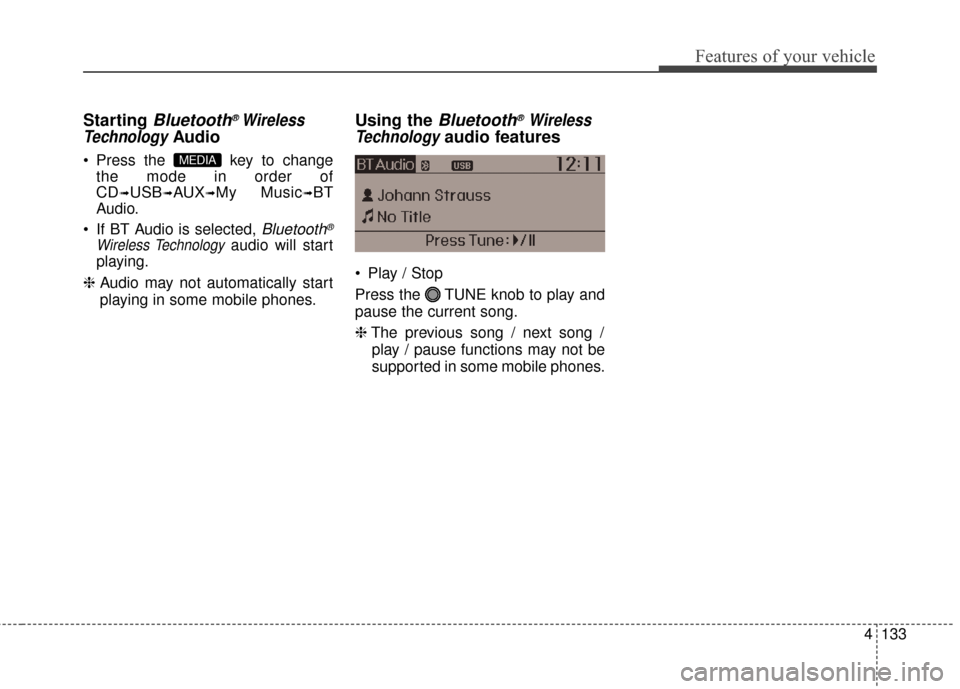
Starting Bluetooth®Wireless
Technology
Audio
Press the key to change
the mode in order of
CD
➟USB➟AUX➟My Music➟BT
Audio.
If BT Audio is selected,
Bluetooth®
Wireless Technologyaudio will start
playing.
❈ Audio may not automatically start
playing in some mobile phones.
Using the Bluetooth®Wireless
Technology
audio features
Play / Stop
Press the TUNE knob to play and
pause the current song.
❈ The previous song / next song /
play / pause functions may not be
supported in some mobile phones.
MEDIA
Page 218 of 397
4153
Features of your vehicle
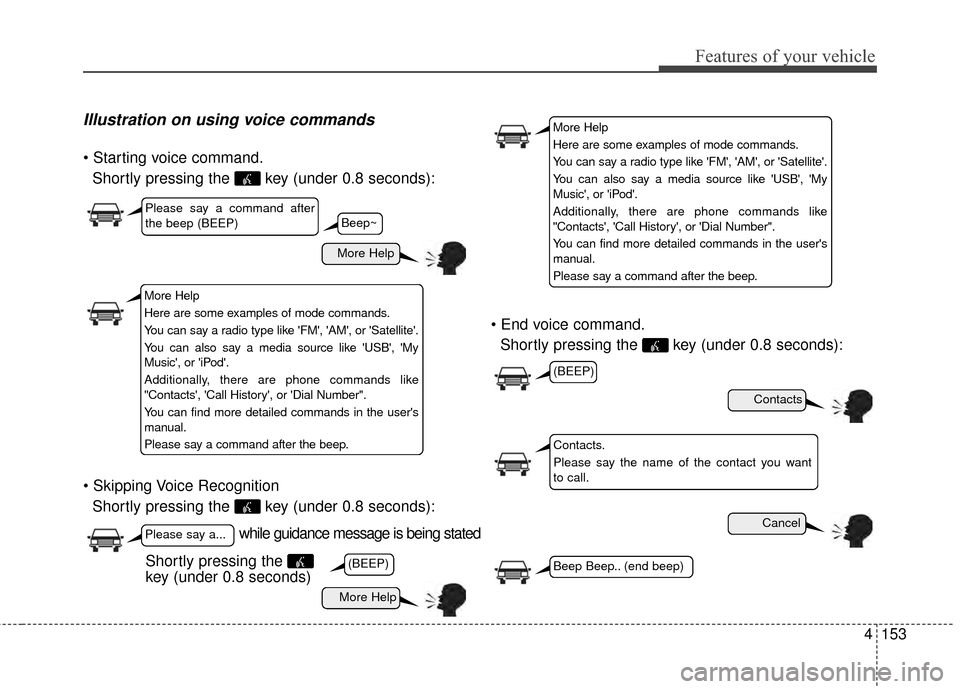
Illustration on using voice commands
Shortly pressing the key (under 0.8 seconds):
Shortly pressing the key (under 0.8 seconds):
Shortly pressing the key (under 0.8 seconds):
while guidance message is being stated
More Help
Contacts
Cancel
More Help
Please say a command after
the beep (BEEP)
Please say a...
Contacts.
Please say the name of the contact you want
to call.
(BEEP)
(BEEP)
Beep Beep.. (end beep)Shortly pressing the
key (under 0.8 seconds)
Beep~
More Help
Here are some examples of mode commands.
You can say a radio type like 'FM', 'AM', or 'Satellite'.
You can also say a media source like 'USB', 'My
Music', or 'iPod'.
Additionally, there are phone commands like
"Contacts', 'Call History', or 'Dial Number".
You can find more detailed commands in the user's
manual.
Please say a command after the beep.
More Help
Here are some examples of mode commands.
You can say a radio type like 'FM', 'AM', or 'Satellite'.
You can also say a media source like 'USB', 'My
Music', or 'iPod'.
Additionally, there are phone commands like
"Contacts', 'Call History', or 'Dial Number".
You can find more detailed commands in the user's
manual.
Please say a command after the beep.
Page 220 of 397
4155
Features of your vehicle
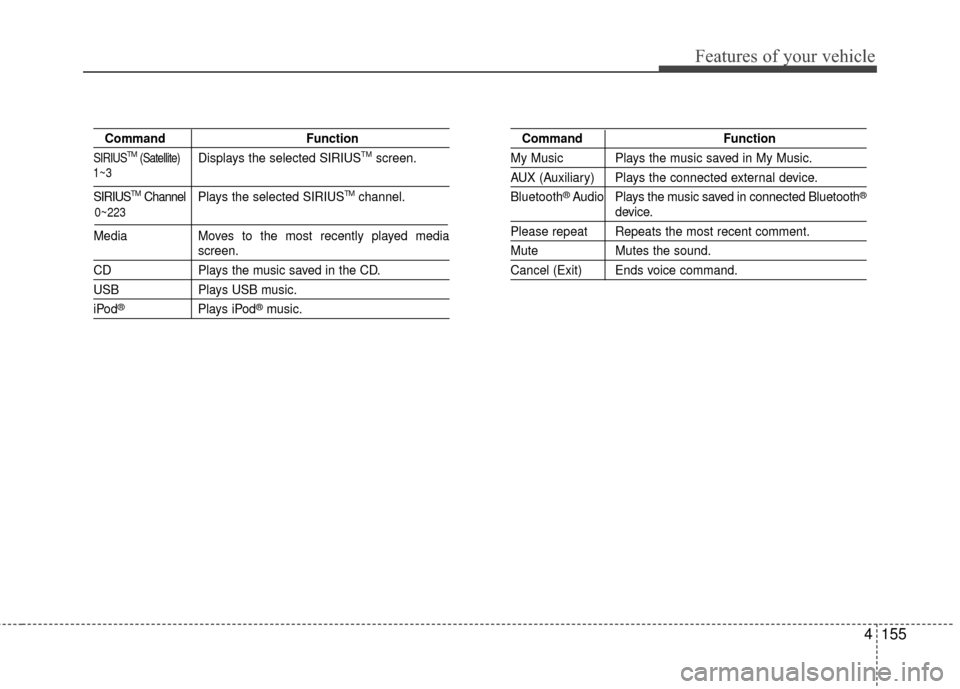
CommandFunction
SIRIUSTM(Satellite)Displays the selected SIRIUSTMscreen.
SIRIUSTMChannel P l ay s the selected SIRIUSTMchannel.
Media Moves to the most recently played media
screen.
CD Plays the music saved in the CD.
USBPlays USB music.
iPod®Plays iPod®music.
Command Function
My Music Plays the music saved in My Music.
AUX (Auxiliary) Plays the connected external device.
Bluetooth
®Audio Plays the music saved in connected Bluetooth®
device.
Please repeat Repeats the most recent comment.
Mute Mutes the sound.
Cancel (Exit) Ends voice command.
0~223
1~3
Page 222 of 397
4157
Features of your vehicle
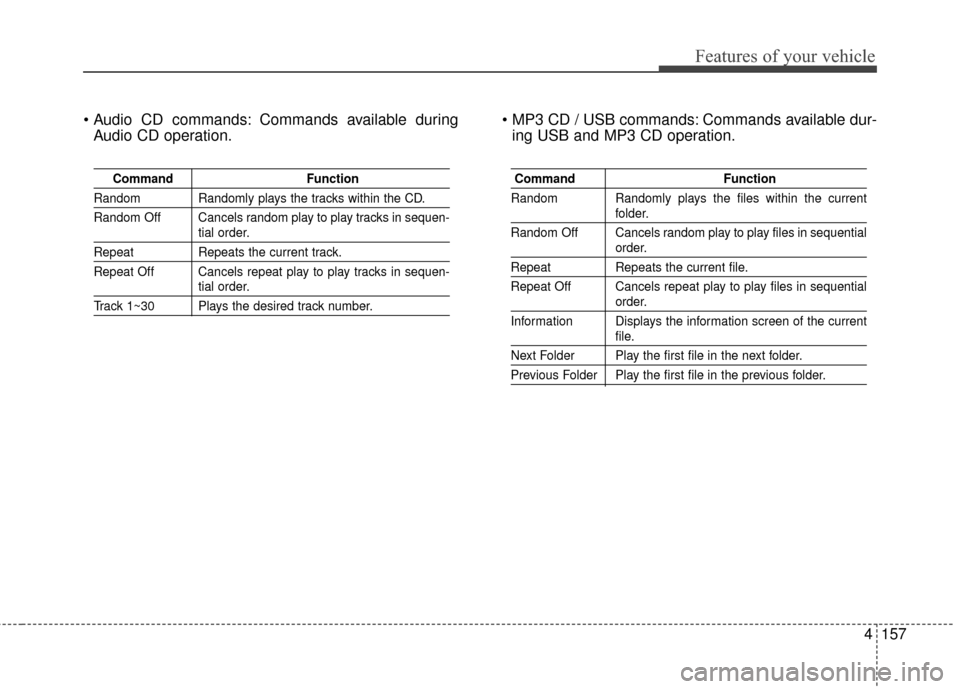
Commands available duringAudio CD operation. Commands available dur-
ing USB and MP3 CD operation.
Command Function
Random Randomly plays the tracks within the CD.
Random Off Cancels random play to play tracks in sequen-
tial order.
RepeatRepeats the current track.
Repeat Off Cancels repeat play to play tracks in sequen-
tial order.
Track 1~30 Plays the desired track number.
Command Function
Random Randomly plays the files within the current
folder.
Random Off Cancels random play to play files in sequential
order.
Repeat Repeats the current file.
Repeat Off Cancels repeat play to play files in sequential
order.
Information Displays the information screen of the current
file.
Next Folder Play the first file in the next folder.
Previous Folder Play the first file in the previous folder.
Page 389 of 397

Index
2I
Active Eco System ··················\
··················\
··················\
···5-41
Air bag warning label ··················\
··················\
················3-53
Air bag warning light··················\
··················\
·················3-33\
Air bags··················\
··················\
··················\
··················\
··3-30Air bag warning label ··················\
··················\
··············3-53
Air bag warning light ··················\
··················\
··············3-33
Curtain air bag ··················\
··················\
··················\
·······3-45
Driver's and passenger's front air bag··········\
················3-41
Occupant detection system ··················\
··················\
······3-36
Side impact air bag ··················\
··················\
··················\
3-44
SRS components and functions ··················\
·················3-33\
Air cleaner ··················\
··················\
··················\
···············7-31
Antenna (Roof) ··················\
··················\
··················\
······4-102
Anti-Lock Brake System (ABS) ··················\
··················\
5-24
Appearance care··················\
··················\
··················\
·······7-60 Exterior care ··················\
··················\
··················\
··········7-60
Interior care ··················\
··················\
··················\
···········7-64
Ashtray ··················\
··················\
··················\
··················\
···4-96
Audio system ··················\
··················\
··················\
·········4-102 Roof antenna··················\
··················\
··················\
········4-102
Steering wheel audio control ··················\
··················\
·4-103
Automatic transaxle ··················\
··················\
··················\
·5-15 Shift lock ··················\
··················\
··················\
···············5-19
Sports mode ··················\
··················\
··················\
···········5-17
Automatic transaxle fluid ··················\
··················\
··········7-30
Aux, USB and iPod port ··················\
··················\
··········4-104 Base curb weight ··················\
··················\
··················\
·····5-56
Battery··················\
··················\
··················\
··················\
····7-34
Battery saver function ··················\
··················\
················4-70
Before driving ··················\
··················\
··················\
············5-3
Bottle holders, see cup holders ··················\
··················\
··4-97
Brake system··················\
··················\
··················\
············5-21
Anti-lock brake system (ABS) ··················\
··················\
5-24
Electronic stability program (ESC) ··················\
···········5-25
Hill-start assist control············\
··················\
··················\
·5-28
Parking brake ··················\
··················\
··················\
·········5-22
Power brakes··················\
··················\
··················\
··········5-21
Vehicle stability management··················\
··················\
··5-29
Brakes/clutch fluid ··················\
··················\
··················\
···7-29
Bulb wattage ··················\
··················\
··················\
··············8-3
Calendar ··················\
··················\
··················\
·················4-10\
0
Capacities (Lubricants) ··················\
··················\
················8-6
Car option ··················\
··················\
··················\
················4-50
Care Exterior care ··················\
··················\
··················\
··········7-60
Interior care ··················\
··················\
··················\
···········7-64
Tire care ··················\
··················\
··················\
·················7-37\
AB
C
Page 392 of 397

I5
Index
GaugeEngine coolant temperature gauge ··················\
············4-42
Fuel gauge ··················\
··················\
··················\
·············4-43
GAW (Gross axle weight) ··················\
··················\
·········5-56
GAWR (Gross axle weight rating) ··················\
··············5-56
Glove box··················\
··················\
··················\
·················4-92\
GVW (Gross vehicle weight) ··················\
··················\
····5-56
GVWR (Gross vehicle weight rating) ··················\
·········5-56
Hazard warning flasher ··················\
··················\
··············4-70
Hazardous driving conditions ··················\
··················\
····5-44
Headrest(front) ··················\
··················\
··················\
···········3-5
Headrest(rear) ··················\
··················\
··················\
············3-9
Hight adjustment··················\
··················\
··················\
······3-15
Highway driving ··················\
··················\
··················\
······5-47
Hill-start assist control ··················\
··················\
···············5-28
Hood··················\
··················\
··················\
··················\
·······4-26
Horn ··················\
··················\
··················\
··················\
·······4-37
How to use this manual ··················\
··················\
···············1-2 Idle stop and go system ··················\
··················\
·············5-37
Immobilizer system ··················\
··················\
··················\
·4-10
Indicator symbols on the instrument cluster ··················\
·1-5
Indicators and warnings ··················\
··················\
·············4-53
Inside rearview mirror ··················\
··················\
···············4-38
Instrument cluster ··················\
··················\
··················\
····4-41
Car option ··················\
··················\
··················\
··············4-50
Engine coolant temperature gauge ··················\
············4-43
Fuel gauge ··················\
··················\
··················\
·············4-43
Instrument panel illumination ··················\
··················\
·4-42
LCD display warning ··················\
··················\
··············4-63
Maintenance ··················\
··················\
··················\
··········4-51
Odometer ··················\
··················\
··················\
···············4-44
Speedometer ··················\
··················\
··················\
··········4-42
Tachometer ··················\
··················\
··················\
············4-42
Trip computer ··················\
··················\
··················\
········4-45
User settings ··················\
··················\
··················\
··········4-49
Warning and indicators ··················\
··················\
············4-53
Instrument panel fuse··················\
··················\
·················7-55\
Instrument panel illumination··················\
··················\
····4-42
Instrument panel overview··················\
··················\
···········2-3
Interior care··················\
··················\
··················\
··············7-64
Interior features··················\
··················\
··················\
········4-96 Ashtray ··················\
··················\
··················\
··················\
4-96
Aux, USB and iPod port··················\
··················\
········4-104
Cigarette lighter ··················\
··················\
··················\
·····4-96
G
H
I