set clock KIA RIO 2017 User Guide
[x] Cancel search | Manufacturer: KIA, Model Year: 2017, Model line: RIO, Model: KIA RIO 2017Pages: 449, PDF Size: 14.88 MB
Page 235 of 449
Features of your vehicle
164
4
Bluetooth®Wireless Technology
Setting
The Bluetooth®word mark and logos are
registered trademarks owned by
Bluetooth SIG, Inc. and any use of such
marks by Kia is under license. Other
trademarks and trade names are those
of their respective owners. A Bluetooth
®
enabled cell phone is required to useBluetooth®Wireless Technology.
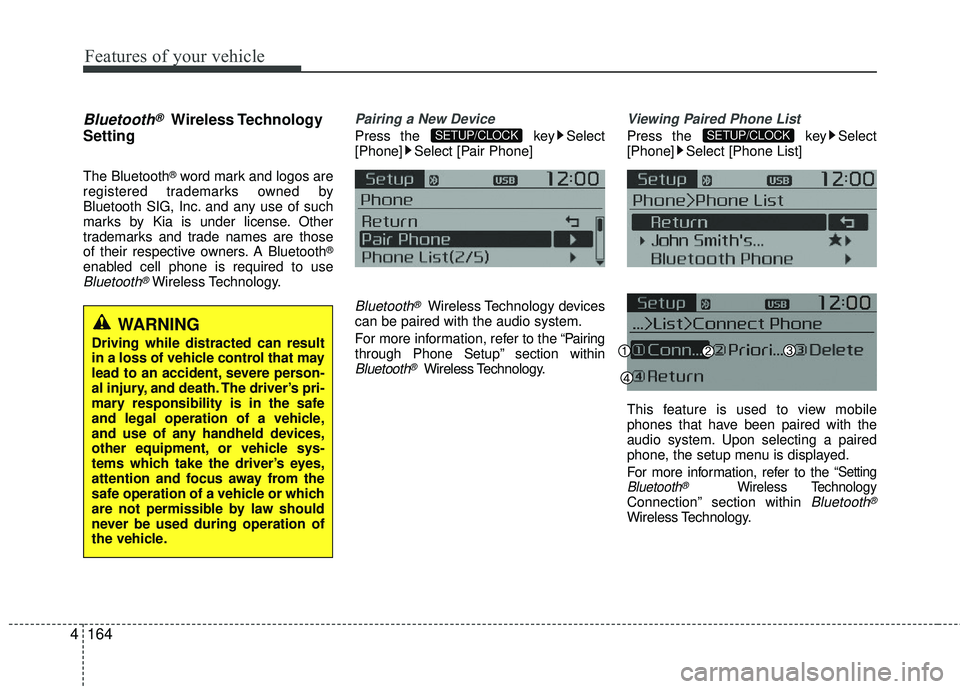
Pairing a New Device
Press the key Select
[Phone] Select [Pair Phone]
Bluetooth®Wireless Technology devices
can be paired with the audio system.
For more information, refer to the “Pairing
through Phone Setup” section within
Bluetooth®Wireless Technology.
Viewing Paired Phone List
Press the key Select
[Phone] Select [Phone List]
This feature is used to view mobile
phones that have been paired with the
audio system. Upon selecting a paired
phone, the setup menu is displayed.
For more information, refer to the
“SettingBluetooth®Wireless TechnologyConnection” section within Bluetooth®
Wireless Technology.
SETUP/CLOCKSETUP/CLOCK
WARNING
Driving while distracted can result
in a loss of vehicle control that may
lead to an accident, severe person-
al injury, and death. The driver’s pri-
mary responsibility is in the safe
and legal operation of a vehicle,
and use of any handheld devices,
other equipment, or vehicle sys-
tems which take the driver’s eyes,
attention and focus away from the
safe operation of a vehicle or which
are not permissible by law should
never be used during operation of
the vehicle.
Page 236 of 449
Features of your vehicle
4165
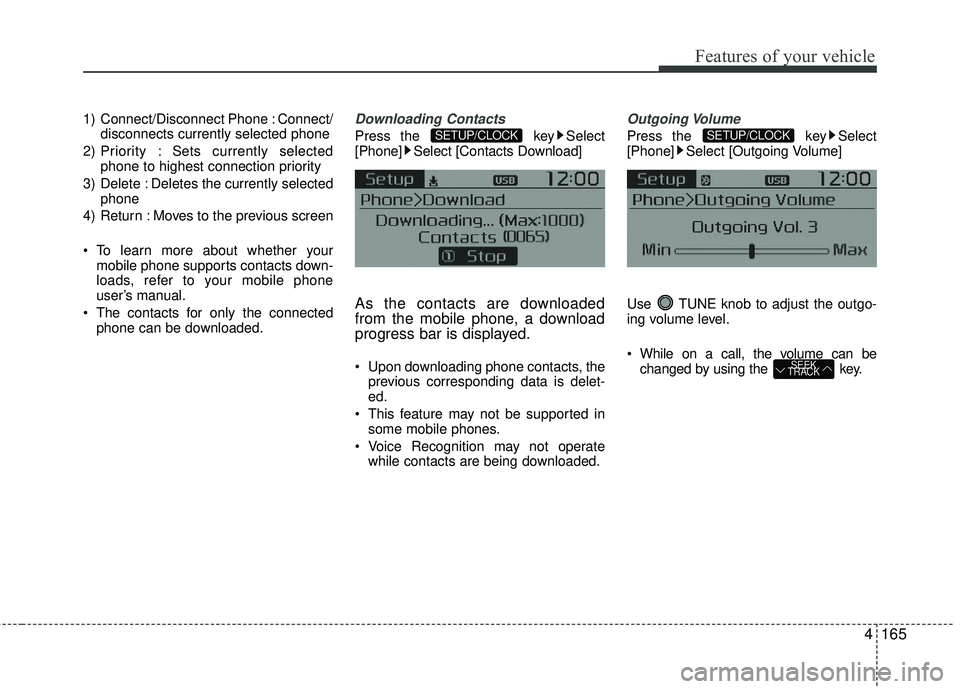
1) Connect/Disconnect Phone : Connect/disconnects currently selected phone
2) Priority : Sets currently selected phone to highest connection priority
3) Delete : Deletes the currently selected phone
4) Return : Moves to the previous screen
To learn more about whether your mobile phone supports contacts down-
loads, refer to your mobile phone
user’s manual.
The contacts for only the connected phone can be downloaded.Downloading Contacts
Press the key Select
[Phone] Select [Contacts Download]
As the contacts are downloaded
from the mobile phone, a download
progress bar is displayed.
Upon downloading phone contacts, the previous corresponding data is delet-
ed.
This feature may not be supported in some mobile phones.
Voice Recognition may not operate while contacts are being downloaded.
Outgoing Volume
Press the key Select
[Phone] Select [Outgoing Volume]
Use TUNE knob to adjust the outgo-
ing volume level.
While on a call, the volume can be changed by using the key.
SEEK
TRACK
SETUP/CLOCKSETUP/CLOCK
Page 237 of 449
![KIA RIO 2017 User Guide Features of your vehicle
166
4
Turning Bluetooth System Off
Press the key Select
[Phone] Select [Bluetooth System Off]
Once
Bluetooth®Wireless Technology is
turned off, Bluetooth®Wireless
Technolo](/img/2/40419/w960_40419-236.png "KIA RIO 2017 User Guide Features of your vehicle
166
4
Turning Bluetooth System Off
Press the key Select
[Phone] Select [Bluetooth System Off]
Once
Bluetooth®Wireless Technology is
turned off, Bluetooth®Wireless
Technolo")
Features of your vehicle
166
4
Turning Bluetooth System Off
Press the key Select
[Phone] Select [Bluetooth System Off]
Once
Bluetooth®Wireless Technology is
turned off, Bluetooth®Wireless
Technology related features will not be
supported within the audio system.
To turn
Bluetooth®Wireless Technology
back on, go to
[Phone] and select “Yes”.SETUP/CLOCK
SETUP/CLOCK
Page 238 of 449
![KIA RIO 2017 User Guide Features of your vehicle
4167
VOICE RECOGNITION
Using Voice Recognition
Starting Voice Recognition
Shortly press the key on the steer-
ing wheel. Say a command.
If prompt feedback is in [ON], then](/img/2/40419/w960_40419-237.png "KIA RIO 2017 User Guide Features of your vehicle
4167
VOICE RECOGNITION
Using Voice Recognition
Starting Voice Recognition
Shortly press the key on the steer-
ing wheel. Say a command.
If prompt feedback is in [ON], then")
Features of your vehicle
4167
VOICE RECOGNITION
Using Voice Recognition
Starting Voice Recognition
Shortly press the key on the steer-
ing wheel. Say a command.
If prompt feedback is in [ON], then the
system will say “Please say a command
after the beep (BEEP)”
If prompt feedback is in [OFF] mode,then the system will only say “(BEEP)”
To change Prompt Feedback [On]/[Off], go to
[System] [Prompt Feedback]
For proper recognition, say the com- mand after the voice instruction and
beep tone.
Contact List Best Practices
1) Use full names vs. short or singlesylla- ble names (“John Smith” vs. “Dad”,
“Smith Residence” vs. “Home”)
2) Avoid using special characters or hyphens (@, &, #, /, -, *, +, etc.)
3) Avoid using acronyms (“In Case Emergency” vs. “ICE”)
4) Spell words completely, no abbrevia- tions (“Doctor Goodman” vs. “Dr.
Goodman”)
Skipping Prompt Messages
While prompt message is being stated
Shortly press the key on the steer-
ing remote controller
The prompt message is immediately
ended and the beep tone will sound.
After the “beep”, say the voice command.
Re-starting Voice Recognition
While system waits for a command
Shortly press the key on the steer-
ing remote controller
The command wait state is immediately
ended and the beep tone will sound.
After the “beep”, say the voice command.
SETUP/CLOCK
Page 321 of 449
What to do in an emergency
16
6
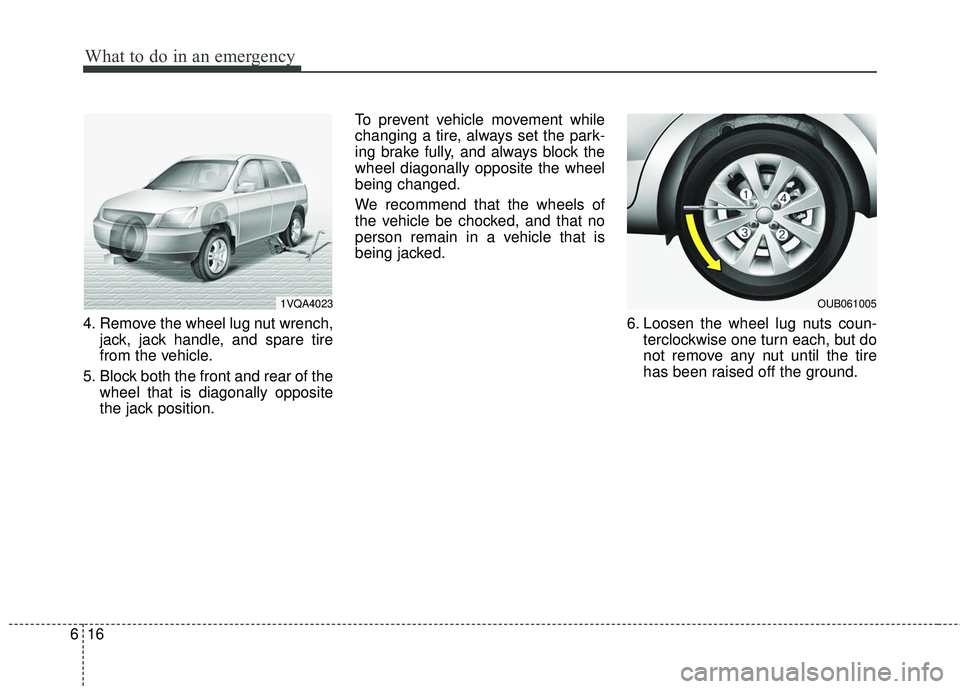
4. Remove the wheel lug nut wrench,
jack, jack handle, and spare tire
from the vehicle.
5. Block both the front and rear of the wheel that is diagonally opposite
the jack position. To prevent vehicle movement while
changing a tire, always set the park-
ing brake fully, and always block the
wheel diagonally opposite the wheel
being changed.
We recommend that the wheels of
the vehicle be chocked, and that no
person remain in a vehicle that is
being jacked.
6. Loosen the wheel lug nuts coun-terclockwise one turn each, but do
not remove any nut until the tire
has been raised off the ground.
1VQA4023OUB061005
Page 334 of 449
629
What to do in an emergency
When towing your vehicle in an emer-
gency without wheel dollies :
1. Set the ignition switch in the ACC posi-tion.
2. Place the transaxle shift lever in N (Neutral).
3. Release the parking brake.
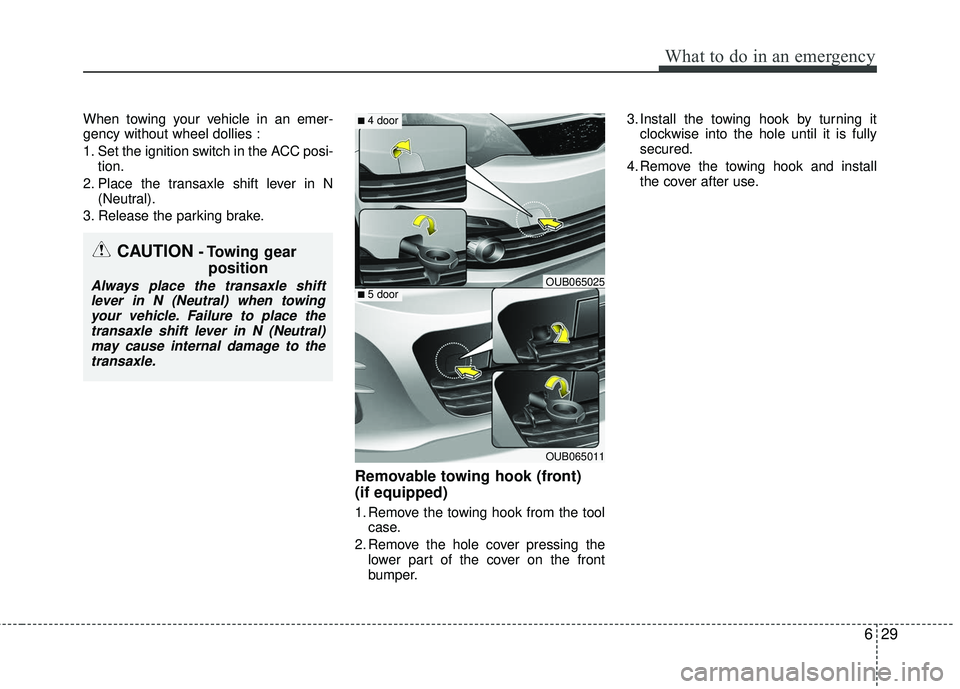
Removable towing hook (front)
(if equipped)
1. Remove the towing hook from the tool case.
2. Remove the hole cover pressing the lower part of the cover on the front
bumper. 3. Install the towing hook by turning it
clockwise into the hole until it is fully
secured.
4. Remove the towing hook and install the cover after use.
CAUTION - Towing gear position
Always place the transaxle shift
lever in N (Neutral) when towingyour vehicle. Failure to place thetransaxle shift lever in N (Neutral)may cause internal damage to the transaxle.
OUB065011
■ 4 door
■ 5 doorOUB065025
Page 383 of 449
747
Maintenance
Reset items
Items should be reset after the battery
has been discharged or the battery has
been disconnected.
Auto down window (See section 4)
Sunroof (See section 4)
Trip computer (See section 4)
Climate control system (See section 4)
Clock (See section 4)
Audio (See section 4)
Page 399 of 449
763
Maintenance
If it fits loosely, consult an authorized Kia
dealer.
If you do not have a spare, use a fuse ofthe same rating from a circuit you maynot need for operating the vehicle, suchas the cigar lighter fuse.
If the headlights or other electrical com-
ponents do not work and the fuses are
OK, check the fuse block in the engine
compartment. If a fuse is blown, it must
be replaced.
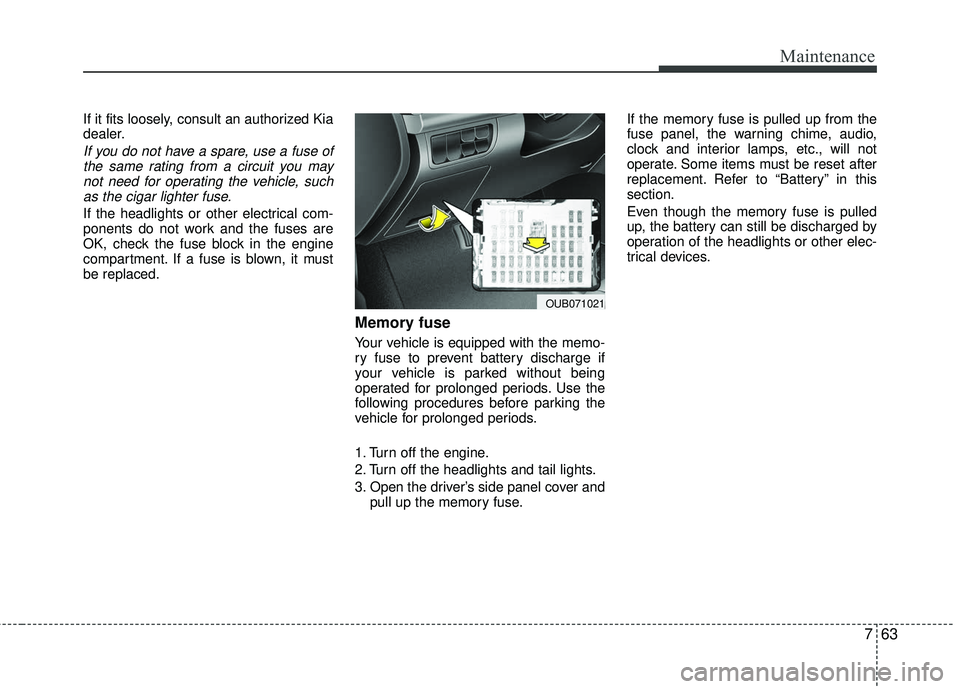
Memory fuse
Your vehicle is equipped with the memo-
ry fuse to prevent battery discharge if
your vehicle is parked without being
operated for prolonged periods. Use the
following procedures before parking the
vehicle for prolonged periods.
1. Turn off the engine.
2. Turn off the headlights and tail lights.
3. Open the driver’s side panel cover and pull up the memory fuse. If the memory fuse is pulled up from the
fuse panel, the warning chime, audio,
clock and interior lamps, etc., will not
operate. Some items must be reset after
replacement. Refer to “Battery” in this
section.
Even though the memory fuse is pulled
up, the battery can still be discharged by
operation of the headlights or other elec-
trical devices.
OUB071021
Page 445 of 449

I5
Index
If the engine stalls at a crossroad or crossing ···············6-3
If you have a flat tire while driving··················\
·············6-3
Instrument cluster ··················\
··················\
··················\
····4-43 Automatic transaxle shift position indicator ···············4-51
Car option (only for Type B cluster) ··················\
·········4-52
Gauges ··················\
··················\
··················\
··················\
·4-44
Illumination intensity ··················\
··················\
··············4-51
Instrument panel illumination ··················\
··················\
·4-44
Maintenance system (only for Type B cluster) ···········4-53
Manual transaxle shift indicator ··················\
················4-50
User Settings (only for Type B cluster)···············\
········4-51
Warnings and indicators ··················\
··················\
··········4-55
Instrument panel overview··················\
··················\
···········2-5
Interior features··················\
··················\
··················\
······4-114 Ashtray ··················\
··················\
··················\
················4-114
Cigarette lighter ··················\
··················\
··················\
···4-114
Clothes hanger ··················\
··················\
··················\
·····4-119
Cup holder ··················\
··················\
··················\
···········4-115
Digital clock and calendar ··················\
··················\
·····4-118
Floor mat anchor(s) ··················\
··················\
···············4-119
Navigation system ··················\
··················\
·················4-12\
0
Power outlet ··················\
··················\
··················\
·········4-117
Shopping bag holder··················\
··················\
··············4-117
Sliding armrest ··················\
··················\
··················\
····4-116
Sunvisor ··················\
··················\
··················\
···············4-116
Interior light ··················\
··················\
··················\
·············4-81 Glove box lamp ··················\
··················\
··················\
·····4-82
Luggage room lamp··················\
··················\
·················4-82\
Map lamp ··················\
··················\
··················\
··············4-81
Room lamp ··················\
··················\
··················\
············4-81
Vanity mirror lamp ··················\
··················\
··················\
4-82
Interior overview··················\
··················\
··················\
········2-4
ISG (Idle Stop and Go) system ··················\
··················\
·5-39 Auto start ··················\
··················\
··················\
···············5-40
Auto stop ··················\
··················\
··················\
···············5-39
Condition of ISG system operation ··················\
···········5-41
ISG system deactivation ··················\
··················\
··········5-42
ISG system malfunction ··················\
··················\
··········5-42
Key positions ··················\
··················\
··················\
·············5-5 Ignition switch position ··················\
··················\
·············5-5
Illuminated ignition switch··················\
··················\
········5-5
Keys ··················\
··················\
··················\
··················\
·········4-3 Key operations ··················\
··················\
··················\
·········4-3
Record your key number ··················\
··················\
···········4-3
Light bulbs ··················\
··················\
··················\
···············7-73 Headlight, position light, turn signal light, sidemarker light and front fog light bulb replacement ····7-74
High mounted stop light replacement ··················\
·······7-83
K
L