wheel KIA RIO 2017 Owner's Manual
[x] Cancel search | Manufacturer: KIA, Model Year: 2017, Model line: RIO, Model: KIA RIO 2017Pages: 449, PDF Size: 14.88 MB
Page 139 of 449
Features of your vehicle
68
4
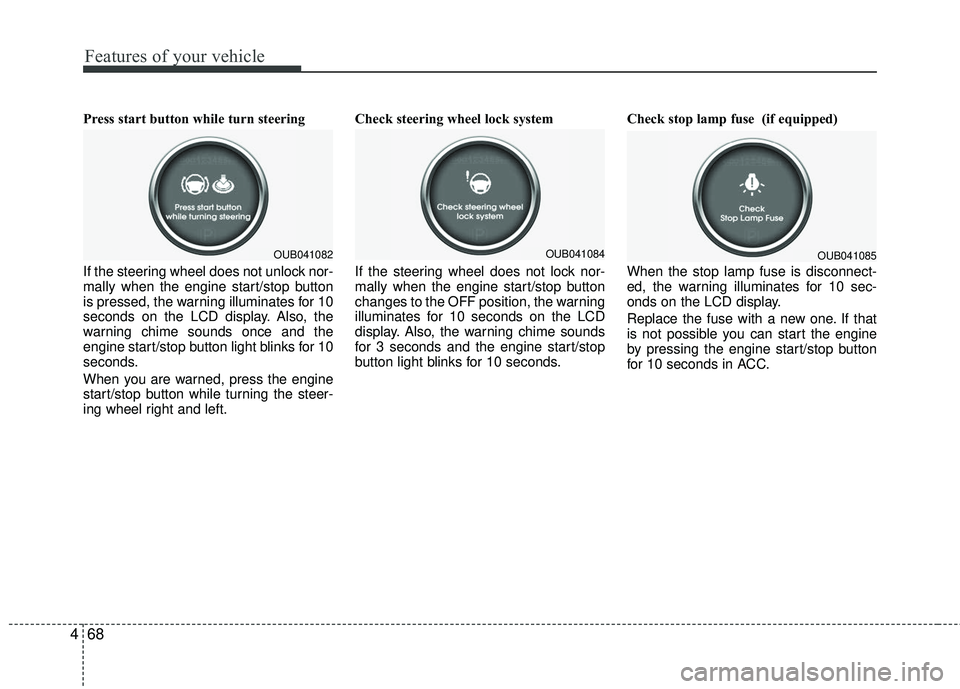
Press start button while turn steering
If the steering wheel does not unlock nor-
mally when the engine start/stop button
is pressed, the warning illuminates for 10
seconds on the LCD display. Also, the
warning chime sounds once and the
engine start/stop button light blinks for 10
seconds.
When you are warned, press the engine
start/stop button while turning the steer-
ing wheel right and left. Check steering wheel lock system
If the steering wheel does not lock nor-
mally when the engine start/stop button
changes to the OFF position, the warning
illuminates for 10 seconds on the LCD
display. Also, the warning chime sounds
for 3 seconds and the engine start/stop
button light blinks for 10 seconds.
Check stop lamp fuse (if equipped)
When the stop lamp fuse is disconnect-
ed, the warning illuminates for 10 sec-
onds on the LCD display.
Replace the fuse with a new one. If that
is not possible you can start the engine
by pressing the engine start/stop button
for 10 seconds in ACC.
OUB041082OUB041084OUB041085
Page 141 of 449
Features of your vehicle
70
4
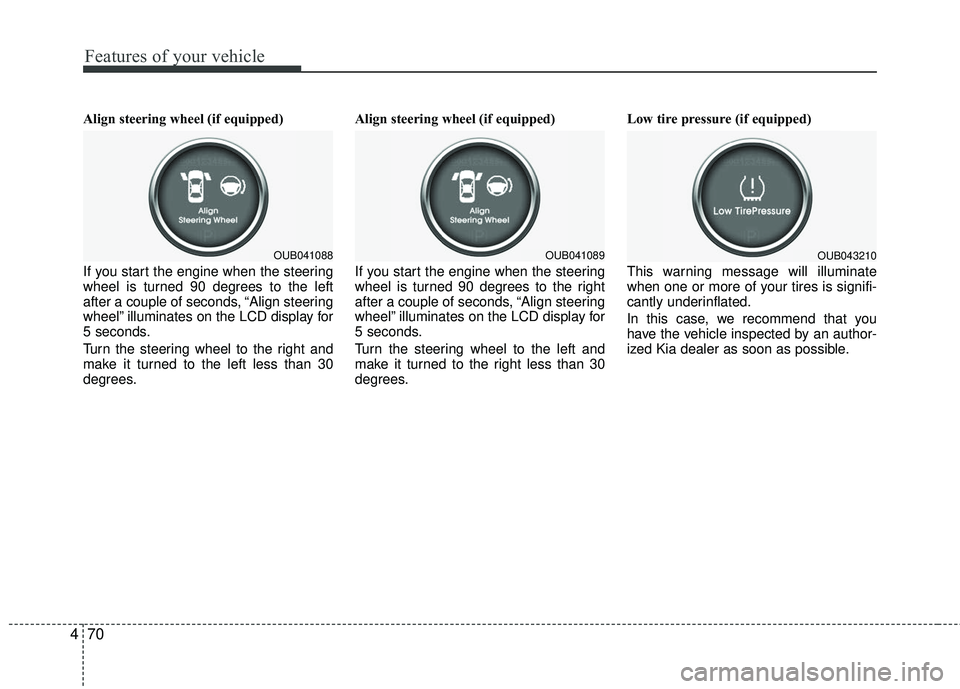
Align steering wheel (if equipped)
If you start the engine when the steering
wheel is turned 90 degrees to the left
after a couple of seconds, “Align steering
wheel” illuminates on the LCD display for
5 seconds.
Turn the steering wheel to the right and
make it turned to the left less than 30
degrees. Align steering wheel (if equipped)
If you start the engine when the steering
wheel is turned 90 degrees to the right
after a couple of seconds, “Align steering
wheel” illuminates on the LCD display for
5 seconds.
Turn the steering wheel to the left and
make it turned to the right less than 30
degrees.Low tire pressure (if equipped)
This warning message will illuminate
when one or more of your tires is signifi-
cantly underinflated.
In this case, we recommend that you
have the vehicle inspected by an author-
ized Kia dealer as soon as possible.
OUB041088OUB041089OUB043210
Page 158 of 449
487
Features of your vehicle
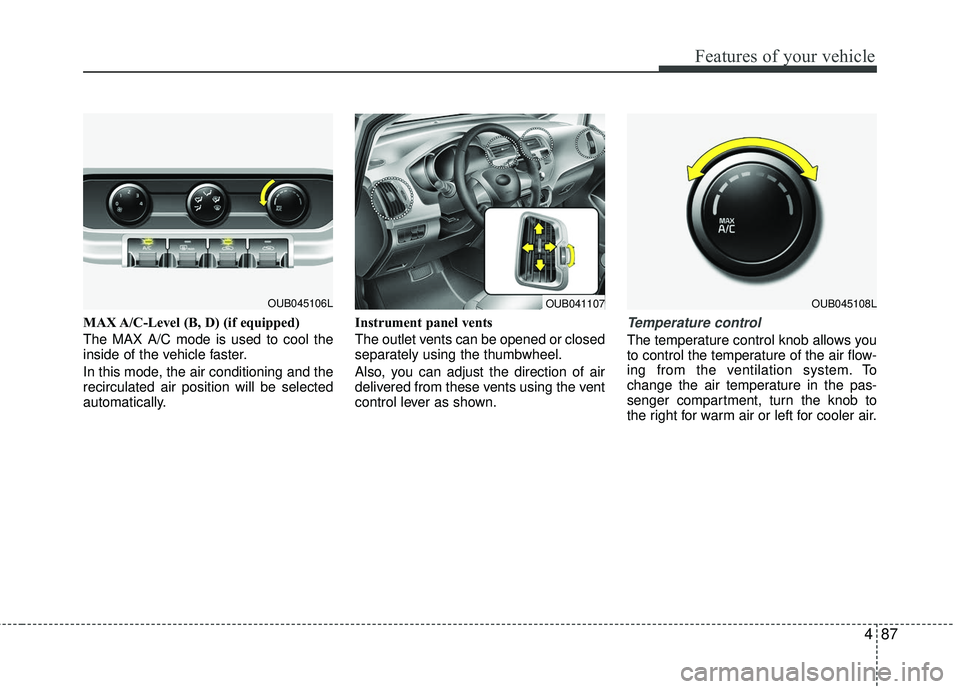
MAX A/C-Level (B, D) (if equipped)
The MAX A/C mode is used to cool the
inside of the vehicle faster.
In this mode, the air conditioning and the
recirculated air position will be selected
automatically.Instrument panel vents
The outlet vents can be opened or closed
separately using the thumbwheel.
Also, you can adjust the direction of air
delivered from these vents using the vent
control lever as shown.Temperature control
The temperature control knob allows you
to control the temperature of the air flow-
ing from the ventilation system. To
change the air temperature in the pas-
senger compartment, turn the knob to
the right for warm air or left for cooler air.
OUB041107OUB045106LOUB045108L
Page 169 of 449
Features of your vehicle
98
4
Defrost mode
When you select the defrost mode, the
following system settings will be made
automatically:
The air conditioning system will be
turned on.
The outside(fresh) air position will be selected.
The fan speed will be set to the high speed.
To turn the defrost mode off, press the
mode button or defrost button again or
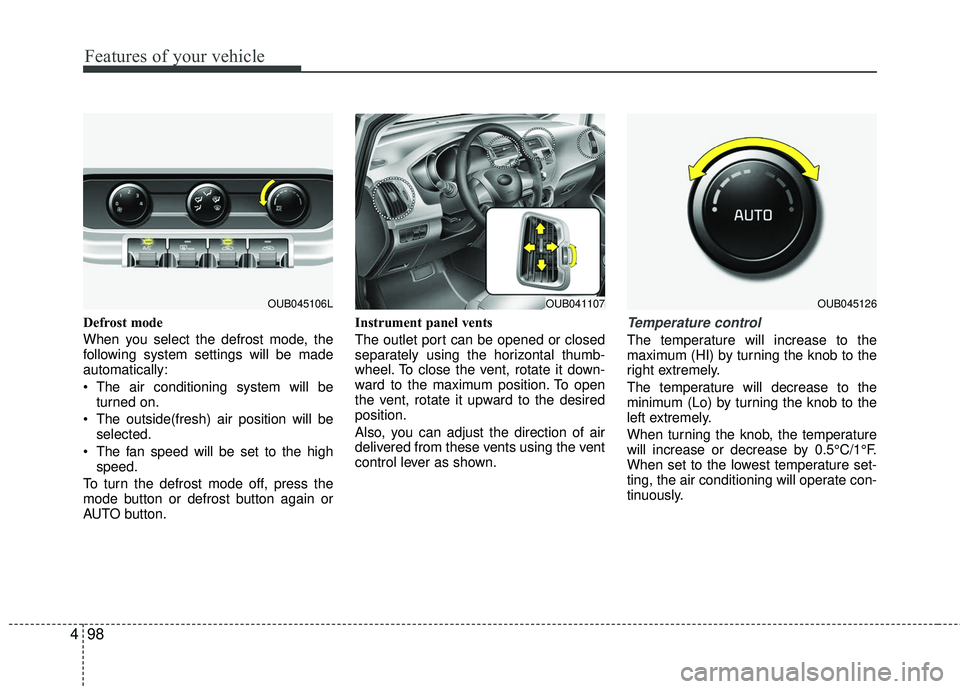
AUTO button. Instrument panel vents
The outlet port can be opened or closed
separately using the horizontal thumb-
wheel. To close the vent, rotate it down-
ward to the maximum position. To open
the vent, rotate it upward to the desired
position.
Also, you can adjust the direction of air
delivered from these vents using the vent
control lever as shown.Temperature control
The temperature will increase to the
maximum (HI) by turning the knob to the
right extremely.
The temperature will decrease to the
minimum (Lo) by turning the knob to the
left extremely.
When turning the knob, the temperature
will increase or decrease by 0.5°C/1°F.
When set to the lowest temperature set-
ting, the air conditioning will operate con-
tinuously.
OUB041107OUB045126OUB045106L
Page 193 of 449
Features of your vehicle
122
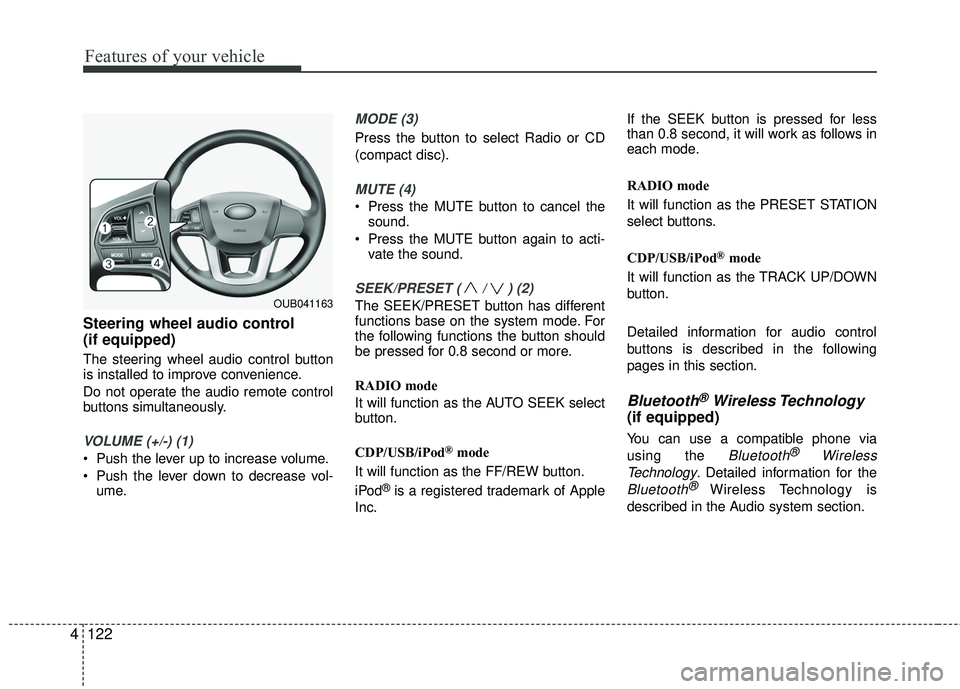
4 Steering wheel audio control
(if equipped)
The steering wheel audio control button
is installed to improve convenience.
Do not operate the audio remote control
buttons simultaneously.
VOLUME (+/-) (1)
Push the lever up to increase volume.
Push the lever down to decrease vol-
ume.
MODE (3)
Press the button to select Radio or CD
(compact disc).
MUTE (4)
Press the MUTE button to cancel thesound.
Press the MUTE button again to acti- vate the sound.
SEEK/PRESET ( / ) (2)
The SEEK/PRESET button has different
functions base on the system mode. For
the following functions the button should
be pressed for 0.8 second or more.
RADIO mode
It will function as the AUTO SEEK select
button.
CDP/USB/iPod
®mode
It will function as the FF/REW button.
iPod
®is a registered trademark of Apple
Inc. If the SEEK button is pressed for less
than 0.8 second, it will work as follows in
each mode.
RADIO mode
It will function as the PRESET STATION
select buttons.
CDP/USB/iPod
®mode
It will function as the TRACK UP/DOWN
button.
Detailed information for audio control
buttons is described in the following
pages in this section.
Bluetooth®Wireless Technology
(if equipped)
You can use a compatible phone via
using the
Bluetooth®Wireless
Technology
. Detailed information for the
Bluetooth® Wireless Technology is
described in the Audio system section.
OUB041163
Page 225 of 449
Features of your vehicle
154
4
PHONE
Before using the Bluetooth®Wireless
Technology phone features
Bluetooth®Wireless
Technology phone, you must first pair
and connect the
Bluetooth®Wireless
Technology mobile phone.
If the mobile phone is not paired or connected, it is not possible to enter
Phone mode. Once a phone is paired
or connected, the guidance screen will
be displayed.
If Priority is set upon vehicle ignition (IGN/ACC ON), the
Bluetooth®
Wireless Technology phone will be
automatically connected. Even if you
are outside, the
Bluetooth®Wireless
Technology phone will be automatically
connected once you are in the vicinity
of the vehicle. If you do not want auto-
matic
Bluetooth®Wireless Technology
phone connection, set the Bluetooth®
Wireless Technology power to OFF.
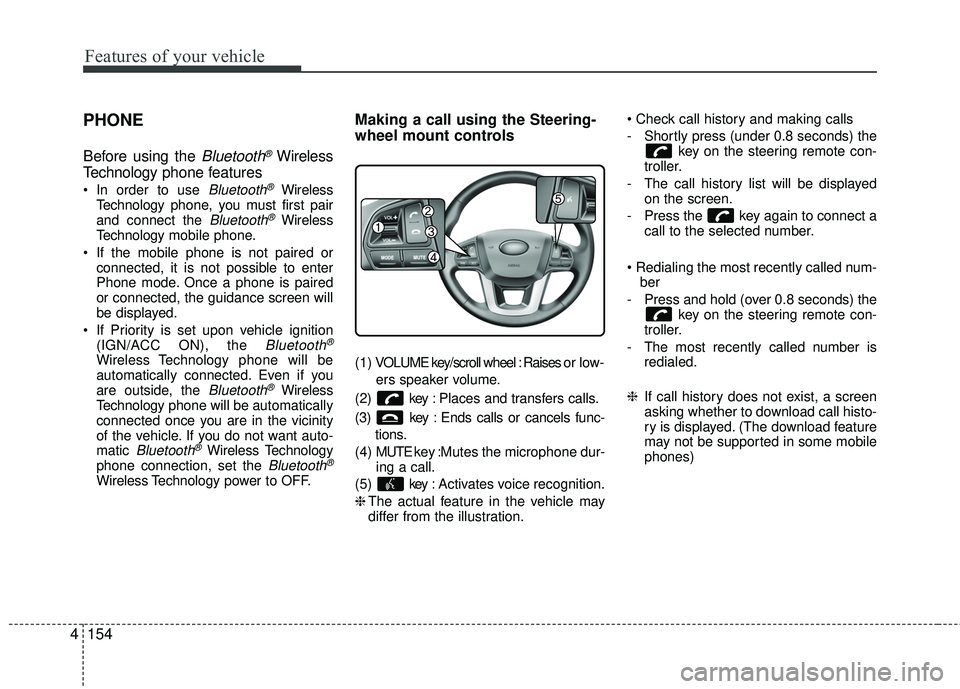
Making a call using the Steering-
wheel mount controls
( 1 ) VOLUME key/scroll wheel : Raises o r l ow -
ers speaker volume.
(2) key : Places and transfers calls.
(3) key : Ends calls or cancels func- tions.
(4) MUTE key : Mutes the microphone dur-
ing a call.
(5) key : Activates voice recognition.
❈ The actual feature in the vehicle may
differ from the illustration.
- Shortly press (under 0.8 seconds) the
key on the steering remote con-
troller.
- The call history list will be displayed on the screen.
- Press the key again to connect a call to the selected number.
ber
- Press and hold (over 0.8 seconds) the key on the steering remote con-
troller.
- The most recently called number is redialed.
❈ If call history does not exist, a screen
asking whether to download call histo-
ry is displayed. (The download feature
may not be supported in some mobile
phones)
Page 227 of 449
![KIA RIO 2017 Owners Manual Features of your vehicle
156
4
2. Select [OK] button to enter the Pair
Phone screen.
1) Vehicle Name : Name of device as shown when searching from your
Bluetooth®Wireless Technology
device
2) Passkey](/img/2/40419/w960_40419-226.png "KIA RIO 2017 Owners Manual Features of your vehicle
156
4
2. Select [OK] button to enter the Pair
Phone screen.
1) Vehicle Name : Name of device as shown when searching from your
Bluetooth®Wireless Technology
device
2) Passkey")
Features of your vehicle
156
4
2. Select [OK] button to enter the Pair
Phone screen.
1) Vehicle Name : Name of device as shown when searching from your
Bluetooth®Wireless Technology
device
2) Passkey : Passkey used to pair the device
3. From your
Bluetooth®Wireless
Technology device (i.e. Mobile
Phone), search and select your car
audio system.
[Non SSP supported device]
(SSP: Secure Simple Pairing)
4. After a few moments, a screen is dis- played where the passkey is entered.
Hear, enter the passkey "0000" to pair
your
Bluetooth®Wireless Technology
device with the car audio system. [SSP supported device]
4. After a few moments, a screen is dis-
played 6 digits passkey. Hear, check
the passkey on your
Bluetooth®
Wireless Technology device and con-
firm.
5. Once pairing is complete, the follow- ing screen is displayed.
Some phones (i.e., iPhone
®, Android TMand
Blackberry®phones) may offer an option
to allow acceptance of all future Bluetooth connection requests
by default." and "Visit http://www.kia.com/us/en/content/owners/bluetoothfor
additional information on pairing your
Bluetooth-enabled mobile phone, and to
view a phone compatibility list. If
Bluetooth®Wireless Technology
devices are paired but none are cur-
rently connected, pressing the key or the key on the
steering wheel displays the following
screen. Select [Pair] button to pair a
new device or select [Connect] to connect
a previously paired device.
PHONE
Page 232 of 449
Features of your vehicle
4161
USING Bluetooth®Wireless
Technology
Phone Menu Screen
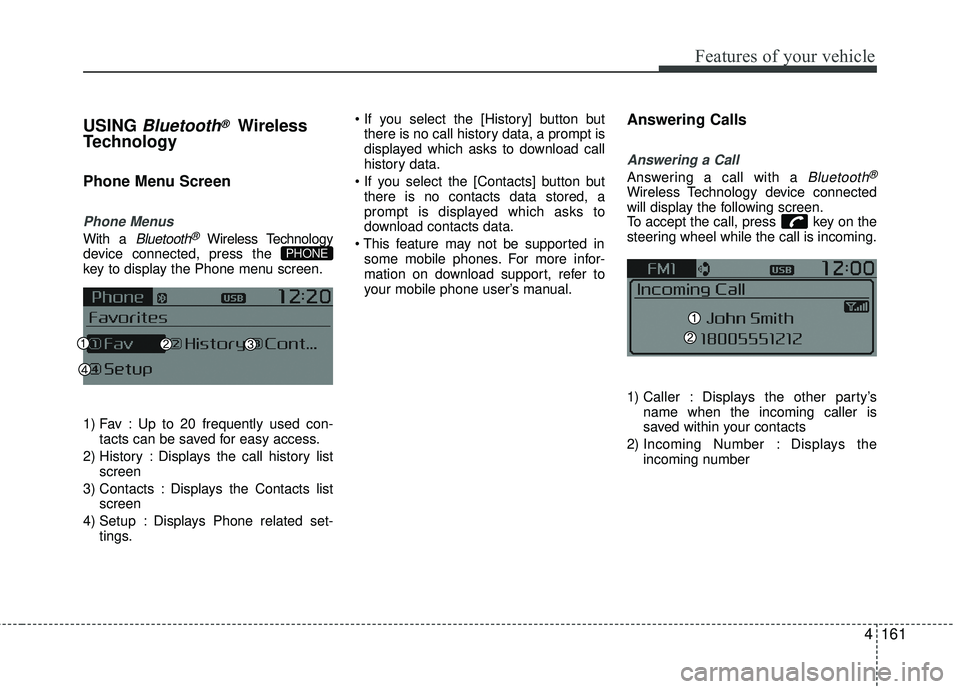
Phone Menus
With a Bluetooth®Wireless Technology
device connected, press the
key to display the Phone menu screen.
1) Fav : Up to 20 frequently used con- tacts can be saved for easy access.
2) History : Displays the call history list screen
3) Contacts : Displays the Contacts list screen
4) Setup : Displays Phone related set- tings.
there is no call history data, a prompt is
displayed which asks to download call
history data.
there is no contacts data stored, a
prompt is displayed which asks to
download contacts data.
some mobile phones. For more infor-
mation on download support, refer to
your mobile phone user’s manual.
Answering Calls
Answering a Call
Answering a call with a Bluetooth®
Wireless Technology device connected
will display the following screen.
To accept the call, press key on the
steering wheel while the call is incoming.
1) Caller : Displays the other party’s name when the incoming caller is
saved within your contacts
2) Incoming Number : Displays the incoming number
PHONE
Page 238 of 449
![KIA RIO 2017 Owners Manual Features of your vehicle
4167
VOICE RECOGNITION
Using Voice Recognition
Starting Voice Recognition
Shortly press the key on the steer-
ing wheel. Say a command.
If prompt feedback is in [ON], then](/img/2/40419/w960_40419-237.png "KIA RIO 2017 Owners Manual Features of your vehicle
4167
VOICE RECOGNITION
Using Voice Recognition
Starting Voice Recognition
Shortly press the key on the steer-
ing wheel. Say a command.
If prompt feedback is in [ON], then")
Features of your vehicle
4167
VOICE RECOGNITION
Using Voice Recognition
Starting Voice Recognition
Shortly press the key on the steer-
ing wheel. Say a command.
If prompt feedback is in [ON], then the
system will say “Please say a command
after the beep (BEEP)”
If prompt feedback is in [OFF] mode,then the system will only say “(BEEP)”
To change Prompt Feedback [On]/[Off], go to
[System] [Prompt Feedback]
For proper recognition, say the com- mand after the voice instruction and
beep tone.
Contact List Best Practices
1) Use full names vs. short or singlesylla- ble names (“John Smith” vs. “Dad”,
“Smith Residence” vs. “Home”)
2) Avoid using special characters or hyphens (@, &, #, /, -, *, +, etc.)
3) Avoid using acronyms (“In Case Emergency” vs. “ICE”)
4) Spell words completely, no abbrevia- tions (“Doctor Goodman” vs. “Dr.
Goodman”)
Skipping Prompt Messages
While prompt message is being stated
Shortly press the key on the steer-
ing remote controller
The prompt message is immediately
ended and the beep tone will sound.
After the “beep”, say the voice command.
Re-starting Voice Recognition
While system waits for a command
Shortly press the key on the steer-
ing remote controller
The command wait state is immediately
ended and the beep tone will sound.
After the “beep”, say the voice command.
SETUP/CLOCK
Page 239 of 449
Features of your vehicle
168
4
ENDING VOICE RECOGNITION
While Voice Recognition is operating
Press and hold the key on the steer-
ing remote controller
any steering wheel control or a different
key will end voice command.
command, say “cancel” or “end” to end
voice command.
command, press and hold the key
on the steering wheel to end voice com-
mand.
Voice Recognition and Phone
Contact Tips:
The Kia Voice Recognition System may
have difficulty understanding some
accents or uncommon names. When
using Voice Recognition to place a call,
speak in a moderate tone, with clear pro-
nunciation.
To maximize the use of Voice
Recognition, consider these guidelines
when storing contacts :
Use full names vs. short or single syl- lable names (“John Smith” vs. “Dad”,
“Smith Residence” vs. “Home”)
Avoid using special characters or hyphens (@, &, #, /, -, *, +, etc.)
Avoid using acronyms (“In Case Emergency” vs. “ICE”)
Spell words completely, no abbrevia- tions (“Doctor Goodman” vs. “Dr.
Goodman”)