reset KIA RIO 2019 Owner's Manual
[x] Cancel search | Manufacturer: KIA, Model Year: 2019, Model line: RIO, Model: KIA RIO 2019Pages: 503, PDF Size: 10.4 MB
Page 236 of 503
![KIA RIO 2019 Owners Manual Audio system
516Menu
Select [Menu], and select the desired
function.
Presets: Save up to 40 frequently
used stations.
To listen to a preset, select the
desired station.
Press and hold the desired slo](/img/2/40414/w960_40414-235.png "KIA RIO 2019 Owners Manual Audio system
516Menu
Select [Menu], and select the desired
function.
Presets: Save up to 40 frequently
used stations.
To listen to a preset, select the
desired station.
Press and hold the desired slo")
Audio system
516Menu
Select [Menu], and select the desired
function.
Presets: Save up to 40 frequently
used stations.
To listen to a preset, select the
desired station.
Press and hold the desired slot
from 1 through 40. This saves the
current station in the selected slot.
If the slot is empty, simply selecting
saves the station to the slot.
Scan: All stations available in the current location of the vehicle are
played for five seconds each.
Information: View detailed station information.
Sound Settings: Audio sound set- tings can be changed.
Station Info: Set whether to receive station information such as Station
Name, Program Type or Information.
✽ ✽ NOTICE - SiriusXM®Satellite
Radio information
• Satellite Radio channels: Enjoy SiriusXM Satellite Radio
with a 3-month trial subscription
to the Sirius Select package. You’ll
get over variable channels, includ-
ing commercialfree music, plus all
your favorite sports, exclusive
talk, entertainment, and a selec-
tion of premium programming.
For more information and a com-
plete list of SiriusXM channels,
visit siriusxm.com in the United
States, siriusxm.ca in Canada, or
call SiriusXM at 1-888-539-7474.
• Satellite Radio reception factors: To receive the satellite signal, your
vehicle has been equipped with a
satellite radio antenna located on
the roof of your vehicle. The vehi-
cle roof provides the best location
for an unobstructed, open view of
the sky, a requirement of a satellite
radio system. Like AM/FM, there
are several factors that can affect
satellite radio reception perform-
ance: (Continued)(Continued)
- Antenna obstructions: For opti-mal reception performance, keep
the antenna clear of snow and
ice build-up and keep luggage
and other material as far away
from the antenna as possible.
• SiriusXM Satellite Radio service: SiriusXM is a subscription-based
satellite radio service that broad-
casts music, sports, news and
entertainment programming to
radio receivers, which are avail-
able for installation in motor vehi-
cles or factory installed, as well as
for the home, portable and wire-
less devices, and through an Internet
connection on a personal computer.
Vehicles that are equipped with a
factory installed SiriusXM Satellite
Radio system include:
- Hardware and an introductorytrial subscription term, which
begins on the date of sale or lease
of the vehicle.
- For a small upgrade fee, access to SiriusXM music channels, and
other select channels over the
Internet using any computer con-
nected to the Internet (U.S. cus-
tomers only).
(Continued)
SC CAN (ENG) 5(audio).qxp 7/18/2018 6:02 PM Page 16
Page 238 of 503
Audio system
518
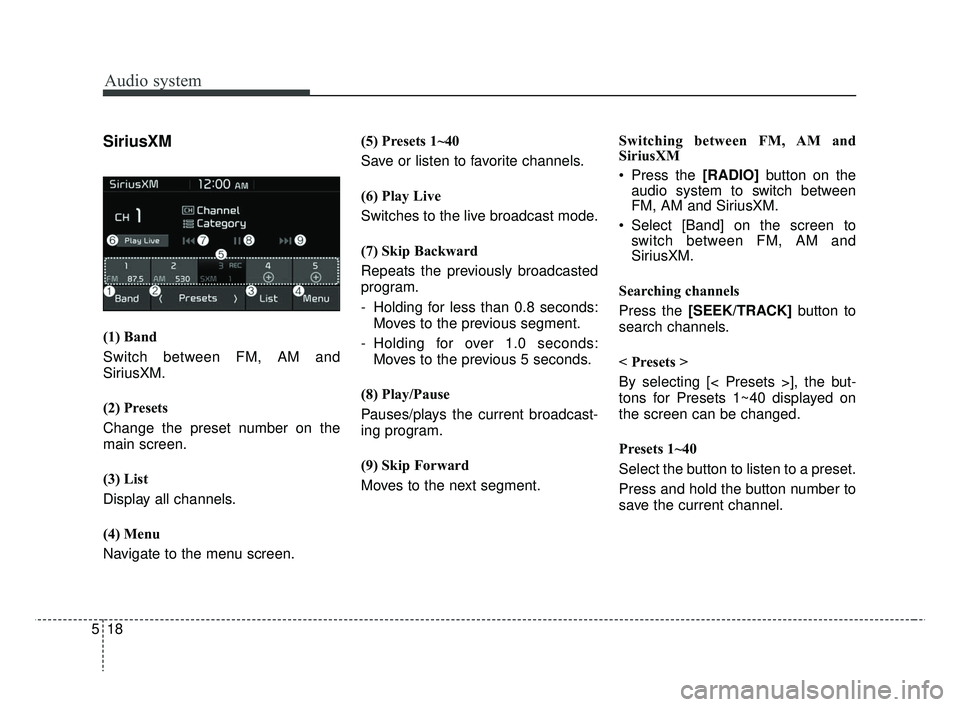
SiriusXM
(1) Band
Switch between FM, AM and
SiriusXM.
(2) Presets
Change the preset number on the
main screen.
(3) List
Display all channels.
(4) Menu
Navigate to the menu screen.(5) Presets 1~40
Save or listen to favorite channels.
(6) Play Live
Switches to the live broadcast mode.
(7) Skip Backward
Repeats the previously broadcasted
program.
- Holding for less than 0.8 seconds:
Moves to the previous segment.
- Holding for over 1.0 seconds: Moves to the previous 5 seconds.
(8) Play/Pause
Pauses/plays the current broadcast-
ing program.
(9) Skip Forward
Moves to the next segment. Switching between FM, AM and
SiriusXM
Press the [RADIO]
button on the
audio system to switch between
FM, AM and SiriusXM.
Select [Band] on the screen to switch between FM, AM and
SiriusXM.
Searching channels
Press the [SEEK/TRACK] button to
search channels.
< Presets >
By selecting [< Presets >], the but-
tons for Presets 1~40 displayed on
the screen can be changed.
Presets 1~40
Select the button to listen to a preset.
Press and hold the button number to
save the current channel.
SC CAN (ENG) 5(audio).qxp 7/18/2018 6:02 PM Page 18
Page 239 of 503
![KIA RIO 2019 Owners Manual Audio system
19
5
List
A list of all channels is displayed.
Select the desired channel.
Favorite channels can be saved to
[Presets] by selecting [+]. Menu
Select [Menu], and select the desired
functio](/img/2/40414/w960_40414-238.png "KIA RIO 2019 Owners Manual Audio system
19
5
List
A list of all channels is displayed.
Select the desired channel.
Favorite channels can be saved to
[Presets] by selecting [+]. Menu
Select [Menu], and select the desired
functio")
Audio system
19
5
List
A list of all channels is displayed.
Select the desired channel.
Favorite channels can be saved to
[Presets] by selecting [+]. Menu
Select [Menu], and select the desired
function.
Presets: Save up to 40 frequently
used channels.
To listen to a preset, select the
desired channel.
Press and hold the desired slot
from 1 through 40. This saves the
current channel in the selected
slot.
If the slot is empty, simply selecting
saves the channel to the slot.
Categories: Channels can be searched by category.
Direct Tune: The desired channel can be selected by entering num-
bers.
Sound Settings: Audio sound set- tings can be changed.
Tag Song: Tag the current song information.
When an Apple device (iPhone
®,
iPod®) is connected, tagged song
information is sent automatically to
the connected device.
✽ ✽ NOTICE
Up to 50 songs can be tagged.
Scan: All channels available in the
vehicle’s current location are
played for ten seconds each.
Program Schedule: View the pro- gram schedule.
Featured Favorites: The Featured Favorites feature allows SiriusXM™
to broadcast additional presets.
- Example 1: During holidays,“Holiday Music” might include all
SiriusXM™ channels that are
playing holiday music for easy
access by users.
Multiple sets of Featured Favorites
data can be broadcast by
SiriusXM™ and can change from
time to time.
Information: View detailed channel information.
Category Lock: Search or scan channels in the current category
only.
SC CAN (ENG) 5(audio).qxp 7/18/2018 6:02 PM Page 19
Page 245 of 503
Audio system
25
5
(Continued)
• The search and song play order in
the iPod
®device may be different
from the search order in the audio
system.
• If the iPod
®has failed due to an
internal defect, please reset the
iPod
®(consult your iPod®manual).
• Depending on the software ver- sion, the iPod
®may fail to sync
with the system. If the media is
removed or disconnected before
recognition, the previous mode
may not be restored (iPad
®cannot
be charged).
• Cables other than the 1-meter cable provided with iPod
®/iPhone®
products may not be recognized.
• When other music apps are used on your iPod
®, the system sync
function may fail due to malfunc-
tion of the iPod
®application.
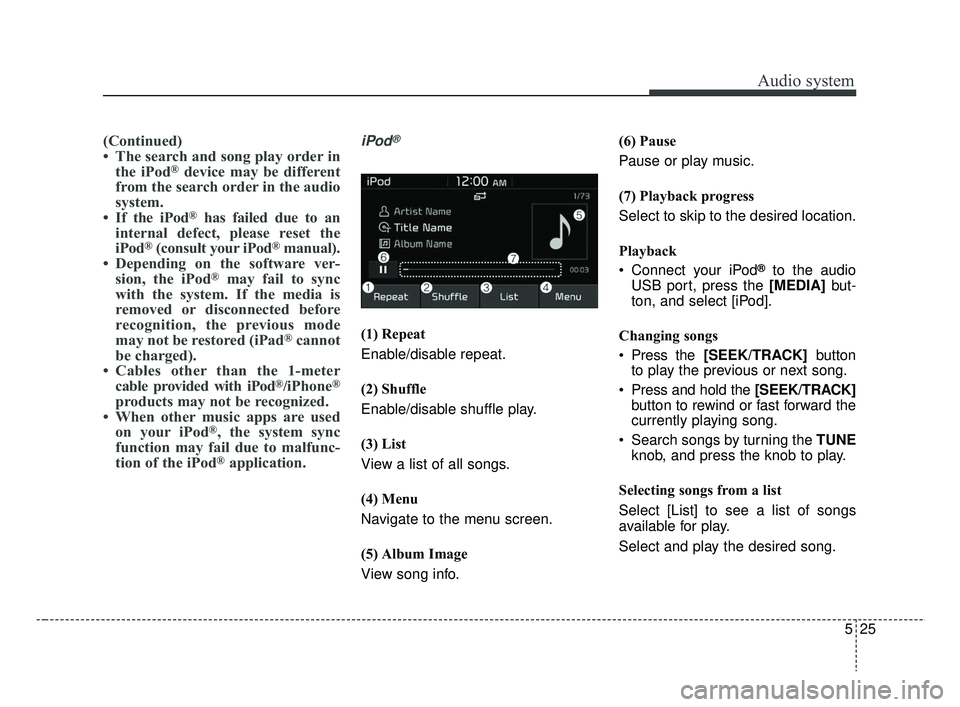
iPod®
(1) Repeat
Enable/disable repeat.
(2) Shuffle
Enable/disable shuffle play.
(3) List
View a list of all songs.
(4) Menu
Navigate to the menu screen.
(5) Album Image
View song info. (6) Pause
Pause or play music.
(7) Playback progress
Select to skip to the desired location.
Playback
Connect your iPod
®to the audio
USB port, press the [MEDIA] but-
ton, and select [iPod].
Changing songs
Press the [SEEK/TRACK] button
to play the previous or next song.
Press and hold the [SEEK/TRACK] button to rewind or fast forward the
currently playing song.
Search songs by turning the TUNE knob, and press the knob to play.
Selecting songs from a list
Select [List] to see a list of songs
available for play.
Select and play the desired song.
SC CAN (ENG) 5(audio).qxp 7/18/2018 6:02 PM Page 25
Page 315 of 503
653
Driving your vehicle
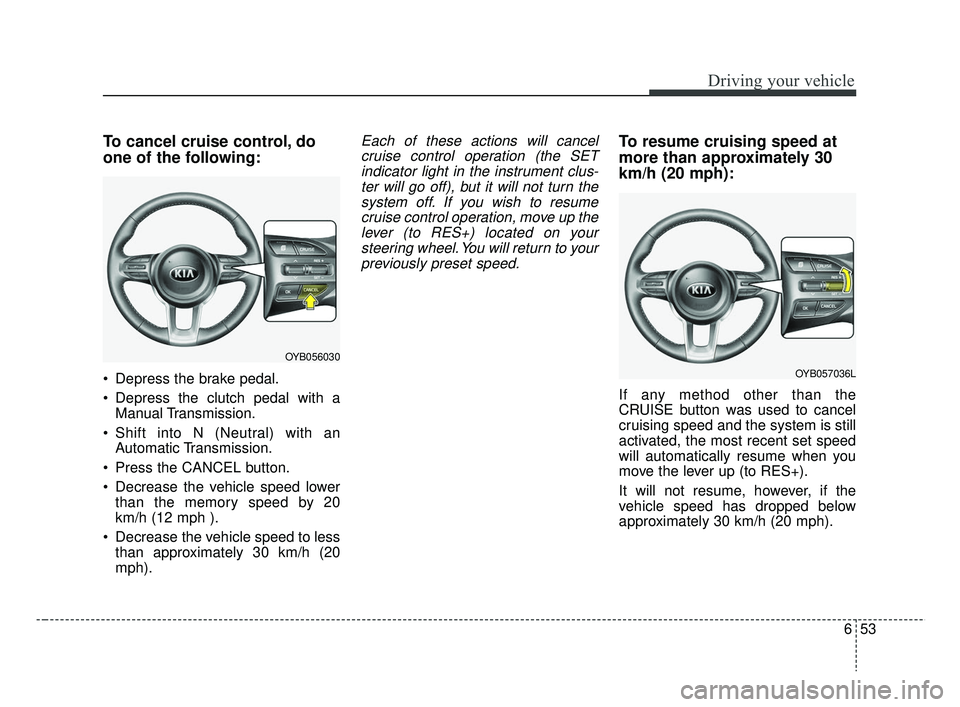
To cancel cruise control, do
one of the following:
Depress the brake pedal.
Depress the clutch pedal with aManual Transmission.
Shift into N (Neutral) with an Automatic Transmission.
Press the CANCEL button.
Decrease the vehicle speed lower than the memory speed by 20
km/h (12 mph ).
Decrease the vehicle speed to less than approximately 30 km/h (20
mph).
Each of these actions will cancelcruise control operation (the SETindicator light in the instrument clus-ter will go off), but it will not turn thesystem off. If you wish to resumecruise control operation, move up thelever (to RES+) located on yoursteering wheel. You will return to yourpreviously preset speed.To resume cruising speed at
more than approximately 30
km/h (20 mph):
If any method other than the
CRUISE button was used to cancel
cruising speed and the system is still
activated, the most recent set speed
will automatically resume when you
move the lever up (to RES+).
It will not resume, however, if the
vehicle speed has dropped below
approximately 30 km/h (20 mph).
OYB056030
OYB057036L
SC CAN (ENG) 6.QXP 7/18/2018 5:43 PM Page 53
Page 373 of 503
Maintenance
Engine compartment . . . . . . . . . . . . . . . . . . . . . . . . 8-4
Maintenance services . . . . . . . . . . . . . . . . . . . . . . . . 8-5
• Owner’s responsibility . . . . . . . . . . . . . . . . . . . . . . . . . 8-5
• Owner maintenance precautions . . . . . . . . . . . . . . . . . 8-6
Owner maintenance . . . . . . . . . . . . . . . . . . . . . . . . . 8-7
• Owner maintenance schedule. . . . . . . . . . . . . . . . . . . . 8-7
Scheduled maintenance service. . . . . . . . . . . . . . . 8-10
• Scheduled maintenance service precaution . . . . . . . 8-10
Explanation of scheduled maintenance items . . . 8-16
Checking fluid levels . . . . . . . . . . . . . . . . . . . . . . . 8-20
Engine oil. . . . . . . . . . . . . . . . . . . . . . . . . . . . . . . . . 8-21
• Checking the engine oil level . . . . . . . . . . . . . . . . . . . 8-21
• Changing the engine oil and filter . . . . . . . . . . . . . . . 8-22
Engine coolant . . . . . . . . . . . . . . . . . . . . . . . . . . . . 8-23
• Checking the coolant level . . . . . . . . . . . . . . . . . . . . . 8-23
• Changing the coolant . . . . . . . . . . . . . . . . . . . . . . . . . 8-25
Brake/clutch fluid . . . . . . . . . . . . . . . . . . . . . . . . . . 8-26
• Checking the brake/clutch fluid level . . . . . . . . . . . . 8-26
Washer fluid . . . . . . . . . . . . . . . . . . . . . . . . . . . . . . 8-27
• Checking the washer fluid level . . . . . . . . . . . . . . . . . 8-27
Parking brake . . . . . . . . . . . . . . . . . . . . . . . . . . . . . 8-28
• Checking the parking brake. . . . . . . . . . . . . . . . . . . . 8-28
Air cleaner. . . . . . . . . . . . . . . . . . . . . . . . . . . . . . . . 8-29
• Filter replacement . . . . . . . . . . . . . . . . . . . . . . . . . . . . 8-29
Climate control air filter . . . . . . . . . . . . . . . . . . . . 8-31
• Filter inspection . . . . . . . . . . . . . . . . . . . . . . . . . . . . . . 8-31
Wiper blades . . . . . . . . . . . . . . . . . . . . . . . . . . . . . . 8-33
• Blade inspection . . . . . . . . . . . . . . . . . . . . . . . . . . . . . . 8-33
• Blade replacement . . . . . . . . . . . . . . . . . . . . . . . . . . . . 8-33
Battery . . . . . . . . . . . . . . . . . . . . . . . . . . . . . . . . . . . 8-\
37
• For best battery service . . . . . . . . . . . . . . . . . . . . . . . 8-37
• Recharging the battery . . . . . . . . . . . . . . . . . . . . . . . . 8-38
• Reset items . . . . . . . . . . . . . . . . . . . . . . . . . . . . . . . . . . 8-39\
Tires and wheels . . . . . . . . . . . . . . . . . . . . . . . . . . . 8-40
• Tire care . . . . . . . . . . . . . . . . . . . . . . . . . . . . . . . . . . . . \
8-40
• Recommended cold tire inflation pressures . . . . . . . 8-40
• Tire pressure . . . . . . . . . . . . . . . . . . . . . . . . . . . . . . . . 8-41
• Checking tire inflation pressure. . . . . . . . . . . . . . . . . 8-41
• Tire rotation . . . . . . . . . . . . . . . . . . . . . . . . . . . . . . . . . 8-42
• Wheel alignment and tire balance . . . . . . . . . . . . . . . 8-43
• Tire replacement . . . . . . . . . . . . . . . . . . . . . . . . . . . . . 8-44
• Wheel replacement . . . . . . . . . . . . . . . . . . . . . . . . . . . 8-45
• Tire traction . . . . . . . . . . . . . . . . . . . . . . . . . . . . . . . . . 8-45
• Tire maintenance . . . . . . . . . . . . . . . . . . . . . . . . . . . . . 8-45
• Tire sidewall labeling . . . . . . . . . . . . . . . . . . . . . . . . . 8-45
• All season tires . . . . . . . . . . . . . . . . . . . . . . . . . . . . . . . 8-52
• Summer tires . . . . . . . . . . . . . . . . . . . . . . . . . . . . . . . . 8-52
• Snow tires . . . . . . . . . . . . . . . . . . . . . . . . . . . . . . . . . . . 8-\
53
8
SC CAN (ENG) 8.qxp 7/18/2018 5:32 PM Page 1
Page 411 of 503
839
Maintenance
When recharging the battery,
observe the following precautions:
The battery must be removed fromthe vehicle and placed in an area
with good ventilation.
Do not allow cigarettes, sparks, or flame near the battery.
Watch the battery during charging, and stop or reduce the charging
rate if the battery cells begin
gassing (boiling) violently or if the
temperature of the electrolyte of
any cell exceeds 49°C (120°F).
Wear eye protection when check- ing the battery during charging.
Disconnect the battery charger in the following order.
1. Turn off the battery charger main switch.
2. Unhook the negative clamp from the negative battery terminal.
3. Unhook the positive clamp from the positive battery terminal. Before performing maintenance or
recharging the battery, turn off all
accessories and stop the engine.
The negative battery cable must be removed first and installed last
when the battery is disconnected.Reset items
The following items should be reset
after the battery has been dis-
charged or the battery has been dis-
connected.
Auto up/down window
Sunroof
Trip computer
Climate control system
SC CAN (ENG) 8.qxp 7/18/2018 5:33 PM Page 39
Page 415 of 503
843
Maintenance
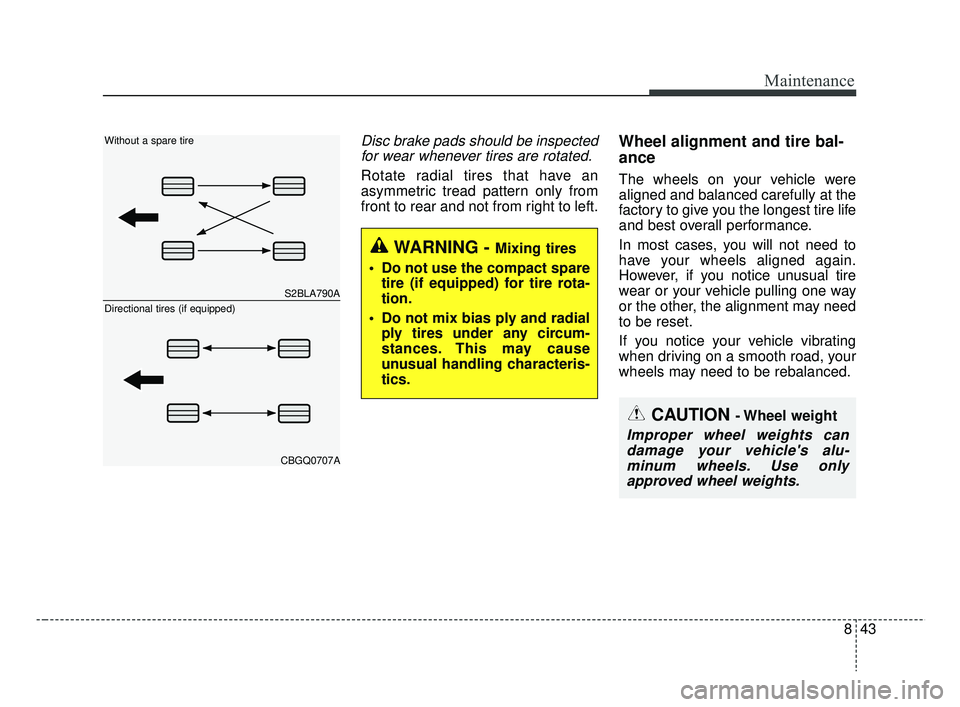
Disc brake pads should be inspectedfor wear whenever tires are rotated.
Rotate radial tires that have an
asymmetric tread pattern only from
front to rear and not from right to left.
Wheel alignment and tire bal-
ance
The wheels on your vehicle were
aligned and balanced carefully at the
factory to give you the longest tire life
and best overall performance.
In most cases, you will not need to
have your wheels aligned again.
However, if you notice unusual tire
wear or your vehicle pulling one way
or the other, the alignment may need
to be reset.
If you notice your vehicle vibrating
when driving on a smooth road, your
wheels may need to be rebalanced.
WARNING - Mixing tires
Do not use the compact spare tire (if equipped) for tire rota-
tion.
Do not mix bias ply and radial ply tires under any circum-
stances. This may cause
unusual handling characteris-
tics.
CAUTION - Wheel weight
Improper wheel weights candamage your vehicle's alu-minum wheels. Use onlyapproved wheel weights.
S2BLA790A
CBGQ0707A
Without a spare tire
Directional tires (if equipped)
SC CAN (ENG) 8.qxp 7/18/2018 5:33 PM Page 43
Page 430 of 503
Maintenance
58
8
✽ ✽
NOTICE
• Set all switches to ON before driv-
ing.
• If the vehicle is going to be unused for over 1 month, set all switches
to OFF to prevent the batteries
from draining.
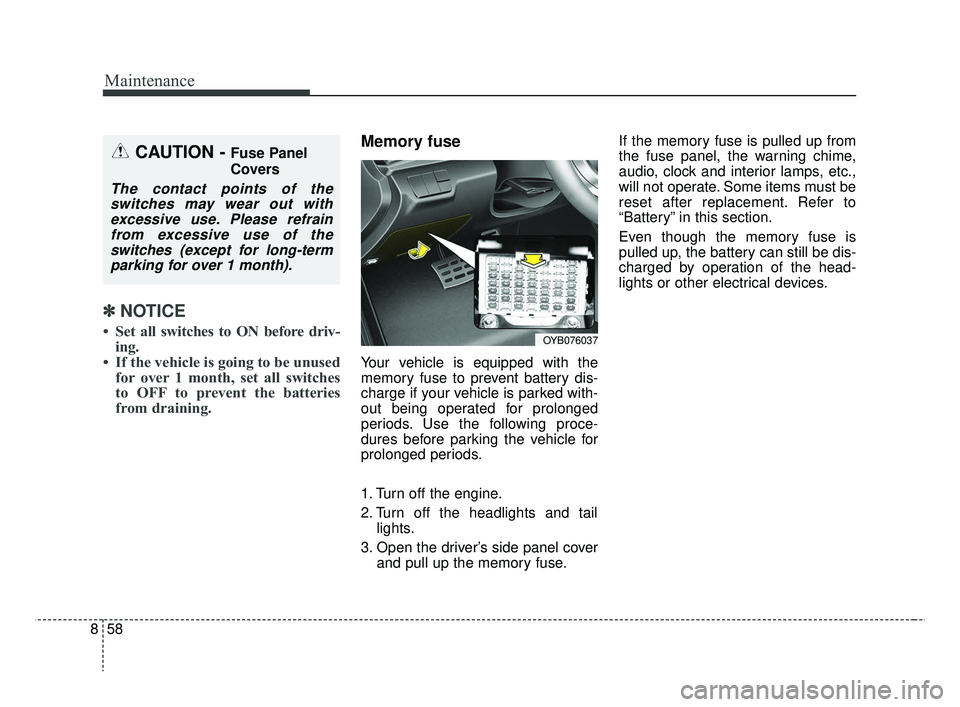
Memory fuse
Your vehicle is equipped with the
memory fuse to prevent battery dis-
charge if your vehicle is parked with-
out being operated for prolonged
periods. Use the following proce-
dures before parking the vehicle for
prolonged periods.
1. Turn off the engine.
2. Turn off the headlights and tail
lights.
3. Open the driver’s side panel cover and pull up the memory fuse. If the memory fuse is pulled up from
the fuse panel, the warning chime,
audio, clock and interior lamps, etc.,
will not operate. Some items must be
reset after replacement. Refer to
“Battery” in this section.
Even though the memory fuse is
pulled up, the battery can still be dis-
charged by operation of the head-
lights or other electrical devices.
CAUTION - Fuse Panel
Covers
The contact points of the
switches may wear out withexcessive use. Please refrainfrom excessive use of theswitches (except for long-termparking for over 1 month).
OYB076037
SC CAN (ENG) 8.qxp 7/18/2018 5:34 PM Page 58
Page 495 of 503
Index
2I
Air bag - advanced supplemental restraint system ........3-33Adding equipment to or modifying your air bag-equipped vehicle ..........................................3-61
Air bag warning label ................................................3-61
Air bag warning light ..................................................3-37
Curtain air bag ............................................................3-53
Driver's and passenger's front air bag ........................3-48
How does the air bag system operate ........................3-34
Inflation and non-inflation conditions of the air bag..3-55
Occupant detection system ........................................3-40
Side air bag ................................................................3-51
SRS Care ....................................................................3-60\
SRS components and functions ..................................3-37
Air cleaner ....................................................................8-29\
Filter replacement ......................................................8-29
Air conditioning system ..................................................9-6
Appearance care ............................................................8-99 Exterior care ................................................................8-99
Interior care ..............................................................8-104
Audio (with touch screen) ..............................................5-8 Feature of your audio ....................................................5-9
Media ........................................................................\
..5-20
Phone ........................................................................\
..5-30
Radio ........................................................................\
..5-15
Setup ........................................................................\
..5-39
SiriusXM ....................................................................5-18\
Audio system ..................................................................5-2
Antenna ........................................................................\
5-2
AUX, USB port ............................................................5-3
How vehicle audio works ............................................5-3
Automatic climate control system ..............................4-119 Automatic heating and air conditioning ..................4-120
Manual heating and air conditioning ........................4-121
System operation ......................................................4-126
Automatic transmission ................................................6-18 Automatic transmission operation ..............................6-18
Good driving practices ................................................6-23
Battery........................................................................\
....8-37 For best battery service ..............................................8-37
Recharging the battery ................................................8-38
Reset items ..................................................................8-39
Before driving ..................................................................6-4 Before entering vehicle ................................................6-4
Before starting ..............................................................6-4
Necessary inspections ..................................................6-4
Brake system..................................................................6-24 Anti-lock Brake System (ABS) ..................................6-29
Electronic Stability Control (ESC) ............................6-30
Good braking practices ..............................................6-37
Hill-start assist control (HAC) ....................................6-34
Parking brake ..............................................................6-26
A
B
SC CAN (ENG) Index.qxp 7/18/2018 5:31 PM Page 2