ignition KIA RIO HATCHBACK 2007 User Guide
[x] Cancel search | Manufacturer: KIA, Model Year: 2007, Model line: RIO HATCHBACK, Model: KIA RIO HATCHBACK 2007Pages: 221, PDF Size: 2.65 MB
Page 23 of 221
Knowing your vehicle14
3
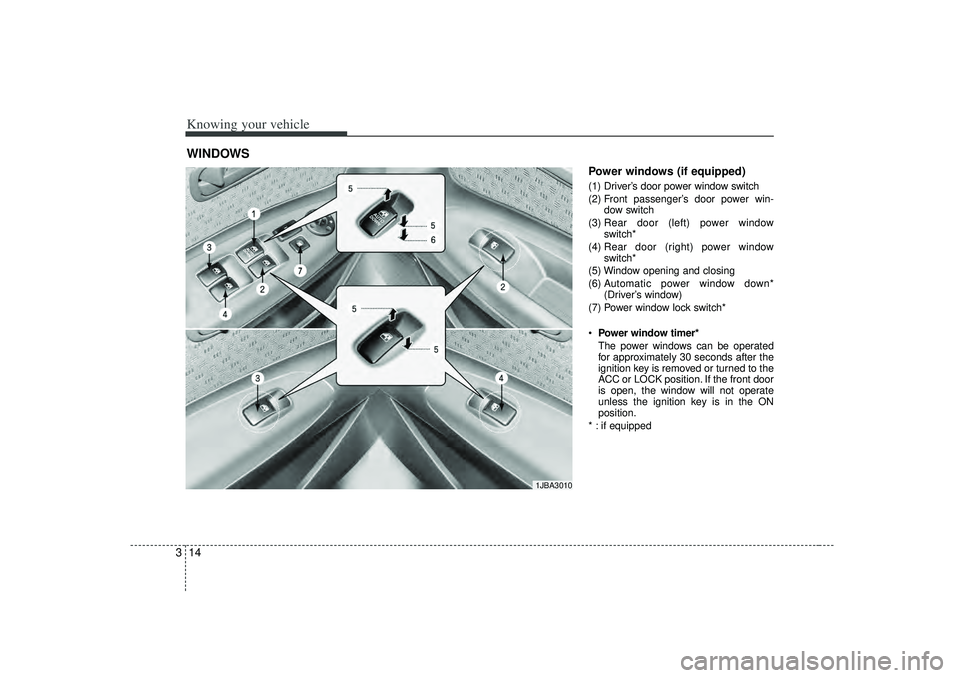
Power windows (if equipped)(1) Driver’s door power window switch
(2) Front passenger’s door power win-
dow switch
(3) Rear door (left) power window
switch*
(4) Rear door (right) power window
switch*
(5) Window opening and closing
(6) A utomatic power window down*
(Driver’s window)
(7) Power window lock switch*
Power window timer*
The power windows can be operated
for approximately 30 seconds after the
ignition key is removed or turned to the
ACC or LOCK position. If the front door
is open, the window will not operate
unless the ignition key is in the ON
position.
* : if equipped
WINDOWS
1JBA3010
Page 24 of 221
315
Knowing your vehicle
Power windows (if equipped)The ignition switch must be in the ON
position for power windows to operate.
Each door has a power window switch
that controls that door’s window.
However, the driver has a power window
lock switch which can block the operation
of passenger windows.
If you notice buffeting and pulsation
(wind shock) with either side window
open, you should open the opposite win-
dow slightly to reduce the condition.✽ ✽NOTICE• To prevent the power window system
from the possibility of damage, do not
open or close two windows at the same
time. This will also ensure the longevi-
ty of the fuse.
• Never try to operate the main switch on the driver's door and the individ-
ual door window switch in opposing
directions at the same time. If this is
done, the window will stop and cannot
be opened or closed.
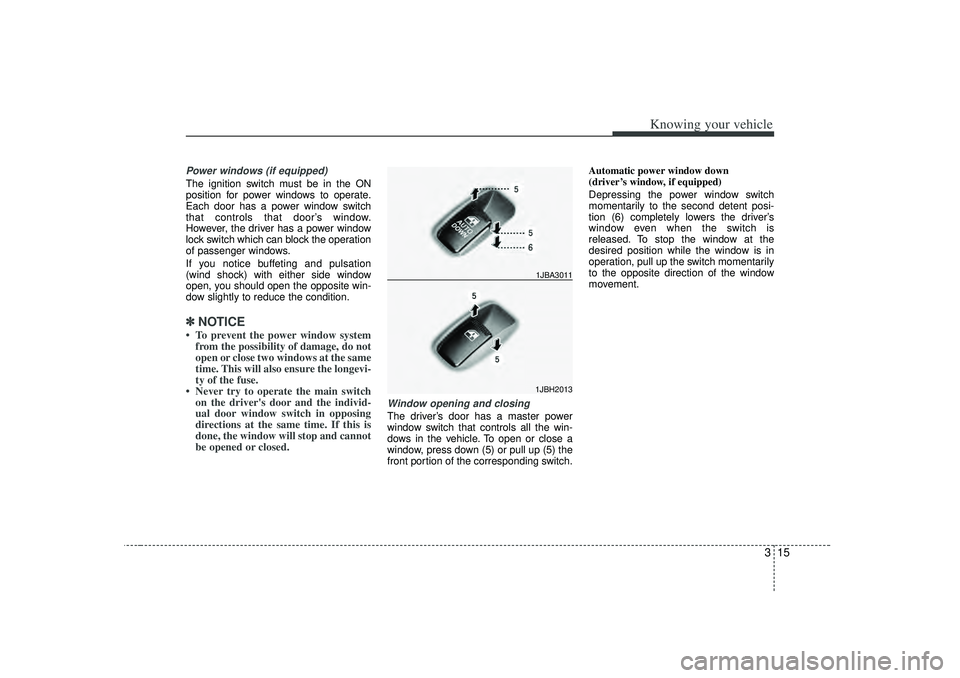
Window opening and closingThe driver’s door has a master power
window switch that controls all the win-
dows in the vehicle. To open or close a
window, press down (5) or pull up (5) the
front portion of the corresponding switch. Automatic power window down
(driver’s window, if equipped)
Depressing the power window switch
momentarily to the second detent posi-
tion (6) completely lowers the driver’s
window even when the switch is
released. To stop the window at the
desired position while the window is in
operation, pull up the switch momentarily
to the opposite direction of the window
movement.
1JBH2013
1JBA3011
Page 29 of 221
Knowing your vehicle20
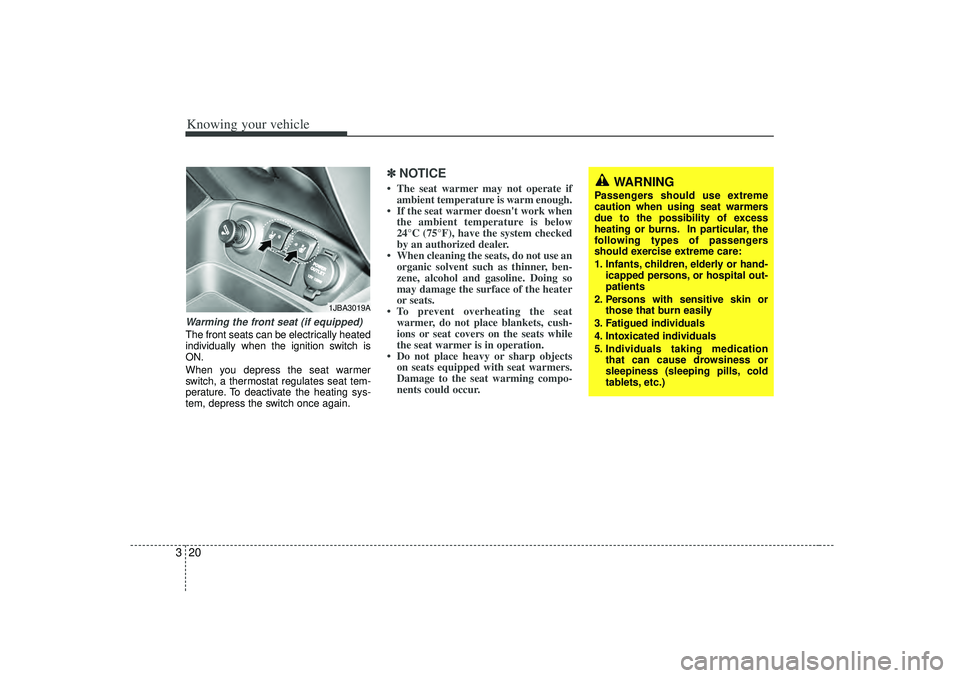
3Warming the front seat (if equipped)The front seats can be electrically heated
individually when the ignition switch is
ON.
When you depress the seat warmer
switch, a thermostat regulates seat tem-
perature. To deactivate the heating sys-
tem, depress the switch once again.
✽ ✽
NOTICE• The seat warmer may not operate if
ambient temperature is warm enough.
• If the seat warmer doesn't work when the ambient temperature is below
24°C (75°F), have the system checked
by an authorized dealer.
• When cleaning the seats, do not use an organic solvent such as thinner, ben-
zene, alcohol and gasoline. Doing so
may damage the surface of the heater
or seats.
• To prevent overheating the seat warmer, do not place blankets, cush-
ions or seat covers on the seats while
the seat warmer is in operation.
• Do not place heavy or sharp objects on seats equipped with seat warmers.
Damage to the seat warming compo-
nents could occur.
1JBA3019A
WARNING
Passengers should use extreme
caution when using seat warmers
due to the possibility of excess
heating or burns. In particular, the
following types of passengers
should exercise extreme care:
1. Infants, children, elderly or hand-
icapped persons, or hospital out-
patients
2. Persons with sensitive skin or those that burn easily
3. Fatigued individuals
4. Intoxicated individuals
5. Individuals taking medication that can cause drowsiness or
sleepiness (sleeping pills, cold
tablets, etc.)
Page 40 of 221
331
Knowing your vehicle
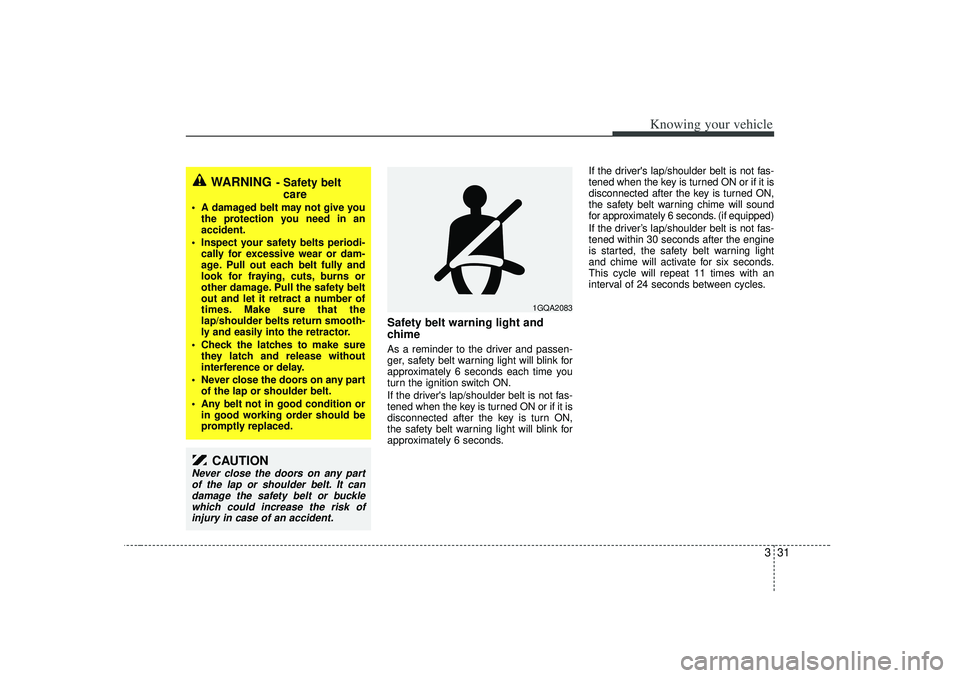
Safety belt warning light and
chimeAs a reminder to the driver and passen-
ger, safety belt warning light will blink for
approximately 6 seconds each time you
turn the ignition switch ON.
If the driver's lap/shoulder belt is not fas-
tened when the key is turned ON or if it is
disconnected after the key is turn ON,
the safety belt warning light will blink for
approximately 6 seconds.If the driver's lap/shoulder belt is not fas-
tened when the key is turned ON or if it is
disconnected after the key is turned ON,
the safety belt warning chime will sound
for approximately 6 seconds. (if equipped)
If the driver’s lap/shoulder belt is not fas-
tened within 30 seconds after the engine
is started, the safety belt warning light
and chime will activate for six seconds.
This cycle will repeat 11 times with an
interval of 24 seconds between cycles.
WARNING
- Safety belt
care
A damaged belt may not give you
the protection you need in an
accident.
Inspect your safety belts periodi- cally for excessive wear or dam-
age. Pull out each belt fully and
look for fraying, cuts, burns or
other damage. Pull the safety belt
out and let it retract a number of
times. Make sure that the
lap/shoulder belts return smooth-
ly and easily into the retractor.
Check the latches to make sure they latch and release without
interference or delay.
Never close the doors on any part of the lap or shoulder belt.
Any belt not in good condition or in good working order should be
promptly replaced.
CAUTION
Never close the doors on any partof the lap or shoulder belt. It candamage the safety belt or buckle which could increase the risk ofinjury in case of an accident.
1GQA2083
Page 58 of 221
349
Knowing your vehicle
Air bag system components The main components of your SRS are:
To indicate that your vehicle is
equipped with air bags, the correspon-
ding air bag covers are marked with
“SRS AIR BAG”.
- Driver’ s air bag
- Passenger’ s air bag
- Side air bag (if equipped)
- Curtain air bag (if equipped)
A diagnostic system that continually
monitors the system operation.
Air bag warning light to warn you of a
possible problem with the system.
Emergency power backup in case your
car’ s electrical system is disconnected
in a crash.
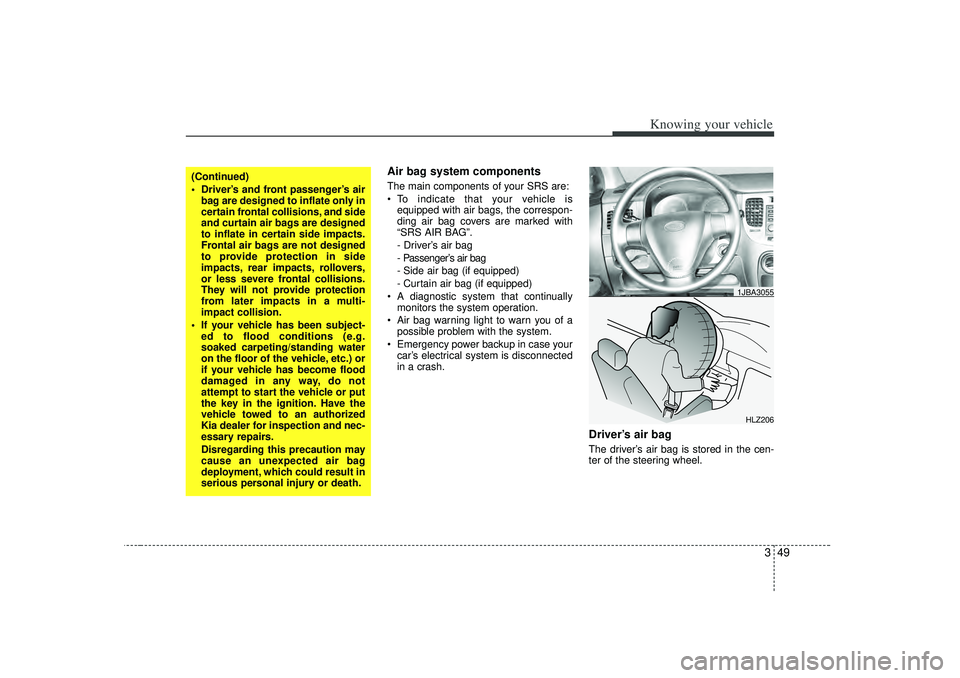
Driver’s air bag The driver’ s air bag is stored in the cen-
ter of the steering wheel.
(Continued)
Driver’s and front passenger’s air bag are designed to inflate only in
certain frontal collisions, and side
and curtain air bags are designed
to inflate in certain side impacts.
Frontal air bags are not designed
to provide protection in side
impacts, rear impacts, rollovers,
or less severe frontal collisions.
They will not provide protection
from later impacts in a multi-
impact collision.
If your vehicle has been subject- ed to flood conditions (e.g.
soaked carpeting/standing water
on the floor of the vehicle, etc.) or
if your vehicle has become flood
damaged in any way, do not
attempt to start the vehicle or put
the key in the ignition. Have the
vehicle towed to an authorized
Kia dealer for inspection and nec-
essary repairs.
Disregarding this precaution may
cause an unexpected air bag
deployment, which could result in
serious personal injury or death.
HLZ2061JBA3055
Page 67 of 221
Knowing your vehicle58
3Air bag system operation Air bags only operate when the ignition
switch is turned to the ON or START
positions.
Air bags inflate instantly in the event of
serious frontal or side collision (if
equipped with side air bag or curtain
air bag) in order to help protect the
occupants from serious physical injury.
There is no single vehicle speed at
which the air bags will inflate.
Air bag deployment depends on a
number of factors including vehicle
speed, angles of impact and the densi-
ty and stiffness of the vehicles or
objects which your vehicle hits in the
collision. However, factors are not limit-
ed to those mentioned above.
The front air bags will completely
inflate and deflate in an instant.
It is virtually impossible for you to see
the air bags inflate during an accident.
It is much more likely that you will sim-
ply see the deflated air bags hanging
out of their storage compartments after
the collision.
In order to help provide protection in a
severe collision, the air bags must
inflate rapidly. The speed of air bag
inflation is a consequence of the
extremely short time in which a collision
occurs and the need to get the air bag
between the occupant and the vehicle
structures before the occupant impacts
those structures. This speed of inflation
reduces the risk of serious or life-
threatening injuries in a severe collision
and is thus a necessary part of air bag
design.
However, air bag inflation can also
cause injuries which normally can
include facial abrasions, bruises and
broken bones, and sometimes more
serious injuries because the inflation
speed also causes the air bags to
expand with a great deal of force.
There are even circumstances under which contact with the steer-
ing wheel air bag can cause fatal
injuries, especially if the occupant
is positioned excessively close to
the steering wheel.
WARNING -
Seated
positioning
To avoid severe personal injury ordeath caused by deploying air
bags in a collision, the driver
should sit as far back from the
steering wheel air bag as possible
(at least 250 mm (10 inches) away).
The front passenger should
always move their seat as far back
as possible and sit back in their
seat.
Air bag inflates instantly in an event of collision, passengers
may be injured by the air bag
expansion force if they are not in
proper position.
Air bag inflation may cause injuries which normally include
facial or bodily abrasions, injuries
by the broken glasses or burns by
the explosives.
Page 69 of 221

Knowing your vehicle60
3
Air bag warning lightThe purpose of air bag warning light in
your instrument panel is to alert you of a
potential problem with your air bag -
Supplemental Restraint System (SRS).
When the ignition switch is turned ON,
the indicator light should blink or illumi-
nate for approximately 6 seconds, then
go off.
Have the system checked if:
The light does not turn on briefly when
you turn the ignition ON.
The light stays on after the engine
starts.
The light comes on while the vehicle is
in motion.
Air bag (Supplemental Restraint
System) service Your Supplemental Restraint System is
virtually maintenance-free. There are no
parts which you can service.
You must have the system serviced
under the following circumstances:
If an air bag ever inflates, the air bag
must be replaced. Do not try to remove
or discard the air bag by yourself. This
must be done by an authorized Kia
dealer.
If the air bag warning indicator light
alerts you to a problem, have the air
bag system checked as soon as possi-
ble. Otherwise, your air bag system
may be ineffective.
WARNING
Never put child restraint in the
front passenger seat. If the front
passenger air bag inflates, it may
cause severe or fatal injuries.
When children are seated in the rear outboard seats in which cur-
tain air bags are equipped, be
sure to put the child restraint sys-
tem as far away from the door
side as possible, and secure the
child restraint system to be
locked in position.
Inflation of side or curtain air bag
(if equipped) could cause severe
injury or death due to the expan-
sion impact.
AIR
BAG
CAUTION
- No modification
Do not modify any part of the air bag
system. Modification could makethe air bag system ineffective or could cause unnecessary deploy-ment.
Page 80 of 221
371
Knowing your vehicle
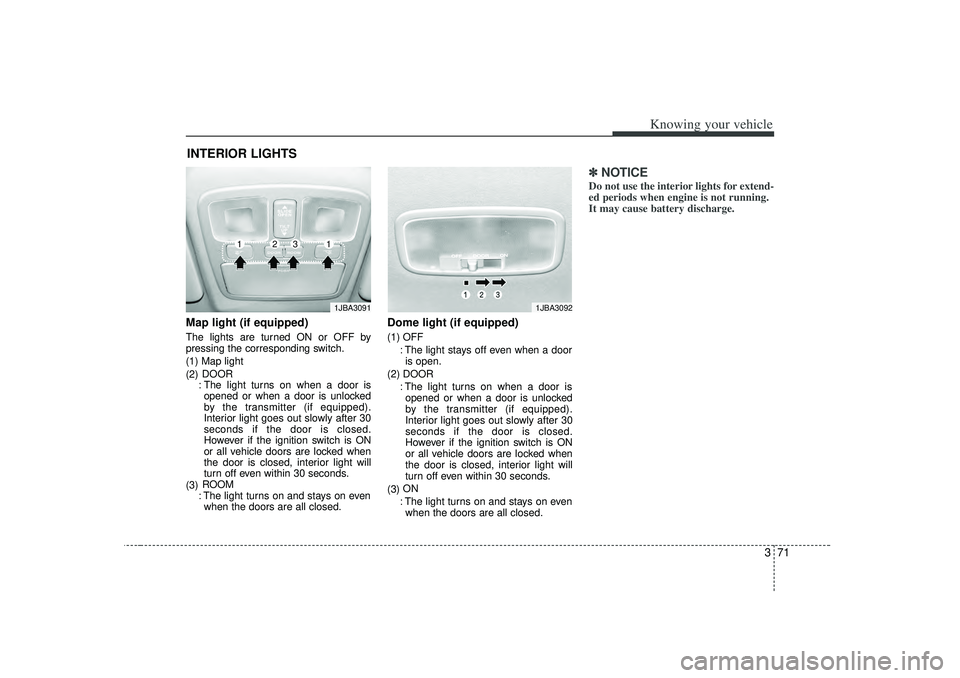
Map light (if equipped)The lights are turned ON or OFF by
pressing the corresponding switch.
(1) Map light
(2)DOOR
: The light turns on when a door is opened or when a door is unlocked
by the transmitter (if equipped).
Interior light goes out slowly after 30
seconds if the door is closed.
However if the ignition switch is ON
or all vehicle doors are locked when
the door is closed, interior light will
turn off even within 30 seconds.
(3) ROOM
: The light turns on and stays on even when the doors are all closed.
Dome light (if equipped)(1) OFF
: The light stays off even when a dooris open.
(2) DOOR : The light turns on when a door isopened or when a door is unlocked
by the transmitter (if equipped).
Interior light goes out slowly after 30
seconds if the door is closed.
However if the ignition switch is ON
or all vehicle doors are locked when
the door is closed, interior light will
turn off even within 30 seconds.
(3) ON
: The light turns on and stays on even when the doors are all closed.
✽ ✽ NOTICEDo not use the interior lights for extend-
ed periods when engine is not running.
It may cause battery discharge.
INTERIOR LIGHTS
1JBA3092
1JBA3091
1
1
2
3
Page 82 of 221
373
Knowing your vehicle
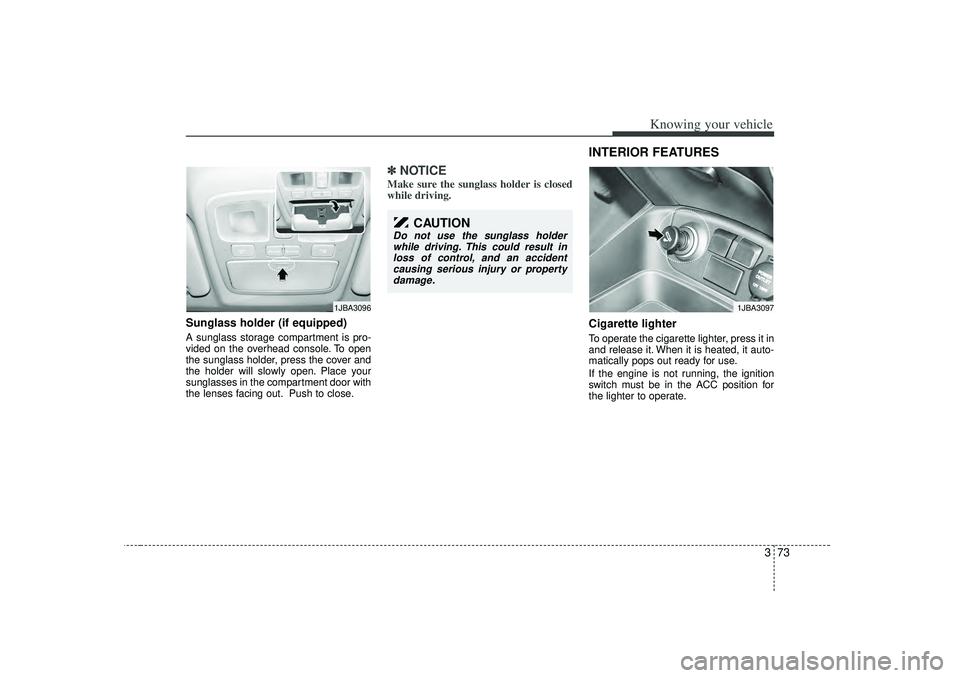
Sunglass holder (if equipped)A sunglass storage compartment is pro-
vided on the overhead console. To open
the sunglass holder, press the cover and
the holder will slowly open. Place your
sunglasses in the compartment door with
the lenses facing out. Push to close.
✽ ✽NOTICEMake sure the sunglass holder is closed
while driving.
INTERIOR FEATURES Cigarette lighterTo operate the cigarette lighter, press it in
and release it. When it is heated, it auto-
matically pops out ready for use.
If the engine is not running, the ignition
switch must be in the ACC position for
the lighter to operate.
1JBA3096
CAUTION
Do not use the sunglass holder
while driving. This could result inloss of control, and an accidentcausing serious injury or property damage.
1JBA3097
Page 85 of 221
Knowing your vehicle76
3✽
✽
NOTICE• Use the power outlet when the engine
is running, and remove a plug from
the power outlet after using the elec-
tric appliance. Using the power outlet
excessively or while the engine is not
running or leaving appliances plugged
into the power outlet when not in use
will cause battery discharge
• Only use the electric appliances which are less than 12V and 10A in electric
capacity.
• Adjust the air-conditioner or heater to the lowest operation level when you
have to use the power socket while
using air-conditioner or heater.
• Close the cover when not in use.
• Some electronic devices can cause electronic interference when plugged
into a vehicle’s power outlet. These
devices may cause excessive audio
static and malfunctions in other elec-
tronic systems or devices used in your
vehicle.
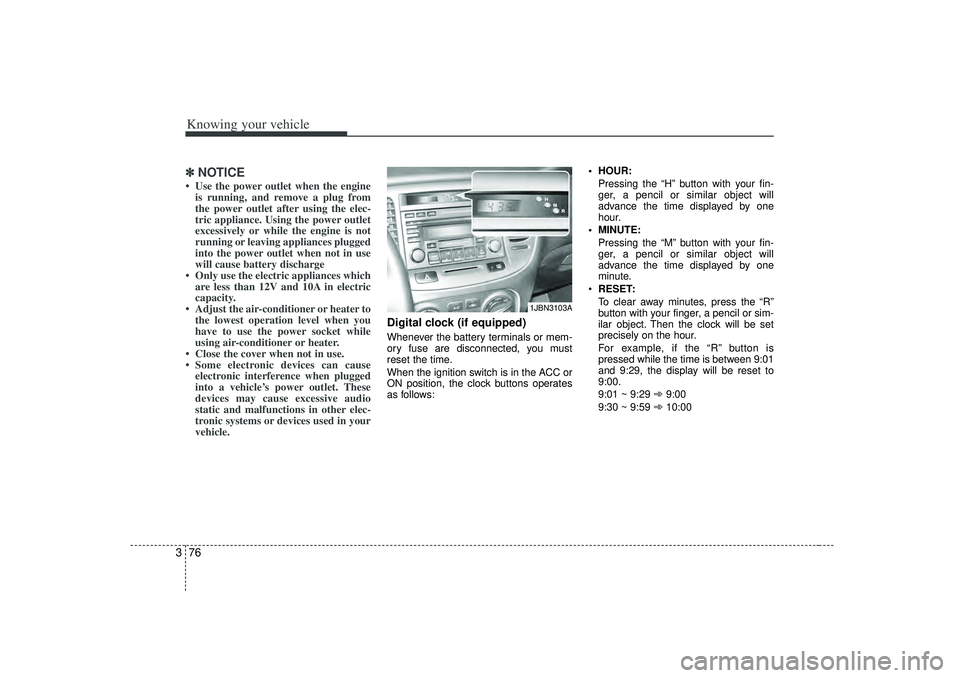
Digital clock (if equipped)Whenever the battery terminals or mem-
ory fuse are disconnected, you must
reset the time.
When the ignition switch is in the ACC or
ON position, the clock buttons operates
as follows: HOUR:
Pressing the “H”button with your fin-
ger, a pencil or similar object will
advance the time displayed by one
hour.
MINUTE: Pressing the “M”button with your fin-
ger, a pencil or similar object will
advance the time displayed by one
minute.
RESET:
To clear away minutes, press the “R”
button with your finger, a pencil or sim-
ilar object. Then the clock will be set
precisely on the hour.
For example, if the “R ” button is
pressed while the time is between 9:01
and 9:29, the display will be reset to
9:00.
9:01 ~ 9:29 ➾ 9:00
9:30 ~ 9:59 ➾ 10:00
1JBN3103A