warning KIA RIO HATCHBACK 2012 Workshop Manual
[x] Cancel search | Manufacturer: KIA, Model Year: 2012, Model line: RIO HATCHBACK, Model: KIA RIO HATCHBACK 2012Pages: 385, PDF Size: 9.68 MB
Page 82 of 385
47
Features of your vehicle
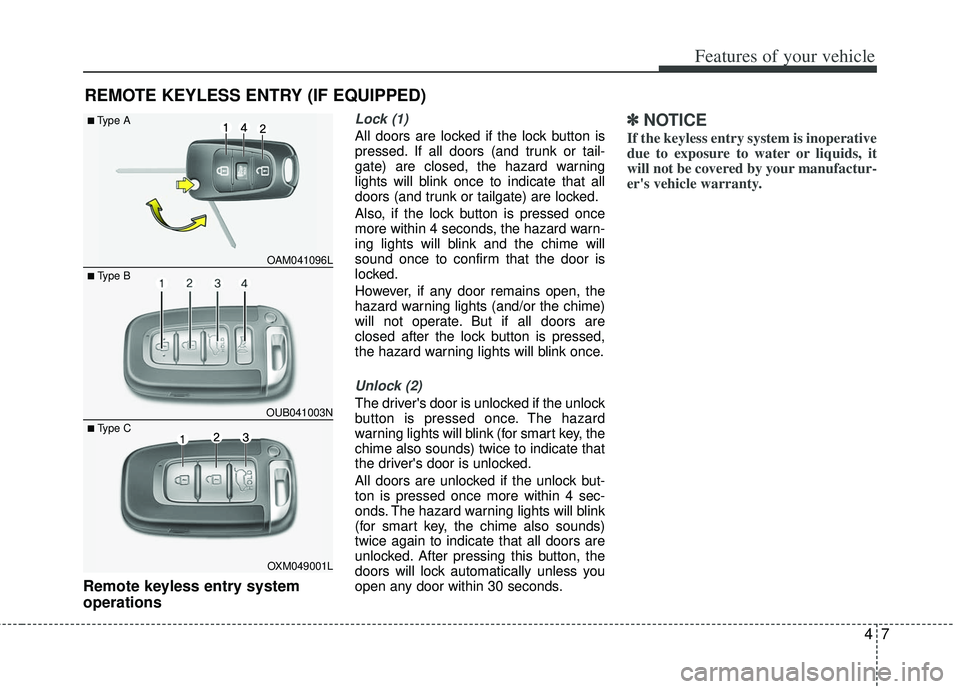
Remote keyless entry system
operations
Lock (1)
All doors are locked if the lock button is
pressed. If all doors (and trunk or tail-
gate) are closed, the hazard warning
lights will blink once to indicate that all
doors (and trunk or tailgate) are locked.
Also, if the lock button is pressed once
more within 4 seconds, the hazard warn-
ing lights will blink and the chime will
sound once to confirm that the door is
locked.
However, if any door remains open, the
hazard warning lights (and/or the chime)
will not operate. But if all doors are
closed after the lock button is pressed,
the hazard warning lights will blink once.
Unlock (2)
The driver's door is unlocked if the unlock
button is pressed once. The hazard
warning lights will blink (for smart key, the
chime also sounds) twice to indicate that
the driver's door is unlocked.
All doors are unlocked if the unlock but-
ton is pressed once more within 4 sec-
onds. The hazard warning lights will blink
(for smart key, the chime also sounds)
twice again to indicate that all doors are
unlocked. After pressing this button, the
doors will lock automatically unless you
open any door within 30 seconds.
✽ ✽NOTICE
If the keyless entry system is inoperative
due to exposure to water or liquids, it
will not be covered by your manufactur-
er's vehicle warranty.
REMOTE KEYLESS ENTRY (IF EQUIPPED)
OAM041096L
OUB041003N
■Type A
■ Type B
OXM049001L
■ Type C
Page 83 of 385
Features of your vehicle
84
Tailgate open (3) (if equipped)
The tailgate is opened if the button is
pressed for more than 1 second.
Once the tailgate is opened and then
closed, the tailgate will lock automatical-
ly.
Alarm (4)
The horn sounds and the hazard warning
lights blink for about 30 seconds if this
button is pressed for more than 0.5 sec-
onds. To stop the horn and lights, press
any button on the transmitter.
Transmitter precautions
The transmitter (or smart key) will not
work if any of following occurs:
The ignition key is in the ignitionswitch.
You exceed the operating distance limit (about 30 m [90 feet]).
The battery in the transmitter (or smart key) is weak.
Other vehicles or objects may be blocking the signal.
The weather is extremely cold.
The transmitter (or smart key) is close to a radio transmitter such as a radio
station or an airport which can interfere
with normal operation of the transmit-
ter.
When the transmitter (or smart key) does
not work properly, open and close the
door with the ignition key. If you have a
problem with the transmitter (or smart
key), contact an authorized Kia dealer. This device complies with Industry
Canada Standard RSS-210.
Operation is subject to the following two
conditions:
1. This device may not cause harmful
interference, and
2. This device must accept any interfer- ence received, including interference
that may cause undesired operation.
✽ ✽NOTICE
Changes or modifications not expressly
approved by the party responsible for
compliance could void the user’s
authority to operate the equipment. If
the keyless entry system is inoperative
due to changes or modifications not
expressly approved by the party respon-
sible for compliance, it will not be cov-
ered by your manufacturer’s vehicle
warranty.
Page 86 of 385
411
Features of your vehicle
This device complies with Industry
Canada Standard RSS-210.
Operation is subject to the following two
conditions:
1. This device may not cause harmfulinterference, and
2. This device must accept any interfer- ence received, including interference
that may cause undesired operation.Limp home (override) procedure
When you turn the ignition switch to the
ON position, if the immobilizer indicator
( ) goes off after blinking 5 times,
your transponder equipped in the ignition
key is out of order. You cannot start the
engine without the limp home procedure.
To start the engine, you have to input
your password by using the ignition
switch. Your password is only available
from an authorized Kia dealership.
Contact an authorized dealer for more
information.
The following procedure is how to input
your password of “2345” as an example.
1. Turn the ignition s witch to the ON posi-
tion. The immobilizer indicator ( )
will blink 5 times and go off indicating
the beginning of the limp home proce-
dure.
2. Turn the ignition switch to the ACC position.
3. To enter the first digit (in this example “2”), turn the ignition switch to the ON
and ACC position twice. Perform the
same procedure for the next digits
between 3 seconds and 10 seconds
(for example, for “3”, turn the ignition
ON and ACC 3 times). 4. If all of the digits have been input suc-
cessfully, you have to start the engine
within 30 seconds. If you attempt to
start the engine after 30 seconds, the
engine will not start and you will have
to input your password again.
After performing the limp home proce-
dure, you have to see an authorized Kia
dealer immediately to inspect and repair
your ignition key or immobilizer system.
WARNING
Changes or modifications not
expressly approved by the party
responsible for compliance could
void the user's authority to operate
the equipment.
Page 87 of 385
Features of your vehicle
12
4
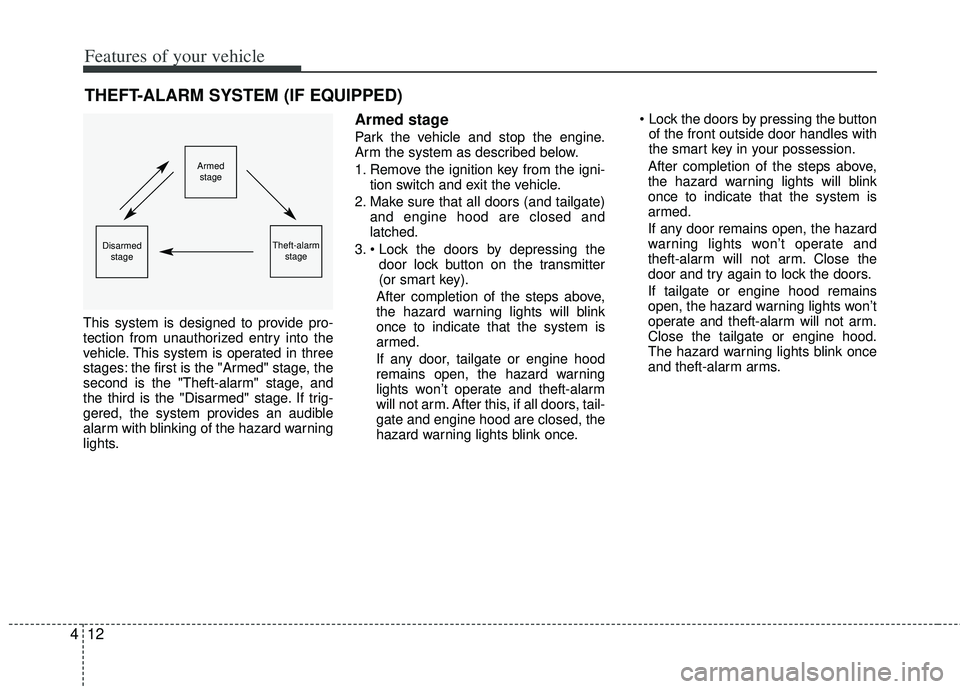
This system is designed to provide pro-
tection from unauthorized entry into the
vehicle. This system is operated in three
stages: the first is the "Armed" stage, the
second is the "Theft-alarm" stage, and
the third is the "Disarmed" stage. If trig-
gered, the system provides an audible
alarm with blinking of the hazard warning
lights.
Armed stage
Park the vehicle and stop the engine.
Arm the system as described below.
1. Remove the ignition key from the igni-
tion switch and exit the vehicle.
2. Make sure that all doors (and tailgate) and engine hood are closed and
latched.
3. door lock button on the transmitter
(or smart key).
After completion of the steps above,
the hazard warning lights will blink
once to indicate that the system is
armed.
If any door, tailgate or engine hood
remains open, the hazard warning
lights won’t operate and theft-alarm
will not arm. After this, if all doors, tail-
gate and engine hood are closed, the
hazard warning lights blink once.
of the front outside door handles with
the smart key in your possession.
After completion of the steps above,
the hazard warning lights will blink
once to indicate that the system is
armed.
If any door remains open, the hazard
warning lights won’t operate and
theft-alarm will not arm. Close the
door and try again to lock the doors.
If tailgate or engine hood remains
open, the hazard warning lights won’t
operate and theft-alarm will not arm.
Close the tailgate or engine hood.
The hazard warning lights blink once
and theft-alarm arms.
THEFT-ALARM SYSTEM (IF EQUIPPED)
Armed stage
Theft-alarm stageDisarmedstage
Page 88 of 385
413
Features of your vehicle
✽
✽NOTICE
The theft-alarm system by the key can be
activated by an authorized Kia dealer.
If you want this feature, consult an
authorized Kia dealer.
Do not arm the system until all pas-
sengers have left the vehicle. If the
system is armed while a passenger(s)
remains in the vehicle, the alarm may
be activated when the remaining pas-
senger(s) leaves the vehicle. If any
door (or tailgate) or engine hood is
opened within 30 seconds after the
system enters the armed stage, the
system will be disarmed to prevent
unnecessary alarm.
Theft-alarm stage
The alarm will be activated if any of the
following occurs while the system is
armed.
A front or rear door is opened without
using the transmitter (or smart key).
The tailgate is opened without using the transmitter (or smart key).
The engine hood is opened.
The horn will sound and the hazard
warning lights will blink continuously for
approximately 27 seconds. To turn off the
system, unlock the doors with the trans-
mitter (or smart key).
Disarmed stage
The system will be disarmed when:
Transmitter
- The door unlock button is pressed.
- The engine is started. (within 3 sec- onds)
- The ignition switch is in the “ON” posi- tion for 30 seconds or more.
Smart key
- The door unlock button is pressed.
- The button of the front outside door ispressed while carrying the smart key.
- The engine is started. (within 3 sec- onds)
After the doors are unlocked, the hazard
warning lights will blink twice to indicate
that the system is disarmed.
After pressing the unlock button, if any
door (or tailgate) is not opened within 30
seconds, the system will be rearmed.
Page 92 of 385
417
Features of your vehicle
If a power door lock ever fails to function
while you are in the vehicle, try one or
more of the following techniques to exit:
Operate the door unlock featurerepeatedly (both electronic and manu-
al) while simultaneously pulling on the
door handle.
Operate the other door locks and han- dles, front and rear.
Lower a front window and use the key to unlock the door from outside.
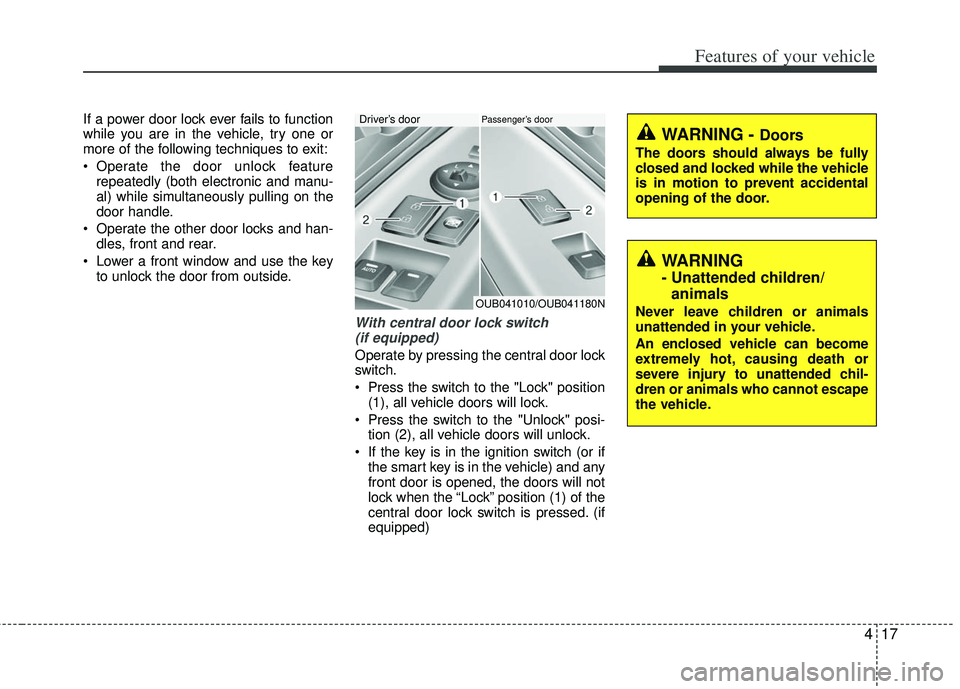
With central door lock switch (if equipped)
Operate by pressing the central door lock
switch.
Press the switch to the "Lock" position (1), all vehicle doors will lock.
Press the switch to the "Unlock" posi- tion (2), all vehicle doors will unlock.
If the key is in the ignition switch (or if the smart key is in the vehicle) and any
front door is opened, the doors will not
lock when the “Lock” position (1) of the
central door lock switch is pressed. (if
equipped)
OUB041010/OUB041180N
Driver’s doorPassenger’s door
WARNING
- Unattended children/animals
Never leave children or animals
unattended in your vehicle.
An enclosed vehicle can become
extremely hot, causing death or
severe injury to unattended chil-
dren or animals who cannot escape
the vehicle.
WARNING - Doors
The doors should always be fully
closed and locked while the vehicle
is in motion to prevent accidental
opening of the door.
Page 94 of 385
419
Features of your vehicle
3. Close the rear door.
To open the rear door, pull the outside
door handle.
Even though the doors may be unlocked,
the rear door will not open by pulling the
inner door handle until the rear door child
safety lock is unlocked.
WARNING- Rear doorlocks
Use the rear door safety locks
whenever children are in the vehi-
cle. If a child accidently opens the
rear doors while the vehicle is
motion, he can fall out.
Page 96 of 385
421
Features of your vehicle
Closing the tailgate
To close the tailgate, lower and push
down the tailgate firmly. Make sure that
the tailgate is securely latched.
Make sure your hands, feet and other
parts of your body are safely out of the
way before closing the tailgate.
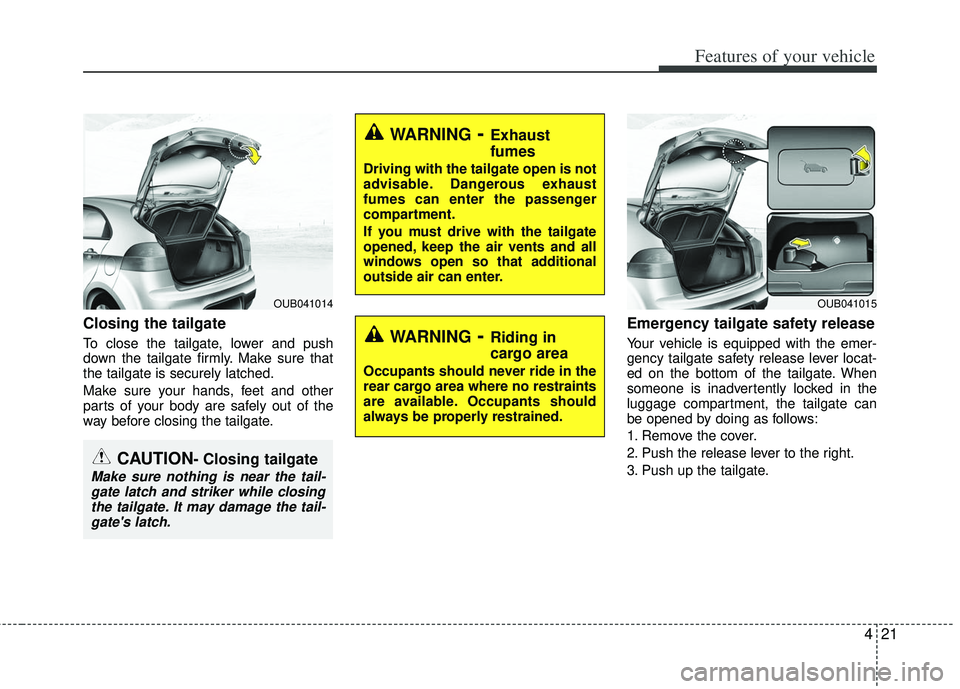
Emergency tailgate safety release
Your vehicle is equipped with the emer-
gency tailgate safety release lever locat-
ed on the bottom of the tailgate. When
someone is inadvertently locked in the
luggage compartment, the tailgate can
be opened by doing as follows:
1. Remove the cover.
2. Push the release lever to the right.
3. Push up the tailgate.
CAUTION- Closing tailgate
Make sure nothing is near the tail-gate latch and striker while closingthe tailgate. It may damage the tail-gate's latch.
OUB041014
WARNING- Exhaust
fumes
Driving with the tailgate open is not
advisable. Dangerous exhaust
fumes can enter the passenger
compartment.
If you must drive with the tailgate
opened, keep the air vents and all
windows open so that additional
outside air can enter.
WARNING- Riding in
cargo area
Occupants should never ride in the
rear cargo area where no restraints
are available. Occupants should
always be properly restrained.
OUB041015
Page 99 of 385
Features of your vehicle
24
4
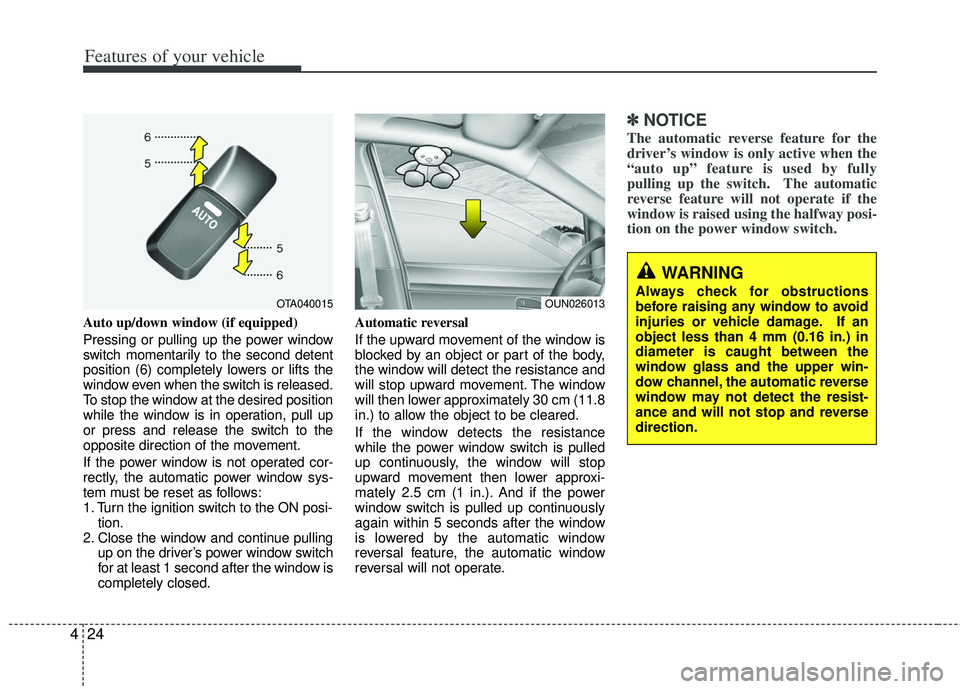
Auto up/down window (if equipped)
Pressing or pulling up the power window
switch momentarily to the second detent
position (6) completely lowers or lifts the
window even when the switch is released.
To stop the window at the desired position
while the window is in operation, pull up
or press and release the switch to the
opposite direction of the movement.
If the power window is not operated cor-
rectly, the automatic power window sys-
tem must be reset as follows:
1. Turn the ignition switch to the ON posi-
tion.
2. Close the window and continue pulling up on the driver’s power window switch
for at least 1 second after the window is
completely closed. Automatic reversal
If the upward movement of the window is
blocked by an object or part of the body,
the window will detect the resistance and
will stop upward movement. The window
will then lower approximately 30 cm (11.8
in.) to allow the object to be cleared.
If the window detects the resistance
while the power window switch is pulled
up continuously, the window will stop
upward movement then lower approxi-
mately 2.5 cm (1 in.). And if the power
window switch is pulled up continuously
again within 5 seconds after the window
is lowered by the automatic window
reversal feature, the automatic window
reversal will not operate.
✽ ✽
NOTICE
The automatic reverse feature for the
driver’s window is only active when the
“auto up” feature is used by fully
pulling up the switch. The automatic
reverse feature will not operate if the
window is raised using the halfway posi-
tion on the power window switch.
OTA040015
WARNING
Always check for obstructions
before raising any window to avoid
injuries or vehicle damage. If an
object less than 4 mm (0.16 in.) in
diameter is caught between the
window glass and the upper win-
dow channel, the automatic reverse
window may not detect the resist-
ance and will not stop and reverse
direction.OUN026013
Page 100 of 385
425
Features of your vehicle
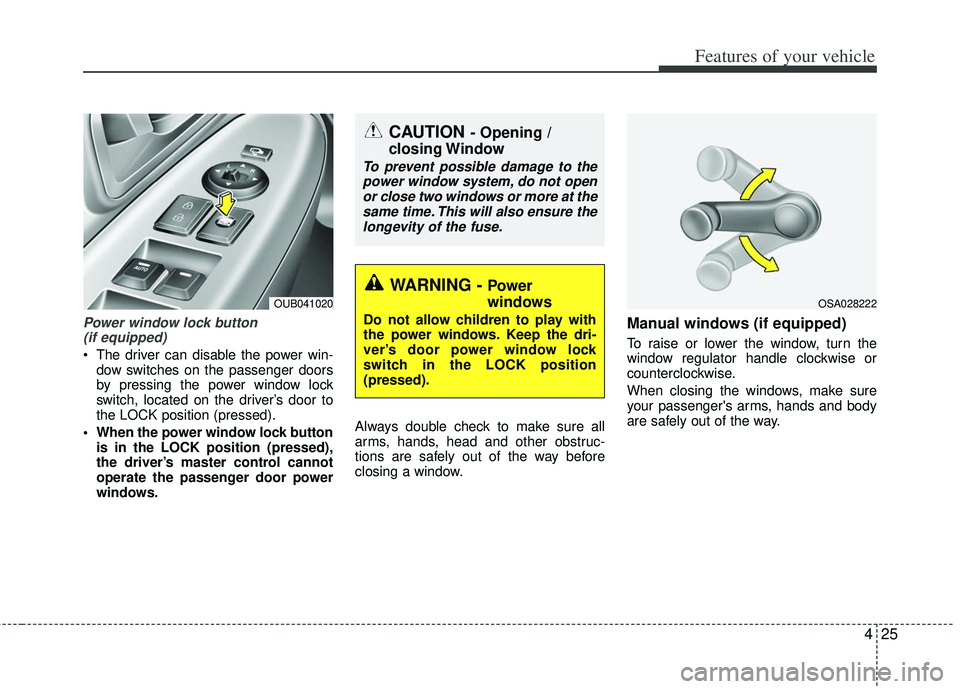
Power window lock button (if equipped)
The driver can disable the power win-
dow switches on the passenger doors
by pressing the power window lock
switch, located on the driver’s door to
the LOCK position (pressed).
When the power window lock button is in the LOCK position (pressed),
the driver’s master control cannot
operate the passenger door power
windows. Always double check to make sure all
arms, hands, head and other obstruc-
tions are safely out of the way before
closing a window.
Manual windows (if equipped)
To raise or lower the window, turn the
window regulator handle clockwise or
counterclockwise.
When closing the windows, make sure
your passenger's arms, hands and body
are safely out of the way.
CAUTION - Opening /
closing Window
To prevent possible damage to the
power window system, do not openor close two windows or more at thesame time. This will also ensure thelongevity of the fuse.
WARNING - Power
windows
Do not allow children to play with
the power windows. Keep the dri-
ver’s door power window lock
switch in the LOCK position
(pressed).
OUB041020OSA028222