key KIA RIO HATCHBACK 2014 Owner's Guide
[x] Cancel search | Manufacturer: KIA, Model Year: 2014, Model line: RIO HATCHBACK, Model: KIA RIO HATCHBACK 2014Pages: 446, PDF Size: 12.98 MB
Page 147 of 446
Features of your vehicle
76
4
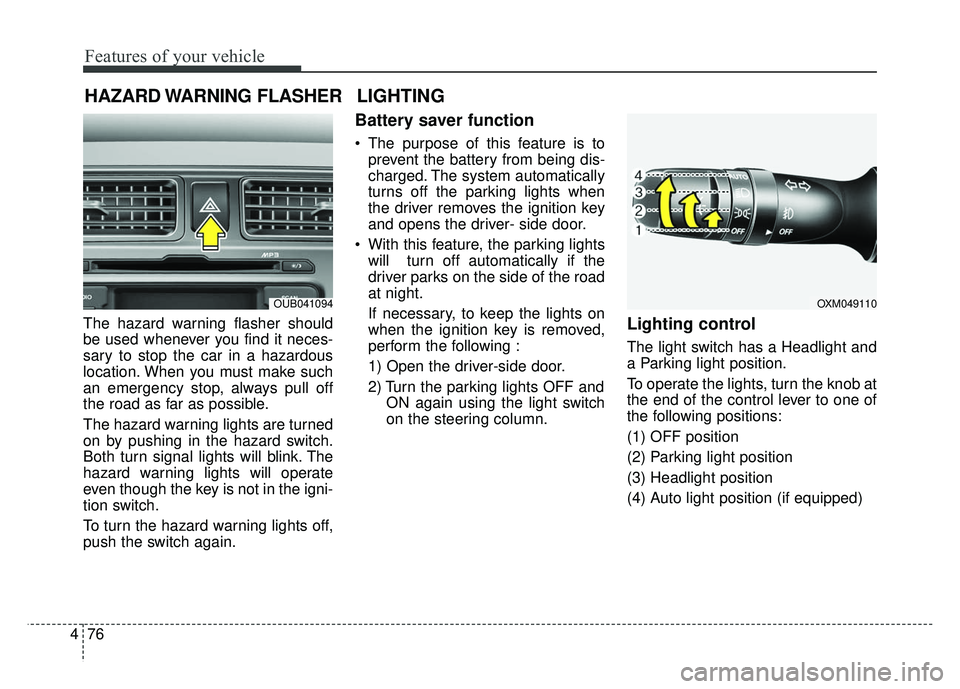
The hazard warning flasher should
be used whenever you find it neces-
sary to stop the car in a hazardous
location. When you must make such
an emergency stop, always pull off
the road as far as possible.
The hazard warning lights are turned
on by pushing in the hazard switch.
Both turn signal lights will blink. The
hazard warning lights will operate
even though the key is not in the igni-
tion switch.
To turn the hazard warning lights off,
push the switch again.
Battery saver function
The purpose of this feature is to
prevent the battery from being dis-
charged. The system automatically
turns off the parking lights when
the driver removes the ignition key
and opens the driver- side door.
With this feature, the parking lights will turn off automatically if the
driver parks on the side of the road
at night.
If necessary, to keep the lights on
when the ignition key is removed,
perform the following :
1) Open the driver-side door.
2) Turn the parking lights OFF and ON again using the light switch
on the steering column.
Lighting control
The light switch has a Headlight and
a Parking light position.
To operate the lights, turn the knob at
the end of the control lever to one of
the following positions:
(1) OFF position
(2) Parking light position
(3) Headlight position
(4) Auto light position (if equipped)
HAZARD WARNING FLASHER
OXM049110
LIGHTING
OUB041094
Page 188 of 446
4117
Features of your vehicle
SYSTEM CONTROLLERS
AND FUNCTIONS
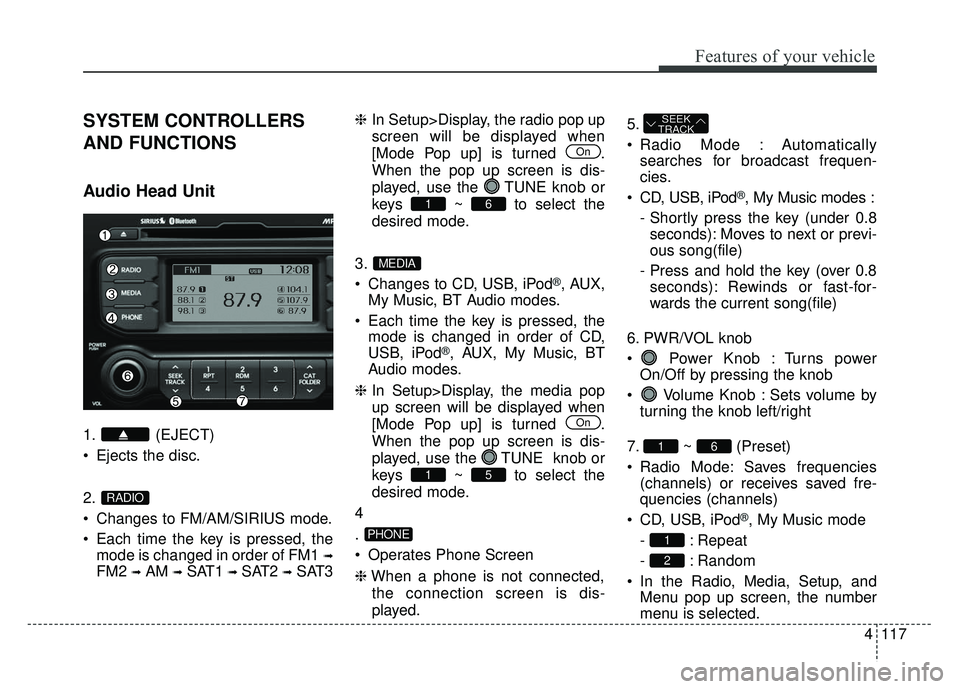
Audio Head Unit
1. (EJECT)
Ejects the disc.
2.
Changes to FM/AM/SIRIUS mode.
Each time the key is pressed, themode is changed in order of FM1
➟
FM2 ➟AM ➟SAT1 ➟SAT2 ➟SAT3 ❈
In Setup>Display, the radio pop up
screen will be displayed when
[Mode Pop up] is turned .
When the pop up screen is dis-
played, use the TUNE knob or
keys ~ to select the
desired mode.
3.
Changes to CD, USB, iPod
®, AUX,
My Music, BT Audio modes.
Each time the key is pressed, the mode is changed in order of CD,
USB, iPod
®, AUX, My Music, BT
Audio modes.
❈ In Setup>Display, the media pop
up screen will be displayed when
[Mode Pop up] is turned .
When the pop up screen is dis-
played, use the TUNE knob or
keys ~ to select the
desired mode.
4
.
Operates Phone Screen
❈ When a phone is not connected,
the connection screen is dis-
played. 5.
Radio Mode : Automatically
searches for broadcast frequen-
cies.
CD, USB, iPod
®, My Music modes :
- Shortly press the key (under 0.8 seconds): Moves to next or previ-
ous song(file)
- Press and hold the key (over 0.8 seconds): Rewinds or fast-for-
wards the current song(file)
6. PWR/VOL knob
Power Knob : Turns power On/Off by pressing the knob
Volume Knob : Sets volume by turning the knob left/right
7. ~ (Preset)
Radio Mode: Saves frequencies (channels) or receives saved fre-
quencies (channels)
CD, USB, iPod
®, My Music mode
- : Repeat
- : Random
In the Radio, Media, Setup, and Menu pop up screen, the number
menu is selected.
2
1
61
SEEK
TRACK
PHONE
51
On
MEDIA
61
On
RADIO
Page 189 of 446
Features of your vehicle
118
4
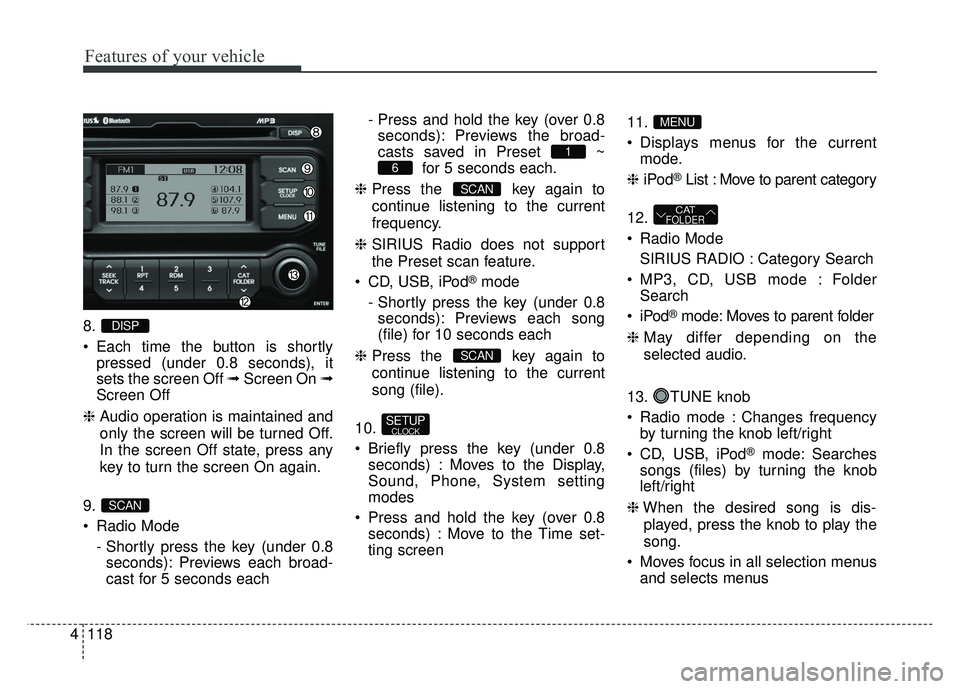
8.
Each time the button is shortly
pressed (under 0.8 seconds), it
sets the screen Off ➟ Screen On ➟
Screen Off
❈ Audio operation is maintained and
only the screen will be turned Off.
In the screen Off state, press any
key to turn the screen On again.
9.
Radio Mode - Shortly press the key (under 0.8seconds): Previews each broad-
cast for 5 seconds each - Press and hold the key (over 0.8
seconds): Previews the broad-
casts saved in Preset ~ for 5 seconds each.
❈ Press the key again to
continue listening to the current
frequency.
❈ SIRIUS Radio does not support
the Preset scan feature.
CD, USB, iPod
®mode
- Shortly press the key (under 0.8 seconds): Previews each song
(file) for 10 seconds each
❈ Press the key again to
continue listening to the current
song (file).
10.
Briefly press the key (under 0.8 seconds) : Moves to the Display,
Sound, Phone, System setting
modes
Press and hold the key (over 0.8 seconds) : Move to the Time set-
ting screen 11.
Displays menus for the current
mode.
❈ iPod
®List : Move to parent category
12.
Radio Mode SIRIUS RADIO : Category Search
MP3, CD, USB mode : Folder Search
®mode: Moves to parent folder
❈ May differ depending on the
selected audio.
13. TUNE knob
Radio mode : Changes frequency by turning the knob left/right
CD, USB, iPod
®mode: Searches
songs (files) by turning the knob
left/right
❈ When the desired song is dis-
played, press the knob to play the
song.
Moves focus in all selection menus and selects menus
CATFOLDER
MENU
SETUPCLOCK
SCAN
SCAN
6
1
SCAN
DISP
Page 190 of 446
4119
Features of your vehicle
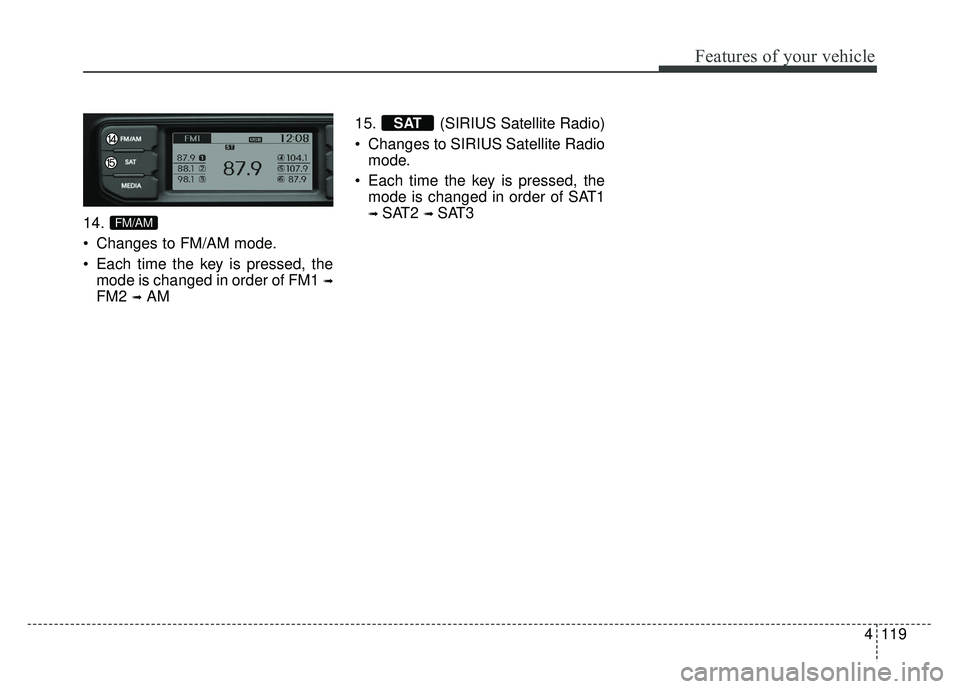
14.
Changes to FM/AM mode.
Each time the key is pressed, themode is changed in order of FM1
➟
FM2 ➟AM 15. (SIRIUS Satellite Radio)
Changes to SIRIUS Satellite Radio
mode.
Each time the key is pressed, the mode is changed in order of SAT1
➟ SAT2 ➟ SAT3
SAT
FM/AM
Page 191 of 446
![KIA RIO HATCHBACK 2014 Owners Guide Features of your vehicle
120
4
DISPLAY SETTINGS
Press the key Select
[Display] through TUNE knob or
key Select menu through
TUNE knob
Mode Pop up
[Mode Pop up] Changes /
selection mode
During On](/img/2/57980/w960_57980-190.png "KIA RIO HATCHBACK 2014 Owners Guide Features of your vehicle
120
4
DISPLAY SETTINGS
Press the key Select
[Display] through TUNE knob or
key Select menu through
TUNE knob
Mode Pop up
[Mode Pop up] Changes /
selection mode
During On")
Features of your vehicle
120
4
DISPLAY SETTINGS
Press the key Select
[Display] through TUNE knob or
key Select menu through
TUNE knob
Mode Pop up
[Mode Pop up] Changes /
selection mode
During On state, press the or key to display the mode
change pop up screen.
Text Scroll
[Text Scroll] Set /
: Maintains scroll
: Scrolls only one (1) time.
Media Display
When playing an MP3 file, select the
desired display info from ‘Folder/File’
or ‘Album/Artist/Song’.
Off
On
OffOn
MEDIA
RADIO
OffOn
1
SETUP
Page 192 of 446
![KIA RIO HATCHBACK 2014 Owners Guide 4121
Features of your vehicle
SOUND SETTINGS
Press the key Select
[Sound] through TUNE knob orkey Select menu through
TUNE knob
Sound Settings
This menu allows you to set the
‘Bass, Middle, Trebl](/img/2/57980/w960_57980-191.png "KIA RIO HATCHBACK 2014 Owners Guide 4121
Features of your vehicle
SOUND SETTINGS
Press the key Select
[Sound] through TUNE knob orkey Select menu through
TUNE knob
Sound Settings
This menu allows you to set the
‘Bass, Middle, Trebl")
4121
Features of your vehicle
SOUND SETTINGS
Press the key Select
[Sound] through TUNE knob orkey Select menu through
TUNE knob
Sound Settings
This menu allows you to set the
‘Bass, Middle, Treble’ and the Sound
Fader and Balance.
Select [Sound Settings] Select
menu through TUNE knob Turn TUNE knob left/right to set
Bass, Middle, Treble : Selects the sound tone.
Fader, Balance : Moves the sound fader and balance.
Default : Restores default settings.
❈ Back : While adjusting values, re-
pressing the TUNE knob will
restore the parent menu.
Virtual Sound
The PoewrBass, PowerTreble, and
Surround can be set.
Select [Virtual Sound] Set menu
through TUNE knob Set
/ through TUNE knob
PowerBass : This is a sound sys-
tem feature that provides live bass.
PowerTreble : This is a sound sys- tem feature that provides live tre-
ble.
Surround : This is a sound system feature that provides surround
sound.
Off
On2
SETUP
Page 194 of 446
![KIA RIO HATCHBACK 2014 Owners Guide 4123
Features of your vehicle
CLOCK SETTINGS
Press the key Select [Clock]
through TUNE knob or key
Select menu through TUNE knob
Clock Settings
This menu is used to set the time.
Select [Clock Set](/img/2/57980/w960_57980-193.png "KIA RIO HATCHBACK 2014 Owners Guide 4123
Features of your vehicle
CLOCK SETTINGS
Press the key Select [Clock]
through TUNE knob or key
Select menu through TUNE knob
Clock Settings
This menu is used to set the time.
Select [Clock Set")
4123
Features of your vehicle
CLOCK SETTINGS
Press the key Select [Clock]
through TUNE knob or key
Select menu through TUNE knob
Clock Settings
This menu is used to set the time.
Select [Clock Settings] Set throughTUNE knob Press TUNE knob
❈ Adjust the number currently in
focus to set the [hour] and press
the TUNE knob to set the [minute].
Calendar Settings
This menu is used to set the date
(MM/DD/YYYY).
Select [Calendar Settings] Set
through TUNE knob Press
TUNE knob ❈
Adjust the number currently in
focus to make the settings and
press the TUNE knob to move to
the next setting. (Set in order of
Month/Day/Year)
Clock Display when Power is
OFF
Select [Clock Disp.(Pwr Off) Set
/ through TUNE knob
: Displays time/date on screen
: Turn off.
Off
On
OffOn
3
SETUP
Page 195 of 446
![KIA RIO HATCHBACK 2014 Owners Guide Features of your vehicle
124
4
SYSTEM SETTINGS
Press the key Select
[System] Select menu through
TUNE knob
Memory Information
Displays currently used memory and
total system memory.
Select [Memory](/img/2/57980/w960_57980-194.png "KIA RIO HATCHBACK 2014 Owners Guide Features of your vehicle
124
4
SYSTEM SETTINGS
Press the key Select
[System] Select menu through
TUNE knob
Memory Information
Displays currently used memory and
total system memory.
Select [Memory")
Features of your vehicle
124
4
SYSTEM SETTINGS
Press the key Select
[System] Select menu through
TUNE knob
Memory Information
Displays currently used memory and
total system memory.
Select [Memory Information] OK
The currently used memory is dis-
played on the left side while the total
system memory is displayed on the
right side.
Prompt Feedback
This feature is used to change voice
command feedback between Normal
and Expert modes.
Select [Prompt Feedback] Set
through TUNE knob
Normal : This mode is for beginnerusers and provides detailed
instructions during voice command
operation. Expert : This mode is for expert
users and omits some information
during voice command operation.
(When using Expert mode, guid-
ance instructions can be heard
through the [Help] or [Menu] com-
mands.
Language
This menu is used to set the display
and voice recognition language.
Select [Language] Set through
TUNE knob
❈ The system will reboot after the
language is changed.
❈ Language support by region
English, French and Spanish
SETUP
Page 196 of 446
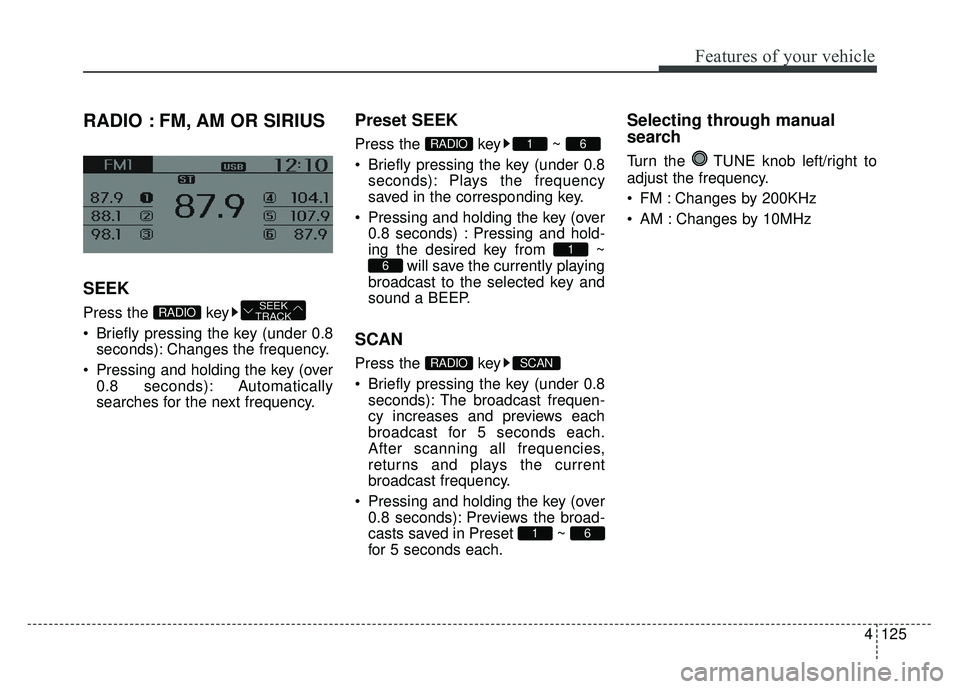
4125
Features of your vehicle
RADIO : FM, AM OR SIRIUS
SEEK
Press the key
Briefly pressing the key (under 0.8seconds): Changes the frequency.
Pressing and holding the key (over 0.8 seconds): Automatically
searches for the next frequency.
Preset SEEK
Press the key ~
Briefly pressing the key (under 0.8seconds): Plays the frequency
saved in the corresponding key.
Pressing and holding the key (over 0.8 seconds) : Pressing and hold-
ing the desired key from ~ will save the currently playing
broadcast to the selected key and
sound a BEEP.
SCAN
Press the key
Briefly pressing the key (under 0.8 seconds): The broadcast frequen-
cy increases and previews each
broadcast for 5 seconds each.
After scanning all frequencies,
returns and plays the current
broadcast frequency.
Pressing and holding the key (over 0.8 seconds): Previews the broad-
casts saved in Preset ~
for 5 seconds each.
Selecting through manual
search
Turn the TUNE knob left/right to
adjust the frequency.
FM : Changes by 200KHz
AM : Changes by 10MHz
61
SCANRADIO
6
1
61RADIO
SEEK
TRACKRADIO
Page 197 of 446
![KIA RIO HATCHBACK 2014 Owners Guide Features of your vehicle
126
4
MENU
Within key are the A.Store
(Auto Store).
A.Store
Press the key Set [A.Store]
through TUNE knob or key.
Saves broadcasts with superior
reception to ~ keys. If no](/img/2/57980/w960_57980-196.png "KIA RIO HATCHBACK 2014 Owners Guide Features of your vehicle
126
4
MENU
Within key are the A.Store
(Auto Store).
A.Store
Press the key Set [A.Store]
through TUNE knob or key.
Saves broadcasts with superior
reception to ~ keys. If no")
Features of your vehicle
126
4
MENU
Within key are the A.Store
(Auto Store).
A.Store
Press the key Set [A.Store]
through TUNE knob or key.
Saves broadcasts with superior
reception to ~ keys. If no
frequencies are received, then the
most recently received frequency will
be broadcast.
61
1
MENU
MENU